
TPS-6X-DS-C - Charger Crestron - Free user manual and instructions
Find the device manual for free TPS-6X-DS-C Crestron in PDF.


| Product Type | Desktop Docking Station (Charging Only) for TPS-6X Series |
| Brand / Model | Crestron TPS-6X-DS-C |
| Dimensions (H x W x D) | 4.19 in x 6.98 in x 6.47 in (107 mm x 178 mm x 165 mm); with touchpanel: 6.00 in (153 mm) height |
| Weight | 1.2 lbs (0.6 kg) |
| Power Requirements | 0.75 Amps @ 24 Volts DC; included power pack: 100-240 Volts AC, 50/60 Hz |
| Supported Touchpanel | Crestron TPS-6X Series Wireless Touchpanels (Isys™) |
| Charging Function | Charges touchpanel battery; touchpanel remains operational while docked |
| Tilt Range | 0° to 45° from vertical; adjustable friction clutch tilt mechanism |
| Locking Options | Available with (TPS-6X-DS-C) or without (TPS-6XNL-DS-C) locking latch; includes optional locking pin for permanent lock |
| Mounting | Desktop; optional swivel mount kit (SMK-6X) available separately |
| Color Options | Gloss Black, Matte Black, Gloss White (per locking/non-locking model) |
| Cleaning | Use included soft microfiber bag to wipe the docking station |
| Safety | Use only Crestron power supplies; included cable cannot be extended |
| Warranty | 3 years for manufacturing defects (excluding moving parts, power supplies, etc.) |
| Spare Parts / Accessories | Locking pin accessory, swivel mount kit (SMK-6X), power pack (24V DC) |
| Environmental | Temperature: 32° to 112°F (0° to 45°C); Humidity: 10% to 90% RH (non-condensing) |
| Enclosure Material | Injection-molded plastic |
| Included Accessories | Power pack (24V DC), soft microfiber bag, wedge insert (for non-lock models) |
| Compliance | CE marking, EMC and Radiocommunications Compliance Labelling |
| Repairability | Contact authorized Crestron dealer for service; RMA required for returns |
Frequently Asked Questions - TPS-6X-DS-C Crestron
User questions about TPS-6X-DS-C Crestron
0 question about this device. Answer the ones you know or ask your own.
Ask a new question about this device
Download the instructions for your Charger in PDF format for free! Find your manual TPS-6X-DS-C - Crestron and take your electronic device back in hand. On this page are published all the documents necessary for the use of your device. TPS-6X-DS-C by Crestron.
USER MANUAL TPS-6X-DS-C Crestron
Crestron TPS-6X-DS-C
& TPS-6XNL-DS-C
Docking Stations for the TPS-6X Series
Operations Guide
This document was prepared and written by the Technical Documentation department at:

CRESTRON®
Crestron Electronics, Inc.
15 Volvo Drive
Rockleigh, NJ 07647
1-888-CRESTRON
Regulatory Compliance
As of the date of manufacture, the TPS-6X-DS-C & TPS-6XNL-DS-C have been tested and found to comply with specifications for CE marking and standards per EMC and Radiocommunications Compliance Labelling.

Contents
Docking Stations for the TPS-6X Series: TPS-6X-DS-C & TPS-6XNL-DS-C 1
Introduction .... 1
Features and Functions....1
Specifications 3
Physical Description....4
Setup 6
Hardware Hookup 6
Recommended Cleaning....6
Operation 7
Mounting the Touchpanel....7
Tilt Adjustment....7
Resources....10
Further Inquiries....10
Future Updates 10
Return and Warranty Policies....11
Merchandise Returns / Repair Service 11
CRESTRON Limited Warranty....11
Docking Stations for the TPS-6X Series: TPS-6X-DS-C & TPS-6XNL-DS-C
Introduction
The TPS-6X-DS-C is a desktop docking station designed for charging the Isys™ TPS-6X Series Wireless Touchpanels. While charging, the touchpanel may continue to be operated as a wireless desktop tilt touchpanel.
The TPS-6X-DS-C and TPS-6XNL-DS-C are functionally identical, except the NL model does not have the locking mechanism. For simplicity within this guide, the term “TPS-6X-DS-C” is used except where noted.
The TPS-6X-DS-C is available in six different models.
Models
| DESCRIPTION | MODEL | NUMBER | COLOR |
| Locking Models | TPS-6X-DS-C | Gloss | Black |
| TPS-6X-DS-C-B-T | Matte | Black | |
| TPS-6X-DS-C-W-S | Gloss | White | |
| No Lock Models | TPS-6XNL-DS-C Gloss Black | ||
| TPS-6XNL-DS-C-B-T Matte Black | |||
| TPS-6XNL-DS-C-W-S Gloss White | |||
Features and Functions
• A stylish desktop dock for the Isys TPS-6X Series
- Provides a simple battery charging solution
- Allows wireless tilt touchpanel operation while charging
• Available with or without locking docking port
• 24 Volt power pack included
Low Profile Base
Its sleek appearance belies a surefooted design offering excellent stability on any flat surface. A single connector is provided at the rear of the base for connection of the wall mount power pack (included). A swivel mount kit is also available for fixed mount applications that require the ability to rotate the docking station during use.
Tilt Docking Port
The tiltable docking port on the TPS-6X-DS-C allows the touchpanel to be tilted at any angle up to 45 degrees for optimal viewing and operation. The angle can be freely adjusted during use or locked down at a fixed angle. Strong magnets help guide the touchpanel onto the docking port and hold it in place.
Locking Option
The TPS-6X-DS-C is available with or without additional locking features. Standard models include a finger-operated latch, which can be engaged at any time to secure the touchpanel to the docking station while it is docked. The touchpanel can even be attached to the docking station semi-permanently using a provided locking pin for a full-time tabletop touchpanel solution. These locking features are omitted on the No Lock model docking stations.
Specifications
Specifications for the TPS-6X-DS-C are listed in the following table.
TPS-6X-DS-C Specifications
| SPECIFICATION | DETAILS |
| Power Requirements | |
| Power Pack (included) | 0.75 Amps @ 24 Volts DC100-240 Volts AC, 50/60 Hz |
| Environmental | |
| Temperature 32° to 112°F (0° to 45°C) | |
| Humidity 10% to 90% RH (non-condensing) | |
| Enclosure | Injection-molded plastic, 0° to 45° tilt docking port, adjustable friction clutch tilt mechanism, optional lock, low-profile base, swivel mount kit available separately |
| Dimensions | |
| Height | 4.19 in (107 mm)6.00 in (153 mm) with touchpanel mounted |
| Width 6.98 in (178 mm) | |
| Depth 6.47 in (165 mm) | |
| Weight 1.2 lbs (0.6 kg) | |
| Available Models | |
| TPS-6X-DS-C | Desktop Docking Station for TPS-6X Series (Charging Only), Gloss Black |
| TPS-6X-DS-C-B-T | Desktop Docking Station for TPS-6X Series (Charging Only), Matte Black |
| TPS-6X-DS-C-W-S | Desktop Docking Station for TPS-6X Series (Charging Only), Gloss White |
| TPS-6XNL-DS-C | Desktop Docking Station for TPS-6X Series (Charging Only), Gloss Black |
| TPS-6XNL-DS-C-B-T | Desktop Docking Station for TPS-6X Series (Charging Only), Matte Black |
| TPS-6XNL-DS-C-W-S | Desktop Docking Station for TPS-6X Series (Charging Only), Gloss White |
| Included Accessories | |
| Power Pack 24 Volt Power Pack | |
| Available Accessories | |
| SMK-6X | Swivel Mount Kit |
Physical Description
This section provides information on the connections, controls and indicators available on your TPS-6X-DS-C.
TPS-6X-DS-C Physical View
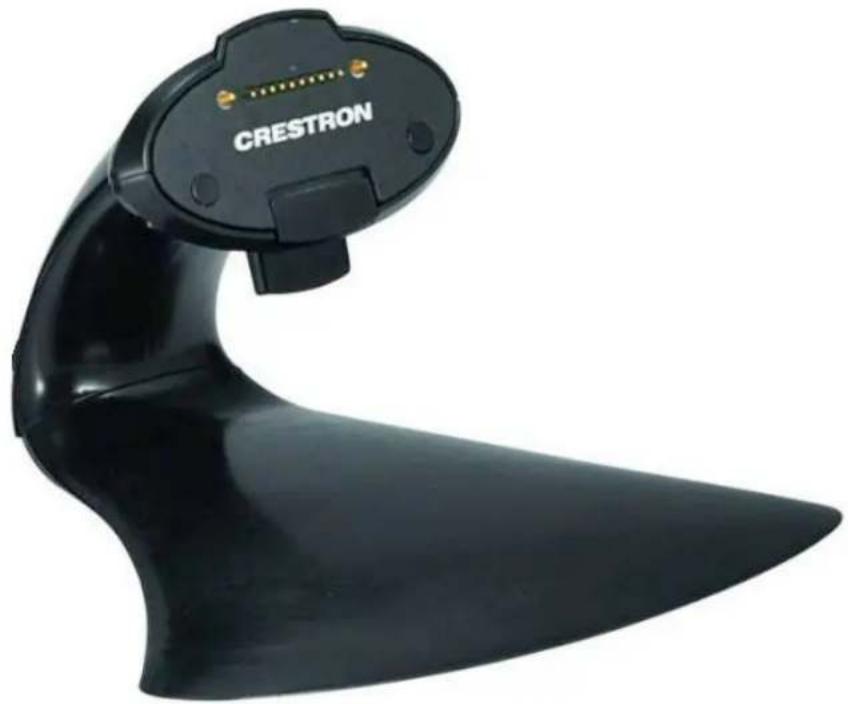
natural_image
Black Crestron scanner device with a pointed tip and gold connector (no visible text or symbols on the device body)TPS-6X-DS-C Overall Dimensions (Front View)
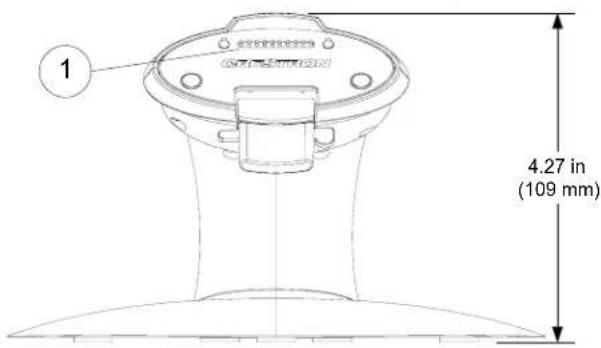
TPS-6X-DS-C Overall Dimensions (Top View)
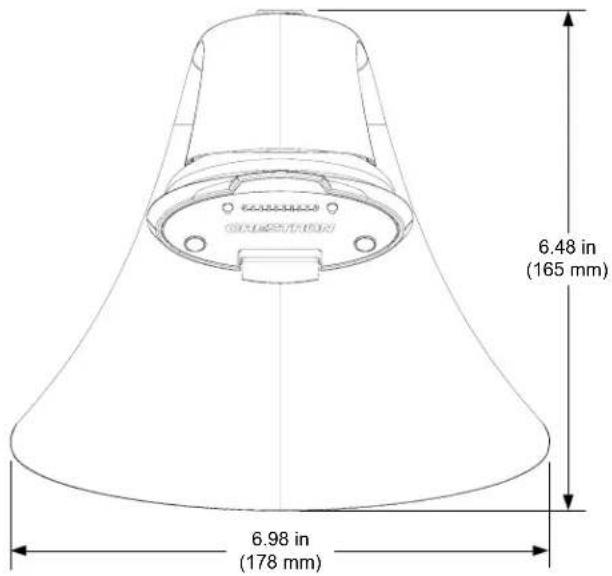
TPS-6X-DS-C (Rear View)
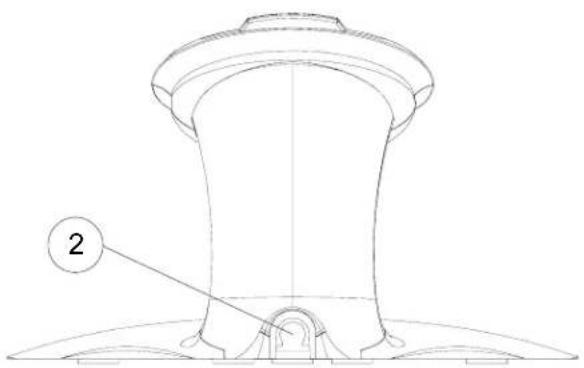
natural_image
Technical line drawing of a mechanical component with a numbered label (2) pointing to a feature on the base (no text or symbols beyond the label)Connectors, Controls & Indicators
| # | CONNECTORS, CONTROLS & INDICATORS | DESCRIPTION |
| 1 | TOUCHPANEL CONNECTOR  | (1) 10-pin connector for connecting to touchpanel. |
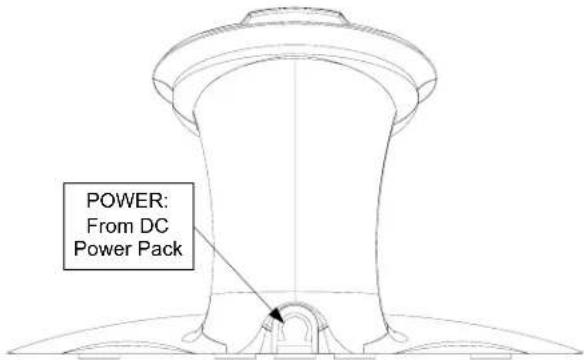
| 2 | POWER  | (1) 2.1 mm barrel DC power jack; 24 Volt DC power input (power supply included). |
Setup
Hardware Hookup
The only connection to the TPS-6X-DS-C is for the included 24 Volt power pack.
When connecting the TPS-6X-DS-C, consider the following:
- Use Crestron power supplies for Crestron equipment.
- The included cable cannot be extended.
Hardware Connections for the TPS-6X-DS-C
Recommended Cleaning
The TPS-6X-DS-C comes in a soft microfiber bag to protect it during shipping. This can be used to clean the docking station.
Operation
Mounting the Touchpanel
To mount the TPS-6X Series, the touchpanel must first be positioned onto the docking station at a slight angle to latch the top portion of the docking station onto the touchpanel. Magnets on the TPS-6X-DS-C attach to metal plates installed on the TPS-6X to secure the touchpanel in place (refer to the illustration below).
Touchpanel Mounting
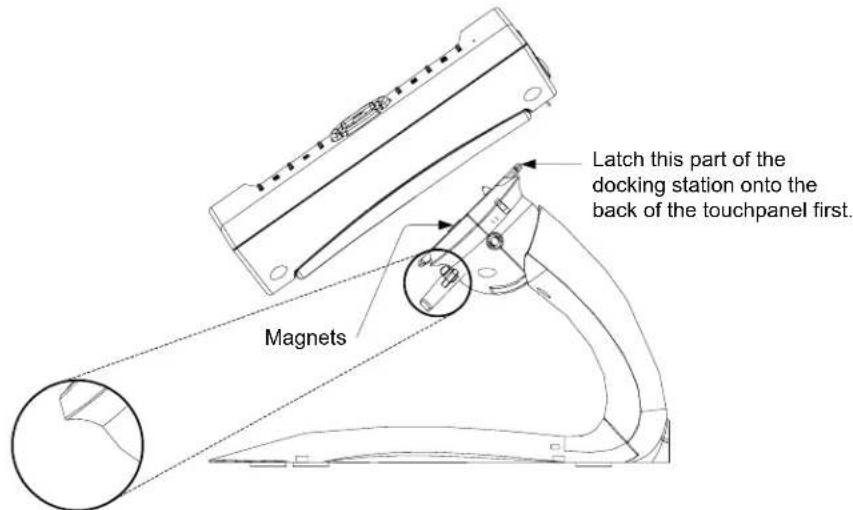
Image in circle above, shows TPS-6XNL-DS-C, with no locking mechanism.
Tilt Adjustment
The TPS-6X-DS-C head can be tilted 45 degrees from vertical. The amount of resistance on the tilt mechanism can be changed or locked to a desired tilt angle by adjusting the tilt clutch using a 7/64" hex wrench (refer to the illustration below).
Touchpanel Tilt Clutch Adjustment
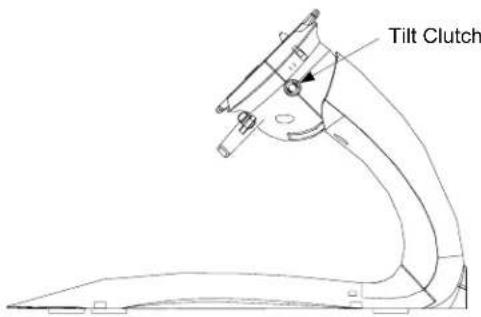
NOTE: Illustration above shows locking model. Tilt clutch is the same on No Lock models.
Operating Modes
NOTE: This section applies to the locking models only.
The TPS-6X-DS-C can be configured into a lock mode or unlock mode to either secure or release the TPS-6X Series touchpanel. The touchpanel can also be configured to permanently lock the touchpanel onto the TPS-6X-DS-C using a locking pin accessory.
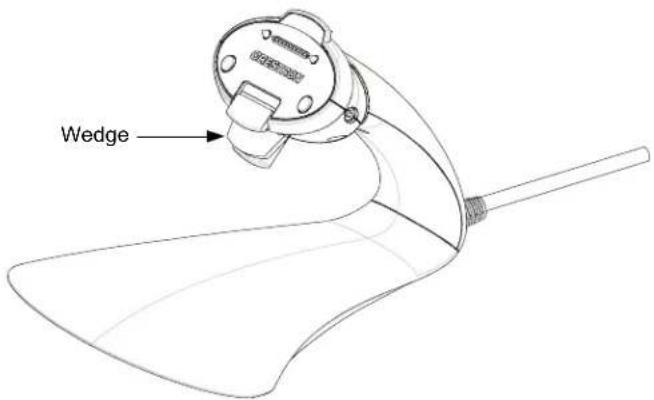
Remove Wedge
To prevent accidental locking, the TPS-6X-DS-C ships with a wedge insert in front of the latching mechanism. To enable locking, remove the wedge insert.
TPS-6X-DS-C with Wedge
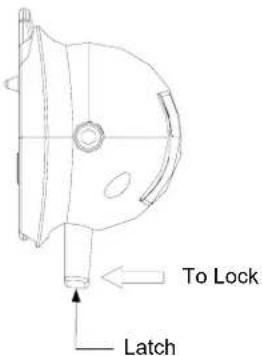
Lock Mode
Pull the latch toward the touchpanel or the user as shown in the illustration below.
When in lock mode, the touchpanel cannot be docked or undocked from the TPS-6X-D-C.
TPS-6X-DS-C Lock Mode
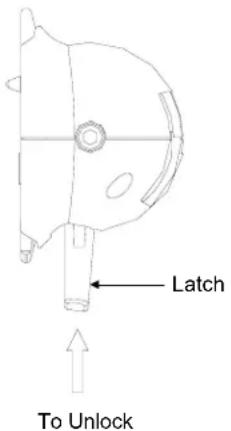
Unlock Mode
Push upward on the latch as shown in the illustration below.
When in unlock mode, the touchpanel can be docked or undocked from the TPS-6X-DS-C.
TPS-6X-DS-C Unlock Mode
NOTE: Lock and unlock modes are mechanical states only. The docked touchpanel will operate in either mode.
Permanent Lock Mode
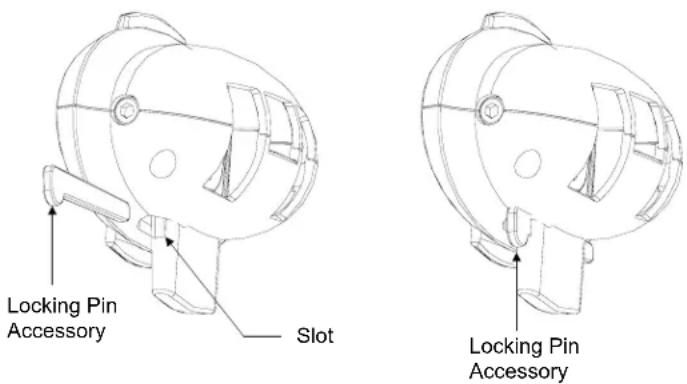
Ensure the touchpanel is securely placed on the docking station and placed in lock mode. Then slide the locking pin accessory straight through the slot on the docking station until the locking pin clicks into place (refer to the illustrations below).
The locking pin can be installed from the left or right side of the docking station with the snap of the pin facing in or out of the slot.
When in permanent lock mode, the touchpanel is permanently secured onto the docking station. While the locking pin is removable, it is recommended that the user only use the locking pin when necessary. Refer to the CAUTION below.
TPS-6X-DS-C Permanent Lock Mode
CAUTION: Use caution if this locking pin must be removed. Using excess force while removing the locking pin once it has been installed can damage the docking station and render the locking mechanism unusable.
Resources
Further Inquiries
If you cannot locate specific information or have questions after reviewing this guide, please take advantage of Crestron's award winning customer service team by calling Crestron ^® at 1-888-CRESTRON [1-888-273-7876].
You can also log onto the online help section of the Crestron website (www.crestron.com/onlinhelp) to ask questions about Crestron products. First-time users will need to establish a user account to fully benefit from all available features.
Future Updates
As Crestron improves functions, adds new features and extends the capabilities of the TPS-6X-DS-C and TPS-6XNL-DS-C, additional information may be made available as manual updates. These updates are solely electronic and serve as intermediary supplements prior to the release of a complete technical documentation revision.
Check the Crestron website periodically for manual update availability and its relevance. Updates are identified as an “Addendum” in the Download column.
Return and Warranty Policies
Merchandise Returns / Repair Service
- No merchandise may be returned for credit, exchange or service without prior authorization from CRESTRON. To obtain warranty service for CRESTRON products, contact an authorized CRESTRON dealer. Only authorized CRESTRON dealers may contact the factory and request an RMA (Return Merchandise Authorization) number. Enclose a note specifying the nature of the problem, name and phone number of contact person, RMA number and return address.
- Products may be returned for credit, exchange or service with a CRESTRON Return Merchandise Authorization (RMA) number. Authorized returns must be shipped freight prepaid to CRESTRON, 6 Volvo Drive, Rockleigh, N.J. or its authorized subsidiaries, with RMA number clearly marked on the outside of all cartons. Shipments arriving freight collect or without an RMA number shall be subject to refusal. CRESTRON reserves the right in its sole and absolute discretion to charge a 15% restocking fee plus shipping costs on any products returned with an RMA.
- Return freight charges following repair of items under warranty shall be paid by CRESTRON, shipping by standard ground carrier. In the event repairs are found to be non-warranty, return freight costs shall be paid by the purchaser.
CRESTRON Limited Warranty
CRESTRON ELECTRONICS, Inc. warrants its products to be free from manufacturing defects in materials and workmanship under normal use for a period of three (3) years from the date of purchase from CRESTRON, with the following exceptions: disk drives and any other moving or rotating mechanical parts, pan/tilt heads and power supplies are covered for a period of one (1) year; touchscreen display and overlay components are covered for 90 days; batteries and incandescent lamps are not covered.
This warranty extends to products purchased directly from CRESTRON or an authorized CRESTRON dealer. Purchasers should inquire of the dealer regarding the nature and extent of the dealer's warranty, if any.
CRESTRON shall not be liable to honor the terms of this warranty if the product has been used in any application other than that for which it was intended or if it has been subjected to misuse, accidental damage, modification or improper installation procedures. Furthermore, this warranty does not cover any product that has had the serial number altered, defaced or removed.
This warranty shall be the sole and exclusive remedy to the original purchaser. In no event shall CRESTRON be liable for incidental or consequential damages of any kind (property or economic damages inclusive) arising from the sale or use of this equipment. CRESTRON is not liable for any claim made by a third party or made by the purchaser for a third party.
CRESTRON shall, at its option, repair or replace any product found defective, without charge for parts or labor. Repaired or replaced equipment and parts supplied under this warranty shall be covered only by the unexpired portion of the warranty.
Except as expressly set forth in this warranty, CRESTRON makes no other warranties, expressed or implied, nor authorizes any other party to offer any warranty, including any implied warranties of merchantability or fitness for a particular purpose. Any implied warranties that may be imposed by law are limited to the terms of this limited warranty. This warranty statement supersedes all previous warranties.
Trademark Information
All brand names, product names and trademarks are the sole property of their respective owners. Windows is a registered trademark of Microsoft Corporation. Windows95/98/Me/XP/Vista/7 and WindowsNT/2000 are trademarks of Microsoft Corporation.

CRESTRON®
Crestron Electronics, Inc. Operations Guide - DOC. 6878B
15 Volvo Drive Rockleigh, NJ 07647 (2025144)
Tel: 888.CRESTRON 01.10
Fax: 201.767.7576 Specifications subject to
www.crestron.com change without notice.
- Regulatory Compliance
- Contents
- Docking Stations for the TPS-6X Series: TPS-6X-DS-C & TPS-6XNL-DS-C 1
- Docking Stations for the TPS-6X Series: TPS-6X-DS-C & TPS-6XNL-DS-C
- Introduction
- Features and Functions
- Low Profile Base
- Tilt Docking Port
- Locking Option
- Specifications
- Physical Description
- Setup
- Hardware Hookup
- Recommended Cleaning
- Operation
- Mounting the Touchpanel
- Tilt Adjustment
- Operating Modes
- Remove Wedge
- Lock Mode
- Unlock Mode
- Permanent Lock Mode
- Resources
- Further Inquiries
- Future Updates
- Return and Warranty Policies
- Merchandise Returns / Repair Service
- CRESTRON Limited Warranty
- Trademark Information
- CRESTRON®
Brand : Crestron
Model : TPS-6X-DS-C
Category : Charger