
EXT-DVI-3000HD - Audio/video extender Gefen - Free user manual and instructions
Find the device manual for free EXT-DVI-3000HD Gefen in PDF.


| Product Type | DVI Extender over Fiber Optic |
| Brand | Gefen |
| Model | EXT-DVI-3000HD |
| Category | Audio/Video Extender |
| Max Extension Distance | Up to 6.25 miles (10 km) via single-mode fiber |
| Max Resolution | 1280x1024 (VESA) / HDTV |
| Video Amplifier Bandwidth | 1.20 Gbps |
| Input Video Signal | 1.2 volts p-p |
| Input DDC Signal | 5 volts p-p (TTL) |
| DVI Connector | DVI-D (19-pin) female |
| USB Input | USB Type B (from computer) |
| USB Output | Two USB Type A (to devices) |
| RS-232 | DB9 Serial (full duplex) |
| Fiber Link Connector | Duplex SC (single-mode) |
| Power Supply | 12 VDC external adapter (included) |
| Power Consumption | 15 Watts max per unit |
| Dimensions (W x H x D) | 8.4 x 1.75 x 4.4 inches |
| Shipping Weight | 7 lbs |
| Housing Material | Metal (steel) for RF shielding |
| Included Accessories | Sender unit, receiver unit, 2 power supplies, 2 DVI cables (6 ft), 1 USB cable (6 ft), user manual |
| Warranty | 2 years (defects in material/workmanship) |
| Support Contact | Email: support@gefen.com, Phone: M-F 8AM-5PM PST |
Frequently Asked Questions - EXT-DVI-3000HD Gefen
User questions about EXT-DVI-3000HD Gefen
0 question about this device. Answer the ones you know or ask your own.
Ask a new question about this device
Download the instructions for your Audio/video extender in PDF format for free! Find your manual EXT-DVI-3000HD - Gefen and take your electronic device back in hand. On this page are published all the documents necessary for the use of your device. EXT-DVI-3000HD by Gefen.
USER MANUAL EXT-DVI-3000HD Gefen
Technical Support Hours:
8:00 AM to 5:00 PM Monday thru Friday.
Write To:
Gefen Inc.
C/O Customer Service
20600 Nordhoff St.
Chatsworth, CA 91311
support@gefen.com
www.gefen.com
Notice
Gefen Inc. reserves the right to make changes in the hard ware, packaging and any accompanying doc u men ta tion without prior written notice.
The DVI 3000HD is a trademark of Gefen Inc.
1 Introduction and Operation Notes
2 Features
3 How It Works
4 DVI·3000HDS Panel Layout
5 DVI·3000HDS Panel Function Descriptions
6 DVI•3000HDR Panel Layout
7 DVI•3000HDR Panel Functions Descriptions
8 Terminology
9 System Specifications
10 Warranty
Thank you for purchasing the new ex-tend-it DVI-3000HD series by Gefen, Inc.
The DVI•3000HD by Gefen allows users the benefits of extending a DVI display, USB, and RS232 up to 6.25 miles away. In a growing number of applications, broadcast stations, production facilities and even military divisions need to securely remote control a computer. Remote controlling a computer over the internet can be slow and inaccurate; but with the DVI•3000HD, you have a physical connection to your CPU. It is as if you are locally connected to the computer.
OPERATION NOTES
READ THESE NOTES BEFORE IN STALL ING OR OPERATING THE DVI·3000HD SYSTEM
* The DVI•3000HD units are housed in a metal box for better RF shielding.
* The DVI•3000HD uses single mode SC-SC fiber optics to connect between the sender and receiver.
Features
- Up to 6.25 miles extension at 1280x1024
- Remote controls your computer over long distances
• Increases productivity - Eliminates computer noise where you work
• Supports VESA Standard resolutions and HDTV resolutions
• Supports DDWG standard for DVI compliant monitors
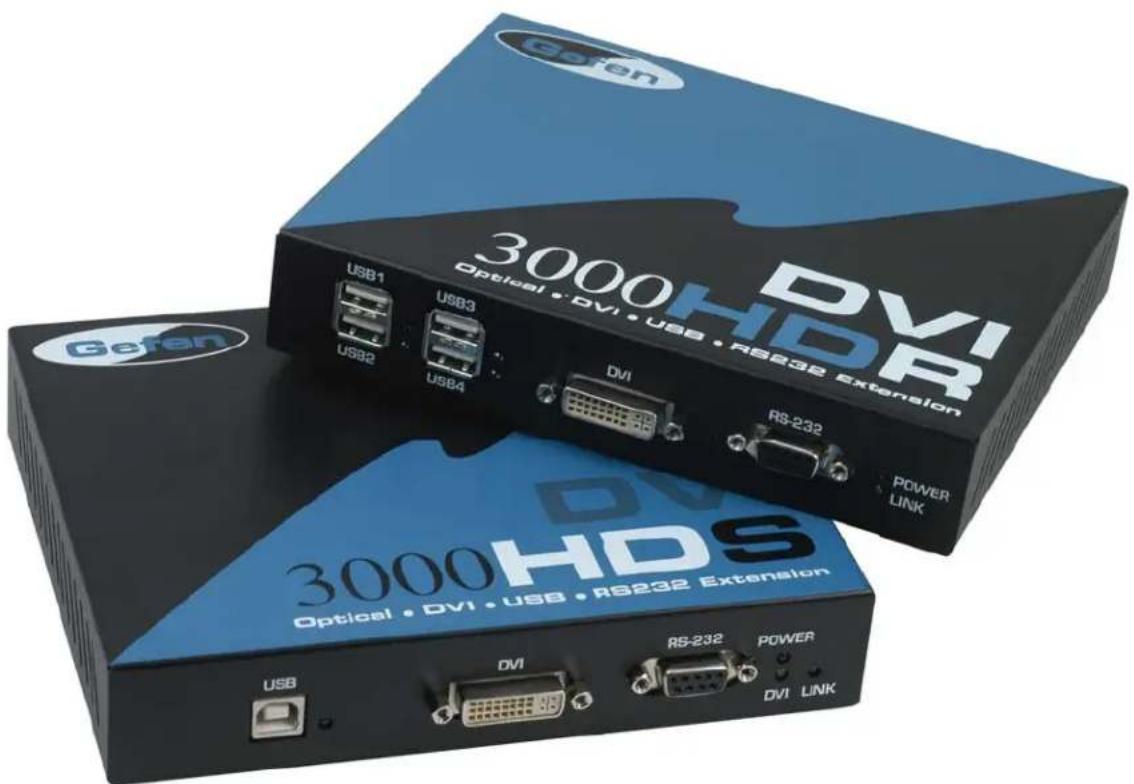
CONTENTS
The DVI•3000HD system consists of:
(1) DVI•3000HDS sender unit
(1) DVI•3000HDR receiver unit
(2) 12 VDC power supplies
(2) DVI cable M-M (6FT)
(1) USB cable (6FT)
(1) User Manual
HOW IT WORKS
The DVI•3000HD sender unit sits next to your computer. The cables supplied with the DVI•3000HD connects your DVI source(s) and USB to the send unit. The DVI•3000HD receiver unit sits next to your DVI display and workstation - up to 6.25 miles away. The displays and USB plug into the back of the DVI•3000HD receiver unit. A two strand SC-SC Single mode fiber cable connect the DVI•3000HD-S and the DVI•3000HD-R units to each other.
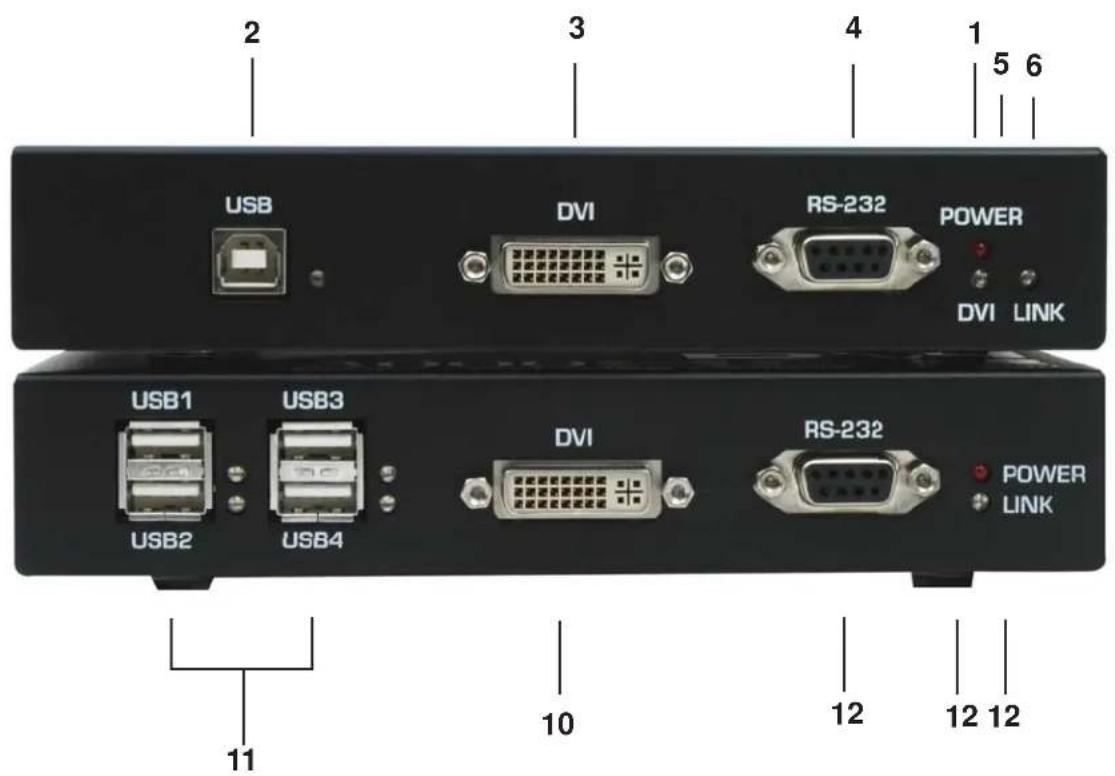
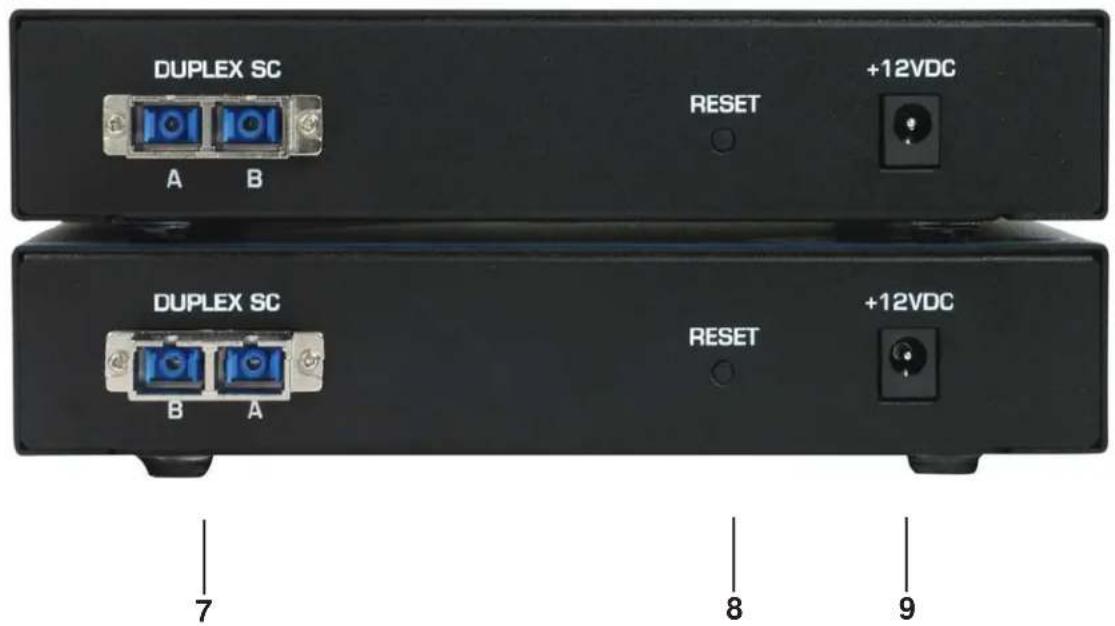
1 POWER LIGHT - Lights when power is supplied to the unit
2 USB IN - USB Input from computer
3 DVI IN - DVI Input connects to your computer
4 RS-232 IN - RS-232 Serial port connects to your computer
5 DVI STATUS LIGHT - Lights when DVI signal is present
6 LINK STATUS LIGHT - Lights when link between sender and receiver is active
7 DUPLEX SC OUT - SC connector connects to DVI-3000HD Sender and Receiver
8 RESET BUTTON - Resets DVI-3000HD Sender and Receiver Units
9 POWER - 12 VDC external power supply
10 DVI OUT - DVI Output to your display
11 USB Out - USB Output connects to USB devices
12 RS-232 OUT - RS-232 output connects to your RS-232 device or serial port
13 POWER LIGHT - Lights when power is supplied to the unit
14 LINK STATUS LIGHT - Lights when link between sender and receiver is active
TERMINOLOGY
DDC
Short form for Display Data Channel. It is a VESA standard for communication between a monitor and a video adapter. Using DDC, a monitor can inform the video card about its properties, such as maximum resolution and color depth. The video card can then use this information to ensure that the user is presented with valid options for configuring the display
DDWG
Digital Display Working Group DDWG are the creators of the DVI specification.
DVI
Digital Visual Interface. Connection standard developed by Intel for connecting computers to digital monitors such as flat panels and DLP projectors. A consumer electronics version, not necessarily compatible with the PC version, is used as a connection standard for HDTV tuners and displays. Transmits an uncompressed digital signal to the display. The latter version uses HDCP copy protection to prevent unauthorized copying
USB
Universal Serial Bus. An external peripheral interface standard for communication between a computer and external peripherals over a cable using bi-serial transmission.
VESA
Video Electronic Standards Association, a consortium of manufacturers formed to establish and maintain industry wide standards for video cards and monitors. VESA was instrumental in the introduction of the Super VGA and Extended VGA video graphics standards with a refresh rate of 70 Hz, minimizing flicker and helping to reduce user eyestrain and fatigue.
RS-232
Recommended Standard 232. This is the de facto standard for communication through PC serial ports. It can refer to cables and ports that support the RS232 standard.
Video Amplifier Bandwidth 1.20 Gbps
Input Video Signal....1.2 volts p-p
Input DDC Signal.... 5 volts p-p (TTL)
Single Link Range 1280x 1024
DVI Connector.... DVI-D (19 pin) female
USB Input.... USB type "B" connector
USB Output..... two USB type "A" connectors
Link Connector.... SC
Power Supply.... 12V DC
Power Consumption per unit.... 15 watts (max)
Dimensions.... 8.4" W x 1.75" H x 4.4" D
Shipping Weight.... 7 lbs.
Gefen Inc. warrants the equipment it manufactures to be free from defects in material and workmanship.
If equipment fails because of such defects and Gefen Inc. is notified within two (2) year from the date of shipment, Gefen Inc. will, at its option, repair or replace the equipment, provided that the equipment has not been subjected to mechanical, electrical, or other abuse or modifications.
Equipment that fails under conditions other than those covered will be repaired at the current price of parts and labor in effect at the time of repair. Such repairs are warranted for ninety (90) days from the day of reshipment to the Buyer.
This warranty is in lieu of all other warranties expressed or implied, including without limitation, any implied warranty or merchantability or fitness for any particular purpose, all of which are expressly disclaimed.
- Proof of sale may be required in order to claim warranty.
- Customers outside the US are responsible for shipping charges to and from Gefen.
- Copper cables are limited to a 30 day warranty and cable must be free from any scratches, markings, and neatly coiled.
The information in this manual has been carefully checked and is believed to be accurate. However, Gefen Inc. assumes no responsibility for any inaccuracies that may be contained in this manual. In no event will Gefen Inc., be liable for direct, indirect, special, incidental, or consequential damages resulting from any defect or omission in this manual, even if advised of the possibility of such damages. The technical information contained herein regarding DVI•3000HD features and specifications is subject to change without notice.
Brand : Gefen
Model : EXT-DVI-3000HD
Category : Audio/video extender