
AD-7740H-01 - Optical drive SONY - Free user manual and instructions
Find the device manual for free AD-7740H-01 SONY in PDF.


| Product Type | Optical Disc Drive (DVD Writer) |
| Model | AD-7740H-01 |
| Brand | Sony |
| Interface | Serial ATA (max 150 MB/s) |
| Dimensions (W x H x D) | 128 x 127 x 129 mm |
| Weight | 170 g |
| Power Supply | +5V DC ±5% |
| Laser Type | Semiconductor laser: 121mW (780-788nm), 109mW (652-663nm) |
| Safety Class | Class 1 Laser Product |
| Buffer Memory | 1 Mbyte |
| Read Speed (DVD-ROM) | Up to 8x CAV (11 MB/s) |
| Write Speed (DVD-R) | Up to 8x |
| Write Speed (CD-R) | Up to 24x |
| Access Time (DVD) | 180 ms average |
| Access Time (CD) | 150 ms average |
| Region Code Setting | Changeable up to 5 times |
| Supported Disc Formats | DVD-ROM, DVD±R, DVD±RW, DVD-RAM, CD-ROM, CD-R, CD-RW, CD-Audio, etc. |
| Operating Temperature | 5°C to 50°C (writing) / 5°C to 55°C (max) |
| Humidity (Operating) | 20% to 80% |
| Noise Level | 47.5 dB(A) max. |
| MTBF | 60,000 power on hours |
| Special Feature | Labelflash direct disc labeling |
| Emergency Eject | Yes, via hole (use straightened paper clip) |
Frequently Asked Questions - AD-7740H-01 SONY
User questions about AD-7740H-01 SONY
0 question about this device. Answer the ones you know or ask your own.
Ask a new question about this device
Download the instructions for your Optical drive in PDF format for free! Find your manual AD-7740H-01 - SONY and take your electronic device back in hand. On this page are published all the documents necessary for the use of your device. AD-7740H-01 by SONY.
USER MANUAL AD-7740H-01 SONY
CLASS 1 LASER PRODUCT
LASER KLASSE 1
LUOKAN 1 LASERILAITE KLASS 1 LASERAFPARAT
This drive employs a laser. Do not remove the cover or attempt to service this device when connected due to the possibility of eye damage.
Caution


The use of controls, adjustments or performance of procedures other than those specified here may result in hazardous radiation exposure.
Laser Specification
Semiconductor Laser:
121mW, 780-788nm; 109mW, 652-663nm
AD-7740H
User's guide
Disposal of Old Electrical & Electronic Equipment
(Applicable in the EU and other European countries with separate collection systems)

This symbol on the product or on its packaging indicates that this product shall not be treated as household waste. Instead it shall be handed over to the applicable collection point for the recycling of electrical and electronic equipment. By ensuring this product is disposed of correctly, you will help prevent potentially negative consequences for the environment and human health, which could otherwise be caused by inappropriate waste handling of this product. The recycling of materials will help to conserve natural resources. For more detailed information about recycling of this product, please contact your local Civic Office, your household waste disposal service or the shop where you purchased the product
AD-7740H
User's guide
Part Names and Functions

1. Front Panel
This panel prevents dust from entering the Optiarc Writer and opens automatically when the Load/Eject button is pushed.
2. Busy Indicator
This indicator lights during data read and write operation.
3. Load/Eject Button
This button is pressed to eject or retract the disc tray when the power is on.
4. Emergency Eject Hole
Use to remove the disc from the DVD Writer if the electrical eject is disabled by software or if power failure occurs.
(see "Emergency Eject" for details)
AD-7740H
User's guide
Installation & Configuration
The drive configures itself independently through the connector.
Note: Not all computer hardware supports the intended automatic configuration. If the device is not supported the computer may not boot up normally. In such case the drive's firmware must be changed by qualified personnel. Or you may have to update your chipset drivers/firmware.
Installing in a host computer
Please note that this drive is designed for usage in portable computer. Thus it has standardized dimensions and connector. If the slimline drive is not targeted for a standard S-ATA slimline system, additional adapters must be procured from an appropriate expert trader.
- Turn off the computer, other peripherals and unplug all the cords and cables. Then remove the computer cover, face plate, mounting clips, and keeper bracket. Refer to the operation guide that came with your computer for help with this step.
- Slide the slimline drive into the computer in such a way that you are able to connect the intended plug.
- Connect the intended plug with the socket on the back of the slimline drive.
- Slide the drive into the computer and fix it in the computer cabinet with appropriate screws. To avoid damage to the drive make sure screws do not go beyond 1.5 mm into the Optiarc Writer's cabinet.
- Reassemble the computer and close the housing cover. Refer to the operation guide that came with the computer for help with this step.
AD-7740H
User's guide
Driver Installation
When you boot your computer after mounting the drive, the software installation starts by activating the reading function of the drive (CD-ROM). If you are using the slimline drive with Windows 95/98/ME/NT/2000/XP/Vista/Win7 or IBM OS/2 Warp/Mac OS and various Linux distributions, all necessary drivers will be loaded automatically by the operating system.
Drivers mentioned above are part of the Operating Systems and are not available from Sony Optlarc.
Software Installation
With the reading function available, the next step will be to install writing and Playback software (to be acquired separately). Please insert your software CD/DVD-ROM into the drive and follow instructions provided by the software developers. If the installation does not start automatically you have to activate the software installation manually.
Drive usage
Inserting a Disc
- Press the Eject button. The disc tray will be ejected by about 10mm.
- Pull the disc tray all the way open by hand.
- Set the disc into the shaft in the centre of the tray with the label side facing up.
- Gently push the disc tray into the drive.
AD-7740H
User's guide
Emergency Eject
The procedure described below can be used to open the tray of the Optiarc Writer if the EJECT button is disabled by software or when power failure occurs.
- Turn off your PC.
- If a disc inside still is spinning wait until it stops.

- Carefully insert a straightened paper clip (about 0.8 mm in diameter) into the hole, and push firmly until the tray opens.
Notes on discs
- To keep a disc clean, do not touch its surface. Handle the disc by its edge.
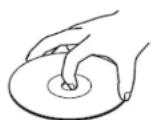
- Keep discs in their cases or disc magazines when not in use.
- Do not use discs with labels or stickers.
- Discs with non-standard shapes (e.g. heart, square, star) cannot be played on this unit. Attempting to do so may damage the drive.
AD-7740H
User's guide
Precautions on Writing/Playing Discs
Write speed and compatible discs
When writing data to disc at high speeds, you must use the appropriate type of disc.
Configure the writing speed through your writing software. For details about the setting procedures, refer to your writing software documentation.
When writing data to disc, the drive may adjust the writing speed to the quality of the disc in the drive.
Depending on the transfer rate, there may also be limitations on writing speeds.
DVD Region Code
The playback of DVD-Video (DVD discs) is protected and controlled by a region code setting. For the drive to play back DVD-Video, the region code on the DVD disc, the region code of the drive, and the region code of the DVD-Video software must all match. The region code can be set up to five times, including the initial assignment. After setting the region code five times, the settling becomes permanent and can no longer be changed. From this point on, you are only able to play back DVD-Video whose region code matches the one set the fifth time. Do not attempt to make unauthorized changes to the region code. Any problems resulting from doing so are not covered by the warranty.
DVD: You can change the region code of the drive on its properties dialog box accessible from the Device.
AD-7740H
User's guide
Precautions when playing back DVD-Video
DVD-Video disc playback conditions are sometimes determined by software manufacturers. Because the drive plays back discs as determined by software manufacturers, some drive functions may not always perform as expected. When playing back DVD-Video, refer to the documentation accompanying each disc.
DVD copy protection technology
Most DVD-Video discs on the market are protected against unauthorized copy. Attempting to copy protected discs violates copyright laws.
Copy controlled CDs
This product is designed to play back discs conforming to the compact disc (CD) standard. Audio CDs encoded with copyright protection technology are now marketed by various record companies. Be aware that some of these discs do not conform to the CD standard and you may not be able to play them back with the drive. When using the drive as an audio CD player, only use audio CDs with the following mark. Some of these discs are encoded in such a way as to prevent sampling and/or copy, while others can only be played back under certain conditions. For details, refer to the documentation of your audio CD.

Please Record Responsibly
Before copying anything onto a disc, please be sure that you are not violating copyright laws. Check your software's license agreement for details.
AD-7740H
User's guide
Pentium is a registered trademark of Intel Corporation.
Microsoft, MS, Windows and Windows Vista are registered trademarks of Microsoft Corporation.
Other system and product names used herein are registered trademarks or trademarks of their respective manufacturers, although the ^TM and ^ marks are not used in the text.
Support
For further information, various download files and hotline support please visit our Website:
http://www.sony-optiarc.eu
AD-7740H
User's guide
Data Section
| Transfer Rate | READ/DVD-ROM-4511 Mb | yes/sec(3.3-8x CAV) |
| DVD-R 4.5-11 Mbytes/sec (3.3-8x CAV) | ||
| DVD-R 4.5-11 Mbytes/sec (3.3-8x CAV) | ||
| DVD-R DL 4.5-11 Mbytes/sec (3.3-8x CAV) | ||
| DVD-R DL 4.5-11 Mbytes/sec (3.3-8x CAV) | ||
| DVD-R 4.5-11 Mbytes/sec (3.3-8x CAV) | ||
| DVD-RW 4.5-11 Mbytes/sec (3.3-8x CAV) | ||
| DVD-RW 4.5-11 Mbytes/sec (3.3-8x CAV) | ||
| DVD-RW 4.5-168 Mbytes/sec (3.5x 20. V) | ||
| CD-ROM, CD-R 1500 - 3600 Mbytes/sec (10-24x CAV) | ||
| CD-RW, CD-ROM XA 1500 - 3600 Mbytes/sec (10-24x CAV) | ||
| CD-DA 1500 - 3600 Mbytes/sec (4-24x CAV) | ||
| WRITE | DVD-R | 3.3-11 Mbytes/sec (2.4-8x) |
| supported specks | 8x/6x/4x/2.4x | |
| DVD-RW (+RDL) | 3.3-83 Mbytes/sec (2-46x) | |
| supported specks | 8x/4x/24x | |
| DVD-RW 3.5-11 Mbytes/sec (2.4-8x) | ||
| supported specks | 8x/6x/4x/3.3x/2.4x | |
| DVD-R | 2.7-11 Mbytes/sec (2-8x) | |
| supported specks | 8x/6x/4x/2x | |
| DVD-R DL 2.7-8.3 Mbytes/sec (2-6x) | ||
| supported specks | 6x/4x/2x | |
| DVD-RW 1.38-8.3 Mbytes/sec (1-6x) | ||
| supported specks | 6x/4x/2x/1x | |
| DVD-RAM(Vers 2) | 2.7-6.9 Mbytes/sec(2-5x) | |
| supported specks | 5x/3x/2x | |
| CD-R | 1200-3600 Mbytes/sec (8-24x) | |
| supported specks | 24x/16x/8x | |
| CD-RW 600-3600 Mbytes/sec (4-24x) | ||
| supported specks | 24x/20x/10x/4x | |
| Write methods | ||
| DAO (dec at once), SAO (session at once), TAO (track at once) with zero gap, variable or fixed packet, multiesession | ||
| Access Time | ||
| DVD-ROM (1.3 stroke read, average) | 180 msec | |
| CD-ROM (10 stroke read, average) | 150 msec | |
| Compatibility | ||
| DVD-ROM DVD Video, DVD-R DVD-R DL, DVD-RW, DVD-R DVD-R DL, DVD-RW, DVD-RAM(Vor 2), CD-Audio, CD-ROM(Modes 1 & 2), CD-ROM XA(modes 2, form 1 & form 2),VIDEO, CD, CD (FMV) Photo CD(single multipassions), CD Extra, CD-RW, CD-TEXT | ||
| In compliance with | ||
| MultiPack, PC 2001, MS Windows 7/Vesta | ||
General
| Memory Buffer | 1 Mbyte | |
| Interface | Serial ATA, max. 150 MB/yr/sec | |
| Volta or blanous | +5V / (DC) + 5% | |
| Dimensions (W x H x D) | 128 x 127 x 129 | |
| Weight | 170grms | |
| Noise | 47.5 dB/A) max. | |
| Temperature (Non-condensing) | Non-operating | -40° to 65°C |
| Operating | 5°C to +50°C (Writing) / 5°C to +55°C | |
| Humidity | Non-operating | 5% to 95% (Max. wet bulb temp 38 deg C) |
| Operating | 20% to 80% (Misc. wet bulb temp 29 deg C) | |
| Direct Label Print | Labelflash | AD 7743H |
| MTEF | 60000 power on hours (POH) | |
| Above specifications are subject to change. | ||


- Caution
- Laser Specification
- Disposal of Old Electrical & Electronic Equipment
- Part Names and Functions
- Front Panel
- Busy Indicator
- Load/Eject Button
- Emergency Eject Hole
- Installation & Configuration
- Installing in a host computer
- AD-7740H
- User's guide
- Driver Installation
- Software Installation
- Drive usage
- Inserting a Disc
- Emergency Eject
- Notes on discs
- Precautions on Writing/Playing Discs
- Write speed and compatible discs
- DVD Region Code
- Precautions when playing back DVD-Video
- DVD copy protection technology
- Copy controlled CDs
- Please Record Responsibly
- Support
Brand : SONY
Model : AD-7740H-01
Category : Optical drive