
Freja - Wristwatch Skagen - Free user manual and instructions
Find the device manual for free Freja Skagen in PDF.


| Brand | Skagen |
| Model | Freja |
| Product Type | Analog Quartz Watch |
| Movement | Quartz (battery-powered) |
| Display | Analog with hour, minute, second hands; date window at 3 o'clock |
| Calendar | Date display (some models may include day of week) |
| Case Material | Stainless steel |
| Crystal | Mineral glass |
| Strap Material | Leather (top grain leather) or mesh stainless steel (depending on variant) |
| Clasp Type | Adjustable buckle or snap-hook clasp with security closure |
| Water Resistance | 30 meters (3 ATM) – splash resistant, not suitable for swimming |
| Battery | Standard watch battery (e.g., SR626SW); replace every 2-3 years |
| Crown | Push/pull crown with three positions: normal (1), date setting (2), time setting (3) |
| Crown Positions | Position 1: normal; Position 2: set date (rotate); Position 3: set time (rotate) |
| Band Adjustment (Mesh) | Lift-shift-press method using a flathead screwdriver on the clasp |
| Band Adjustment (Link) | Remove pins with a small pointed tool; arrows indicate removal direction |
| Leather Strap Care | Wipe with damp cloth (water only); use leather conditioner to maintain suppleness |
| Case & Crystal Cleaning | Use 3:1 ammonia-based window cleaner to water or 4:1 rubbing alcohol to water; apply with soft cloth |
| Warranty | 2 years (manufacturer warranty) |
| Origin | Denmark (Skagen design) |
Frequently Asked Questions - Freja Skagen
User questions about Freja Skagen
0 question about this device. Answer the ones you know or ask your own.
Ask a new question about this device
Download the instructions for your Wristwatch in PDF format for free! Find your manual Freja - Skagen and take your electronic device back in hand. On this page are published all the documents necessary for the use of your device. Freja by Skagen.
USER MANUAL Freja Skagen
Instructions and care

SKAGEN
DENMARK
WATCH CARE
Skagen suggests the following solutions for cleaning metal and crystal surfaces:
3:1 solution of ammonia based window cleaner to water
4:1 solution of rubbing alcohol to water.
*Do not use soap products, soap will leave residue behind when dry.
These suggested solutions will evaporate cleanly from metal and glass surfaces.
To clean the case and crystal:
Moisten a soft cloth with one of the above solutions. Gently wipe the case and crystal clean. Be careful not to put too much stress on the crystal as you clean. Avoid immersing or soaking the case or crystal portion of the watch, regardless of water resistance rating.
To clean the band or strap:
Metal: Dip a cotton swab into the above solution and gently rub it on the unclean area of the band. For more intricate mesh bands, you may want to use a soft bristle toothbrush or nailbrush. Be sure to cover the case of the watch during this process so as not to soak it. For stubborn dirt, you may want to take your watch in to the nearest Skagen location.
Silicon, Felt and Ceramic: Simply wipe the strap down with a damp, soft cloth. Avoid soaps and solvents as they may damage the material.
Leather: Simply wipe it clean with a damp cloth, using water only. You may want to use leather conditioner or a small amount of hand lotion to keep the leather supple over time. Top grain leather may develop a milky "haze" if left alone for extended periods. This can simply be wiped away or removed with leather conditioner. A product called "nubuck eraser" can be used to remove light stains and debris from the inside of the strap.
Mesh Band adjustMent Instructions
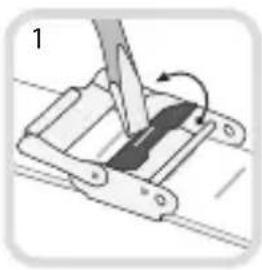

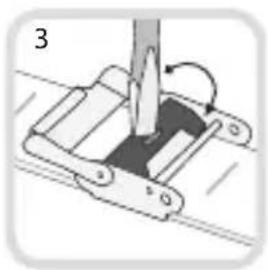
ShiftLift Press
TO ADJUST THE BAND: LIFT - SHIFT - PRESS
- Position a flathead screwdriver or other adjustment tool in the slot on the clasp. Lift the bar in the direction facing away from the straight pin.
IMPORTANT: Ensure that the tool handle points toward the watch case. Pressing the adjustment tool against the straight pin may bend and destroy the pin.
-
Shift the adjustable buckle to the desired position. Clasp must be placed in one of the adjustment indentations on the back of the band.
-
Press the slotted clasp closed.


SnapHook Clasp
TO SECURE THE BAND: HOOK - SNAP - CLASP
Pull the hook over the pin, snap the flat clasp closed, then close the security clasp.
SIZING A LINK STRAP


Using a small pointed tool, insert tip into hole on underside of band and push the pin out. Grasp the pin and pull out. Arrows on the band indicate the direction that the links are to be removed. In order to remove one link, two pins must be removed. If removing more than one link, remove an equal number of links from both sides to keep the symmetry of the wrist band. After removing the necessary number of links, tap the remaining pins back into places using a small hammer.
STANDARD DIAL INSTRUCTIONS


A. Pull the crown out to the ② position.
B. Rotate the crown to set the date.
(Either clock wise or counter-clockwise depending on the model)
C. Pull the crown out to the fully extended ③ position and rotate to set the desired time.
D. Push the crown back to its normal ① position and the date and time are now set.
MULTIFUNCTION


A. Pull the crown out to the middle ② and rotate crown to set the date. (Either clockwise or counter-clockwise depending on the model)
B. Pull the crown out to the fully extended ③ position and rotate clockwise cycling through hours to set day. Then set time.
C. Push the crown back to its normal ① position and the day, date and time are now set.
CHRONOGRAPH

- Press down to start and stop the stopwatch. Ⓐ
- Controls day, date and time functions. Ⓑ
- Press down to stop, continue, and to reset stopwatch. ©
A. Pull the crown out to the ② position and rotate crown to set date. (Either clockwise or counter-clockwise depending on the model)
B. Pull the crown out to fully extended ③ position and rotate to set desired time.
C. Push the crown back to its normal ① position and the date and time are now set.
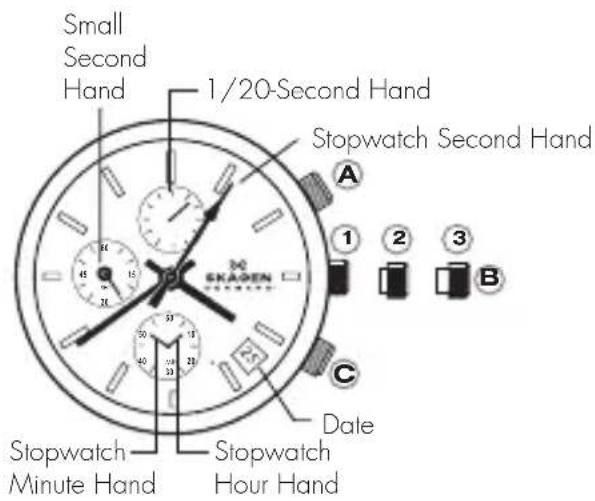
CHRONOGRAPH RESET
This should only be performed when second hand does not return to 0 second position.
A. Pull the crown out to the middle or full extended position. (② or ③ depending on the model)
B. Press the Ⓐ for 2 seconds to select the stopwatch hand(s) that need to be adjusted.
C. Press the Ⓑ repeatedly to place the selected stopwatch hand(s) at zero second position.
The hand(s) move(s) quicker if the Ⓑ is kept pressed.
BIG DATE

A. On the first day of a new month the date has to be manually set from 31 over 39 to 1 by the user. The date change (e.g. from 21 to 22) has a long changing time. (2-3 hours) instead of the normal 1 hour changing time.
B. To set second digit: Pull crown out to the ② position and rotate counter-clockwise to set. To set first digit: Pull crown out to the ① position and rotate clockwise to set.
C. To set time: Pull crown out to the fully extended ③ position and set to desired date.
D. Push the crown back to normal ① position and the date and time are now set.
3 HAND DAY AND DATE


SETTING THE TIME
A. Pull the crown out to the ③ position.
B. Rotate the crown to desired time.
C. Push the crown back to normal ① position and the time is set.
SETTING THE DATE
A. Pull the crown out to the ② position.
B. Rotate the crown counter-clockwise to set date. *If the date is set between the hours of around 9:00 PM and 1:00 AM, the date may not change on the following day.
C. After date has been set, push the crown back to normal ① position and your date is set.
SETTING THE DAY OF THE WEEK
A. Pull the crown out to the ② position.
B. Rotate the crown clockwise to set the day. *If the day is set between the hours of around 9:00 PM and 1:00 AM, the day may not change on the following day.
C. Push the crown back to normal ① position and the day of the week is set.
RETROGRADE DUAL TIME
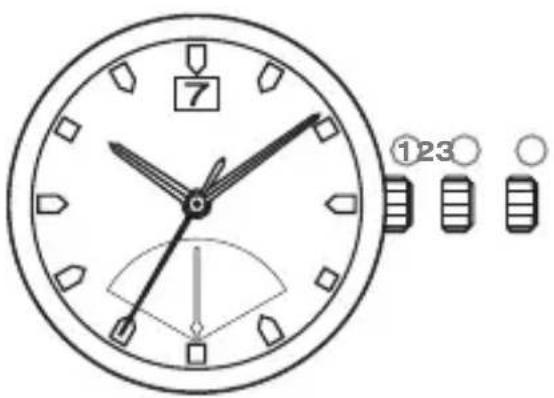
SETTING THE TIME
A. Pull the crown out to the ③ position.
B. Rotate the crown to desired time.
C. Push the crown back to normal ① position and the time is set.
SETTING THE DATE
A. Pull the crown out to the ② position.
B. Rotate the crown clockwise to set the date.
*If the day is set between the hours of around 9:00 PM and 2:00 AM, the date may not change on the following day.
C. Push the crown back to normal ① position and the date is set.
SETTING THE 2ND TIME (24 HOURS)
A. Pull the crown out to the ② position.
B. Rotate the crown counter-clockwise to set the 2nd time.
C. Push the crown back to normal ① position and the 2nd time is set.
SOLAR POWERED


WARNINGS / NOTIFICATIONS FOR CHARGING:
Recharge warning function: Second hand moves at 2-second intervals. The second hand changes to a two second interval movement to indicate insufficient recharging. After exposing the watch to light, recharging takes place and the watch returns to one second interval movement.
Time setting notification: Second hand moves irregularly / 1sec-1sec-2sec. When the second hand moves irregularly (1sec-1sec-2sec), it tells that the time setting was not done after the watch stopped (due to insufficient charge), and will continue to do so until the time is set. It is advised to set the time after each sufficient charge.
APPROXIMATE TIME REQUIRED FOR CHARGING:
Charging Source For Full Charge For 1 Day Operation
20cm (8in.) under
a flourescent light 484 hours 2.8 hours
Outside, Cloudy conditions 31 hours 11.4 minutes
Outside, Sunny conditions 16.9 hours 6.0 minutes
SETTING THE TIME
A. Pull the crown out to fully extended position ② and rotate crown to set desired time. Push the crown back to its normal position.
- This watch has a rechargeable cell which is charged by exposing the watch dial to light such as direct sunlight or fluorescent lamps.
- Expose the watch dial towards direct sunlight for several hours at least once a month.
- Do not charge watch at a high temperature (about 60°C / 140°F or higher).
• After taking off the watch, put it in a position so that the dial is exposed to bright light, such as by a window.
- Before storing the watch in a dark place for an extended period of time, be sure to charge it fully.
GMT/ALARM

SETTING THE TIME
A. Pull the Ⓑ crown out to the fully extended position ③ and rotate the crown.
SETTING THE DATE
A. Pull the Ⓑ crown out to the middle position ② and rotate the crown clockwise.
B. Push the Ⓑ crown back to its normal position. The date and time are now set.
SETTING THE SECOND TIME ZONE
A. Pull the Ⓑ crown out to middle position ② push and hold down A push-button to set the hour hand.
SETTING THE ALARM
A. Pull the Ⓑ crown out to middle position ② and rotate crown counter clockwise. B. Use the Ⓓ push-button to turn the alarm on and off, one beep means alarm is off, two beeps means it is on.
*SETTING THE DATE CAUTION: NEVER CORRECT DATE BETWEEN 9 PM AND 12.30 AM
ANA-DIGI
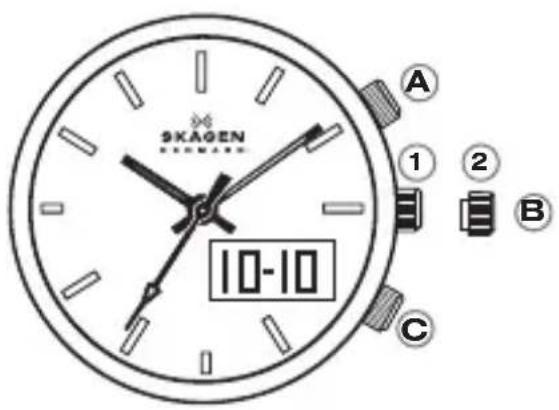
NORMAL TIME DISPLAY
• In regular time display mode, press pusher ① to light up LCD light.
- Press pusher © to select between modes: REAL TIME → ALARM → DATE → SECOND
TIME AND CALENDAR SETTING - ANA-DIGI
- Press pusher © until REAL TIME mode is selected.
- Press and hold pusher Ⓐ for 3 seconds to enter setting mode.
- Press pusher Ⓐ to select second, hour, month, date.
- Press pusher ⓒ to adjust digit.
- Press and hold pusher Ⓐ for 3 seconds to exit setting mode.
TIME AND CALENDAR SETTING - ANALOG
- Pull crown Ⓑ out to the ② position and rotate to set the desired time.
- Push the crown back to its normal ① position and the time is now set.
ALARM SETTING
- Press pusher © until ALARM mode is selected.
- Press and hold pusher Ⓐ for 3 seconds to enter alarm time.
- Press pusher Ⓐ to select hour, minute, chime/alarm on/off.
- Press pusher Ⓐ to adjust digit.

- WATCH CARE
- MESH BAND ADJUSTMENT INSTRUCTIONS
- TO ADJUST THE BAND: LIFT - SHIFT - PRESS
- TO SECURE THE BAND: HOOK - SNAP - CLASP
- SIZING A LINK STRAP
- STANDARD DIAL INSTRUCTIONS
- MULTIFUNCTION
- CHRONOGRAPH
- CHRONOGRAPH RESET
- BIG DATE
- 3 HAND DAY AND DATE
- SETTING THE TIME
- SETTING THE DATE
- SETTING THE DAY OF THE WEEK
- RETROGRADE DUAL TIME
- SETTING THE 2ND TIME (24 HOURS)
- SOLAR POWERED
- WARNINGS / NOTIFICATIONS FOR CHARGING
- APPROXIMATE TIME REQUIRED FOR CHARGING
- GMT/ALARM
- SETTING THE SECOND TIME ZONE
- SETTING THE ALARM
- ANA-DIGI
- NORMAL TIME DISPLAY
- TIME AND CALENDAR SETTING - ANA-DIGI
- TIME AND CALENDAR SETTING - ANALOG
- ALARM SETTING
Brand : Skagen
Model : Freja
Category : Wristwatch