
Sonic Style 456 - Toothbrush OMRON - Free user manual and instructions
Find the device manual for free Sonic Style 456 OMRON in PDF.


| Product Type | Sonic Electric Toothbrush |
| Model | Sonic Style 456 (HT-B456-E) |
| Brand | OMRON |
| Power Supply | AC 220-240 V, 50/60 Hz |
| Charging Method | Electromagnetic induction |
| Battery | Two built-in Ni-MH batteries (2.4 V), non-replaceable |
| Charging Time | Approx. 16 hours (at 240 V, 50/60 Hz, 23 °C) |
| Continuous Usage Time | Approx. 20 minutes (standard swing mode, 23 °C) |
| Automatic Timer | 3-minute auto shut-off |
| Cleaning Modes | Standard Swing, Wide Swing (orange indicator), Point Swing (blue indicator) |
| Brush Heads Included | Triple Cleaning Head, Super-Fine Soft Bristle Head |
| Brush Head Replacement | Every 3 months or when worn out |
| Water Resistance | Main unit and charger not waterproof; do not immerse |
| Dimensions (Main Unit) | Approx. 225 mm (length) x 20 x 23 mm (diameter) |
| Dimensions (Charger) | Approx. 61 (W) x 47 (H) x 83 (L) mm |
| Weight (Main Unit with Brush Head) | Approx. 62 g |
| Weight (Charger) | Approx. 210 g |
| Power Cable Length | Approx. 120 cm |
| Operating Temperature/Humidity | +10 °C to +40 °C, 30-85% RH |
| Storage Temperature/Humidity | -20 °C to +60 °C, 10-95% RH |
| Warranty | 2 years (excluding battery, brushes, packaging, misuse) |
| Accessories Sold Separately | Triple Cleaning Head (SB-070), Super-Fine Soft Bristle Head (SB-080), Point Brush (SB-090) |
| Safety Certifications | EMC Directive 2004/108/EC, Low Voltage Directive 2006/95/EC |
Frequently Asked Questions - Sonic Style 456 OMRON
User questions about Sonic Style 456 OMRON
0 question about this device. Answer the ones you know or ask your own.
Ask a new question about this device
Download the instructions for your Toothbrush in PDF format for free! Find your manual Sonic Style 456 - OMRON and take your electronic device back in hand. On this page are published all the documents necessary for the use of your device. Sonic Style 456 by OMRON.
USER MANUAL Sonic Style 456 OMRON
natural_image
Simple black curved line on white background (no text or symbols)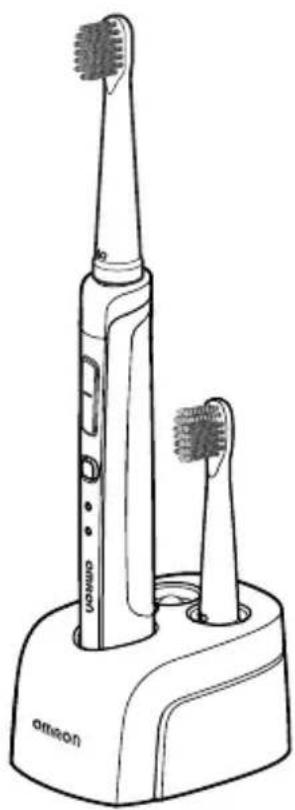
natural_image
Line drawing of an electric toothbrush with two base teeth, no text or symbols presentOMRON Sonic style 456
Sonic Electric Toothbrush
- Instruction Manual 1
- Mode d'emploi 11
• Gebrauchsanweisung 21
• Manuale di istruzioni 31 - Manual de instrucciones 41
- Gebruiksaanwijzing 51
• РУКОВОДСТВО ПО ЭКСПЛУАТАЦИИ 61
1
• كتيب الإرشادات
Contents
- Notes on Safety .... 1 6. After Use .... 5
- Know Your Unit...... 2 7. Cleaning, Storage and Disposal...... 5
- Charging 2 8. Troubleshooting 7
- Attachment of Brush Head .... 3 9. Technical Data .... 8
- How to Use .... 3
OMRON Sonic style 456 Sonic Electric Toothbrush
Thank you for purchasing this OMRON Sonic style 456. Please read the instructions carefully before use, and keep this manual for future references. Do not use this unit for purposes other than described in this manual.
1. Notes on Safety
Warning:
- Please consult your dentist if you recently had oral or periodontal surgery, or if you are under treatment with other oral symptoms (tooth is being treated, loose false tooth).
- Consult your dentist if there is continuous or serious bleeding of the gums after using the toothbrush.
- Children should be supervised to ensure correct usage of the product.
- Do not share the brush with others.
- Do not rinse the battery charger with water.
- Do not leave the main unit or battery charger in shower room or other wet places.
-
Do not mishandle the electric cable, such as:
-
Damage or break the cable - Machining or modifying the cable
- Forcibly stretch or bend the cable - Twist the cable
- Bundle the power cables - Place heavy weights on the power cable
- Clamp or clip the cable
- Do not use when the power cable or power plug is damaged, or the power jack is loose.
- Do not connect or remove the power plug with wet hands.
- Be sure to use the device at the specified mains voltage.
- Except for waste disposal, do not disassemble the main unit.
Caution:
- When disposing the main unit, affix scotch tape or label to the electrodes of the battery.
- Do not use battery charger other than the one dedicated to this product.
- Do not press the toothbrush with excessive force against the teeth or gum, or touch them with the plastic parts other than the front end of the bristle. Also, avoid brushing the same area for too long.
- Approved for human use only.
- Do not step on or drop the main unit or battery charger, or subject them to strong shock.
- Do not throw the rechargeable battery in fire.
- For energy saving purposes, please charge the main unit only when the battery level is too low. When not charging it, we recommend the power plug to be removed from the socket.
- Do not leave the unit unattended with persons who cannot express their consent.
General Advice:
- It is widely accepted that the abrasive used in toothpaste to remove cigarette stains or whiten the teeth may bring serious wear if it is used too long. Please consult your dentist before using abrasive types of toothpastes as it may damage the teeth or gum.
- You may experience a light tickling or tingling sensation when you use the toothbrush for the first time. This is caused by the sonic oscillation unique to the sonic electric toothbrush.
2. Know Your Unit
■ Toothbrush main unit
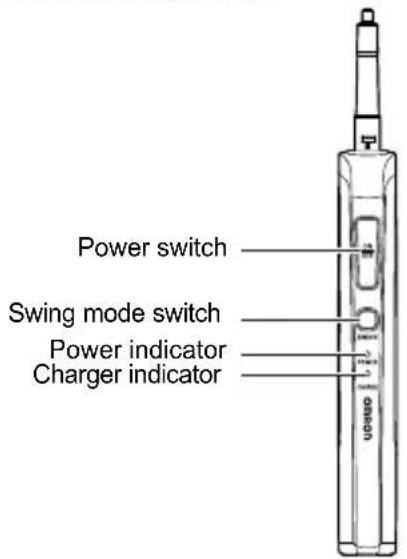
■ Brush heads

Triple Cleaning Head
With three kinds of bristles on the head, it can apply uniform force to effectively remove dental plaque.
Super-Fine Soft Bristle Head
It can effectively remove dental plaque with gentle and smooth action, e.g. for sensitive gums.
■ Battery charger
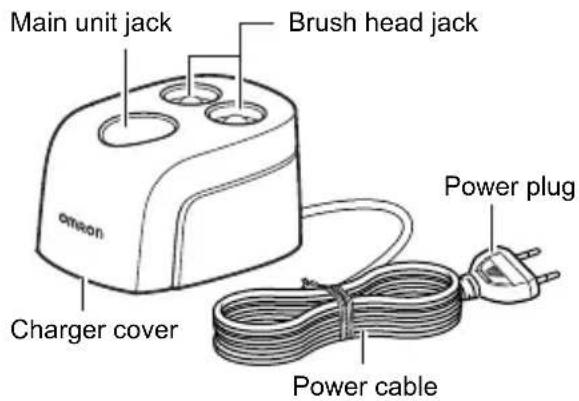
3. Charging
Before first usage, charge for at least 16 hours (non-stop) to ensure full battery.
Notes:
• The main unit and charger may slightly heat up during charging.
- You cannot turn on the power of the main unit during charging.
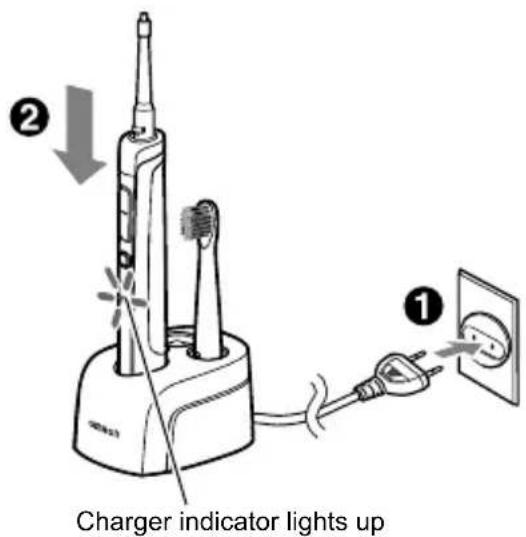
1. Plug the power plug into a power outlet.
2. Insert the main unit into the charger.
The charger indicator (red) lights up, and the charging begins.
■ Charger indicator
The charger indicator lights up continuously when the main unit is in the charger.
Note: If the toothbrush shuts off shortly after being turned on, immediately charge again for at least 16 hours (non-stop).
4. Attachment of Brush Head
1. Attach the brush head to the toothbrush main unit.
Align the groove on the brush head with the locking tab on the main unit and then attach the brush head.
Note: The head cannot be mounted if the groove and the locking tab do not fit together.

2. Secure the brush head and the main unit.
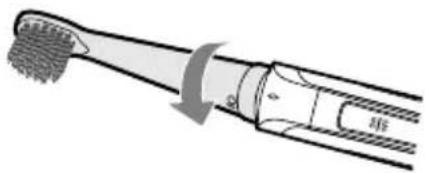
Gently turn the brush head in the direction shown by the arrow, to align the ○ mark on the brush head with the ○ mark on the toothbrush. The brush head will be secured once the ○ mark aligned with the □ mark.
Notes:
- Do not over-tighten and go beyond the position of the mark on the main unit. Otherwise the product may be damaged.
- When disassembling the product, turn in the opposite direction of the arrow and remove the brush head.
- Exchange brush heads at least every three months or as soon as worn out.

5. How to Use
1. Preparation to brush your teeth.
Notes:
- Wet the bristle with water for better result.
• Extrude some toothpaste onto the brush head. - Place the brush head in your mouth.
• To prevent spilling of toothpaste turn on and off the toothbrush while the brush head is in your mouth.
2. Press the power switch (on/off button).
The power indicator (green) lights up and the brush head starts oscillating.
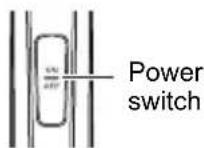
Note: You may feel strong vibration when you use the toothbrush for the first time. This is caused by the sonic oscillation, which is unique to sonic electric toothbrushes and allows for effective plaque removal. You will get used to it after using the toothbrush regularly.
■ Select one of the three different cleaning modes with the Swing mode switch
Press the switch "swing" to change the cleaning mode.
When switched on, the toothbrush will select the mode last used.

flowchart
graph LR
    A["Swing mode switch"] --> B["Standard swing mode (Indicator off)"]
    B --> C["Wide swing mode (Orange)"]
    C --> D["Point swing mode (Blue)"]
Description in ( ) shows the color of indicator when the mode is changed.
Cleaning mode of brush head
The wide swing mode and point swing mode are recommended to effectively remove dental plaque, as the oscillation of the bristle end is more refined with these two modes. Choose the mode according to brushing position and personal preference.
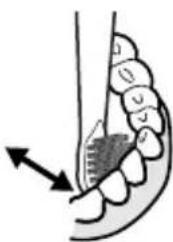
- Wide swing mode
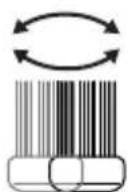
Mode on: orange indicator lights up
Under the wide swing mode, the bristle moves two times wider in a horizontal way compared to the standard swing mode. It is recommended for gently cleaning the gap between teeth and gums.
natural_image
Diagram of a toothbrush with teeth and jaw, showing tooth movement (no text or labels)- Point swing mode
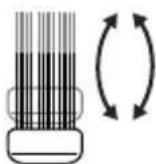
Mode on: blue indicator lights up
Under the point swing mode, the bristle moves approx. 1.5 times in vertical way compared to the standard swing mode.
It is recommended for cleaning the inner side of front teeth, back teeth and area that is difficult to clean thoroughly due to poorly-aligned teeth.
natural_image
Diagram of human teeth with a magnified inset showing tooth structure (no text or labels)Note: The actual oscillation condition of the brush head cannot be visibly determined.
3. After you have finished brushing your teeth and when the brush head is still in your mouth, press the power switch to turn off the power.
The power will be automatically switched off 3 minutes after it is turned on. If the power is turned on again, you can brush your teeth for another 3 minutes in the selected mode.
■ Ideal way to brush your teeth
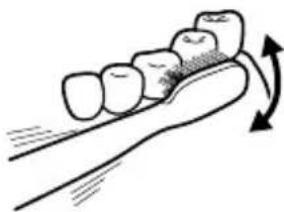
Strength applied on the brush head: Touch the teeth or gum gently with the front end of the bristle. How to move the brush head: Move the brush head horizontally to brush your teeth.
Tooth facing and occlusal surface
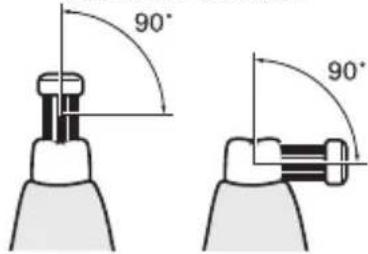
Place the brush head on the teeth, and keep it in a 90° angle to the teeth.
Border between teeth and gum
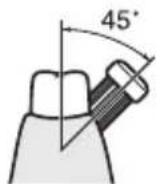
Place the bristle on gum groove, and keep it in a 45^ angle to the groove.
Backside of incisor teeth or area with poorly-aligned teeth
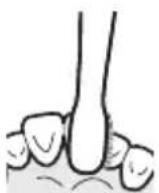
Press the brush head vertically against the teeth, and clean them one by one, following the alignment angles of the teeth.
6. After Use
- Remove the brush head from the main unit.
Gently turn the brush head in the direction shown by the arrow, and remove it from the main unit.
natural_image
Diagram of a toothbrush with toothbrush teeth and tooth profile, showing tooth structure (no text or labels)- Wash the brush head and main unit with water.
Gently shake off the excess water.
-
Wipe off the water on the main unit with a soft, dry cloth before inserting it into the charger.
-
Insert the brush head and main unit into the charger.
7. Cleaning, Storage and Disposal
■ How to clean
Please keep the main unit/charger clean.
Remove stains with soft, dry cloth.
For heavy stains, wet the cloth with water or mild detergent, wring the cloth out and wipe the stains off; or rinse with water before wiping with the cloth.
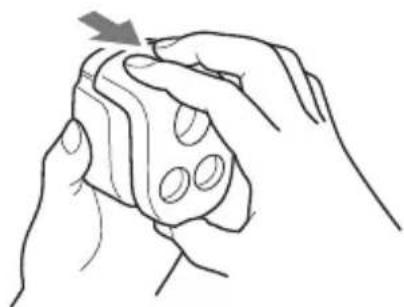
• The charger cover can be cleaned with water.
Pull out the charger cover of the charger main unit as shown.
Attention during cleaning
- Remove the power plug from the power outlet before cleaning the charger.
- Do not let water into the main unit.
- Do not immerse the brush head or main unit in alcohol, or sanitize with hot water ( >40^ C).
- Do not wipe with cloth soaked with antiseptic.
- Do not use petrol, thinners, or similar solvents to remove the stains.
natural_image
Line drawing of two hands holding a cylindrical object with circular holes, no text or symbols present■ Storage
Do not store at the following places.
- Place that can easily get wet.
- Place that can be easily exposed to environmental factors such as high temperature, moisture, direct sunlight, dust and salt.
- Place that is exposed to strong shocks or vibrations (for example, where possible to fall to the floor easily).
Store in places out of the reach of children.
■ Disposal
When disposing the product, remove the rechargeable battery if necessary and please follow local regulations on environmental protection.
The rechargeable battery on the product cannot be replaced.
Removing the Rechargeable Battery
This is not a repair procedure.
Once the unit is disassembled, it cannot be repaired.
-
Check that the brush does not operate, then remove the brush head from the main unit. (Refer to Section 6.)
-
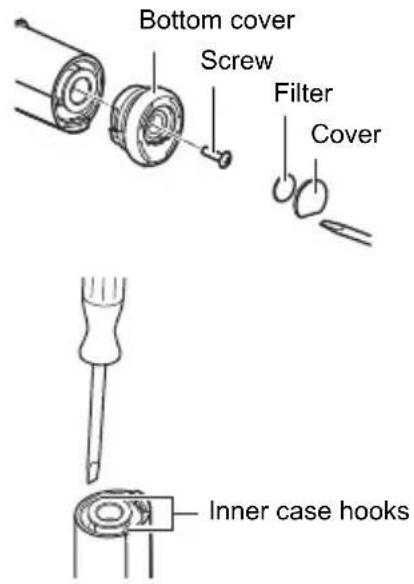
Remove the bottom cover of the main unit.
1) Use a flat head screwdriver to remove the cover and the filter.
2) Use a cross head screwdriver to remove the screw at the bottom of the main unit, and remove the bottom cover.
- Lift out the inner case.
Lift the inner case out while pressing one of the two inner case hooks with a flat head screwdriver.
- Remove the rechargeable battery.
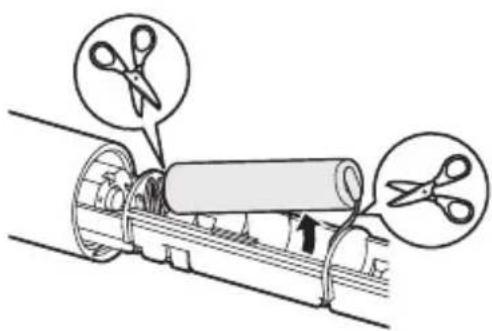
Remove the tape, pull out the battery and cut the cables at each end of the battery.
Notes:
- To prevent the removed battery from short-circuiting, place sticky tape, sticky labels or similar material over its + and - terminals.
• Take care to avoid burns caused by leaking battery liquid or a hot battery.
• Take care to avoid cuts from sharp edges. - Dispose of the old batteries, main unit, brush head and battery charger according to applicable local regulations.
8. Troubleshooting
| Problem Cause Correction | ||
| The oscillation of the brush head is unstable. | The brush head has not been properly mounted to the main unit. | Properly mount the brush head onto the main unit. (Refer to Section 4.) |
| The product does not run or the oscillation of the brush head is too slow. | The battery level is too low. Charge with the battery charger. (Refer to Section 3.) | |
| The main unit and charger heat up. | They may heat up slightly during charging. | This is not unusual, and does not affect the service life of the product. |
| When the toothbrush is placed into the charger, the charger indicator does not light up. | The power plug is not connected with the power outlet. | Confirm that it is correctly connected. (Refer to Section 3.) |
| The product can only last for a short period even after it has been charged; the oscillation of the brush head is too slow. | When you start using the toothbrush (just purchased or not used for extended period), or when the brush head stops oscillating during operation, please continuously charge for at least 16 hours. (Refer to Section 3.) | |
| The product can only last for a short period even after it has been continuously charged for at least 16 hours; the oscillation of the brush head is too slow. | Verify if the charger still works. The rechargeable battery within the brush cannot be replaced. Please follow local regulations on environmental protection when disposing the battery. | |
EN
9. Technical Data
Product Name OMRON Sonic style 456
Type HT-B456-E
Supply Voltage AC220-240V 50/60Hz
Power Consumption Approx. 2.5W (during charging)
Charging Method Electromagnetic induction
Battery Two Ni-MH batteries built in (Ni-MH 2.4V)
Charging Time Approx. 16 hours (at AC240V, 50/60Hz, 23°C)
Time of Continuous Usage Under the standard swing mode: Approximately 20 minutes (at 23°C)
Automatic stop after three minutes.
- The battery cannot be replaced. When the battery has reached the end of its service life, dispose of it together with the product.
Operating Temperature/ Humidity +10°C to +40°C, 30 to 85% RH
Storage Temperature/ Humidity -20°C to +60°C, 10 to 95% RH
Weight Main unit: Approx. 62g (including brush head) Charger: Approx. 210g
Dimensions Main unit: Approx. 225mm (length), Approx. 20 x 23mm (diameter)
Charger: Approx. 61 (W) x 47 (H) x 83 (L) mm
Length of Power Cable Approx. 120cm
Package Content Toothbrush main unit, Triple Cleaning Head, Super-Fine Soft Bristle Head, charger, instruction manual.
Note: Subject to technical modification without prior notice.
This device fulfills the previsions of the EMC directive 2004/108/EC and Low Voltage Directive 2006/95/EC.
OMRON HEALTHCARE EUROPE B.V. guarantees this product for 2 years after date of purchase. The guarantee does not cover battery, brushes, packaging and/or damages of any kind due to misuse (such as dropping or physical misuse) caused by the user. Claimed products will only be replaced when returned together with the original invoice / cash ticket.

■ Parts sold separately
Triple Cleaning Head
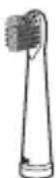
SB-070 (2 pieces)
Super-Fine Soft Bristle Head
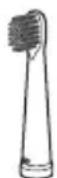
SB-080 (2 pieces)
It can effectively remove dental plaque with gentle and smooth action, e.g. for sensitive gums.
Point Brush
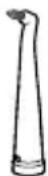
SB-090 (2 pieces)
Effective interdental brush to clean areas that are difficult to reach.
Correct Disposal of This Product (Waste Electrical & Electronic Equipment)
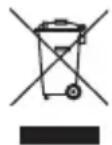
This marking shown on the product or its literature, indicates that it should not be disposed of, with other household wastes at the end of its working life. To prevent possible harm to the environment or human health from uncontrolled waste disposal, please separate this from other types of wastes and recycle it responsibly to promote the sustainable reuse of material resources.
Household users should contact either the retailer where they purchased this product, or their local government office, for details of where and how they can take this item for environmentally safe recycling.
Business users should contact their supplier and check the terms and conditions of the purchase contract. This product should not be mixed with other commercial wastes for disposal.
This product does not contain any hazardous substances.
Disposal of used batteries should be carried out in accordance with the national regulations for the disposal of batteries.
Manufacturer | OMRON HEALTHCARE CO., LTD.24, Yamanouchi Yamanoshita-cho, Ukyo-ku, Kyoto, 615-0084, Japan |
EU-representative | OMRON HEALTHCARE EUROPE B.V.Kruisweg 577, 2132 NA Hoofddorp, The Netherlandswww.omron-healthcare.com |
| Subsidiary | OMRON HEALTHCARE UK LTD.Opal DriveFox Milne, Milton Keynes MK15 0DG, United Kingdom |
| OMRON Medizintechnik Handelsgesellschaft mbHJohn-Deere-Str. 81a, 68163 Mannheim, Germanywww.omron-medizintechnik.de | |
| OMRON SANTÉ FRANCE SAS14, rue de Lisbonne, 93561 Rosny-sous-Bois Cedex, France |
Made in China
- OMRON Sonic style 456
- Sonic Electric Toothbrush
- Contents
- OMRON Sonic style 456 Sonic Electric Toothbrush
- Notes on Safety
- Warning:
- Caution:
- General Advice:
- Know Your Unit
- ■ Toothbrush main unit
- ■ Brush heads
- Triple Cleaning Head
- Super-Fine Soft Bristle Head
- ■ Battery charger
- Charging
- Notes:
- Plug the power plug into a power outlet.
- Insert the main unit into the charger.
- ■ Charger indicator
- Attachment of Brush Head
- Attach the brush head to the toothbrush main unit.
- Secure the brush head and the main unit.
- How to Use
- Preparation to brush your teeth.
- Press the power switch (on/off button).
- ■ Select one of the three different cleaning modes with the Swing mode switch
- Cleaning mode of brush head
- - Wide swing mode
- - Point swing mode
- After you have finished brushing your teeth and when the brush head is still in your mouth, press the power switch to turn off the power.
- ■ Ideal way to brush your teeth
- After Use
- Cleaning, Storage and Disposal
- ■ How to clean
- Attention during cleaning
- ■ Storage
- ■ Disposal
- Removing the Rechargeable Battery
- Troubleshooting
- Technical Data
- ■ Parts sold separately
- Correct Disposal of This Product (Waste Electrical & Electronic Equipment)
Brand : OMRON
Model : Sonic Style 456
Category : Toothbrush