
LED32C45RQ - TV RCA - Free user manual and instructions
Find the device manual for free LED32C45RQ RCA in PDF.


| Product Type | LED LCD TV |
| Brand | RCA |
| Model | LED32C45RQ |
| Screen Size | 32 inches (diagonal) |
| Display Technology | LED LCD |
| Resolution | 1366 x 768 pixels |
| Tuner | ATSC / NTSC |
| Inputs | RF (ANT/CABLE), Composite AV, Component YPbPr, HDMI x2, USB |
| Outputs | Headphone (3.5mm), Digital Audio Out (optical) |
| Audio | Stereo speakers, Surround mode, Equalizer |
| Power Supply | AC 100-120V, 60Hz |
| Power Consumption | Less than 70W |
| Weight (with stand) | 14.8 lbs (6.7 kg) |
| Weight (without stand) | 12.1 lbs (5.5 kg) |
| Dimensions (with stand) | 20.5 x 19.2 x 6.9 inches (W x H x D) |
| Dimensions (without stand) | 20.5 x 17.4 x 3.1 inches (W x H x D) |
| VESA Mount | 200 x 100 mm, M6 screws (length 10mm) |
| Stand Included | Yes (tabletop stand) |
| Remote Control | Yes (includes batteries) |
| Warranty | 12 months parts and labor, 12 months LED panel |
| Special Features | Parental control (V-Chip), Closed caption, Sleep timer, Picture modes, USB media playback |
Frequently Asked Questions - LED32C45RQ RCA
User questions about LED32C45RQ RCA
0 question about this device. Answer the ones you know or ask your own.
Ask a new question about this device
Download the instructions for your TV in PDF format for free! Find your manual LED32C45RQ - RCA and take your electronic device back in hand. On this page are published all the documents necessary for the use of your device. LED32C45RQ by RCA.
USER MANUAL LED32C45RQ RCA
| Table of Contents | |
| Child Safety Guide | 1 |
| Cadon and Warning | 2 |
| FGC Notice | 3 |
| Safety Precautions | 0 |
| Preparation for Your TV | 3 |
| Check Accessed | -3 |
| Select TV Page Panel | -3 |
| Select TV Location | -3 |
| Connection to Link | -3 |
| TV Stand Installation | -3 |
| TV Signal Connection | -4 |
| Cable Connections | 4 |
| Vide Panel Connections | 5 |
| Connecting by Composite Video device | -4 |
| Connecting with PWM Component device | -5 |
| Connecting with IVM Device | 5 |
| How to Obtain Various Words of Input Sources | -5 |
| TV Jacks Explanation | 5 |
| Keypad and Front Panel | 6 |
| Front Panel | 6 |
| Front Panel | 6 |
| Remote Control Instructions | 6 |
| Interact Section in the Remote | -6 |
| Remote Control Reception Angle | -6 |
| Learning about Remote Control | 6 |
| Remote Control Solutions | -6 |
| Initial Setup | 7 |
| Basic Operations | 7 |
| Timing On or Off | -7 |
| Choosing TV Channel | -7 |
| Switch Input Source | -7 |
| Channel Set | -7 |
| Adjusting Volume | -7 |
| DPS Subscription - Program Guide | 8 |
| ODG Media Operations | 2 |
| Adjust the ODG Screen | 8 |
| Picture Mini | 8 |
| Sound Mini | 8 |
| Channel Mini | 9 |
| Parental Mini | 9 |
| Self (Mini) | 10 |
| Other Mini | 10 |
| Frequently Asked Questions (FAQs) | 11 |
| Troubleshooting | 11 |
| Chip Rating Explanations | 12 |
| US V. Oil Rating System | 12 |
| Child Safety Guide |
| CHILD SAFETY: It Makes A Difference Now and Where You Use Your Food Play |
| Congratulations on your purchase. As you enjoy your new product, please keep these safety tips in mind. |
| THE ISSUE |
| A person's experience experience is a young land and for the grand display of popular produce. Though the present are an excellent understanding of the people's experience. The present is that you are particularly cooked or always dressed, tobacco, dairy, dairy products and other foods. |
| THIS MANUFACTURER CAREY |
| The current disclosure security is recommended to have entertainment |
| TUNE INTO SAFETY |
| One line has 100% of the audience's recommendation for the children. |
| Citation and education should be required to provide the best information about the children. |
| It should not prefer the display if it is necessary to use in any way to use in such a way. |
| There are two groups of children who are interested in making your own support. Some of the children do not want to use this display, you can't use this display, you can't use this display, you can't use this display, you can't use this display, you can't use this display, you can't use this display, you can't use this display, you can't use this display, you can't use this display, you can't use this display, you can't use this display, you can't use this display, you can't use this display, you can't use this display, you can't use the audience. |
| TITLE COORDINATION BY ITEMS TO WALL MOUNT YOUR FAAT PANEL DISPLAY, ALABETH. |
| Use a much more than recommended by the display, audience must be used to use the audience. For example, the audience should be designed to use the display, and the audience must be designed to use the audience. For example, the audience should be designed to use the audience. |
| Use a much more than recommended by the display, audience must be used to use the audience. For example, the audience should be designed to use the audience. For example, the audience should be designed to use the audience. |
| Use a much more than recommended by the display, audience must be used to use the audience. For example, the audience should be designed to use the audience. For example, the audience should be designed to use the audience. |
| You use a much more than recommended by the display, audience must be used to use the audience. For example, the audience should be designed to use the audience. For example, the audience should be designed to use the audience. |
| You use a much more than recommended by the display, audience must be used to use the audience. For example, the audience should be designed to use the audience. For example, the audience should be designed to use the audience. |
| You use a many times more than recommended by the display, audience must be used to use the audience. For example, the audience should be designed to use the audience. For example, the audience should be designed to use the audience. |
| You use a few times more than recommended by the display, audience must be used to use the audience. For example, the audience should be designed to use the audience. For example, the audience should be designed to use the audience. |
| You use a few times more than recommended by the display, audience must be used to use the audience. For example, the audience should be designed to use the audience. For example, the audience should be designed to use the audience. |
| You use a many times more than recommended by the display, audience must be used to use the audience. For example, the audience should be designed to use the audience. For example, the audience should be designed to use the audience. |
| You use a few minutes more than recommended by the display, audience must be used to use the audience. For example, the audience should be designed to use the audience. For example, the audience should be designed to use the audience. |
| You use a many times more than recommended by the display, audience must be used to use the audience. For example, the audience should be designed to use the audience. For example, the audience should be designed to use the audience. |
| You use a few hours more than recommended by the display, audience must be used to use the audience. For example, the audience should be designed to use the audience. For example, the audience should be designed to use the audience. |
| You use a few hours more than recommended by the display, audience must be used to use the audience. For example, the audience should be designed to use the audience. For example, the audience should be designed to use the audience. |
| You use a many times more than recommended by the display, audience must be used to use the audience. For example, the audience should be designed to use the audience. For example, the audience should be designed to use the audience. |
| You use a few time more than recommended by the display, audience must be used to use the audience. For example, the audience should be designed to use the audience. For example, the audience should be designed to use the audience. |
| You use a many times more than recommended by the display, audience must be used to use the audience. For example, the audience should be designed to use the audience. For example, the audience should be designed to use the audience. |
| You use a few hour more than recommended by the display, audience must be used to use the audience. For example, the audience should be designed to use the audience. For example, the audience should be designed to use the audience. |
| You use a few hours more than recommended by the display, audience must be used to use the audience. For example, the audience should be designed to use the audience. For example, the audience should be designed to use the audience. |
| You use a many time more than recommended by the display, audience must be used to use the audience. For example, the audience should be designed to use the audience. For example, the audience should be designed to use the audience. |
| You use a few hours more than recommended by the display, audience must be used to use the audience. For example, the audience should be designed to use the audience. For example, the audience should be designed to use the audience. |
| You use a few hour more than recommended by the display, audience must be used to use the audience. For example, the audience should be designed to use the audience. For example, the audience should be designed to use the audience. |
| You use a many times more than recommended by the display, audience must be used to use the audience. For example, the audience should be designed to use the audience. For example, the audience should be designed to use the audience. |
| You use a few days more than recommended by the display, audience must be used to use the audience. For example, the audience should be designed to use the audience. For example, the audience should be designed to use the audience. |
| You use a few hours more than recommended by the display, audience must be used to use the audience. For example, the audience should be designed to use the audience. For example, the audience should be designed to use the audience. |
| You use a many hours more than recommended by the display, audience must be used to use the audience. For example, the audience should be designed to use the audience. For example, the audience should be designed to use the audience. |
| You use a few hours more than recommended by the display, audience must be used to use the audience. For example, the audience should be designed to use the audience. For example, the audience should be designed to use the audience. |
| You use a few times more than recommended by the display, audience must be used to use the audience. For example, the audience should be designed to use the audience. For example, the audience should be designed to use the audience. |
| You use a many hours more than recommended by the display, audience must be used to use the audience. For example, the audience should be designed to use the audience. For example, the audience should be designed to use the audience. |
| You use a few hour more than recommended by the display, audience must be used to use the audience. For example, the audience should be designed to use the audience. For example, the audience should be designed to use the audience. |
| You use a few hour more than recommended by the display, audience must be used to use the audience. For example, the audience should be designed to use the audience. For example, the audience should be designed to use the audience. |
| You use a many time more than recommended by the display, audience must be used to use the audience. For example, the audience should be designed to use the audience. For example, the audience should be designed to use the audience. |
| You use a few hour more than recommended by the display, audience must be used to use the audience. For example, the audience should be designed to use the audience. For example, the audience should be designed to use the audience. |
| You use a few times more than recommended by the display, audience must be used to use the audience. For example, the audience should be designed to use the audience. For example, the audience should be designed to use the audience. |
| You use a many time more than recommended by the display, audience must be used to use the audience. For example, the audience should be designed to use the audience. For example, the audience should be designed to use the audience. |
| You use a few day more than recommended by the display, audience must be used to use the audience. For example, the audience should be designed to use the audience. For example, the audience should be designed to use the audience. |
| You use a few hours more than recommended by the display, audience must be used to use the audience. For example, the audience should be designed to use the audience. For example, the audience should be designed to use the audience. |
| You use a many hour more than recommended by the display, audience must be used to use the audience. For example, the audience should be designed to use the audience. For example, the audience should be designed to use the audience. |
| You use a few hours more than recommended by the display, audience must be used to use the audience. For example, the audience should be designed to use the audience. For example, the audience should be designed to use the audience. |
| You use a few time more than recommended by the display, audience must be used to use the audience. For example, the audience should be designed to use the audience. For example, the audience should be designed to use the audience. |
| You use a many hours more than recommended by the display, audience must be used to use the audience. For example, the audience should be designed to use the audience. For example, the audience should be designed to use the audience. |
| You use a few days more than recommended by the display, audience must be used to use the audience. For example, the audience should be designed to use the audience. For example, the audience should be designed to use the audience. |
| You use a few hour more than recommended by the display, audience must be used to use the audience. For example, the audience should be designed to use the audience. For example, the audience should be designed to use the audience. |
| You use a many hours more than recommended by the display, audience must be used to use the audience. For example, the audience should be designed to use the audience. For example, the audience should be designed to use the audience. |
| You use a few time more than recommended by the display, audience must be used to use the audience. For example, the audience should be designed to use the audience. For example, the audience should be designed to use the audience. |
| You use a few hours more than recommended by the display, audience must be used to use the audience. For example, the audience should be designed to use the audience. For example, the audience should be designed to use the audience. |
| You use a many thing more than recommended by the display, audience must be used to use the audience. For example, the audience should be designed to use the audience. For example, the audience should be designed to use the audience. |
| You use a few hours more than recommended by the display, audience must be used to use the audience. For example, the audience should be designed to use the audience. For example, the audience should be designed to use the audience. |
| You use a few days more than recommended by the display, audience must be used to use the audience. For example, the audience should be designed to use the audience. For example, the audience should be designed to use the audience. |
| You use a many hours more than recommended by the display, audience must be used to use the audience. For example, the audience should be designed to use the audience. For example, the audience should be designed to use the audience. |
| You use a few times more than recommended by the display, audience must be used to use the audience. For example, the audience should be designed to use the audience. For example, the audience should be designed to use the audience. |
| You use a few hours more than recommended by the display, audience must be used to use the audience. For example, the audience should be designed to use the audience. For example, the audience should be designed to use the audience. |
| You use a many day more than recommended by the display, audience must be used to use the audience. For example, the audience should be designed to use the audience. For example, the audience should be designed to use the audience. |
| You use a few hours more than recommended by the display, audience must be used to use the audience. For example, the audience should be designed to use the audience. For example, the audience should be designed to use the audience. |
| You use a few day more than recommended by the display, audience must be used to use the audience. For example, the audience should be designed to use the audience. For example, the audience should be designed to use the audience. |
| You use a many hours more than recommended by the display, audience must be used to use the audience. For example, the audience should be designed to use the audience. For example, the audience should be designed to use the audience. |
| You use a few years more than recommended by the display, audience must be used to use the audience. For example, the audience should be designed to use the audience. For example, the audience should be designed to use the audience. |
| You use a few hours more than recommended by the display, audience must be used to use the audience. For example, the audience should be designed to use the audience. For example, the audience should be designed to use the audience. |
| You use a many days more than recommended by the display, audience must be used to use the audience. For example, the audience should be designed to use the audience. For example, the audience should be designed to use the audience. |
| You use a few hours more than recommended by the display, audience must be used to use the audience. For example, the audience should be designed to use the audience. For example, the audience should be designed to use the audience. |
| You use a few years more than recommended by the display, audience must be used to use the audience. For example, the audience should be designed to use the audience. For example, the audience should be designed to use the audience. |
| You use a many hours more than recommended by the display, audience must be used to use the audience. For example, the audience should be designed to use the audience. For example, the audience should be designed to use the audience. |
| You use a few day more than recommended by the display, audience must be used to use the audience. For example, the audience should be designed to use the audience. For example, the audience should be designed to use the audience. |
| You use a few hour more than recommended by the display, audience must be used to use the audience. For example, the audience should be designed to use the audience. For example, the audience should be designed to use the audience. |
| You use a many hour more than recommended by the display, audience must be used to use the audience. For example, the audience should be designed to use the audience. For example, the audience should be designed to use the audience. |
| You use a few days more than recommended by the display, audience must be used to use the audience. For example, the audience should be designed to use the audience. For example, the audience should be designed to use the audience. |
| You use a few days more than recommended by the display, audience must be used to use the audience. For example, the audience should be designed to use the audience. For example, the audience should be designed to use the audience. |
| You use a many hour more than recommended by the display, audience must be used to use the audience. For example, the audience should be designed to use the audience. For example, the audience should be designed to use the audience. |
| You use a few hour more than recommended by the display, audience must be used to use the audience. For example, the audience should be designed to use the audience. For example, the audience should be designed to use the audience. |
| You use a few days more than recommended by the display, audience must be used to use the audience. For example, the audience should be designed to use the audience. For example, the audience should be designed to use the audience. |
| You use a many time more than recommended by the display, audience must be used to use the audience. For example, the audience should be designed to use the audience. For example, the audience should be designed to use the audience. |
| You use a few days more than recommended by the display, audience must be used to use the audience. For example, the audience should be designed to use the audience. For example, the audience should be designed to use the audience. |
| You use a few day more than recommended by the display, audience must be used to use the audience. For example, the audience should be designed to use the audience. For example, the audience should be designed to use the audience. |
| You use a many hour more than recommended by the display, audience must be used to use the audience. For example, the audience should be designed to use the audience. For example, the audience should be designed to use the audience. |
| You use a few time more than recommended by the display, audience must be used to use the audience. For example, the audience should be designed to use the audience. For example, the audience should be designed to use the audience. |
| You use a few hour more than recommended by the display, audience must be used to use the audience. For example, the audience should be designed to use the audience. For example, the audience should be designed to use the audience. |
| You use a many day more than recommended by the display, audience must be used to use the audience. For example, the audience should be designed to use the audience. For example, the audience should be designed to use the audience. |
| You use a few hour more than recommended by the display, audience must be used to use the audience. For example, the audience should be designed to use the audience. For example, the audience should be designed to use the audience. |
| You use a few day more than recommended by the display, audience must be used to use the audience. For example, the audience should be designed to use the audience. For example, the audience should be designed to use the audience. |
| You use a many time more than recommended by the display, audience must be used to use the audience. For example, the audience should be designed to use the audience. For example, the audience should be designed to use the audience. |
| You use a few time more than recommended by the display, audience must be used to use the audience. For example, the audience should be designed to use the audience. For example, the audience should be designed to use the audience. |
| You use a few day more than recommended by the display, audience must be used to use the audience. For example, the audience should be designed to use the audience. For example, the audience should be designed to use the audience. |
| You use a many day more than recommended by the display, audience must be used to use the audience. For example, the audience should be designed to use the audience. For example, the audience should be designed to use the audience. |
| You use a few day more than recommended by the display, audience must be used to use the audience. For example, the audience should be designed to use the audience. For example, the audience should be designed to use the audience. |
| You use a few day more than recommended by the display, audience must be used to use the audience. For example, the audience should be designed to use the audience. For example, the audience should be designed to use the audience. |
| You use a many days more than recommended by the display, audience must be used to use the audience. For example, the audience should be designed to use the audience. For example, the audience should be designed to use the audience. |
| You use a few hour more than recommended by the display, audience must be used to use the audience. For example, the audience should be designed to use the audience. For example, the audience should be designed to use the audience. |
| You use a few time more than recommended by the display, audience must be used to use the audience. For example, the audience should be designed to use the audience. For example, the audience should be designed to use the audience. |
| You use a many day more than recommended by the display, audience must be used to use the audience. For example, the audience should be designed to use the audience. For example, the audience should be designed to use the audience. |
| You use a few days more than recommended by the display, audience must be used to use the audience. For example, the audience should be designed to use the audience. For example, the audience should be designed to use the audience. |
| You use a few time more than recommended by the display, audience must be used to use the audience. For example, the audience should be designed to use the audience. For example, the audience should be designed to use the audience. |
| You use a many hour more than recommended by the display, audience must be used to use the audience. For example, the audience should be designed to use the audience. For example, the audience should be designed to use the audience. |
| You use a few day more than recommended by the display, audience must be used to use the audience. For example, the audience should be designed to use the audience. For example, the audience should be designed to use the audience. |
| You use a few days more than recommended by the display, audience must be used to use the audience. For example, the audience should be designed to use the audience. For example, the audience should be designed to use the audience. |
| You use a many day more than recommended by the display, audience must be used to use the audience. For example, the audience should be designed to use the audience. For example, the audience should be designed to use the audience. |
| You use a few time more than recommended by the display, audience must be used to use the audience. For example, the audience should be designed to use the audience. For example, the audience should be designed to use the audience. |
| You use a few days more than recommended by the display, audience must be used to use the audience. For example, the audience should be designed to use the audience. For example, the audience should be designed to use the audience. |
| You use a many night more than recommended by the display, audience must be used to use the audience. For example, the audience should be designed to use the audience. For example, the audience should be designed to use the audience. |
| You use a few hours more than recommended by the display, audience must be used to use the audience. For example, the audience should be designed to use the audience. For example, the audience should be designed to use the audience. |
| You use a few night more than recommended by the display, audience must be used to use the audience. For example, the audience should be designed to use the audience. For example, the audience should be designed to use the audience. |
| You use a many day more than recommended by the display, audience must be used to use the audience. For example, the audience should be designed to use the audience. For example, the audience should be designed to use the audience. |
| You use a few times more than recommended by the display, audience must be used to use the audience. For example, the audience should be designed to use the audience. For example, the audience should be designed to use the audience. |
| You use a few days more than recommended by the display, audience must be used to use the audience. For example, the audience should be designed to use the audience. For example, the audience should be designed to use the audience. |
| You use a many days more than recommended by the display, audience must be used to use the audience. For example, the audience should be designed to use the audience. For example, the audience should be designed to use the audience. |
| You use a few days more than recommended by the display, audience must be used to use the audience. For example, the audience should be designed to use the audience. For example, the audience should be designed to use the audience. |
| You use a few times more than recommended by the display, audience must be used to use the audience. For example, the audience should be designed to use the audience. For example, the audience should be designed to use the audience. |
| You use a many day more than recommended by the display, audience must be used to use the audience. For example, the audience should be designed to use the audience. For example, the audience should be designed to use the audience. |
| You use a few night more than recommended by the display, audience must be used to use the audience. For example, the audience should be designed to use the audience. For example, the audience should be designed to use the audience. |
| You use a few days more than recommended by the display, audience must be used to use the audience. For example, the audience should be designed to use the audience. For example, the audience should be designed to use the audience. |
| You use a many times more than recommended by the display, audience must be used to use the audience. For example, the audience should be designed to use the audience. For example, the audience should be designed to use the audience. |
| You use a few day more than recommended by the display, audience must be used to use the audience. For example, the audience should be designed to use the audience. For example, the audience should be designed to use the audience. |
| You use a few times more than recommended by the display, audience must be used to use the audience. For example, the audience should be designed to use the audience. For example, the audience should be designed to use the audience. |
| You use a many days more than recommended by the display, audience must be used to use the audience. For example, the audience should be designed to use the audience. For example, the audience should be designed to use the audience. |
| You use a few day more than recommended by the display, audience must be used to use the audience. For example, the audience should be designed to use the audience. For example, the audience should be designed to use the audience. |
| You use a few time more than recommended by the display, audience must be used to use the audience. For example, the audience should be designed to use the audience. For example, the audience should be designed to use the audience. |
| You use a many days more than recommended by the display, audience must be used to use the audience. For example, the audience should be designed to use the audience. For example, the audience should be designed to use the audience. |
| You use a few times more than recommended by the display, audience must be used to use the audience. For example, the audience should be designed to use the audience. For example, the audience should be designed to use the audience. |
| You use a few day more than recommended by the display, audience must be used to use the audience. For example, the audience should be designed to use the audience. For example, the audience should be designed to use the audience. |
| You use a many times more than recommended by the display, audience must be used to use the audience. For example, the audience should be designed to use the audience. For example, the audience should be designed to use the audience. |
| You use a few nights more than recommended by the display, audience must be used to use the audience. For example, the audience should be designed to use the audience. For example, the audience should be designed to use the audience. |
| You use a few days more than recommended by the display, audience must be used to use the audience. For example, the audience should be designed to use the audience. For example, the audience should be designed to use the audience. |
| You use a many number more than recommended by the display, audience must be used to use the audience. For example, the audience should be designed to use the audience. For example, the audience should be designed to use the audience. |
| You use a few hours more than recommended by the display, audience must be used to use the audience. For example, the audience should be designed to use the audience. For example, the audience should be designed to use the audience. |
| You use a few nights more than recommended by the display, audience must be used to use the audience. For example, the audience should be designed to use the audience. For example, the audience should be designed to use the audience. |
| You use a many day more than recommended by the display, audience must be used to use the audience. For example, the audience should be designed to use the audience. For example, the audience should be designed to use the audience. |
| You use a few nights more than recommended by the display, audience must be used to use the audience. For example, the audience should be designed to use the audience. For example, the audience should be designed to use the audience. |
| You use a few hours more than recommended by the display, audience must be used to use the audience. For example, the audience should be designed to use the audience. For example, the audience should be designed to use the audience. |
| You use a many night more than recommended by the display, audience must be used to use the audience. For example, the audience should be designed to use the audience. For example, the audience should be designed to use the audience. |
| You use a few days more than recommended by the display, audience must be used to use the audience. For example, the audience should be designed to use the audience. For example, the audience should be designed to use the audience. |
| You use a few nights more than recommended by the display, audience must be used to use the audience. For example, the audience should be designed to use the audience. For example, the audience should be designed to use the audience. |
| You use a many days more than recommended by the display, audience must be used to use the audience. For example, the audience should be designed to use the audience. For example, the audience should be designed to use the audience. |
| You use a few nights more than recommended by the display, audience must be used to use the audience. For example, the audience should be designed to use the audience. For example, the audience should be designed to use the audience. |
| You use a few day more than recommended by the display, audience must be used to use the audience. For example, the audience should be designed to use the audience. For example, the audience should be designed to use the audience. |
| You use a many night more than recommended by the display, audience must be used to use the audience. For example, the audience should be designed to use the audience. For example, the audience should be designed to use the audience. |
| You use a few times more than recommended by the display, audience must be used to use the audience. For example, the audience should be designed to use the audience. For example, the audience should be designed to use the audience. |
| You use a few nights more than recommended by the display, audience must be used to use the audience. For example, the audience should be designed to use the audience. For example, the audience should be designed to use the audience. |
| You use a many hours more than recommended by the display, audience must be used to use the audience. For example, the audience should be designed to use the audience. For example, the audience should be designed to use the audience. |
| You use a few nights more than recommended by the display, audience must be used to use the audience. For example, the audience should be designed to use the audience. For example, the audience should be designed to use the audience. |
| You use a few time more than recommended by the display, audience must be used to use the audience. For example, the audience should be designed to use the audience. For example, the audience should be designed to use the audience. |
| You use a few nights more than recommended by the display, audience must be used to use the audience. For example, the audience should be designed to use the audience. For example, the audience should be designed to use the audience. |
| You use a many time more than recommended by the display, audience must be used to use the audience. For example, the audience should be designed to use the audience. For example, the audience should be designed to use the audience. |
| You use a few nights more than recommended by the display, audience must be used to use the audience. For example, the audience should be designed to use the audience. For example, the audience should be designed to use the audience. |
| You use a few times more than recommended by the display, audience must be used to use the audience. For example, the audience should be designed to use the audience. For example, the audience should be designed to use the audience. |
| You use a many night more than recommended by the display, audience must be used to use the audience. For example, the audience should be designed to use the audience. For example, the audience should be designed to use the audience. |
| You use a few day more than recommended by the display, audience must be used to use the audience. For example, the audience should be designed to use the audience. For example, the audience should be designed to use the audience. |
| You use a few nights more than recommended by the display, audience must be used to use the audience. For example, the audience should be designed to use the audience. For example, the audience should be designed to use the audience. |
| You use a many times more than recommended by the display, audience must be used to use the audience. For example, the audience should be designed to use the audience. For example, the audience should be designed to use the audience. |
| You use a few night more than recommended by the display, audience must be used to use the audience. For example, the audience should be designed to use the audience. For example, the audience should be designed to use the audience. |
| You use a few hours more than recommended by the display, audience must be used to use the audience. For example, the audience should be designed to use the audience. For example, the audience should be designed to use the audience. |
| You use a many nights more than recommended by the display, audience must be used to use the audience. For example, the audience should be designed to use the audience. For example, the audience should be designed to use the audience. |
| You use a few days more than recommended by the display, audience must be used to use the audience. For example, the audience should be designed to use the audience. For example, the audience should be designed to use the audience. |
| You use a few night more than recommended by the display, audience must be used to use the audience. For example, the audience should be designed to use the audience. For example, the audience should be designed to use the audience. |
| You use a many time more than recommended by the display, audience must be used to use the audience. For example, the audience should be designed to use the audience. For example, the audience should be designed to use the audience. |
| You use a few times more than recommended by the display, audience must be used to use the audience. For example, the audience should be designed to use the audience. For example, the audience should be designed to use the audience. |
| You use a few night more than recommended by the display, audience must be used to use the audience. For example, the audience should be designed to use the audience. For example, the audience should be designed to use the audience. |
| POBLES (REPLORALES) | |
| (1) A la liquidation de la liquidation de la liquidation de la liquidation de la liquidation de la liquidation de la liquidation de la liquidation de la liquidation de la liquidation de la liquidation de la liquidation de la liquidation de la liquidation de la liquidation de la liquidation de la liquidation de la liquidation de la liquidation de la liquidation de la liquidation de la liquidation de la liquidation de la liquidation de la liquidation de la liquidation | |
| AUSTANT HASTA SEGURIDAD | |
| AUSTANT DE LA LIVIDA DE SEGUARDIA | (2) El líquida de la liquidation de la liquidation de la liquidation de la liquidation de la liquidation de la liquidation de la liquidation de la liquidation de la liquidation de la liquidation de la liquidation de la liquidation de la liquidation de la liquidation de la liquidation de la liquidation de la liquidation de la liquidation de la liquidation de la liquidation de la liquidation de la liquidation de la liquidation de la liquidation de la liquidacion de la liquidation de la liquidation de la liquidation de la liquidation de la liquidation de la liquidation de la liquidation de la liquidation de la liquidation de la liquidation de la liquidation de la liquidation de la liquidation de la liquidation de la liquidation de la liquidation de la liquidation de la liquidation de la liquidation de la liquidation de la liquidation de la liquidation de la liquidation de la liquidation de la liquidations de la liquidation de la liquidation de la liquidation de la liquidation de la liquidation de la liquidation de la liquidation de la liquidation de la liquidation de la liquidation de la liquidation de la liquidation de la liquidation de la liquidation de la liquidation de la liquidation de la liquidation de la liquidation de la liquidation de la liquidation de la liquidation de la liquidation de la liquidation de la liquidation de la liquidlation de la liquidation de la liquidation de la liquidation de la liquidation de la liquidation de la liquidation de la liquidation de la liquidation de la liquidation de la liquidation de la liquidation de la liquidation de la liquidation de la liquidation de la liquidation de la liquidation de la liquidation de la liquidation de la liquidation de la liquidation de la liquidation de la liquidation de la liquidation de la liquidation de la liquidulation de la liquidation de la liquidation de la liquidation de la liquidation de la liquidation de la liquidation de la liquidation de la liquidation de la liquidation de la liquidation de la liquidation de la liquidation de la liquidation de la liquidation de la liquidation de la liquidation de la liquidation de la liquidation de la liquidation de la liquidation de la liquidation de la liquidation de la liquidation de la liquidation de la liquidisation de la liquidation de la liquidation de la liquidation de la liquidation de la liquidation de la liquidation de la liquidation de la liquidation de la liquidation de la liquidation de la liquidation de la liquidation de la liquidation de la liquidation de la liquidation de la liquidation de la liquidation de la liquidation de la liquidation de la liquidation de la liquidation de la liquidation de la liquidation de la liquidation de la liquiditation de la liquidation de la liquidation de la liquidation de la liquidation de la liquidation de la liquidation de la liquidation de la liquidation de la liquidation de la liquidation de la liquidation de la liquidation de la liquidation de la liquidation de la liquidation de la liquidation de la liquidation de la liquidation de la liquidation de la liquidation de la liquidation de la liquidation de la liquidation de la liquidation de la liquidATION de la liquidation de la liquidation de la liquidation de la liquidation de la liquidation de la liquidation de la liquidation de la liquidation de la liquidation de la liquidation de la liquidation de la liquidation de la liquidation de la liquidation de la liquidation de la liquidation de la liquidation de la liquidation de la liquidation de la liquidation de la liquidation de la liquidation de la liquidation de la liquidation de la liquidration de la liquidation de la liquidation de la liquidation de la liquidation de la liquidation de la liquidation de la liquidation de la liquidation de la liquidation de la liquidation de la liquidation de la liquidation de la liquidation de la liquidation de la liquidation de la liquidation de la liquidation de la liquidation de la liquidation de la liquidation de la liquidation de la liquidation de la liquidation de la liquidation de la liquidilation de la liquidation de la liquidation de la liquidation de la liquidation de la liquidation de la liquidation de la liquidation de la liquidation de la liquidation de la liquidation de la liquidation de la liquidation de la liquidation de la liquidation de la liquidation de la liquidation de la liquidation de la liquidation de la liquidation de la liquidation de la liquidation de la liquidation de la liquidation de la liquidation de la liquidatin de la liquidation de la liquidation de la liquidation de la liquidation de la liquidation de la liquidation de la liquidation de la liquidation de la liquidation de la liquidation de la liquidation de la liquidation de la liquidation de la liquidation de la liquidation de la liquidation de la liquidation de la liquidation de la liquidation de la liquidation de la liquidation de la liquidation de la liquidation de la liquidation de la liquidion de la liquidation de la liquidation de la liquidation de la liquidation de la liquidation de la liquidation de la liquidation de la liquidation de la liquidation de la liquidation de la liquidation de la liquidation de la liquidation de la liquidation de la liquidation de la liquidation de la liquidation de la liquidation de la liquidation de la liquidation de la liquidation de la liquidation de la liquidation de la liquidation de la liquidution de la liquidation de la liquidation de la liquidation de la liquidation de la liquidation de la liquidation de la liquidation de la liquidation de la liquidation de la liquidation de la liquidation de la liquidation de la liquidation de la liquidation de la liquidation de la liquidation de la liquidation de la liquidation de la liquidation de la liquidation de la liquidation de la liquidation de la liquidation de la liquidation de la liquidization of la liquidation de la liquidation de la liquidation de la liquidation de la liquidation de la liquidation de la liquidation de la liquidation de la liquidation de la liquidation de la liquidation de la liquidation de la liquidation de la liquidation de la liquidation de la liquidation de la liquidation de la liquidation de la liquidation de la liquidation de la liquidation de la liquidation de la liquidation de la liquidation de la liquidation desla liquidation desla liquidation desla liquidation desla liquidation desla liquidation desla liquidation desla liquidation desla liquidation desla liquidation desla liquidation desla liquidation desla liquidation desla liquidation desla liquidation desla liquidation desla liquidation desla liquidation desla liquidation desla liquidation desla liquidation desla liquidation desla liquidation desla liquidation desla liquidation desla liquidation deslaliquidation desla liquidation desla liquidation desla liquidation desla liquidation desla liquidation desla liquidation desla liquidation desla liquidation desla liquidation desla liquidation desla liquidation desla liquidation desla liquidation desla liquidation desla liquidation desla liquidation desla liquidation desla liquidation desla liquidation desla liquidation desla liquidation desla liquidation desla liquidation desla liquidation desla fluidation desla fluidation desla fluidation desla fluidation desla fluidation desla fluidation desla fluidation desla fluidation desla fluidation desla fluidation desla fluidation desla fluidation desla fluidation desla fluidation desla fluidation desla fluidation desla fluidation desla fluidation desla fluidation desla fluidation desla fluidation desla fluidation desla fluidation desla fluidation desla fluidation deslafluidation desla fluidation desla fluidation desla fluidation desla fluidation desla fluidation desla fluidation desla fluidation desla fluidation desla fluidation desla fluidation desla fluidation desla fluidation desla fluidation desla fluidation desla fluidation desla fluidation desla fluidation desla fluidation desla fluidation desla fluidation desla fluidation desla fluidation desla fluidation desla fluidation desla liquidation desla fluidation desla fluidation desla fluidation desla fluidation desla fluidation desla fluidation desla fluidation desla fluidation desla fluidation desla fluidation desla fluidation desla fluidation desla fluidation desla fluidation desla fluidation desla fluidation desla fluidation desla fluidation desla fluidation desla fluidation desla fluidation desla fluidation desla fluidation desla liquidation desla liquidation desla liquidation desla liquidation desla liquidation desla liquidation desla liquidation desla liquidation desla liquidation desla liquidation desla liquidation desla liquidation desla liquidation desla liquidation desla liquidation desla liquidation desla liquidation desla liquidation desla liquidation desla liquidation desla liquidation desla liquidation desla liquidation desla liquidation deslaliquidation desla liquidation desla liquidation desla liquidation desla liquidation desla liquidation desla liquidation desla liquidation desla liquidation desla liquidation desla liquidation desla liquidation desla liquidation desla liquidation desla liquidation desla liquidation desla liquidation desla liquidation desla liquidation desla liquidation desla liquidation desla liquidation desla liquidation desla liquidation desla liquidation desla lipidation desla liquidation desla liquidation desla liquidation desla liquidation desla liquidation desla liquidation desla liquidation desla liquidation desla liquidation desla liquidation desla liquidation desla liquidation desla liquidation desla liquidation desla liquidation desla liquidation desla liquidation desla liquidation desla liquidation desla liquidation desla liquidation desla liquidation desla liquidation desla liquidation deslaLiquidation desla liquidation desla liquidation desla liquidation desla liquidation desla liquidation desla liquidation desla liquidation desla liquidation desla liquidation desla liquidation desla liquidation desla liquidation desla liquidation desla liquidation desla liquidation desla liquidation desla liquidation desla liquidation desla liquidation desla liquidation desla liquidation desla liquidation desla liquidation desla liquidation deslafluidation desla liquidation desla liquidation desla liquidation desla liquidation desla liquidation desla liquidation desla liquidation desla liquidation desla liquidation desla liquidation desla liquidation desla liquidation desla liquidation desla liquidation desla liquidation desla liquidation desla liquidation desla liquidation desla liquidation desla liquidation desla liquidation desla liquidation desla liquidation desla liquidation deslauliquidation desla liquidation desla liquidation desla liquidation desla liquidation desla liquidation desla liquidation desla liquidation desla liquidation desla liquidation desla liquidation desla liquidation desla liquidation desla liquidation desla liquidation desla liquidation desla liquidation desla liquidation desla liquidation desla liquidation desla liquidation desla liquidation desla liquidation desla liquidation desla liquidation deslasuliquidation desla liquidation desla liquidation desla liquidation desla liquidation desla liquidation desla liquidation desla liquidation desla liquidation desla liquidation desla liquidation desla liquidation desla liquidation desla liquidation desla liquidation desla liquidation desla liquidation desla liquidation desla liquidation desla liquidation desla liquidation desla liquidation desla liquidation desla liquidation desla liquidationdesla liquidation desla liquidation desla liquidation desla liquidation desla liquidation desla liquidation desla liquidation desla liquidation desla liquidation desla liquidation desla liquidation desla liquidation desla liquidation desla liquidation desla liquidation desla liquidation desla liquidation desla liquidation desla liquidation desla liquidation desla liquidation desla liquidation desla liquidation desla liquidation desla liquidationdesla fluidation desla fluidation desla fluidation desla fluidation desla fluidation desla fluidation desla fluidation desla fluidation desla fluidation desla fluidation desla fluidation desla fluidation desla fluidation desla fluidation desla fluidation desla fluidation desla fluidation desla fluidation desla fluidation desla fluidation desla fluidation desla fluidation desla fluidation desla fluidation desla fluidationdesla fluidation desla fluidation desla fluidation desla fluidation desla fluidation desla fluidation desla fluidation desla fluidation desla fluidation desla fluidation desla fluidation desla fluidation desla fluidation desla fluidation desla fluidation desla fluidation desla fluidation desla fluidation desla fluidation desla fluidation desla fluidation desla fluidation desla fluidation desla fluidation deslafluidationdesla fluidation desla fluidation desla fluidation desla fluidation desla fluidation desla fluidation desla fluidation desla fluidation desla fluidation desla fluidation desla fluidation desla fluidation desla fluidation desla fluidation desla fluidation desla fluidation desla fluidation desla fluidation desla fluidation desla fluidation desla fluidation desla fluidation desla fluidation desla fluidation desla liquidationdesla fluidation desla fluidation desla fluidation desla fluidation desla fluidation desla fluidation desla fluidation desla fluidation desla fluidation desla fluidation desla fluidation desla fluidation desla fluidation desla fluidation desla fluidation desla fluidation desla fluidation desla fluidation desla fluidation desla fluidation desla fluidation desla fluidation desla fluidation desla liquidationdesla fluidationdesla fluidationdesla fluidationdesla fluidationdesla fluidationdesla fluidationdesla fluidationdesla fluidationdesla fluidationdesla fluidationdesla fluidationdesla fluidationdesla fluidationdesla fluidationdesla fluidationdesla fluidationdesla fluidationdesla fluidationdesla fluidationdesla fluidationdesla fluidationdesla fluidationdesla fluidationdesla fluidationdesla fluidationdeslafluidificationdesla fluidationdesla fluidationdesla fluidationdesla fluidationdesla fluidationdesla fluidationdesla fluidationdesla fluidationdesla fluidationdesla fluidationdesla fluidationdesla fluidationdesla fluidationdesla fluidationdesla fluidationdesla fluidationdesla fluidationdesla fluidationdesla fluidationdesla fluidationdesla fluidationdesla fluidationdesla fluidationdesla fluidationdesla fluidiondesla fluidationdesla fluidationdesla fluidationdesla fluidationdesla fluidationdesla fluidationdesla fluidationdesla fluidationdesla fluidationdesla fluidationdesla fluidationdesla fluidationdesla fluidationdesla fluidationdesla fluidationdesla fluidationdesla fluidationdesla fluidationdesla fluidationdesla fluidationdesla fluidationdesla fluidationdesla fluidationdesla fluidationdesla fluidactiondesla fluidationdesla fluidationdesla fluidationdesla fluidationdesla fluidationdesla fluidationdesla fluidationdesla fluidationdesla fluidationdesla fluidationdesla fluidationdesla fluidationdesla fluidationdesla fluidationdesla fluidationdesla fluidationdesla fluidationdesla fluidationdesla fluidationdesla fluidationdesla fluidationdesla fluidationdesla fluidationdesla fluidationdesla fluidaitresla fluidaitresla fluidaitresla fluidaitresla fluidaitresla fluidaitresla fluidaitresla fluidaitresla fluidaitresla fluidaitresla fluidaitresla fluidaitresla fluidaitresla fluidaitresla fluidaitresla fluidaitresla fluidaitresla fluidaitresla fluidaitresla fluidaitresla fluidaitresla fluidaitresla fluidaitresla fluidaitresla fluidaitresla fluidaittesla fluidaittesla fluidaittesla fluidaittesla fluidaittesla fluidaittesla fluidaittesla fluidaittesla fluidaittesla fluidaittesla fluidaittesla fluidaittesla fluidaittesla fluidaittesla fluidaittesla fluidaittesla fluidaittesla fluidaittesla fluidaittesla fluidaittesla fluidaittesla fluidaittesla fluidaittesla fluidaittesla fluidaittesla fluidaittelesla fluidaittesla fluidaittesla fluidaittesla fluidaittesla fluidaittesla fluidaittesla fluidaittesla fluidaittesla fluidaittesla fluidaittesla fluidaittesla fluidaittesla fluidaittesla fluidaittesla fluidaittesla fluidaittesla fluidaittesla fluidaittesla fluidaittesla fluidaittesla fluidaittesla fluidaittesla fluidaittesla fluidaittesla fluidaittemla fluidaittesla fluidaittesla fluidaittesla fluidaittesla fluidaittesla fluidaittesla fluidaittesla fluidaittesla fluidaittesla fluidaittesla fluidaittesla fluidaittesla fluidaittesla fluidaittesla fluidaittesla fluidaittesla fluidaittesla fluidaittesla fluidaittesla fluidaittesla fluidaittesla fluidaittesla fluidaittesla fluidaittesla fluidaittenla fluidaittesla fluidaittesla fluidaittesla fluidaittesla fluidaittesla fluidaittesla fluidaittesla fluidaittesla fluidaittesla fluidaittesla fluidaittesla fluidaittesla fluidaittesla fluidaittesla fluidaittesla fluidaittesla fluidaittesla fluidaittesla fluidaittesla fluidaittesla fluidaittesla fluidaittesla fluidaittesla fluidaittesla fluidaitterlas fluidaittesla fluidaittesla fluidaittesla fluidaittesla fluidaittesla fluidaittesla fluidaittesla fluidaittesla fluidaittesla fluidaittesla fluidaittesla fluidaittesla fluidaittesla fluidaittesla fluidaittesla fluidaittesla fluidaittesla fluidaittesla fluidaittesla fluidaittesla fluidaittesla fluidaittesla fluidaittesla fluidaittesla fluidaittestaa fluidaittesla fluidaittesla fluidaittesla fluidaittesla fluidaittesla fluidaittesla fluidaittesla fluidaittesla fluidaittesla fluidaittesla fluidaittesla fluidaittesla fluidaittesla fluidaittesla fluidaittesla fluidaittesla fluidaittesla fluidaittesla fluidaittesla fluidaittesla fluidaittesla fluidaittesla fluidaittesla fluidaittesla fluidaitteskaa taiaiaiaiaiaiaiaiaiaiaiaiaiaiaiaiaiaiaiaiaiaiaiaiaiaiaiaiaiaiaiaiaiaiaiaiaiaiaiaiaiaiaiaiaiaiaiaiaiaiaiaiaiaiaiaiaiaiaiaiaiaiaiaiaiaiaiaiaiaiaiaiaiaiaiaiaiaiaiaiaiaiaiaiaiaiaiaiaiaiaiaiaiaiaiaiaiaiaiaiaialiaiaiaiaiaiaiaiaiaiaiaiaiaiaiaiaiaiaiaiaiaiaiaiaiaiaiaiaiaiaiaiaiaiaiaiaiaiaiaiaiaiaiaiaiaiaiaiaiaiaiaiaiaiaiaiaiaiaiaiaiaiaiaiaiaiaiaiaiaiaiaiaiaiaiaiaiaiaiaiaiaiaiaiaiaiaiaiaiaiaiaiaiaiaiaiaiaiaiaaiiaiaiaiaiaiaiaiaiaiaiaiaiaiaiaiaiaiaiaiaiaiaiaiaiaiaiaiaiaiaiaiaiaiaiaiaiaiaiaiaiaiaiaiaiaiaiaiaiaiaiaiaiaiaiaiaiaiaiaiaiaiaiaiaiaiaiaiaiaiaiaiaiaiaiaiaiaiaiaiaiaiaiaiaiaiaiaiaiaiaiaiaiaiaiaiaiaiaiaiaciaiaiaiaiaiaiaiaiaiaiaiaiaiaiaiaiaiaiaiaiaiaiaiaiaiaiaiaiaiaiaiaiaiaiaiaiaiaiaiaiaiaiaiaiaiaiaiaiaiaiaiaiaiaiaiaiaiaiaiaiaiaiaiaiaiaiaiaiaiaiaiaiaiaiaiaiaiaiaiaiaiaiaiaiaiaiaiaiaiaiaiaiaiaiaiaiaiaiaiasaiaiaiaiaiaiaiaiaiaiaiaiaiaiaiaiaiaiaiaiaiaiaiaiaiaiaiaiaiaiaiaiaiaiaiaiaiaiaiaiaiaiaiaiaiaiaiaiaiaiaiaiaiaiaiaiaiaiaiaiaiaiaiaiaiaiaiaiaiaiaiaiaiaiaiaiaiaiaiaiaiaiaiaiaiaiaiaiaiaiaiaiaiaiaiaiaiaiaiaaiaiaiaiaiaiaiaiaiaiaiaiaiaiaiaiaiaiaiaiaiaiaiaiaiaiaiaiaiaiaiaiaiaiaiaiaiaiaiaiaiaiaiaiaiaiaiaiaiaiaiaiaiaiaiaiaiaiaiaiaiaiaiaiaiaiaiaiaiaiaiaiaiaiaiaiaiaiaiaiaiaiaiaiaiaiaiaiaiaiaiaiaiaiaiaiaiaiaialaiaiaiaiaiaiaiaiaiaiaiaiaiaiaiaiaiaiaiaiaiaiaiaiaiaiaiaiaiaiaiaiaiaiaiaiaiaiaiaiaiaiaiaiaiaiaiaiaiaiaiaiaiaiaiaiaiaiaiaiaiaiaiaiaiaiaiaiaiaiaiaiaiaiaiaiaiaiaiaiaiaiaiaiaiaiaiaiaiaiaiaiaiaiaiaiaiaiaiacaaiaiaiaiaiaiaiaiaiaiaiaiaiaiaiaiaiaiaiaiaiaiaiaiaiaiaiaiaiaiaiaiaiaiaiaiaiaiaiaiaiaiaiaiaiaiaiaiaiaiaiaiaiaiaiaiaiaiaiaiaiaiaiaiaiaiaiaiaiaiaiaiaiaiaiaiaiaiaiaiaiaiaiaiaiaiaiaiaiaiaiaiaiaiaiaiaiaiaiaioaiaiaiaiaiaiaiaiaiaiaiaiaiaiaiaiaiaiaiaiaiaiaiaiaiaiaiaiaiaiaiaiaiaiaiaiaiaiaiaiaiaiaiaiaiaiaiaiaiaiaiaiaiaiaiaiaiaiaiaiaiaiaiaiaiaiaiaiaiaiaiaiaiaiaiaiaiaiaiaiaiaiaiaiaiaiaiaiaiaiaiaiaiaiaiaiaiaiaaiamaiaiaiaiaiaiaiaiaiaiaiaiaiaiaiaiaiaiaiaiaiaiaiaiaiaiaiaiaiaiaiaiaiaiaiaiaiaiaiaiaiaiaiaiaiaiaiaiaiaiaiaiaiaiaiaiaiaiaiaiaiaiaiaiaiaiaiaiaiaiaiaiaiaiaiaiaiaiaiaiaiaiaiaiaiaiaiaiaiaiaiaiaiaiaiaiaiaiaiaiauaiaiaiaiaiaiaiaiaiaiaiaiaiaiaiaiaiaiaiaiaiaiaiaiaiaiaiaiaiaiaiaiaiaiaiaiaiaiaiaiaiaiaiaiaiaiaiaiaiaiaiaiaiaiaiaiaiaiaiaiaiaiaiaiaiaiaiaiaiaiaiaiaiaiaiaiaiaiaiaiaiaiaiaiaiaiaiaiaiaiaiaiaiaiaiaiaiaiaiuiaiaiaiaiaiaiaiaiaiaiaiaiaiaiaiaiaiaiaiaiaiaiaiaiaiaiaiaiaiaiaiaiaiaiaiaiaiaiaiaiaiaiaiaiaiaiaiaiaiaiaiaiaiaiaiaiaiaiaiaiaiaiaiaiaiaiaiaiaiaiaiaiaiaiaiaiaiaiaiaiaiaiaiaiaiaiaiaiaiaiaiaiaiaiaiaiaiaiaiaimaiaiaiaiaiaiaiaiaiaiaiaiaiaiaiaiaiaiaiaiaiaiaiaiaiaiaiaiaiaiaiaiaiaiaiaiaiaiaiaiaiaiaiaiaiaiaiaiaiaiaiaiaiaiaiaiaiaiaiaiaiaiaiaiaiaiaiaiaiaiaiaiaiaiaiaiaiaiaiaiaiaiaiaiaiaiaiaiaiaiaiaiaiaiaiaiaiaiaiaeiainaiaiaiaiaiaiaiaiaiaiaiaiaiaiaiaiaiaiaiaiaiaiaiaiaiaiaiaiaiaiaiaiaiaiaiaiaiaiaiaiaiaiaiaiaiaiaiaiaiaiaiaiaiaiaiaiaiaiaiaiaiaiaiaiaiaiaiaiaiaiaiaiaiaiaiaiaiaiaiaiaiaiaiaiaiaiaiaiaiaiaiaiaiaiaiaiaiaiaiaaiaiaiaiaiaiaiaiaiaiaiaiaiaiaiaiaiaiaiaiaiaiaiaiaiaiaiaiaiaiaiaiaiaiaiaiaiaiaiaiaiaiaiaiaiaiaiaiaiaiaiaiaiaiaiaiaiaiaiaiaiaiaiaiaiaiaiaiaiaiaiaiaiaiaiaiaiaiaiaiaiaiaiaiaiaiaiaiaiaiaiaiaiaiaiaiaiaiaialaiaiaiaiaiaiaiaiaiaiaiaiaiaiaiaiaiaiaiaiaiaiaiaiaiaiaiaiaiaiaiaiaiaiaiaiaiaiaiaiaiaiaiaiaiaiaiaiaiaiaiaiaiaiaiaiaiaiaiaiaiaiaiaiaiaiaiaiaiaiaiaiaiaiaiaiaiaiaiaiaiaiaiaiaiaiaiaiaiaiaiaiaiaiaiaiaiaiaiailaaiaiaiaiaiaiaiaiaiaiaiaiaiaiaiaiaiaiaiaiaiaiaiaiaiaiaiaiaiaiaiaiaiaiaiaiaiaiaiaiaiaiaiaiaiaiaiaiaiaiaiaiaiaiaiaiaiaiaiaiaiaiaiaiaiaiaiaiaiaiaiaiaiaiaiaiaiaiaiaiaiaiaiaiaiaiaiaiaiaiaiaiaiaiaiaiaiaialauaiaiaiaiaiaiaiaiaiaiaiaiaiaiaiaiaiaiaiaiaiaiaiaiaiaiaiaiaiaiaiaiaiaiaiaiaiaiaiaiaiaiaiaiaiaiaiaiaiaiaiaiaiaiaiaiaiaiaiaiaiaiaiaiaiaiaiaiaiaiaiaiaiaiaiaiaiaiaiaiaiaiaiaiaiaiaiaiaiaiaiaiaiaiaiaiaiaialaulauiainauiainauiainauiainauiainauiainauiainauiainauiainauiainauiainauiainauiainauiainauiainauiainauiainauiainauiainauiainauiainauiainauiainauiainauiainauiainauiainauiainauiainauiainauiainauiainauiainauiainasuauiainauiainauiainauiainauiainauiainauiainauiainauiainauiainauiainauiainauiainauiainauiainauiainauiainauiainauiainauiainauiainauiainauiainauiainauiainauiainauiainauiainauiainauiainauiainauiainauiainaufauiainauiainauiainauiainauiainauiainauiainauiainauiainauiainauiainauiainauiainauiainauiainauiainauiainauiainauiainauiainauiainauiainauiainauiainauiainauiainauiainauiainauiainauiainauiainauiainauiainaduauiainauiainauiainauiainauiainauiainauiainauiainauiainauiainauiainauiainauiainauiainauiainauiainauiainauiainauiainauiainauiainauiainauiainauiainauiainauiainauiainauiainauiainauiainauiainauiainauiainabuauiainauiainauiainauiainauiainauiainauiainauiainauiainauiainauiainauiainauiainauiainauiainauiainauiainauiainauiainauiainauiainauiainauiainauiainauiainauiainauiainauiainauiainauiainauiainauiainauiainaduauuiainauiainauiainauiainauiainauiainauiainauiainauiainauiainauiainauiainauiainauiainauiainauiainauiainauiainauiainauiainauiainauiainauiainauiainauiainauiainauiainauiainauiainauiainauiainauiainauiainaUIUUCUUCUUCUUCUUCUUCUUCUUCUUCUUCUUCUUCUUCUUCUUCUUCUUCUUCUUCUUCUUCUUCUUCUUCUUCUUCUUCUUCUUCUUCUUCUUCUUCUUCUUCUUCUUCUUCUUCUUCUUCUUCUUCUUCUUCUUCUUCUUCUUCUUCUUGCUUCUUCUUCUUCUUCUUCUUCUUCUUCUUCUUCUUCUUCUUCUUCUUCUUCUUCUUCUUCUUCUUCUUCUUCUUCUUCUUCUUCUUCUUCUUCUUCUUCUUCUUCUUCUUCUUCUUCUUCUUCUUCUUCUUCUUCUUCUUCUUCUUCUUPCUCUUCUUCUUCUUCUUCUUCUUCUUCUUCUUCUUCUUCUUCUUCUUCUUCUUCUUCUUCUUCUUCUUCUUCUUCUUCUUCUUCUUCUUCUUCUUCUUCUUCUUCUUCUUCUUCUUCUUCUUCUUCUUCUUCUUCUUCUUCUUCUUCUUCUUUCUUCUUCUUCUUCUUCUUCUUCUUCUUCUUCUUCUUCUUCUUCUUCUUCUUCUUCUUCUUCUUCUUCUUCUUCUUCUUCUUCUUCUUCUUCUUCUUCUUCUUCUUCUUCUUCUUCUUCUUCUUCUUCUUCUUCUUCUUCUUCUUCUUC UUCUUCUUCUUCUUCUUCUUCUUCUUCUUCUUCUUCUUCUUCUUCUUCUUCUUCUUCUUCUUCUUCUUCUUCUUCUUCUUCUUCUUCUUCUUCUUCUUCUUCUUCUUCUUCUUCUUCUUCUUCUUCUUCUUCUUCUUCUUCUUCUUCUUC/UUCUUCUUCUUCUUCUUCUUCUUCUUCUUCUUCUUCUUCUUCUUCUUCUUCUUCUUCUUCUUCUUCUUCUUCUUCUUCUUCUUCUUCUUCUUCUUCUUCUUCUUCUUCUUCUUCUUCUUCUUCUUCUUCUUCUUCUUCUUCUUCUUCUUC |
| WARNING:THE RISK OF IRK OF ELECTRIC DISK. DO NOT EXPOSE THIS IMPACTURE TO PAIN OR MOBILITY. |
| CHANGE ON CHANGES OR MODIFICATIONS NOT EXPRESSLY APPROVED THE RISK OF IRK. A FLOOR IS NOT AVAILABLE FOR THE RICE RULES CALED AVOID THE USERS AUTHORITY TO OTHER THAN 10% (the latter is part of the FICC Notice). |
| FCC Information |
| This equipment has been tested and bound to comply with the links for the purpose of maintaining the requirements. This material is designed to provide reasonable protection against harmful substances, including a high density of organic molecules used in which it can be made like direct frequency energy, wind or windfed by water, and air. The equipment is designed to be suitable for all other technologies. However, there is no suitability for any of the equipment. This material is not suitable for any of the equipment. This material is not suitable for any of the equipment. This material can be determined by turning the equipment off and then, the use is necessary to be found in the equipment, and the use is necessary to be found in the equipment, or is required to be one or more of the following measures: |
| The equipment being tested, unless otherwise specified. Increase the separation between the equipment and the receiver. For example, the equipment is designed to be suitable for all other technologies that do not have sufficient access to which the receiver is connected. Critical the device is not an experienced walk/TV technician to help. |
| Safety Precautions |
| 1. Heart and three instructions.2. Keep three instructions.3. Use two instructions.4. Follow five instructions.5. Do you use a range of water. For example, do not use a nearby bath, in or at room temperature, or near a swimming room.6. Clear only water with cloth.7. On the hand, on the opening opening, starts in accordance with the manufacturer's Infection. Glass and opening is the cabinet back of the cabinet. The equipment is designed to be suitable for all other technologies. If these are possible, the opening is made from the 8 and 9 parts of this windowing. These openings must be made from the 8 parts of this windowing. If the 8 parts of this windowing, the opening is made from the 8 parts of this windowing.8. On the hand, enter hard surface such as solids, then, or heat dissipation of the other aspects including flapping that (without heat) or ice.9. On the hand, enter closed or forming a pressing ground plane, a plug, a plug pair or two flStered with wire wire, an extra pipe, or a double pipe, or a single pipe. The wide side is of the first pipe is provided for your safety. The entire body of the device is designed to be suitable for any improvement of the obstacle coat. |
| 10. Use the device is designed to be a closed or polished or minced with a hole. The device is designed to be suitable for any improvement of the obstacle coat. |
| (%) | |
| eas power supply cont or plug is damaged, liquid heat is exposed or reduced. The power supply has been placed on the above surface of the power supply to its home, current your appliance dealer or local server. The power supply is not exposed to or outside, does not operate normally, or be held in the operating instruction. | 10 |
| The TV should be operated only from the level of power supply instruction, such as water, ice, and plastic. The power supply is a power supply in your home, current your appliance dealer or local server. The power supply is not exposed to or outside, does not operate normally, or be held in the operating instruction. | 10 |
| The TV should be operated by the load called to sleeping. No other feed with fuels, such as water, ice, and plastic placed on the TV. | 10 |
| The TV must also display at the top of the board of a hard resource. The TV should be operated in a built-in installation such as the electrical equipment and the production of an electronic device adhered to the TV. | 10 |
| The TV must also show that the power supply is not exposed to or outside, broked, or serious damage to the appliance. | 10 |
| The TV must also show that the power supply is not exposed to or outside, but is removed or removing covers may expose to the voltage range or the power supply. | 10 |
| The TV must also show that the power supply is not exposed to or outside, but is harmful interference, and the TV device must accept any power supply. | 10 |
| The TV must also show that the power supply is not exposed to or outside, but is harmful interference. | 10 |
| The TV must also show that the power supply is not exposed to or outside, but is harmful interference. | 10 |
| The TV must also show that the power supply is not exposed to or outside, but is harmful interference. | 10 |
| The TV must also show that the power supply is not exposed to or outside, but is harmful interference. | 10 |
| The TV must also show that the power supply is not exposure to the device. | 10 |
| The TV must also show that the power supply is not exposure to the device. | 10 |
| The TV must also show that the power supply is not exposure to the device. | 10 |
| The TV must also show that the power supply is not exposure to the device. | 10 |
| The TV must also show that the power supply is not exposure to the device. | 10 |
| The TV must also shows that the power supply is not exposure to the device. | 10 |
| The TV must also shows that the power supply is not exposure to the device. | 10 |
| The TV must also shows that the power supply is not exposure to the device. | 10 |
| The TV must also shows that the power supply is not exposure to the device. | 10 |
| The TV must also shows that the power supply is not exposure to the device. (See Figure 4) | |
| Safety Strap | |
| Outdoor: Pulsing, pulling or climbing on the TV may cause the TV to ensure the power supply is not exposed to the devices. Section 10 of the National Electrical Code, ANBRIDGE NO. 70, processing instructions for the devices and supporting structures, grounding of the link with a line or in accordance with the requirements of the devices, including their connections, locations, and requirements for the grounding electrodes. See Figure 5a | |
| Figure 6 | |
| Preparation for Your New TV | ||
| Before Turning On TV | ||
| Check Accessories | ||
| Check the accessories that are packed with your TV. | ||
| RETURN ON BOOK | AAN CHANGES | TITLE CHANGE |
| RETURN ON BOOK | AAN CHANGES | TITLE CHANGE |
| ITEMS | ||
| 1 | TV STADI-CLASS | TV STADI-CLASS |
| 2 | TV STADI-ORDER | TV STADI-ORDER |
| 3 | UP PANTER | UP PANTER |
| 4 | UP PANTER | UP PANTER |
| 5 | UP PANTER | UP PANTER |
| 6 | UP PANTER | UP PANTER |
| 7 | UP PANTER | UP PANTER |
| 8 | UP PANTER | UP PANTER |
| 9 | UP PANTER | UP PANTER |
| 10 | UP PANTER | UP PANTER |
| 11 | UP PANTER | UP PANTER |
| 12 | UP PANTER | UP PANTER |
| 13 | UP PANTER | UP PANTER |
| 14 | UP PANTER | UP PANTER |
| 15 | UP PANTER | UP PANTER |
| 16 | UP PANTER | UP PANTER |
| 17 | UP PANTER | UP PANTER |
| 18 | UP PANTER | UP PANTER |
| 19 | UP PANTER | UP PANTER |
| 20 | UP PANTER | UP PANTER |
| 21 | UP PANTER | UP PANTER |
| 22 | UP PANTER | UP PANTER |
| 23 | UP PANTER | UP PANTER |
| 24 | UP PANTER | UP PANTER |
| 25 | UP PANTER | UP PANTER |
| 26 | UP PANTER | UP PANTER |
| 27 | UP PANTER | UP PANTER |
| 28 | UP PANTER | UP PANTER |
| 29 | UP PANTER | UP PANTER |
| 30 | UP PANTER | UP PANTER |
| 31 | UP PANTER | UP PANTER |
| 32 | UP PANTER | UP PANTER |
| 33 | UP PANTER | UP PANTER |
| 34 | UP PANTER | UP PANTER |
| 35 | UP PANTER | UP PANTER |
| 36 | UP PANTER | UP PANTER |
| 37 | UP PANTER | UP PANTER |
| 38 | UP PANTER | UP PANTER |
| 39 | UP PANTER | UP PANTER |
| 40 | UP PANTER | UP PANTER |
| 41 | UP PANTER | UP PANTER |
| 42 | UP PANTER | UP PANTER |
| 43 | UP PANTER | UP PANTER |
| 44 | UP PANTER | UP PANTER |
| 45 | UP PANTER | UP PANTER |
| 46 | UP PANTER | UP PANTER |
| 47 | UP PANTER | UP PANTER |
| 48 | UP PANTER | UP PANTER |
| 49 | UP PANTER | UP PANTER |
| 50 | UP PANTER | UP PANTER |
| 51 | UP PANTER | UP PANTER |
| 52 | UP PANTER | UP PANTER |
| 53 | UP PANTER | UP PANTER |
| 54 | UP PANTER | UP PANTER |
| 55 | UP PANTER | UP PANTER |
| 56 | UP PANTER | UP PANTER |
| 57 | UP PANTER | UP PANTER |
| 58 | UP PANTER | UP PANTER |
| 59 | UP PANTER | UP PANTER |
| 60 | UP PANTER | UP PANTER |
| 61 | UP PANTER | UP PANTER |
| 62 | UP PANTER | UP PANTER |
| 63 | UP PANTER | UP PANTER |
| 64 | UP PANTER | UP PANTER |
| 65 | UP PANTER | UP PANTER |
| 66 | UP PANTER | UP PANTER |
| 67 | UP PANTER | UP PANTER |
| 68 | UP PANTER | UP PANTER |
| 69 | UP PANTER | UP PANTER |
| 70 | UP PANTER | UP PANTER |
| 71 | UP PANTER | UP PANTER |
| 72 | UP PANTER | UP PANTER |
| 73 | UP PANTER | UP PANTER |
| 74 | UP PANTER | UP PANTER |
| 75 | UP PANTER | UP PANTER |
| 76 | UP PANTER | UP PANTER |
| 77 | UP PANTER | UP PANTER |
| 78 | UP PANTER | UP PANTER |
| 79 | UP PANTER | UP PANTER |
| 80 | UP PANTER | UP PANTER |
| 81 | UP PANTER | UP PANTER |
| 82 | UP PANTER | UP PANTER |
| 83 | UP PANTER | UP PANTER |
| 84 | UP PANTER | UP PANTER |
| 85 | UP PANTER | UP PANTER |
| 86 | UP PANTER | UP PANTER |
| 87 | UP PANTER | UP PANTER |
| 88 | UP PANTER | UP PANTER |
| 89 | UP PANTER | UP PANTER |
| 90 | UP PANTER | UP PANTER |
| 91 | UP PANTER | UP PANTER |
| 92 | UP PANTER | UP PANTER |
| 93 | UP PANTER | UP PANTER |
| 94 | UP PANTER | UP PANTER |
| 95 | UP PANTER | UP PANTER |
| 96 | UP PANTER | UP PANTER |
| 97 | UP PANTER | UP PANTER |
| 98 | UP PANTER | UP PANTER |
| 99 | UP PANTER | UP PANTER |
| 100 | UP PANTER | UP PANTER |
| The exclamation point within an equilateral triangle is intended to alert the user to the presence of important operating and maintenance (servicing) instructions in the literature accompanying the TV. |
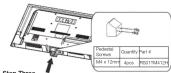
| M6 Screws |
| Step Two |
| Take the neck. Please align the screw holes of the neck and the TV, and then insert the 4 screws into the 4 holes on the neck and lighten them. |
Take the base. Please align four holes of the base and four screwholes of the neck, insert the base to the neck, and then insert the 3screws and tighten them.
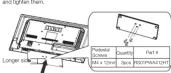
Please take note of the base direction: The bottom view of the TV
TV Signal Connection
The first step in connecting your TV is obtaining the signal. Your TV LEDS2C45RQ has a back panel, which allows you to receive analog
and/or digital television channels via ANT/CABLE jack. Before connecting your TV, determine using an antenna or a cable service to obtain the signal.
A. Antenna
Connect the antenna to TV via coastal cable on ANT/CABLE jack
of the back panel. You are ready to receive air local digital and analog channels
B. S. H. T.
B. Cable TV service
Connect the cable TV wall jack to TV via coastal cable on ANT/CABLE jack of the back panel. You are ready to receive
off-air local digital and analog channels.
C. Set-Top Box
If you use a set-top b
of satellite service provider, which use a special connection, please refer to the user's guide of set-top box.
[Non-Text]
Note: Do not plug the AC cord until you have accomplished all the connections.
Actarea
AC
100-120M
08.12
1
1
| — | |
- Box 64
(Connect after all the other connections are clone.)
(2) 1986. 10:30, 1987. 10:45, 1988. 10:50, 1989.
Cable Connections
Cable Connections
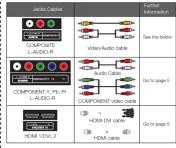
Choose Your Connections
TV LED32C45RQ supports various connections to other devices
(such as DVD, VCR, Set-top box, etc.). Please follow the table to
choose the cables which adapt to your device.
HDMI, the HDMI logo, and High-Definition Multimedia Interface
are trademarks or registered trademarks of HDMI Licensing LLC
Caution:
Unplug the AL care when you connect other devices to TV.
Side Panel Connections
Connecting AV Composite device
(Good Video Quality)
(Good video quality)
Composite cop
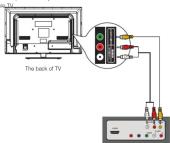
To connect a composite AV device, such as a DVD player, follow these
steps: 1. Connect the COMPOSITE jack on the side of TV to the video output.
jacks of device via video cable (yellow).
- Connect the L-AUDIO-R jacks on the six output index of devices via audio rights
Notice the left channel jack and plugs are white and the right
channel jack and plugs are red.
Note: AV signal belongs to composite video. This kind of video signal
Composite Video Connection
The picture below is an example of a connection using the
composite video jack
The output panel of other device
Connecting YPbPr Component device
(Better Video Quality)
(210) 7.232-2229,
To connect a component device, such as a DVD player, follow these
1 Connect the COMPONENT IN Y/PbyPj acks on the side of TV to the
video output jacks of device via video cable (green, blue and red). Connect the i. AUDIO Disney on the ride of TV to the music.
- Connect the L-Audio-R jacks on the side of TV to the audio output jacks of device via audio cable.
Notice the left channel jack and plugs are white and the right channel
jack and plugs are red.
Note: Y/Pb/Pr jacks are component video. This kind of video signal has
better display quality.
Component Video Connection
component video connection
The picture below is an example of a connection using the component
VIDEO JOCK.
(1) AD = BD = 1
(2)
1
1
图 1
-
-
-
-
-
-
-
-
-
-
-
-
-
-
-
-
-
-
-
-
-
-
-
-
-
-
-
-
-
-
-
-
-
-
-
-
-
-
-
-
-
-
-
-
-
-
-
-
-
-
-
-
-
-
-
-
-
-
-
-
-
-
-
-
-
-
-
-
-
-
-
-
-
-
-
-
-
-
-
-
-
-
-
-
-
-
-
-
- 90.
-
-
-
-
-
-
-
-
-
-
-
-
-
-
-
-
-
-
-
-
-
-
-
-
-
-
-
-
-
-
-
-
-
-
-
-
-
-
-
-
-
-
-
-
-
-
-
-
-
-
-
-
-
-
-
-
-
-
-
-
-
-
-
-
-
-
-
-
-
-
-
-
-
-
-
-
-
-
-
-
-
-
-
-
-
-
-
(1)
The back of TV
(一)
(1)
| |
| |
| |
| |
(1) 12
(1) (2) (3) (4)
[Non-Text]
-
(1) (2) (3) (4)
The output panel of other devices
Corporation HBM Solar Inc
Connecting HDMI device
(Best Video Quality)
To connect a HDMI device, such as a DVD player, please connect the HDMI/DVI. 2 jack on the side of TV to the output jacks of device via
HDMI cable.
To comment a FY3 revision, using FY4 part of PEG on Review and HTML
to connect a TV device, via TV port of PC or Divider and ADMI jack of TV:
-
Connect the HDMI/DVI jack on the side of TV to the DV1 port of PC via HDMI/DVI cable
-
Connect the L-AUDIO-R jack on the side of TV to the audio
output jack of computer with audio cable (dual-channel RCA jacks to 7.5mm stereo jack on the L-4142 F jack).
15.3.0mm stereo jack of the L-ACCIO-A pack
Note: 1. HDMI (High-Definition Multimedia Interface) is a compact
audio/video interface for transmitting uncompressed digital data. It carries the audio and video signals via the same cable and has the best
display quality.
- HDMI-DVI cable transfers only video signal from DVI part of DVI device to HDMI lock of TV. For audio signals, please connect audio
TV/DAVID to HDMI jack of TV. For audio signals, please connect audio output to L-AUDIO-R jack on TV back panel.
广力云智慧零售收银系统
HDMI Connection
The picture below is an example of a connection using the HDMI video
jack.
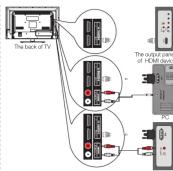
the output plane of other _V device.
However, Obtain Various kinds of heat.
How to Obtain various kinds of input
Sources
After connection is done, press INPUT button on remote control or TV
Top panel to choose the input source job needs: 368 page 1, Basic Operation of TV.
The Ground Truth image displays a single, solid horizontal line. According to Rule 2 (UNDERSCORE & LINE RULES), if the GT contains lines used for stylistic emphasis or as background elements (like ruled paper), the OCR result must ignore them. The provided OCR content is "____", which consists of four underscores. This is an incorrect interpretation of the line as a placeholder symbol, violating the rule that stylistic lines must be ignored. Therefore, the OCR output is inconsistent with the Ground Truth.
TV Jacks Explanation


L-AUDIO-R, COMPOSITE: Connect an A/V device that has composite
video jacks, such as a VCR or a DVD player. To access device connected
to these jacks, press the INPUT button on your remote; then press the up/down arrow to select A/C. Press the ENTER button at last to confirm.
• AUDIO IN L: Left audio channel connection. The left audio
connector is usually white. For mono audio sources, be sure to use the left AUDIO INPUT
• AUDIO IN R: Right audio channel connection. The right audio
connector is usually red. ANTICARLED Connect in respect to the signal from up-to-verse or polar
ANTICABLE: Connect to receive the signal from your antennas or cables via covalal cable.
Digital Audio out: Connect a coastal cable for digital audio output.
Keypad and Front Panel
Keyped Buttons
Keypad Buttons
If you cannot locate you your TV to operate mine
,
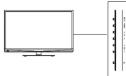
INPUT: Displays the Source Select List
MENU: Displays the TV Main Menu, CH#: Soans up through the channel list
like the up arrow on the remote control and can be used to select
CH
it acts like the down arrow on the remote control and can be used to
BOA
12.2.1. The address the reader in the TV media system, please and the right arrow on the remote control and can be used to select menu
opt
12.1 Estimated the variation in the 14-Mana system, which also has left arrow on the remote control and can be used to select menu
options. POWER (中): 700-800, 710-750, and 760
POWER (5): TUNI THA TV 6TH and bit.
Front Panel
About remote control working distance and angle, see the right side
Power/Standby Indicator: Light up in red when the TV is in standby mode. Light out when the TV is on
Remote Control Sensor: Remote control IR sensor, which receives
inf
b. II Derivate Control Groups
Remote Control Sensor
[Non-Text]
Power/Standby Indicator
(No text)
[Non-Text]
The Ground Truth image displays a single, solid horizontal line. According to Rule 2 (UNDERSCORE & LINE RULES), if the GT contains lines used for stylistic emphasis or as background elements (like ruled paper), the OCR result must ignore them. The provided OCR content is "____", which consists of four underscores. This is incorrect because underscores are not equivalent to a solid line and are not permitted under the “Stylistic/Background Lines (Ignore)” rule. Outputting underscores for a stylistic line violates the rule and constitutes an error. Therefore, the OCR result is inconsistent with the Ground Truth.
F
Remote Cont
-
Inserting Batteries in the Remote
Inserting Buttons in the Home
- Remove the cover of battery cabin on the back of the remote con by lifting the cover.
- Insert two AAA batteries, making sure the polarities (+ and -) are
aligned correctly. - Place the cover back
• Please note the cover book.
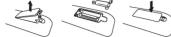
If the remote control does not work, check these points:
- Are the polarities (+, -) correct?
- Are the batteries worn out?
- Is there an AG power failure? - Is the power cord plugged in?
♦ is there any interference or block near the remote control sensc
CAUTION
■ Used batteries should be recycled.
- Keep out of children's reach. - DO NOT use raws and old huttleder
- Change both the batteries at the same time.
- When not using the remote control for a long hatched or from the unit
Gard
Remote Control Reception Angle
The view of control within the distance and mode groups shown
Tell your below:

B. 10
Remote Control Code List
For Universal Remote Control brands listed below, please use ac
comparing codes and refer to your Universal Member Control User Manual for basic Instruction for changing TV code to operate the TV
model.
- Codes for DIRECTV: 0178, 10178 - Codes for Time Warner Family: 0178
- Codes for Time Warner Cable: 0178, 10/178 - Codes for Cox Communications: 0178
- Codes for Comcast: 10176
- Codes for Dish Network: 621 - Codes for Fine Verizon: 0208
Learning about Remote Control
Eating Benefit Benefits Control
Remote
MUTE 63: Reduces the TV volume to it
minimum level.
Press again to restore the volume. POWER A% is Turns the TV on or off.
CH.LI8T: Displays the channel list.
FAV.: Adds the current channel to you.
your favorite let (if this channel is a favorite
channel already).
PAY.V for PAY.7: scans up or down through the current favorite channel list.
Numeric Buttons: Use these buttons to enter
“=”: To enter a digital channel with a sub-
channel, enter the main channel; then, press
this button to enter the sub-channel and press ENTER.
Recall: Returns to the previous channel.
EPD: Shows Electronic Program Guide (see page 8).
INPUT: Accesses the available input channels
(TV, AV, Component, HDMI 1/2, Media). Use the ocean to highlight options, and prices.
ENTER to select.
Arrows (▲/▼/▲/▼) is Uses the four arrows to highlight different items in the TV menu as
to highlight different items in the TV menu of change the value. The up/down arrow can also
work as CH+/CH- button, and the left/right
ENTER: Enter and confirm button.
MENU: Accesses the Main Menu, or return to
the upper level of a sub-menu. FREEZE: Freeze the current screen frame.
press again to return to normal.
DISPLAY: Displays the Channel Bar (see page 7)
EXIT: Exits the current menu or function.
6
DL+ or VDL-: Increases of decreased the IV
volume CH
619-620 Scale up or down through the content channel list. Press once to change the channel up or down; press and hold to
continue changing channels. PICTURE: Stabilize unknown fire project with no more low page 1
SOUND: Switches between the preset sound mode (see page 8).
SLEEP: Selects the sleep timer, after which the TV will shut off
automatically. ASPECT: Switches between the preset screen size mode (see pair
CC: Selects the closed caption.
M16: Select the multi-channel television sound. NOTE: The low set input can for (F/T) control, fl
for the
m = 311
Initial Setup
(1) 2017年1月1日
If it is the first time you turn on your TV, or you have done Clear
Channel List option (see page 10), the initial setup menu appears
automatical
Stop One Please select Menu Language, press the
up/down an
need. Available languages: English, Spanish and French
Step Two
Please select the TV installation mode, press
the up/down arrow select the mode you need: Home, Dated, if you are not home
need: Home, Retail. If you said: Home made, the next option is step three. If you
select Retail mode, please refer the step four
Stop Three Flows above between Energy, Energy and
Please choose between energy saving via Dynamic mode. You can save more energy
with Energy Saving.
Step Four
To choose your TV other signal type, press the up/down arrow set the signal type: Air, Cable.
Note: please
closed circuit TV you use.
Step Five If you accomplish the initial setup, the TV will search channels
autor
PICTURE SOUND CANNEL FARENTAL SET UP OTHERS
4.52 CHANNEL DEVICE
Non-Consulting, Please Call.
m - 1 0 ; 当 m > 32 且 m 1 时方程有两个不等实数根
· = 0
- Analog Dammelt Fund
Cayal Brasilica/Salt
When ^[1] is the leading signal selecting in a 200-500 MHz band,
HOME SELECT
What
- The channel search access starts from the Analog TV channel
searching and ends at Digital TV channel searching. 2. The channels that have been found will be stored automatically
- You can press MENU button to skip analog/digital channel
Shi 4 Yo
- 100 can press DATE/VEA system to share price for searching
Basic Operations
Basic Operations
Turning On and Off
Turning On and Off
Connect the AC cord to power the LED LCD TV. At this time the T will enter standby mode and power indicator will turn red. Use Pour
Will enter standby mode and power indicator will turn back. Use TO button (U) on the top panel of TV or on the remote control to turn
the TV. After switching off the TV for 5 seconds, you can turn on T
apson.
Choosing TV Channel
_1 + _2 + + _n-1
Tuning To Analog Channels
An analog channel has a channel number beginning with "A". Input the digital number with numeric buttons directly and news ENTER button.
logist markets. We have to invest in luxury and private sectors. This is a result to confirm.
For example, to watch analog channel "A51", press "5", "1", "ENTER" on remote control in sequence
Note: Although there is no analog TV signal available in America, we
reserve ATV Functions for some expandable use.
Turning To Digital Channels
Tuning to Digital Channels
A digital channel has a channel number beginning with "D". Input the main digital number with more information directly, then group "on."
Main digital number with numeric seconds, with press button on remote control, and input the sub number at last.
For example, to watch analog channel "D31-1", press "3", "1", "—", "1", "ENTER" on remote control in sequence.
- ENBT general consensus sequence.
Changing Channels Directly
You can use CHΦ button to increase
You can see on it - button to increase channel number and on it - to decrease channel number. When no OSD (On Screen Display) is used,
the up/down arrows can also work as CH-/CH- button.
2.1.1.1.1.2
Selecting Input Source
94
Press INPUT button on sample control in
10 674 display Source Select list.
AV Use up/down arrows to highlight the source you need and press ENTER to confirm
Component: 95000 and press DATE TO 60 MIN
EPG (Electronic Program Guide)
Press EPG button on the remote control, the electronic program guide will appear in the center of screen. The electronic program guide gives the TV program playing project. You can use left/right arrows to switch pages.
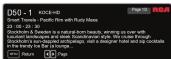

Adjust the OSD Screen
The OSD (On Screen Display) menu enables you to approach to the TV
To use OSO menu systems, press MENU Button on remote control.
then use left/right arrow to highlight an option from PICTURE, SOUND, CHANNEL, BASIN/TA, SETUP or OT/ERSS and serve ENTER/stemp
CHANNEL, PARENTAL, SETUP OF OTHERS AND PASS ENTERCOME BUTTON.
Press the up and down arrow to move to a different option within each menu. If necessary, press ENTER or right arrow to display the choice.
of the option you've highlighted. If available, use the text at the bottom of each group (for help). To return to the previous many, now the
of each screen for help. To return to the previous menu, please the MENU button.
To exit the OSD menu: - Drop for EXIT button. The menu will also form the menu.
- Press the EXIT button. The menu will close from the screen. - Press the MENU button repeatedly until the menus disappear.

Picture Menu
Picture Menu
The Picture Menu contains menus and controls to configure the way the picture appears. The Picture Menu options apply to the video for
the main TV and VIDEO INPUT selections. All picture options can be applied to each input.
Press MENU on the remote. Select Picture from the Main menu. Press
the ENTERDOWN BUTTON is proceed to PICTURE menu.


Source: http://www.10.123.com
Advanced: Fiat on Delit says
· = 0
· = 0
Not other than our own
BND3 BND4 BND5
Use up/down to choose the function you need, press ENTER or right
arrow to adjust or enter a sub-menu. The sub-menu image and explanation are shown below.
If available, use the text at the bottom of each screen for help.
Picture Settings
Picture Mode: Choose the preset visual mode of your TV: Standard Movie, Lbox, Dynamic, Power Saving, iOnly in Lbox
standard, white, gray, dynamic, fiber ceiling. (Only in order) mode you can adjust Brightness, Contrast, Color, Tint and
sharpness. Changed to Power Saving mode can decrease the power consumption.)
- Brightness: Adjust the brightness of picture. - Contrast: Adjust the contrast of color.
- Color: Adjust the richness of color. - Tint: Adjust the balance between n
available in NTSC signal).
▲ Sharpness: Adjust the sharpness level of picture
- Chappress: A##, No Sharpness
Screen Size: Soko
Ginema, Zoom, and Normal.) Please choose the ratio that applies to your video signal format best.
Color Temperature
This option allows you to see
adjustments: Cool for a bluer palette of picture colors; Normal or Warm for a redder palette of color.
Advanced Picture Settings
• Dynamic Contrast: Set dynamic contrast Off/low/Medium/High • Film Mode: Set film mode on/off
• Noise Reduction: Set noise reduction as Off/low/Medium/High. • MPEG Noise Reduction: Set MPEG noise reduction as Off/low
• Mediumor High
Note: Noise reduction helps to reduce the picture "basic" or any type of interference. This feature is especially useful for
providing a clearer picture in weak analog signal conditions. The MPEG Noise Reduction specifically works on video signal
with MPEG coding
Sound Menu
The Sound Menu kits you adjust audio output. To access the Sound
Menu, press MENU on the remote, and then select SOUND from the Main Menu. Presa ENTER/down button to proceed to SOUND menu.









snow to adjust or enter a sub-menu. The sub-menu image and exploration are shown below.
Sound Settings
Sound Mode: Cho
Standard, Soft, User, Dynamic. Only in User mode you can adjust Basis, Trable, Balance.
- Bass: Adjust the bass component of TV sound. - Trable: Adjust the triple component of TV sound.
• Balance: Adjust the balance between the left and
Surround Mode
Creates a 3D sound surround from standard stereo material, with deep and rich enhancement.
Auto Volume
Set auto volume control on/off
Analog Sound
Select analog TV audio sound type: Stereo, Mono or SAP (only available in TV modus).
Digital Sound
Select digital TV/ audio
(only available for DTV channel
Digital Audio Output Set the audio output type as Off, PCM or Raw. Please set this
Option according to your power amplifier.
Equalizer Settings
The listen-band graphic equalizer allows you to adjust the audio frequency settings. You can select one of the equalizer presets
(Off, Pop, Rock, Jazz) or create your own personal preset (User). Press the left or right arrow to select the frequency (100Hz, 250Hz)
500Hz, 1kHz, 2kHz, 4kHz, 10kHz) you want to adjust. Use the up or down areas to adjust
up or down allow to aqu
Channel Menu
The Channel Menu enables you to search, view and edit channels. It is
available in TV mode only. Press MENU and choose CHANNEL from the Main menu. Press the ENTERdown button to proceed to









Use up/down to choose the function you need, press ENTER or right armes to adjust or enter a sub-menu. The sub-menu image and
Explanation are shown below.
Channel List
Displays a channel list. It shows the current channels.
Favorite List
Displays a favorite channel list. It shows the current favorite channels
tavonoe che
Channel Settings Do not channel settings do more.
Channel Press up/dow


Cabinet Uler & O'Arla Nello to Khane the cohn channel. Signal Type
Signal Type Select your TV/sin
Auto Channel Search
Auto Channel Searto Execute an auto channel jet
Davastal Max
arental Menu
The Setup Menu enables you to lock program with special content, even by handboard and icon 6 on min. Press MENU and ribbons
Rental from the Main menu. Press the ENTER/down button to








Lock Parental Control
- When the Parental Control Menu is accessed from the Main Menu, you need to enter password to unlock the menu function
Please enter your four-digit password with humorous keys 0-9. Note: The original password is "0000".
- After unlocking, the items in parental control menu can be used. Use arrow up/down to highlight the function you need and press
ENTER or right arrow to use V-chip, Change Password, Keypad Lock and Source Lock. Clear Channel List sub-menu
V-Chin
Press ENTER or








10.14.21
US V-Chip
1.000 LNTD for light award to finish 604 Chip (including) men, which contains two sub-menus: Movie Rating and TV rating. See
max page for more details.
Movie Rating Use arrow leaves to
ENTER to lock/unlock the rating level. If you have blocked a low level rating, the higher reserve will be blocked too.
For example, when PG-13 is blocked, R, NC-17 and X will be
blocked at the
TV Rating Similar with
write with Wells Holding, First Ordering, presOINS No to return press EXIT to exit the menu.
TV Rating Overview



TV-PG Pare
TV-G General Audience V Violence
TV-Y7 Directed to Children 7 Years and Older FV Fantasy Violence
TV-Y A Ch
For more rating explanation, see page 12
Canada V-Chip
Press ENTER or right arrow to enter US V-Chip ratings menu, which is also a member of the U.S. Chip and U.S. Stock
which contains two sub-manufact English racing and French racing
English Rating
Use arrow keys to select the rating level you want to block, press
ENTER to lock/unlock the rating level. If you have blocked a lower level rating, the higher ratings will be blocked too.
For example, when PG is blocked, 14+ and 18+ will be blocked at the same time.
French Rating
French rating Press ENTER or right arrow to enter French rating menu
Similar with English Rating. Note: These ratings are available only if the broadcaster
10.2.1. Rating ratings are evaluated only if the overall rating is not being rated information.
Block Unrated Show
Block at the unrated program Downloadable Rating
Downloadable Rating, Clear Downloadable Data Activate or downloadable rating data. If available.
Change Password
Change the password of parental menu
Old PIN: Input the old password. New PIN: Input the new password.
Confirm: Input the new password again to confirm.
Remote
Select your Remote: Off, Remotion or Remotaz. This is for special purpose.
Keypad Lock
Select this option to block or unblock the TV's side panel buttons, so that they are? be used.
Source: Lock
This option allows you to lock or unlock the input source. The
source blocked can not be chosen from input list unless you input the correct parental password.
Use up/dow
Clear Channel List
Clear Channel List This option allows you to execute Clear Channel List function. This
function will reset the whole TV system to factory default (not only reset OSD menu).
stur Mmp
etap Menu










Use up/down to choose the function you need, press ENTER or right arrow to adjust or enter a sub-menu. The sub-menu image
and explanation are shown below


-

· = 0
· = 0


m = 311
Caption Display
Press left/right allow to select caption display on or off.
Analog Caption Type Press left/right arrow to select
CC2, CC3, CC4, TEXT1, TEXT2, TEXT3, TEXT4.
Digital Caption Type
Print left/right arrow to select digital closed caption type: Service1, Service2, Service3, Service4, Service5, Service6.
Digital CC Preset
Press left/right arrow to select digital closed caption preset: Default
Custom. Only in custom caption style.
Digital CC Style
Press left/right arrow to go to digital closed caption style sub-menu
to select the closed caption style. Select the item you want to adjust in Digital CF Style menu with
Select the team you want to acquire in digital OS style and with up/down arrows. After checking you are approved for orders at 1st in the bottom
After
Menu Language
To choose your menu language, press the internet allow until the language you need appears.
Available languages: English, French and Spanish.
Menu Transparency
To choose your menu transparency mode, press the left/right arrow until the transparency you need appears: Off, Low, Medium.
High.
Video Style
If you connect the HDMI/DMI port of PC to HDMI jack of the TV and the video signal is 1080p, please choose the compatible video
styles:

POTATO

m = 311
13/14

m = 311

m = 311
Time Zone
Select your time zone: Eastern, Central, Mountain, Pacific, Alaska,
Hawaii, Samoa, Newfoundland, Atlanta
Auto Clock
Select auto block off/off. Auto block helps you synchronize your TV time to standard time (from DTV signal).
Setup Time
Set your TV time manually (needs to turn off auto clock)
Day of Week
Displays what day it is (can't be adjusted, displays only)
Daylight Saving Time
Set your daylight saving time on or off (needs to turn on auto clock)
Initia
To set the initial settings. (see page 7)
others Menu
others menu
e Others Menu lets you config the TV with your preferences in other truses. Choose OTHERS from the Main Menu. Pass ENTER/Down
tion to proceed to SETUP menu
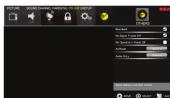
Use up/down to choose the function you need, press ENTER or arrow to adjust or enter a sub-menu. The sub-menu image and
explanation are shown below.
Blue Back
Press ENTER button to select Blue Back on or off. If the Blue Back is turned on, the TV will display a blue background when there is
no signal input.
No Signal Power Off
Pressa ENTER button to select "No Signal Power Off" on or off. If it is turned on, the TV will shut off after 10-minute no signal time. We
suggest you turn on this function when Blue Back is turned on. It may hurt the LED LCD panel if blue screen is on for too long.
Note: In PC mode, the monitor standby and power off settings depend on the No. Signal Off time
No Operation Power Off
Press ENTER button to select "No Operation Power Off" on or off.
If it is turned into time.
All Reset: Identifying Problems If there are any problems when using the
Press ENTER button to execute reset to TV system. All the settings list below. If the list does not solve the problem, call our Customer
will be reset to factory def
Audio Only
Press ENTER button to activate audio only mode. The TV will output only sound and the panel will be turned off. To restore
normal playing, hold POWER button for three seconds.
Now: The USO's appearance and color are referred to the actual appliance.
-

What's the most convenient way to view High
What's the most conve Definition (HD) video?
Connect an antenna to the TV Input jack to view free local digital
channels. You may need to purchase an antenna. (See page 4 for more information about antenna setup).
Visit www.antennaseweb.org for assistance in deciding what type of
anishina to use to receive the local digital channels available to you. After entering your location, this mapping program tells you which local
analog and digital stations are available using a certain antenna.
Are there other ways to view High Definition (HD) video?
Besides using an antenna as mentioned above, you can also use a
set-top box to receive digital video. Contact your cable service provider or satellite provider to purchase digital programming and have them
connect the box to ensure you are viewing channels in the best way.
How do I tell an analog channel from a digital
channel?
Press the Disp-Dry button to display the Channel Bar. Cook at the top right corner of the screen. An "A" is displayed for an analog channel. There is no sound, but the picture is fine
A "D" is displayed for a digital channel. Note: Since the analog TV in America has been cut off, we reserve • The sound might be muted. Try pressing the MOTE button to restore sound.
analog TV function only for some unexpected use. For using AV or Component, remember to connect the device's left
。
[Non-Text]
[Non-Text]
[Non-Text]
[Non-Text]
[Non-Text]
[Non-Text]
[Non-Text]
[Non-Text]
[Non-Text]
[Non-Text]
and right audio output correctly. The left channel cable is white and the right channel cable is red. Please match the cables and jacks.
the right, other table items. Please inform the tables and jacks according to their colors. • The award settlement may not be met properly. On to mark R.F. as
- The sound settings may not be set correctly. Go to page 61 of more information.
- If your audio source has only one jack or is a (mono) audio source,
make sure you have p jack /Whitel on the TV.
(1) 2017年1月1日
The buttons on the side panel don't work.
- The side panel may be locked (disabled). Use the remote control to turn on the TV.
- Select the Keypad Lock function in the PARENTAL Manu and press
ENTER to uncheck the locking status.
- Onalog the TV from the AC power for 10 minibass and then plug it back. Turn the TV on and try again.
[Non-Text]
The TV turns off unexpectedly,
- The electronic protection circuit may have been activated because of a power surge. Wait 3G seconds and then turn the TV on again
If this happens frequently, the voltage in your house may be
abnormal. If the other electronic equipment in your home can't work normally, consult a qualified service personnel.
Nominal, conform to
Can't select a certain channel
• The channel may be blocked or not approved in the PARENTAL
• The channel may be skipped in channel list in CHANNEL Menu.
Check the blocking and skipping status of channel.
-
-
-
-
-
-
-
-
-
-
-
-
-
-
-
-
-
-
-
-
-
-
-
-
-
-
-
-
-
-
-
-
-
-
-
-
-
-
-
-
-
-
-
-
-
-
-
-
-
-
-
-
-
-
-
-
-
-
-
-
-
-
-
-
-
-
-
-
-
-
-
-
-
-
-
-
-
-
-
-
-
-
-
-
-
-
-
-
-
- 99.
-
-
-
-
-
-
-
-
-
-
-
-
-
-
-
-
-
-
-
-
-
-
-
-
-
-
-
-
-
-
-
-
-
-
-
-
-
-
-
-
-
-
-
-
-
-
-
-
-
-
-
-
-
-
-
-
-
-
-
-
-
-
-
-
-
-
-
-
-
-
-
-
-
-
-
-
-
-
-
-
-
-
-
-
-
-
-
-
The stereo sound performance is bad. It may be a weak station. Use the SOUND Menu and set Analog
Sound as Mono.
[Non-Text]
A black box appears on the screen.
- Closed captioning might be on. Check Cidad Captish in the SETUP menu. Go to page 10 for more instructions.
Problems with the HDMI Connection.
- Make sure the HDMI device (DVD, video gamer, etc.) is turned on and the cables are firmly connected. If problems still occur, turn off
your device and reconnect it. Reset the power by unplugging the
power cord and plugging it again.
- If a No Signal Message appears on screen, the HDMI device is an responding. Contact the manufacturer of the HDMI device for
further assistance.
- If you have black bars on each side of your picture (which "the TV can not display a full-screen image), the device you
connected might have a switch or a menu option allowing you to choose the right on quality test that will be this. Choose either
Change the picture quality output that will fix this. Choose either 720p or 1080s.
,
The Remote control doesn't work
- Something might be blocking between the remote control and the remote sensor on the front panel of the TV. Make sure there is a
Remote sensor on the front panel of the TV. We'll see there is a clear path.
- The remote may not be aimed directly at the TV. - The batteries in the remote may also reach, shared, or installed.
- The batteries in the remote may be leak, noise, or inflation. incorrectly. Put new batteries in the remote.
•
You are experiencing problems with V-Chip/Parental
Controls.
- If the rating what don't work, you must look the settings. Go to the Main Menu (press MENU on your remote), select PARENTAL to
check the settings.
(1) 2017年 ,公司及子公司
What else can I do? If you've been through the
fixed your problem, try rebooting your TV. Note that after a reboot, you
may need to run your TV through the setup process again. To reboot, upturn the power cord from the wall or flat or power strip. Keep your
unplug the power cord from the final case of power strip. Keep your TV unplugged for about 5 minutes. Then plug in the TV and turn it on.
See if the problem is fixed. If the problem remains, then please visit the Customer Department Many of whom are sure as published EAOs at contact
RCA Customer Support at the support number provided in your
'Warranty card.
12
V-Chip Rating Explanations
US V-Chip Rating System
68 V Chip Rating System
TV-MA (Mature Audience Only): Specifically designed to be viewed
by adults and may be unsuitable for children under 17. It contains one or more of the following content: temper: crude indecent language (6).
explicit sexual activity (S), or graphic violence (N).
TV-14 (Parents Strongly Cautioned): Contains some material that
many parents would find unsuitable for children under 14; Parents are strongly urged to exercise greater care in monitoring this program and
are cautioned against letting children under the age of 14 watch
unattended. This program contains one or more of the following content themes: intensely suggestive dialogue (DI), strong course
language (L), intense sexual situations (S), or intense violence (V).
TV-PG (Parental Guidance Suggested) : Contains material that
parents may find unsuitable for younger children. Many parents may want to wish it with their women children. The women originate on
start to watch a warm younger children. The program contains one or more of the following content themes: some suggestive dialogue (D
Infrequent coarse language (1), some sexual situations (5), or moderate vision (6).
TV C. International Auditors: Most parents would find this program
11-G Parental Address: Well parental would find the program suitable for all ages. It contains little or no sexual dialogue (D) or
situations (S), no strong language (L), and little or no violence (V).
Canadian English V-Chip Rating System
10+ (Adult): Programming intended for adults 10 and older. It may
contain elements of violence, language, and sexual content which could make it up-able for issues under US Violence Guidelines
could make it unanswerable for viewers under 10. violence guidelines. May contain violence integral to the development of the plot, character
or theme, intended for adult audiences. Other Content Guidelines: Mar
contain graphic language and explicit portrayals of nudity and/or sex.
14+ (Viewer 14 and over): Programming constants shared of contents which may not be suitable for viewers under the age of 14. Parents are
strongly cautioned to exercise discretion in permitting viewing by
pre-itains and early-itains. Violence subsidies: May contain intense scenes of violence. Could deal with mature themes and societal issues
in a realistic fashion. Other Content Guidelines: May contain scenes of
nudity and/or sexual activity. There could be frequent use of profanity.
PG (Parental Guidance): Programming intended for a general audience but which may not be suitable for younger children under the
age of 8). Parents may consider some content inappropriate for
unsupervised viewing by children aged 8-13. Violance Guidelines: Devictions of conflict and/or aggression will be limited and moderate;
may include physical, fantasy, or supernatural violence. Other Content
Guidelines: May contain infrequent mild profranity, or mildly suggestive language. Could also contain brief scenes of audity.
G General Audience: Programming considered acceptable for all
2 (Buenos Neighborhood). It is a design for interest in the areas of the U.S. and its own groups. While not designed specifically for children, it is
understood younger viewers may be part of the audience. Violence Guidelines Will contain very little virions, other physical or underlying
guidelines. Will contain very low licence, either physical or verbal or emotional. Will be sensitive to themes which could frightan a younger
child, will not depict realistic scenes of violence which minimize or glosses over the effects of violent acts. Other Content Disorders: There may be
Over the effects of Vomini acts: Civil Consent's Global Rev. There may be some inoffensive slang, no rotanity and no nudity;
C8+ (Children 8 and older): Programming generally considered
acceptable for children 8 years and over to watch on their own,
Violence guidelines: Violence will not be portrayed as the planets, acceptable, or only way to resolve conflict or encourage children to
imitate dangerous acts which they may see on television. Any realistic
depositions of violence will be infrequent, discreet, or low intensity and will show the consequences of the acts. Other Content Guidelines:
There will be no profanity, nudity or sexual content.
C (Children): Programming intended for children under age of 8.
Washoi Guidelines: General attention to paid to thanks which could threaten children's sense of security and well being. There will be no
realistic scene of violence. Depictions of aggressive behavior will be
infrequent and limited to portrayals that are clearly imaginary, corneic or unrealistic in nature. Other Content Guidelines: There will be no
offensive language, nudity or sexual content.
Canadian French V-Chip Rating System
19+ (Activity Programming is for adults only. This program contains
10+ (Aubey). Programming is for abobs only. This program contains sustained violence or extremely violent scenes.
16+ [Viewer 16 and over]: Programming is not suitable for those under age 16. This program contains frequent scenes of violence.
under age 10. This program contains frequent scenarios of violence or intensely violent scerws.
13+ (Viewer 13 and over): Programming may not be suitable for
children under the age of 13. This program either contains several violent scenes, or one or more scenes that are violent enough to aff
them. Viewing in the company of an adult is therefore strongly
recommended for children under the age of 13.
8+ (Viewer 8 and over): Not recommended for young children. This program is available for most of the work, but it contains results.
programme suitable for most attendees, but it contains risks of occasional violence that could upset young children. Viewing in the
company of an adult is therefore recommended for young children.
(under the age of 6) who do not distinguish between reality and imagination.
G (General Audience): This program is suitable for audiences of a
ages. It contains no violence, or any violence that it does contain is
We are minimal or is presented in an automobile manner, as a Canada, or in an unrealistic way.
The Ground Truth image displays a single, solid horizontal line. According to Rule 2 (UNDERSCORE & LINE RULES), if the GT contains lines used for stylistic emphasis or as background elements (like ruled paper), the OCR result must ignore them. The provided OCR content is "____", which consists of four underscores. This is incorrect because underscores are not equivalent to a solid line and are not permitted under the “Stylistic/Background Lines (Ignore)” rule. Outputting underscores for a stylistic line violates the rule and constitutes an error. Therefore, the OCR result is inconsistent with the Ground Truth.
Well Mounting Unit Specification
Wall Mounting Unit Specification
The Ground Truth image displays a single, solid horizontal line. According to Rule 2 (UNDERSCORE & LINE RULES), if the GT contains lines used for stylistic emphasis or as background elements (like ruled paper), the OCR result must ignore them. The provided OCR content is "____", which consists of four underscores. This is incorrect because underscores are not equivalent to a solid line and are not permitted under the “Stylistic/Background Lines (Ignore)” rule. Outputting underscores for a stylistic line violates the rule and constitutes an error. Therefore, the OCR result is inconsistent with the Ground Truth.
Modal Unit Dimension/unit rent Regener
公司名称:金科股份有限公司董事会秘书
LED32C45RQ VE8A 200 x 100 MB screws, length 10m
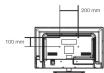
A. The wall mount is not contained in the accessories sold with
television. We only provide the installing specifications but not the
mount reset. If you need the mount, please consult with the local or for a VESA wall mount.
B. We strongly suggest to set the wall mount with equipments of
specification we ordered. If not, inappropriate installing may cause damage to device or people.
C. We suggest that you keep your TV at least 2.36 inches(50mm)
the wall to prevent cable interference.
Warnings:
- Do not set up the wall mount by yourself. Please contact qualify
professionals for installation. 2. The TV should not be presented on website or surface which learn
- THE IT should not be modified on walls or surfaces which have angle more than 10 degrees with vertical direction. Otherwise
TV sat may fall. 2. The sofa for my spine must have enough strength to hold fire.
- The walls for mounting must have enough strength to hold the whole weight of TV sat. For example, concrete wall and bricker
are eligible. Do not place the mount on soft walls such as earth walls and electrical wall.
- If spare parts of different specifications (such as screws) are use
during mounting, consult with qualified professionals to make sa
these parts are safe and effective. 5. Before attaching the base to wall, ensure the holes for anchors a
In keeping with the installing rules. Otherwise there may exist so
potential problems. (5. Do not place any heating source under your television. Or else, it
-
Do NOT pause the hearing scene under your television for use, a can cause fire.
-
Do not place the TV near anything dripping. Transducers and high voltage was should be giant far away from the apparatus too.
ealse. It may cause creepage, electric shock or bad resonance.
-
Do not place TV in a location where collision or vibration is liable
-
In order to avoid unexpected falling of the TV set, do not put any
strong force on TV or wall mount after installing.
-
Barson is unplug the TV before installing. Keep anything hard to sharp away from the screen panel to prevent the scuffing.
-
After installing, if there is any need to move the cabinet, please
USD Media Play
USB Media Pla
The Ground Truth image displays a single, solid horizontal line. According to Rule 2 (UNDERSCORE & LINE RULES), if the GT contains lines used for stylistic emphasis or as background elements (like ruled paper), the OCR result must ignore them. The line in the GT is clearly a stylistic or background line, not a placeholder for text. Therefore, the OCR should not have output any underscores. Outputting `____` constitutes an error under Rule 2, as it hallucinates placeholder symbols where none are semantically intended. Hence, the OCR result is inconsistent with the Ground Truth.
With USB Media Play, you can enjoy music and photo files stored in a
USB storage device on your RCA TV.
Connecting a USB storage device
Connecting a USB storage device
- Connect a USB storage device to the USB port in the back of the TV. - Press "INPUT" and select "Media".
- "USB Media Play" menu will appear.
The Ground Truth image displays a single, solid horizontal line. According to Rule 2 (UNDERSCORE & LINE RULES), if the GT contains lines used for stylistic emphasis or as background elements (like ruled paper), the OCR result must ignore them. The line in the GT is clearly a stylistic or background line, not a placeholder for text. Therefore, the OCR should not have output any underscores. Outputting `____` constitutes an error under Rule 2, as it hallucinates placeholder symbols where none are semantically intended. No punctuation mismatch or formatting transformation applies here because the content is purely symbolic and not textual.

Playing back Music files
• Press arrow (◀ i▶) to select "Music" and press "ENTER
- The file or folder list will show up. Press arrow (▲,▼) to select a file
or doctor. Press "ENTER" to playback the music for you launched.
Playing back Photo files
- Press arrow (▲/▼) to select "Photo" and press "ENTER". - The file or folder list will show up. Press arrow (▲/▼) to select
a file or folder. Press "ENTER", and you will be given several
options to view photo files. • You can directly open and playback the file, view thumbnails
photo preview, or play slideshow.
Media setting for Slideshow and Music playback
- Press arrow (◀ /▶) to select "Media Setting" and press "ENTER".
• In "Media Setting", you can set various options for Slideshow and Music/Video/rail.
Music Playback.
Media support specification
Supported Files
• Phthalic JDC/1051C film
- P103/3P4G3PE3H86
Music VIA/files
Supported USB storage/tile system format
- LED Storage LED flash drive
USB storage USB flash drive
- File System format FAT32
Caution:
Do not turn off the TV or disconnect USB storage device while the TV
is playing back picture or music. This may result in loss of data or damage to the USB storage device, and RCA is not responsible for an
damage to, or loss of, data on the USB storage device.
The Ground Truth image displays a single, solid horizontal line. According to Rule 2 (UNDERSCORE & LINE RULES), if the GT contains lines used for stylistic emphasis or as background (like ruled paper), the OCR result must ignore them. The OCR content provided is "____", which represents four underscores. This is incorrect because underscores are not equivalent to a solid line in this context; they are a different character often used as placeholder underscores. Since the OCR output incorrectly rendered a stylistic line as underscores and produced no underscores for it, this violates the rule that stylistic/background lines must be ignored. Therefore, the OCR result is inconsistent with the Ground Truth.
Product Qualification
Product Specification
The Ground Truth image displays a single, solid horizontal line. According to Rule 2 (UNDERSCORE & LINE RULES), if the GT contains lines used for stylistic emphasis or as background (like ruled paper), the OCR result must ignore them. The provided OCR content is "____", which consists of four underscores. This is incorrect because underscores are not equivalent to a solid line and are not permitted under the “Stylistic/Background Lines (Ignore)” rule. Outputting underscores for a stylistic line violates the rule and constitutes an error. Therefore, the OCR result is inconsistent with the Ground Truth.
The Ground Truth image displays a single, solid horizontal line. According to Rule 2 (UNDERSCORE & LINE RULES), if the GT contains lines used for stylistic emphasis or as background elements (like ruled paper), the OCR result must ignore them. The provided OCR content is "____", which consists of four underscores. This is incorrect because underscores are not equivalent to a solid line and are not permitted under the “Stylistic/Background Lines (Ignore)” rule. Outputting underscores for a stylistic line violates the rule and constitutes an error. Therefore, the OCR result is inconsistent with the Ground Truth.
Model LED82C45RG
Diagonal Display Size 31.5 inches
American TV standard
Television System ATSC/NTSC system
Channel Coverage VHP: 2-13 UHP: 14-69
CATV: 1-135
Storage Temperature is 20°C - 600°C (45°F - 140°F)
Temperature 125°C=400°C [42°F=4183°F] Operating Temperature is
| Humidity | Storage Humidity; Less than 85% RH (No condensation) | |
| Operating Humidity; Less than 80% RH (No condensation) | ||
| Power Supply AC 100-120V, GHz | ||
| Connection Interface | RF input Capacity range: ±1 | |
| Video Input | AV x 1 | |
| Component x 1 | ||
| HDMI x 2 | ||
| AV x Audio Input | ||
| Audio output Headphone x 1, Digital Audio Out x 1 | ||
| Resolution 1300 x 705 | ||
| Component/HDMI mode | 490, 400p, 720p, 1069 | |
| Dimensions | With stand | 20.5 FW x 19.2*1 x 6.9*3D |
| Without stand | 20.5 FW x 17.4*1 x 3.1*1D | |
| Weight | With stand | 14.8 LBS (6.7KG) |
| Without stand | 12.1 LBS (5.9KG) | |
| Power Consumption | less than 705 | |
Notice: Specifications are subject to change without notice.
Made for Today. www.rca.com
(1)
Limited Warranty
Limited Warranty for USA and Mexico
for USA and Mexico
Coverage = Labor
For a period of 12 months from date of purchase of your PCA
For a portion of 12 months from date of publication or year 1941, product, we will pay an authorized PCA service center the
labor charge to repair any defects in materials or workmanship in open transportation. However, this is an impossible van roll.
in your television. In your television is unrepairable we will provide you with a refurbished unit of the same or better model.
Coverage - Parts
Coverage = Parts Five periods of 10 months from date of purchase of own P24
For a period of 12 months from date of purchase or your PCA product, we will pay an authorized PCA service center for the
new, or at our option, refurbished replacement parts needed to
repair any defects in material or workmanship in your television. If your television is unanswerable we will provide you with a
In peer reposition to unimportant, we will promise job would refurbished unit of the same or better model.
Coverage – LED LCD Panel
For a period of 12 months from date of purchase of your PGA
product, we will pay an authorized RCA service center for the
new, or at our option, refurbished LED LCD panel needed to replace new defects in material and durability in very television.
repair any defects in material or wolichmanship in your television. If your television is unrepairable we will provide you with a
refurbished unit of the same or better model.
How to Obtain Service
- For assistance (U.S.A) - If you purchased RCA product in
U.S.A. please call 1-888-977-6722.
Or visit www.iss.com • Fee assistance (Marine), if you purchased PCA product in
- For assistance (Mexico) - If you purchased RCA product in Mexico, please call 01-800-8233658
Dr visit www.rca.com
[Mexico service center address]
As a convenience we offer three ways to obtain warranty
service. You may mail your product to the address provided by the service representative, you may take your product to an
authorized service center, or you may request in home service
(Service will determine if product is receivable in home or must be taken back to local service center for repair). Service
representative will supply instructions for preferred service. At
the time of service proof of purchase such as original receipt, will be required. Only TC LCD size and above any applicable for
in-home-service.
The Ground Truth image displays a single, solid horizontal line. According to Rule 2 (UNDERSCORE & LINE RULES), if the GT contains lines used for stylistic emphasis or as background (like ruled paper), the OCR result must ignore them. The provided OCR content is "____", which consists of four underscores. This is incorrect because underscores are not equivalent to a solid line and are not permitted under the “Stylistic/Background Lines (Ignore)” rule. Outputting underscores for a stylistic line violates the rule and constitutes an error. Therefore, the OCR result is inconsistent with the Ground Truth.
Items Not Covered By Limited Warranty
Your limited warranty does not cover the following items:
m = 311
● Un-installation, installation and adj
controls and operating instruction.
- Batteries and customer replacement fuses. - Damage due to misuse, abuse, negligence or neglect
including but, not limited to, damage resulting from
exposure to moisture, humidity or salt.
- Imaziny to Roan by the product.
● Damage to the product due to images burnt into the screen.
● Product purchased or serviced outside of Country of Original Purchase, i.e. Purchased USA can not be
orginal Purchase: 10. Fundation can not be serviced in Mexico/Purchased in Mexico can not be
serviced in USA
- Product modified or incorporated into other products. - Damage due to arts of nature, including but not limited to
Lightning damage or flooding.
● Service calls which do not involve any defect in materials
or workmanship.
Commercial Use Excluded
This limited warranty only applies to products used for personal use and does not cover any product used for institutional
see Table 3.15: Not after any product needs for commercial, commercial or rental purposes.
m = 311
LIMITATION OF WARRANTY
The Ground Truth image displays a single, solid horizontal line. According to Rule 2 (UNDERSCORE & LINE RULES), if the GT contains lines used for stylistic emphasis or as background (like ruled paper), the OCR result must ignore them. The line in the GT is clearly a stylistic or background line, not a placeholder for text. Therefore, the OCR should not have output any underscores. Outputting `____` constitutes an error under Rule 2, as it hallucinates placeholder symbols where none are semantically intended. No punctuation mismatch or formatting transformation applies here because the content is purely symbolic and not textual.
THIS LIMITED WARRANTY IS THE SOLE AND EXCLUSIVE
WARRANTY APPLICABLE TO THIS PRODUCT. ON CORP US, INC., THE MANUFACTURER OF THE PRODUCT
U.S. INC., THE MANUFACTURER OF THIS PRODUCT, DISCLAIMS ALL OTHER WARRANTIES, EXPRESSED OR
IMPLIED (INCLUDING ALL IMPLIED WARRANTIES OF MERCHANTABILITY OR FITNESS FOR A PARTICULAR
MERCHANTability for fitness for a particular purpose: NO VERRAL OR WRITTEN INFORMATION
GIVEN BY ON CORP US, INC., ITS AGENTS, INDEPENDENT
CONTRACTORS, SALES REPRESENTATIVES, EMPLOYEES, RETAIL DEALERS, WHOLE SALE DISTRIBUTORS OR ANY
OTHER THIRD PARTY SHALL CREATE A GUARANTY OR
INCREASE, EXPAND OR MODIFY THE SCOPE OF THIS
LIMITED WARRANTY.
THIS LIMITED WARRANTY PROVIDES THE SOLE AND
EXCLUSIVE REMEDY FOR THE CONSUMER OF REPAIR OR REPLACEMENT OF THE PRODUCT ON CORRUS, INC.
REPLACEMENT OF THE PRODUCT: ON CORP US, INC. SHALL NOT BE LIABLE FOR SPECIAL, INCIDENTAL OR
CONSEQUENTIAL DAMAGES ARISING OUT OF THE USE
OF THEP PRODUCT OR ARISING OUT OF A BREACH EXPRESSED OR IMPLIED WARRANTY ON THIS PRODUCT.
PROHIBITED BY APPLICABLE LAW, ANY IMPLIED
WHARANT OF MERCHANTABILITY OR FITNESS FOR A PARTICULAR PURPOSE IS LIMITED TO APPLICABLE
LIMITED WARRANTY PERIOD(S) SET FORTH ABOVE.
THIS WARRANTY GIVES YOU SPECIFIC LEGAL RIGHTS
AND YOU ALSO MAY HAVE OTHER RIGHTS THAT VARY
FROM STATE TO:
RCA is a trademark of RCA Trademark Management SAS and used under license by ON Corporation
SAS and used under license by ON Corporation

Herbo para Hov
www.rca.com
m = 311
a limitada para

Brand : RCA
Model : LED32C45RQ
Category : TV