
XTC-100 - Dive computer OCEANIC - Free user manual and instructions
Find the device manual for free XTC-100 OCEANIC in PDF.


| Product Type | Dive computer |
| Display | LCD with backlight |
| Maximum Depth | 330 ft (100 m) |
| Depth Range | 0–330 ft (0–100 m) |
| Altitude Compensation | Automatic |
| Battery Type | CR2450 (user replaceable) |
| Battery Life | Approximately 2 years |
| Dimensions | 2.4 × 2.0 × 1.2 in (61 × 51 × 30 mm) |
| Weight | 3.5 oz (100 g) |
| Water Resistance | 330 ft (100 m) |
| Decompression Model | RGBM (Reduced Gradient Bubble Model) |
| Logbook Capacity | Up to 60 dives |
| Dive Modes | Air, Nitrox (up to 50% O₂), Gauge |
| Alarms | Depth, dive time, ascent rate, deco violation |
| Safety Stop | Countdown timer |
| Maintenance | Rinse with fresh water after each dive; dry with soft cloth |
| Spare Parts Available | Battery cover, strap, O-rings |
| Repairability | User-replaceable battery; other repairs by authorized service center |
Frequently Asked Questions - XTC-100 OCEANIC
User questions about XTC-100 OCEANIC
0 question about this device. Answer the ones you know or ask your own.
Ask a new question about this device
Download the instructions for your Dive computer in PDF format for free! Find your manual XTC-100 - OCEANIC and take your electronic device back in hand. On this page are published all the documents necessary for the use of your device. XTC-100 by OCEANIC.
USER MANUAL XTC-100 OCEANIC
RESPONSIBLE COMPUTER DIVING
• Always Plan Each Dive
• Always Limit Your Dive to the Level of Your Training and Experience
• Always Make Your Deepest Dive First
• Always Make The Deepest Part of Every Dive First
- Check Your Computer Often During the Dive
- Do A Safety Stop on Every Dive
- Allow Adequate Surface Interval Between Each Dive
- Allow Adequate Surface Interval Between Each Day of Diving (12 Hours or Until Your Computer Clears)
Read And Understand This Owner's Guide* Thoroughly Before Using the XTC-100.

*This Owner's Guide applies to the Green Button Model only.

WARNINGS and SAFETY RECOMMENDATIONS
- The XTC-100 is intended for use by recreational divers who have successfully completed a nationally recognized course in scuba diving, and diving with enriched nitrogen-oxygen (nitrox) mixtures.
- It is intended only for no decompression diving, NOT intentional decompression diving.
- It must not be used by untrained persons who may not have knowledge of the potential risks and hazards of scuba diving, and diving with enriched nitrogen-oxygen (nitrox) mixtures.
- You must obtain scuba certification, and certification in diving with enriched nitrogen-oxygen (nitrox) mixtures before using the XTC-100 if you have not already done so.
- It is NOT for use by military and commercial divers.
- It should NOT be utilized for any competitive, or repetitive square wave or decompression diving, as it is intended solely for recreational use and no decompression multilevel diving.
- As with all underwater life support equipment, improper use or misuse of this product can cause serious injury or death.
- Never participate in sharing or swapping of a dive computer.
- Conduct your dives in such a manner so as to insure that you continuously check the computer's proper function.
- Read and understand this owner's guide* completely before diving with the XTC-100.
- If you do not fully understand how to use this dive computer, or if you have any questions, you should seek instruction in its use from your Authorized Oceanic Dealer before you utilize this product.
OCEANIC
LIMITED TWO-YEAR WARRANTY
For details, refer to the Product Warranty Registration Card provided.
COPYRIGHT NOTICE
This owner's guide is copyrighted, all rights are reserved. It may not, in whole or in part, be copied, photocopied, reproduced, translated, or reduced to any electronic medium or machine readable form without prior consent in writing from Oceanic / 2002 Design. The Surface Time/Mode, Plan Mode, No Decompression Time, Decompression Stop Time, Dive Log, Low Battery, Elapsed Dive Time, Maximum Depth, Ascent Rate, and Caution Zone icons are protected by copyright, and are trademarks of Oceanic.
XTC-100 Owner's Guide, Doc. No. 12-2188 (11/1/99)
© 2002 Design 1999
2002 Davis Street
San Leandro, Ca. USA 94577
510/569-3100
TRADEMARK NOTICE
Oceanic, the Oceanic logo, XTC-100, the XTC-100 logo, Oceanglo, Smart Glo, Graphic Diver Interface, Tissue Loading Bar Graph, Pre Dive Planning Sequence, Variable Ascent Rate Indicator, Set Point, Control Console, and OceanLog are all registered and unregistered trademarks of Oceanic. All rights are reserved.
PATENT NOTICE
U.S. Patents have been issued, or applied for, to protect the following design features: Graphic Diver Interface, Pre Dive Planning Sequence, Dive Time Remaining, Depth Alarm Set Point, Smart Glo, Main Menu Structure, Data Sensing and Processing Device (U.S. Patent no. 4,882,678), Dive Time Remaining (U.S. Patent no. 4,586,136), and Variable Ascent Rate Indicator Bar Graph (U.S. Patent no. 5,156,055).
DECOMPRESSION MODEL
The programs within the XTC-100 simulate the absorption of nitrogen into the body by using a mathematical model. This model is merely a way to apply a limited set of data to a large range of experiences. The XTC-100 dive computer model is based upon the latest research and experiments in decompression theory. Still, using the XTC-100, just as using the U.S. Navy (or other) No Decompression Tables, Is no guarantee of avoiding decompression sickness, i.e. "the bends." Every diver's physiology is different, and can even vary from day to day. No machine can predict how your body will react to a particular dive profile.
iv
CONTENTS
FEATURES and DISPLAYS 1
Introduction 2
Interactive Control Console 2
Informational Displays 3
Universal Graphic Diver Interface 4
- Tissue Loading Bar Graph 4
- Oxygen Accumulation Bar Graph 5
- Variable Ascent Rate Indicator 6
Dive Time Remaining 6
- No Decompression Dive Time Remaining 7
- Oxygen Accumulation Time Remaining 8
Alpha / Numeric Displays 8
- Depth Displays 8
- Time Displays 9
• Temperature Displays 9
Audible Alarm 10
Backlight Feature 11
Operating Temperature 12
ACTIVATION and SETUP 15
Activation....16
Surface Mode 17
Main Mode Menu 17
OCEANIC
CONTENTS (CONTINUED)
Entering Settings....19
• To Set: Alternate On/Off 19
• To Set: Audible Alarm On/Off 20
• To Set: Depth Alarm Set Point 20
• To Set: Date/Hour Format/Time 21
• To Set: Sampling Rate 23
• To Set: Units of Measure 24
- To Set: FO2 50% Default On/Off 24
EA Mode 25
Summary of Access to Set Modes 26
PRE DIVE and DIVE MODES 27
Operational Modes 28
• Temperature/Date/Time Mode 28
• FO2 Mode 28
- FO2 50% Default 29
- FO2 Set for an Air Dive 29
- Setting FO2 30
-
FO2 Set for a Nitrox Dive 30
-
Pre Dive Planning Sequence 31
- Prior to a Repetitive Dive ...... 32
- No Decompression Dive Mode 33
- Main Display 33
- Secondary Display 34
• Alternate Display 34
Ascending to the Surface 36
Altitude Diving 37
CONTENTS (CONTINUED)
POST DIVE MODES 39
First 2 Hours After a Dive 40
• Transition Period 40
• To view Temperature/Date/Time 40
- To view That Dive's Log 41
After the Transition Period 41
• To view Temperature/Date/Time 41
- To access FO2 Mode 42
• To access Pre Dive Planning Sequence 42
To access Time to Fly and Desaturate Countdowns 43
Log Mode 44
After the First 2 Hours 46
Downloading Data to PC 46
Summary of Access to Post Dive Modes 48
HANDLING THE EXTREMES 49
Avoiding and Managing Decompression 50
Tissue Loading Bar Graph 50
- Decompression Dive Mode 51
- Main Display 51
- Secondary Display 52
- Alternate Display 52
Managing Decompression Stops 53
Violation Modes 53
- Conditional Violation Mode 54
- Delayed Violation Mode 55
- Exceeding Maximum Operating Depth 56
OCEANIC
CONTENTS (CONTINUED)
- Immediate Violation Mode .... 56
- Gauge Mode 57
- Permanent Violation .... 57
Oxygen Exposure 58
- Partial Pressure of Oxygen 58
• High PO2 Dive Mode 58
• High Oxygen Accumulation 59
Unexpected Loss of Displayed Information 61
CARE and MAINTENANCE 65
Care and Cleaning 66
Annual Inspections and Service 66
• To Obtain Service 67
Oceanic Facilities 67
Battery Life 68
Low Battery Condition 68
Battery Replacement 70
REFERENCE 75
No Decompression Limits 77
Decompression Model 77
Oxygen Exposure Limits 78
Multiple Tissue Tracking 78
Specifications 80
Glossary 83
Service Record 87
viii
XTC-100
FEATURES
a n d
DISPLAYS

refer to page 14 for - WARNINGS and SAFETY RECOMMENDATIONS
OCEANIC
INTRODUCTION
Welcome to Oceanic and thank you for choosing the XTC-100!
The XTC-100 has a wide array of features described in detail throughout the pages that follow. Due to the importance that they be understood thoroughly prior to using the XTC-100, information will be expanded upon and some refreshed as you proceed. Relax and read through the complete guide.
It is extremely important that you read this owner's guide in sequence and understand it completely before attempting to use the XTC-100.
Remember that technology is no substitute for common sense, and a dive computer only provides the person using it with data, not the knowledge to use it.
INTERACTIVE CONTROL CONSOLE
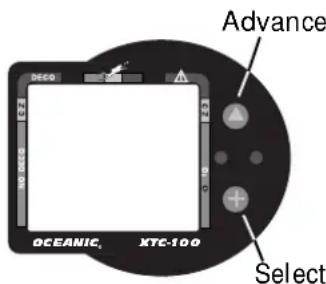
Fig. 1 - Interactive Control Console
The Interactive Control Console, consisting of the Advance (Upper) button and Select (Lower) button (Fig. 1), allows you to select various display options and access specific information when you choose to see it. The buttons can be pressed repeatedly, or held in to scroll.
INFORMATIONAL DISPLAYS
XTC-100
Operational modes and status information are visually represented numerically and/or graphically and can be understood at a glance with the aide of universal icons (Fig. 2) that identify and bring quick focus to the displays. Segmented bar graphs will show how close you are to critical limits.
Each XTC-100 numeric and graphic display represents a unique piece of information. It is imperative that you understand the formats, ranges, and values of the information represented to avoid any possible misunderstanding that could result in error.

NOTE: Throughout this owner's guide reference is made to the term "breathing gas". The rational being that the XTC-100 can be used for 'air' dives or 'nitrox' dives. For clarity these terms are defined as -
Breathing Gas - the gaseous mixture breathed during a dive. Air - a breathing gas that contains approximately 21% oxygen and 79% nitrogen (nature's common nitrogen-oxygen mixture). Nitrox - a nitrogen-oxygen breathing gas that contains a higher fraction of oxygen (22 to 50%) than air.
a. Operating Mode
b. Elapsed Dive Time
c. Deco Stop
d. Temperature
e. Log
f. Audible
g. Maximum Depth
h. Low Battery
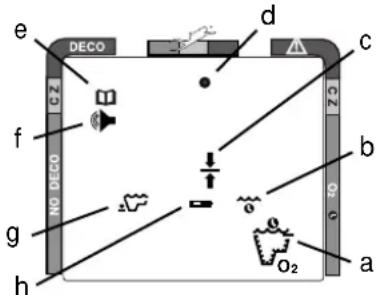
Fig. 2 - Universal Icons
OCEANIC
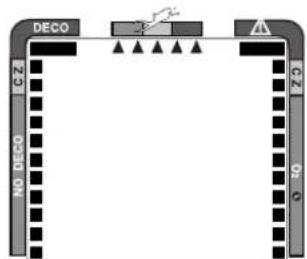
Fig. 3 - Bar Graphs
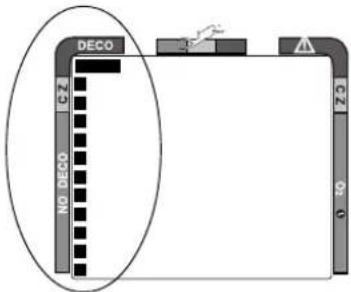
Fig. 4 - Tissue Loading Bar Graph
UNIVERSAL GRAPHIC DIVER INTERFACE™
Three bar graphs referred to as the Universal Graphic Diver Interface™ appear around the perimeter of the screens (Fig. 3). These segmented bar graphs are located next to green, yellow, and red color coded portions of the peripheral decal that denote normal, caution, and danger zones, respectively.
When underwater, you can quickly focus on the bar graphs to make sure that they are in the green. You can quickly verify that you're not getting too close to the no decompression limit or the limit for exposure to oxygen (accumulation), or ascending too fast.
Tissue Loading Bar Graph™
The Tissue Loading Bar Graph™ (TLBG) represents nitrogen loading (Fig. 4), showing your relative no decompression or decompression status. As your depth and elapsed dive time increase, segments will add to the graph beginning in the lower left portion of the screen. As you ascend to shallower depths, this bar graph will begin to recede, indicating that additional no decompression time is allowed for multilevel diving.
The Tissue Loading Bar Graph monitors 12 different nitrogen compartments simultaneously and displays the one that is in control of your dive. It is divided into a green No Decompression zone (NO DECO), a yellow Caution zone (C.Z.), and a red Decompression zone (DECO). The bar graph gives a visual
X TC-10 0
representation of just how close you are to the no decompression limit with a yellow Caution (C.Z.) Zone that allows you to make a decision regarding safety stop duration or necessity.
The Tissue Loading Bar Graph ^™ also assists you with managing decompression (explained later) by filling a large red 'ceiling stop required' segment.
Oxygen Accumulation (O2) Bar Graph

NOTE: Displays associated with oxygen and the O2 bar graph will only appear if FO2 has been set at a value other than 'Air'.
The Oxygen Accumulation (O2) Bar Graph (Fig. 5) represents oxygen loading, your relative oxygen tolerance dosage (OTU), showing the maximum of either per dive accumulated oxygen, or 24 hour period accumulated oxygen. As your exposure (accumulation of oxygen) increases during the dive, segments will add to the bar graph starting in the lower right portion of the screen. As oxygen loading decreases, the bar graph will begin to recede, indicating that additional exposure (accumulation) is allowed for that dive, and 24 hour period.
The O2 bar graph also assists you with managing high partial pressure of oxygen (PO2) by flashing the large red Danger zone segment as a warning when the level of PO2 exceeds the maximum allowed limit of 1.60 ATA.
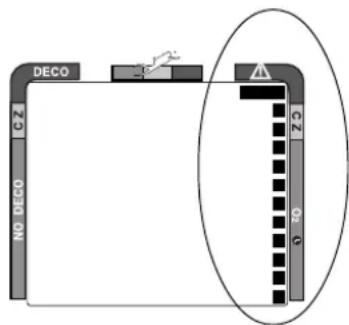
Fig. 5 - Oxygen Accumulation (O2) Bar Graph
OCEANIC
Variable Ascent Rate Indicator™ (VARI)
Segments = Speed (rate)
0 = 0 - 20 fpm (0 - 6 mpm)
1 = 21 - 30 fpm (6.5 - 9 mpm)
2 = 31 - 40 fpm (9.5 - 12 mpm)
3 = 41 - 50 fpm (12.5 - 15 mpm)
4 = 51 - 60 fpm (15.5 - 18 mpm)
5 = 61 + fpm (18.5 + mpm)
(when 5, all will flash)
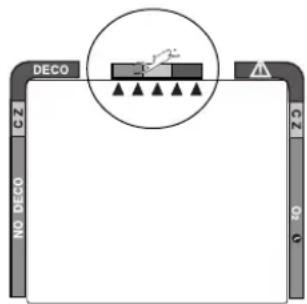
Fig. 6 - Variable Ascent Rate Indicator
The Variable Ascent Rate Indicator™ (Fig. 6) is provided to help you avoid excessive ascent rates by displaying a visual representation of ascent speed, rather than just showing that you are ascending too fast. The Variable Ascent Rate Indicator has been granted U.S. Patent no. 5,156,055.
The 5 triangular segments of the bar graph, located beside green, yellow, and red reference zones, appear beginning from the left and may be considered an ascent rate speedometer. Green is a 'normal' rate, yellow is a 'caution' rate, and red is 'Too Fast'.
In the event that your ascent rate exceeds the maximum recommended rate of 60 feet (18 meters) per minute, the bar graph segments will enter the red zone and all 5 segments will flash once per second until your ascent speed is slowed. If this occurs, you should immediately slow your ascent.
DIVE TIME REMAINING
One of the most important pieces of information on the XTC-100 is the 'Dive Time Remaining numeric display'. The XTC-100 constantly monitors two critical pieces of information; no decompression status and oxygen accumulation status. The Dive Time Remaining display will indicate the time that is more critical for you at that particular moment (i.e.; whichever time is the
least amount available of the three). The specific time being displayed is identified by the No Decompression Dive Time icon or the O2 Time icon (Fig. 7). This unique feature has been granted U.S. Patent No. 4,586,136.
No Decompression Dive Time Remaining
No Decompression Dive Time Remaining is the maximum amount of time that you can stay at your present depth before entering a decompression situation. It is calculated based on the amount of nitrogen absorbed by twelve hypothetical tissue compartments. The rates each of these compartments absorb and release nitrogen is mathematically modeled and compared against a maximum allowable nitrogen level. Whichever one of the twelve is closest to this maximum level is the controlling compartment for that depth. Its resulting value will be displayed numerically (Fig. 8a) along with the No Decompression Dive icon and graphically as the Tissue Loading Bar Graph.
As you ascend from depth following a dive that has approached the no decompression limit, the Tissue Loading Bar Graph will recede as control shifts to slower compartments. This is a feature of the decompression model that is the basis for multilevel diving, one of the most important advantages the XTC-100 offers.
The no decompression algorithm is based upon Haldane's theory using maximum allowable nitrogen levels developed by Merrill Spencer. Repetitive diving
X TC-10 0

No
Decompression
Time

Oxygen
Accumulation
Time

Fig. 7 - Dive Time Remaining
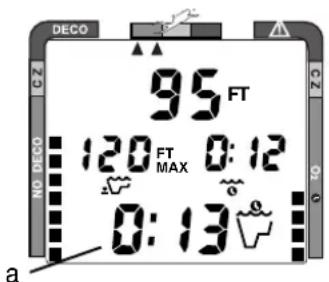
Fig. 8 - No Decompression Dive Time Remaining
OCEANIC
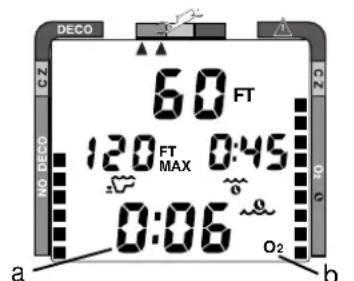
Fig. 9 - O2 Time Remaining
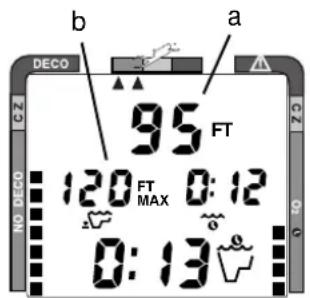
Fig. 10 - Depth Displays
control is based upon experiments designed and conducted by Dr. Ray Rogers and Dr. Michael Powell in 1987. Diving Science and Technology ^® (DSAT), a corporate affiliate of PADI ^® , commissioned these experiments.
Oxygen Accumulation Time Remaining
Oxygen accumulation (exposure) during a dive, or 24 hour period, appears graphically as the Oxygen Accumulation (O2) Bar Graph. As time remaining before reaching the oxygen exposure limit decreases, segments are added to the O2 bar graph. When the amount of time remaining before reaching the oxygen limit becomes less than the No Decompression Dive Time Remaining, calculations for that depth will be controlled by oxygen. Oxygen Time Remaining will then appear as the main numeric time display (Fig. 9a) as signified by the O₂ Time icon (Fig. 9b) appearing on the display. As oxygen accumulation continues to increase, the O2 bar graph will enter the yellow Caution Zone (described later).
ALPHA/NUMERIC DISPLAYS
Depth Displays
During a dive, Current Depth (Fig. 10a) and Maximum Depth reached during that dive (Fig. 10b) are displayed from 0 to 330 feet (99.5 meters) in 1 foot (.5 meter) increments.
During a Decompression Dive, the required Ceiling Stop Depth is displayed from 60 to 10 feet (20 to 3 meters) in 10 foot (3 meter) increments.
Time Displays
Time displays (Fig. 11 a & b) are shown in hour:minute format (i.e., 1:02 represents one hour and two minutes, not 102 minutes!). An exception to this is Decompression Stop Time that displays 0 to 99 minutes (:00 to :99).
The colon that separates hours and minutes blinks once per second when the display is indicating real time such as elapsed Surface Time, Elapsed Dive Time, or Time of Day. Dive Time Available, Dive Time Remaining, Decompression Stop Time, Total Ascent Time required, Time to Fly, or Desaturation Time are calculated projections of time and use a solid (non-blinking) colon to indicate that they are counting down, rather than up.
Depth and Time displays will be illustrated and described in more detail as applicable for each of the operating modes.
Temperature Displays
Ambient Temperatures from 0° to 99°F (-9 to 60°C) are displayed together with date and time (Fig. 12) when the Advance (Upper) button is pressed while in the Surface Mode or a dive mode (described later).
X TC-10 0
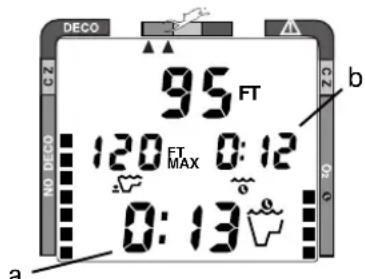
Fig. 11 - Time Displays
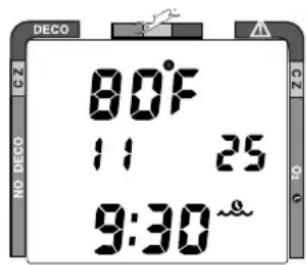
Fig. 12 - Temperature
OCEANIC
AUDIBLE ALARM
During situations that may pose potential danger, one Double Beep is emitted. These situations are:
- Entry into decompression.
- Partial pressure of oxygen equal to or greater than 1.40 ATA.
When the XTC-100 senses immediate danger to you, it emits One Beep per Second until the situation is corrected (if the Audible Alarm feature is set ON). These situations are:
- Descent deeper than the Depth Alarm Set Point.
- Ascent to a depth shallower than a required stop depth.
- Ascent rate that exceeds 60 ft./min (18 m/min).
- Partial pressure of oxygen equal to or greater than 1.60 ATA.
- Oxygen accumulation equal to or greater than the allowed per dive or 24 hour limit.


NOTE: If the Audible Alarm feature is set OFF (described later), you will be alerted instead by one Double Beep.
X TC-10 0
If you enter a Delayed or Immediate Violation Mode, a Single Long Beep will be emitted. This will occur if:
- Depth is shallower than the required stop depth for more than 5 minutes.
- Required Decompression exceeds a 60 FT/18 M ceiling.
Immediately following activation and a diagnostic check the XTC-100 will emit a Short Beep.
BACKLIGHT FEATURE
In addition to using a high contrast LCD for easy readability in low light conditions, the backlight features evenly illuminate the full upper and lower displays.
Smart Glo™, the surface mode backlight, senses the intensity of light that is passing through small ports located between the control buttons (Fig. 13a). If a low level of light is sensed, the Smart Glo™ backlight will illuminate the display for button depression time plus 10 seconds when either button is pressed.
Oceanglo®, the dive mode backlight, will illuminate the displays for button depression time plus 5 seconds when the Select (Lower) control button is pressed. Additional illumination time can be obtained by pressing the button again.
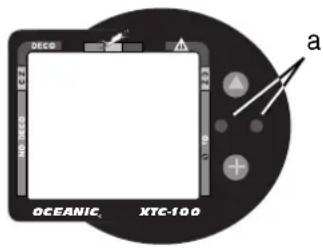
Fig. 13 - Smart Glo Sensors
OCEANIC
NOTE: Extensive use of the backlight reduces estimated battery life. Also, the backlight will not activate during a 'low battery condition', or when downloading data to a PC.
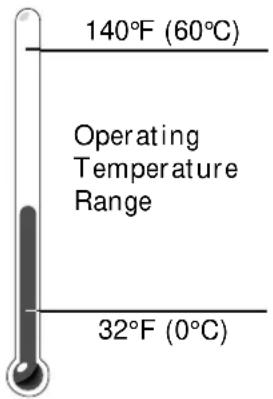
The XTC-100 will operate in almost any temperature diving environment in the world between 32 and 140 °F (0 and 60 °C).
At extremely low temperatures, the LCD may become sluggish, but this will not affect its accuracy. If stored or transported in extremely low temperature areas (below freezing), you should warm the module and its battery with body heat before diving.
Even though the XTC-100 will operate in this wide range of temperatures, it is possible to damage the electronics if left exposed to direct sunlight, or in a hot confined space (like a car trunk).
After the dive, cover the XTC-100 and keep it out of the sun. If inadvertently left in the direct sunlight for a long period, the LCD display may become totally black. If this occurs, immediately immerse the XTC-100 in water. The display should recover its normal appearance after a few minutes. Damage from excess heat, or cold, is not covered by the XTC-100 two year limited warranty.
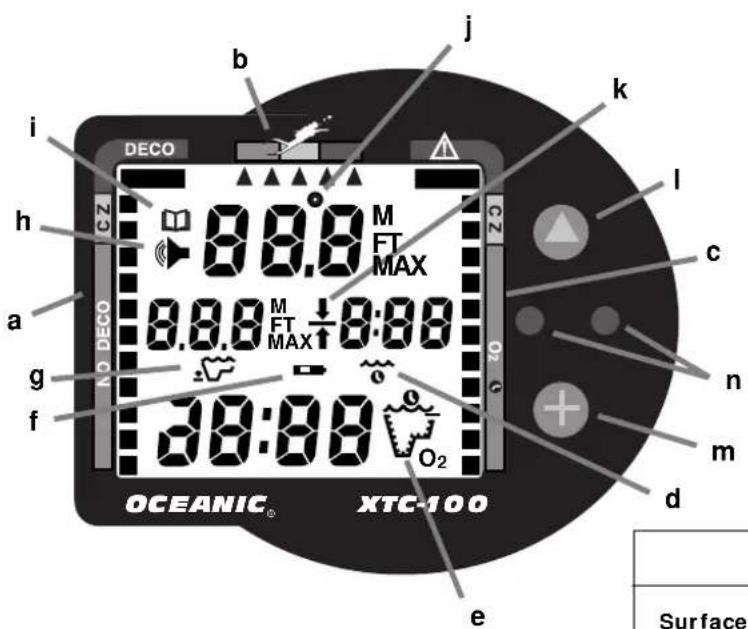
Graphic Interface Legend
XTC-100
a. Tissue Loading Bar Graph
b. Variable Ascent Rate Indicator
c. Oxygen Loading Bar Graph
d. Icon - Elapsed Dive Time
e. Icon - Operating Mode (detail A)
f. Icon - Low Battery
g. Icon - Maximum Depth
h. Icon - Audible Alarm
i. Icon - Log Mode
j. Icon - Temperature
k. Icon - Deco Stop Ceiling
1. Control Button - Advance
m. Control Button - Select
n. Sensors - Smart GloTM/ Download
| Detail 'A' - Operating Mode Icons | ||||
Surface Plan No Deco Deco |  |  |  | O2 Time[IMAGE] |
OCEANIC

WARNINGS and SAFETY RECOMMENDATIONS
- Inspect your XTC-100 prior to every dive, checking for any signs of the entrance of moisture, damage to the housing, or damage to the LCD display. If these or other signs of damage are found, return the unit to an Authorized Oceanic Dealer. DO NOT attempt to use it until it has received factory service.
- Oceanic advocates responsible diving practices consistent with your individual level of formal training and experience, and does not recommend decompression diving or diving below 130 feet (39 m).
- Always carry primary and backup dive lights when conducting dives that could include low light situations.
- You should never, under any circumstances, swap your computer with another unit between dives, or share your computer with another diver underwater. It is impossible for two divers to stay precisely together underwater, and your computer's dive profile tracking of previous dives will be pertinent to you only. Nitrogen and oxygen loading of a second user may be significantly different and thus swapping dive computers could lead to inaccurate and potentially dangerous predictions of decompression and oxygen accumulation status. This rule applies to the use of all dive computers, but is especially important when using the XTC-100, due to the personal information it provides.
XTC-100
ACTIVATION
a n d
SETUP

refer to page 25 for - WARNINGS and SAFETY RECOMMENDATIONS
OCEANIC
ACTIVATION
To activate the XTC-100, press the Select (Lower) button once and release.
It will immediately enter Diagnostic Mode, displaying all “8's” (Fig. 14), followed by “dashes”, and a countdown from 9 to 0. While conducting diagnostics, the displays are illuminated by the Smart Glo™ backlight as display functions and battery voltage are checked to ensure that everything is working correctly.
Upon activation, the XTC-100 will also check the ambient barometric pressure, and calibrate its present depth as zero. At elevations of 2,000 feet (610 meters), or higher, it will recalibrate itself to measure depth in feet of fresh water instead of feet of sea water.
If no dive is made within 2 hours after initial activation, the XTC-100 will automatically deactivate to conserve its battery power.
Always check the display before entering the water to ensure that it is activated.
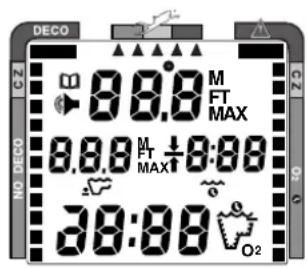
Fig. 14 - Diagnostic Mode
SURFACE MODE
Surface Mode, identified by the Surface Time icon (Fig. 15a), immediately follows Diagnostic Mode after initial activation. Information displayed includes the Dive Number '0' (no dive made yet) and Surface Time with flashing colon.
If battery voltage is below the level sufficient for a day's operation, the Battery icon will be displayed (Fig. 16a). Below 15% of rated voltage, all graphic displays will shut off except the Battery icon that will flash for 4 seconds, then the unit will shutdown.
MAIN MODE MENU
Using the control buttons while on the surface, you can access:
• Temperature/Date/Time mode
- FO2 Set mode
• Pre Dive Planning Sequence
• Time to Fly/Desaturate
- Log mode
- Set mode
XTC-100
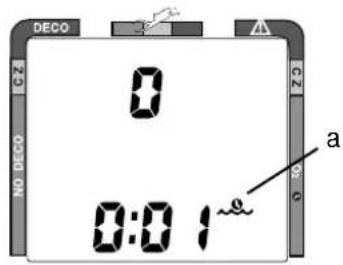
Fig. 15 - Surface Mode
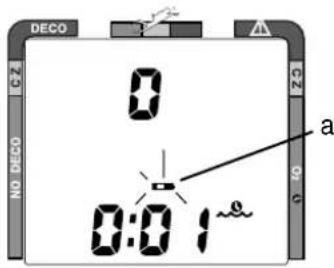
Fig. 16 - Low Battery
OCEANIC

Be a -
RESPONSIBLE DIVER
at all times.
The menu structure of the Set Mode enables you to:
- set Dive Mode Alternate Display (On or Off)
- set Audible Alarm (On or Off)
- select Depth Alarm value
- set Year/Month/Day
• select Hour Format (12 or 24 hour) - set Hour/Minute
- select Dive Profile Sampling Rate (for PC download data)
- set Units of Measure (Imperial or Metric)
- set FO2 Default (On or Off)
- initiate download of data (External Access)
Before going diving, enter settings that will be common for each of your dives (e.g., Units of Measure, etc.). This will save you time at the dive site.
Setting the FO2 value for a nitrox mix is a 'pre dive' setting that is entered before nitrox dives. This is described on page 30.
As described later (page 69), some of the settings will have to be reentered when the battery is replaced.
ENTERING SETTINGS
- The Advance (Upper) button is used to gain access to settings.
- The Select (Lower) button is used to toggle between, or scroll through, the individual set points available for each of the settings.
- The Advance (Upper) button is then used to accept and save the set point and revert to Surface Mode, or continue to the next setting.
- See page 26 for a 'Summary of Access to Set Modes' that also notes 'settings entered by the factory'.

NOTE: While in the Set Mode, if neither button is pressed, the unit will automatically revert to Surface Mode in 2 minutes.
TO SET: ALTERNATE DISPLAY ON/OFF
'OFF' - Dive Modes 'will display' Max Depth and Elapsed Dive Time.
'ON' - Max Depth and Elapsed Dive Time are 'accessed' by pressing a button.
- press BOTH buttons simultaneously, while in Surface Mode
- 'Alt' appears with 'On', or 'Off', flashing (Fig. 17)
- press Select (Lower) button to toggle between 'On' and 'Off'
- press Advance (Upper) button to accept the setting displayed, and either -
- revert to Surface Mode (if this setting was changed), or -
- advance to Set: Audible Alarm (if this setting was not changed)
X TC-10 0
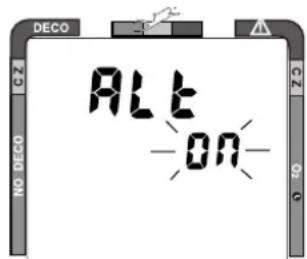
Fig. 17 - Set Alternate Display
OCEANIC
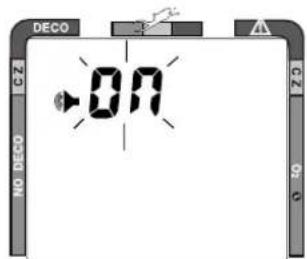
Fig. 18 - Set Audible Alarm
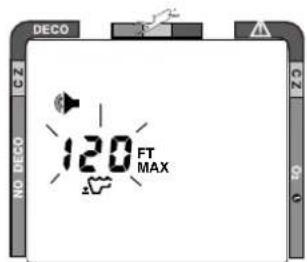
Fig. 19 - Set Depth Alarm
TO SET: AUDIBLE ALARM ON/OFF
'OFF' - If the unit senses a condition that poses immediate danger (page 10), it emits a double beep instead of one beep per second. Other alarms are silenced. 'ON' - alarms will be sounded for all conditions as listed on pages 10 and 11.
- press BOTH buttons simultaneously, while in Surface Mode
- press Advance (Upper) button 1 time
• the Audible Alarm icon appears with 'On', or 'Off', flashing (Fig. 18)
- press Select (Lower) button to toggle between 'On' and 'Off'
- press Advance (Upper) button to accept the setting displayed, and either -
- revert to Surface Mode (if this setting was changed), or -
- advance to Set:Depth Alarm (if this setting was not changed)
TO SET: DEPTH ALARM SET POINT
The Depth Alarm can be set to values between 30 feet (10 meters) and 330 feet (97.5 meters) in 10 foot (3/3.5 meter) increments.
- press BOTH buttons simultaneously, while in Surface Mode
- press Advance (Upper) button 2 times
- Max Depth and Audible Alarm icons appear with the Max Depth value flashing (Fig. 19)
X TC-10 0
- press Select (Lower) button until the desired Max Depth value appears
- press Advance (Upper) button to accept the setting displayed, and either -
- revert to Surface Mode (if this setting was changed), or -
- advance to Set: Year (if this setting was not changed)
TO SET: DATE/HOUR FORMAT/TIME
- press BOTH buttons simultaneously, while in Surface Mode
-
press Advance (Upper) button 5 times
• the Date appears with the Year setting (Fig. 20a) flashing -
press Select (Lower) button until the correct Year appears
- press Advance (Upper) button 1 time to accept the setting displayed
• the Month setting (Fig. 20b) flashes
- press Select (Lower) button until the correct Month appears.
- press Advance (Upper) button 1 time to accept the setting displayed
• the Day setting (Fig. 20c) flashes
- press Select (Lower) button until the correct Day appears.
- press Advance (Upper) button 1 time to accept the setting displayed
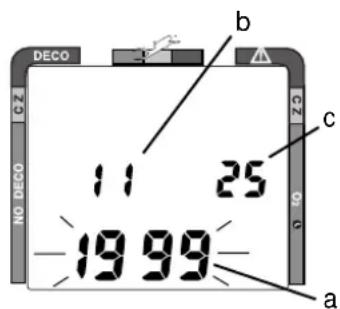
Fig. 20 - Set Date
OCEANIC
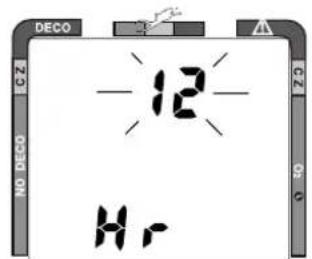
Fig. 21 - Set Hour Format
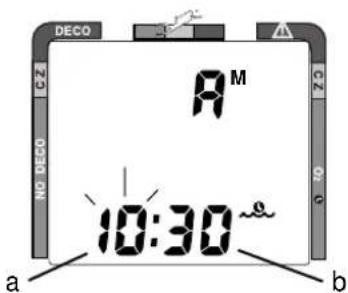
Fig. 22 - Set Time
• the Hour Format appears flashing (Fig. 21)
• 12 Hr format = 12: Am to 11: Pm
• 24 Hr format = 0: to 24: (hours)
- press Select (Right) button to toggle between '12' and '24'
- press Advance (Left) button 1 time to accept the setting displayed
• the Time appears with the Hour setting (Fig. 22a) flashing
- press Select (Right) button until the correct Hour appears.
- press Advance (Left) button 1 time to accept the setting displayed
• the Minute setting (Fig. 22b) flashes
- press Select (Right) button until the correct Minute appears.
- press Advance (Left) button to accept the setting displayed, and either - revert to Surface Mode (if this setting was changed), or - advance to Set: Sampling Rate (if Date/Time settings not changed)
TO SET: SAMPLING RATE
X TC-10 0
Sampling Rate is the Time, or Depth, interval at which data samples will be recorded for subsequent download to the OceanLog™ PC software program. It has 'no effect' upon displayed data or data stored in the unit's viewable Log.
Rates available are 2 FT (.5M), 5 FT (1.5 M), 10 FT (3 M), 2 SEC, 5 SEC, 10 SEC, 15 SEC, 20 SEC, 25 SEC, 30 SEC.
When lower rates (e.g., 2 FT or 2 SEC) are selected more samples are recorded per dive making profile graphs smoother. However, since more memory is used per dive, fewer dives can be stored for download. Also, lower sampling rates require long periods of time to download (up to 45 minutes).
- press BOTH buttons simultaneously, while in Surface Mode
- press Advance (Upper) button 11 times
• the Sampling Rate value appears flashing (Fig. 23) - press Select (Lower) button until the desired Rate appears.
- press Advance (Upper) button to accept the setting displayed, and either -
- revert to Surface Mode (if this setting was changed), or -
- advance to Set: Unit (if this setting was not changed)
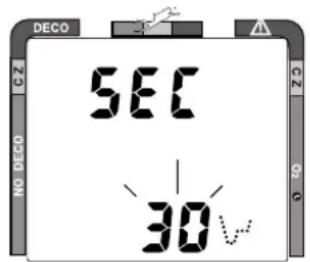
Fig. 23 - Set Sampling Rate
OCEANIC
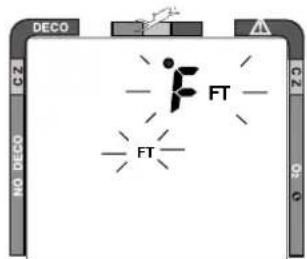
Fig. 24 - Set Units of Measure
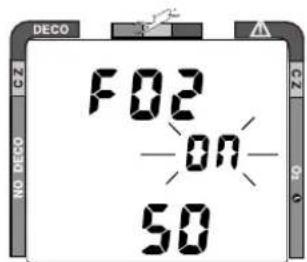
Fig. 25 - Set FO2 Default
TO SET: UNITS OF MEASURE
- press BOTH buttons simultaneously, while in Surface Mode
- press Advance (Left) button 12 times
• the Units of Measure icons appear flashing (Fig. 24)
- press Select (Right) button to toggle between 'FT, °F' and 'M, °C'
- press Advance (Left) button to accept the setting displayed, and either -
- revert to Surface Mode (if this setting was changed), or -
- advance to Set: FO2 Default (if this setting was not changed)
TO SET: FO2 50% DEFAULT (described on page 29) ON/OFF
'OFF' - FO2 value set point remains at the % set until changed or shut down. 'ON' - FO2 value set point reverts to 50% after dives (must be set each dive).
- press BOTH buttons simultaneously, while in Surface Mode
- press Advance (Left) button 13 times
• FO2 50 appears with On or Off flashing (Fig. 25)
- press Select (Right) button to toggle between 'On' and 'Off'
- press Advance (Left) button to accept the setting displayed, and either -
- revert to Surface Mode (if this setting was changed), or -
- advance to EA Mode (if this setting was not changed)
EA MODE
Although included in the menu structure, External Access (EA) Mode has no settings. It is accessed only when data is being downloaded (copied) to the OceanLog™ PC software program for storage and viewing. This is described on page 46.
- press Advance (Upper) button to 'bypass EA Mode' (Fig. 26) and revert to Surface Mode
X TC-10 0
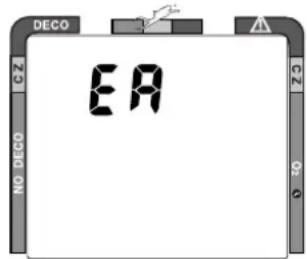
Fig. 26 - EA Mode
⚠️ WARNINGS and SAFETY RECOMMENDATIONS
- Never activate the XTC-100 underwater. This may result in inaccurate depth and no-decompression time displays. If the unit is activated when deeper than 4 feet (1 meter) underwater, or at elevations higher than 14,000 feet (4,267 meters), it will perform a diagnostic check followed by immediate shutdown.
- During activation and diagnostics, if any display or function varies from the information presented here, return the XTC-100 to your Authorized Oceanic Dealer for inspection.
- If a Low Battery condition is indicated following diagnostics, Oceanic strongly recommends that you DO NOT dive until the battery is replaced.
OCEANIC
SUMMARY OF ACCESS TO SET MODES
(settings entered by the factory appear in italics)
To access a specific Set mode from the Surface Mode, press the button(s) as follows:
SET MODE TO ACCESS TO VIEW TO SAVE
To access/set> Both '1' time>
- Alternate Display (Off) Upper '0' times> Lower - toggle (On/Off)> Upper - to Surface* or Audible
- Audible Alarm (On) Upper '1' time> Lower - toggle (On/Off)> Upper - to Depth Alarm
- Depth Alarm (330 ft) Upper '2' times> Lower - 10 ft (3 m)/sec> Upper - to Year
• Year (1999) Upper '3' time> Lower - 1 year/sec> Upper - to Month
• Month (1) Upper '4' times> Lower - 1 month/sec> Upper - to Day - Day (1) Upper '5' times> Lower - 1 day/sec> Upper - to Hour Format
• Hour Format (12) Upper '6' times> Lower - toggle 12/24> Upper - to Hour
• Hour (12) Upper '7' times> Lower - 1 hour/sec> Upper - to Minute - Minute (00) Upper '8' times> Lower - 1 minute/sec> Upper - to Surface* or Rate
- Sample Rate (10 FT) Upper '9' times> Lower - 1 rate/sec> Upper - to Surface* or Units
- Units (Imperial) Upper '10' times> Lower - toggle> Upper - to Surface* or Default
- FO2 Default (On) Upper '11' times> Lower - toggle (On/Off)> Upper - to Surface* or EA
- EA (download) Upper '12' times> > > > Upper - to Surface
* If the setting was altered
XTC-100
PRE DIVE
a n d
DIVE MODES

refer to page 38 for - WARNINGS and SAFETY RECOMMENDATIONS
OCEANIC
OPERATIONAL MODES
While on the surface, the Interactive Control Console enables you to access six operational modes and activate the backlight. During a dive, it enables you to view 'alternate' displays of information and activate the backlight.
TEMPERATURE/DATE/TIME MODE
To view Ambient Temperature/Date/Time (Fig. 27) while in Surface Mode:
- press the Advance (Upper) button 1 time
- During low light conditions, the Smart Glo™ backlight will illuminate the display for button depression time plus 10 seconds.
- The unit reverts to Surface Mode after 10 seconds, unless the Advance (Upper) button is pressed to access FO2 Mode.
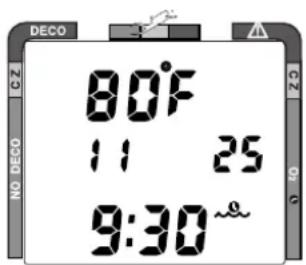
Fig. 27 - Temperature/Date/Time
Set for Imperial units of measure, Month is on the left and Day on the right. Set for Metric, Day is on the left and Month on the right. Year doesn't appear.
FO2 MODE
The XTC-100 can be used either as an Air computer or as a Nitrox computer. After activation, it will operate as an Air computer without displaying information associated with oxygen calculations, unless the percentage of oxygen (FO2) is set for a value other than 'Air' (i.e., a numerical value of 21 to 50 %).
FO2 50% Default
If the Default is set to 'On' and FO2 is set to a value 'greater than 21%', the FO2 value will automatically revert to 50% 10 minutes after that dive.
- In this case FO2 must be reset for each repetitive nitrox dive, or the value will automatically 'default' to 50 (Fig. 28) and the dives will be calculated based on 50% O2 for oxygen calculations and 21% O2 (79% nitrogen) for nitrogen calculations.
- If you surface for greater than 10 minutes during a dive, a subsequent descent will be considered a new dive and the FO2 value must be reentered.
If the Default is set to 'Off', the FO2 value for repetitive dives remains the same as the value to which it is set until the set point is manually changed.
FO2 Set for an Air Dive
When set with an FO2 value of 'Air', the XTC-100 will perform calculations the same as if FO2 were set for 21% oxygen, internally accounting for oxygen loading for any subsequent Nitrox dives. However, oxygen related displays, warnings, and the O2 Bar Graph will not appear on the display for that dive (Fig. 29), or subsequent dives, unless FO2 is set for a numerical value (21 to 50%).
XTC-100
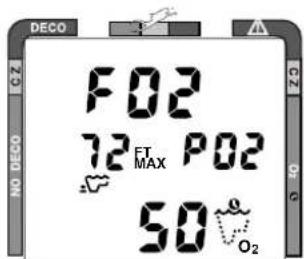
Fig. 28 - FO2 Default
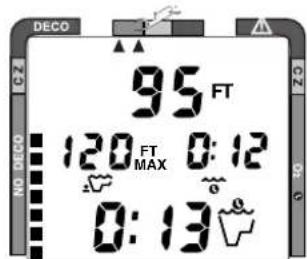
Fig. 29 - Dive Mode (FO2 Set for 'Air')
OCEANIC
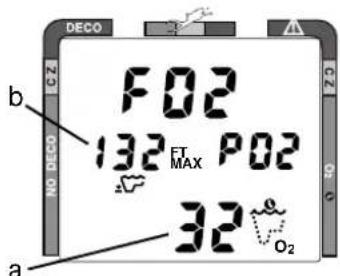
Fig. 30 - Setting FO2
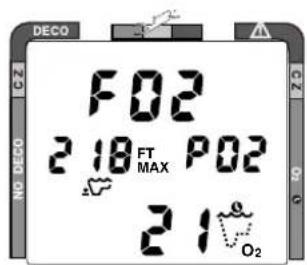
Fig. 31 - FO2 Set for 21%
Setting FO2
To access FO2 Mode while in the Surface Mode and set the unit for Air or the percentage (%) of oxygen (FO2) in your nitrox mix:
- press the Advance (Upper) button 2 times
- press the Select (Lower) button repeatedly, or press and hold it, until the value of FO2 for the nitrox mix being used is displayed
- the FO2 value displayed (Fig. 30a) will advance from 21 to 50 (%) in increments of 1 (%), then display 'Air' again.
- the Maximum Depth that can be achieved with an oxygen partial pressure (PO2) of 1.60 ATA will be displayed (Fig. 30b) for each FO2 value. No value will appear for Air.
The unit reverts to Surface Mode after 10 seconds, unless the Advance (Upper) button is pressed to access the Pre Dive Planning Sequence.
FO2 Set for a Nitrox Dive
You can set the XTC-100 for nitrogen-oxygen (nitrox) mixtures of 21% to 50% oxygen (O2). If FO2 is set at a value of 21% (Fig. 31), the unit will remain set as a '21% nitrox computer' for subsequent nitrox dives until FO2 is set to a higher value, or until it automatically turns off and is reactivated.
X TC-10 0
Once a dive is made with the XTC-100 set as a nitrox computer (FO2 set for a numerical value), it cannot be set for 'Air' until 24 hours after the last nitrox dive. However, you can set FO2 for 21% for use with air.
PRE DIVE PLANNING SEQUENCE™
Oceanic strongly recommends that you review the Pre Dive Planning Sequence (PDPS) prior to every dive to help you plan your dive as required to avoid exceeding no decompression or oxygen exposure limits. This is especially important for repetitive dives, when the Pre Dive Planning Sequence (Fig. 32) will indicate for you the no decompression dive times that are available to you on your next dive, based on any residual nitrogen or oxygen accumulation (whichever is in control) following your last dive and surface interval.
To access the Pre Dive Planning Sequence while in the Surface Mode:
- press the Advance (Upper) button 3 times
- press repeatedly, or press and hold, the Select (Lower) button
- a sequence of depths from 30 to 160 feet (9 to 48 meters) in 10 foot (3 meter) increments will be displayed
The unit reverts to Surface Mode 10 seconds after the Select (Lower) button is released, unless the Advance (Upper) button is pressed to access the Log Mode.
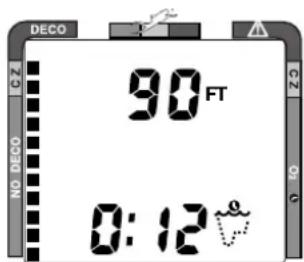
Fig. 32 - Pre Dive Planning Sequence
OCEANIC
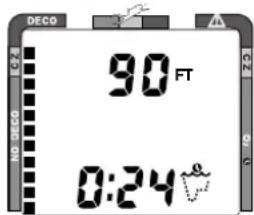
Fig. 33 - Nitrogen Control
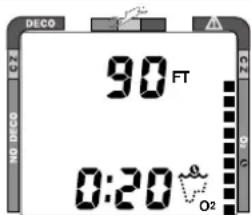
Fig. 34 - Oxygen Control
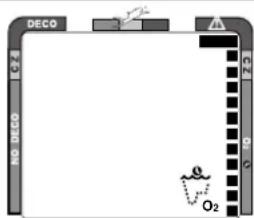
Fig. 35 - O2 Limit Exceeded
With each depth display, you will see either 'predicted' no decompression limits based upon your previous dive profiles (if calculated to be nitrogen controlled), or 'predicted' oxygen tolerance limits based upon accumulation of oxygen (if calculated to be oxygen controlled).
No decompression times are only displayed for depths where there is at least 3 minutes of dive time available at the depth, taking into account a descent rate of 120 feet (36 meters) per minute. Depths greater than the maximum depth that can be achieved with a partial pressure of oxygen (PO2) of 1.60 ATA will not be displayed.
Prior to a Repetitive Nitrox Dive
If the segments of the Tissue Loading Bar Graph are displayed (Fig 33) during the Pre Dive Planning Sequence, that next dive is calculated to be controlled by nitrogen loading.
If the segments of the O2 bar graph are displayed (Fig. 34), that next dive is calculated to be controlled by oxygen loading.
The XTC-100 will store oxygen accumulation calculations for up to 10 dives conducted during a 24 hour period. In the event that the maximum limit for oxygen loading has been exceeded for that day, all of the segments of the O2 bar graph will be displayed (Fig. 35).
X TC-10 0
Depth and Time displays will not appear until the O2 bar graph recedes into the green (normal) zone (e.g., your daily oxygen dosage decreases an amount equivalent to the amount accumulated during the latest dive completed).
NO DECOMPRESSION DIVE MODE
As long as it is activated on the surface, the XTC-100 will enter the No Decompression Dive Mode when you descend deeper than 5 feet (1.5 meters), regardless of the operating mode it is in. If activated below 4 feet (1 meter), the unit will perform a diagnostic check and shutdown.
To activate the Oceanglo® backlight underwater, press the Select (Lower) button. The display will be illuminated for button depression time plus 5 seconds. It will not activate if a Low Battery condition exists.
Main Display (data shown depends on Alternate ON/OFF setting)
If the Alternate Display is set to 'OFF', information (Fig. 36) includes - Current Depth, Elapsed Dive Time (and icon), Dive Time Remaining (and icon), and Maximum Depth for that dive (and icon).
If the Alternate Display is set to 'ON', information (Fig. 37) includes: Current Depth and Dive Time Remaining (and icon). Elapsed Dive Time and Maximum Depth are 'accessed' in Large Format, as described next.
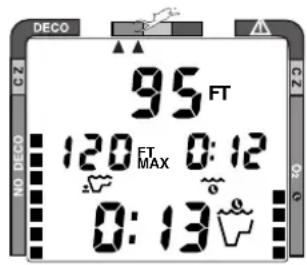
Fig. 36 - Main Display (Alternate Off)
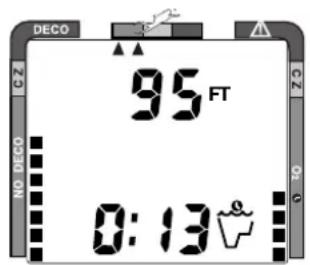
Fig. 37 - Main Display (Alternate On)
OCEANIC
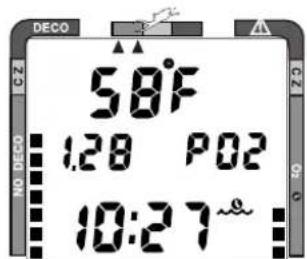
Fig. 38 - Secondary Display
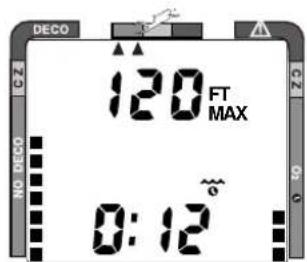
Fig. 39 - Alternate Display
Secondary Display (access if Alternate is set ON or OFF)
To view water Temperature, Time of Day, and if FO2 was set for a numerical value, display the current level of PO2 (Fig. 38):
- press the Advance (Upper) button 1 time
- the unit will revert to the Main Display after 10 seconds, if the Advance (Upper) button is not pressed again.
Alternate Display (access only if Alternate is set ON)
To view water Elapsed Dive Time and Maximum Depth in Large Format in place of Current Depth and Dive Time Remaining (Fig. 39):
- press the Advance (Upper) button 2 times, or -
- press the Advance (Upper) button 1 time, if viewing Temp/Time/PO2.
- the unit will revert to the Main Display after 10 seconds, or if the Advance (Upper) button is pressed.
The Graphic Diver Interface (bar graphs) will be active with each display representing nitrogen loading, oxygen accumulation (if FO2 was set for a value other than Air), and ascent rate.
DECOMPRESSION DIVE MODE
X TC-10 0
The XTC-100 provides information that will help you avoid, or if necessary, manage emergency decompression.
The Decompression Dive Mode activates when the Tissue Loading Bar Graph enters the red 'DECO' zone (Fig. 40a).
VIOLATION MODES
The XTC-100 enters Violation Modes when it is unable to predict an ascent procedure.
GAUGE MODE
If the XTC-100 enters a Permanent Violation Mode, it will not display information relating to nitrogen or oxygen loading for the remainder of that dive or for subsequent dives conducted during the 24 hour period after surfacing.

NOTE: Decompression Dive Mode, Violation Modes, and Gauge Mode are described beginning on page 50.
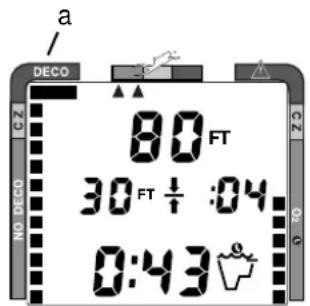
Fig. 40 - Entering Into Decompression Mode
OCEANIC
ASCENDING TO THE SURFACE
While ascending to shallower depths, the segments that have filled up the Tissue Loading Bar Graph will begin to recede (Fig. 41), offering a graphic representation of your multilevel diving capability. By 'backing off' on the bar graph (fewer segments), you can establish and adjust your personal level of conservatism and margin of protection.
If you entered Decompression Mode, you must not complete your ascent until the Tissue Loading Bar Graph is 'at least' inside the yellow Caution Zone.
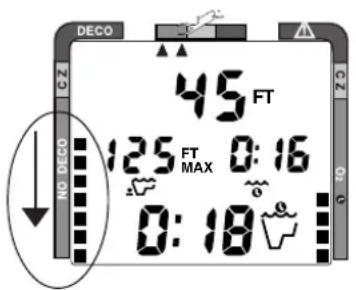
Fig. 41 - Tissue Loading Bar Graph (receding)
If you have not entered Decompression Mode, a safety stop made between 15-20 feet (5-6.5 meters) is strongly recommended as a standard procedure before completing your ascent.
You should make every effort to complete all of your ascents with the Tissue Loading Bar Graph inside of the green zone.
While you cannot provide a guarantee against the occurrence of decompression sickness, you may choose your own personal zone of caution based upon your individual age, physique, excessive weight, training, experience, etc. to reduce the statistical risk.
X TC-10 0
The Variable Ascent Rate Indicator™ shows how fast you are ascending. When you exceed the maximum recommended ascent rate of 60 feet per minute (18 meters per minute), the bar graph will enter the red (Too Fast) zone (Fig. 42a). You will be alerted by all segments of the bar graph flashing and an audible alarm which will stop when your ascent rate is slowed.
ALTITUDE DIVING
The mathematical model within the XTC-100 accounts for the reduced No Decompression dive time available at higher elevations based on NOAA (National Oceanic and Atmospheric Administration) guidelines. When diving in high altitude lakes or rivers from 2,000 to 14,000 feet (610 to 4,268 meters), the XTC-100 will adjust automatically, providing corrected depth and reduced No Decompression and Oxygen Exposure times.
Also, when above 2,000 feet (610 meters), depth calibration is automatically changed to read in feet of freshwater rather than feet of seawater.
If activated above 14,000 feet (4,268 meters), the unit will perform a diagnostic check and shutdown.
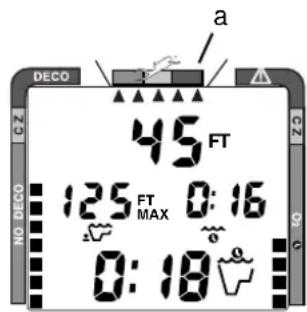
Fig. 42 - Ascent 'Too Fast'
OCEANIC

WARNINGS and SAFETY RECOMMENDATIONS
- The percentage of oxygen (FO2) in the nitrox mix being used must be set 'before each' nitrox dive, unless the FO2 50% Default is set to 'Off'.
- The Pre Dive Planning Sequence provides predicted times for subsequent dives. Depending on cylinder size, breathing gas consumption, and oxygen accumulation you may have less time available than indicated because of breathing gas quantity or other limitations.
- The XTC-100 must be manually activated and be in an operating mode prior to start of a dive. The unit will not activate automatically by immersion in water.
- Every effort should be made to keep each of the bar graphs in the green throughout your dives to reduce your risk of exposure to decompression sickness and oxygen toxicity.
- Until it has shut itself off, you must not use the XTC-100 at a different altitude than the altitude where it was originally activated. Doing so will result in an error equal to the difference in barometric pressure, and possibly a false dive mode with erroneous data.
X TC-10 0
POST
DIVE
MODES

refer to page 47 for - WARNINGS and SAFETY RECOMMENDATIONS
OCEANIC
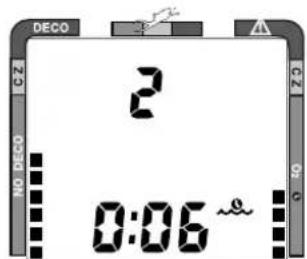
Fig. 43 - Post Dive Surface Mode (< 10 min)
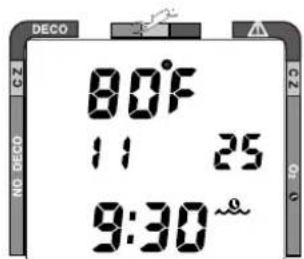
Fig. 44 - Temperature/Date/Time
FIRST 2 HOURS AFTER A DIVE
When you ascend to 3 feet (1 meter) or shallower, the XTC-100 will enter Surface Mode and begin counting your surface interval.
TRANSITION PERIOD
The first 10 minutes is, in affect, a Transition Period during which time the following information is displayed (Fig. 43):
• Surface Mode icon (flashing).
• 'Number' of that dive
• Surface Interval (colon flashing).
- Tissue Loading Bar Graph indicating current nitrogen loading.
• O2 Bar Graph indicating current oxygen loading (if a nitrox dive)
If you descend during the 10 minute Transition Period, time underwater will be considered a continuation of that dive. The time at the surface (if less than 10 minutes) will not be added as Elapsed Dive Time.
To view the Temperature/Date/Time (Fig. 44):
- press the Advance (Upper) button 1 time
- the unit will revert to Surface Mode after 10 seconds, if no button is pressed
X TC-10 0
To view that Dive's Log (during the 10 minute Transition Period):
- press the Advance (Upper) button 2 times, or -
- press the Advance (Upper) button 1 time, if viewing Temp/Date/Time
- the unit will revert to Surface Mode after 2 minutes, if no button is pressed
Data will not be stored in the unit's memory until the 10 minute Transition Period is completed.
Once 10 minutes have elapsed, that dive and Transition Period are completed, and a subsequent descent will be considered a new dive.
AFTER THE TRANSITION PERIOD
For the remainder of the first 2 hours after surfacing, the information described above will continue to be displayed as Surface Mode (Fig. 45), and you will have full access to other modes.
To view the Temperature/Date/Time:
- press the Advance (Upper) button 1 time
- During low light conditions, the Smart Glo™ backlight illuminates the display for 10 seconds. Press the button again to reactivate the light as desired.
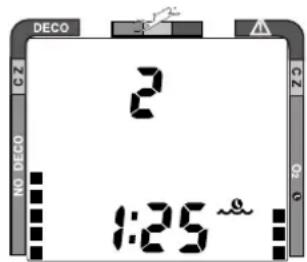
Fig. 45 - Surface Mode (first 2 hours)
OCEANIC
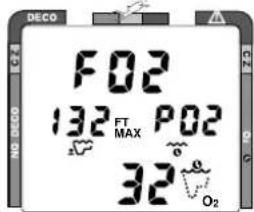
Fig. 46 - FO2 (Default OFF)
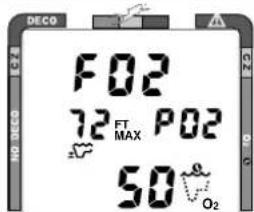
Fig. 47 - FO2 (Default ON)
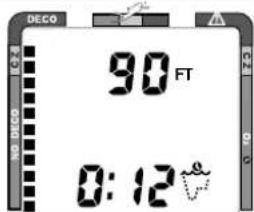
Fig. 48 - Adjusted NDLs
To access FO2 Mode:
- press the Advance (Upper) button 2 times (while in Surface Mode)
- If the FO2 Default was set OFF, the FO2 setting displayed will be the same value previously set (Fig. 46).
- If the FO2 Default was set ON, the FO2 value displayed (Fig. 47) will be the 'default value' of 50 (%) and will have to be set for the breathing gas used for the next dive.
- press the Select (Lower) button to alter the setting, if required.
- the unit reverts to Surface Mode after 2 minutes, unless the Advance (Upper) button is pressed to access the Pre Dive Planning Sequence.
To access Pre Dive Planning Sequence™:
- press the Advance (Upper) button 3 times (while in Surface Mode)
- press the Select (Lower) button to scroll through the sequence
- The unit reverts to Surface Mode after 2 minutes, unless the Advance (Upper) button is pressed to access the Fly Mode.
The Pre Dive Planning Sequence will now show 'adjusted' No Decompression Limits (Fig. 48) based on residual nitrogen calculated to be remaining from the previous dives. Calculated dive times and the maximum allowed depth displayed will increase as the real time surface interval increases after completion of a dive.
The Pre Dive Planning Sequence will only scroll to the maximum depth allowed by the nitrogen or oxygen limit, whichever is in control. The respective bar graph will be displayed to indicate which is in control.
To access Time to Fly and Desaturate Countdowns:
- press the Advance (Upper) button 4 times (while in Surface Mode)
- The unit reverts to Surface Mode after 10 seconds, unless the Advance (Upper) button is pressed to access the Log Mode.
The Time To Fly counter begins counting down 10 minutes after the last dive has ended (after the 10 minute Transition Period) displaying the word 'FLY' with a countdown (Fig. 49a) that starts at 23:50 (hr:min) and counts down to 0:00 (hr:min).
The Time to Desaturate counter (Fig. 49b), provides calculated time for tissue desaturation at sea level. The countdown starts at 9:59 (hours:minutes) maximum and counts down to 0:00. If the time is calculated to be greater than 9:59, the display will indicate 9:- - (Fig. 50a) until it decreases to 9:59.
If a violation occurred during the dive, Time to Desaturate will not be displayed and a single dash (-) will appear instead of the letters FLY (Fig. 51).
X TC-10 0
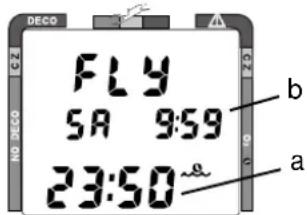
Fig. 49 - Time to Fly/Desaturate
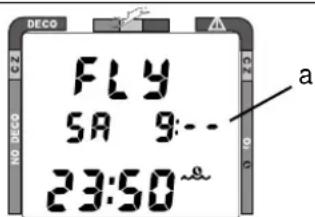
Fig. 50 - Desaturate (>9:59)
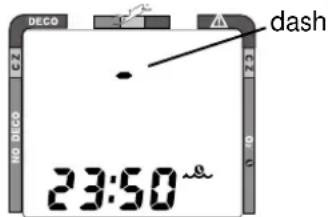
Fig. 51 - After Violation
OCEANIC
LOG MODE
Information from your 12 latest dives is stored in the Log for viewing. After 12 dives are accumulated, each subsequent dive will overwrite the oldest dive in the log (i.e., the most recent dive deletes the oldest). Log information will not be lost when batteries are removed, but factory service will delete the logs.
Dives are displayed in a reverse sequence that starts with the dive most recently recorded back to the oldest of the 12 dives stored. Thus, your most recent dive will always be the first shown in the sequence. Each dive has three log screens - Date/Time started, Nitrogen data, and Oxygen data.
Dives are identified by the Date/Time and number. The first dive of a new day (after midnight) will be #1.
The Advance (Upper) button is used to access each dive's log.
The Select (Lower) button is used to view second and third screens for that dive (Nitrogen and Oxygen related data).
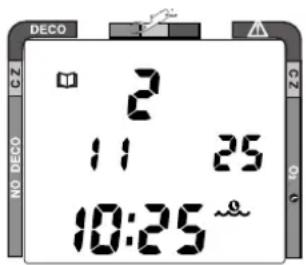
Fig. 52 - Log Mode (first screen - date/time)
To access the Log Mode:
- press the Advance (Upper) button 5 times (while in Surface Mode)
- the first screen of the most recent dive will appear (Fig. 52) showing -
- Log Mode icon and Dive Number
- Date and Time of Day that the dive started (and icon)
XTC-100
To access a specific dive's log, press the Advance (Left) button repeatedly.
To view the second screen for that dive (Nitrogen Log- Fig. 53):
- press the Select (Lower) button 1 time, appearing will be -
- Log Mode icon
- Dive number
• Maximum Depth reached for the dive (and icon)
• Elapsed Dive Time (and icon)
• Surface Interval prior to that dive (and icon) - Variable Ascent Rate Indicator - showing the maximum ascent rate maintained for 4 consecutive seconds during the dive
- Tissue Loading Bar Graph - showing tissue nitrogen loading at the end of the dive
To view the third screen for that dive (Oxygen Log - Fig. 54):
- press the Select (Lower) button 1 time, appearing will be -
- Log Mode icon
• FO2 value - % set for that dive (and 'FO2' symbol)
• Maximum PO2 level - reached during that dive (and 'PO2' symbol) - O2 bar graph - showing oxygen loading at the time you surfaced.
- If FO2 was set for 'Air' for that dive, the O2 screen will only display 'FO2' and 'Air'.
- press the Advance (Upper) button 1 time to view the first screen of the previous dive's log.
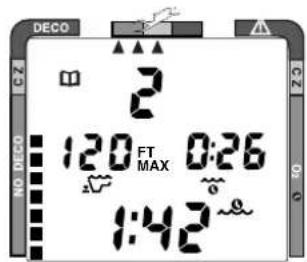
Fig. 53 - Log Mode (second screen - nitrogen)
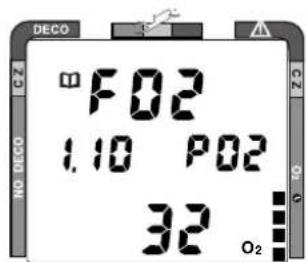
Fig. 54 - Log Mode (third screen - oxygen)
OCEANIC
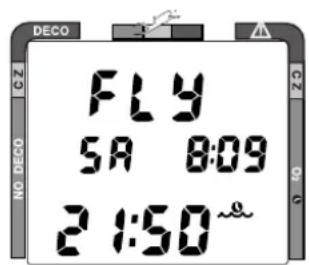
Fig. 55 - Fly/Dsat Display (after 2 hours on surface)
To exit Log Mode and return to the Surface Mode:
- press the Advance (Upper) button repeatedly to proceed through the remaining recorded dives.
- the unit will automatically revert to Surface Mode after 2 minutes, if no button is pressed
AFTER THE FIRST 2 HOURS
Two hours after the last dive the Surface Mode will no longer be displayed. The Time to Fly and Desaturate countdown timers will be displayed continuously, giving the final countdowns from 22:00 and 9:xx to 0:00 (Fig. 55).
To access other modes or enter settings:
- press the Select (Lower) button to enter Surface Mode
- the unit will revert to Fly Mode after 2 hours, if no button is pressed
DOWNLOADING DATA TO PC
Using special infrared linking hardware and a unique PC software program, data from your dives can be downloaded (copied) from your XTC-100 into an IBM compatible PC program running on a Windows® 95 or 98 operating system. Instructions for performing the interface and download are provided with the OceanLog™ for XTC-100 hardware and software package. The OceanLog™ program provides profile data sampled throughout the dive.
X TC-10 0
To access the External Access (EA) Mode:
- press both buttons simultaneously while in Surface Mode
- press the Advance (Upper) button 12 times
• the letters EA appear, flashing (Fig. 56) - press the Advance (Upper) button to revert to Surface Mode, or -
- press the Select (Lower) button to initiate download
- the unit will automatically revert to Surface Mode after download is complete, or in 2 minutes if no button is pressed
• the backlight will not operate while in EA Mode
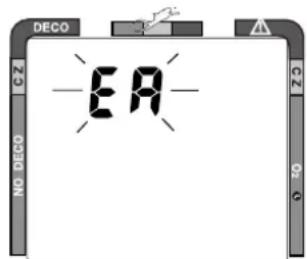
Fig. 56 - EA Mode

WARNING and SAFETY RECOMMENDATION
- The longer you wait to fly (or travel to higher elevations) after diving, the more you will reduce your exposure to decompression sickness.
OCEANIC
SUMMARY OF ACCESS TO POST DIVE MODES
During the first 2 hours after a dive* (after the 10 minute Transition Period has ended):
MODES TO ACCESS TO VIEW
Backlight press Either '1 time'
Temperature/Date/Time press Upper '1 time'
FO2 set press Upper '2 times' > press Lower (hold or repetitive)
Pre Dive Plan Sequence press Upper '3 times' > press Lower (hold or repetitive)
Fly/Desaturate press Upper '4 times'
Log Mode press Upper '5 times' > press Lower (hold or repetitive)
Set Mode press Both '1 time' > Refer to page 26 for a summary
EA Mode press Both '1 time' > press Upper '12 times' > Lower '1 time'
*After the First 2 Hours, the unit will remain in Fly/Desaturate Mode. To access other Modes:
- press the Lower button to return to the Surface Mode, then press the buttons as indicated above.
X TC-10 0
HANDLING
THE
EXTREMES

refer to pages 62-64 for - WARNINGS and SAFETY RECOMMENDATIONS
OCEANIC
AVOIDING AND MANAGING DECOMPRESSION
The XTC-100 is a sophisticated instrument designed with capabilities that go beyond the range of recreational diving with compressed air. It will help you to avoid and, if necessary, manage decompression.
TISSUE LOADING BAR GRAPH™
The Tissue Loading Bar Graph™ offers you a convenient way to consistently monitor how close you are coming to the No Decompression Limit. As you use the XTC-100 and become familiar with the Tissue Loading Bar Graph, you will notice that it displays fewer segments for shorter dive times and shallower depths. Use this feature to adjust conservatism to your diving needs.
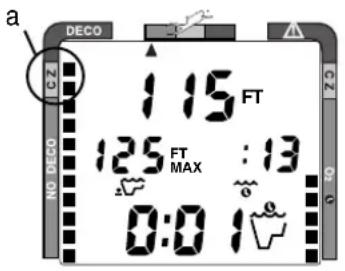
Fig. 57 - Caution Zone
Use the yellow Caution (CZ) Zone (Fig. 57a) as a visual reference to place a wider margin of protection between you and the No Decompression Limit.
Oceanic suggests keeping the Tissue Loading Bar Graph in the green No Decompression (NO DECO) zone during all of your dives, and that it be in the green when leaving the water.
DECOMPRESSION DIVE MODE
X TC-10 0
The XTC-100 is designed to help you by providing a complete representation of how close you are to entering decompression. Decompression Dive Mode activates when theoretical no decompression time/depth limits are exceeded.
In the event that you enter Decompression Mode, as indicated by a double beep, the large red segment of the Tissue Loading Bar Graph (Fig. 58a) flashing, and ceiling bar of the Decompression Mode icon flashing, immediately begin a safe controlled ascent to a depth slightly deeper than, or equal to, the Required Ceiling Stop Depth indicated (Fig. 58b) and decompress for the Stop Time indicated (Fig. 58c).
Main Display (data shown is the same if Alternate is set ON or OFF)
Information displayed in addition to Stop Depth/Time includes:
- current Depth
- Total Ascent Time (Fig. 58d) - that includes stop times required at all ceilings and vertical ascent time calculated at 60 ft (18 m) per minute.
- O2 bar graph (if a nitrox dive) and Variable Ascent Rate Indicator
Additional data can be accessed by pressing the Advance (Upper) button, and the Oceanglo® backlight can be activated by pressing the Select (Lower) button.
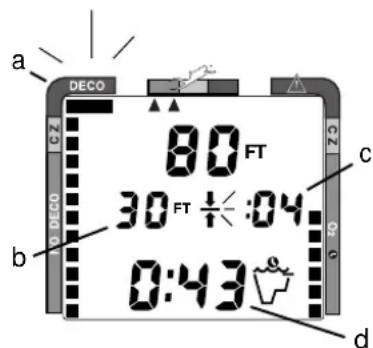
Fig. 58 - Main Display (Alternate set ON or OFF)
OCEANIC
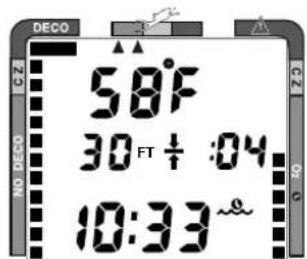
Fig. 59 - Secondary Display
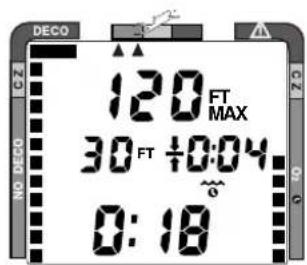
Fig. 60 - Alternate Display
Secondary Display (access if Alternate is set ON or OFF)
To view water Temperature and Time of Day in place of Current Depth and Total Ascent Time (Fig. 59):
- press the Advance (Upper) button 1 time
- the unit will revert to the Main Display after 10 seconds if the Advance (Upper) button is not pressed again.
Alternate Display (access only if Alternate is set ON)
To view Maximum Depth and Elapsed Dive Time, in Large Format, in place of Current Depth and Total Ascent Time (Fig. 60):
- press the Advance (Upper) button 2 times, if viewing the Main Display, or -
- press the Advance (Upper) button 1 time, if viewing Temp/Time.
- the unit will revert to the Main Display after 10 seconds, or if the Advance (Upper) button is pressed again.
MANAGING DECOMPRESSION STOPS
X TC-10 0
The amount of decompression credit time that you receive is dependent on depth, with slightly less credit given the deeper you are.
You should stay slightly deeper (Fig. 61a) than the Required Stop Depth indicated (Fig. 61b) until the next shallower Stop Depth appears. Then, you can slowly ascend to, but not shallower than, that indicated ceiling Stop Depth.
Once all required decompression has been completed, the XTC-100 will switch to the No Decompression Dive Mode. This is indicated by Total Ascent Time = 0:00, and the Tissue Loading Bar Graph receding into the Caution Zone.
Dive Time Remaining now appears in place of Total Ascent Time displaying No Decompression Dive Time remaining, or Oxygen Accumulation Time remaining (whichever time is the least).
VIOLATION MODES
While in Violation Modes, the Secondary and Alternate displays previously described can be accessed using the Advance (Upper) button, and the Oceanglo® backlight can be activated using the Select (Lower) button.
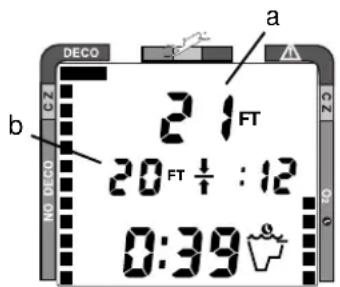
Fig. 61 - Managing a Decompression Stop
OCEANIC
CONDITIONAL VIOLATION MODE
The XTC-100 will enter the Conditional Violation Mode if you ascend shallower (Fig. 62a) than the Required Decompression Ceiling Stop Depth displayed (Fig. 62b).
The audible alarm will beep once per second* and the Total Ascent Time display (Fig. 62c) will flash until you descend below the Required Stop Depth.
*If the audible alarm feature was set to OFF, only a double beep will be emitted to alert you.
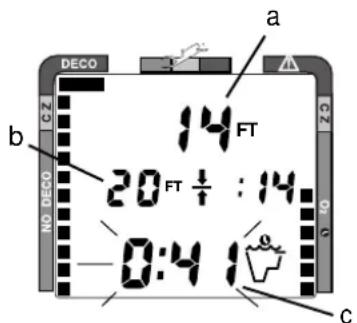
Fig. 62 - Conditional Violation
Remaining above the Required Stop Depth for 5 minutes or less:
For each minute that you are above the required decompression ceiling (before 5 minutes have elapsed), no off-gassing credit will be given, and 1^1/2 minutes of penalty time is added to the Required Stop Time.
The added penalty decompression time will have to be 'worked off' first, before obtaining off-gassing credit. Once the penalty time is worked-off, and off-gassing credit begins, required decompression Stop Depths and Time will decrease toward zero, then the Tissue Loading Bar Graph will recede into the caution zone and the XTC-100 will revert to the No Decompression Dive Mode.
DELAYED VIOLATION MODE
Three conditions cause the XTC-100 to enter the Delayed Violation Mode:
1. Remaining 'more than 5 minutes' above the Required Stop Depth.
The Audible Alarm will emit one long beep and the Total Ascent Time display will flash until you descend below the Required Stop Depth (Fig. 63).
You would then need to follow the Stop Depths and Times toward the surface until the Tissue Loading Bar Graph recedes into the caution zone.
2. Your necessary Decompression requires a Ceiling Stop Depth 'between' 60 feet (18 meters) and 70 feet (21 meters).
The Audible Alarm will emit one long beep and the Tissue Loading Bar Graph will flash. Total Ascent Time needed to get back to the surface will still be displayed, flashing (Fig. 64).
You must ascend to just deeper than 60 feet (18 meters) staying as close to 60 feet (18 meters) as possible without causing the Total Ascent Time display to flash. When the Required Stop Depth indicates 50 FT/15 M, etc., you can ascend to, but no shallower than those depths and continue decompressing.
XTC-100
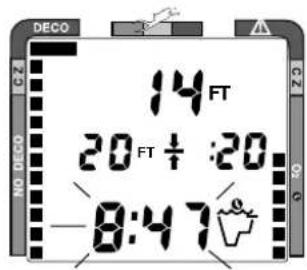
Fig. 63 - Delayed Violation (> 5 minutes above Stop)
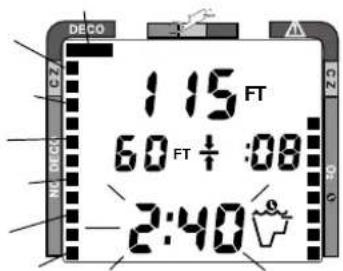
Fig. 64 - Delayed Violation (Required Stop > 60FT/18M)
OCEANIC
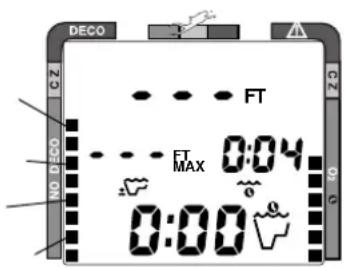
Fig. 65 - Delayed Violation (deeper than 330ft/99.5m)
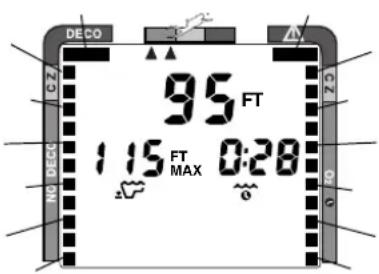
Fig. 66 - Immediate Violation
The XTC-100 cannot accurately calculate decompression times for Stop Depths much greater than 60FT (18M) and offers no indication of how much time spent underwater would result in the need for a greater stop depth.
3. You exceed the maximum operating depth (330 feet/99.5 meters). The Audible Alarm will beep once per second\* when you descend deeper than the Depth Alarm set point that you selected (set).
*If the Audible Alarm feature was set to OFF, only a double beep will be emitted to alert you.
Upon descending deeper than 330 feet (99.5 meters), the Tissue Loading Bar Graph will flash and the Current Depth and Max Depth displays will only indicate 3 dashes (Fig. 65) until ascent is made to a depth shallower than 330 feet (99.5 meters), at which time the Current Depth display will be restored. Max Depth will only display 3 dashes for the remainder of that dive and in the Log.
IMMEDIATE VIOLATION MODE
Five minutes after reaching the surface from a dive in which a Delayed Violation occurred, the XTC-100 will enter an Immediate Violation Mode.
During a dive, the XTC-100 will enter an Immediate Violation Mode if a ceiling much greater than 60FT (18M) is required (Fig. 66).
XTC-100
GAUGE MODE
Once the XTC-100 enters Immediate Violation Mode it will operate with limited functions (Current Depth, Max Depth, and Elapsed Dive Time) in Gauge Mode during the remainder of that dive and for 24 hours after surfacing.
The XTC-100 reverts to being a digital instrument without any decompression or oxygen monitoring functions. Dive Time Remaining will not be displayed and the Tissue Loading Bar Graph and O2 Bar Graph will flash as a warning of this condition (Fig. 67).
After surfacing, Gauge Mode does not provide the FO2, Pre Dive Planning Sequence, or Time to Fly features (Fig. 68). The countdown timer that appears when you try to access Time to Fly does not represent 'Time to Fly'. It is only provided to inform you of the time remaining before normal XTC-100 operation can resume with full features and functions.
PERMANENT VIOLATION
Entering the Immediate Violation Mode, then Gauge Mode, with loss of all decompression and oxygen monitoring functions for 24 hours after that dive is considered a Permanent Violation. In the event that a dive is made during the 24 hour period, a full 24 hour surface interval must be served before all functions are restored.
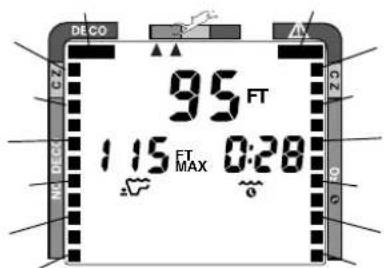
Fig. 67 - Gauge Mode (underwater)
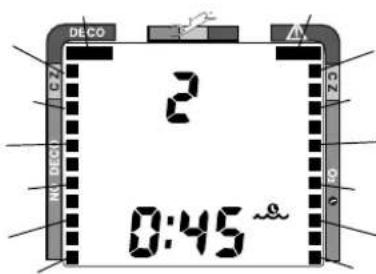
Fig. 68 - Gauge Mode (surface)
OCEANIC
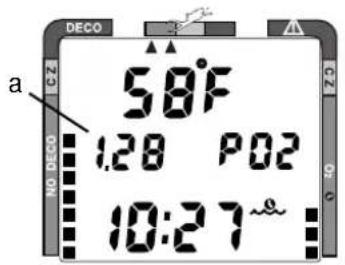
Fig. 69 - Current PO2
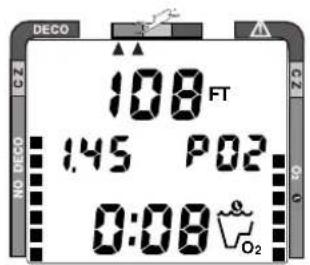
Fig. 70 - High PO2 (= / > 1.40 ATA)
OXYGEN EXPOSURE
The XTC-100 is a sophisticated instrument designed with capabilities that go beyond the range of recreational diving with compressed air. It will help you to avoid and manage excessive oxygen exposure.
PARTIAL PRESSURE OF OXYGEN
As depth increases during the dive, the partial pressure of oxygen (PO2) increases. To view the current value of PO2 (Fig. 69a):
- press the Advance (Upper) button 1 time to access the Secondary Display.
HIGH PO2 DIVE MODE
The XTC-100 enters the High PO2 Dive Mode when partial pressure of oxygen becomes equal to, or greater than, 1.40 ATA (Fig. 70). A double beep will sound to alert you.
The current value of PO2 and symbol 'PO2' will appear and remain on the Main Display until PO2 decreases below a value of 1.40 ATA (regardless if the Alternate Display is set ON or OFF).
X TC-10 0
If partial pressure of oxygen continues to increase, the value of PO2 displayed will increase from 1.40 toward a maximum value of 5.00 ATA in increments of '.01' ATA.
When PO2 reaches a value of 1.60 ATA (Fig. 71), the large red segment of the O2 bar graph, the PO2 value, and PO2 symbol will flash continuously and the Audible Alarm will emit one beep per second* as a warning until the level of PO2 decreases below 1.60 ATA.
*If the audible alarm feature was set to OFF, only a double beep will be emitted to alert you.
HIGH OXYGEN ACCUMULATION
The O2 bar graph provides you with a convenient graphic representation of your oxygen accumulation, displaying either oxygen accumulated during that dive, or during the repetitive dives you conducted during that 24 hour period, whichever of the two is greater at that time.
The yellow Caution Zone (CZ) of the O2 Bar Graph offers you a convenient way to consistently monitor how close you are coming to the limits of oxygen tolerance. Use it as a visual reference to place a wider margin of protection between you and the Limits.
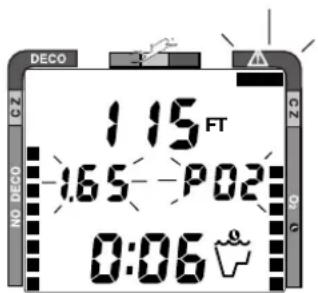
Fig. 71 - High PO2 (= / > 1.60 ATA)
OCEANIC
If the theoretical amount of oxygen accumulated equals, or exceeds, the limit for a single exposure, or the exposure limit for a 24 hour period, Oxygen Dive Time Remaining becomes 0:00 (Fig. 72). The O2 Bar Graph will enter the red danger zone, the full bar graph will flash, and the Audible Alarm will emit one beep per second* as a warning until the level of oxygen decreases below the exceeded limit.
*If the audible alarm feature was set to OFF, only a double beep will be emitted to alert you.
You must immediately focus on making a safe controlled ascent to the surface to prevent further exposure. As your accumulation (dose) decreases during your surface interval, the O2 bar graph will gradually recede into the yellow (caution) zone and green (normal) zone.
Oceanic suggests always leaving the water with the Oxygen Accumulation Bar Graph in the green (normal) zone.
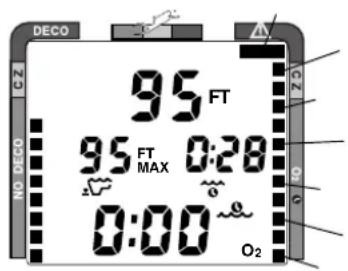
Fig. 72 - High O2
UNEXPECTED LOSS OF DISPLAYED INFORMATION
XTC-100
If your XTC-100 stops working for any reason, it is important that you have anticipated this possibility and are prepared for it.
If you dive in situations where your trip would be ruined or your safety would be jeopardized by losing the use of your XTC-100, an analog or digital backup system or use of standard air (or nitrox) tables is highly recommended.
Be a RESPONSIBLE DIVER at all times!

OCEANIC

WARNINGS and SAFETY RECOMMENDATIONS
- There are few legitimate excuses for making unplanned Decompression dives, and the consequences of this type of diving can be severe. By making an unplanned Decompression dive without the necessary preparation and training, you will have placed yourself in an unnecessarily dangerous situation. Allow a surface interval of at least 24 hours before reentering the water in the event a dive requires emergency decompression.
- By entering decompression, you automatically impose a “ceiling” above you which you cannot immediately ascend beyond, denying you free access to the surface.
- Existing data for making planned decompression dives is extremely limited, and virtually nonexistent for repetitive decompression diving. Decompression diving greatly increases your risk of decompression sickness.
- Decompression diving, or diving deeper than 130 feet (39 m), will greatly increase your risk of decompression sickness.
- Special training, equipment, and support are necessary for diving deeper than the maximum recommended sport diving depth limit of 130 feet (39 meters). Oceanic does not advocate diving to depths below 130 feet (39 meters), the basis for which is purely theoretical.
X TC-10 0

WARNINGS and SAFETY RECOMMENDATIONS
- Exiting the water with the Tissue Loading Bar Graph in the red decompression zone greatly increases the risk of decompression sickness, and may result in injury or death.
- The oxygen features of the XTC-100 are intended for use only by recreational divers trained for nitrox diving by an instructor certified by a recognized training agency to teach diving with nitrox.
- The XTC-100 enters Immediate Violation Mode when a situation totally exceeds its capacity to predict an ascent procedure. These dives represent gross excursions into decompression that are beyond the boundaries and spirit of the XTC-100 design. If you are following these dive profiles, Oceanic advises you not use a XTC-100 dive computer.
- If you exceed certain limits, the XTC-100 will not be able to tell you how to get safely back to the surface. These situations exceed tested limits and can result in loss of some XTC-100 functions for 24 hours after the dive in which a violation occurred.
- The XTC-100 is not intended for use by military or commercial divers.
OCEANIC

WARNINGS and SAFETY RECOMMENDATIONS
- Maximum limits for exposure to oxygen should not be exceeded, and the consequences of CNS (Central Nervous System) oxygen toxicity can be severe, resulting in Gran Mal convulsions and drowning.
- Conducting repetitive dives using enriched nitrogen-oxygen mixtures can lead to oxygen buildup, reducing oxygen tolerance while increasing the risk of pulmonary oxygen toxicity.
- In the event that you exceed the maximum per dive allowable oxygen exposure limit, it is recommended that you allow a surface interval of at least 2 hours before reentering the water. If you exceed the maximum 24 hour period allowable oxygen exposure limit, you must allow a surface interval of at least 24 hours before reentering the water.
- Allowing the O2 Bar Graph to enter the red (Danger) zone greatly increases the risk of CNS oxygen toxicity, and may result in serious injury or death.
- It should not be considered that the capabilities built into the XTC-100 provide any implied approval or consent from Oceanic for individuals to exceed the defined limits of recreational dive profiles, as agreed on by all internationally recognized training agencies.
X TC-10 0
CARE
a n d
MAINTENANCE

refer to page 74 for - WARNINGS and SAFETY RECOMMENDATIONS
OCEANIC
CARE AND CLEANING
The XTC-100 must be protected from shock, excessive heat, chemical attack, and tampering. The housing, made of an impact resistant resin, is extremely shock resistant but susceptible to chemical attack and scratches. Protect the lens against scratches with a transparent Oceanic Instrument Lens Protector. Small scratches will naturally disappear underwater.
AFTER THE DIVE
Soak and rinse the XTC-100 in fresh water following each dive, and check the low pressure sensor guard cap to ensure that it is free of any debris or obstructions. Use lukewarm water or a slightly acidic white vinegar/water bath to dissolve any salt crystals. After removal from a fresh water bath, place the XTC-100 under gently running water and towel dry before storing. Transport cool, dry, and protected.
ANNUAL INSPECTIONS AND SERVICE
Your XTC-100 should be inspected annually by an Authorized Oceanic Dealer who will perform a factory prescribed function check and inspection for damage or wear. To keep the 2 year limited warranty in effect, this inspection must be completed one year after purchase (+/- 30 days).
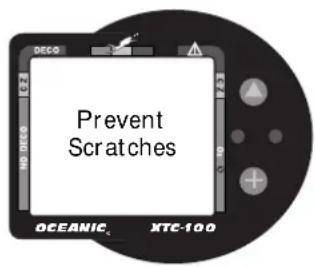
Oceanic recommends that you continue to have this inspection performed every year to ensure your XTC-100 is working properly. The costs of annual inspections are not covered under the terms of the 2 year limited warranty.

NOTE: Annual inspections are only performed by Authorized Oceanic Dealers and are not performed by the factory.
TO OBTAIN SERVICE
Take your XTC-100 to an Authorized Oceanic Dealer or send it to the 'nearest' Facility listed at the right. When shipping your XTC-100 be sure to:
- Package it using a protective cushioning material.
- Include a legible note stating specific reason for return, your name, street address, daytime phone number, serial number, and a copy of your original sales receipt and Warranty Registration Card.
- Send freight prepaid and insured to the nearest Oceanic service facility.
• Non-warranty service must also be prepaid (call for an estimated cost). - If you are sending the unit to Oceanic USA, call Oceanic Customer Service or email service@oceanicusa.com to obtain an RMA number.
- Record all dive data in the Log or download the data in memory. All data will be erased when your XTC-100 receives factory service.
For more information regarding service and products, visit Oceanic's web site.
X TC-10 0
OCEANIC USA
2002 Davis Street
San Leandro, Ca. 94577
Tel: 510-562-0500 Fax: 510-569-5404
http://www.oceanicusa.com
service@oceanicusa.com
Oceanic Europe
Pomezia, Italy
Tel: 39-6-910-4148 Fax: 39-6-910-4163
Oceanic SW, Ltd
Devon, United Kingdom
Tel: 44-1-404-89-1819 Fax: 44-1-404-89-1909
Oceanic Germany
Numberg, Germany
Tel: 49-911-324-6630 Fax: 49-911-312-999
Oceanic International (Pacific)
Kapolei, Hawaii
Tel: 808-682-5488 Fax: 808-682-1068
Oceanic Diving Australia Pty. Ltd
Sorrento, Victoria, Australia
Tel: 61-3-5984-4770 Fax: 61-3-5984-4307
Oceanic Asia-Pacific Pte. Ltd
Singapore
Tel: 65-779-3853 Fax: 65-779-3945
Oceanic Japan
Tokyo, Japan
Tel: 3-3664-6541 Fax: 3-3667-6187/6
OCEANIC
BATTERY LIFE
Battery consumption rate varies throughout periods of operation, which begin upon activation and continue for 24 hours after surfacing from a dive. The exact number of dives, or hours of operation, that you will obtain with a battery is subject to variables, such as, temperature, the number of dives conducted during an operational period, and how often the backlight is used.
Tests and calculations indicate that a new Tadiran® 1/2AA model TL-2150, .95Ah, 1.0 ma, Lithium battery will maintain unit operation for approximately 100 dive hours (if 1 - 1 hour dive per dive day) to over 300 dive hours (if 3 - 1 hour dives per dive day). Yearly replacement is recommended.
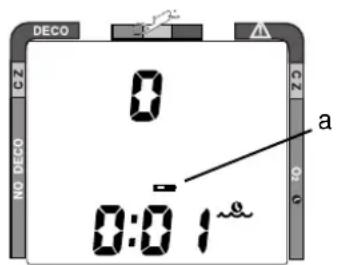
Fig. 73 - Low Battery
NOTE: The disposable battery supplied with the unit is not covered by the XTC-100 limited 2 year warranty.
LOW BATTERY CONDITION
During unit operation, voltage level is checked every second. A Low Battery condition is indicated by the Battery icon appearing on the display (Fig. 73a). Upon decreasing to a voltage level that will not maintain proper unit operation, the icon will flash for 5 seconds followed by shutdown of the unit. The backlight will not operate during a Low Battery Condition.
X TC-10 0
If the unit did not display the Low Battery icon 'prior' to entering the Dive mode, and a low battery condition occurs during a dive, as indicated by the Low Battery icon appearing on the display, there will be sufficient battery power to maintain unit operation 'for the remainder of that dive'.

NOTE: The XTC-100 will continue to function on real time for a period of 4 seconds after the battery is removed, maintaining Nitrogen and Oxygen calculations for a repetitive dive. By having a new battery ready to insert prior to removing the battery hatch and the battery that's in the unit, you can take advantage of this enhanced feature.

CAUTION: If the new battery is not inserted within 4 seconds after removal of the battery that's in the unit, you must wait for a minimum of 2 minutes prior to inserting the new battery. Otherwise, the unit may enter Dive Mode, perform a quick dive while on the surface, log the dive, then resume normal operation. Also, Nitrogen and Oxygen calculations will be erased and Date and Time will have to be reset.
Therefore, to retain calculated data for repetitive dives, the battery must be replaced in less than 4 seconds!

OCEANIC
BATTERY REPLACEMENT
NOTE: The following procedure must be closely adhered to. Damage due to improper battery replacement is not covered by the XTC-100 limited 2 year warranty.
BATTERY REMOVAL
The battery compartment should only be opened in a dry and clean environment, with extreme care taken to prevent the entrance of moisture or dust.
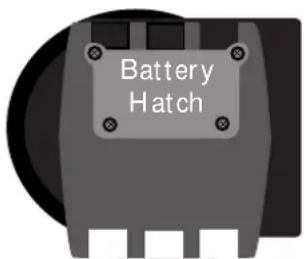
Fig. 74 - Case Back
Examine the case back to find the Battery Hatch (Fig. 74):
- Remove the four screws that secure the battery hatch to the housing by turning counter clockwise with a small philips head screwdriver.
- Lift the hatch up and out of the housing.
- Lift the battery, positive (+) end first out of the battery compartment.
- Remove the battery hatch o-ring and inspect it for any signs of deterioration or deformity. DO NOT use tools to remove the o-ring.
- O-ring replacement is highly recommended to ensure proper sealing.
- Closely check the battery hatch and the housing sealing surfaces for any signs of damage that might impair proper sealing. If found, return your XTC-100 to your Authorized Oceanic Dealer, and DO NOT attempt to use it until it has received factory service.
- Closely examine the inside of the battery compartment for any signs of corrosion indicating entrance of moisture into the unit. If found, return your XTC-100 to an Authorized Oceanic Dealer, and DO NOT use it until it has received service.
Moisture in the Battery Compartment
In the event that your XTC-100 is subjected to a flooded battery compartment, or moisture is found in the compartment, regardless of the cause, it should be returned for 'factory service'. DO NOT dive with the unit or attempt to repair the unit in the field.
Moisture in the battery compartment may also enter the PCB area of the module and compromise the electronic operation of the unit, resulting in inaccurate calculations and displayed information.
As an additional precautionary measure to prevent formation of moisture in the battery compartment, it is recommended that the battery be changed in an environment equivalent to the local outdoor temperature and humidity (e.g., do not change the battery in an air conditioned environment then take it outside during a hot sunny day.
X TC-10 0

OCEANIC
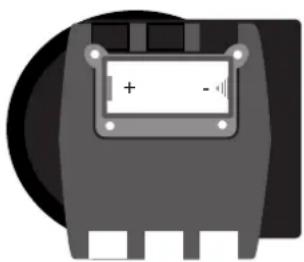
natural_image
Pure electrical component diagram without any text, numbers, or symbolsFig. 75 - O-ring Installation
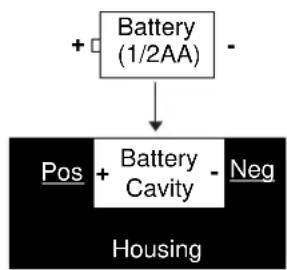
flowchart
graph TD
    A["+ Battery (1/2AA)"] --> B["Pos + Battery Cavity - Neg"]
    B --> C["Housing"]
Fig. 76 - Battery Orientation
BATTERY INSTALLATION
- To replace the battery hatch o-ring, lightly lubricate it with silicon grease and place it on the beveled outer edge of the battery compartment (Fig. 75). Ensure that it is evenly seated.

NOTE: This o-ring must be a genuine Oceanic part that can be purchased from your Authorized Oceanic Dealer. Use of any other o-ring will void the XTC-100 warranty.
- Place a new 3.6 volt TADIRAN®, model TL-2150, .95Ah, 1.0ma, Lithium battery, negative end first into the battery compartment toward the spring, ensuring proper orientation of the positive (+) and negative (-) ends (Fig. 76).
- Carefully place the battery hatch into position so that it seats on top of the o-ring, and while holding it in place with your thumb, secure it with the four screws by turning them clockwise with a small Philips head screwdriver. DO NOT attempt to use any other screws.
- Carefully tighten the screws until secure by alternately turning them each one turn at a time. Turn the upper left, then the lower right, then the lower left, then the upper right.
- Repeat the sequence until all of the screws are evenly secure. The outer surface of the battery hatch should be flush with the outer surface of the housing. DO NOT overtighten.
INSPECTION
- Activate the XTC-100 and watch carefully as it performs a full diagnostic and battery check and enters Surface Mode.
- Observe the LCD display to ensure it is consistently clear and sharp in contrast throughout the screen.
- If any portions of the display are missing or appear dim, or if a Low Battery condition is indicated, return the unit to your Authorized Oceanic Dealer for a complete evaluation before attempting to use it.
Care and maintenance is simple and easy, and will help keep your XTC-100 in top condition for years of diving enjoyment.
X TC-10 0

OCEANIC

WARNINGS and SAFETY RECOMMENDATIONS
- Never, under any circumstances, poke any object through any slots or holes of the XTC-100. Doing so may damage the depth sensor, possibly resulting in erroneous depth and/or dive time remaining displays.
- If you are in doubt about the accuracy of your XTC-100 depth readings, DO NOT attempt to dive with it until it has been inspected by Oceanic Customer Service.
- Never pressure test the XTC-100 in an air environment. Doing so may damage the depth sensor; possibly resulting in erroneous depth or time readings.
- Never spray aerosols of any kind on, or near, the XTC-100. The propellants may chemically attack the plastic.
- When the Low Battery icon is displayed prior to a dive, DO NOT attempt to dive with the XTC-100 until the battery is replaced.
- In the event that moisture appears in the battery compartment and/or module housing, DO NOT dive with the XTC-100 until it has received 'factory' service. DO NOT attempt to repair the unit in the field.
X TC-10 0
REFERENCE

refer to page 76 for - WARNINGS and SAFETY RECOMMENDATIONS
OCEANIC

WARNINGS and SAFETY RECOMMENDATIONS
- Diving at high altitude requires special knowledge of the variations imposed upon divers, their activities, and their equipment by the decrease in atmospheric pressures. Oceanic recommends completion of a specialized Altitude training course by a recognized training agency prior to diving in high altitude lakes or rivers.
- Altitude compensation provided by the XTC-100 takes place when the unit is activated. DO NOT dive at any different altitude until the XTC-100 shuts off after having been activated at a different altitude. It will recalibrate automatically when reactivated at the new altitude.
- When returning to lower altitudes, diving should not be conducted until the XTC-100 automatically clears of any residual nitrogen and oxygen loading, shuts off, and is reactivated and resets to operate at the new altitude.
- Decompression diving is inherently hazardous and greatly increases your risk of decompression sickness - even when performed according to the computer's calculations.
- Using the XTC-100, just as using the U.S. Navy, or other, No Decompression Tables, is no guarantee of avoiding decompression sickness, i.e. "the bends."
NO DECOMPRESSION LIMITS
Note how the No Decompression Limits for the XTC-100 are contrasted with the U.S. Navy limits (Fig. 77). For most depths, the XTC-100 provides somewhat less no decompression times than the U.S. Navy Tables. However, while the No Decompression Limits may be less, you will receive greatly increased allowable bottom times as you take advantage of the multilevel dive capabilities offered by the XTC-100. Notice also that the XTC-100 Pre Dive Planning Sequence does not scroll past 160 feet (48 meters).
DECOMPRESSION MODEL
The decompression model used by the XTC-100 is based on the no decompression multilevel repetitive dive schedules successfully tested by Dr. Ray Rogers and Dr. Michael Powell. Note, however, that these tests did not include repetitive dives deeper than 90 feet (27 meters) or decompression dives.
Due to the present unavailability of statistical data, XTC-100 decompression predictions are based on U.S. Navy theory. Therefore, pay special attention to the Warnings and Safety Recommendations that have been provided in this owner's guide.
XTC-100 U.S.
Depth NDL-mins. Navy
feet (meters) Eng (Metric) NDL -mins.
| 30 | (9) 260 | (283) --- |
| 35 --- --- 310 | ||
| 40 | (12) 137 | (144) 200 |
| 50 | (15) 80 | (84) 100 |
| 60 | (18) 57 | (58) 60 |
| 70 | (21) 40 | (41) 50 |
| 80 | (24) 30 | (31) 40 |
| 90 | (27) 24 | (26) 30 |
| 100 | (30) 19 | (20) 25 |
| 110 | (33) 16 | (16) 20 |
| 120 | (36) 13 | (13) 15 |
| 130 | (39) 10 | (11) 10 |
| 140 | (42) 9 | (9) 10 |
| 150 | (45) 8 | (8) 5 |
| 160 | (48) 7 | (7) 5 |
| 170 | (51)* | * 5 |
| 180 | (54)* | * 5 |
| 190 | (57)* | * 5 |
[* The XTC-100 will not scroll past 160 feet (48 meters), or when projected bottom /descent time is less than three minutes.]
Fig. 77 - No Decompression Limits
OCEANIC
| PO2 (ATA) | Maximum Exposure Time | |
| Per Dive (Min.) | Per 24hr (Min.) | |
| 0.60 | 720 | 720 |
| 0.70 | 570 | 570 |
| 0.80 | 450 | 450 |
| 0.90 | 360 | 360 |
| 1.00 | 300 | 300 |
| 1.10 | 240 | 270 |
| 1.20 | 210 | 240 |
| 1.30 | 180 | 210 |
| 1.40 | 150 | 180 |
| 1.50 | 120 | 180 |
| 1.60 | 45 | 150 |
Fig. 78 - Oxygen Exposure Limits
OXYGEN EXPOSURE LIMITS
Predicted exposure limits and oxygen calculations of the XTC-100 are based on maximum exposure durations (Fig. 78) published by the National Oceanic and Atmospheric Administration in the October 1991 NOAA Diving Manual.
MULTIPLE TISSUE TRACKING
The XTC-100 tracks twelve tissue compartments with halftimes ranging from 5 to 480 minutes. The Tissue Loading Bar Graph always displays the controlling compartment that is the only one important at that time. Think of the Tissue Loading Bar Graph as twelve separate transparent displays laid on top of one another (Fig. 79). The tissue compartment that has filled up fastest is the only one the viewer can see from the top.
At any particular point, one tissue compartment may be absorbing nitrogen, while another that was previously higher may be off-gassing. Figure 80 illustrates the point at which one compartment “hands over” control to another compartment at a different depth. This feature of the Decompression Model is the basis of multilevel diving, one of the most important contributions the XTC-100 offers you.
XTC-100
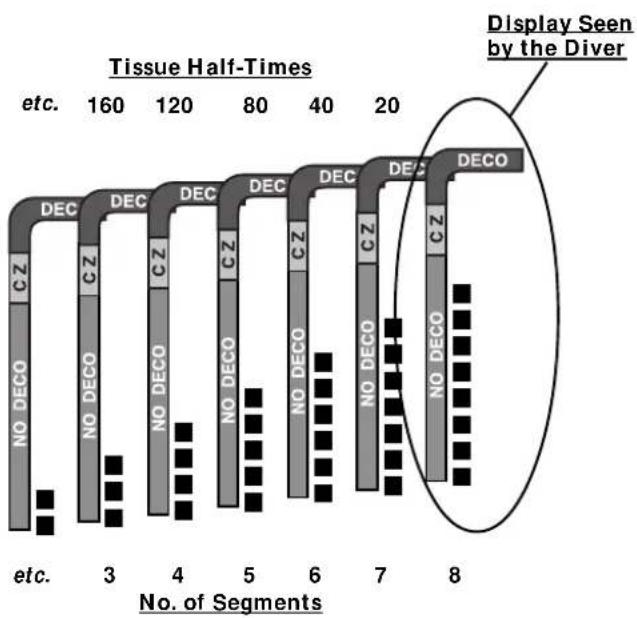
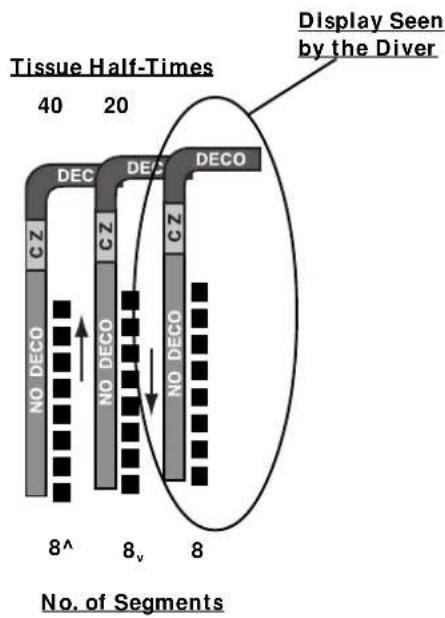
bar_stacked
| Segment Type | Value | | ------------ | ----- | | DECO | 20 | | DECO | 15 | | DECO | 10 | | DECO | 5 | | CZ | 10 | | NO DECO | 5 | | No DECO | 5 | | No DECO | 5 | | No DECO | 5 | | No DECO | 5 | | No DECO | 5 | | No DECO | 5 | | No DECO | 5 | | No DECO | 5 | | No DECO | 5 | | No DECO | 5 | | CZ | 10 | | CZ | 5 | | CZ | 5 | | CZ | 5 | | CZ | 5 | | CZ | 5 | | CZ | 5 | | CZ | 5 | | CZ | 5 | | CZ | 5 | | CZ | 5 | | CZ | 5 | | CZ | 5 |Fig. 79 - Tissue Compartment Control Fig. 80 - Tissue Compartment Control Hand-Over
OCEANIC
SPECIFICATIONS
NO DECOMPRESSION MODEL
Basis:
- Modified Haldanean Algorithm
• 12 tissue compartments
Data Base:
• Diving Science and Technology (DSAT) - Rogers/Powell
Performance:
- Tissue compartment halftimes (in mins.) Spencer's "M" values 5, 10, 20, 40, 80, 120, 160, 200, 240, 320, 400, 480
• Reciprocal subsurface elimination - 60 minute surface credit control for compartments faster than 60 minutes
- Tissue compartments tracked up to 24 hours after last dive
Decompression Capabilities:
- Decompression stop ceilings at 10, 20, 30, 40, 50, & 60 feet (3, 6, 9, 12, 15, & 18 meters)
Altitude Algorithm:
- Based on NOAA tables
Oxygen Exposure Limits:
- Based on NOAA tables
OPERATIONAL MODES
- Activation/Diagnostic
- Surface -
• Temperature/Date/Time
- FO2 Set Point
• Pre Dive Planning Sequence
• Time to Fly/Desaturate
• Dive Log (Date/Nitrogen/Oxygen)
- Set -
- Alternate (On/Off)
• Audible Alarm (On/Off) - Depth Alarm Value
• Year, Month, Day
• Hour Format (12/24)
- No Decompression Dive -
- Main display
- Secondary display
• Alternate display (Large Format)
- Decompression Dive -
- Main display
- Secondary display
• Alternate display (Large Format)
• Violation (Conditional, Delayed, and Immediate)
- Gauge
- High PO2
- High O2
-
Backlight (Oceanglo®/SmartGlo™)
-
Hour, Minute
- Sampling Rate
- Units (Imperial/Metric)
• FO2 Default (On/Off)
• External Access (EA) - download
SPECIFICATIONS (continued)
DISPLAY RANGE/RESOLUTION
| Numeric Displays: | Range: Resolution: | |
| Dive Number 0 - 9 | 1 | |
| Depth | 0 - 330 ft (0 - 99.5 m) | 1 ft (.5 m) |
| Maximum Depth | 330 ft (99.5 m) | 1 ft (.5 m) |
| FO2 Set Point | 21 - 50 % | 1 % |
| PO2 Value | .00 - 5.00 ATA | .01 ATA |
| Dive Time Remaining | :00 - 9:59 (hr:min) 1 minute | |
| Total Ascent Time | :00 - 9:59 (hr:min) 1 minute | |
| Decompression Stop Time | 00 - 99 min (per stop depth) | 1 minute |
| Elapsed Dive Time | :00 - 1:59 (hr:min) 1 minute | |
| Surface Time | :00 - 23:59 (hr:min) | 1 minute |
| Dive Log Surface Interval | :00 - 2:59 (hr:min) 1 minute | |
| Time to Fly | 23:50 - 0:00 (hr:min)* | 1 minute(* starting 10 min. after the dive) |
| Time to Desaturate | 9:59 - 0:00 (hr:min)* | 1 minute(* starting 10 min. after the dive) |
| Temperature | 0 to 99°F (-9 to 60°C) | 1° |
GRAPHIC DIVER INTERFACE
| Tissue Loading Bar Graph (TLBG): | segments |
| No Decompression zone (green) | 9 |
| No Deco Caution zone (yellow) | 2 |
| Decompression Warning zone (red) | 1 |
| Oxygen Accumulation Bar Graph (O2BG): segments | |
| Normal zone (green) | 9 |
| Caution zone (yellow) | 2 |
| Danger zone (red) | 1 |
Variable Ascent Rate Indicator (VARI):
| segments feet/min. meters/min. | |
| 0 0 - 20 0 - 6 | |
| Normal zone (green) 1 21 - 30 6.5 - 9 | |
| Caution zone (yellow) 2 31 - 40 9.5 - 12 | |
| 3 41 - 50 12.5 - 15 | |
| 4 51 - 60 15.5 - 18 | |
| Too Fast zone (red flashing) 5 61 + 18.5 + | |
Special Displays: Occurrence
• Diagnostic Display Activation
• Out of Range > 330 feet (> 99.5 meters)
• Gauge Mode Countdown Timer 22:00 - 0:00 hours (after violation)
OCEANIC
SPECIFICATIONS (continued)
• Depth ± 1% of full scale
- Timers 1 second per day
Dive Counter:
- Displays Dives #1, 2, 3, 4, 5, 6, 7, 8, 9, 0 (continues #1 to #0)
- Displays #0 for dives #10, 20, etc.
- Resets to Dive # 1, upon diving after midnight (new date)
Dive Log Mode:
• Stores 12 most recent dives in memory for viewing
• After 12 dives, adds 13th dive in memory and deletes the first dive
Altitude:
• Operational from sea level to 14,000 feet (4,267 meters) elevation
- Recalibration of depth readings from 'feet of sea water' to 'feet of fresh water' when higher than 2,000 feet (610 meters) elevation
Power:
- Battery 1 - 3.6 volt, 1/2AA TADIRAN ^ model TL-2150, .95Ah, 1.0ma, Lithium (must be 3.6 v, .95Ah, 1.0ma rating)
• Shelf life Up to 10 years - Replacement User replaceable (annual recommended)
- Life expectancy 100 dive hours (if 1 - 1 hour dive per dive day) to -300 dive hours (if 3 - 1 hour dives per dive day). Yearly replacement is recommended.
Activation:
- Manual (push button) - cannot be activated by water immersion
- Cannot be activated deeper than 4 feet (1.5 m)
- Cannot be activated at elevations higher than 14,000 feet (4,267 m)
- Needed before first dive (of an activation period).
• Automatically shuts off if no dive is made within 120 minutes after initial activation. Reactivation required. - Cannot be shut off manually.
Setting FO2:
• Automatically set for 'Air' upon activation
- Remains set for Air unless an FO2 numerical value is set
• Nitrox set points from 21 to 50 %
- If set for 21% , remains set for 21% until changed
- If set for >21% , reverts to 50% 10 minutes after the dive (however, if the FO2 Default setting is OFF, the previous value set will be retained)
ACCESSORIES
Optional items available from your Authorized Oceanic Dealer:
- Battery Kit - includes 1 battery, 1 o-ring, silicon grease
- Lens Protector - adheres to lens face, prevents scratches
- OceanLog™ for XTC-100 - PC Download Package (hardware and software program)
X TC-10 0
GLOSSARY
Air - A breathing gas that contains approximately 21% oxygen and 79% nitrogen (nature's common nitrogen - oxygen mixture).
Air Dive - A dive conducted using air (approximately 21% oxygen & 79% nitrogen) as the breathing gas.
Algorithm - A step-by-step mathematical formula designed to accomplish a particular result (i.e. Dive Time Remaining in the XTC-100).
Altitude Dive - A dive made at an elevation above sea level (2,000+ ft. / 610+ m.) where a different set of no decompression tables is used.
Ascent Rate - The speed that a diver ascends toward the surface.
Audible Alarm - A computer emitted tone that alerts the diver to potential danger.
Breathing Gas - The gaseous mixture breathed during a dive.
CZ - Abbreviation for Caution Zone.
Caution Zone - The yellow sections of the bar graphs that give a visual indication of a diver's proximity to respective limits.
Ceiling - See decompression ceiling.
Clean Dive - A dive preceded by 24 hours of no diving activity.
CNS - Abbreviation for the Central Nervous System of the body.
Competitive Dive - A dive conducted for profit or prize.
Compartment - A term applied to the hypothetical modeling of nitrogen absorption in the tissues (more accurate than the term “tissue” because dive computer models have no direct relation to human tissues).
DCS - Abbreviation for decompression sickness, i.e., "the bends".
DECO - Abbreviation for Decompression.
Decompression Ceiling - The shallowest depth a diver may reach upon ascent without risking decompression sickness.
Decompression Stop - The depth(s) at which a diver must pause during ascent to allow absorbed nitrogen to escape naturally from the tissues.
Depth Sensor - An electro-mechanical device that converts water pressure into an electrical signal, that is converted to a visual
OCEANIC
GLOSSARY (continued)
depth display.
Diagnostic Mode - The first display seen on dive computers after initial activation during which time a self-check for internal faults is performed.
Display - A visual readout of information.
Dive Log Mode - A computer display of previous dive information.
Dive Time Remaining - A display of the time before a diver must surface based on no-decompression status, or oxygen accumulation status.
Elapsed Dive Time - The total time spent underwater during a dive between 5 feet (1.5 meters) on initial descent to 3 feet (1 meter) on final ascent.
FO2 - The fraction (percent / 100) of oxygen (O2) in the breathing gas mixture.
Graphic Diver Interface™ - A feature of Oceanic dive computers. Easily understandable color coded bar graphs that indicate diver status; green = normal, yellow = caution, red = danger.
Icon - a small pictorial representation of an operational mode
LCD - Abbreviation for liquid crystal display, an easily viewed low voltage display usually found on dive computers
Maximum Depth - The deepest depth attained during a dive.
Mode - A specific set of functions in a dive computer.
Multi-level Dive - A type of dive profile where the diver spends various times at different depths (opposite of a “Square Wave” dive profile).
Nitrox - A nitrogen-oxygen breathing gas mixture that contains a higher fraction of oxygen (22 to 50 %) than air.
Nitrox Dive - A dive conducted using nitrox as the breathing gas.
No Deco - Abbreviation for No Decompression.
No Deco Time Remaining - The amount of dive time remaining based on no-decompression status.
No Decompression - Any part of a dive where the diver can surface without requiring a decompression stop.
O2 Bar Graph - A visual representation of oxygen accumulation on a dive computer display.
Oceanglo® - An Oceanic name for an instrument backlight feature.
X TC-10 0
GLOSSARY (continued)
OceanLog™ - An Oceanic name for a PC interface hardware/software package.
OTU - Abbreviation for oxygen tolerance unit. A Hamilton's Repex method term for oxygen dose.
Out of Range - The point at which a dive computer can no longer supply correct dive information.
Oxygen Tolerance - Dose or exposure to the physiological affects of elevated levels of oxygen.
Oxygen Toxicity - The adverse physiological affects of exposure to elevated levels of oxygen.
Partial Pressure - The proportion of the total pressure contributed by a single gas in a mixture of gases.
PDPS - Abbreviation for Pre Dive Planning Sequence
PO2 - Abbreviation of Partial Pressure of Oxygen (the proportion of total pressure of a gas mixture contributed by oxygen)
Pre Dive Planning Sequence™ - A display of available dive times at 10 foot. (3 meter) intervals from 30 to 160 feet. (9 to 48 meters) used when dive planning.
Repetitive Dive - Any dive that takes place within 12 hours of a previous dive.
Safety Stop - A depth at which a diver may choose, but is not required, to pause during ascent to allow absorbed nitrogen to escape naturally from the tissues.
Smart Glo™ - An Oceanic name for an instrument backlight feature sensitive to light intensity.
Square Wave Dive - A type of dive profile where the entire dive is spent at one depth between descent and ascent.
Tissue - See Compartment.
Tissue Compartment - See Compartment.
Tissue Loading Bar Graph™ - A graphic display of simulated nitrogen absorption on Oceanic dive computers.
TLBG - Abbreviation for Tissue Loading Bar Graph.
Transducer - An electro-mechanical device in a dive computer that acts as a depth or pressure sensor.
Transition Period - The first 10 minutes of surface time after ascending above 3 feet (1 meter) from a dive.
VARI - Abbreviation for Variable Ascent Rate Indicator.
Variable Ascent Rate Indicator ^™ - A display on the dive computer that shows ascent rate as a bar graph alongside a color-coded indicator (similar to a speedometer).
OCEANIC
THE CODE OF THE RESPONSIBLE DIVER
AS A RESPONSIBLE DIVER I UNDERSTAND AND ASSUME THE RISKS I MAY ENCOUNTER WHILE DIVING.
RESPONSIBLE DIVING BEGINS WITH
• DIVING WITHIN THE LIMITS OF MY ABILITY AND TRAINING
- EVALUATING THE CONDITIONS BEFORE EVERY DIVE AND MAKING SURE THEY FIT MY PERSONAL CAPABILITIES
- BEING FAMILIAR WITH AND CHECKING MY EQUIPMENT BEFORE AND DURING EVERY DIVE
- KNOWING MY BUDDY'S ABILITY LEVEL AS WELL AS MY OWN
• ACCEPTING THE RESPONSIBILITY FOR MY OWN SAFETY ON EVERY DIVE
XTC-100 SERVICE RECORD
Serial Number
Date of purchase ____
Purchased from ____
Below to be filled in by an Authorized Oceanic Dealer:
| Date | Service Performed | Dealer / | Technician |

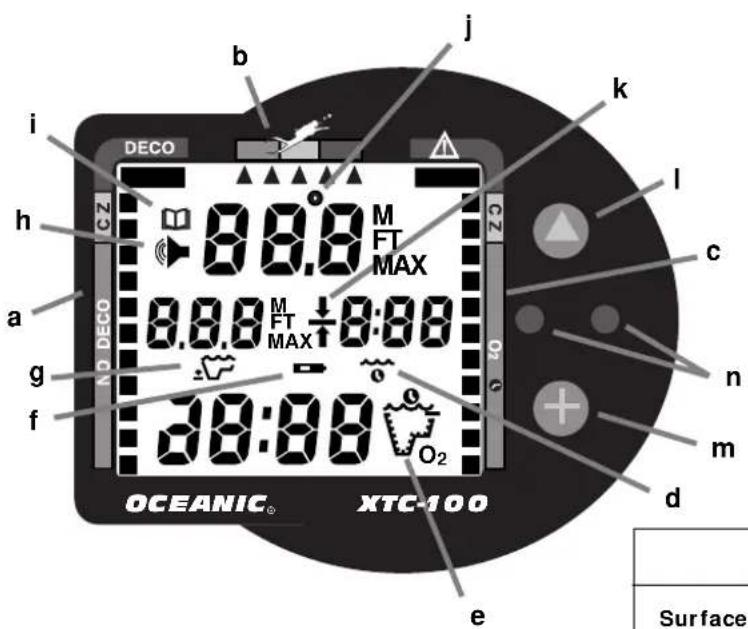
Graphic Interface Legend
XTC-100
a. Tissue Loading Bar Graph
b. Variable Ascent Rate Indicator
c. Oxygen Loading Bar Graph
d. Icon - Elapsed Dive Time
e. Icon - Operating Mode (detail A)
f. Icon - Low Battery
g. Icon - Maximum Depth
h. Icon - Audible Alarm
i. Icon - Log Mode
j. Icon - Temperature
k. Icon - Deco Stop Ceiling
I. Control Button - Advance
m. Control Button - Select
n. Sensors - Smart Glo™/ Download
| Detail 'A' - Operating Mode Icons | ||||
Surface Plan No Deco Deco |  |  |  | O2 Time O2 |
OCEANIC USA
2002 Davis Street
San Leandro, Ca. 94577
USA
Phone: 510/562-0500
Fax: 510/569-5404
Web: http://www.oceanicusa.com
© 2002 Design 1999
Green Button Model
Doc. No. 12-2188 (11/1/99)
- RESPONSIBLE COMPUTER DIVING
- WARNINGS and SAFETY RECOMMENDATIONS
- OCEANIC
- LIMITED TWO-YEAR WARRANTY
- COPYRIGHT NOTICE
- TRADEMARK NOTICE
- PATENT NOTICE
- DECOMPRESSION MODEL
- CONTENTS
- FEATURES and DISPLAYS 1
- ACTIVATION and SETUP 15
- CONTENTS (CONTINUED)
- PRE DIVE and DIVE MODES 27
- POST DIVE MODES 39
- HANDLING THE EXTREMES 49
- CARE and MAINTENANCE 65
- REFERENCE 75
- FEATURES
- a n d
- DISPLAYS
- INTRODUCTION
- INTERACTIVE CONTROL CONSOLE
- INFORMATIONAL DISPLAYS
- UNIVERSAL GRAPHIC DIVER INTERFACE™
- Tissue Loading Bar Graph™
- Oxygen Accumulation (O2) Bar Graph
- NOTE: Displays associated with oxygen and the O2 bar graph will only appear if FO2 has been set at a value other than 'Air'.
- Variable Ascent Rate Indicator™ (VARI)
- DIVE TIME REMAINING
- No Decompression Dive Time Remaining
- Oxygen Accumulation Time Remaining
- ALPHA/NUMERIC DISPLAYS
- Depth Displays
- Time Displays
- Temperature Displays
- AUDIBLE ALARM
- BACKLIGHT FEATURE
- ACTIVATION
- SETUP
- SURFACE MODE
- MAIN MODE MENU
- ENTERING SETTINGS
- TO SET: ALTERNATE DISPLAY ON/OFF
- TO SET: AUDIBLE ALARM ON/OFF
- TO SET: DEPTH ALARM SET POINT
- TO SET: DATE/HOUR FORMAT/TIME
- TO SET: SAMPLING RATE
- TO SET: UNITS OF MEASURE
- TO SET: FO2 50% DEFAULT (described on page 29) ON/OFF
- EA MODE
- ⚠️ WARNINGS and SAFETY RECOMMENDATIONS
- SUMMARY OF ACCESS TO SET MODES
- SET MODE TO ACCESS TO VIEW TO SAVE
- PRE DIVE
- DIVE MODES
- OPERATIONAL MODES
- TEMPERATURE/DATE/TIME MODE
- FO2 MODE
- FO2 50% Default
- FO2 Set for an Air Dive
- Setting FO2
- FO2 Set for a Nitrox Dive
- PRE DIVE PLANNING SEQUENCE™
- Prior to a Repetitive Nitrox Dive
- NO DECOMPRESSION DIVE MODE
- Main Display (data shown depends on Alternate ON/OFF setting)
- Secondary Display (access if Alternate is set ON or OFF)
- Alternate Display (access only if Alternate is set ON)
- DECOMPRESSION DIVE MODE
- VIOLATION MODES
- GAUGE MODE
- ASCENDING TO THE SURFACE
- ALTITUDE DIVING
- POST
- DIVE
- MODES
- FIRST 2 HOURS AFTER A DIVE
- TRANSITION PERIOD
- To view the Temperature/Date/Time (Fig. 44):
- AFTER THE TRANSITION PERIOD
- To view the Temperature/Date/Time:
- To access FO2 Mode:
- To access Pre Dive Planning Sequence™:
- To access Time to Fly and Desaturate Countdowns:
- LOG MODE
- To access the Log Mode:
- To view the second screen for that dive (Nitrogen Log- Fig. 53):
- To view the third screen for that dive (Oxygen Log - Fig. 54):
- AFTER THE FIRST 2 HOURS
- To access other modes or enter settings:
- DOWNLOADING DATA TO PC
- To access the External Access (EA) Mode:
- WARNING and SAFETY RECOMMENDATION
- SUMMARY OF ACCESS TO POST DIVE MODES
- HANDLING
- THE
- EXTREMES
- AVOIDING AND MANAGING DECOMPRESSION
- Main Display (data shown is the same if Alternate is set ON or OFF)
- MANAGING DECOMPRESSION STOPS
- CONDITIONAL VIOLATION MODE
- DELAYED VIOLATION MODE
- Remaining 'more than 5 minutes' above the Required Stop Depth.
- Your necessary Decompression requires a Ceiling Stop Depth 'between' 60 feet (18 meters) and 70 feet (21 meters).
- You exceed the maximum operating depth (330 feet/99.5 meters). The Audible Alarm will beep once per second\* when you descend deeper than the Depth Alarm set point that you selected (set).
- IMMEDIATE VIOLATION MODE
- PERMANENT VIOLATION
- OXYGEN EXPOSURE
- PARTIAL PRESSURE OF OXYGEN
- HIGH PO2 DIVE MODE
- HIGH OXYGEN ACCUMULATION
- UNEXPECTED LOSS OF DISPLAYED INFORMATION
- CARE AND CLEANING
- AFTER THE DIVE
- ANNUAL INSPECTIONS AND SERVICE
- NOTE: Annual inspections are only performed by Authorized Oceanic Dealers and are not performed by the factory.
- TO OBTAIN SERVICE
- OCEANIC USA
- Oceanic Europe
- Oceanic SW, Ltd
- Oceanic Germany
- Oceanic International (Pacific)
- Oceanic Diving Australia Pty. Ltd
- Oceanic Asia-Pacific Pte. Ltd
- Oceanic Japan
- BATTERY LIFE
- LOW BATTERY CONDITION
- BATTERY REPLACEMENT
- BATTERY REMOVAL
- Moisture in the Battery Compartment
- BATTERY INSTALLATION
- INSPECTION
- REFERENCE
- NO DECOMPRESSION LIMITS
- OXYGEN EXPOSURE LIMITS
- MULTIPLE TISSUE TRACKING
- SPECIFICATIONS
- NO DECOMPRESSION MODEL
- Basis:
- Data Base:
- Performance:
- Decompression Capabilities:
- Altitude Algorithm:
- Oxygen Exposure Limits:
- SPECIFICATIONS (continued)
- Special Displays: Occurrence
- Dive Counter:
- Dive Log Mode:
- Altitude:
- Power:
- Activation:
- Setting FO2:
- ACCESSORIES
- GLOSSARY
- GLOSSARY (continued)
- THE CODE OF THE RESPONSIBLE DIVER
- RESPONSIBLE DIVING BEGINS WITH
- XTC-100 SERVICE RECORD
Brand : OCEANIC
Model : XTC-100
Category : Dive computer