
A7E32ET#ABB - Computer Accessories HP - Free user manual and instructions
Find the device manual for free A7E32ET#ABB HP in PDF.


| Product Type | HP 2012 90W Docking Station |
| Model Number | A7E32ET#ABB |
| Dimensions (H x W x D) | 2.6 x 10.24 x 6.44 in (6.60 x 26.00 x 16.36 cm) |
| Weight | 2.36 lb (1.07 kg) |
| Power Supply Input | 100–240 V, 2.5 A, 50–60 Hz |
| Power Adapter | HP 90W Smart AC Adapter with integrated surge protection |
| USB Ports | 4x USB 3.0 (3 Always-On, 1 Powered) |
| Video Outputs | 1x DVI-D, 1x DisplayPort 1.2, 1x VGA |
| Audio Connectors | Line-in jack, audio-out (headphone) jack |
| Networking | RJ-45 (network) jack |
| Legacy Ports | Mouse (PS/2), keyboard (PS/2), serial, parallel |
| Security | Integrated cable lock slot (supports HP Docking Station Cable Lock and industry standard notebook lock); security cable tab |
| Docking Mechanism | 2 docking posts, visual alignment indicator, eject button, docking light |
| Operating Temperature | 50° to 95°F (10° to 35°C) |
| Non-Operating Temperature | 14° to 140°F (-10° to 60°C) |
| Relative Humidity (Operating) | 10% to 90% (non-condensing) |
| Maximum Altitude (Operating) | 0 to 10,000 ft (0 to 3,048 m) |
| Warranty | One-year limited warranty; 24/7 phone and online support |
| Care and Cleaning | Clean with a soft, dry cloth. Do not use liquid or aerosol cleaners. |
| Reparability | No user-serviceable parts inside. Contact HP support for service. |
Frequently Asked Questions - A7E32ET#ABB HP
User questions about A7E32ET#ABB HP
0 question about this device. Answer the ones you know or ask your own.
Ask a new question about this device
Download the instructions for your Computer Accessories in PDF format for free! Find your manual A7E32ET#ABB - HP and take your electronic device back in hand. On this page are published all the documents necessary for the use of your device. A7E32ET#ABB by HP.
USER MANUAL A7E32ET#ABB HP
HP docking solutions include a range of convenient expansion solutions that easily connect to your HP Business Notebook and enable connectivity to a range of peripherals. Create an ideal desktop computing environment using comfort-focused docking stations and stands that provide port replication, cable management, and future expandability.
These docking stations feature the proprietary HP Docking Station Cable Lock, in addition to an industry standard notebook lock slot. The HP Docking Station Cable Lock (AU656AA) gives you three locking options: lock the docking station only (which also prevents access to the advanced docking station's drive bay); lock both the docking station and the notebook; or physically secure the docking station to a stationary object using the security cable tab.
NOTE: Check the compatibility sections below for a list of products supported by these docking stations. Due to technology changes, some notebook models may be supported by different docking station solutions. Please also refer to your notebook's QuickSpecs for individual compatible product information. All docking stations only support single-link DVI-D.
Models
| HP 2012 90W Docking Station | A7E32AA |
| HP 2012 230W Docking Station | A7E34AA |
| HP 2012 120W Advanced Docking Station | A7E36AA |
| HP 2012 230W Advanced Docking Station | A7E38AA |
| HP Docking Station Cable Lock | AU656AA |
Compatibility
HP 2012 Docking Stations and HP Advanced Docking Stations are compatible with HP ProBook b-Series Notebook PCs, HP EliteBook 8xxx p Series Notebook PCs, and HP EliteBook 8xxx w Series Mobile Workstations.
The HP 2012 230W Docking Station and Advanced Docking Station are compatible with the HP EliteBook 8xxx p Series Notebook PCs and w Series Mobile Workstations. The HP Docking Station Cable Lock (AU656AA#XXX) is compatible with the docking stations.
NOTE: Some notebook models do not support these docking features. Docking capability for these models is provided by the HP 3005pr USB 3.0 Port Replicator (H1L08AA) and HP 2005pr USB 2.0 Port Replicator (H1L07AA). NOTE: Not all models are available in all regions.
Service and support
One-year limited warranty. Additional support is available 24 hours a day, seven days a week by phone as well as online support forms. NOTE: Certain restrictions and exclusions apply. Consult the HP Customer Support Center for details.
HP 2012 90W and 230W Docking Stations
HP 2012 90W Docking Station
HP 2012 230W Docking Station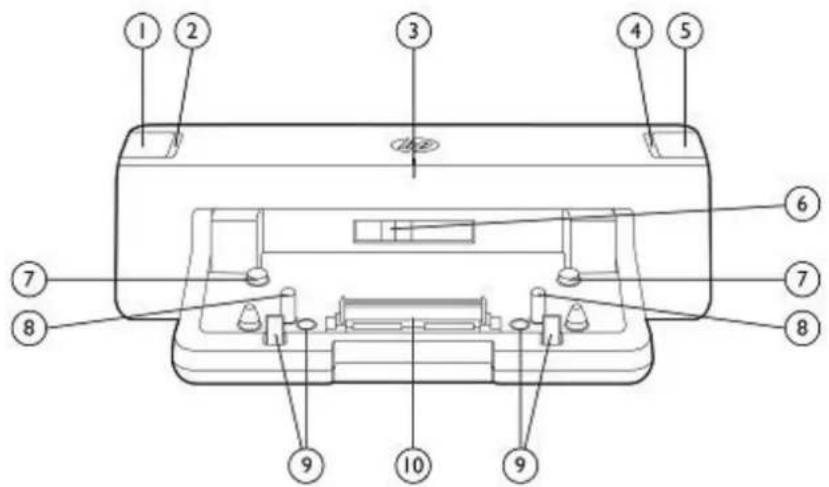
- Power button
- Power light
- Visual alignment indicator
- Docking light
- Notebook eject button
- Battery size lever
- Guide pads
- Docking posts
- Notebook eject mechanisms
- Docking connector
HP 2012 90W Docking Station Left-Side Components
HP 2012 230W Docking Station Left-Side Components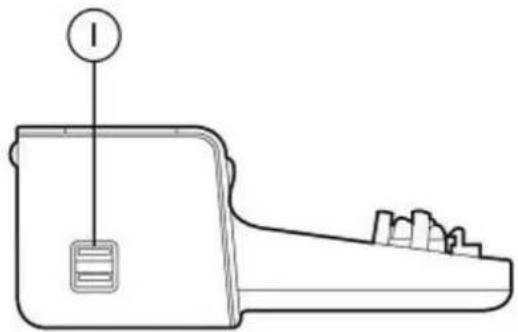
- Always-On USB 3.0 ports
HP 2012 90W Docking Station Right-Side Components HP 2012 230W Docking Station Right-Side Components
HP 2012 90W and 230W Docking Stations
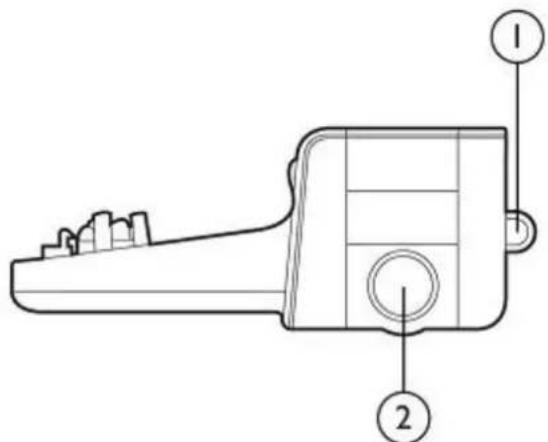
- Security cable tab
- Integrated cable lock slot (to connect HP Docking Station Cable Lock or industry standard notebook lock)
HP 2012 90W Docking Station Rear Components
HP 2012 230W Docking Station Rear Components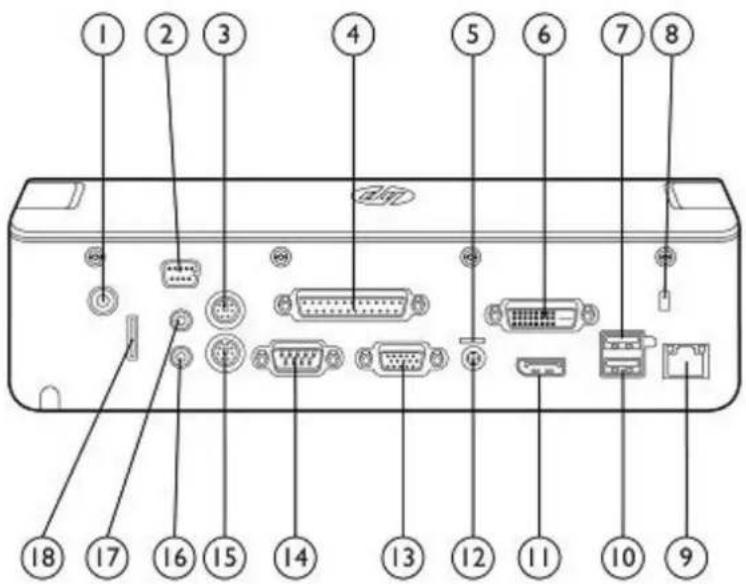
- HP Docking Station Cable Lock slot
- Monitor stand port
- Mouse connector
- Parallel port
- Power light
- Digital video (DVI-D) port
- Powered USB 3.0 port
- Security cable slot
- RJ-45 (network) jack
- Always-On USB 3.0 port
- DisplayPort connector
- Power connector
- External monitor (VGA) port
- Serial port
- Keyboard connector
- Line-In jack
- Audio-out (headphone) jack
- Security cable tab
HP 2012 90W and 230W Docking Stations
Key Benefits
Desktop convenience with full port replication capability in a space-saving design.
- Conveniently charges your notebook while it is in the docking station.
- Easy docking system provides port replication and cable management in one product.
- Four USB 3.0 ports allow you to connect to legacy and evolving peripherals and be more productive.
- Optional integrated HP Docking Station Cable Lock allows you to secure your docking station and notebook with one lock. Also supports an industry standard notebook lock.
AC adapter included
The HP 2012 90W Docking Station gives you an energy-efficient 90W Smart AC adapter for your Notebook PC. The HP 2012 230W Docking Station gives you an energy-efficient 230W Smart AC adapter for your Notebook PC or Mobile Workstation. These Smart Adapters help guard against power fluctuations with integrated surge protection.
Standard Features
| 2 docking posts | Align and secure the computer for proper connection to the docking station |
| Docking connector | Connects the computer to the docking station |
| Visual alignment indicator | Helps you align the computer with the docking station for fast and easy docking |
| Power button and power light | Power indicators |
| Eject button and docking light | Ejects computer from docking station. Docking light is turned on when the computer is properly connected. |
| USB ports | 4 USB 3.0 ports (3 Always-On, 1 powered) |
| Always-On USB port | Allows you to charge USB powered devices while the computer is in standby mode, powered off or not in the docking station. |
| Powered USB port | Allows you to connect to select powered USB and regular USB devices. |
| Integrated cable lock slot | Supports the HP Docking Station Cable Lock with a drastically simplified locking mechanism. Gives you two security options: lock the docking station only (which also prevents access to the Advanced Docking Station drive bay); or lock both the docking station and your notebook for additional security.Also supports an industry standard notebook lock. |
| Audio and Network connectors | Audio and Ethernet ports, Line-in jack, headphone jack; does not support mic out |
| Legacy connectors | Mouse, keyboard, serial and parallel connectors |
| Other connectors | 1 Monitor Stand, 1 DisplayPort 1.2, 1 VGA, and 1 DVI-D connector. AC adapter connector with light |
| Smart Adapter | HP 90W Smart AC Adapter or HP 230W Smart AC Adapter |
NOTE: Your computer, docking station, and monitor must all support USB 3.0 and DisplayPort 1.2 to benefit from the advanced speeds or features that these technologies provide. If one of the devices does not support these technologies, you will still have USB 2.0 and DisplayPort 1.1 functionality.
HP 2012 90W and 230W Docking Stations
Specifications
| Dimensions(H x W x D) | 2.6 x 10.24 x 6.44 in (6.60 x 26.00 x 16.36 cm) | |
| Weight | 2.36 lbs (1.07 kg) | |
| Power Supply (input) | Rated Voltage | 100 to 240 V |
| Rated Current | 2.5A rms | |
| Line Frequency | 50 - 60 Hz | |
| Temperature | Operating | 50° to 95° F (10° to 35°C) |
| Non-operating | 14° to 140° F (-10° to 60°C) | |
| Relative Humidity | Operating/Non-condensing | 10% to 90% relative humidity |
| Non-operating | 5% to 90% relative humidity, 101.6° F (38.7°C) maximum wet bulb temperature | |
| Maximum Altitude | Operating | 0 to 10,000 ft (0 to 3,048 m) |
| Non-operating | 0 to 30,000 ft (0 to 9,144 m) | |
| Shock | Operating | 10 G, 11 ms, half-sine |
| Non-operating | 60 G, 11 ms, half-sine | |
| Vibration | Operating | 0.5 G zero-to-peak, 10 to 500 Hz, 0.25 oct/min sweep rate |
| Non-operating | 1 G, zero-to-peak, 10 to 500 Hz, 0.5 oct/min sweep rate | |
| Option Kit Contents | HP 2012 90W Docking Station, AC power adapter, documentation | |
| HP 2012 230W Docking Station, AC power adapter, documentation | ||
HP 2012 120W and 230W Advanced Docking Stations
HP 2012 120W Advanced Docking Station
HP 2012 230W Advanced Docking Station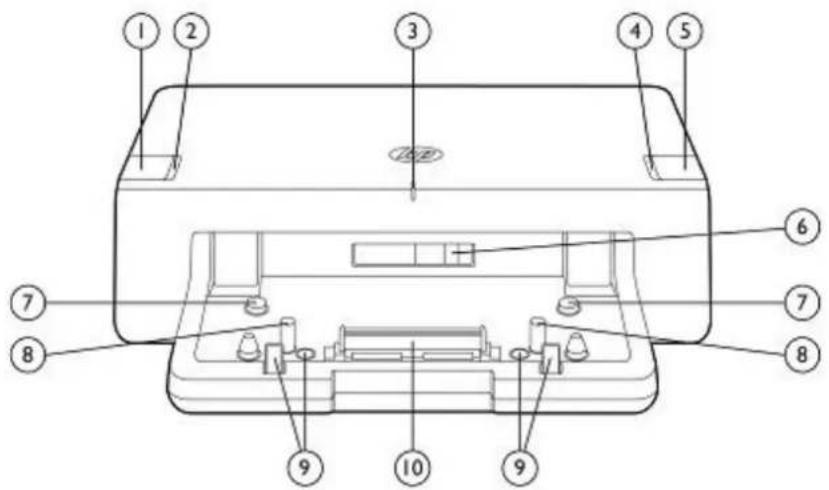
- Power button
- Power light
- Visual alignment indicator
- Docking light
- Notebook eject button
- Battery size lever
- Guide pads
- Docking posts
- Notebook eject mechanisms
- Docking connector
HP 2012 120W Advanced Docking Station Left-Side Components
HP 2012 230W Advanced Docking Station Left-Side Components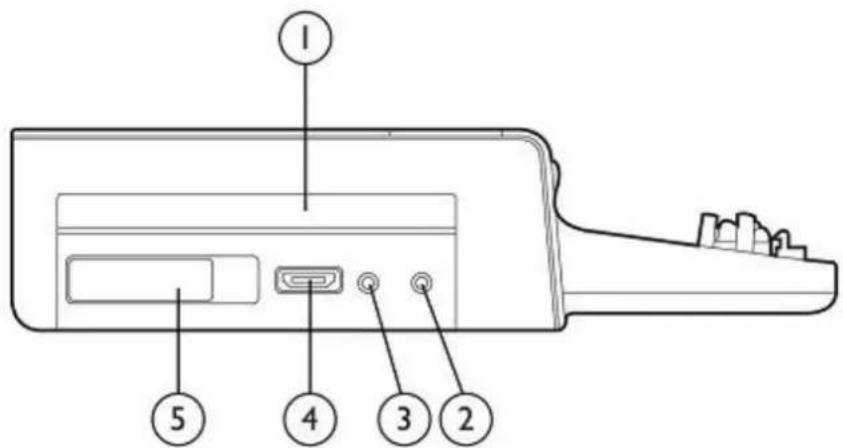
- SATA upgrade bay
- Audio-out (headphone) jack
- Line-in jack
- eSATA adapter
- SATA upgrade bay release lever
HP 2012 120W Advanced Docking Station Right-Side Components HP 2012 230W Advanced Docking Station Right-Side Components
HP 2012 120W and 230W Advanced Docking Stations
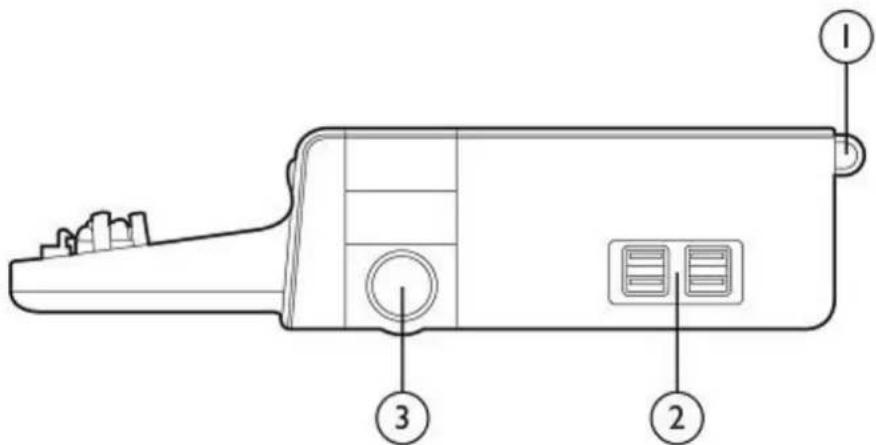
- Security cable slot
- (4) USB 3.0 ports
- Integrated cable lock slot (to connect HP Docking Station Cable Lock or industry standard notebook lock)
HP 2012 120W Advanced Docking Station Rear Components
HP 2012 230W Advanced Docking Station Rear Components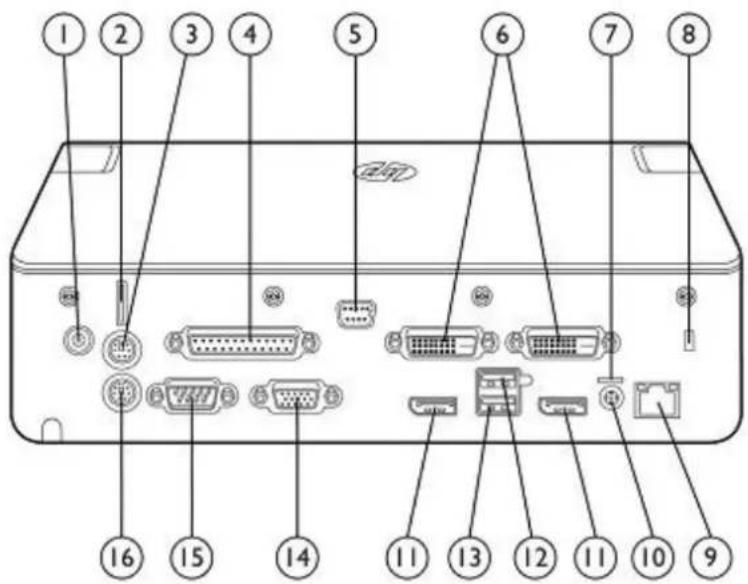
- HP Docking Station Cable Lock slot
- Security cable tab
- Mouse connector
- Parallel port
- Monitor stand port
- Digital video (DVI-D) ports
- Power light
- Security cable slot
- RJ-45 (network) jack
- Power connector
- DisplayPort connector
- Powered USB 2.0 port
- Always-On USB 2.0 port
- External monitor (VGA) port
- Serial port
- Keyboard connector
HP 2012 120W and 230W Advanced Docking Stations
Key Benefits
Robust desktop replacement solution for your mobile office with advanced features for future expansion.
- Conveniently charges your notebook while it is in the docking station.
- Easy docking system provides port replication and cable management, plus expandability through an integrated SATA upgrade bay- all in one product.
- Four USB 3.0 ports and two USB 2.0 ports allow you to connect to legacy and evolving peripherals and be more productive.
- Optional integrated HP Docking Station Cable Lock allows you to secure your docking station, notebook and integrated SATA drive with one lock. Also supports an industry standard notebook lock.
AC adapter included
The HP 2012 120W Advanced Docking Station gives you an energy-efficient 120W Smart AC adapter for your Notebook PC. The HP 2012 230W Advanced Docking Station gives you an energy-efficient 230W Smart AC adapter for your Notebook PC or Mobile Workstation. These Smart adapters guard against power fluctuations with integrated surge protection.
Standard Features
| 2 docking posts | Align and secure the computer for proper connection to the docking station |
| Docking connector | Connects the computer to the docking station |
| Visual alignment indicator | Helps you align the computer with the docking station for fast and easy docking |
| Power button and power light | Power indicators |
| Eject button and docking light | Ejects computer from docking station. Dock light is turned on when the computer is properly connected. |
| USB ports | 4 USB 3.0 ports (Always On), 2 USB 2.0 ports (1 Always-On, 1 powered) |
| Always-On USB port | Allows you to charge USB powered devices while the computer is in standby mode, powered off or not in the docking station. |
| Powered USB port | Allows you to connect to select powered USB and regular USB devices |
| Integrated cable lock slot | Supports the HP Docking Station Cable Lock, which gives you two security options: lock the docking station only (which also prevents access to the Advanced Docking Station drive bay); or lock both the docking station and your notebook for additional security.Also supports an industry standard notebook lock. |
| eSATA port | Enable ultra-fast (up to 3Gb/s) external data connectivity with any customer supplied eSATA device such as an eSATA Hard Drive. |
| Audio and Network connectors | Audio and Ethernet ports, line-in jack, headphone jack; does not support mic out |
| Legacy connectors | Mouse, keyboard, serial and parallel connectors |
| Other connectors | 1 Monitor Stand, 2 DisplayPort 1.2, 1 VGA, and 2 DVI-D connectors. AC adapter connector with lightNOTE:A maximum of three displays can be supported through the HP 2012 120W Advanced Docking Station (A7E36AA) and HP 2012 230W Advanced Docking Station (A7E38AA). The DisplayPort and DVI connectors are shared, so you may choose one DisplayPort or DVI plus a second DisplayPort, or DVI plus the VGA connector. Therefore, the choices are DP+DP+VGA, DP+DVI+VGA, DVI+DP+VGA or DVI+DVI+VGA. |
| Upgrade bay | Supports all HP upgrade bay hard drives and optical drives for additional local storage capabilities. |
| Smart Adapter | HP 120W or HP 230W Smart AC Adapter |
NOTE: Your computer, docking station, and monitor must all support USB 3.0 and DisplayPort 1.2 to benefit from the advanced speeds or features that these technologies provide. If one of the devices does not support these technologies, you will still have USB 2.0 and DisplayPort 1.1 functionality.
HP 2012 120W and 230W Advanced Docking Stations
Specifications
| Dimensions(H x W x D) | 2.60 x 10.65 x 10.24 in (6.6 x 27.05 x 26.0 cm) | |
| Weight | 3.61 lbs (1.637 kg) | |
| Power Supply (input) | Rated Voltage | 100 to 240 V |
| Rated Current | 2.5A rms | |
| Line Frequency | 50 - 60 Hz | |
| Temperature | Operating | 50° to 95° F (10° to 35°C) |
| Non-operating | 14° to 140° F (-10° to 60°C) | |
| Relative Humidity | Non-operating | 5% to 90% relative humidity, 101.6° F (38.7°C) maximum wet bulb temperature |
| Maximum Altitude | Operating | 0 to 10,000 ft (0 to 3,048 m) |
| Non-operating | 0 to 30,000 ft (0 to 9,144 m) | |
| Shock | Operating | 10 G, 11 ms, half-sine |
| Non-operating | 60 G, 11 ms, half-sine | |
| Vibration | Operating | 0.5 G zero-to-peak, 10 to 500 Hz, 0.25 oct/min sweep rate |
| Non-operating | 1 G, zero-to-peak, 10 to 500 Hz, 0.5 oct/min sweep rate | |
| Option Kit Contents | HP 2012 120W Advanced Docking Station, AC power adapter, documentation | |
| HP 2012 230W Advanced Docking Station, AC power adapter, documentation | ||
Related Options
| HP Docking Station Cable Lock | AU656AA#XXX |
| HP Upgrade Bay 500 GB 7200 rpm Hard Drive (works with pre-2011 HP Business Notebooks) | AU097AA |
| HP 2011 BNB Notebook Upgrade Bay DL DVD+/-RW | LZ835AA |
| HP 500-GB 7200rpm Primary SATA Hard Drive | AU098AA |
| HP USB Keyboard/Mouse Bundle* | RC465AA |
| HP Adjustable Display Stand | AW663AA |
| HP LCD Monitor Stand | QM196AA |
*Availability may vary by region. Check your notebook platform QuickSpecs for specific compatibility.
© Copyright 2012 Hewlett-Packard Development Company, L.P.
The information contained herein is subject to change without notice.
The only warranties for HP products and services are set forth in the express warranty statements accompanying such products and services. Nothing herein should be construed as constituting an additional warranty. HP shall not be liable for technical or editorial errors or omissions contained herein.
Brand : HP
Model : A7E32ET#ABB
Category : Computer Accessories