MCM600 - Microwaves M-SYSTEM - Free user manual and instructions
Find the device manual for free MCM600 M-SYSTEM in PDF.


| Product Type | Microwave Oven with Grill and Convection |
| Brand | M-System |
| Model | MCM600 |
| Power Supply | 230 V ~, 50 Hz |
| Microwave Power Consumption | 1550 W |
| Microwave Output Power | 1000 W (IEC 705) |
| Microwave Frequency | 2450 MHz |
| Grill Power Consumption | 1400 W |
| Convection Power Consumption | 1450 W (Temporary Max: 2800 W) |
| Dimensions (W x H x D) | 526 x 345 x 496 mm |
| Oven Chamber Dimensions (W x H x D) | 335 x 260 x 335 mm |
| Weight | 23 kg |
| Functions | Microwave, Grill, Convection, Combination, Defrost (Time/Weight), Programmed Cooking, Speedy Cooking |
| Control Type | Electronic dial and buttons with LED display |
| Turntable | Yes (rotating base and turntable tray) |
| Accessories Included | Rotating base, turntable tray, low metal rack, high metal rack |
| Child Lock | Yes (hold Stop/Clear 3 seconds) |
| Safety Features | Door safety locks, seal surfaces, automatic shut-off when door opened |
| Oven Chamber Material | Metal with splash guard |
| Cleaning | Use mild detergent; avoid abrasives; clean seal surfaces regularly |
| Repair | No user-serviceable parts; contact qualified technician |
| Error Codes | E--2 (overheat), E--3 (temperature sensor fault) |
| Fuse Rating (UK plug) | 13 A |
| Cable Length | Approx. 1.2 m |
Frequently Asked Questions - MCM600 M-SYSTEM
User questions about MCM600 M-SYSTEM
0 question about this device. Answer the ones you know or ask your own.
Ask a new question about this device
Download the instructions for your Microwaves in PDF format for free! Find your manual MCM600 - M-SYSTEM and take your electronic device back in hand. On this page are published all the documents necessary for the use of your device. MCM600 by M-SYSTEM.
USER MANUAL MCM600 M-SYSTEM
Microwave Oven with Grill and Convection
Instruction manual MCM600
Things you SHOULD KNOW!
natural_image
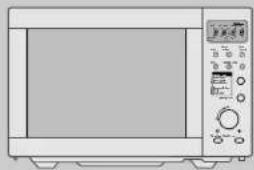
Front view of a microwave oven with control panel and door (no visible text or symbols)
WARNING
When heating liquids, e.g. soups, sauces and beverages in your microwave oven, overheating the liquid beyond boiling point can occur without evidence of bubbling. This could result in a sudden boil over of the hot liquid. To prevent this possibility the following steps should be taken:
- Avoid using straight sided containers with narrow necks.
Do not overheat. - Stir the liquid before placing the container in the oven and again halfway through the heating time.
After heating, allow to stand in the oven for a short time, stir or shake them again carefully and check the temperature of them before consumption to avoid burns (especially, contents of feeding bottles and baby food jars).
When you unpack your microwave oven from its box, please check it immediately for damage. If the door is damaged or bent, if there are dents inside the oven etc., get in touch with your retail outlet immediately.
Using a microwave oven safely
- WARNING: If the door or door seals are damaged, the oven must not be operated until it has been repaired by a trained person.
WARNING: It is hazardous for anyone other than a trained person to carry out any service or repair operation which involves the removal of any cover which gives protection against exposure to microwave energy. - WARNING: Liquids or other foods must not be heated in sealed containers since they are liable to explode.
♦WARNING: Only allow children to use the oven without supervision when adequate instructions have been given so that the child is able to use the oven in a safe way and understands the hazards of improper use.
◆This microwave oven contains no user-serviceable components. Any adjustments or repairs must be performed by a qualified technician.
◆Never use the oven with the door open. There is the risk of being exposed to dangerous microwave energy. Never manipulate or tamper with the safety locks and the hinges of the door.
◆Keep the seals and seal surfaces clean and free of contamination like food remains and cleaner residue.
◆Microwave heating of beverages can result in delayed eruptive boiling, therefore care has to be taken when handling the container.
◆Use the microwave oven for cooking purposes only.
Do not use it to dry animals, clothing, paper or other objects or for sterilisation or as a storage space for books, cooking utensils etc.
◆Utensils should be checked to ensure that they are suitable for use in microwave ovens. - When heating food in plastic or paper containers, check the oven frequently due to the possibility of ignition.
◆If smoke is observed, switch off or unplug the appliance and keep the door closed in order to stifle any flames.
The right place for your microwave oven
◆The microwave oven should stand on a flat, stable surface. This appliance is designed for standing only.
◆The area immediately around the oven should be free to allow the circulation of fresh air for cooling.
◆Do not place the microwave oven near a radio or television set etc. This might cause interference.
◆Never place the oven where it is exposed to convection, steam or humidity.
◆The minimum height of free space necessary above top surface of the oven is 150mm.
Things you
SHOULD KNOW!
Before using the oven please read these instructions carefully, they contain safety notes and useful tips.
Contents
Microwaves and oven
Cooking safely with microwaves - The oven 2 - 3
Accessories 4 - 5
Using the oven
The controls - Setting the clock - Child lock 6 - 7
Cooking with microwaves
Easy cooking - Speedy cooking - Programmed cooking....8 - 9
Cooking with convection
Easy baking 10
Cooking with convection&combi
Combination microwaves and Convection 11
Defrosting and grilling
Defrosting by time - Defrosting by weight - Easy grilling with top heaters.....12 - 13
Appendix
Tips and guidelines - Error messages 14 - 15
Before calling technical service 16
Microwave suitable dishes and utensils - Care and maintenance - Power Supply.....17
Technical data - Electrical connection....18
Moulded plugs 19
Connecting up your microwave oven
◆The oven requires a mains electrical connection of 230 V \~ / 50 Hz with a 15 Amp. fuse.
◆Only insert the plug into properly installed electrical sockets. If in doubt contact an electrician.
◆Faulty connections can start fires and create other risks and prevent the oven from working correctly. DAEWOO is not liable for any damage due to faulty connection.
◆A defective power cable must be replaced by a qualified technician with an new special replacement cable from DAEWOO.
Prior to use! The grill elements of your oven have been covered by a coating in order to protect during transporting and storage. To remove the coating heat the elements about 5 minutes (bad odour):
Place a bowl suitable for microwaves, not too small, filled with 0,2 l water or more into the oven chamber. See chapter "Easy grilling" and start grilling with the time set to 5:00 minutes.
MICROWAVES and OVEN
natural_image
Front view of a microwave oven with control panel and door (no visible text or symbols)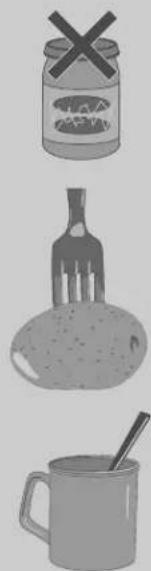
natural_image
Illustration of three food items: a jar with a cross, a fork, and a mug with a straw (no text or symbols)When preparing ready-to-serve food (like TV dinners) always carefully follow the instructions provided by the food manufacturer on the package and also the tips and guidelines contained at the end of this manual.
Cooking safely with microwaves
Microwaves are high frequency electromagnetic waves like radio waves. They create heat by causing the molecules in water, fat and sugar to vibrate. They only penetrate a certain depth (e.g. approx. 25 mm into meat) and this heat is then conducted to the rest of the item being cooked.
Tableware must be suitable for use in a microwave oven. For example, dishes made of temperature resistant glass, ceramics, porcelain and plastic (in the case of combination cooking it should also be fireproof). Never place closed metal containers into your microwave oven - the microwaves are reflected and the food will not get warm.
◆In the case of TV dinners the food can be left in the aluminium tray with the top removed.
- Microwaves can damage any crockery with gold or silver decoration.
- Never place food in the oven in closed containers - the container could explode.
- Food with a skin or peel can explode. Never place eggs in a microwave. When cooking items such as potatoes, chicken livers etc., puncture the skin using e.g. a fork to allow steam to escape.
- Never heat spirits (alcoholic drinks) to high temperatures; they may self-ignite.
- When heating small amounts of liquid (e.g. a cup of tea/coffee), place a spoon in the cup to prevent boiling over.
- Food which has been cooked with a microwave continues to cook after the oven is switched off.
Before allowing others, in particular children or older people, to eat food or drinks from the microwave oven check that the temperature of the food is acceptable (danger of burning/scalding).
◆ Help the heat to spread uniformly by stirring and turning, in particular after only short heating periods.
- Never turn the microwave oven on without food in the chamber - it might overload and get damaged.
◆ Metal items, e.g. dishes, should not touch the walls of the oven, this can cause sparking and could cause a fire.
◆Eggs in their shell and whole hard-boiled eggs shall not be heated in microwave ovens since they may explode.
MICROWAVES
a n d O V E N
The microwave oven
Safety door lock
The oven will only operate with the door fully closed. When the door is open the oven turns off and will only start again after the door is closed.
ENSOLIDH
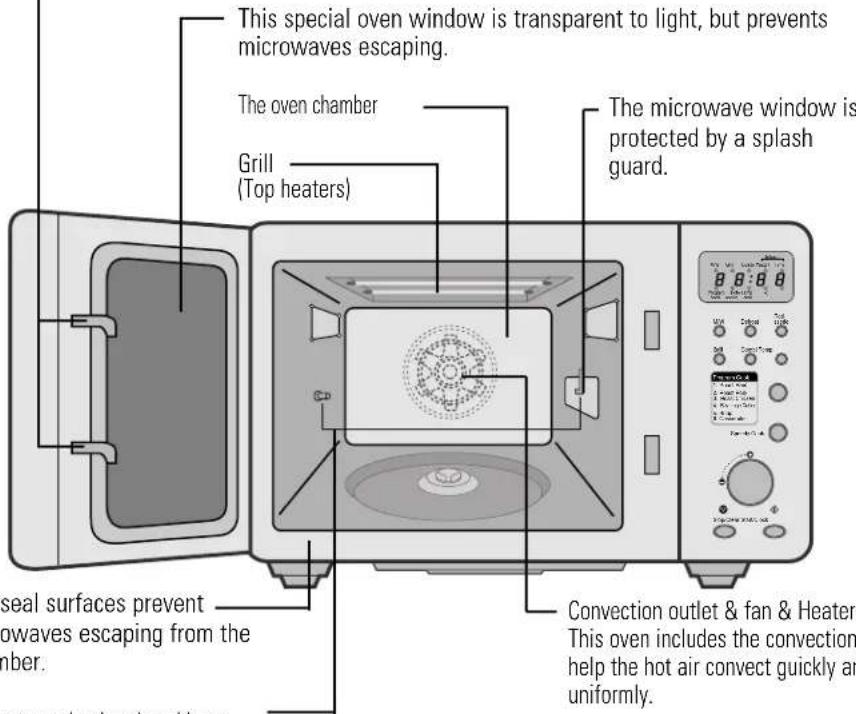
The seal surfaces prevent — microwaves escaping from the chamber.
This motor and rotisserie-guide are used for rotating the utensil bar. This motor is always rotated when the oven is operating (Rotisserie type only).
Convection outlet & fan & Heater This oven includes the convection fan. It help the hot air convect quickly and uniformly.
Place food in a suitable container (dish) on the rotating plate.
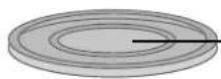
The rotating base supports the rotating plate. The rotating base can be easily removed for cleaning. Make sure they are correctly positioned (indentation) when reinserting.
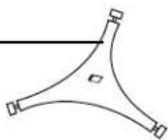

- Only use the oven with the rotating plate in position.
◆ To secure your safety, please use thick oven gloves when you remove food or accessories from the oven chamber.
ACCESSORIES

natural_image
Front view of a microwave oven with control panel and door (no visible text or labels)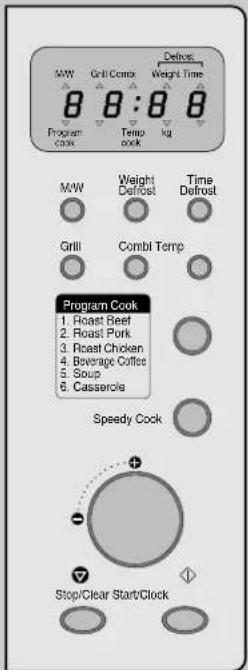
This oven comes equipped with several accessories. They can be used in various ways to facilitate cooking. Be sure to follow specific directions for their use when given in charts or recipes in the cookbook.
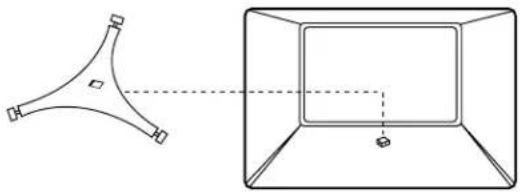
Rotating base
This fits over the shaft in the center of the oven's cavity floor. This is to remain in the oven for all cooking. It should only be removed for cleaning.
natural_image
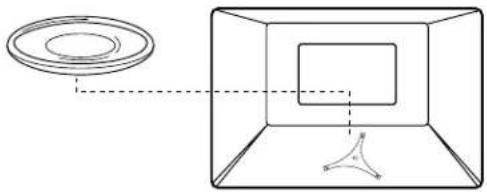
Simple line drawing of a 3D geometric shape with a dashed-line perspective view (no text or symbols)Turntable tray or turntable
This metal tray fits oven the rotating base and locks into place. This is to be used in the oven for all cooking. It rotates clockwise or counterclockwise during cooking. It is easily removable for cooking and cleaning needs.
natural_image
Diagram showing a circular object and a rectangular chamber with internal structure, no text or symbols presentMetal rack
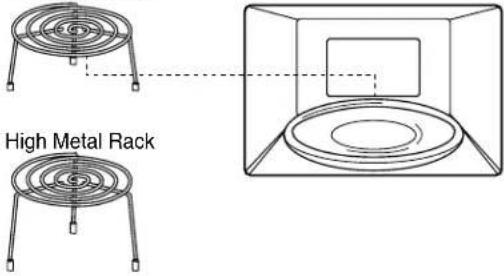
This metal rack is used with the turntable tray.
Low Metal Rack
M-SYSTEM M-SYSTEM
ACCESSORIES
How to use the accessories of cooking
■Turntable
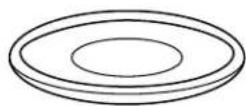
- MICROWAVE
- CONVECTION
- COMBINATION
• GRILL
■Low metal rack
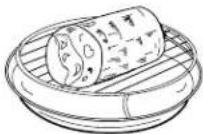
- MICROWAVE
• DEFROST - CONVECTION
- COMBINATION
■High metal rack
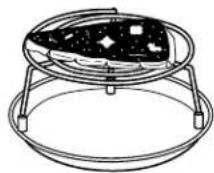
• GRILL
ENSOLIDH

natural_image
Line drawing of a microwave oven with control panel and door (no text or symbols)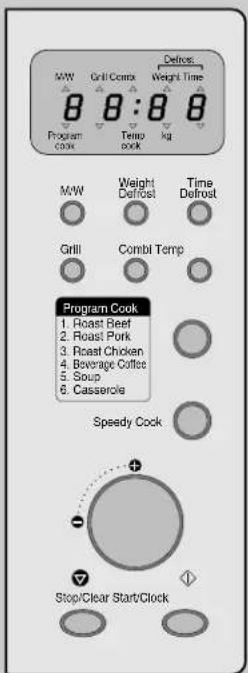
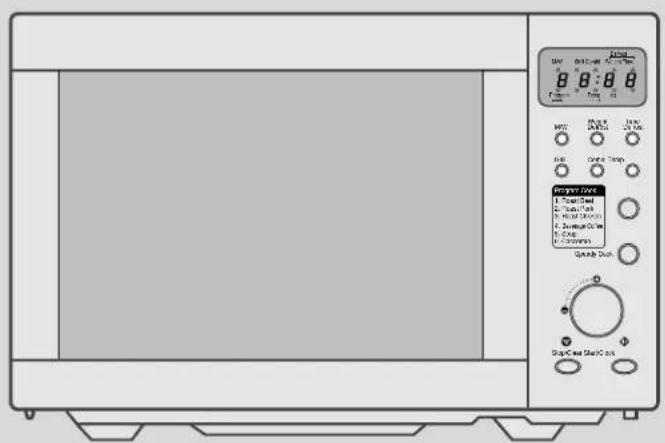
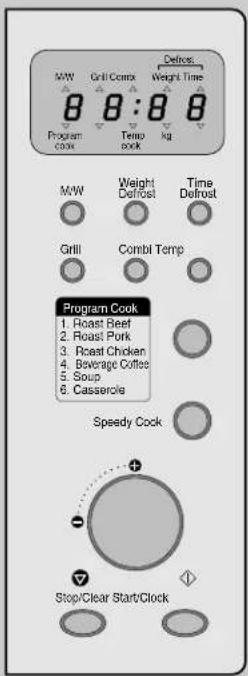
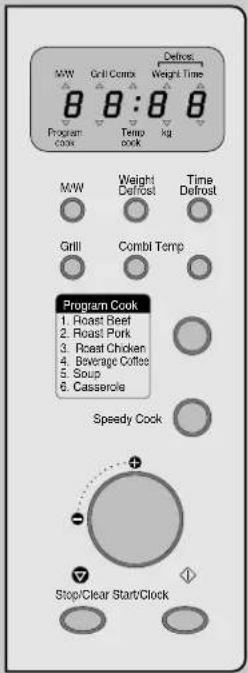
Your DAEWOO microwave oven always keeps you well informed: the display tells you which buttons can be pressed next or which settings are required (user guide).
The controls
Display (flashes to tell you what the oven is doing):
| M/W | Cooking with microwaves |
| GRILL | Grilling with top heaters |
| COMBI | Combination microwaves and convection |
| DEFROST - WEIGHT | Defrosting food by weight |
| DEFROST - TIME | Defrosting food by time |
| PROGRAM COOK | Cooking using a program |
| TEMP COOK | Baking |
| kg | Weight information |
Buttons:


Selects grill.
Selects combined microwaves and convection.
Select the baking temperature (hold down for fast selection).
Press to cook using a program.
Selects microwaves. Press to select the power (hold down for fast selection).
Defrosting, press to select weight.
Defrosting press to select time.
Press to start operation and for clock setting.
Stops the operation, also erases all entries.
Dial for setting time, temperature and weight.
Press for Speedy cook (each press adds 30 seconds microwave cooking time).
Using the
O I - SY S E M M E S Y S T E N
Setting the clock
When not in use the display shows the present time.

4 sec.
When first connected to the mains, the display looks like this (also after power disconnection).
ENGLISH
Hold the button pressed for a few seconds (4 sec.) for 24 hour clock. (Press the button once more after 24 hour clock for 12 hour clock.)
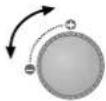
(No text)
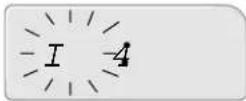
Turn the dial to adjust hours.

广力云智慧零售收银系统
Press the button.
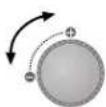
(No text)
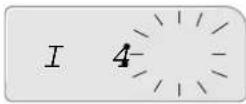
Turn the dial to adjust minutes.
Start the clock. The two dots flash each second.
Child lock
The child lock prevents the oven from being used. For example because children could hurt themselves on hot liquids etc.

3 sec.
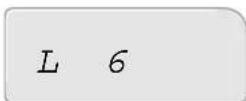
Hold the button pressed for a few seconds. (3 sec.) when loc appears in the display, the oven is locked.
Hold the button for a few seconds to release the lock.
When the time appears in the display, the oven is again available for normal use.
Cooking with MICROWAVES
natural_image
Front view of a microwave oven with control panel (no visible text or symbols)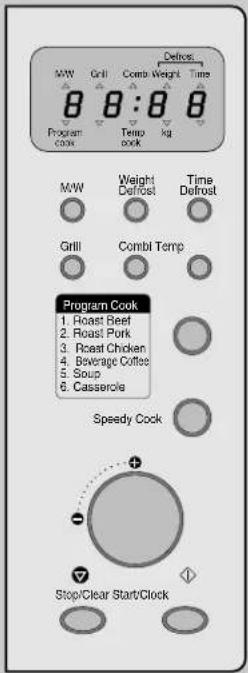
Cookery books and recipes provide details of power settings and times.
Easy cooking

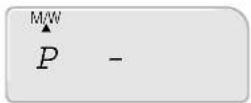
Set one of the 10 power levels. Press button 1 - 10 times.

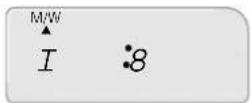
Turn the dial to set the cooking time O O Up to 60 minutes.

Start the operation. "▲* flashes below "M/W" in the display.
Speedy cooking

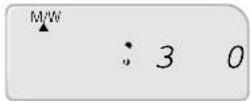
Press the button a number of times to set a cooking time between 30 seconds and 5 minutes.
The oven starts automatically at high power level after the button is released.
| Level | P-10 | P-20 | P-30 | P-40 | P-50 | P-60 | P-70 | P-80 | P-90 | P-HI |
| Power (watt) | 10% | 20% | 30% | 40% | 50% | 60% | 70% | 80% | 90% | 100% |

◆The microwave power can be set in 10 levels, even during cooking.
When the operation is finished the oven beeps four times, the clock appears in the display, the rotating plate stops turning and the oven light turns off.
◆If you have used the appliance for grilling, convection or combination cooking, let the oven cool down before using again.
The oven displays the set cooking time in 10 seconds steps (up to 5 minutes cooking time), in 30 seconds steps (up to 15 minutes cooking time), in 1 minute steps (up to 30 minutes cooking time), and 2 minutes steps (up to 60 minutes cooking time).
◆ Opening the oven door interrupts any operation except cooling fan. To cancel the operation, press STOP. To continue the operation, press START.
Cooking with
MICROWAVES
Programmed cooking
You need set neither power nor time.

1-6x
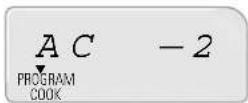
Select one of the six menu programs. Select by pressing the button 1 - 6 times.
ENGLISH
Cooking Programs
| Category Food Quantity Food Temp Utensils | ||||
| AC-1 Roast Beef 0.7kg-1.3kg Refrigerated Temp(10-15°C) Roasting Rack | ||||
| AC-2 Roast Pork 0.7kg-1.3kg Refrigerated Temp(10-15°C) Roasting Rack | ||||
| AC-3 Roast Chicken | 0.7kg-1.5kg Refrigerated Temp(10-15°C) Roasting Rack | |||
| AC-4 | Beverage Coffee | 1cup(250ml)-4cup | Refrigerated Temp(5-10°C) | mug |
| AC-5 | Soup | 0.2kg/0.4kg/0.6kg/0.8kg | Refrigerated Temp(5-10°C) | Casserole |
| AC-6 | Casserole | 0.2kg/0.4kg/0.6kg/0.8kg | Refrigerated Temp(5-10°C) | Casserole |


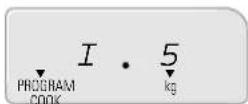
Turn the dial to set weights or cups.
Start the operation.
▼" flashes above "PROGRAM COOK" in the display and the cooking time is also displayed.
| Item | Directions |
| Roast Beef | Place roasts fat-side down and whole poultry breast-side downon a microwave roasting rack.Place dish on the turntable. |
| Roast Pork | |
| Roast Chicken | |
| Beverage Coffee | Pour beverage in microwave mug. Place on the edge of the turntable in oven.Do not cover. Stir before serving. |
| Soup | For reheating refrigerated Soup, Casserole. Pour refrigerated it in casserole.Cover and microwave stir after reheating. |
| Casserole |
General cooking hints
◆ If during the program cooking operation you hear sound 4 times 3 beeps, turn over the food.
When cooking a roast with an excess amount of drippings, it is helpful to remove the dripping at turnover time to prevent spattering.
◆ Prick the meats, fish or poultry with a fork to prevent bursting. Steam builds up pressure in meats, fish, or poultry which are tightly covered by a skin or membrane.
◆ Reduce suggested cooking times. It is always better to undercook food rather than to overcook them. If a range of times is stated in a recipe, cook the minimum suggested time, check for doneness, and then cook slightly longer if necessary.

When the operation is finished the oven beeps four times, the clock appears in the display, the rotating plate stops turning and the oven light turns off.
- Opening the oven door interrupts any operation except cooling fan. To cancel the operation, press STOP. To continue the operation, press START.
Cooking with CONVECTION
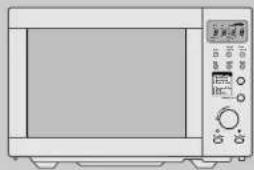
natural_image
Front view of a microwave oven with control panel and door (no visible text or symbols)The temperature can be selected between 100^ and 250^ in 10^ steps for cooking and baking. Top heaters and under heater operate simultaneously and convection fan rotates.
Easy baking

1-16x
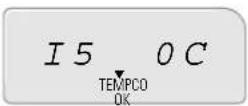
Set one of the 16 temperature levels. Press the button 1 - 16 times.

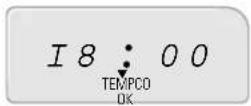
Turn the dial to set the time. Up to 60 minutes.

Start the operation.
▼ flashes above "TEMP COOK" in the display.
Cooking with CONVECTION&COMBI
This appliance has multiple heating systems to help cook meals uniformly and crisply. The oven does not need to be preheated.
Combination microwaves and Convection

1-3x
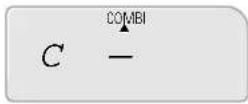
Press the button one to three times to select the microwave power.
▲H appears below "COMBI" in the display together with the microwave power level: "Lo" = low (500 watt), "O" = medium (600 watt), "HI" = high (700 watt).
ENGLISH

1-16x
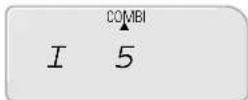
Set one of the 16 temperature levels for the convection. Press the button 1 - 16 times.

[Non-Text]
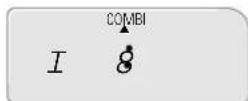
Set the cooking time on the dial. Up to 60 minutes.

Start the operation.
"▲" flashes below "COMBI" in the display.

- When the operation is finished the oven beeps four times, the clock appears in the display, the rotating plate stops turning and the oven light turns off.
◆ To check the temperature during cooking press Temp, after a few seconds the display shows the cooking time again. - Opening the oven door interrupts any operation except cooling fan. To cancel the operation (and clear the memory), press STOP. To continue the operation, press START.
DEFROSTING and GRILLING
natural_image
Front view of a microwave oven with control panel (no visible text or symbols)Defrosting by time

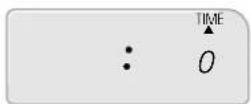
Press the button once.
"▲" appears below "TIME" in the display.

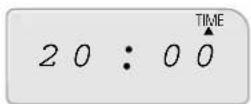
Set the defrost time on the dial.
Up to 60 minutes.

Start the operation.
"▲" flashes below "TIME" in the display.
Defrosting by weight

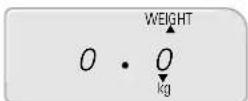
Press the button once.
"▲" appears below "WEIGHT" in the display and "▼" flashes above 'kg'.

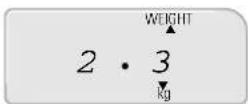
Use the dial to adjust the weight of the food.
Weights from 0.1 kg up to 2.9 kg are possible.

Start the operation.
"▲" flashes below "WEIGHT" in the display.

When the operation is finished the oven beeps four times, the clock appears in the display, the rotating plate stops turning and the oven light turns off.
- Turn the food over during defrosting after the 4 beeps to ensure complete and even defrosting.
◆ Press the Defrost button to switch: defrosting by weight, "WEIGHT" → defrosting by time, 'TIME' → etc.
- Opening the oven door interrupts any operation except cooling fan. To cancel the operation (and clear the memory), press STOP. To continue the operation, press START.
DEFROSTING
and GRILLING
Easy grilling with top heaters

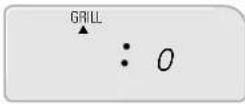
Press the button once.
"▲" appears below "GRILL" in the display.

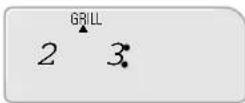
Set the grill time on the dial.
Up to 60 minutes.

Start the operation.
"▲" flashes below "GRILL" in the display.
ENSOLIDH

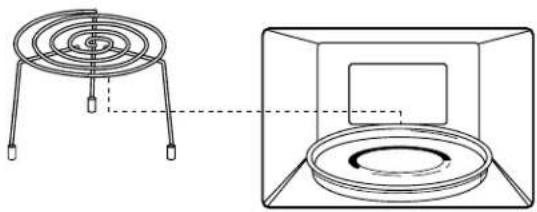
To use the metal rack.
- Place food on the rack
- Place the rack on the rotating plate.
-
WARNING
-
The temperature inside the oven and window is very high.
- Do not touch the oven window and metallic interoir of the oven when taking food in and out.
- Use thick oven gloves while handling food or accessories.
natural_image
Technical line drawing showing a circular component mounted on a stand next to a rectangular housing with a central square (no text or symbols)
When the operation is finished the oven beeps four times, the clock appears in the display, the rotating plate stops turning and the oven light turns off.
◆The grill element is at the top of the oven compartment.
◆ Do not preheat before grilling.
The oven displays the set grill time in 10 seconds steps (up to 5 minutes cooking time), in 30 seconds steps (up to 10 minutes cooking time) and in 1 minute steps (up to 60 minutes cooking time).
- Opening the oven door interrupts any operation except cooling fan. To cancel the operation (and clear the memory), press STOP. To continue the operation, press START.
natural_image
Front view of a microwave oven with control panel and display (no visible text or symbols)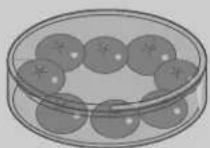
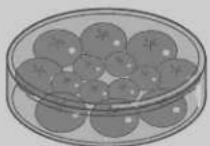
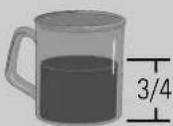
Cooking with microwaves differs in some aspects from normal cooking. The guidelines and tips below will help you get better results using a microwave oven.
Tips and guidelines
Wait time
Microwaves do not usually completely penetrate the food on the rotary plate. The wait time allows the food to continue cooking even after the oven has switched off. The temperature can rise by up to 8^ C inside the food. After heating food in the microwave, let it stand in the oven for a short time to allow the temperature to equalise. The wait time depends on the weight, volume and density of the food (and can be up to 10 minutes).
How to cook food without overcooking (drying, charring etc.)
◆Select the right cooking level.
◆Select the right cooking time. Times quoted in recipes are approximate and depend upon initial temperature, weight, density of food etc.
◆Always use microwave-suitable dishes.
Defrosting
◆Defrosting is faster in flatter dishes than in higher dishes.
◆Divide large pieces of food into smaller pieces for faster defrosting.
◆ Cover the smaller pieces when they start to warm up.
◆Do not defrost completely under power, let the food stand for a while.
Amount
To warm up more food you need more time. Rule of thumb: double the food, double the time (almost).
Initial temperature
The colder the food, the more time is needed.
Different foods
When cooking a meal with various ingredients remember that fat and sugar heat up faster than water. This means that ingredients with higher fat and sugar contents will have higher temperatures after cooking than those containing water. The more dense a food, the longer it takes to cook/defrost. Very dense foods, like meat, take much longer to warm up than say sponge cake. Micro heating of beverages can result in delayed eruptive boiling, therefore care has to be taken when handling the container.
Skins, peels, shells ...
Some foods have a skin, peel or a shell (eggs, potatoes, apples, liver, sausages). Puncture the skin or peel with for example a fork to allow steam to escape and the food to expand - this releases pressure and prevents the food from bursting.
Water
Cooking in a microwave needs very little water. For 100 g of vegetables or potatoes, use 1 tablespoon of water.
Covering food
Food can be covered with foils or tops which let microwave through in order
◆to prevent splashing
◆to shorten the cooking time and/or
◆ to retain any natural moisture in the food (→ Microwave suitable dishes and utensils).
Arranging food - size and shape
To achieve the shortest cooking times and the best results it is sometimes useful to arrange the food in a certain way.
Small pieces cook faster than big pieces.
Pieces of the same size cook more evenly than different sized pieces.
In the case of irregularly shaped pieces, the thin sections will cook faster than the thick sections.
When cooking several of the same item, e.g. stuffed tomatoes, arrange them on the rotating plate in a circle to achieve even cooking.
When cooking irregularly shaped items or food with different thicknesses, place the smaller or thinner parts in the middle and the thicker (denser) parts towards the outside. Alternatively, cover thinner parts with a piece of aluminium foil to prevent drying or charring.
Where possible, place fish with the tail towards the centre, slit the skin to prevent the skin from tearing or bursting open. Another possibility is to cover the head and the tail ends with aluminium foil to prevent premature drying or charring.
When warming up pre-cooked meals, place the thinner and lighter items towards the middle, the heavier and denser items towards the outside of the plate.
Place thin slices (e.g. bacon) on top of one another (fully or partially).
Arrange sausages close together.
Drinks, sauces and gravy should be heated in separate containers. Fill tall narrow vessels only 34 full.
Stir or turn the food every now and then to help spread the heat more evenly.
Error messages
1
E - - 2
- When inside part of the oven is very hot abnormally, E--2 appears.
- Let the oven cool 15\~20 minutes opening the door slightly.
- Unplug the power and then plug the power again.
- If the oven does not work normally, call technical service.
2
E - - 3
- When temperature sensor is disconnected, E--3 appears.
- Call technical service.
natural_image
Line drawing of a microwave oven with control panel and door (no text or symbols)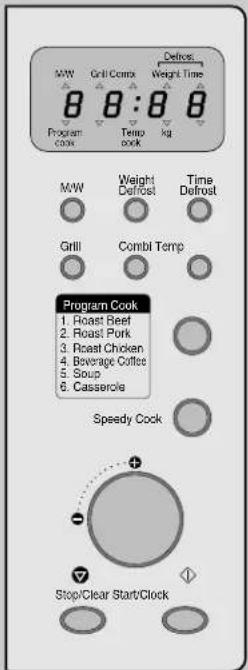
No components of this microwave oven are user-serviceable. Any repairs or adjustments must always be performed by qualified service technicians.
Before calling technical service
Before calling your technical service, check the following:
Oven doesn't work?
◆ Is the power supply correctly connected?
◆ Is the oven door shut?
◆ Has a cooking time been set?
◆ Has the house mains switch disconnected or the fuse blown?
Sparks in the oven?
◆ Is there metal, or a dish with metal edges or aluminium foil, in the oven? Metal must never touch the inner walls of the oven.
Turn the microwave on without food in oven?
Although switching the oven on for short periods will cause no damage, it is not recommended.
Use the oven without the rotating plate?
- No – always ensure that the rotating plate and its support ring are correctly inserted.
Open door during cooking?
The door can be opened at any time during an operation (e.g. to stir, turn over). The oven switches the operation off immediately. Any settings are kept and when the door is closed again the operation can be continued by pressing START, or cancelled by pressing STOP.
Condensation on oven walls and/or door?
◆ Condensation on the inner surfaces is normal when cooking water containing food.
Can microwaves pass through the door window?
- No – the window is made of a special glass which lets no microwaves through.

◆For more information read the first chapter and the appendix. This should answer most of your questions.
◆If you cannot solve your problem, ask a qualified service technician.
Microwave suitable dishes and utensils
Microwave suitable dishes are transparent to microwaves (i.e. made of such materials as plastic, glass and ceramics), especially when also fireproof. Suitable dishes only become slightly warm after one minute microwave cooking at high power.
Dishes unsuitable for microwave ovens are all metal dishes which reflect microwaves. Also unsuitable for microwaves are dishes made of lead glass, dishes with metal applications (gold edged), paper or plastic containers which cannot withstand high temperatures (120°C).

◆If in doubt, check for information such as "microwave suitable".
◆Bear in mind that this appliance is not only a microwave unit.
Any dishes must also be fireproof when used with the grill or convection.
◆ Dishes, foils and covers should never be allowed to touch the walls of the oven compartment.
Best cooking results are achieved if not only the material but also the shape of the dish is suitable.
Round dishes promote more even heating, whereas in square or rectangular dishes the food can easily dry out or char in the corners.
Food in flat dishes will cook more evenly.
Small pieces of aluminium foil are good for covering any vulnerable sections (e.g. the thin flat tail end of a fish).
Care and maintenance
Although this microwave oven is fitted with state-of-the-art safety arrangements ...
◆Never manipulate or tamper with the door locks or hinges,
Make sure the seals and seal surfaces are free of contamination e.g. food remains or cleaner residues. Clean the oven – especially the seal areas of the door – with a mild cleaning agent. Do not use any abrasive agents or abrasive pads.
Make sure the oven door is not mistreated (e.g. that children don't swing on it). Do not use the oven if it is damaged. It is especially important that the door closes properly. The door must have no distortions, the hinges and locks must not be broken, bent or loose and the seal surfaces must not be corroded.
Only allow children to use the oven without supervision when adequate instructions have been given so that the child is able to use the oven in a safe way and understands the hazards of improper use.
The contents of feeding bottles and baby food Jars are to be stirred or shaken and the temperature is to be checked before consumption, in order to avoid the burns;
Power Supply
◆ Check your local power source. This oven requires a current of approximately 13 amperes, 230V, 50Hz. (KOC-995T2S : 12 amperes)
◆Power supply cord is ablut 1.2 meter long.
The voltage used must be the same as specified on this oven. Using a higher voltage may result in a fire or other accident causing oven damage. Using low voltage will cause slow cooking. We are not responsible for damage resulting from use of this oven with a voltage of ampere fuse other than those specified.
If the supply cord is damaged, it must be replaced by the manufacturer or its service agent or similarly qualified person in order to avoid a hazard.
natural_image
Front view of a microwave oven with control panel and display (no visible text or symbols)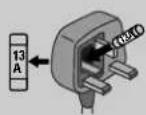
Technical data
Power supply 230 V\~, 50 Hz
Microwave Power consumption 1550 Watt
Power 1000 Watt (IEC 705)
Frequency
2450
MHz
Grill power consumption 1400 Watt
Convection power consumption 1450 Watt (Temporary Maximum Power
Consumption: 2800 Watt)
Microwave/convection power consumption
2950 Watt
Dimensions (w-h-d) 526 x 345 x 496 mm
Oven chamber (w-h-d) 335 x 260 x 335 mm
Weight 23 kg
The right to make technical improvements is reserved. Errors and omissions excepted.
Electrical connection (for UK only)
- For your own safety read the following instructions carefully before attempting to connect this unit to mains.
◆ Check that the voltage on the rating plate corresponds to the voltage in your home. The rating plate is on the back panel of the appliance.
The power cable must be fitted with a fused plug approved by ASTA or BSI to BS 1362 and provided with a 13 A fuse. The fuse cover must always be securely replaced. If the oven is not working, the fuse may need replacing.
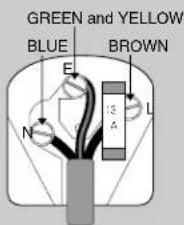
The wires of the mains lead fitted to this appliance are coloured in accordance with the following code:
GREEN and YELLOW
=EARTH (GREEN or GREEN and YELLOW or 12 )
BLUE
= NEUTRAL (BLACK)
BROWN
= LIVE (RED)
If the terminals in the plug are unmarked or you are in any doubt as to the correct connections, consult a qualified electrician.
Please read also chapter "Moulded plugs".

◆We recommend the use of a good quality plug.
◆The pages of this instruction manual show pictures of the various control buttons referred to in the text. Descriptions of the display information are also shown where applicable.
Moulded plugs (for UK only)
- Should it be necessary to remove a moulded on plug from the mains cable, it should be cut off and replaced with a suitable replacement.
The moulded plug cannot be used for any other appliance, therefore remove the fuse and dispose immediately and safely to prevent anyone, especially children from plugging it in to a wall socket, which will create a safety hazard. - Should the mains lead ever require replacement, it is essential that this operation be carried out by a qualified electrician and should only be replaced with a flexible cord obtained from the manufacturer.
◆Applicable only if moulded plug is fitted.
After replacement of a fuse in the plug, the fuse cover must be refitted. If the fuse cover is lost a replacement cover must be obtained. The colour of the correct replacement fuse cover is that of the coloured insert in the base of the plug or the colour that is embossed in words in the base of the plug recess or elsewhere on the plug. Always state this colour when ordering a replacement fuse cover.
◆Only 13 A replacement fuses which are ASTA approved to BS 1362 should be fitted.

This symbol means that this unit is double insulated, an earth connection is not necessary.

Caution:
To prevent electric shock, do not remove any covers. No user serviceable parts inside, refer servicing to qualified service personnel.

Caution:
When operating this unit on 230 V \~ mains supply, please note that when the power switch is in the off mode, the unit is not disconnected from the mains supply. However, please be assured that it is perfectly safe to leave the unit connected to the mains supply.
- Microwave Oven with Grill and Convection
- Instruction manual MCM600
- Things you SHOULD KNOW!
- WARNING
- Using a microwave oven safely
- The right place for your microwave oven
- Things you
- SHOULD KNOW!
- Contents
- Connecting up your microwave oven
- MICROWAVES and OVEN
- Cooking safely with microwaves
- MICROWAVES
- a n d O V E N
- The microwave oven
- ACCESSORIES
- Rotating base
- Turntable tray or turntable
- Metal rack
- M-SYSTEM M-SYSTEM
- How to use the accessories of cooking
- The controls
- Buttons:
- Using the
- O I - SY S E M M E S Y S T E N
- Setting the clock
- Child lock
- Cooking with MICROWAVES
- Easy cooking
- Speedy cooking
- Cooking with
- Programmed cooking
- General cooking hints
- Cooking with CONVECTION
- Easy baking
- Cooking with CONVECTION&COMBI
- Combination microwaves and Convection
- DEFROSTING and GRILLING
- Defrosting by time
- Defrosting by weight
- DEFROSTING
- and GRILLING
- Easy grilling with top heaters
- ENSOLIDH
- To use the metal rack.
- Tips and guidelines
- Wait time
- How to cook food without overcooking (drying, charring etc.)
- Amount
- Initial temperature
- Different foods
- Skins, peels, shells ...
- Water
- Covering food
- Arranging food - size and shape
- Error messages
- Before calling technical service
- Oven doesn't work?
- Sparks in the oven?
- Turn the microwave on without food in oven?
- Use the oven without the rotating plate?
- Open door during cooking?
- Condensation on oven walls and/or door?
- Can microwaves pass through the door window?
- Microwave suitable dishes and utensils
- Care and maintenance
- Power Supply
- Technical data
- Electrical connection (for UK only)
- Moulded plugs (for UK only)
Brand : M-SYSTEM
Model : MCM600
Category : Microwaves