SPMIC510 Di - Microphone Saramonic - Free user manual and instructions
Find the device manual for free SPMIC510 Di Saramonic in PDF.


| Product Type | Compact Stereo Condenser Microphone |
| Compatibility | iOS devices with Lightning connector (iPhone, iPad, iPod touch with iOS 10 or later) |
| Transducer Type | Condenser |
| Polar Pattern | Cardioid (X/Y stereo pattern) |
| Frequency Response | 45 Hz – 20 kHz |
| Signal-to-Noise Ratio | 78 dB |
| Audio Sampling | 48 kHz / 16-bit |
| Output Connector | Apple MFI Certified Lightning |
| Power Supply | Powered by iOS device (no batteries required) |
| LED Indicator | Blue LED power indicator (lights when recording app is active) |
| Dimensions (L x W x H) | 70 x 18.4 x 26.88 mm |
| Weight | 15.5 g (0.55 oz) |
| Operating Temperature | -10°C to 55°C |
| Key Features | Plug-and-play; X/Y dual condenser capsules; compact and lightweight for gimbals; directional arrow for optimal sound source |
| Setup | Plug directly into Lightning port; ensure arrow points to sound source; check Settings > General > About for recognition; open camera/recording app |
| Maintenance & Cleaning | Keep dry; clean gently with a soft, dry cloth; avoid exposure to extreme temperatures or moisture |
| Safety Precautions | Do not drop or subject to shock; do not disassemble; keep away from liquids and dust |
| Spare Parts & Repairability | No user-serviceable parts; contact dealer or Saramonic support for service |
| Brand & Model | Saramonic SPMIC510 Di (MFi certified) |
Frequently Asked Questions - SPMIC510 Di Saramonic
User questions about SPMIC510 Di Saramonic
0 question about this device. Answer the ones you know or ask your own.
Ask a new question about this device
Download the instructions for your Microphone in PDF format for free! Find your manual SPMIC510 Di - Saramonic and take your electronic device back in hand. On this page are published all the documents necessary for the use of your device. SPMIC510 Di by Saramonic.
USER MANUAL SPMIC510 Di Saramonic
Compact Stereo Microphone for iOS Devices with a Lightning Connector
SPMIC510 Di
User Manual
Thank you for choosing Saramonic!
Saramonic SPMIC510 Di is a compact stereo condenser microphone designed for iOS devices with a Lightning connector.
The microphone is equipped with two condenser microphone elements positioned in an X/Y configuration. It provides superb stereo sound that is ideal for vlogging, live streaming, interviews, ENG and mobile video production.
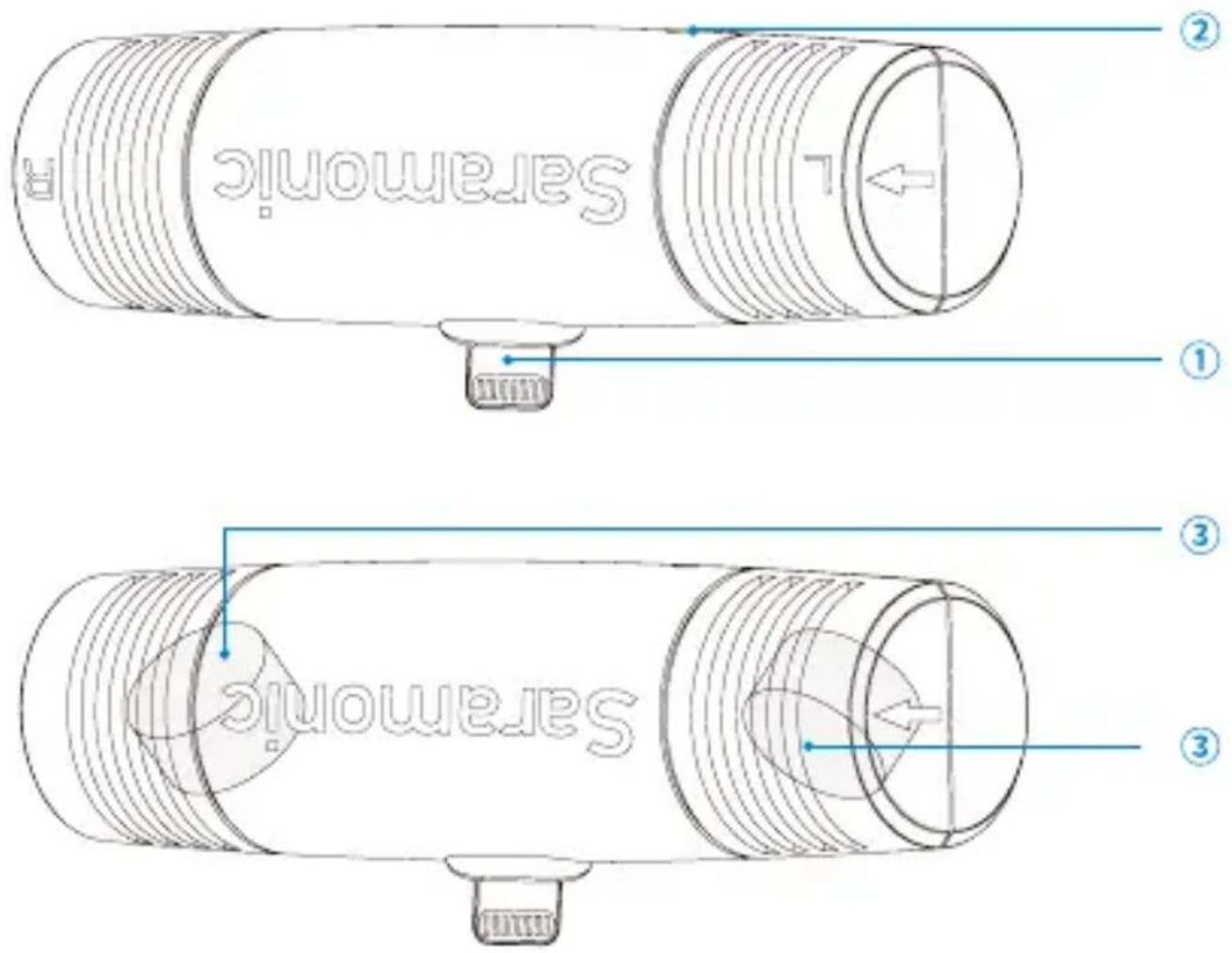
① Lightning connector
② LED power indicator
③ Microphone capsules
Highlights
- Plug-and-play
• Dual Condenser Elements in X/Y Pattern - Compact and lightweight design. Ideal when using with smartphone accessories, like gimbals
• For Apple iOS Lightning Devices
Setup Guide
- Plug the microphone directly into the lightning connector of your iOS device.
- For optimum signal, make sure the arrow mark on the microphone is pointed at the sound source.
- Click the Settings- General - About- Stereo microphone, to ensure the microphone is recognized by your iOS device.
- Go back to the home page, open the Camera or Recording App, the microphone LED indicator will turn blue, then you are ready to record.
Note: To avoid feedback, please turn down the volume of your recording device and unplug the 3.5mm jack headphone (when using an iPad).
Common Technical Issues and Solutions
- If you have any problems when using SPMIC510 Di, please refer to below list:
| Issue Reason Solution | ||
| Mic is not recognized by recording device | Mic is not well connected | Unplug and reconnect |
| Mic is not picking up sound | Mic not selected in app's settings | External Lightning mic must be selected in app's setting |
| No sound when you plug out and replug the mic during recording | You may use a 3.5mm headphone simultaneously | Plug out both the headphone and mic, and try again. |
| Sound is distorted | The input level of your recording app is too high | Lower the input level before recording |
| You are monitoring with a mono headphone | Choose a stereo headphone | |
| The mic is picking up too ambient sound, not the subject | 1. Recording distance is too far from the subject2. The mic's capsules are pointing in the wrong direction | 1. Get closer to the subject2. Make sure the arrow mark on the mic points to the sound source |
- If you have further questions, please consult your dealer or info@saramonic.com
Specifications
| Transducer Type Condenser | |
| Polar Pattern Cardioid (X/Y Pattern) | |
| Audio 48 kHz / 16-bit | |
| Frequency response 45 - 20,000 Hz | |
| Signal to noise ratio 78dB | |
| Output Apple MFI Certified Lightning Connector | |
| Power Supplied by iOS device | |
| Operating temperature - 10°C - 55 °C | |
| Dimension (L x W x H) 70 x 18.4 x 26.88mm | |
| Weight 15.5g (0.55oz.) |
www.saramonic.com
Saramonic is a trademark registered and owned by Shenzhen DSQN Investment CO., LTD. COPYRIGHT 2011-2021 SARAMONIC INTERNATIONAL (A brand of DSQN)
Room 2009, Shenzhou Bairuida Bldg, Banxuegang Road, Bantian Street, Longgang District, Shenzhen, China 518129 Email: info@saramonic.com
Made in China


Brand : Saramonic
Model : SPMIC510 Di
Category : Microphone