
BT Box E HD - Hi-Fi PRO-JECT - Free user manual and instructions
Find the device manual for free BT Box E HD PRO-JECT in PDF.


| Product Type | Bluetooth Receiver / DAC |
| Brand | Pro-Ject |
| Model | BT Box E HD |
| Dimensions (W x H x D) | 195 x 32 x 103 mm |
| Weight | 0.5 kg |
| Power Supply | 5V DC, 1A via USB or external adapter |
| Bluetooth Version | 5.0 with aptX HD |
| Audio Outputs | RCA, optical, coaxial |
| Supported Codecs | SBC, AAC, aptX, aptX HD |
| Maximum Sampling Rate | 24-bit / 192 kHz |
| Frequency Response | 20 Hz – 20 kHz |
| Signal-to-Noise Ratio | > 110 dB |
| Total Harmonic Distortion | < 0.005% |
| Cleaning Instructions | Wipe with dry, soft cloth |
| Safety Precautions | Do not expose to moisture or open device |
| Spare Parts Availability | Contact Pro-Ject authorized service |
| Repairability | Not user-serviceable |
| Operating Temperature | 5°C – 35°C |
| Accessories Included | USB cable, manual |
Frequently Asked Questions - BT Box E HD PRO-JECT
User questions about BT Box E HD PRO-JECT
0 question about this device. Answer the ones you know or ask your own.
Ask a new question about this device
Download the instructions for your Hi-Fi in PDF format for free! Find your manual BT Box E HD - PRO-JECT and take your electronic device back in hand. On this page are published all the documents necessary for the use of your device. BT Box E HD by PRO-JECT.
USER MANUAL BT Box E HD PRO-JECT
BY PRO-JECT AUDIO SYSTEMS
INSTRUCTIONS FOR USE Pro-Ject BT Box E HD
Dear music lover,
thank you for purchasing a Pro-Ject Audio Systems BT Box E HD.
In order to achieve maximum performance and reliability you should study these instructions for use carefully.

Warning of a hazard for the user, the unit or possible misuse.

Important notice.
Safety instructions

AC outlet voltages vary from country to country. Before connecting to the mains, make sure that the voltage in your area meets the voltage requirements printed on the power supply.
The power supply is used to disconnect the unit from the mains. Make sure that the pow supply is easily accessible at all times. Never handle the device, the power supply while your hands are wet or damp.
Avoid letting liquids enter the device or the power supply. Never place any item containing liquid, such as a flower vase on or near the device. Never spill any liquid on the device or the power supply. Never place any naked flame sources, such as lighted candles on or near the device. The product shall not be used in damp or wet locations, to a bathtub, sink, swimming pool or any other similar conditions.
Connectors
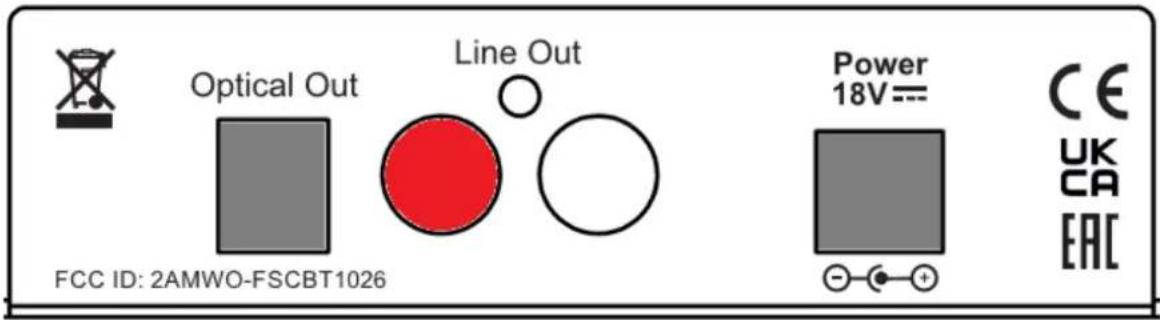

Make all connections whilst the product is disconnected from the power supply.
Take care to connect the left and right channels correctly. The right channel is usually marked red, the left channel black or white.
Never use any other power supply than the one supplied with the unit.
Never connect or disconnect power supply to or from the unit whilst the power supply is connected to the mains.
Connection to the amplifier
Connect the Line Out socket to a line input (such as AUX) on your amplifier. Alternatively you can use also digital Optical Out to connect the unit to a D/A converter or to a digital input of your amplifier or AVR. Both outputs are active all the time.
Mains power connection
Connect the low voltage plug from the power supply to the Power 18V DC socket before connecting the power supply to the mains.
BT pairing
Pairing with devices with Android OS
Open Settings and tap on Bluetooth. Turn on BT and tap on Scan. Searched devices will show up. Tap on "BT Box E HD" (Confirm pairing code if requested). Once paired it will show "Connected to media Audio", now you can play music from your Android device over BT to BT Box E.
Pairing with Apple devices
Tap on Settings, tap on Bluetooth, turn it on, your device will automatically start searching for available devices. Tap on "BT Box E" and it will be connected to the BT Box E HD. Now you can play music.

It's possible to use BT Box E HD also with other than above mentioned devices, pairing procedure is always similar.
Reconnecting
If you move out of range or turn off Bluetooth, BT Box E HD will disconnect from your device. To reconnect simply open the Bluetooth manager and tap on "BT Box E HD". If the signal is lost for only a few seconds it can reconnect automatically - typically if you move out of the range and then return back.
Adding a new phone or tablet
The unit can play music from one device at a time. If you want to switch from one device to another, you have to disconnect existing connection to BT Box E HD and then follow the steps for pairing with new device.
Troubleshooting
No music from speakers:
- make sure the BT Box E HD is powered
- make sure an audio cable or an optical cable is correctly connected to BT Box E HD
- make sure you are within the range
- make sure the Bleutooth is enabled and the device is connected to BT Box E. Volume level is properly set
Technical specifications Pro-Ject BT Box E HD
Bluetooth version: 5.0
Effective working range: up to 10m (direct visibility)
Bluetooth Profile: A2DP
Supported codecs: SBC, aptX, aptX HD
Frequency: 2402 - 2480 MHz
Sensitivity: - 88 dBm
Audio Output Level (nominal at 0dBFS): 2.0 Vrms
Frequency response (@-1,5dB): 20Hz - 20kHz
Channel separation (Line Out@10kHz): <-113 dB
Channel separation (Digital Out@10kHz): <-140 dB
SNR (Line out): >93dB
SNR (Digital out): >120dB
THD - Line out (1kHz/0dBFS): <0.03%
THD - Optical (1kHz/0dBFS): <0.01%
Analog output: 1 pair RCA/cinch
Digital output: 1x optical S/PDIF (Toslink)
Outboard power supply: 18V/500mA
Power consumption: 18V/50mA max.
Dimensions W x H x D (D with sockets): 120 x 32 x 100 mm
Weight: 250g without power supply
Service
Should you encounter a problem which you are not able to alleviate or identify despite the above information, please contact your dealer for further advice. Only if the problem cannot be resolved there, the unit should be sent to the responsible distributor in your country.
Warranty

The manufacturer accepts no responsibility for damage caused by not adhering these instructions for use. Modification or changes to any part of the product by unauthorized persons release the manufacturer from any liability over and above the lawful rights of the customer.
Copyright, trademarks
Pro-Ject Audio Systems is a registered Trademark of H. Lichtenegger.
This guide was produced by: Pro-Ject Audio Systems
Copyright © 2022. All rights reserved.
The information was correct at the time of going to press. The manufacturer reserves the right to make changes to the technical specification without prior notice as deemed necessary to uphold the ongoing process of technical development.
Bluetooth® is a trademark owned by the Bluetooth SIG, Inc., Apple is registered trademark of Apple Inc., Android™ is a trademark of Google Inc.
Waste from Electrical and Electronic Equipment (WEEE): This directive mandates the collection and recycling of electronics and component materials in order to reduce the amount going to landfills. Outside North America, when the user decides to discard this product, it must be sent to a separate collection facility for recycling. Please contact your point of purchase for more details.
Federal Communication Commission (FCC) Interference Statement FCC Part 15: This equipment has been tested and found to comply with the limits for a Class B digital device, pursuant to Part 15 of the FCC Rules. These limits are designed to provide reasonable protection against harmful interference in a residential installation. This equipment generates, uses and can radiate radio frequency energy and, if not installed and used in accordance with the instructions, may cause harmful interference to radio communications. However, there is no guarantee that interference will not occur in a particular installation. If this equipment does cause harmful interference to radio or television reception, which can be determined by turning the equipment off and on, the user is encouraged to try to correct the interference by one or more of the following measures:
- Reorient or relocate the receiving antenna
-
Increase the separation between the equipment and receiver
-
Connect the equipment into an outlet on a circuit different from that to which the receiver is connected
- Consult the dealer or an experienced radio/TV technician for help.
This device complies with part 15 of the FCC Rules. Operation is subject to the following two conditions: (1) This device may not cause harmful interference, and (2) this device must accept any interference received, including interference that may cause undesired operation. FCC Radiation Exposure Statement: This equipment complies with FCC radiation exposure limits set forth for an uncontrolled environment.
To maintain compliance with FCC's RF exposure guidelines, this equipment should be installed and operated with minimum distance 20cm between the radiator and your body.
Contains FCC ID: 2AMWO-FSCBT1026
Declaration of Conformity
We, Canor spol. s r.o.
Družstevná 13925/39
08006 Prešov
Slovakia
(manufacturer)
and
Pro-Ject Audio Systems a division of Audio Tuning GmbH
Margaretenstrasse 98
1050 Vienna,
Austria
(distributor)
declare under our responsibility that the product is in conformity with the provisions of Directives:
2014/35/EU including amendments
2014/30/EU including amendments
2014/53/EU including amendments
The following harmonised standards were applied:
Pro-Ject Audio Systems a division of Audio Tuning GmbH
1050 Vienna, Austria, Margaretenstrasse 98
info@project-audio.com
Brand : PRO-JECT
Model : BT Box E HD
Category : Hi-Fi