
WD-1000TR - AV Extension Edimax - Free user manual and instructions
Find the device manual for free WD-1000TR Edimax in PDF.


| Product Type | AV Extender (Wireless) |
| Brand | Edimax |
| Model | WD-1000TR |
| Connectivity | Wireless (2.4 GHz / 5 GHz) |
| Video Interface | HDMI (Input/Output) |
| Maximum Resolution | 1080p Full HD |
| Wireless Range | Up to 100 meters (open area) |
| Audio Support | Stereo PCM, Dolby Digital up to 5.1 |
| Power Supply | 5V DC, 1A (via USB or adapter) |
| Dimensions (Transmitter) | 90 x 30 x 15 mm |
| Dimensions (Receiver) | 90 x 30 x 15 mm |
| Weight (each) | Approx. 50 g |
| Operating Temperature | 0°C to 40°C |
| Storage Temperature | -20°C to 60°C |
| Supported Systems | HDMI devices (Blu-ray, gaming consoles, PC) |
| Mounting | Desk or wall mountable |
| LED Indicators | Power, Link, Signal |
| Warranty | 2 years |
| Package Contents | Transmitter, Receiver, HDMI cables, Power adapters, Manual |
Frequently Asked Questions - WD-1000TR Edimax
User questions about WD-1000TR Edimax
0 question about this device. Answer the ones you know or ask your own.
Ask a new question about this device
Download the instructions for your AV Extension in PDF format for free! Find your manual WD-1000TR - Edimax and take your electronic device back in hand. On this page are published all the documents necessary for the use of your device. WD-1000TR by Edimax.
USER MANUAL WD-1000TR Edimax
EDiMAX NETWORKING PEOPLE TOGETHER
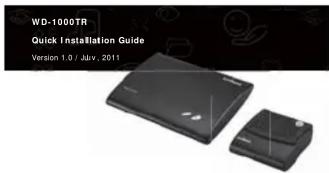
Edimax WD-1000TR WHDI Caster
EDIMAX
COPYRIGHT
Copyright© Edimax Technology Co., Ltd. all rights reserved. No part of this publication may be reproduced, transmitted, transcribed, stored in a retrieval system, or translated into any language or computer language, in any form or by any means, electronic, mechanical, magnetic, optical, chemical, manual or
otherwise, without the prior written permission from Edimax Technology Co., Ltd. Edimax Technology Co., Ltd. makes no representations or warranties, either
expressed or implied, with respect to the contents hereof and specifically disclaims any warranties, merchantability, or fitness for any particular purpose. Any software described in this manual is sold as loaned or is. Should the
Any software described in this manual is sold or licensed as is. Should the programs prove defective following their purchase, the buyer (and not this company, its distributor, or its dealer) assumes the entire cost of all necessary
servicing, repair, and any incidental or consequential damages resulting from any defect in the software. Edimax Technology Co., Ltd. reserves the right to revise
this publication and to make changes from time to time in the contents hereof without the obligation to notify any person of such revision or changes.
The product you have purchased and the setup screen may appear slightly different from those shown in this OIG. For more information about this product
different from these shown in this QRC. For more information about this product, please refer to the user manual on the CD-ROM. The software and specifications are subject to change without notice. Please visit our website www.edimax.com
for updates. All brand and product names mentioned in this manual are trademarks and/or registered trademarks of their respective holders.
Linux Open Source Code
Certain Edimax products include software codes developed by third parties, which are subject to the GNU General Public License (GPL) or GNU Lesser General Public License (LGPL). Please see the GNU (www.gnu.org) website for the terms and conditions of each license.
The GNU GPL and GNU LGPL software codes used in Edimax products are distributed without any warranty and are subject to the copyrights of their
respective authors. The firmware files for this product can be found under the "Download" page at the Edimax website (www.edimax.com).
- 包装内容 (CN)
(1) Power connector (2) HDMI in
(3) HDMI out
(4) Service port
(5) Power button (6) Info/Channel button
©For more details, please refer to the manual in the CD. ©The picture is for reference only.
(7) (8) (9)
- Package Contents (EN)
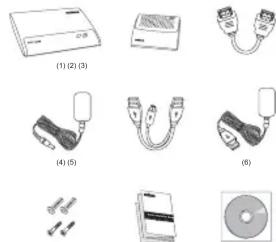
(1) WHDI transmitter (1 p) (2) WHDI receiver (1 pos)
(3) HDMI cable (2 pcs)
(4) Power adapter for receiver (1 pcs)
(5) USB power adapter for transmitter (1 pcs) (6) USB power cable for transmitter (1 pcs)
(7) Anchor and screw (2 pcs each)
(8) Quick installation guide (1 pcs) (9) CP with multi language OIC or
(9) CD with multi-language QoS and user manual (1 pcs)
2
145
natural_image
Diagram of a device connected to a monitor displaying a screen, with no visible text or symbols.6
7
(3)
单位
- Installation (EN)
(1) Connect the WHDI transmitter to a computer or a multimedia device via HDMI cable, and revs it on with the power adapters as LiSR never able
HDMI cable, and power it on with the power adapter of USB power cable. (2) Connect the WHDI receiver to a LCD TV or HD projector via HDMI cable, and
power it on with the power adapter
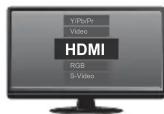
(3) Switch on the TV or projector and select HDMI under the source menu
- Installation (DE)
EU Declaration of Conformity
English: This equipment is in compliance with the essential requirements and other
2008/123/EC Norwegian: Dette utstyret
Direktiv 1999/5/EC, 2009/125/EC.
Declaration of Conformity
We, Edimax Technology Co., LTD., declare under our sole responsibility, that the equipment described below complies with the requirements of the European R&TTE directive (1999/5/EC).
WHDI Transmitter & Receiver
Model No.: WD-1000TR (WD-1000TX+WD-1000RX) The following European standards for essential requirements have been followed:
EN 62311:2008
EN 55022:3006+A1:2007
EN 55024:1998+A1:2001+A2:2003
IEC 61000-4-2:2008; IEC 61000-4-3:2008; IEC 61000-4-4:2004; IEC 61000-4-5:2005; IEC 61000-4-6:2008; IEC 61000-4-8:2009;
2004/108/EC
EN 61000-3-2:2006
EN 61000-3-3:2008
ETSI EN 301489-17: V1.3.2 (2008-04)
ETSI EN 301409:1.V1.5.1 (2008-0) ETSI EN 301893:V1.5.1 (2008-12)
2006/95/EC EN 60065:2002+A1:2006+A11:200
ErP Directive: 2009/124/EC
ErP Normative: 1275/2008 HDMI Version: 1.4 WEEE Directive: 2002/96/EC
max Technology Co., Ltd
o. 3, Wu Chuan 3^nd Road,
Wu-Ku Industrial Park
July 11 ^th , 2011 Albert Chang Director
Edimax Technology Co., LTD.
2018年1月1日
Federal Communication Commission Interference Statement
This equipment has been tested and found to comply with the limits for a Class B digital device, pursuant to Part 15 of FCC Rules. These limits are designed to provide reasonable protection against harmful interference in a residential installation. This equipment generates, uses, and can radiate radio frequency energy and, if not installed and used in accordance with the instructions, may cause harmful interference
to radio communications. However, there is no guarantee that interference will not occur in a particular installation. If this equipment does cause harmful interference to radio or television reception, which can be determined by turning the equipment off and on, the user is encouraged to try to correct the interference by one or more of the following measures:
-
Reorient or relocate the receiving antenna.
-
Increase the separation between the equipment and receiver.
- Connect the equipment into an outlet on a circuit different from that to which the
receiver is connected.
- Consult the dealer or an experienced radio technician for help
ECC Caution
This device and its antenna must not be co-located or operating in conjunction with any other antenna or transmitter. This device complies with Part 15 of the FCC Rules. Operation is subject to the following two conditions: (1) this device may not cause harmful interference, and (2) this device must accept any interference received, including interference that may cause undesired operation. Any changes or modifications not expressly approved by the party responsible for compliance could void the authority to operate equipment.
Federal Communications Commission (FCC) Radiation Exposure Statement This equipment complies with FCC radiation exposure set forth for an uncontrolled
This equipment complies with FCC radiation exposure set forth for an unconfounded environment. In order to avoid the possibility of exceeding the FCC radio frequency exposure limits, human proximity to the antenna shall not be less than 2.5cm (1 inch) during normal operation.
Federal Communications Commission (FCC) RF Exposure Requirements SAR compliance has been established in the laptop computer(s) configurations with PCMCIA slot on the side near the center, as tested in the application for certification, and can be used in laptop computer(s) with substantially similar physical dimensions, construction, and electrical and RF characteristics. Use in other devices such as PDAs or lap pads is not authorized. This transmitter is restricted for use with the specific antenna tested in the application for certification. The antenna(s) used for this transmitter must not be co-located or operating in conjunction with any other antenna or transmitter.
R&TTE Compliance Statement
THIS equipment complies with all the requirements of DIRECTIVE 1998/SEC OF THE EUROPEAN PARLIAMENT AND THE COUNCIL of March 9, 1999 on radio equipment
and telecommunication terminal equipment and the mutual recognition of their conformity (R&TTE). The R&TTE Directive repeals and replaces in the directive
98/13/EEC (Telecommunications Terminal Equipment and Satellite Earth Station Equipment)
Equipment) As of April 8, 2000.
Safety
This equipment is designed with the utmost care for the safety of those who install and use it. However, special attention must be paid to the dangers of electric shock and
static electricity when working with electrical equipment. All guidelines of this and of the computer manufacture must therefore be allowed at all times to ensure the safe
use of the equipment
EU Countries intended for Use
The ETSI version of this device is
Belgium, Bulgaria, Cyprus, Czech, Denmark, Estonia, Finland, France, German
Greece, Hungary, Ireland, Italy, Latvia, Lithuania, Luxembourg, Malta, Netherlands, Poland, Portugal, Romania, Slovakia, Slovenia, Spain, Sweden, Turkey, and United
Poland, Portugal, Romania, Slovenia, Spain, Sweden, Turkey, and Finland. Kingdom. The ETSI version of this device is also authorized for use in EFTA member states: Iceland, Liechtenstein, Norway, and Switzerland.
EU Countries Not Intended for Use
None

CE① FC N20219 PC AM
[Non-Text]
WEEE Directive & Product Disposal
定
general waste. It should be handed over to the applicable collection point for the recycling of electrical and electronic equipment, or returned to the supplier for disposal.
Edimax Headquarters
Edimax Technology Co., Ltd.
Add: 6P., No. 3, Wu-Chuan 3rd Road, Wu-Gu, New Taipei City 24591, Taiwan (R.O.C.)
Support: support@edimax.com
[Non-Text]
[Non-Text]
[Non-Text]
[Non-Text]
[Non-Text]
[Non-Text]
[Non-Text]
[Non-Text]
[Non-Text]
[Non-Text]
[Non-Text]
[Non-Text]
[Non-Text]
[Non-Text]
[Non-Text]
[Non-Text]
[Non-Text]
[Non-Text]
[Non-Text]
[Non-Text]
[Non-Text]
[Non-Text]
[Non-Text]
[Non-Text]
[Non-Text]
[Non-Text]
[Non-Text]
[Non-Text]
[Non-Text]
[Non-Text]
[Non-Text]
[Non-Text]
[Non-Text]
[Non-Text]
[Non-Text]
[Non-Text]
Brand : Edimax
Model : WD-1000TR
Category : AV Extension