TESLA Device WK180 - Keyboard

Device WK180 - Keyboard TESLA - Free user manual and instructions

Find the device manual for free Device WK180 TESLA in PDF.

📄 1 pages English EN Download 💬 AI Question 10 questions ⚙️ Specs
Notice TESLA Device WK180 - page 1
Pick your language and provide your email: we'll send you a specifically translated version.
Product Type Wireless Keyboard
Brand Tesla
Model Device WK180
Dimensions 445 x 125 x 20 mm
Weight 520 g
Power Supply 2 x AAA batteries (included)
Connectivity Bluetooth 5.0 or 2.4 GHz USB receiver
Compatible Systems Windows, macOS, iOS, Android
Keys 78 keys with multimedia function
Key Type Membrane
Battery Life Up to 12 months (depending on usage)
Operating Range Up to 10 m
Special Features Low battery indicator, auto-sleep mode
Cleaning Wipe with a soft, dry cloth. Do not use liquid cleaners.
Safety Keep away from liquids and extreme temperatures.
Spare Parts Batteries, USB receiver (model specific)
Repairability Contact Tesla support for repairs; not user-serviceable.
Package Contents Keyboard, USB receiver, 2 x AAA batteries, user manual

Frequently Asked Questions - Device WK180 TESLA

How do I connect the keyboard to my computer?
Insert the USB receiver into a USB port on your computer, or enable Bluetooth and pair with the device named 'WK180'.
How do I change the batteries?
Remove the battery cover on the back of the keyboard and replace the old batteries with two new AAA batteries, observing polarity.
Why is the keyboard not responding?
Check if the keyboard is turned on, batteries are installed correctly, and the USB receiver is plugged in or Bluetooth is connected. Try re-pairing.
Can I use this keyboard with my tablet or smartphone?
Yes, the keyboard is compatible with iOS and Android devices via Bluetooth. Go to Bluetooth settings and select 'WK180'.
What does the low battery indicator look like?
When batteries are low, the Battery LED on the keyboard will flash red. Replace batteries promptly.
How to clean the keyboard?
Turn off the keyboard and remove batteries. Use a soft, lint-free cloth slightly dampened with water to wipe the surface. Do not use alcohol or abrasive cleaners.
What is the range of the wireless connection?
The keyboard works up to 10 meters (33 feet) from the receiver or Bluetooth device in an open area.
How many devices can I pair via Bluetooth?
This model supports pairing with up to 3 devices and switching between them using dedicated keys.
Is the keyboard spill-resistant?
The keyboard is not fully waterproof. If liquid is spilled, immediately remove batteries and let it dry completely before use.
Where can I find the user manual?
The manual is available for free download on notice-facile.com in PDF format. Visit the product page for Device WK180 by Tesla.

User questions about Device WK180 TESLA

0 question about this device. Answer the ones you know or ask your own.

Ask a new question about this device

The email remains private: it is only used to notify you if someone responds to your question.

No questions yet. Be the first to ask one.

Download the instructions for your Keyboard in PDF format for free! Find your manual Device WK180 - TESLA and take your electronic device back in hand. On this page are published all the documents necessary for the use of your device. Device WK180 by TESLA.

USER MANUAL Device WK180 TESLA

The following table is in English:

Sporechym stukhutim klavek (Fr+Space) zyolite baryu podsviceni

POPIS OVLÁDÁNÍ A ZMĚNA BAREV PODSVÍCENÍ - KLÁVESNICE
TESLA Device WK180 - 1

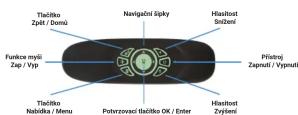
POPIS OVLÁDÁNÍ - DÁLKOVÝ OVLADAČ

Manual assistant
Powered by Anthropic
Waiting for your message
Product information

Brand : TESLA

Model : Device WK180

Category : Keyboard