
VY-235 - Vacuum Cleaner Orava - Free user manual and instructions
Find the device manual for free VY-235 Orava in PDF.


| Product Type | Cordless Ash Vacuum Cleaner |
| Brand | Orava |
| Model | VY-235 |
| Power Supply | Rechargeable Li-Ion Battery 18V / 2000 mAh; AC Adapter Input: 100-240V~ 50/60Hz, Output: 21V 800mA |
| Charging Time | Approximately 5 hours |
| Runtime | Up to 50 minutes continuous use |
| Suction Type | Dry vacuuming only (cold ash, sand, coal pellets) |
| Filtration System | HEPA filter with metal screen |
| Noise Level | 75 dB(A) |
| Container Capacity | Not specified; estimated 1-2 liters based on typical ash vacuum |
| Battery Protection | Automatic shut-off if temperature exceeds 70°C; resets when cooled below 65°C |
| Hose Length | Flexible hose 150 cm |
| Suction Tube | Aluminum tube 15 cm |
| Weight | Not specified; estimated ~2-3 kg with battery |
| Dimensions | Not specified; compact design |
| Safety Features | Double insulation, battery protection, thermal cut-off, low voltage protection |
| Maintenance | Clean HEPA filter regularly; empty container; wipe clean with damp cloth; do not immerse in water |
| Included Accessories | Vacuum assembly, aluminum tube, flexible hose, battery, HEPA filter, AC adapter, manual |
| Intended Use | Indoor/home use for vacuuming cold ash from fireplaces, boilers, grills; not for hot ash or flammable materials |
| Repairability | Battery and filter replaceable; other repairs by authorized service only |
| Environmental Protection | IP20; operate at +5°C to +40°C, humidity 5-85% |
| Disposal | Battery and electronic waste must be disposed of separately at designated collection points |
Frequently Asked Questions - VY-235 Orava
User questions about VY-235 Orava
0 question about this device. Answer the ones you know or ask your own.
Ask a new question about this device
Download the instructions for your Vacuum Cleaner in PDF format for free! Find your manual VY-235 - Orava and take your electronic device back in hand. On this page are published all the documents necessary for the use of your device. VY-235 by Orava.
USER MANUAL VY-235 Orava
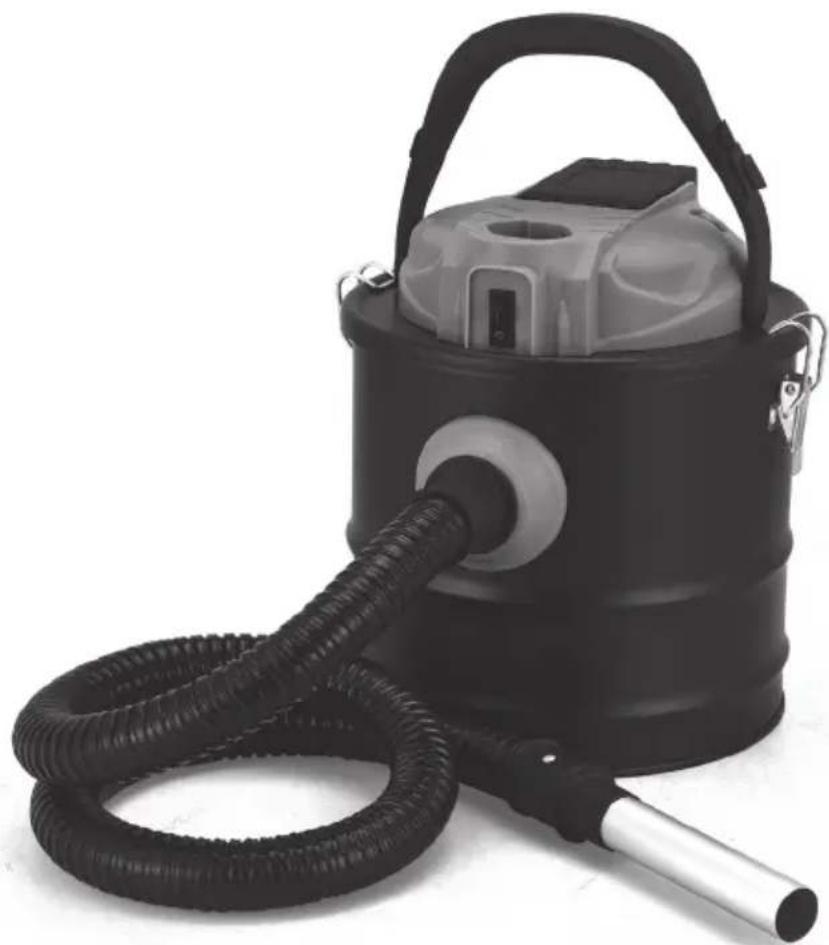
Cordless ash vacuum cleaner
Orava
VY-235
Instruction manual
EN
natural_image
Black industrial vacuum cleaner with coiled hose and handle (no visible text or symbols)CE
VY-235
Intended use of the device
The device - vacuum cleaner, easy to move on the floor - is intended exclusively for dry vacuuming of „cold ash“ from fireplaces, boilers, grills and similar devices burning solid fuels - wood, wood briquettes, brown / black coal, etc., to the extent specified technical and operating parameters and functions, safety and user instructions, and external influences of the operating environment.
ORAVA electrical devices are manufactured according to the state of the art and recognized safety rules. Nevertheless, improper or improper use or improper use may result in injury or endangerment to the life of the user or a third party, or to a third party. damage to equipment and other property.
1. GENERAL SAFETY INSTRUCTIONS AND WARNINGS
- This document contains important safety instructions and warnings for safe, correct and economical operation of the electrical equipment. Its compliance helps the user avoid risks, increase reliability and product life.
- In this document, the generic term product is used in text parts such as: electrical equipment - any device used for the production, conversion, transmission, distribution or use of electricity.
- From the point of view of the purpose of using electricity, the concept of electrical equipment in the strict sense of the word will include the following categories:
- household electric devices,
- information and communication equipment,
- consumer electronics,
- lighting equipment,
- electrical and electronic tools,
- toys and equipment for sporting and recreational
1.1 General safety instructions
- Before commissioning the unit, we recommend that you carefully read the operating instructions and operate the equipment in accordance with the instructions!
-
The safety instructions and warnings in this manual do not cover all the possible conditions and situations that may arise when using the device. The user must understand that a factor that can not be incorporated into any of the products is responsibility and caution. These factors must therefore be ensured by users / users who use and operate this device.
-
Failure to follow the safety instructions and warnings is forbidden by the manufacturer for any damage to health or property!
- Make sure that the device is complete and shows no signs of damage before using the device for the first time. If the product is defective or if it has any visible damage, do not use the product.
- Keep the operating instructions as close to the device as possible throughout its service life. Always keep the operating instructions together with the device for future use and use by new users.
- Use the device only for the purpose for which it is intended and in the manner specified by the manufacturer.
- The device is intended for home and similar indoor use, with no special focus.
- It is not a professional device for commercial use.
- Do not change the technical parameters and features of the device by unauthorized modification or modification of any part of the device.
- The manufacturer is not responsible for damages caused during transportation, misuse, damage or destruction of the equipment due to adverse weather conditions.
1.2 Safety of the operating environment
- Do not use the device in an industrial environment or outside environment.
• Always keep the operating environment clean and well lit.
- Do not place the device on an unstable surface. Overriding or dropping the device may result in personal injury or damage to the device.
- Do not expose the unit to direct sunlight or excessive heat sources.
- Do not use an electric device in areas with flammable liquids, gases or dust. The device may be the source of scaling, which can result in the ignition of dust or vapors.
Features of the operating environment
-
Ambient temperature: +5 ÷ +40 °C
-
Humidity: 5 ÷ 85%
-
Altitude: ≤ 2 000 m
-
Occurrence of water: intermittent condensation of water or occurrence of water vapor
-
Occurrence of foreign bodies: amount and type of dust are not significant
Protection class: IP20
- Other characteristics of the operating environment (mechanical stress
- shocks and vibrations, occurrence of plant, animals, weather effects) are negligible in terms of effect on the correct and safe use of electrical equipment.
1.3 Electrical safety
- Before connecting the device to the power supply for the first time, make sure that the voltage on the device label corresponds to that of the household electrical outlet.
- The electrical device is designed for mains supply 230 V \~.
The electrical safety of the device is guaranteed only if it is properly connected to the electricity grid.
- Only use a power cord with a plug (mains lead) that came with the device and compatible with a wall outlet. Using another cable may result in fire or electric shock.
- Always connect an electrical device to an easily accessible power outlet. In the event of an operating fault, the device must be switched off as soon as possible and disconnected from mains supply.
- Do not pull the power cord / power cord by pulling on the cord / cord. Disconnect the power cord by pulling the plug behind the power cord / power cord plug.
- If you use an extension cord, check that the total rated (ampere) power of all devices connected to the extension cord does not exceed the maximum current rating of the extension cable.
- If you need to use an extension cord or power supply block, make sure that the extension cord or power pack is plugged into a power outlet, and not to another extension cord or power supply. Extension power cord or power supply block must be designed for grounded plugs and plugged into a grounded outlet.
- The power plug of the device must be compatible with the mains socket. Never use any adapters or modify the socket in any other way. Do not use inappropriate or damaged sockets.
- To avoid electrical shock, plug the power cables into properly grounded electrical outlets. If the device is equipped with a 3-pin power supply cord, do not use adapters that do not have a grounding element or remove the grounding element from the plug or adapter.
- Do not bend, crush or otherwise expose the power cord / power cord of the device to mechanical stress or external heat sources. Damage to the power cord may result in electric shock.
- If the power cord is damaged, disconnect the device from the mains and do not use it again. If the power cord / power cord is damaged, it must be replaced by the manufacturer, its service department, or a qualified person to avoid the risk of electric shock.
- Regularly check and maintain the electrical device as well as the power cable. Disconnect the power plug regularly and clean it if necessary. Pollution by dust or other substances may cause disruption of the insulating state and consequently fire.
- Do not expose the device to water or moisture. The ingress of water into the device increases the risk of electric shock. If the power cord is wet or the device gets water, disconnect it immediately from the mains. If the device is plugged into a mains socket and if possible, turn off the power supply before attempting to disconnect the power supply. If you are pulling wet wires from a live power source, be very careful.
- If the electrical equipment is installed (connecting) the protective covers are dismantled, the electrical parts must not be accessible to the user when the installation is finished.
1.4 Safety of persons
- This device is intended for use by persons without an electrotechnical qualification (layperson) according to the instructions specified by the manufacturer.
• Device operation includes activities such as switching on and off, user manipulation and setting of operating parameters, visual or auditory inspection of the equipment, and user cleaning and maintenance. - This device can be used by children 8 years of age and older and persons with reduced physical, sensory or mental abilities or lack of experience and knowledge only when under the supervision or guidance of the responsible person have been instructed to use the device in a safe way and understand the potential hazards.
- Cleaning and user maintenance can be carried out by children 8 years of age and older only under the supervision of the responsible person.
• Children may not play with the device. - Always keep the device out of reach of children during use and operation. Be sure to download the device even for a freely accessible power cord.
- Always be careful when operating the electric device. Do not use an electric device if you are overly tired, under the influence of medication or narcotic drugs that reduce attention and focus. Inattention during operation may result in serious injury.
1.5 Cleaning, maintenance and repairs
- Observe the normal user cleaning and maintenance of the device in the recommended way. Do not use solvents or harsh cleaners for cleaning. Pollution and visible stains from finger contact, respectively. The hands can be cleaned using detergent detergents specially designed to clean household devices.
- If you do not use the device, clean it or disconnect the device from the power supply when the device is faulty.
- Do not disassemble the device. The device works with a dangerous voltage. For this reason, always switch off the device and disconnect it from the power supply. In the event of a fault, please have the repair serviced by an authorized service center.
- Only guarantee qualified and qualified personnel to repair and repair the electrical device.
(*) Appropriate qualified professional: the sales department of the manufacturer or importer or the person qualified and authorized to carry out this type of activity with the ability to avoid all risks.
2. Special safety instructions. Read carefully!
- Electrical device is designed and manufactured in such a way as to allow safe operation and use by unauthorized personnel. Despite all precautions taken by the manufacturer for safe use, operation and use entails certain residual risks and the associated potential hazards.
- The following symbols and their meanings have been used on the device and in the accompanying documentation to indicate potential hazards:
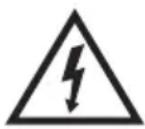
This symbol alerts users that the device is operating with hazardous electrical voltages. Do not remove protective covers on the device.
Failure to follow the safety instructions while using and operating the device may result in:
Risk of electric shock!
Risk of serious injury or death!

This symbol alerts users that if the safety instructions for using and operating the device are not followed, there is a risk of:
Risk of serious injury or death!
Risk of equipment damage or other property damage!

This symbol indicates that the product is made with double insulation between hazardous live parts (parts with dangerous voltage from the mains) and parts that are accessible in normal use.
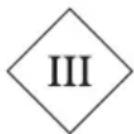
This symbol indicates that protection against electric shock is ensured by a safe low voltage (SELV) so that the device is operated only by batteries or a rechargeable battery.
The battery is not recharged outside the device.
The main part of the device is designed as a protection class III construction.
Transportation/Transfer
- During transport and use e.g. Take care when moving the truck to prevent the device from toppling over.
- Do not carry the device until the mains is disconnected.
- The device is intended for manual guidance / translation and transport during use.
- Carry the device by its grip when carrying it. Do not move or carry the device by the power cord.
Risk of serious injury or death! Risk of equipment damage!
Unpacking/Packaging
- Unpack the device and accessories before use and dispose of all parts of the packaging material, etiquettes and labels. Keep packaging materials in a safe place or keep them out of reach of children and incapacitated persons.
Risk of serious injury! Risk of suffocation!
Inspection/Commissioning
- We recommend performing initial and subsequent regular inspections of the device.
- Do not use the device without the required filters and accessories.
- Never use the device if it is incomplete, damaged or parts or accessories have been damaged during use (e.g. due to a fall).
- Pay special attention to periodically checking the condition and operation of the AC adapter.
- Clean the unit before commissioning according to the instructions in the "Commissioning" section. „Cleaning".
- Never clean the device (body with electrical parts) and the AC adapter in a way that could cause liquid to flow into the device.
- Clean these parts only with a damp cloth and wipe them dry or allow them to dry.
- Only clean the unit when it is turned off and unplugged.
Risk of electric shock! Risk of serious injury!
Operation/Location/Supervision Warning!
- The device is equipped with an AC adapter for recharging the built-in battery. The mains adapter operates with a dangerous mains voltage, therefore strictly observe the following safety instructions and warnings:
- To charge the built-in battery, use only the supplied accessories and the AC adapter supplied by the manufacturer or a type that is specified and approved by the manufacturer of the device.
- Only charge the battery indoors. Select the location and installation of the battery charging holder to prevent the occurrence of potentially hazardous situations.
- Do not expose the mains adapter and the cord to sources of excessive heat, mechanical influences, water or other liquids and excessive moisture.
- Make sure that the unit is turned off before connecting the AC power adapter to the mains.
- Check the mains lead or cord for damage before each use. If you find any damage, do not use the power supply.
- Do not unplug the AC adapter from the wall socket by pulling on the cord.
- Do not leave the AC adapter plugged into an electrical socket when the device is not placed in the charging cradle and the battery is not charging.
- Do not use the AC adapter if it has been dropped, if it shows signs of malfunction or damage, if it becomes excessively hot or makes abnormal noises.
- If the AC adapter is connected to the mains, the surface of the UPS may become slightly warm when the battery is being charged. This is a normal operating condition and is not a malfunction.
- If the AC adapter or power cord is damaged, it must be replaced with a new, corresponding type. Replacement of the power supply for your device shall be provided by the manufacturer, its professional service or an authorized qualified person.
- Only use the AC adapter indoors. Be careful to observe the environmental characteristics and properties to avoid a hazardous situation.
- Never connect the AC power adapter to an AC socket while your hands are wet or the power cord or device is wet. Always wipe the hands, power cord, and device thoroughly with a dry cloth.
- Do not allow the power cord to hang over the sharp edges of the furniture, as this may damage its protective insulation and create a hazard.
- Only perform cleaning and user maintenance when the device is turned off and unplugged. Never immerse the mains adapter in water or other liquids.
Warning!
- The device and the AC adapter must not be left unattended when connected to the mains.
- Never leave the device unattended and freely accessible and do not leave it with an unplugged power cord. Children, incapacitated persons or animals could pull the device off the cord and cause serious injury.
Risk of electric shock! Risk of serious injury!
Warning!
- The device is designed for vacuuming dry dirt and liquids of a small amount and range.
• Vacuuming dry dirt does not require special precautions for use. Use suitable attachments for vacuuming. - Observe the following precautions when vacuuming liquids:
- Use a soft plastic attachment for the purpose of vacuuming liquids.
- Before picking up liquids, check the condition and contents of the dirt container.
- Thoroughly empty the dirt container and remove as much dry residue as possible. Mixing the dry contaminants in the container and the liquid to be sucked results in a mass of consistency that can seriously damage, damage or even destroy the device.
- When picking up liquids, do not tip the device in such a way that the liquid can enter the engine and other electrical parts.
- Do not exceed the amount of suction liquid, which is determined by the mark on the surface of the dirt container.
- After draining the liquid, empty the device and wipe thoroughly to dry. Let the filters dry. This is the device ready for further use to vacuum dry dirt and liquids.
Warning!
- Do not use the device for vacuuming oily or greasy materials or substances such as:
- fats, oils and the like.
- Do not use the device for vacuuming technical materials such as:
- sharp glass and metal particles, remnants of building materials, etc.
- Do not use the device for vacuuming chemical and toxic materials and particles such as:
- chlorine and ammonia cleaners, bleaches, etc.
- Do not use the device for picking up easily flammable and flammable materials and particles such as: solid and/or liquid firelighters, petrol, thinners and the like.
- Do not use the device for picking up hot objects, materials or particles such as:
- cigarette butts and cigarette ash, carbons and coal ash, matches and the like.
• Vacuuming very fine particles can block the dust filter pores and reduce the suction power of the device. In this case, the filter must be cleaned / replaced even if the dirt tank is not filled.
- If a larger object is sucked in and the suction line becomes blocked, switch off the unit immediately. Do not continue using the device until the object has been removed and the suction line has been released and cleared.
- Only place the device on a flat and stable surface.
- Do not place the device:
- on uneven and dirty surfaces,
- on the edges of tables or furniture parts,
- near sources of excessive heat and open fire,
- in the vicinity of containers containing water or other liquids. Risk of serious injury!
There is a risk of damage to the device or other property damage!
Warning!
- Do not use the device to vacuum textiles and clothing directly on persons!
- Do not use the device to vacuum animal hair and hair directly on pets!
- Do not expose yourself (body parts, face, hair, loose clothing, etc.), other people or animals to the suction line (suction line) or accessory attachments when using the device (while the device is operating). Risk of serious injury!
- Only assemble and disassemble parts and accessories, and clean and carry the unit when the unit is turned off and unplugged.
- Always turn on the device with the main switch during normal use. After use, turn off the device with the power switch. Do not use the device if the power switch does not work.
- Do not use or place the device in a place where children can reach freely.
- Do not allow children to play with the device. The device may topple over and cause injury to children.
- Mechanical damage (breakage or breakage of parts and covers, damage to insulation, etc.) may cause serious injury. Do not use a damaged device.
Risk of serious injury!
There is a risk of damage to the equipment or other property damage!
- Do not use or place the device near containers containing water. Should the device fall into the water, allow it to dry thoroughly. In such cases, take the equipment to a professional service center to check that it is safe and working properly.
- Do not partially cover the device. Do not insert or allow foreign bodies to enter the openings of the device covers.
- Do not block the air vents of the covers. Air ventilation ensures correct operation, reliable and safe operation of the device.
• Always keep the unit under supervision during use and operation!
- This unit is not intended to be operated by a programmer, external timer or remote control, as there is a risk of fire if it is covered or incorrectly positioned.
- Never overload the device beyond the limits specified in the technical data!
- Observe the operating mode of the device (operation / operation time and pause) according to the operating and use instructions. Clean the device regularly and empty it from dirt. Overfilling and excessive contamination can result in reduced operating parameters, possibly overheating and subsequent damage.
- If you notice any abnormal effects (sounds, odors, smoke, ...) while using the unit, turn off the unit immediately and unplug it. Have the device checked by a specialist garage.
- If any safety part (mechanical, electrical) is part of the device, never put it out of operation! Do not use the device if the safety part / component is damaged or malfunctioning!
- Never underestimate possible dangers and be careful!!!
Producer:
ORAVA retail 1, a.s.
Seberíniho 2
821 03 Bratislava
Slovenská republika
Importer:
ORAVA retail 1, a.s.
Seberíniho 2
821 03 Bratislava
Slovenská republika
ORAVA distribution CZ, s.r.o.
Ostravská 494
739 25 Sviadnov
Česká republika
BATTERY DISPOSAL
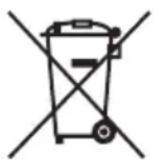
Before disposing of the product or handing it over to a designated collection point, you will need to ensure that the built-in batteries are removed. Before removing the batteries, turn on the vacuum cleaner and wait for the batteries to discharge. Battery removal is provided by an authorized service center.
Batteries contain substances harmful to the environment and therefore do not belong in the normal household waste. Their correct disposal will be ensured by the appropriate collection point.
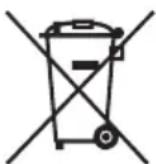
DISPOSAL OF USED ELECTRICAL AND ELECTRONIC EQUIPMENT
The symbol on the product or on its packaging indicates that this product does not belong to household waste. It is necessary to take it to a collection point for electrical recycling and electronic equipment.
By ensuring proper disposal of this product, you will help prevent negative consequences to the environment and human health that would otherwise be caused by inappropriate disposal of this product. For more detailed information about recycling of this product, please contact your local authority, your household waste disposal service or the shop where you purchased the product.

This product meets all the essential requirements of the EU directives that apply to it.
Description of parts
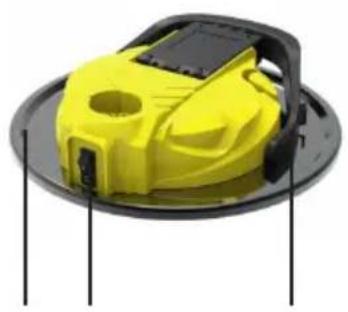
1 cover
2 I/O switch (on/off)
3 handle
4 flex hose
5 aluminum tube
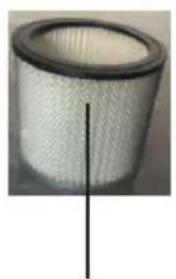
6 HEPA filter with metal screen inserted
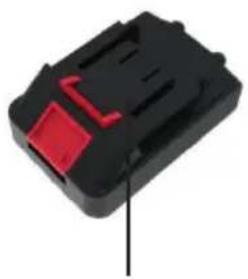
7 rechargeable battery
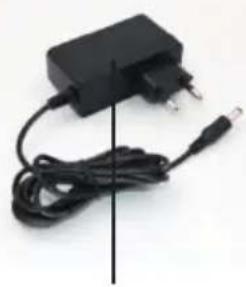
8 AC adapter with power cord
natural_image
Yellow and black plastic robot device with mounting bracket (no visible text or symbols)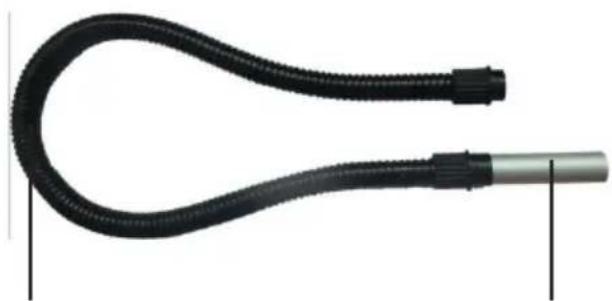
natural_image
Close-up of a black flexible hose with a metallic end cap, shown against white background (no text or symbols)521 3 4
natural_image
Close-up of a white cylindrical filter or filter component with a black vertical line indicating a measurement or edge (no text or symbols visible)6
natural_image
Close-up of a black plastic electronic component with a red handle and a black arrow pointing to it (no text or symbols visible)7
natural_image
Black rectangular electronic device with attached cable and terminal connector (no visible text or symbols)8
Assembly and operation
Before first use:
Unpack the device and remove all packing material.
This ash vacuum cleaner is not only a high quality and highly reliable product, but is also easy to use and safe with a long life. It is designed to vacuum only cold ash (up to 50 °C), but also sand, coal pellets, etc.
It is not suitable for boilers or fuel oil stoves and cannot be used for cement and gypsum dust.
Battery charge
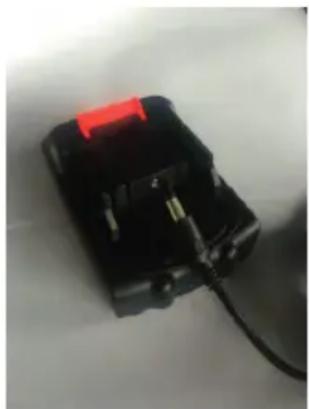
Charge the supplied battery for about 5 hours before first use (and then whenever the battery runs out).
A fully charged battery allows up to 50 minutes of continuous vacuuming. The battery charges the removed top assembly.
Connect the AC adapter's power cord to the selected battery into the battery connector, and then connect the AC adapter to a wall socket.
natural_image
Close-up of a black electronic device with a red handle and cable, no visible text or symbolsNotes and advice
- The AC adapter and battery may become warm during charging.
It is normal. When the charging process is complete, they will cool down. - If the engine turns slower (weaker), it is necessary to fully charge the battery.
- It is advisable to discharge the battery from time to time (approximately once a month) and then fully charge it to maintain optimal performance and condition.
- Charge the battery after each use.
Note about charging
If the battery surface temperature is above 55 °C or below 0 °C while charging, or if the battery enters self-protection mode, try to stop charging until the battery surface temperature returns to 0 to 55 °C .
If the battery surface temperature exceeds 70 °C during battery operation, it may switch to self-protection mode and disconnect the power to the vacuum cleaner.
When the battery surface temperature drops to 65^ C, the battery and vacuum cleaner will operate again.
Vacuum cleaner assembly
Do not remove the battery before attaching or removing accessories.
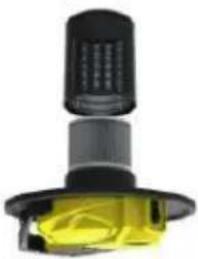
1. Insert the filter
Loosen the retaining clips on the top cover and remove the top assembly from the ash container. Replace the filter on the bottom of the top assembly and put the entire assembly back on the container.
Then secure the clips.
natural_image
Close-up of a mechanical component with black and yellow sections, no visible text or symbols2. Insert the flexible hose into the vacuum cleaner
Insert one end of the suction hose into the suction opening on the container in the correct position.
Hose removal:
Pull the hose out of the suction opening.
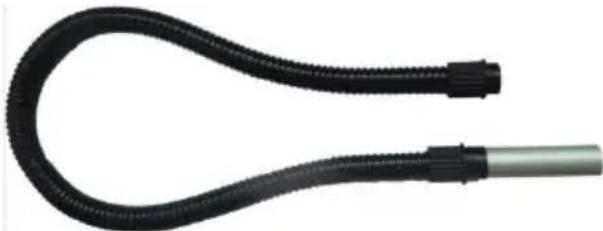
3. Insert the suction aluminum tube into the flexible hose
Attach the suction tube to the other end of the flexible hose.
natural_image
Close-up of a black flexible hose with a metallic handle, no text or symbols visible4. Insert a charged battery
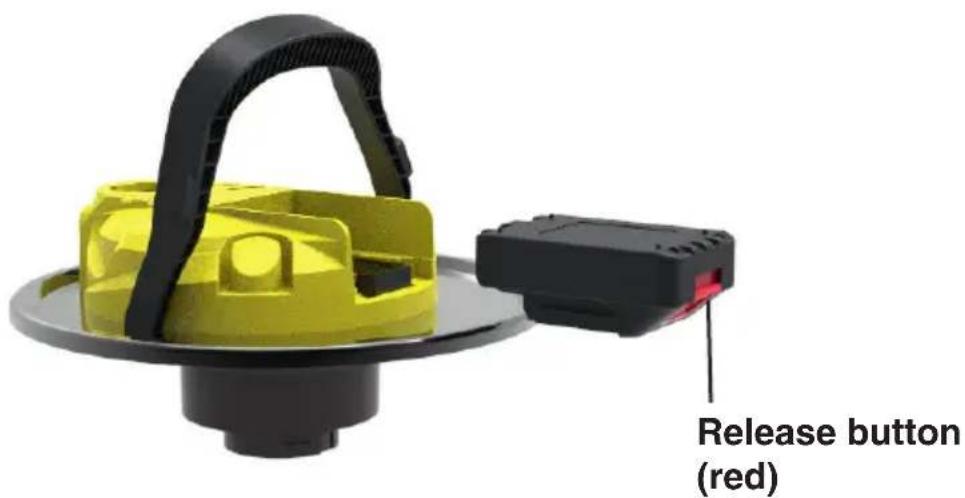
Turn the charged battery in the correct direction and slide it into the battery compartment on the top assembly until it clicks.
To remove the battery, press the release button (red) on the battery and pull it out of the top assembly.
Using the vacuum cleaner
Turn off the vacuum cleaner before attaching or removing accessories.
1 Charge the battery according to the charging section and insert it.
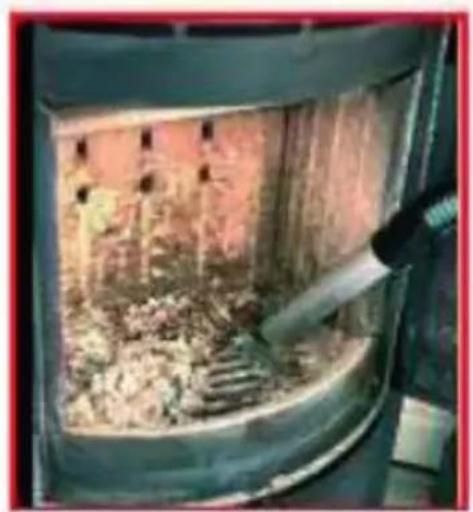
2 Switch on the vacuum cleaner with the I/O switch (on/off). After switching on, vacuum the ash directly from the fireplace or stove using a suction tube. Do not pick up ash from the burning hotplate!
If suction power decreases, turn off the vacuum cleaner with the switch and I/O (On/Off) and clean the filter as described in the filter cleaning section.
Then turn on the vacuum cleaner again and continue vacuuming.
natural_image
Interior view of a large industrial furnace or reactor with workers inside (no visible text or symbols)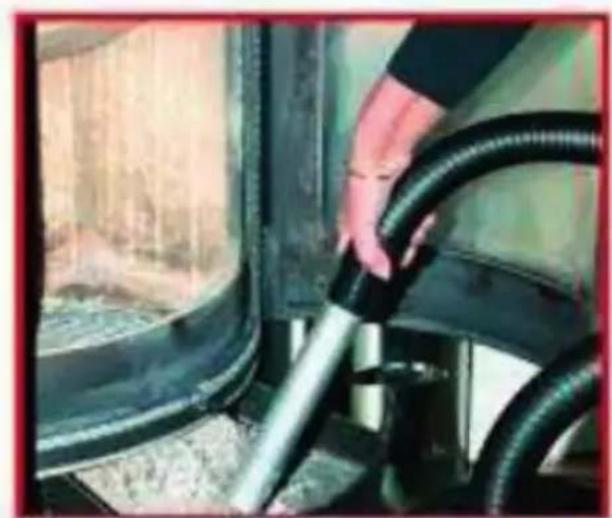
natural_image
Person handling a black rubber hose inside a vehicle cabin (no visible text or symbols)After vacuuming
1 Press the I/O (on/off) switch on the device to turn off the vacuum cleaner.
2 Remove the battery from the top assembly.
3 Pull the suction hose out of the suction opening and disconnect the tube from the hose. Then clean and store the suction cup and accessories.
Emptying the ash container
Warning!
Remove the battery before emptying.
Note:
When vacuuming larger amounts of ash, the container may fill up faster, so check with the filter more often.
Never vacuum with a container other than the original container and the original filter.
1 Remove the battery.
2 Pull the suction hose out of the suction opening.
3 Loosen the retaining clips on the top cover and remove the top assembly from the ash container.
4 Empty the ash container, wash the container, then wipe it with a dry cloth and allow it to dry freely.
If necessary, remove the filter and clean it as described in the filter cleaning section.
5 Replace the filter on the bottom of the top assembly and replace the entire assembly on the container.
Then secure the clips.
Warning!
Before closing the cover, make sure that the filter is correctly inserted and that nothing prevents the cover from closing properly.
Filter cleaning and replacement
If the vacuum cleaner is of poor performance, the HEPA filter should be cleaned. If the suction power is greatly reduced, check that the suction nozzle or hole is not blocked.
The filter should be cleaned or replaced regularly, depending on the intensity of use. Failure to do so may result in reduced device performance and / or reduced filter life.
Filter cleaning/replacement
1 Remove the battery.
2 Pull the suction hose out of the suction opening.
3 Loosen the retaining clips on the top cover and remove the top assembly from the ash container.
4 Empty the ash container, wash the container and allow it to dry freely.
5 Remove the filter and clean it first by tapping it, then with a lukewarm shower from the inside as shown and dry it in the air.

6 After thoroughly drying the filter, replace it on the bottom of the top assembly and replace the entire assembly on the container.
Then secure the clips.
Warning!
If the filter is very dirty, replace it with a new one. (Check with your dealer.)
Warning!
Never insert a wet filter into the vacuum cleaner as this may damage the vacuum cleaner or cause an electric shock.
Cleaning the suction opening
If there is an object clogging the suction opening of the vacuum cleaner, proceed as follows:
1 Pull out the hose.
2 Remove the sucked obstruction from the suction port.
3 Attach the hose.
Cleaning and maintenance
- Never wash the engine top assembly under running water or immerse it in water.
- Clean the equipment and accessories with a soft cloth. Do not use solvents or abrasive cleaners for cleaning.
- The device must remain completely dry after cleaning.
Battery and motor protection function
The device is equipped with a battery protection function to prevent overloading and overheating and damage the batteries and the device itself. This can happen if the hole or nozzles are blocked. If the device turns itself off in the middle of operation without the battery running out, this is due to the battery and motor protection function.
If the battery surface temperature exceeds 70 °C during operation, the battery may switch to self-protection mode and disconnect power to the vacuum cleaner, the vacuum cleaner will shut itself off.
Turn the power switch off and wait at least until the battery or engine has cooled. When the battery surface temperature returns to 65 °C , the battery and vacuum cleaner will operate again. If the cause of the overheating is a clogging of the suction port, eliminate any possible cause of blockage of the port or nozzles, empty the garbage container and clean the filters. After the engine has cooled down and the cause of the blockage has been eliminated, turn the device on again. If the device still does not work properly, contact the service center.
Technical specifications
AC Adapter Power: 100-240 V (AC) 50/60 Hz
Charging Adapter Output Voltage: 21 V (DC), 800 mA
Battery Operating Voltage: 18 V (DC)
Battery: 18V/2000mAh (Li-Ion)
Noise level: 75 dB (A)
The declared noise emission value of this device is 75 dB (A), which represents the sound power level A relative to the reference sound power of 1 pW.
Package Contents: Vacuum Cleaner Assembly (1)
Aluminum Tube 15 cm (1)
Flexible hose 150 cm (1)
Battery 18 V (1)
HEPA Filter (1)
AC Adapter (1)
Instruction Manual (1)
Subject to change!


- Cordless ash vacuum cleaner
- Orava
- Intended use of the device
- GENERAL SAFETY INSTRUCTIONS AND WARNINGS
- General safety instructions
- Safety of the operating environment
- Features of the operating environment
- Electrical safety
- Safety of persons
- Cleaning, maintenance and repairs
- Special safety instructions. Read carefully!
- Transportation/Transfer
- Unpacking/Packaging
- Inspection/Commissioning
- Operation/Location/Supervision Warning!
- Warning!
- Producer:
- Importer:
- BATTERY DISPOSAL
- DISPOSAL OF USED ELECTRICAL AND ELECTRONIC EQUIPMENT
- Description of parts
- Assembly and operation
- Before first use:
- Battery charge
- Notes and advice
- Note about charging
- Vacuum cleaner assembly
- Insert the filter
- Insert the flexible hose into the vacuum cleaner
- Hose removal:
- Insert the suction aluminum tube into the flexible hose
- Insert a charged battery
- Using the vacuum cleaner
- After vacuuming
- Emptying the ash container
- Note:
- Filter cleaning and replacement
- Filter cleaning/replacement
- Cleaning the suction opening
- Cleaning and maintenance
- Battery and motor protection function
- Technical specifications
Brand : Orava
Model : VY-235
Category : Vacuum Cleaner