
RAD 350 - Detector COBRA - Free user manual and instructions
Find the device manual for free RAD 350 COBRA in PDF.


| Product Type | Radar/Laser Detector |
| Brand | Cobra |
| Model | RAD 350 |
| Detection Bands | X, K, Ka, Ku (optional), Laser |
| VG-2 Immunity | Yes |
| POP Mode Detection | Yes |
| Safety Alert | Yes (detects emergency vehicles) |
| Display | LED with signal strength and band indicators |
| Audio Alerts | Voice alerts and tones |
| Mute Function | Yes (auto mute available) |
| City/Highway Modes | Yes (reduces false alerts) |
| Power Source | 12V DC cigarette lighter adapter |
| Dimensions (L x W x H) | Approx. 5.1 x 2.9 x 0.9 inches |
| Weight | Approx. 4.2 oz |
| Mounting | Windshield suction cup mount and dash mount |
| Cable Length | Approx. 4.5 ft coiled |
| Warranty | 1 year limited |
| Maintenance & Cleaning | Clean lens with soft cloth; avoid moisture and extreme temperatures |
| Safety | Do not obstruct driver's view; mount securely; check local legality |
| Spare Parts / Repairability | Replacement power cords and mounts available; no user-serviceable parts |
Frequently Asked Questions - RAD 350 COBRA
User questions about RAD 350 COBRA
0 question about this device. Answer the ones you know or ask your own.
Ask a new question about this device
Download the instructions for your Detector in PDF format for free! Find your manual RAD 350 - COBRA and take your electronic device back in hand. On this page are published all the documents necessary for the use of your device. RAD 350 by COBRA.
USER MANUAL RAD 350 COBRA
The Cobra line of quality products includes:
CB Radios
Dash Cams
Radar Detectors
Marine VHF Radios
Power Inverters
Accessories
For more information or to
order any of our products, please visit www.westles
www.cobra.com
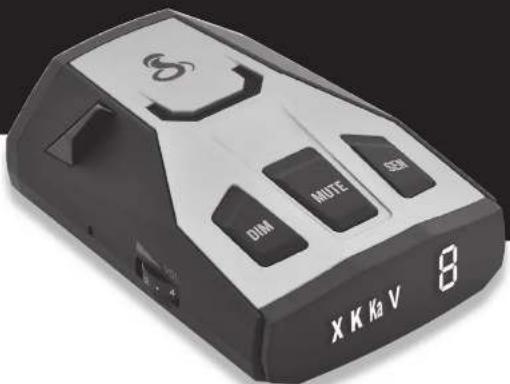
RADAR/LASER
PROTECTION
RAD350
The following table is a simple diagram and contains no textual content.
①
EnglishNothing Comes Close to a Cobra

Important Information and
Customer Assistance
Important Information
Federal Laws Governing the Use of Radar Detectors
It is not against federal law to receive radar transmissions with your Cobra radar
laser detector. The Communications Act of 1924 guarantees your right to receive
radio transmissions on any frequency. Local laws that contravene this Ac
may be enforced by your local law enforcement officials until and unless they are prohibited from doing so by federal court action.
they are prohibited from doing so by federal court action.
Safe Driving
Motorists, as well as operators of emergency or service vehicles, are expected to
exercise all due caution while using this product, and to obey all applicable traffic
laws. Do not attempt to change settings of the unit while in motion.
Security of Your Vehicle
Before leaving your vehicle, always remember to conceal your radar detector
in order to reduce the possibility of break-in and theft.
Aurita Cervis Sivemnitz Corporation
100 West Corollard Center Group, Inc. 1916
www.anchinalc.com
Nothing Use Cos. or Dals*


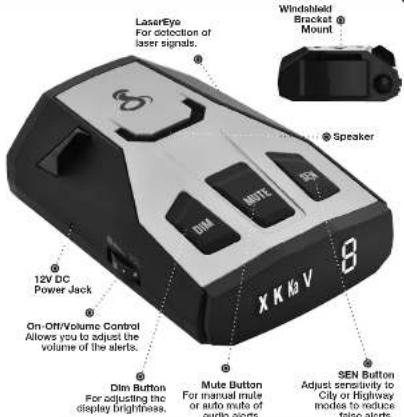
Controls, Indicators and Connections

FCC NOTICE This device complies with part 15 of FCC rules: Operation is subject to the following two conditions: (1) This device may not cause harmful interference, and (2) This device must accept any interference received including interference that may cause undesired operation.
Display and Product Features
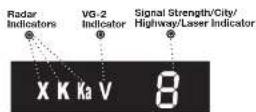
Easy-to-Read Display
Product Features
Congratulations! You've made a smart choice by purchasing a radar/laser detector from Cobra. Just look at some of the sophisticated features and capabilities your new unit includes:
Radar/Laser Protection
Detects all radar and laser guns.
LaserEye®
Detects laser signals from both front and rear.
Anti-Falsing Circuitry
Automatically reduce false alerts from erroneous responses including automatic doors open and
sources including automatic door openers and fixed position traffic flow monitoring systems.
IVT FILTER ^TM
Automatically reduces false alerts from moving in-Vehicle Technology sources such as collision avoidance systems and adaptive cruise control.
City & Highway Modes
Selectable modes reduces falsing in densely
populated areas.
Auto Mute
Automatically miles audio for sustained alerts.
7-Segment Color Display
Bright display with band identification icons and numeric signal elongation modes
and humenic signal strength meter. Audible Signal Strength Level
Additive Signal Strength Levels
unique tones provide signal strength and band Identification.
E. Power Cord and
This booklet describes the simple steps for mounting and setting up your detector. It also provides helpful information about how radar and laser guns are used and how you can interpret the alerts you receive.
Nothing Consider Discert


Trademark AcknowledgementControls Inc
Trademark Acknowledgement
Cobra ^8 , DigNow ^8 , EasySet ^8 , Extra Sensory Detection ^8 , LaserEye ^6 . Nothing Comes Close to a Cobra ^8 , 96-2 Alert ^8 , Xtreme Range Superbiprodyne ^8 and the naive design are registered trademarks of Cobra Electronics Corporation, USA.
Cobra Electronics Corporation™, AJRA™, IntelliLink™, IntelliScope™, IntelliNew™, Revolution™ Series, NT Filter™, SmartPower™, Super-Xtreme Range Superheterodyne™, 5-XRS™, and Voice Alert™ are trademarks of Cobra Electronics Corporation, USA.
Opticorm "Is a trademark of 3M Corporation, Indicateaf" for Ford is a registered trademark of Ford Motor Company, Inc. (Debitoclear®) for CM is a registered trademark of General Motore Corporation. LTI Laser® and LTI 20-20® are trademarks of Laser Technology, Inc. Kustom Laser®, Kustom Laser 340° and ProLaser III® are trademarks of Kustom Signals, Inc. SpecOaser® is a trademark of Laser Atlanta, Boe III® and Pop® are a trademark of MPH Industries. Stalker® LDAIR is a trademark of Applied Concepts, Inc. Spectro® and Socetre IV® are trademarks of Stealth Micro Systems Pty. Ltd. SpecOaser® is a trademark of Laser Alumis, LLC. Interceptor V6-2® is a trademark of TechnoSonic Industries LTD. Tomaf® is a registered trademark of IGMAR Electronics, Inc.
Nothing Since Cusca Dab


Introduction
Important Information ...... A1
Controls, Indicators and Connections.... A2
Display.... A3
Product Features A3

Your Detector
Installation.... 2
Getting Started 5
Settings 6
Highway/City Mode.... 6
Anti-Falsing Circuitry 7
Muting an Alert 7
Auto Mute Mode 7
Display Brightness 8
Tone Setting 8
VG-2 Alert Settings 9
Radar Alert Settings 10
Detection.... 11
Signals Detected.... 11
Audio Alerts.... 11
Visual Display 11
Instant-On Detection.... 13
Responding to Alerts.... 14
Understanding Radar and Laser 15
Understanding LIDAR.... 16
Customer Information
Maintenance 16
Specifications 17
Limited 1-Year Warranty 18
Product Service & Optional Accessories 19
Trademark Acknowledgement....20


Installation
Installation
Where to Mount Your Unit
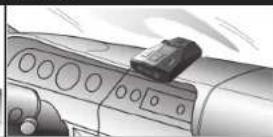
You will get optimum performance from your detector if you Mount it at a point approximately in the center of the vehicle, as low as possible on the front windshield without obstructing the unit's view of the road either to the front or rear. You can also mount it directly on the dashboard.
Windshield Mounting Dashboard Mounting
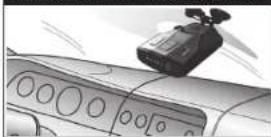
The unit's lens must not be blocked and the LaserEye should have a clear view out the back window to allow maximum detection.
The LaserEye Should Have a Clear View
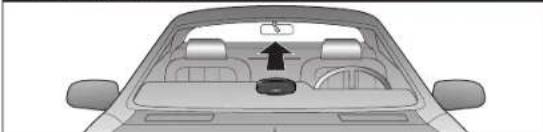
natural_image
Top-down view of a car showing the dashboard and rear seats with a central circular object (no text or symbols visible)Radar and laser signals pass through glass but not through other materials and objects. Objects that can block or weaken incoming signals include:
■ Windshield wiper blades
■ Mirrored sun screens
■ Dark tinting at the top of the windshield
■ Heated windshields currently available on some vehicles (Instaclear for Ford, Electriclear for GM). Consult your dealer to see if you have this option.
Windshield Mounting
| 1. Attach the rubber cups to the bracket. | 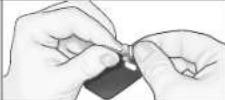 |
| 2. Make sure the rubber cups and your windshield are clean. | |
| 3. Push the bracket firmly onto the windshield. | 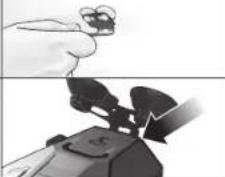 |
| 4. Attach the detector to the bracket. Check that the unit is parallel to the road's surface. | |
| 5. To adjust the angle if necessary, gently push or pull on the bracket to bend it. DO NOT use the detector to bend the bracket. | 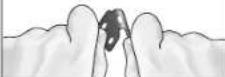 |
| 6. Plug the power cord into the detector. | 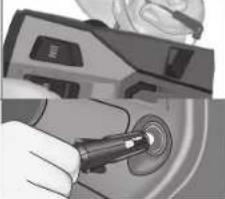 |
| 7. Plug the cigarette lighter adapter on the power cord into your vehicle's cigarette lighter. | |

English
Nothing Comes Close to a Cobra ^2


Installation
Dashboard Mounting
- Place the detector on the dashboard to find a location where the unit has a clear, level view of the road and is parallel to the road's surface. The angle CANNOT be adjusted after mounting
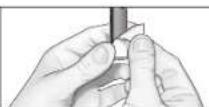
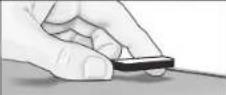
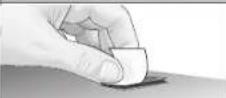
- Remove the paper backing from one side of the hook-and-loop fastener.
- Attach the pad to the dashboard at your chosen location and remove the other paper backing.
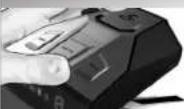
- Attach the detector to the hook-and-loop fastener. You can remove and reattach the unit as often as you like.
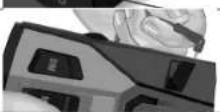
- Plug the power cord into the detector.
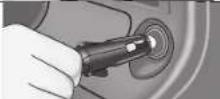
- Plug the cigarette lighter adapter on the power cord into your vehicle's cigarette lighter.
Getting Started
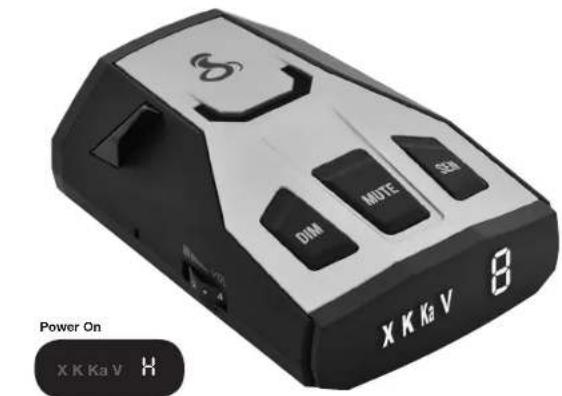
To Turn On The Unit And Adjust The Audio Volume
| Rotate the On-Off/Volume control clockwise (away from you). | Audible Tone Visual Display | |
| Three beeps | H or C pears in the display indicating that the power is On | |

NOTE
In some vehicles, power is supplied to the cigarette lighter even while the ignition is Off. If this is the case with your vehicle, you should turn Off or unplug your detector when parking for lengthy periods.

English

Settings
Settings
Sens Mode
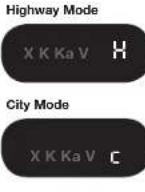
Setting your detector to City mode sensitivity delays all X band audio alerts at lower signal strength levels. (A single beep will sound when the signal is first detected.) This will reduce false alerts while you are driving in, or near, urban areas where there are many sources for conflicting X band signals such as microwave towers and automatic door openers.
To change settings, follow the procedure listed below, which indicates what you will see and hear as you complete each step. The factory setting is Highway mode.
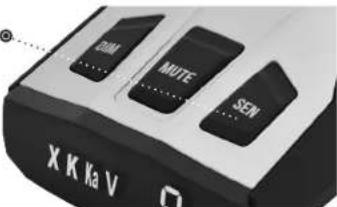
SEN Button Ⓞ
Press and
release
To Change From Highway Mode To City Mode
| Press and release the SEN button. | Audible Tone Visual Display | |
| One beep | C appears in the display | |
To Change From City Mode To Highway Mode
| Press and release the SEN button again. | Audible Tone Visual Display | |
| Two beeps | H appears in the display | |

English

Settings
Anti-Falsing Circuitry
Your RAD 350 is designed to provide you the truest alerts and minimize the distraction of erroneous signals from radar-based fixed-position and moving sources.
- Adjustable Sensitivity: City / Highway modes allow driver to adjust sensitivity to driving environment, reducing false alarms from fixed position sources such as automatic door openers.
- IVT Filter: system automatically reduces false alerts from moving In-Vehicle Technology sources such as collision avoidance systems and adaptive cruise control.
Manual Mute
Your detector allows you to quickly turn Off an audio Alert by momentarily pressing the Mute button. If you press the Mute button a second time during the Alert, the audio Alert will be turned back On.
Auto Mute will automatically reduce the audio volume of all alerts after four seconds for as long as the signal is detected. The factory setting for Auto Mute is On.
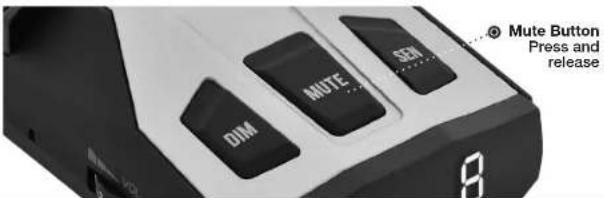
To Turn Auto Mute Off
| Press and release the Mute button while no alert is occurring. | Audible Tone Visual Display | |
| One beep Audio Only | ||
To Turn Auto Mute On
| Press and release the Mute button again while no alert is occurring. | Audible Tone Visual Display | |
| Two beeps Audio Only | ||
Nothing Comes Close to a Cobra ^2


Settings
Display Brightness
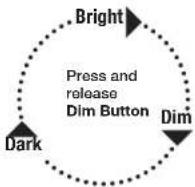
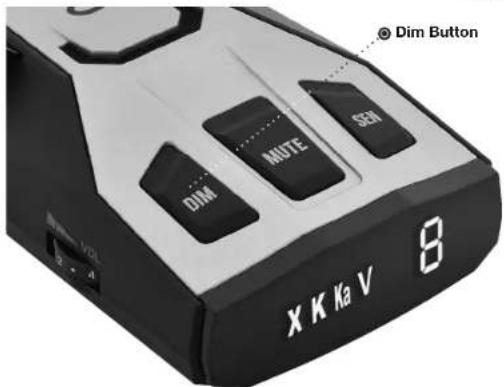
You can choose from three settings for Brightness of the display. Repeatedly push the Dim button to cycle through the settings. The factory setting is Bright.

Settings
VG-2 Alert Settings
Police use radar detector detectors (RDDs) to spot users of radar detectors. Your detector is able to identify signals from VG-2 RDDs and can provide alerts when any of these or similar devices are in use near your vehicle.
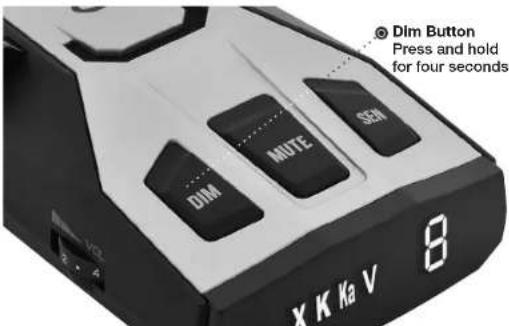
Your detector is invisible to VG-2 RDDs. You can choose whether you want to be alerted to VG-2 RDD signals. The factory setting for VG-2 alert is Off.
To Turn VG-2 Alerts On and Off
| While no signal is being detected, press and hold the Dim button for four seconds. | Audible Tone Visual Display | |
| On = One beep V LED Flashes | Once | |
| Off = Two beeps V LED Flashes | Twice | |

English
Nothing Comes Close to a Cobra ^2


Settings
Radar Alert Settings
The detector allows you to choose whether it will show alerts on the X, K and Ka Bands. The factory settings are: X, K, and Ka On.
| To Turn X Band On and Off | ||
| While no signal is being detected, press and hold both the Dim and Mute buttons for four seconds. | Audible Tone Visual Display | |
| X On = Two beeps X LED Flashes Twice | ||
| X Off = One beep X LED Flashes Once | ||
| To Turn K Band On and Off | |
| While no signal is being detected, press and hold both the Mute and SEN buttons for four seconds. | Audible Tone Visual Display |
| K On = Two beeps K LED Flashes Twice | |
| K Off = One beep K LED Flashes Once | |
| To Turn Ka Band On and Off | ||
| While no signal is being detected, press and hold the Dim and SEN buttons for four seconds. | Audible Tone Visual Display | |
| Ka On = Two beeps | Ka LED Flashes Twice | |
| Ka Off = One beep Ka LED Flashes Once | ||

Detection
Signals Detected
The tables on the following pages show you the types of Signals your detector will detect, as well as the visual alerts it provides for each of them.
Audio Alerts
A distinctly different Alert tone is used for each type of signal detected (including separate tones for each laser signal). For X, K and Ka band radar signals, the tones will repeat faster as you approach the signal source. The repeat rate of the tones gives you useful information about the signal detected. (See responding to alerts on page 14.)
Visual Display
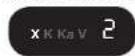
An indication of the type of signal detected will appear in the display. During X, K, and Ka alerts, a number will also appear, indicating the strength of the signal detected. (1 = weakest, 5 = strongest).
Weak X Signal Detected Moderate K Signal Detected Strong Ka Signal Detected
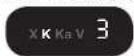
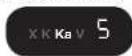
Laser Signal Detected

VG-2 Alert Signal Detected
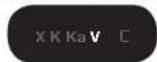

Detection
Visual Display (continued)
Radar Signals and Visual Displays
Type of Signal Visual Display
X Band Radar X Is Steady
K Band Radar K is Steady
Ka Band Radar Ka is Steady
Laser Signals and Visual Displays
Type of Signal Visual Display
LTI 20-20* L is Steady
LTI Laser* L Is Steady
Kustom Signals Laser 340* L is Steady
Kustom Signals Laser* L is Steady
Stalker LIDAR ^4 L Is Steady
Laser Atlanta SpeedLaser/Kustom Signals-ProLaser II* L is Steady
* Your detector provides 360° detection of these signals.

Detection
VG-2 Visual Display
| Type of Signal | Visual Display |
| VG-2 RDD | V is Steady |
Instant-On Detection
Your detector is designed to detect Instant-On speed monitoring signals, which can suddenly appear at full strength.

NOTE
You should take appropriate action immediately whenever an Instant-On alert is given.

Detection
Responding to Alerts
| Description | Interpretation | Recommended Response |
| Tone repeats slowly at first, then speeds up rapidly. | Probably police radar. FULL ALERT | |
| Tone sounds one time only. | Probably a false alarm, but possibly pulsed radar or VG-2 nearby. | Exercise caution |
| Tone instantly begins repeating rapidly. | Radar or VG-2 nearby has been activated suddenly. | FULL ALERT |
| Tone repeats slowly as you approach a hill or bridge, then speeds up sharply as you reach it. | Probably police radar beyond the hill or bridge. | FULL ALERT |
| Tone repeats slowly for a short period. | Probably a false alarm. Exercise caution | |
| Any type of laser alert. Laser alerts are never false alarms. | FULL ALERT | |

Understanding Radar and Laser
Understanding Radar and Laser
Radar Speed Monitoring Systems
Three band frequencies have been approved by the Federal Communications Commission (FCC) for use by speed monitoring radar equipment:
X band 10.525 GHz
K band 24.150 GHz
Ka band 33.400 - 36.00 GHz
Your detector detects signals in all three radar bands, plus Ku band (13.435 GHz), which is an approved frequency used in parts of Europe and Asia.
VG-2
VG-2 is a "detector detector" that works by detecting low-level signals emitted by most radar detectors. Your detector does not emit signals that can be detected by VG-2, but does detect VG-2 signals and will alert you when a device is in use near your vehicle. While no signal is being detected, press and hold the Dim button for four seconds.
The factory setting for VG-2 alerts is Off.

English

Understanding LIDAR & Maintenance
LIDAR (Laser)
The correct name for the technology that most people refer to as laser is actually LIDAR, which stands for Light Detection and Ranging.
LIDAR operates much like radar. Its signal spreads out like a radar signal, though not as widely. Unlike radar, LIDAR must have a clear line of sight to its target vehicle throughout the entire measurement interval. Obstructions such as sign posts, utility poles, tree branches, etc., will prevent valid speed measurement.
Some common questions about LIDAR include:
■ Does weather have any affect on LIDAR?
Yes. Rain, snow, smoke, fog or airborne dust particles will reduce the effective range of LIDAR and can, if dense enough, prevent its operation.
■ Can LIDAR operate through glass?
Yes. Newer LIDAR guns can obtain readings through most types of glass. However, the laser pulse also can be received through glass to trigger an alarm by your detector.
■ Can LIDAR operate while in motion?
No. Because LIDAR operates by line of sight, the person using it cannot drive the vehicle, aim and operate the gun all at the same time.
- Is it legal for police to use LIDAR?
Yes, LIDAR is allowed to be used in all 50 States by police. Your detector detects LIDAR (laser).
Maintenance
Your detector is designed and built to give you years of trouble-free performance without the need for service. No routine Maintenance is required.
If your unit does not appear to be operating properly, please follow these troubleshooting steps:
■ Make sure the power cord is properly connected.
■ Make sure the socket of your vehicle's cigarette lighter is clean and free of corrosion.
■ Make sure the power cord's cigarette lighter adapter is firmly seated in your cigarette lighter.

English

Specifications
Specifications
Band and Frequencies
Band Frequencies
| X Band 10.525 ± 0.050 GHz |
| K Band 24.125 ± 0.125 GHz |
| Ka Band 34.700 ± 1.300 GHz |
| Laser 910 ± 50 nm 100 PP |
| VG-2 11.500 ± 0.250 GHz |

WARNING Modifications or parts substitutions not approved by Cobra Electronics Corporation may violate FCC Rules and void your authority to operate this equipment.
U.S. Patent Number: 6,078,279


Warranty
Limited 1-Year Warranty
Cobra Electronics Corporation warrants that this product and the component parts thereof, will be free of defects in workmanship and materials for a period of one year from the date of first consumer purchase. This warranty may be enforced by the first consumer purchaser. If the product is under warranty, it will be repaired or exchanged depending on the model as determined at Cobra's sole discretion. Such remedy shall be your sole and exclusive remedy for any breach of warranty.
The procedure for obtaining service and support, and the applicability of this warranty, will vary depending on the country or jurisdiction in which you purchased and utilize the product. For the details on obtaining product service, support and warranty please visit www.cobra.com/support
Provided that the product is utilized within the U.S.A.- Cobra will, without charge, repair or replace, at its option, defective products, products or component parts upon delivery to the Cobra Factory Service department, accompanied by proof of the date of first consumer purchase, such as a duplicated copy of a sales receipt. You must pay any initial shipping charges required to ship the product for warranty service, but the return charges, to an address in the U.S.A., will be at Cobra's expense, if the product is repaired or replaced under warranty.
This warranty gives you specific legal rights, and you may also have other rights which may vary from state to state and country to country.
Exclusions: This limited warranty does not apply: 1) To any product damaged by accident; 2) In the event of misuse, ordinary wear, failure to follow directions, or improper maintenance of the product or as a result of unauthorized alterations or repairs; 3) If the serial number has been altered, defaced, or removed; 4) If the product was purchased or is utilized in a jurisdiction not covered by the limited warranty.
All implied warranties, including warranties of merchantability and fitness for a particular purpose are limited in duration to the length of this warranty. Cobra shall not be liable for any incidental, consequential or other damages; including, without limitation, damages resulting from loss of use or cost of installation.
Some states and countries do not allow limitations on how long an implied warranty lasts and/or do not allow the exclusion or limitation of incidental or consequential damages, so the above limitations may not apply to you. This warranty gives you specific legal rights, and you may also have other rights which vary from state to state and country to country.

Product Service & Support and Optional Accessories
Product Service and Support
For any questions about operating or installing this new Cobra product, PLEASE CONTACT COBRA FIRST...do not return this product to the retail store. The contact information for Cobra will vary depending on the country in which you purchased and utilize the product. For the latest contact information, please go to www.cobra.com/support
For products purchased in the U.S.A. you may also call 1-773-889-3087.
For Products Purchased in the U.S.A., if your product should require factory service, please go to www.cobra.com/support and follow the instructions for returning your product to the Cobra Factory Service Department for service.
Optional Accessories
You can find quality Cobra products and accessories at your local Cobra dealer, or in the U.S.A., you can order directly from Cobra at www.cobra.com

Windshield Mounting Bracket Includes suction cups Item #545-159-N-001

Straight 12V DC Power Cord Includes plug and fuse Item #420-030-N-001

Colled 12V DC Power Cord Includes plug and fuse Item # 420-026-N-001

Straight Combination Radar USB Cord
Includes plug and USB Output
Item # PWR USB-01
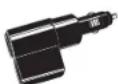
Dual Port Power Adapter Includes adjustable plug (up to 90') and fuse Item # CLP-2B

Hardware Cord for Radar Includes fuse Item # RA-PSCB

Install Mount Includes 3M Dual Lock Item # 545-002

English
Nothing Comes Close to a Cobra ^®


- The Cobra line of quality products includes:
- Important Information
- Display and Product Features
- Product Features
- Trademark AcknowledgementControls Inc
- Trademark Acknowledgement
- Introduction
- Your Detector
- Customer Information
- Installation
- Where to Mount Your Unit
- Dashboard Mounting
- Getting Started
- NOTE
- Settings
- Sens Mode
- Anti-Falsing Circuitry
- Manual Mute
- Display Brightness
- VG-2 Alert Settings
- Radar Alert Settings
- Detection
- Signals Detected
- Audio Alerts
- Visual Display
- Type of Signal Visual Display
- Instant-On Detection
- Understanding Radar and Laser
- Radar Speed Monitoring Systems
- VG-2
- Understanding LIDAR & Maintenance
- LIDAR (Laser)
- Maintenance
- Specifications
- Warranty
- Limited 1-Year Warranty
- Product Service & Support and Optional Accessories
- Product Service and Support
- Optional Accessories
Brand : COBRA
Model : RAD 350
Category : Detector