
AD Box S2 Phono - Audio recorder PRO-JECT - Free user manual and instructions
Find the device manual for free AD Box S2 Phono PRO-JECT in PDF.


| Product Type | Phono Preamplifier (Phono Stage) |
| Model | AD Box S2 Phono |
| Brand | Pro-Ject Audio Systems |
| Dimensions (W x H x D) | 103 x 36 x 103 mm (4.1 x 1.4 x 4.1 inches) |
| Weight | Approximately 0.5 kg (1.1 lbs) |
| Power Supply | External DC adapter, 18V / 500 mA |
| Inputs | 1x RCA pair (phono) |
| Outputs | 1x RCA pair (line level) |
| Gain | 40 dB (MM) / 60 dB (MC) |
| Input Capacitance | 100 pF (MM) / 470 pF (MC) - switchable |
| Input Impedance | 47 kΩ (MM) / 100 Ω (MC) - switchable |
| Subsonic Filter | Yes, switchable at 20 Hz |
| RIAA Accuracy | ±0.3 dB (20 Hz - 20 kHz) |
| Signal-to-Noise Ratio | >80 dB (MM) / >70 dB (MC) |
| Chassis Material | Aluminum |
| Color Options | Silver or Black |
| Energy Consumption | <5 W |
| Operating Temperature | 5°C to 35°C (41°F to 95°F) |
| Maintenance | Keep dry; clean with soft, dry cloth. No internal user-serviceable parts. |
| Safety | Use only supplied power adapter. Do not expose to moisture or extreme temperatures. |
| Spare Parts & Repairability | Contact Pro-Ject authorized service centers. Power adapter available as spare part. |
Frequently Asked Questions - AD Box S2 Phono PRO-JECT
User questions about AD Box S2 Phono PRO-JECT
0 question about this device. Answer the ones you know or ask your own.
Ask a new question about this device
Download the instructions for your Audio recorder in PDF format for free! Find your manual AD Box S2 Phono - PRO-JECT and take your electronic device back in hand. On this page are published all the documents necessary for the use of your device. AD Box S2 Phono by PRO-JECT.
USER MANUAL AD Box S2 Phono PRO-JECT
BY PRO-JECT AUDIO SYSTEMS
INSTRUCTIONS FOR USE Pro-Ject AD Box S2 Phono
Dear music lover,
thank you for purchasing this AD Box S2 Phono from Pro-Ject Audio Systems.
In order to achieve maximum performance and reliability you should study these instructions for use carefully.


Warning of a hazard for the user, the unit or possible misuse
Important notice
Safety instructions
AC outlet voltages vary from country to country. Before connecting to the mains, make sure that the voltage in your area meets the voltage requirements printed on the power supply.
The power supply is used to disconnect the unit from the mains. Make sure that the power supply is easier accessible at all times. Never handle the device, the power supply while your hands are wet or damp.

Avoid letting liquids enter the device or the power supply. Never place any item containing liquid, such as a flower vase on or near the device. Never spill any liquid on the device or the power supply. Never place any naked flame sources, such as lighted candles on or near the device. The product shall be used in damp or wet locations, next to a bathtub, sink, swimming pool or any other similar condition
Connectors
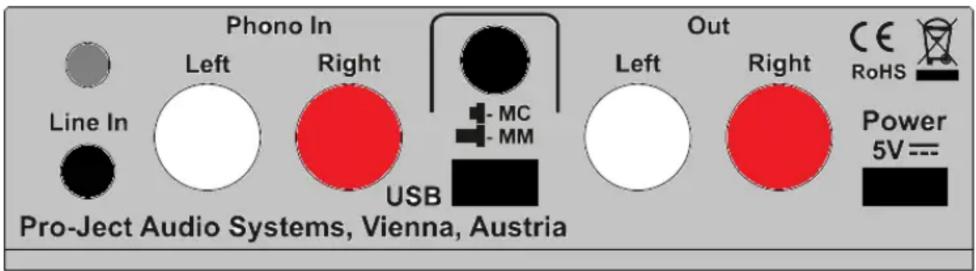
Make all connections whilst the phono amplifier is disconnected from the power supply.
Take care to connect the left and right channels correctly. The right channel is usually marked red, the left channel black or white.
Do not connect the phono amplifiers output to a phono input (sometimes labelled gram, disc or RIAA) on the amplifier.
Never use any other power supply than the one supplied with the unit.
Connecting the record player or a line level source
Connect the tonearm signal lead to the sockets Phono In of the phono amplifier. The earthing wire of the tonearm signal lead may be connected to the screw terminal if you encounter hum problems when using the record player. The signal lead of a line level source has to be connected to the socket Line In.
Setting the cartridge mode
The phono amplifier can be used in either MM (for moving magnet and high-output MC cartridges) or MC (for low-output MC cartridges) mode according to the construction principle of the pickup cartridge to be used. Since most cartridges use the MM principle the phono amplifier is factory set to operate in this mode. To find out which type your cartridge is please consult the literature accompanying your cartridge. If in doubt please consult your dealer.
A switch at the back of the phono amplifier sets the correct level of amplification for the cartridge.

Before setting MM / MC mode the unit must be disconnected from the power supply and amplifier.
Connection to the amplifier
Connect the Out of the phono amplifier to a line input (such as AUX, CD, Tuner, Tape or Video) on your amplifier.
Mains power connection
Connect the low voltage plug from the power supply to the Power 5V DC socket of the phono amplifier before connecting the power supply to the mains.
Front panel controls
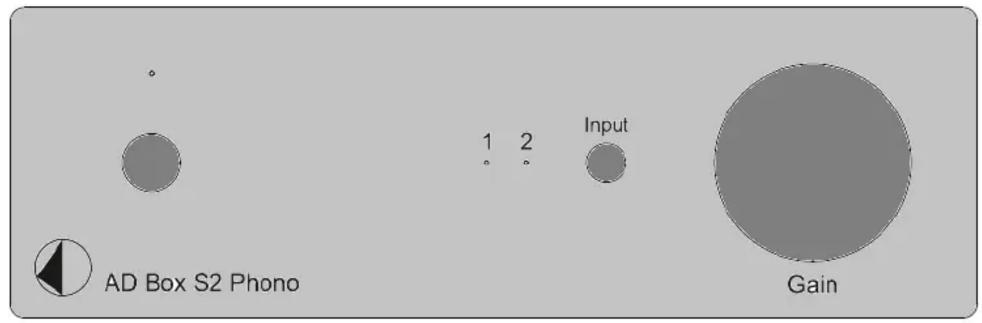
To switch on from standby or to standby
The push button on the left hand side will toggle the phono amplifier between its fully operational status and standby. The blue LED above the stand-by push button shows that the unit is switched on.
Input selector
Press the push button next to the two LEDs to switch between the inputs 1 (record player) and 2 (line level source). The selected input will be shown by the corresponding LED on the front panel.
Setting the record level
In case of distorted playback of the recorded music, the level of the analogue signal going to the A/D converter can be reduced with the level control (Gain) on the front panel.
Connecting to a Computer
Connect the USB-output of the unit to a free USB-socket on your computer and turn it on/make sure it is powered on.
The "new hardware found assistant" will automatically detect the unit and announces it as a Microphone USB audio codec. There is no need to install a driver manually.
After installation, one setting has to be done. For example - Windows 7 ^® operating system:
→ Control Panel → Sound → Recording → Microphone USB Audio CODEC → Properties →
Advanced: set to 2 channel, 16 bit, 48000 Hz (DVD Quality)

Please note: Connection should be made to an USB-socket of your computer directly. Connecting to USB-hubs or switches can cause problems.
Recording Programme
In case you do not have a recording programme installed on your computer, you may download one free from the Internet. Recording programmes can be found easily on internet.

In the menu of the recording programme, source or input may have to be set to Microphone USB audio codec. Please be aware that downloads from the Internet are made entirely at your own risk. Under circumstances can Pro-Ject Audio Systems carry responsibility or provide support for third-party software products sourced from the internet or for any damage or problems arising from the thereof. All downloads should be checked with an up-to-date anti-virus programme. License fees may be applicable.
Technical specifications Pro-Ject AD Box S2 Phono
^A Typical for low output MC cartridges, ^B typical for MM or high output MC cartridges
Input capacitance/input impedance, MC: 100ohms/120pF ^A
Input capacitance/input impedance, MM: 47kohms/120pF ^B
Gain MM/MC: 40dB/56dB
Gain, line level input: 11dB
Max. output 5Vrms / 1kHz
Noise floor, MM / MC: 94dB (A weighted) / 75dB (A weighted)
THD, MM / MC: <0,003% / <0,02%
RIAA-equalisation curve accuracy: 20Hz - 20kHz / max. 0,5dB
A/D converter: Burr Brown PCM2904 16-Bit Delta Sigma
Sampling rates: 32, 44, 1 and 48kHz
Inputs (Phono-In / Line-In): 1 pair RCA/phono sockets / 3-pole 3,5mm co-axial jack
Analogue output: 1 pair RCA/phono sockets
Outboard power supply: 5V/1A DC
Power consumption: 300mA DC, <1W in standby
Dimensions W x H x D (D with sockets): 103 x 37 x 127 mm
Weight: 330g without power supply
Service
Should you encounter a problem which you are not able to alleviate or identify despite the above information, please contact your dealer for further advice. Only if the problem cannot be resolved there, the unit should be sent to the responsible distributor in your country.
Warranty

The manufacturer accepts no responsibility for damage caused by not adhering to these instructions for use. Modification or changes to any part of the product by unauthorized persons release the manufacturer from any liability over and above the lawful rights of the customer.
Copyright, trademarks
Pro-Ject Audio Systems is a registered Trademark of H. Lichtenegger.
This guide was produced by: Pro-Ject Audio Systems Copyright © 2017. All rights reserved.
The information was correct at the time of going to press. The manufacturer reserves the right to make changes to the technical specification without prior notice as deemed necessary to uphold the ongoing process of technical development.
Windows 7 ^® , Windows 8 ^® , Windows 10 ^® are trademarks of the Microsoft group of companies.
- INSTRUCTIONS FOR USE Pro-Ject AD Box S2 Phono
- Safety instructions
- Connectors
- Connecting the record player or a line level source
- Setting the cartridge mode
- Connection to the amplifier
- Mains power connection
- To switch on from standby or to standby
- Input selector
- Setting the record level
- Connecting to a Computer
- Recording Programme
- Technical specifications Pro-Ject AD Box S2 Phono
- Service
- Warranty
- Copyright, trademarks
Brand : PRO-JECT
Model : AD Box S2 Phono
Category : Audio recorder