
LTRISERP - Charging Station / Docking Station StarTech.com - Free user manual and instructions
Find the device manual for free LTRISERP StarTech.com in PDF.


| Product Type | Charging Station / Docking Station |
| Brand | StarTech.com |
| Model | LTRISERP |
| Dimensions (approx.) | 4.5 x 3.5 x 1.0 inches (11.4 x 8.9 x 2.5 cm) |
| Weight | 0.5 lbs (0.23 kg) |
| Power Input | USB-C Power Delivery 3.0 (up to 100W) |
| Host Connection | USB-C (Thunderbolt 3/4 compatible) |
| Video Output | 1x HDMI 2.0 (up to 4K@60Hz), 1x DisplayPort 1.4 (up to 4K@60Hz) |
| USB Ports | 2x USB-A 3.2 Gen 1 (5Gbps), 1x USB-C 3.2 Gen 1 (data only) |
| Ethernet | 1x Gigabit RJ45 |
| Audio | 1x 3.5mm combo headphone/microphone jack |
| Card Reader | SD/MicroSD card slot (UHS-I) |
| Charging Power | Up to 85W pass-through to laptop, 15W to other devices |
| OS Compatibility | Windows 10/11, macOS 10.15+, iPadOS, Chrome OS |
| Cable Length | 8 inches (20 cm) integrated cable |
| Cleaning | Wipe with a soft, dry cloth. Do not use liquids or abrasives. |
| Safety | Avoid exposure to liquids, extreme temperatures, and direct sunlight. |
| Repairability | No user-serviceable parts. Contact StarTech.com support for issues. |
| Warranty | 2-year limited warranty via StarTech.com |
Frequently Asked Questions - LTRISERP StarTech.com
User questions about LTRISERP StarTech.com
0 question about this device. Answer the ones you know or ask your own.
Ask a new question about this device
Download the instructions for your Charging Station / Docking Station in PDF format for free! Find your manual LTRISERP - StarTech.com and take your electronic device back in hand. On this page are published all the documents necessary for the use of your device. LTRISERP by StarTech.com.
USER MANUAL LTRISERP StarTech.com
Portable Laptop Riser - Adjustable Height - Vented
LTRISERP
FR: Guide de l'utilisateur - fr.startech.com
DE: Bedienungsanleitung - de.startech.com
ES: Guía del usuario - es.startech.com
NL: Gebruiksaanwijzing - nl.startech.com
PT: Guia do usuário - pt.startech.com
IT: Guida per l'uso - it.startech.com
Product diagram
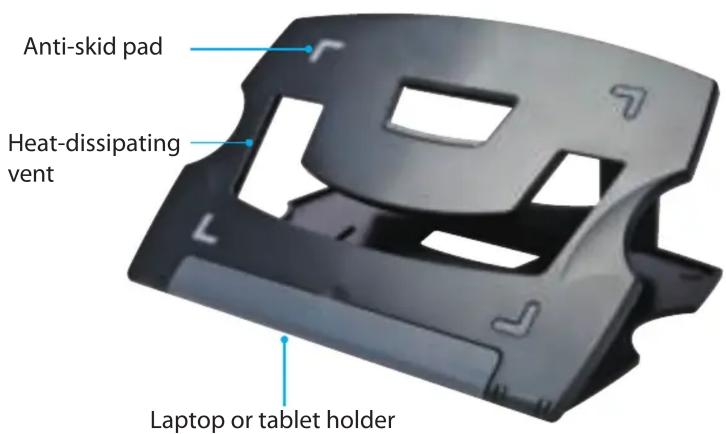
*actual product may vary from photos
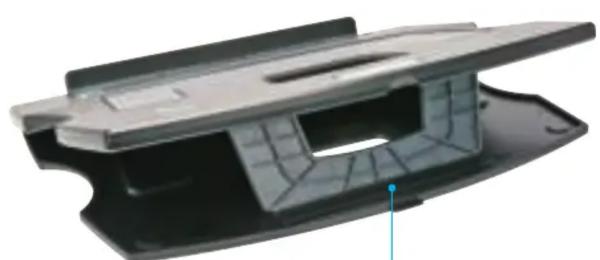
natural_image
3D model of a black plastic mechanical component with internal cavities and a blue arrow pointing to a feature (no text or symbols)Small adjustable stand
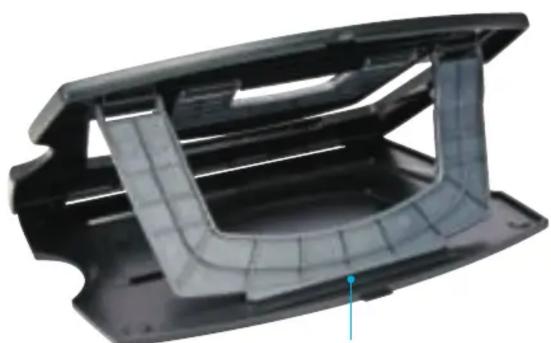
natural_image
3D model of a black plastic mechanical component with internal curved cutouts and mounting holes (no text or symbols visible)Large adjustable stand
For the latest information, technical specifications, and support for this product, please visit www.StarTech.com/LTRISERP.
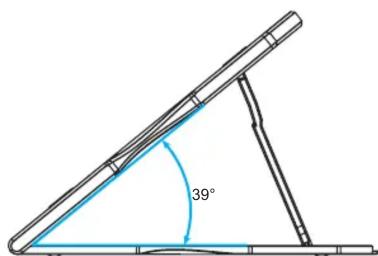
Adjust the angle of the laptop riser
- To position the laptop riser at a 15^ , 17^ , or 19^ angle, place the small adjustable stand in one of the three slots at the back of the laptop riser.
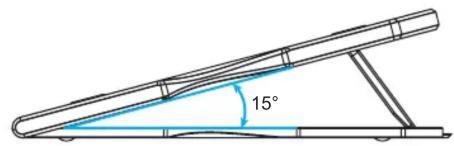
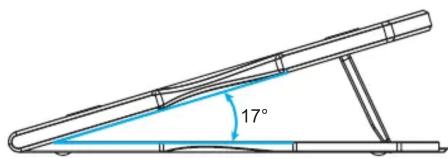
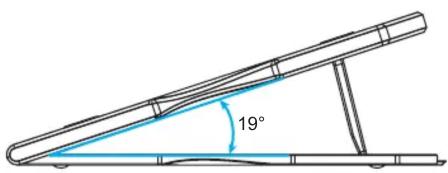
- To position the laptop riser at a 35^ , 37^ , or 39^ angle, place the large adjustable stand in one of the three slots at the back of the laptop riser.
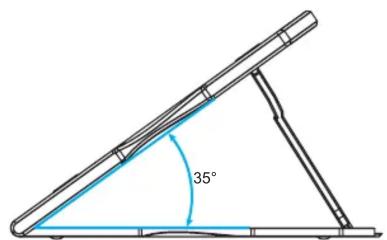
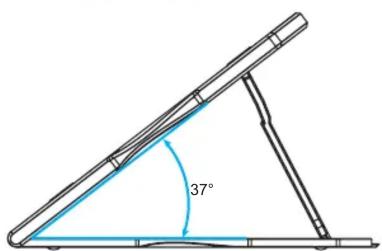
Package contents
- 1 x laptop riser
• 1 x instruction manual
Technical specifications
The laptop riser:
- Weighs 0.8 lb. (0.36 kg)
- Adjusts to 15^ , 17^ , 19^ , 35^ , 37^ , and 39^ angles
• Is compatible with 9 to 12 in. (229 mm to 305 mm) tablets
• Is 0.4 in. (10 mm) thick
StarTech.com
Hard-to-find made easy®
Use of Trademarks, Registered Trademarks, and other Protected Names and Symbols
This manual may make reference to trademarks, registered trademarks, and other protected names and/or symbols of third-party companies not related in any way to
StarTech.com. Where they occur these references are for illustrative purposes only and do not represent an endorsement of a product or service by StarTech.com, or an endorsement of the product(s) to which this manual applies by the third-party company in question. Regardless of any direct acknowledgement elsewhere in the body of this document, StarTech.com hereby acknowledges that all trademarks, registered trademarks, service marks, and other protected names and/or symbols contained in this manual and related documents are the property of their respective holders.
Technical Support
StarTech.com's lifetime technical support is an integral part of our commitment to provide industry-leading solutions. If you ever need help with your product, visit www.startech.com/support and access our comprehensive selection of online tools, documentation, and downloads.
For the latest drivers/software, please visit www.startech.com/downloads
Warranty Information
This product is backed by a two-year warranty.
StarTech.com warrants its products against defects in materials and workmanship for the periods noted, following the initial date of purchase. During this period, the products may be returned for repair, or replacement with equivalent products at our discretion. The warranty covers parts and labor costs only. StarTech.com does not warrant its products from defects or damages arising from misuse, abuse, alteration, or normal wear and tear.
Limitation of Liability
In no event shall the liability of StarTech.com Ltd. and StarTech.com USA LLP (or their officers, directors, employees or agents) for any damages (whether direct or indirect, special, punitive, incidental, consequential, or otherwise), loss of profits, loss of business, or any pecuniary loss, arising out of or related to the use of the product exceed the actual price paid for the product. Some states do not allow the exclusion or limitation of incidental or consequential damages. If such laws apply, the limitations or exclusions contained in this statement may not apply to you.
Brand : StarTech.com
Model : LTRISERP
Category : Charging Station / Docking Station