
U3 - Microphone Xvive - Free user manual and instructions
Find the device manual for free U3 Xvive in PDF.


| Product Type | Wireless Microphone System |
| Brand | Xvive |
| Model | U3 |
| Frequency Band | 2.4 GHz ISM |
| Operating Range | Up to 27 m (90 ft) |
| Audio Frequency Response | 20 Hz – 20 kHz (-3 dB) |
| Dynamic Range | 110 dB |
| Signal-to-Noise Ratio | 110 dB |
| Latency | <5 ms |
| Number of Channels | Up to 6 (simultaneous) |
| Battery Type | Rechargeable Li-Ion 3.7V, 860 mAh |
| Battery Life | Up to 5 hours |
| Charging Time | Approximately 2.5 hours |
| Power Input | USB (Micro-USB) |
| Transmitter Weight | 93 g |
| Receiver Weight | 92 g |
| Transmitter Dimensions | 31 x 29 x 98 mm |
| Receiver Dimensions | 31 x 29 x 98 mm |
| Housing Material | Molded plastic and cast metal |
| Antenna Type | 1/4 wave sleeve dipole, non-removable |
| Audio Input Connector | Balanced XLR male |
| Audio Output Connector | Balanced XLR female |
| Supported Microphone Types | XLR dynamic and battery-powered condenser |
| Input Modes | Mic (0 dB), Line (-10 dB) |
| Audio Resolution | 24-bit / 48 kHz |
| RF Output Power | 10 mW E.I.R.P. |
| Operating Temperature | -18°C to 57°C |
Frequently Asked Questions - U3 Xvive
User questions about U3 Xvive
0 question about this device. Answer the ones you know or ask your own.
Ask a new question about this device
Download the instructions for your Microphone in PDF format for free! Find your manual U3 - Xvive and take your electronic device back in hand. On this page are published all the documents necessary for the use of your device. U3 by Xvive.
USER MANUAL U3 Xvive

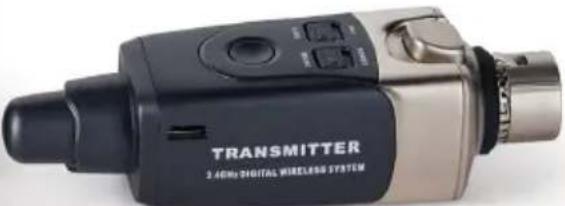
natural_image
Exterior view of a black and silver digital wireless device labeled 'TRANSMITTER 2.40MHz DIGITAL WIRELASS SYSTEM' (no additional text or symbols visible on the device body)
This Class B digital apparatus complies with Canadian ICES-003.
IC Caution: RSS-Gen Issue 4 December 2014" & "CNR-Gen 4e Décembre 2014:
This device complies with Industry Canada licence-exempt RSS standard(s).
Operation is subject to the following two conditions:
(1) This device may not cause interference, and
(2) This device must accept any interference, including interference that may cause undesired operation of the device.
Radio Approvals:
FCC Part 15.249, FCC Part 15 B, RSS-210 (Canada), EN 300 440 (Europe), EN 301.489 (Europe), Japan Radio 2.4GHz Band (Japan), MIC ARIB STD-T66 (Japan), California 65, CE.
FCC CERTIFICATION
THIS DEVICE COMPLIES WITH PART 15 OF THE FCC RULES. OPERATION IS SUBJECT TO THE FOLLOWING TWO CONDITIONS:
(1) THIS DEVICE MAY NOT CAUSE HARMFUL INTERFERENCE, AND
(2) THIS DEVICE MUST ACCEPT ANY INTERFERENCE RECEIVED, INCLUDING INTERFERENCE THAT MAY CAUSEUNDESIRED OPERATION.
Warning: Changes or modifications not expressly approved in writing by Xvive may void the users authority to operate this equipment.
RF Exposure Statement: This transmitter must not be co-located or operated in conjunction with any other antennae or transmitter.
Note: This equipment has been tested and found to comply with the limits for a Class B digital device, pursuant to part 15 of the FCC Rules. These limits are designed to provide reasonable protection against harmful interference in a residential installation. This equipment generates, uses and can radiate radio frequency energy and, if not installed and used in accordance with the instructions, may cause harmful interference to radio communications. However, there is no guarantee that interference will not occur in a particular installation. If this equipment does cause harmful interference to radio or television reception, which can be determined by turning the equipment off and on, the user is encouraged to try to correct the interference by one or more of the following measures:
- Reorient or relocate the receiving antenna.
- Increase the separation between the equipment and the receiver.
- Connect the equipment into an outlet on a circuit different from that to which the receiver is connected.
- Consult the dealer or an experienced radio/TV technician for help.
This Class B digital apparatus complies with Canadian ICES-003.
CAUTION RISK OF ELECTRIC SHOCK DO NOT OPEN

WARNING:
TO REDUCE THE RISK OF FIRE OR ELECTRIC SHOCK, DO NOT REMOVE SCREWS.
NO USER-SERVICEABLE PARTS INSIDE.
REFER SERVICING TO QUALIFIED SERVICE PERSONNEL.
WARNING:
TO REDUCE THE RISK OF FIRE OR ELECTRIC SHOCK, DO NOT EXPOSE THE APPLIANCE TO RAIN OR MOISTURE.

Hereby, SHENZHEN FZONE TECHNOLOGY CO., LTD, declares that this type of equipment is in compliance with the essential requirements and other relevant provisions of Directive 2014/53/EU
SAFETY INSTRUCTIONS FOR LITHIUM-ION RECHARGEABLE BATTERIES
If abused or misused, the rechargeable batteries may leak. In extreme cases, they may even present a risk of explosion, fire, heat, smoke or gas. Xvive does not accept any liability for damage arising from abuse or misuse.
- Keep away from children.
- Only charge rechargeable batteries with chargers recommended by Xvive.
- Observe correct polarity.
- Pack/store charged rechargeable batteries so that the terminals cannot contact each other (danger of shorting out/fire hazard).
- Do not expose to moisture.
- Switch rechargeable battery-powered products off after use.
- Only charge rechargeable batteries at ambient temperatures between 10^ / 50^ and 40^ / 104^ .
- When not using rechargeable batteries for extended periods of time, charge them regularly (about every three months).
-
Do not mutilate or dismantle.
-
Do not heat above 60^ / 140^ , e.g. do not expose to sunlight or throw into a fire.
- Immediately remove rechargeable batteries from obviously defective products.
- Do not continue to use defective rechargeable batteries.
- Only use rechargeable batteries specified by Xvive.
- Dispose of rechargeable batteries at special collection points or return them to your specialist dealer.
- Store the products in a cool and dry place at room temperature (approx. 20^ / 68^ ).
- Remove the rechargeable batteries if the products will not be used for extended periods of time.
INFORMATION ABOUT COLLECTION AND DISPOSAL OF OLD ITEMS AND USED BATTERIES
These symbols on the products, packaging, or on any documents in the package mean it is incorrect to mix the used electrical and electronic products and batteries with general household garbage.
To protect our environment, please take old products and used batteries to proper collection places, and follow your national legislation and the Directives 2012/19/EU and 2006/66/EC.
To deal with these old products and batteries properly, please help to save valuable resources and prevent any possibility of side effects on human health and our environment due to the inappropriate disposal of the old products and used batteries.
You can contact your local authority for getting more helpful information on how to dispose the recycling and collection of the old products and batteries.
[For business users in the European Union]
If you want to discard electrical and electronic item, please contact your dealer or supplier for further information.
[Information on Disposal in other Countries outside the European Union]
These symbols are only valid in the European Union. Please contact your local authorities or dealer for more information on disposal of old items and used batteries.
![Xvive U3 - [For business users in the European Union] - 1](/content/2026/05/760232/images/1be32a71d0c826e5f1a53a90386afc114ad4abe6e826ba6d7a0f9a9a74365b16.jpg)
![Xvive U3 - [For business users in the European Union] - 2](/content/2026/05/760232/images/3a70de3315fcfe1b01df7e62d69ed11e0941b97b99300a1a1a788ef9fee82670.jpg)
![Xvive U3 - [For business users in the European Union] - 3](/content/2026/05/760232/images/637072317004a7e369a17f4760efa852a25a2db069ac02e1eb29778da7dc85a3.jpg)
Cd
IMPORTANT SAFETY INSTRUCTIONS PLEASE READ THESE INSTRUCTIONS AND KEEP THEM IN A SAFE PLACE

WARNING: BEFORE USING YOUR XVIVE U3 MICROPHONE WIRELESS SYSTEM, CAREFULLY READ THE OPERATING INSTRUCTIONS.
- Carefully observe all instructions in the U3 manual
-
Do not to perform service operations beyond those described in the U3 Manual. Service is required when the apparatus was damaged in any way, such as:
-
liquid was spilled or objects were dropped into the device,
- the unit was exposed to rain or moisture,
- the unit does not operate normally or significant changes in performance occur,
-
the unit is dropped or the housing is damaged.
-
Do not place near heat sources, such as radiators, heating ducts, or appliances which produce heat.
- Guard the device against objects or liquids entering the device. Do not use or store the unit close to water.
- Clean only with a damp cloth.
- Only use attachments/accessories specified by the manufacturer.
- Prolonged listening at high volume levels may cause irreparable hearing loss and/or damage. Always be sure to practice "safe listening."
U3 SET PRODUCT INTRODUCTION
- 2.4 Ghz band is ideal for wireless systems for dynamic microphones and it is approved for use worldwide.
• Less than 5 ms latency, simultaneous transmission on 6 channels - Wide frequency response range 20 Hz – 20 kHz
- Range up to 27 m / 90 feet (actual range depends on RF signal absorption, reflection and interference)
- 5 hours of battery life (rechargeable battery for both Transmitter & Receiver)
- Works with XLR dynamic microphones and battery-powered condenser microphones
- Mic mode for microphone and Line mode for output from other equipment
• High resolution audio at 24-bit/48kbps
• Dynamic range 110 dB
• Signal-to-Noise ratio 110 dB - The U3 Wireless System is designed to take the complexity and frustration out of traditional wireless microphone systems and helps you create a flexible all-in-one solution that turns any dynamic microphone into a wireless microphone.
- Can also be used as wireless audio source for active speakers.
PACKAGE DETAILS
U3 Transmitter 1x
U3 Receiver 1x
USB Cable 1x
Manual 1x
Bag 1x
QUICK START
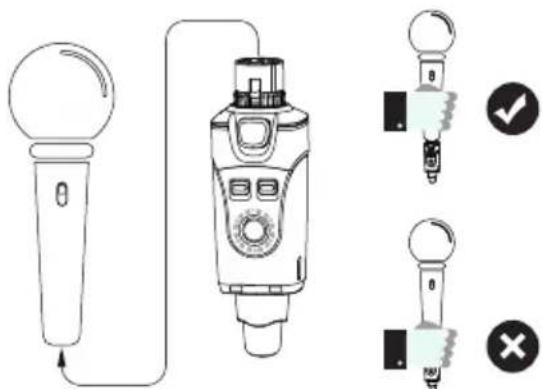
- Plug the transmitter into your XLR dynamic microphone or battery-powered condenser microphone.
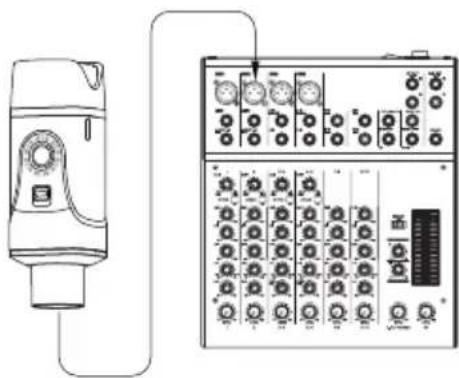
natural_image
Line drawing of a device connected to an electrical control panel (no text or symbols visible)- Plug the Receiver into the Mixer.
QUICK START

natural_image
Line drawing of two laboratory gas collection devices with control knobs (no text or symbols)- Turn transmitter and receiver on and check that they operate on the same channel.
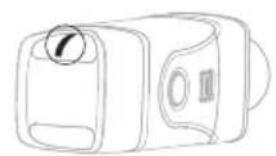
natural_image
Line drawing of a rectangular device with a circular button and internal components (no text or symbols)- The LED on the transmitter will be lit continuously after the connection was established successfully.
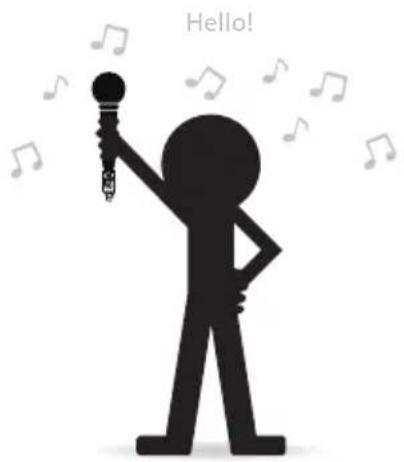
- Check the connection by talking through the microphone.
① Mic In: XLR microphone input jack
② Spring: circumferential spring provides ground connection to metal housing parts
③ Mic lock: secures transmitter to the microphone
④ Input level switch: MIC = 0dB input
⑤ Power switch: switches unit on/off
⑥ Channel status LED: indicates selected channel
⑦ Channel switch: selects channels 1-6
⑧ USB charging port
⑨ Power status LED: indicates power status:
⑩ Antenna.
$$ \text { LINE } = - 1 0 \text { dB input } $$
$$ \text { Led off } = 100 \% \sim 30 \% $$
$$ \text { Solid red } = 29 \% \sim 11 \% $$
$$ \text { Blinking red } = \text { less than } 10 \% $$
① XLR OUT: XLR microphone input jack
② Power switch: switches the unit on and off
③ Channel status LED: indicates selected channel
④ Channel switch: selects channels 1-6
⑤ USB charging port
⑥ RF Status LED:
ON = Transmitter is on and link is established
Flashing = Signal connection interference
OFF = Transmitter off or not linked
⑦ Power status Led: indicates power status.
Led off = 100% \~ 30%
Solid red = 29% \~ 11%
Blinking red = less than 10%
⑧ Antenna.
SPECIFICATIONS
| U3 MICROPHONE WIRELESS SYSTEM | |
| Transmission bandwidth | 2400 – 2483.5 MHz |
| Working range | Up to 27 m / 90 feet. Actual range depends on RF signal absorption, reflection and interference. |
| Audio frequency response | 20 Hz - 20 kHz (-3 dB). Depending on microphone type or input signal. |
| Dynamic range | 110 dB |
| Battery life | Up to 5 hours |
| RF sensitivity | -88 dBm |
| Total harmonic distortion | 0.2% |
| RF output power | 10 mW E.I.R.P. max |
| Operating temperature range | -18°C to 57°C. Battery characteristics may limit this range. |
| Number of channels | Up to 6 channels. |
U3 TRANSMITTER U3 RECEIVER
| Dimensions | 31 X 29 X 98 mm | 31 X 29 X 98 mm |
| Weight | 93 g | 92 g |
| Housing | Molded plastic and cast metal | Molded plastic and cast metal |
| Battery | 3.7 V rechargeable Li-lon, 860 mA | 3.7 V rechargeable Li-lon, 860 mA |
| Impedance | Input 15 kΩ (1 KHz) | Output 470 Ω (1 KHz) |
| Audio input connector | Balanced XLR male input | |
| Audio output connector | Balanced XLR female output | |
| Maximum input level | Mic mode: 2.8 Vp-p Line mode: 7 Vp-p | |
| Maximum output level | 2.8 Vp-p | |
| Gain adjustment range | Two modes: Mic 0 dB, Line -10 dB | |
| Battery life | Up to 5 hours | Up to 5 hours |
| Supported microphone types | XLR dynamic microphone and battery-powered condenser microphones. | |
| Antenna impedance | 50 Ω | 50 Ω |
| Antenna type | 1/4 wave sleeve dipole, non-removable | 1/4 wave sleeve dipole, non-removable |
| Number of antennae | 1 | 2 |
BATTERIES AND CHARGING
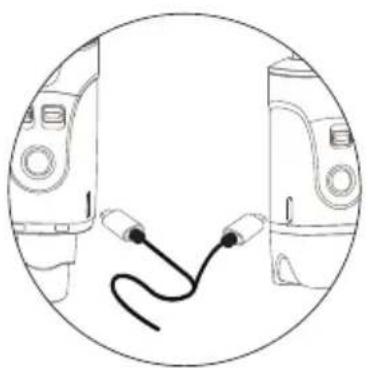
natural_image
Simple line drawing of two connected audio equipment devices (no text or symbols)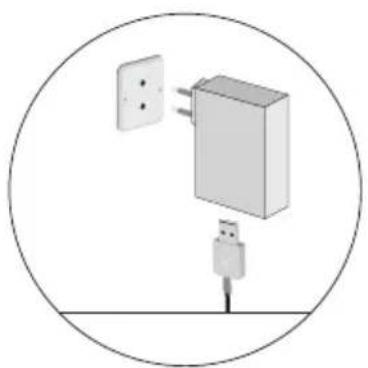
natural_image
Diagram of a wall-mounted device with two connectors and a plug, enclosed in a circle (no text or symbols)| CHARGING TIMES | BATTERY LIFE |
| 15 minutes | 30 minutes |
| 30 minutes | 1 hour |
| 1 hour | 2 hours |
| 2,5 hours | 5 hours |
Always store the U3 at room temperature.
When storing the unit, please check the battery state regularly and charge if necessary.
Connect to the outletConnect Power
Note:
Turn off the power switch while charging.
Please do not use the U3 when charging.
This may reduce battery life.
2.4 GHz WIRELESS OVERVIEW AND INTERFERENCE
The U3 operates in the 2.4 GHz ISM band, the same band used by Wi-Fi, Bluetooth, and other wireless systems. 2.4 GHz is an open band and as such does not require a license to operate worldwide.
Tips and Methods to improve the performance of the wireless system
1) Keep more than 3 meters distance between the U3 receiver and other transmitters such as Wi-Fi routers.
2) If you experience interference from Wi-Fi devices in the vicinity, try changing to a different channel on the U3 transmitter and receiver.
3) If necessary, shorten the distance between the U3 receiver and transmitter.
2.4 Ghz Frequency Tables
| CHANNEL 1 | 2402 MHz, 2480 MHz, 2482 MHz |
| CHANNEL 2 | 2408 MHz, 2472 MHz, 2474 MHz |
| CHANNEL 3 | 2416 MHz, 2464 MHz, 2466 MHz |
| CHANNEL 4 | 2434 MHz, 2440 MHz, 2442 MHz |
| CHANNEL 5 | 2427 MHz, 2448 MHz, 2450 MHz |
| CHANNEL 6 | 2422 MHz, 2456 MHz, 2458 MHz |
U2 channels 1-4 use the same frequencies as U3/U3C/U4 channels 1-4. A maximum of six U2/U3/U3C and U4 sets can be used at the same time.
TROUBLESHOOTING
| ISSUE | SOLUTION |
| No sound | Check that the U3 Receiver's RF LED is lit.Check that the microphone is turned on and that you receive a signal from the U3 transmitter.Check that the power switch is turned on for both the Transmitter and the Receiver.Ensure that the U3 Transmitter and Receiver are on the same channel.The Receiver can only be paired with one Transmitter at a time. |
| Distortion or weak sound | Switch the gain mode to "Line" or "Mic"Adjust the output signal from the transmitting device. |
| Signal instability: RF LED flickering, or off completely | See, "Tips and methods to improve wireless system performance" page 15 |
| Unable to switch the channel | The channel switch locks after 15 seconds. Double-click the channel button to unlock and reset. |
| Multiple connect | One transmitter can be used with multiple receivers on the same channel. |
APPLICATION EXAMPLE
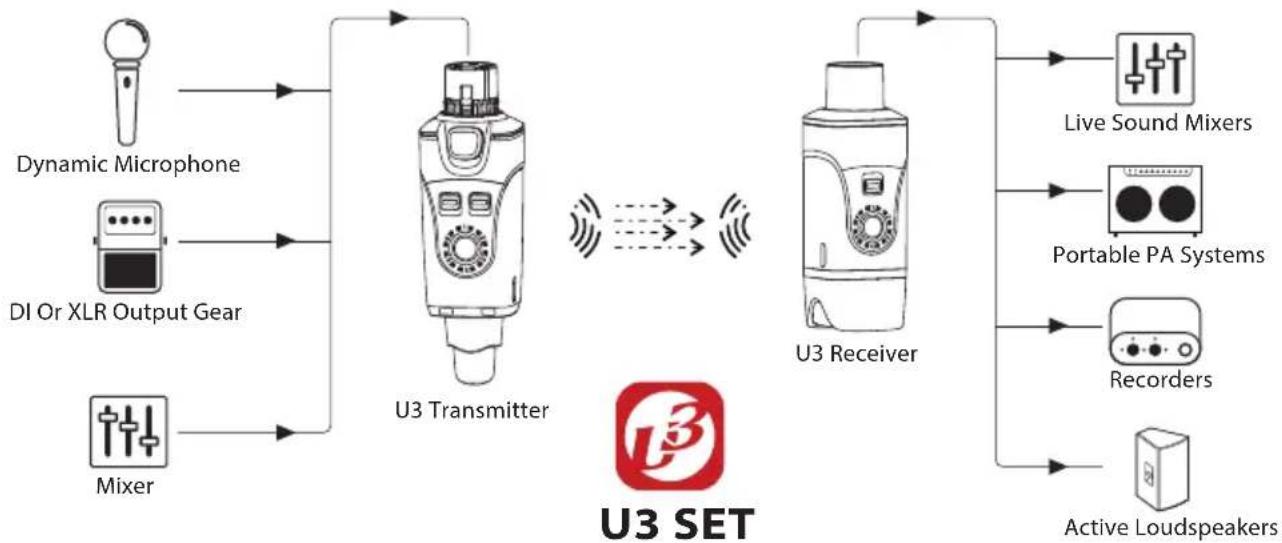
flowchart
graph LR
    A["Dynamic Microphone"] --> B["U3 Transmitter"]
    C["DI Or XLR Output Gear"] --> B
    D["Mixer"] --> B
    B --> E["Live Sound Mixers"]
    B --> F["Portable PA Systems"]
    B --> G["Recorders"]
    B --> H["Active Loudspeakers"]
    I["U3 SET"] --> J["U3 Receiver"]
    J --> B
U3 SET DYNAMIC MICROPHONE WIRELESS SYSTEM

SHENZHEN FZONE TECHNOLOGY CO., LTD.
2nd floor, Building 12, Xicheng Industrial Area, Xixiang Town,
Baoan District, Shenzhen Guangdong China. 518101
E-mail: support@xvive.com
www.xvive.com
CHINA PATENT NUMBERS ZL 2016 3 0165464.8
Note: The manufacturer reserves the right to change these specifications without notice.
- Operation is subject to the following two conditions:
- Radio Approvals:
- FCC CERTIFICATION
- CAUTION RISK OF ELECTRIC SHOCK DO NOT OPEN
- WARNING:
- SAFETY INSTRUCTIONS FOR LITHIUM-ION RECHARGEABLE BATTERIES
- INFORMATION ABOUT COLLECTION AND DISPOSAL OF OLD ITEMS AND USED BATTERIES
- [For business users in the European Union]
- IMPORTANT SAFETY INSTRUCTIONS PLEASE READ THESE INSTRUCTIONS AND KEEP THEM IN A SAFE PLACE
- U3 SET PRODUCT INTRODUCTION
- PACKAGE DETAILS
- QUICK START
- BATTERIES AND CHARGING
- GHz WIRELESS OVERVIEW AND INTERFERENCE
- Tips and Methods to improve the performance of the wireless system
- APPLICATION EXAMPLE
- SHENZHEN FZONE TECHNOLOGY CO., LTD.
Brand : Xvive
Model : U3
Category : Microphone