
ML-900C - Tripod E-Image - Free user manual and instructions
Find the device manual for free ML-900C E-Image in PDF.


| Product Type | Monopod with Geared Center Column / Convertible Tripod |
| Model | ML-900C |
| Brand | E-Image |
| Material | Carbon Fiber |
| Maximum Height | 185 cm (72.8 in) |
| Folded Height | 81 cm (31.2 in) |
| Payload Capacity | 10 kg (22.0 lb) |
| Net Weight | 1660 g (3.7 lb) |
| Key Features | Geared center column, 360° rotation, flip locks, mini legs for low-angle shooting |
| Compatibility | Direct camera attachment; bearing plate for fluid head |
| Accessories Included | Gift box, carry bag, monolift, user manual, wrench |
| Warranty | Manufacturer warranty (refer to official site) |
| Maintenance | Clean with dry cloth; avoid solvents; store in dry place |
| Safety | Ensure tight locks before use; do not exceed max payload |
| Spare Parts | Replacement rubber feet available; contact manufacturer for other parts |
| Repairability | Wing locking knob, flip lock, and rubber foot replaceable |
Frequently Asked Questions - ML-900C E-Image
User questions about ML-900C E-Image
0 question about this device. Answer the ones you know or ask your own.
Ask a new question about this device
Download the instructions for your Tripod in PDF format for free! Find your manual ML-900C - E-Image and take your electronic device back in hand. On this page are published all the documents necessary for the use of your device. ML-900C by E-Image.
USER MANUAL ML-900C E-Image
E-IMAGE ML-900C new designed monopod with geared center column is extremely solid and wobble free. Geared center column provides extra height if you need to get your camera high up, it can be used on moving shooting and other events, which is easier to use than hand-head. It integrates the monopod, sticks and low profile tripod into one. Easy to get functions switching and it is a great choice for travel and outdoor shooting.
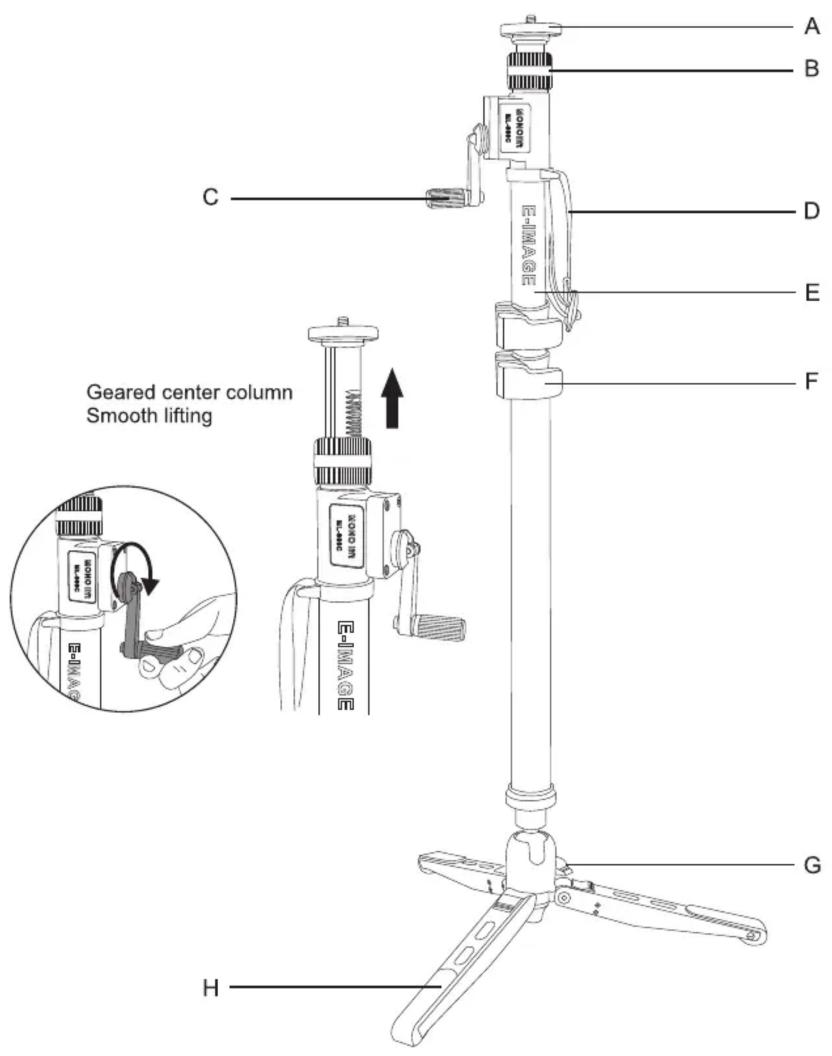
ML-900C
A: Bearing plate for fluid head
B: Rotation locking knob
C: Gear elevator handle
D: Wrist strap
E: Monopod spong cover
F: Flip lock
G: Wing locking knob
H: Aluminium leg support
Specifications
| Model No. | ML-900C |
| Material | Carbon fiber |
| Max.Height | 185cm/72.8in |
| Payload | 10kg/22.0lb |
| Net Weight | 1660g/3.7lb |
| Folded Height | 81cm/31.2in |
Contact Information
NINGBO EIMAGE STUDIO EQUIPMENT CO., LTD
Add: NO.373 South Hangyong Road, Luotuo Industry Zone, Zhenhai, Ningbo, China 315202
Tel: +86-574-55681753/55681675 Fax: +86-574-86590078
E-mail: sales@eimagevideo.com
Visit www.eimagevideo.com for more information
EIMAGE official QR code
Instructions
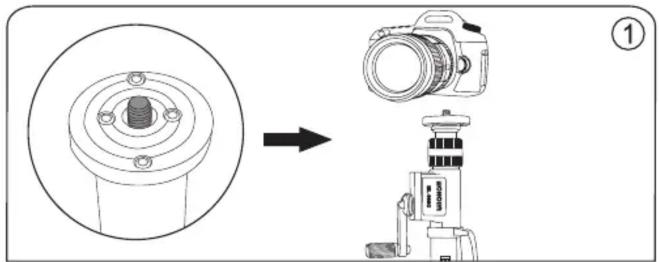
- Camera can be attached to the monopod directly.
natural_image
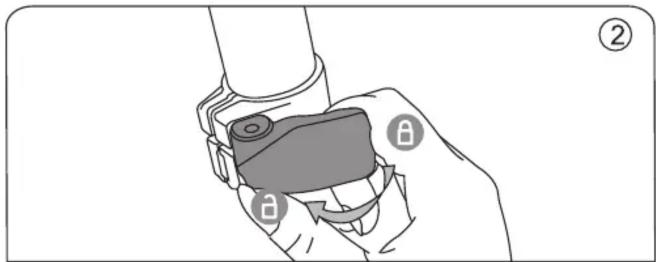
Illustration of a hand holding a mechanical component with labeled parts (no text or symbols present)- Open the flip locking to expand or collapse monopod tube.
natural_image
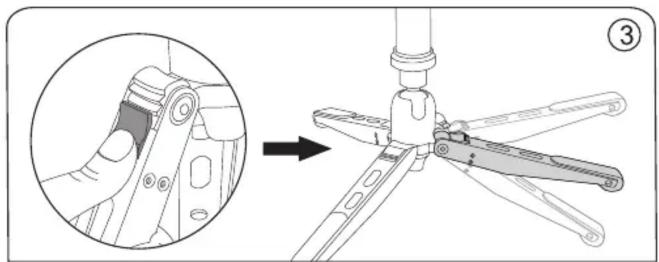
Technical diagram showing a mechanical assembly with an inset close-up of a component detail (no text or symbols)- Push the block to adjust the mini leg angle.
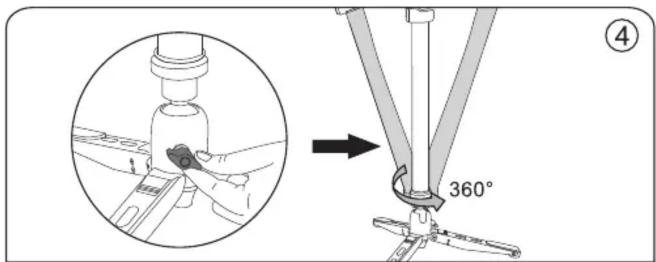
- Loose the Wing locking knob, the monopod can swivel 360^ and be tilted in any direction.
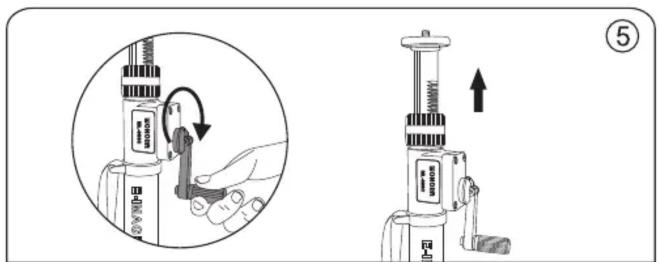
- Geared center column provides extra height if you need to get your camera high up, it can be used on moving shooting and other events, which is easier to use than hand-head.
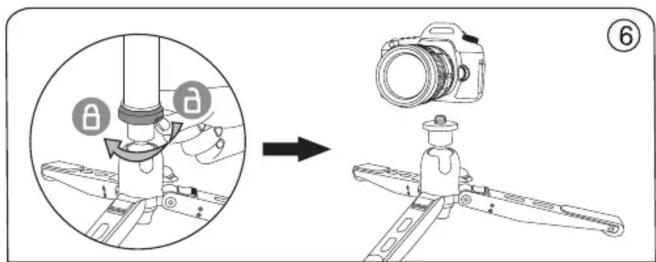
- Loose the bottom base of monopod to remove the monopod, the mini leg can be acted as a mini tripod, make low angle shooting.
In the box
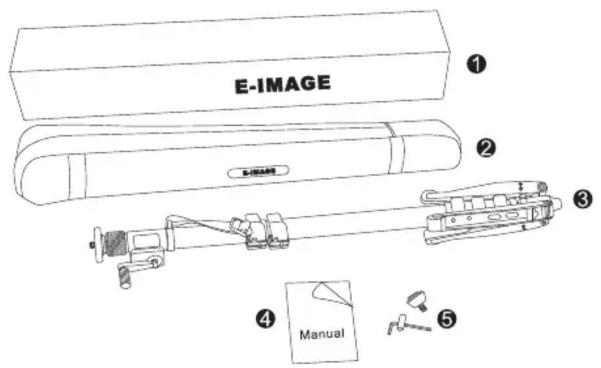
① Gift box
② Carry bag
③ Monolift
④ User manual
⑤ Wrench
Replaceable rubber foot
Brand : E-Image
Model : ML-900C
Category : Tripod