
SL60W - Video Lighting GODOX - Free user manual and instructions
Find the device manual for free SL60W GODOX in PDF.


| Product Type | Video Light |
| Brand | Godox |
| Model | SL60W |
| Color Temperature | 5600K ± 300K (White Version) |
| Maximum Power | 60W |
| AC Power Supply | AC 100~240V, 50/60Hz |
| Color Rendering Index (CRI) | >95 (R9: 90) |
| TLCI (Qa) | >90 |
| Illuminance (100%, 1m) | 4100 LUX |
| Luminous Flux (100%) | 4500 lm |
| Brightness Adjustment Range | 10% to 100% |
| Wireless Control | 433MHz, 6 groups (A-F), 16 channels |
| Remote Control Distance | ≥20 m (open area) |
| Operating Temperature | -10°C to 50°C |
| Safe Temperature Limit | ≤70°C |
| Dimensions (without lamp cover) | 23 × 24 × 14 cm |
| Net Weight | Approx. 1.61 kg |
| Remote Control Model | RC-A5 (requires 2× AAA batteries, not included) |
| Cooling System | Red copper heatsink with built-in fan |
| Protection Features | Over-temperature protection, protective cover for LED beads |
| Display | Large LCD panel with auto-save settings |
| Safety Warnings | Do not expose to high temperature/humidity, do not disassemble, avoid water contact |
| Maintenance | Clean with dry cloth; store in cool, dry place when not in use |
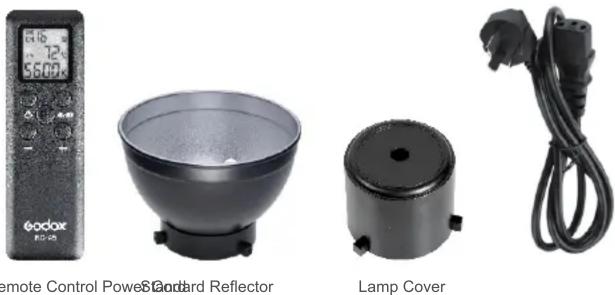
| Parts Included | Light body, remote control, protective cover, mounting bracket, AC power cable |
Frequently Asked Questions - SL60W GODOX
User questions about SL60W GODOX
0 question about this device. Answer the ones you know or ask your own.
Ask a new question about this device
Download the instructions for your Video Lighting in PDF format for free! Find your manual SL60W - GODOX and take your electronic device back in hand. On this page are published all the documents necessary for the use of your device. SL60W by GODOX.
USER MANUAL SL60W GODOX
natural_image
Black Kodax SL60W flash unit with cooling fan and tripod base (no visible text or symbols on body)深圳市神牛摄影器材有限公司
2/F, Building A4, Xinhe Huafa Industrial Zone, Fuzhou RD West,
Fuyong Town, Baoan District, Shenzhen 518103, China
电话/Tel: +86-755-29609320(8062)
传真/Fax: +86-755-25723423
邮箱/E-mail: godox@godox.com
705-SL6000-00
Instruction manual | 说明手册
Chinese English Bilingual | 中英文双语
产品参数
Thank you for purchasing this Godox Product!
SL Series video lights are excellent for product shooting, photojournalistic and video
recording, etc. It creates stable light resource and even illumination for photography.
Two models are available: White Version (5600K), Yellow Version (3300K).
Features:
- 60W LED bulbs guarantee high light brightness
- The color rendering index is over 95 and R9 is 90, presenting the objects authentically
- Wirelessly adjust light brightness
● Wireless 433MHz grouping system (6 groups & 16 channels) - Large-sized LCD panel. Settings auto saved
- With temperature control function to prevent overheating
- With specialized protect cover to protect the LED beads
- With red copper heatsink and built –in fan to offer excellent heat dissipation
| Type | Model |
| White Version(Color Temperature 5600K) | SL60W |
| Yellow Version(Color Temperature 3300K) | SL60Y |
For your safety:
Do not place in high temperature or high humidity conditions.
If this product overheats, it will cease operation and resume working after cooling down. This is due to the built-in overtemperature protection.
Do not handle with wet hands, immerse in water, or expose to rain.
Do not dissemble or modify this product. Should the product break open as the result of a fall or other accident, send the defective back to authorized service center for inspection and maintenance.
Parts
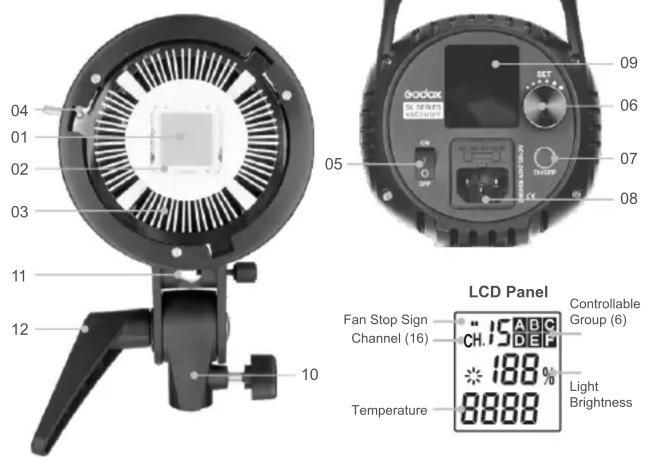
Body
- LED Beads
- Protect Cover
- Heatsink
- Accessory Slot
- ON/OFF Power Switch
- Select Dial + SET Button
- CH/GRP Button
- AC Power Jack
- LCD Panel (White in Blue)
- Mounting Bracket
- Umbrella Input
- Direction Adjusting Handle
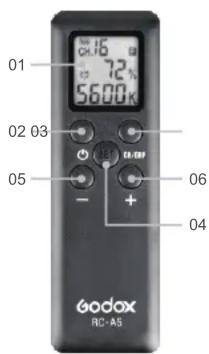
Remote Control:
-
LCD Panel (Black in White)
-
Power Switch
-
CH/GRP Button
-
SET Button
-
"-" Button
-
"+" Button
-
Battery Compartment
-
Battery Compartment
Cover
Accessories
Operation
Using the Video Light
- Connect the light with AC power jack.
- Press the ON/OFF Power Switch, the video light begins to giving out light.
• LCD panel shows the information.
Light Brightness Adjustment
- Turn the select dial to adjust the light brightness.
- The light brightness adjustable range is at 10%\~100%.
Temperature Indication
- This video light checks its temperature at any time to avoid dangerous situations.
It will auto power off when the temperature is too high. - Press the SET button for 2 seconds and the temperature can be switched between Celsius and Fahrenheit.
Wireless Remote Control
With 433 MHz wireless system, this product has remote grouping and control function. Up to 6 groups of video lights can be controlled. 16 channels are available with strong anti-interference capability.
- Please set the channels and groups of video light to the same as those of remote control before usage.
- When using the White Version, please set the color temperature of the remote control as 5600K constantly;
- When using the Yellow Version, please set the color temperature of the remote control as 3300K constantly;
Adjusting Channel/Group of the Video Light
- Press the CH/GRP button and the group icon blinks. Turn the select dial to choose a group ID (A to F).
- Press the CH/GRP button twice and the channel icon blinks. Turn the select dial to choose a channel ID (1 to 16).
Adjusting Channel/Group of the Remote Control
- Press the CH/GRP button and the group icon blinks. Press the"- "+ " button to choose a group ID (A to F).
- Press the CH/GRP button twice and the channel icon blinks. Press the "-" + " button to choose a channel ID (1 to 16).
Adjusting Light Brightness/Color Temperature with the Remote Control
- Press the"-"+" button to adjust the light brightness.
- Press the SET button of the remote control once and the color temperature icon blinks. Press the"-"+" button to adjust the color temperature.
Other Operation Tips:
- Pressing the ON/OFF button on the remote control can turn on/off all the video light groups.
- Pressing the "SET" button on the remote control for 2 seconds can turn on/off the current video light group.
- Please remove the battery if the light will not be used for an extended period of time.

When there are some abnormal situations in the inner video light, the relevant LCD signs will blink as warnings. For example:
- When the fan stops working due to fault, II signs will blink to alarm.
- When heatsink' temperature is over 70 Celsius degrees, the temperature on the LCD panel will blink and the video light will stop working.
Technical Data:
| Video Light | White Version SL60W | Yellow Version SL60Y |
| AC Power Supply | AC 100~240V 50/60Hz | |
| Channel | 16 | |
| Group | 6 groups (A, B, C, D, E, F) | |
| Power | Max. 60W | |
| Color Temperature | 5600K±300K | 3300K±300K |
| 100% Illuminance (LUX) | 4100 (1m) | |
| 100% Luminous Flux | 4500 | |
| Color Rendering Index | >95 | |
| R9 | 90 | |
| TLCI(Qa) | >90 | |
| Light Brightness Range | 10%~100% | |
| Operation Temperature | -10~50°C | |
| Safe Temperature | ≤70°C | |
| Dimension | 23x24x14cm (Not included the Lamp Cover) | |
| Net Weight | Approx. 1.61kg | |
| Remote Control | RC-A5 |
| Power Supply | 3.0V(AAA*2)(not include) |
| Wireless Frequency | 433MHz |
| Distance(emptiness) | ≥ 20 m |
| Channel | 16 |
| Group | 6 groups(A, B, C, D, E, F) |
| Standby Time | Over one year |
| Operation Temperature | -10~50 °C |
| Dimension | 120mm*38mm*15mm |
| Net weight | 30g |
* Product design and specifications are subject to change without notice.
- 深圳市神牛摄影器材有限公司
- Features:
- For your safety:
- Body
- Remote Control:
- Operation
- Using the Video Light
- Light Brightness Adjustment
- Temperature Indication
- Wireless Remote Control
- Adjusting Channel/Group of the Video Light
- Adjusting Channel/Group of the Remote Control
- Adjusting Light Brightness/Color Temperature with the Remote Control
- Other Operation Tips:
Brand : GODOX
Model : SL60W
Category : Video Lighting