
AP6120A - Extension block APC - Free user manual and instructions
Find the device manual for free AP6120A APC in PDF.


| Product Type | Power Strip / Surge Protector |
| Model | AP6120A |
| Brand | APC |
| Number of Outlets | 6 |
| Surge Protection | Yes, 1080 Joules |
| Input Voltage | 120 V AC |
| Maximum Current | 15 A |
| Circuit Breaker | 15 A resettable |
| Cord Length | 6 ft (1.8 m) |
| Dimensions (H x W x D) | 1.5 x 12 x 2 in (3.8 x 30.5 x 5.1 cm) |
| Weight | 1.5 lbs (0.68 kg) |
| LED Indicator | Surge protection status |
| Safety Features | Overload protection, fire-resistant casing |
| Installation | Plug and play, no tools required |
| Cleaning | Unplug and wipe with dry cloth |
| Operating Temperature | 32°F to 104°F (0°C to 40°C) |
| Compliance | UL listed, cUL, FCC |
| Repairability | Non-repairable, replace if damaged |
| Warranty | Lifetime, with connected equipment warranty |
Frequently Asked Questions - AP6120A APC
User questions about AP6120A APC
0 question about this device. Answer the ones you know or ask your own.
Ask a new question about this device
Download the instructions for your Extension block in PDF format for free! Find your manual AP6120A - APC and take your electronic device back in hand. On this page are published all the documents necessary for the use of your device. AP6120A by APC.
USER MANUAL AP6120A APC
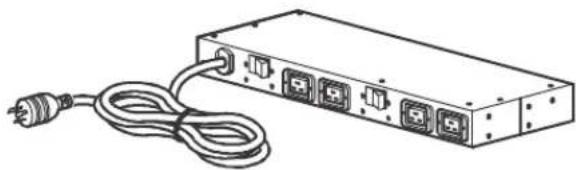
The APC by Schneider Electric Basic Rack Power Distribution Unit (PDU) distributes power to devices in the rack.
Outlets. The Rack PDU has four (4) C19 outlets.
Power cord. The 3.65 m (12.00 ft) power cord terminates with a NEMA L6-30P plug.
natural_image
Line drawing of a rectangular electronic device with four ports and a power outlet, connected by a coiled cable (no text or symbols)Specifications
Electrical
| Input connection NEMA L6-30P cord included | |
| Acceptable input voltage 200–240 VAC +6% to -10% | |
| Maximum input current (phase) | 30 A (24 A UL/C-UL derated) |
| Input frequency 50/60 Hz | |
| Output voltage 200–240 VAC +6% to -10% | |
| Output connections (4) C19 | |
| Maximum output current (outlet) | C19; 16 A (UL/C-UL derated)C19; 20 A (PSE) |
| Maximum output current (phase) | 30 A (24 A UL/C-UL derated) |
| Maximum output current (bank) | 16 A UL/C-UL derated)20 A (PSE) |
| Overcurrent protection (internal) | (2) 20 A, 2-pole breakers |
| Cord length 3.65 m (12.00 ft) | |
Physical
| Dimensions(H x W x D) | 43.81 x 4.36 x 12.57 cm(17.25 x 1.72 x 4.95 in) |
| Shipping dimensions(H x W x D) | 47.29 x 28.09 x 18.00 cm(18.62 x 11.06 x 7.09 in) |
| Weight 3.80 kg (8.36 lb) | |
| Shipping weight 4.60 kg (10.12 lb) | |
Environmental
| Maximum elevation (above MSL) | |
| Operating | 0 to 3048 m (0 to 10,000 ft) |
| Storage | 0 to 15240 m (0 to 50,000 ft) |
| Temperature | |
| Operating | 0 to 50°C (32 to 122°F) |
| Storage | -15 to 60°C (5 to 140°F) |
| Humidity | |
| Operating | 5 to 95%, non-condensing |
| Storage | 5 to 95%, non-condensing |
Compliance
| Safety approvals UL/C-UL |
| ROHS 2011/65/EU – latest revision |
en
Customer support and warranty information is available at www.apc.com.
© 2015 Schneider Electric. All trademarks are owned by Schneider Electric Industries S.A.S.
by Schneider Electric
natural_image
Line drawing of a rectangular electronic device with multiple ports and a power outlet, no text or symbols present.by Schneider Electric
natural_image
Line drawing of a rectangular electronic device with four ports and a power outlet, connected by a coiled cable (no text or symbols)
Brand : APC
Model : AP6120A
Category : Extension block