
Envaya DSB250 - Pregnant DENON - Free user manual and instructions
Find the device manual for free Envaya DSB250 DENON in PDF.


| Product Type | Portable Waterproof Bluetooth Speaker |
| Model | Denon Envaya DSB250BT |
| Dimensions (W x H x D) | 209 x 74 x 77 mm |
| Weight | 750 g |
| Power Supply | DC 5 V, 2.1 A (USB power adapter not included) |
| Battery Life | Up to 13 hours (varies with usage) |
| Charging Time | Approx. 3.5 hours (with 2.1A adapter) |
| Bluetooth Version | Bluetooth 4.2 |
| Supported Profiles | A2DP, AVRCP, HFP |
| Supported Codecs | aptX Low Latency, AAC, SBC |
| Speaker Drivers | 2 x 40 mm full-range, 1 x 53 x 135 mm passive radiator |
| Dust Resistance | IP6X (dust-tight) |
| Water Resistance | IPX7 (submersion up to 1 m for 30 min) |
| Microphone | Built-in for hands-free calls |
| Multipoint | Simultaneous connection of up to 2 Bluetooth devices |
| Stereo Pairing (Envaya Link) | Pair two identical speakers for stereo sound |
| Voice Control | Siri support (iOS devices) |
| AUX Input | 3.5 mm stereo mini jack |
| USB Port | Micro USB for charging only |
| Auto Power Off | After 15 min no audio (Bluetooth), 8 hours (AUX) |
| What's in the Box | Speaker, USB cable, strap, quick start guide, safety instructions |
Frequently Asked Questions - Envaya DSB250 DENON
User questions about Envaya DSB250 DENON
0 question about this device. Answer the ones you know or ask your own.
Ask a new question about this device
Download the instructions for your Pregnant in PDF format for free! Find your manual Envaya DSB250 - DENON and take your electronic device back in hand. On this page are published all the documents necessary for the use of your device. Envaya DSB250 by DENON.
USER MANUAL Envaya DSB250 DENON
Contents Preparation Connections Operation Troubleshooting Appendix
DENON®
envaya
Portable Waterproof Speaker
Owner's Manual
Index

Contents Preparation Connections Operation Troubleshooting Appendix
Preparation
| Introduction | 4 |
| Unpacking | 5 |
| Overview | 6 |
| Sound Quality | 6 |
| Design | 6 |
| Operation | 6 |
| Features and functions | 7 |
| Attaching the Strap | 9 |
| Charging | 10 |
| Turning the power on | 14 |
| Turning the power off | 14 |
Connections
| Bluetooth operation | 15 |
| Pairing | 15 |
| Connecting | 15 |
| 1: Connecting for the first time | 16 |
| 2: Reconnecting paired devices | 18 |
| Simultaneously connecting multiple Bluetooth devices (Multipoint function) | 19 |
| Envaya Link (DSB50BT) | 20 |
| Envaya Link (DSB150BT/DSB250BT) | 21 |
Operation
| Adjusting the volume | 22 |
| Listening to music using a wired connection | 23 |
| Voice Control Using Siri | 24 |
| Conducting hands-free phone calls using Envaya | 25 |
Troubleshooting
| Tips | 27 |
| Troubleshooting | 28 |
| Speaker does not turn on | 28 |
| Envaya cannot be charged | 28 |
| No sound from the speaker | 29 |
| Sound is distorted, noisy, or cuts in and out | 29 |
| Cannot pair a Bluetooth device with the speaker | 30 |
| Speaker is turning off automatically | 31 |
| Speaker is malfunctioning | 31 |
| Cannot conduct a call | 31 |
| Restarting the Envaya | 32 |
Index

Contents Preparation Connections Operation Troubleshooting Appendix
Appendix
| Playing back a Bluetooth device | 33 |
| Precautions for Dust Resistance and Water Resistance | 33 |
| Trademark information | 34 |
| Specifications | 35 |
| DSB50BT | 35 |
| DSB150BT | 37 |
| DSB250BT | 39 |
| Index | 41 |
Index

Contents
ration
s Operation Troubleshooting Appendix
Introduction
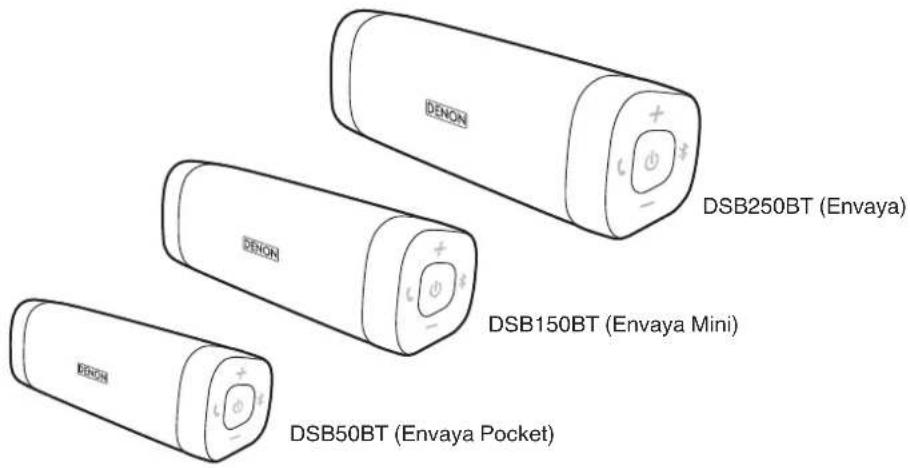
This manual is for all three models.
For the purposes of this manual, the name "Envaya" is used to refer to the three products.
Their respective model names are used in the model-specific manuals.
Index


flowchart
graph LR
    A["Contents"] --> B["Operation"]
    B --> C["Connections"]
    C --> D["Operation Troubleshooting Appendix"]
    D --> E["Appendix"]
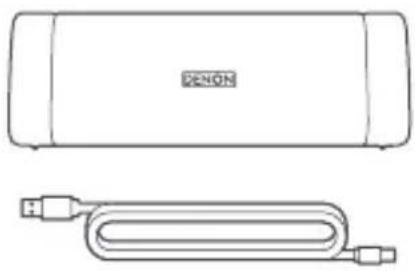
Unpacking
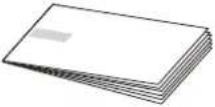 Quick Start Guide Safety Instructions USB Cable Quick Start Guide Safety Instructions USB Cable | 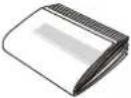 | 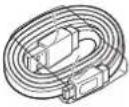 (Micro B connector) (Micro B connector) |
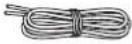 Strap Strap | ||

• USB to AC power adapter not included.
Index

Contents
ation
Operation Troubleshooting Appendix
Overview
Sound Quality
- Despite the compact size of Envaya, powerful playback sound is produced by using neodymium magnets in the magnetic circuit and utilizing an original surround shape in the passive radiator.
- Envaya is compatible with a wide range of codecs, including the high sound quality Qualcomm® aptX™, AAC and SBC. Envaya automatically selects the optimum compatible codec for your Bluetooth device (smartphone or tablet) so you can enjoy high-grade wireless sound. aptX is also Low Latency compatible to minimize lag in the picture and audio (Not supported during stereo pairing).
Design
- Envaya has a slim stick design for easy carrying.
- Envaya has a waterproof and dustproof design to keep the unit safe if it gets wet or is exposed to dust clouds.
This allows it to be used in a wider range of areas, such as by a pool or in dusty outdoor environments.
Operation
- Hands-free phone calls can be conducted using Envaya by pairing with a Bluetooth-compatible mobile phone.
- If you have two Envaya units*, you can make a stereo pair connection between them to create spatial stereo sound.
* The two units must be the same model.
* Stereo pair connection does not support aptX's Low Latency function.
Index


flowchart
graph LR
    A["Contents"] --> B["Operation"]
    B --> C["Operations Troubleshooting Appendix"]
    C --> D["Next Step"]
Features and functions
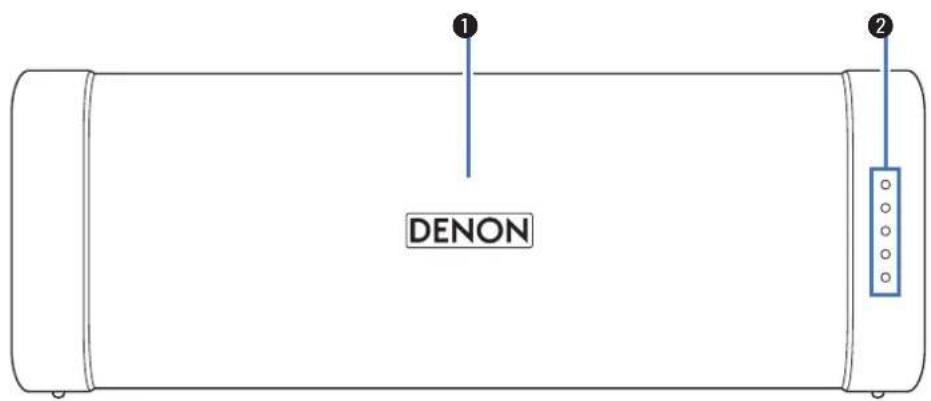
① Microphone
This microphone is used when conducting hands-free phone calls.
( p. 25)
② Status Indicator
Lit when power is on.
Lit when charging. (p. 12)
Lit when pairing. (p. 16)
Index

Contents
ation
Operation Troubleshooting Appendix
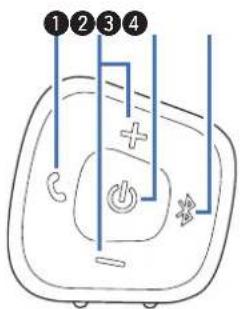
① Call button (C)
Answers incoming calls and ends calls. (p. 25)
② Volume adjustment buttons (-,+)
Adjusts the volume up and down. (☐ p. 22)
③ Power button (⏻)
Turns the power on/off. (p. 14)
④ Bluetooth button (*)
Press this to start pairing. (p. 15)
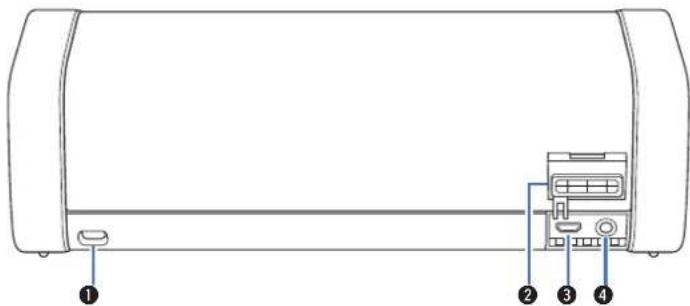
① Strap loop
Attach the provided strap here.
② Cap
Close this cap securely to ensure proper dustproof and waterproof performance.
③ Micro USB port
Connect Envaya to the USB to AC power adapter (not included) using the supplied USB cable to charge this unit. (p. 10)
④ AUX Input connector
Used to connect an external audio player with an analog output. (1 p. 23)
Index

Contents
ation
Operation Troubleshooting Appendix
Attaching the Strap
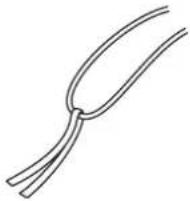
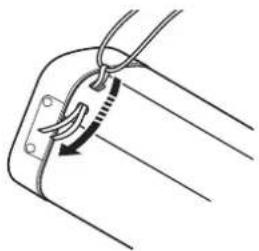
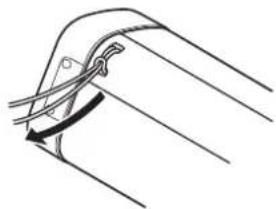
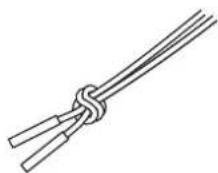
The strap can be attached more easily by using the twist tie that holds it in place.
1 Loop the twist tie around the strap.
2 Pass the twist tie through the strap loop of this unit.
natural_image
Diagram of a cable clamp securing a wire, showing rope routing and angle measurement (no text or symbols)3 When the loop of the strap appears on the other side, insert both ends of the strap through the loop to secure it in place.
natural_image
Pure mechanical diagram showing a curved component with diagonal lines and a central fastener (no text or symbols)4 Tie the ends of the strap securely.
NOTE
- Do not spin Envaya around holding the strap, as doing so may cause injury or damage.
Index

Contents
ration
s Operation Troubleshooting Appendix
Charging
Envaya can be charged and operated on battery power. It can also be operated from an AC power source by connecting it to the USB to AC power adapter (available commercially) using the supplied USB cable.
Please make sure you charge the battery completely before listening on battery power.

• After purchase, charge this unit before use.
| DSB50BT DSB150BT | DSB250BT | ||
| Operating life *1 (hours) | 10 11 13 | ||
| Charging time *2 (hours) | 2.5 3.0 3.5 |
*1 The playback time may differ depending on the ambient temperature, playback volume, and usage conditions.
*2 If using a USB to AC power adapter with an output of 2.1A or higher.
NOTE
- Only use the supplied USB cable.
• Rating of adapter should be DC 5 V, and between 2.1 A and 2.4 A. - Must be used with an approved adapter suitable for the countries where the requirement will be applied.
Index

Contents
ation
Operation Troubleshooting Appendix
■ Charging the speaker
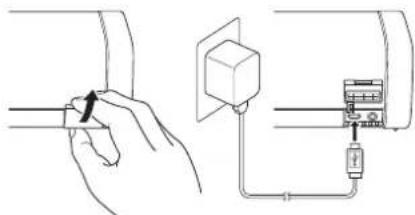
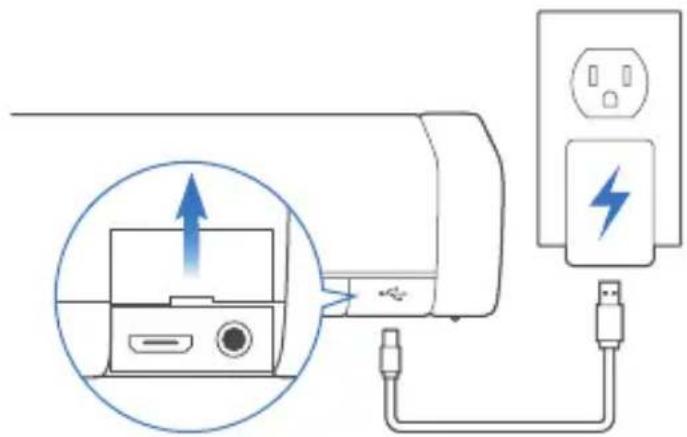
① Open the cap on the rear side.
② Connect the small end of USB cable to the speaker.
③ Connect the large end of the USB cable to a USB to AC power adapter and a power source.
NOTE
- When connecting the dedicated charging cable to the charging port, be sure to match the cable connector with the shape of the socket. Forcing the connector into the socket will cause damage.
- Remove the USB cable and firmly close the cap when charging is completed.
Index

Contents
ation
Operation Troubleshooting Appendix
■ Battery indicator
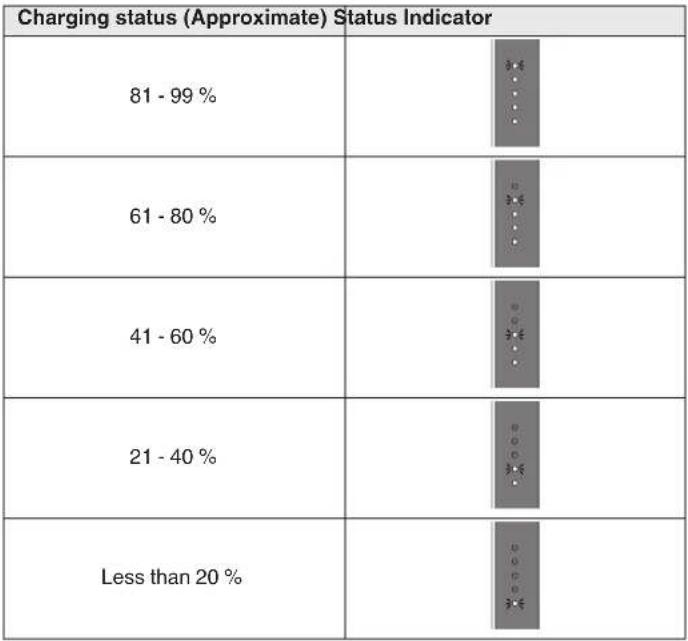
The battery indicator uses 5 LEDs to indicate the status of the charge process when connected to the USB to AC power adapter.
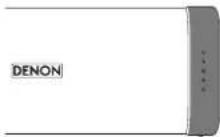
When connected to the USB to AC power adapter (charging)
The battery indicator is always lit when charging.
The battery indicator turns off when charging is complete.
 |
Index

Contents
ation
Operation Troubleshooting Appendix
When running on battery power
Press and release the ⏻ button to check the remaining battery. The remaining battery level is displayed for approximately 2 seconds.

- When the battery indicator flashes on battery power, connect Envaya to the USB to AC power adapter.
| Remaining battery (Approximate) | Status Indicator |
| 81 - 100 % | |
| 61 - 80 % | |
| 41 - 60 % | |
| 21 - 40 % | |
| 7 - 20 % | |
| Less than 7 % |
Index

Contents
ation
Operation Troubleshooting Appendix
Turning the power on
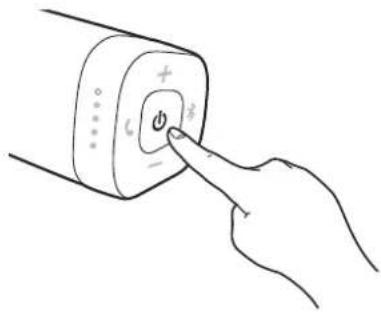
1 Press and hold ⏻ until a notification sound is heard. The status indicator illuminates and Envaya turns on.
Turning the power off
1 Press and hold ⏻ until a notification sound is heard. The status indicator lights turn off and the speaker's power is turned off.

- Envaya automatically turns off when there is no audio output from a Bluetooth device for approximately 15 minutes and the unit is not operated during this time.
- If the stereo mini plug cable is connected to Envaya for approximately 8 hours, Envaya automatically turns off (AUX auto off function).
Index

Bluetooth operation
You can enjoy listening to music wirelessly by connecting Envaya to your Bluetooth device.
Pairing
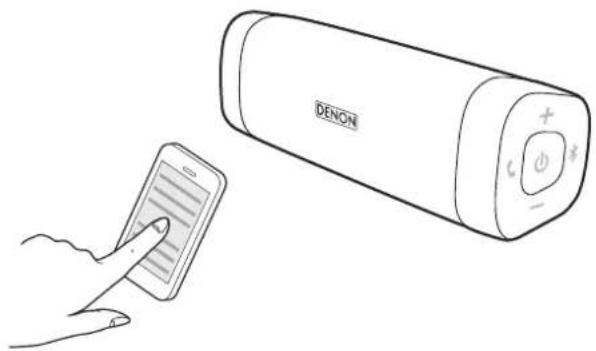
Pairing (registration) is an operation that is required in order to connect a Bluetooth device to Envaya.
When using Bluetooth for the first time, you need to pair Envaya and your Bluetooth device so they can communicate with each other.
Envaya can store pairing information for up to 8 devices.
natural_image
Line drawing of a hand holding a smartphone next to a large Danish 3000-branded phone with control buttons (no text or symbols on device)NOTE
- Multiple Bluetooth devices cannot be played back at the same time.
Connecting
There are two methods for connecting with Bluetooth devices:

Connecting for the first time (p. 16)

Reconnecting paired devices (p. 18)
Index

1: Connecting for the first time
1 Turn on Bluetooth on your mobile device.
- For details, see the Owner's Manual of your Bluetooth device.
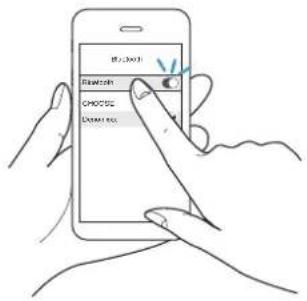
2 Press and hold ⏻ until a notification sound is heard.
The status indicator illuminates and Envaya turns on.
- Envaya automatically enters pairing mode the first time the power is turned on after purchase. In this case, you do not need to perform step 3.
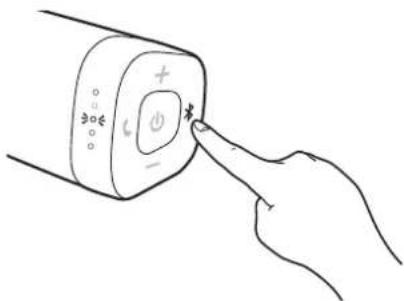
3 Press the Ⓧ button.
The status indicator blinks rapidly and Envaya enters pairing mode.
Contents Preparation
Operation Troubleshooting Appendix
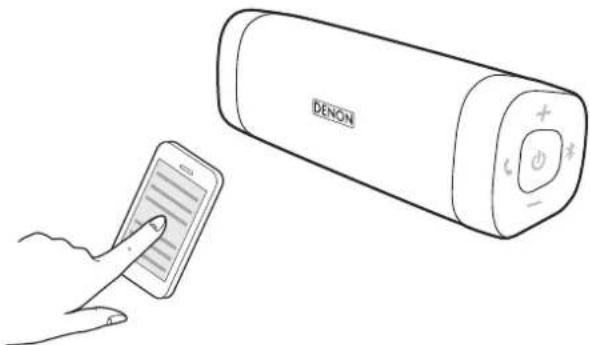
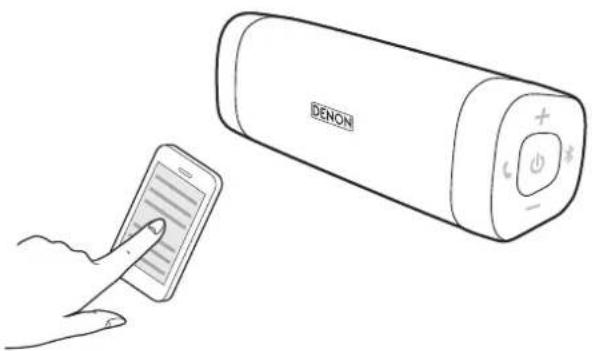
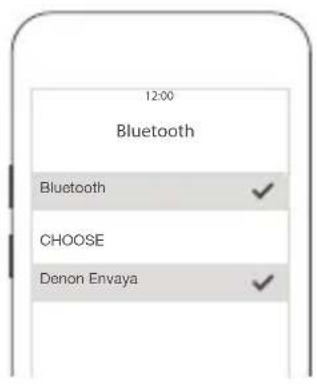
4 Select "Denon Envaya xxx" ^1 from the list of devices displayed on the screen of your Bluetooth device.
When pairing is complete a notification sound is heard.
natural_image
Line drawing of a hand holding a smartphone next to a large Danish 3000-branded device (no text or symbols on device)
- If you are asked to enter a pass key in the Bluetooth device screen, enter "0000".
NOTE
• *1 : The name displayed depends on the model.
5 Listening to music.
Music played back on the Bluetooth device will now play through your Envaya speaker.

- Adjust the volume to an appropriate level.
NOTE
- Envaya remains in the pairing mode for approximately 5 minutes and then will exit pairing mode. If your device could not connect, please try again from step 3.
- Envaya cannot pair with Bluetooth devices that require a pass key other than "0000".
Index

2: Reconnecting paired devices
1 Turn on Bluetooth on your mobile device.
- For details, see the Owner's Manual of your Bluetooth device.
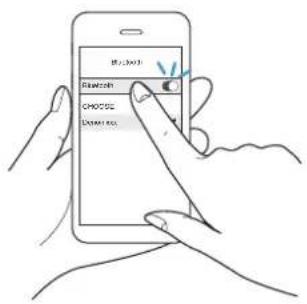
2 Press and hold ⏻ until a notification sound is heard.
The status indicator illuminates and Envaya turns on.
- If the last device which was connected to Envaya is turned on, in range, and has Bluetooth enabled, it automatically connects to Envaya.
- If the stereo mini plug cable is connected to Envaya, remove the cable to switch to the Bluetooth input.
3 Select "Denon Envaya xxx" ^1 from the list of devices displayed on the screen of your Bluetooth device.
When a device is connected by Bluetooth, a notification sound is heard.
natural_image
Line drawing of a hand holding a smartphone next to a large Denon phone with control buttons (no text or symbols on device)NOTE
• *1 : The name displayed depends on the model.
DSB50BT : Denon Envaya Pocket
DSB150BT : Denon Envaya Mini
DSB250BT : Denon Envaya
4 Listening to music.
Music played back on the Bluetooth device will now play through your Envaya speaker.
Index

Simultaneously connecting multiple Bluetooth devices (Multipoint function)
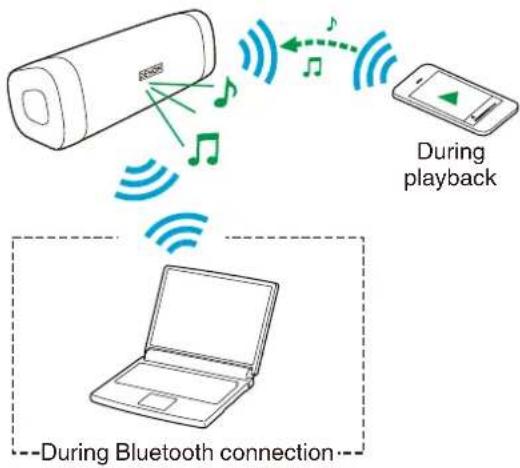
Two Bluetooth devices can be simultaneously connected to Envaya so you can easily switch between multiple Bluetooth audio sources without having to disconnect and reconnect each device. ("Bluetooth operation" (p. 15))
It is convenient to connect devices that you use frequently so that you do not need to re-connect each time you want to switch playback devices. Pair the devices that you want to connect in advance.
Audio signal
flowchart
graph TD
    A["Device with antenna"] -->|Wireless signal| B["Mobile phone"]
    B -->|Audio/Play Music| C["Playback"]
    C -->|Audio/Play Music| D["Laptop"]
    D -->|Bluetooth signal| E["Bluetooth Connection"]
    style A fill:#f9f,stroke:#333
    style B fill:#ccf,stroke:#333
    style C fill:#cfc,stroke:#333
    style D fill:#fcc,stroke:#333
    style E fill:#ffc,stroke:#333
■ Switching playback devices
1 Stop or pause playback on the device that you are currently listening to.
2 Begin playback on the device that you want to listen to.
■ Disconnecting the bluetooth connection
Disconnect the Bluetooth connection by turning off the Bluetooth function of the Bluetooth device.
Index

Envaya Link (DSB50BT)
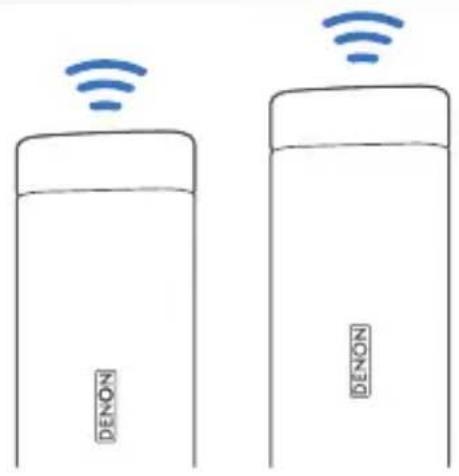
If you have two of the same speakers, you can use them as a pair of stereo speakers.
1 Connect the first Envaya to the Bluetooth device.
2 Press and hold the Bluetooth buttons simultaneously on both Envayas for approximately 6 seconds.
NOTE
- Adjust the volume on the Bluetooth device.
- Envaya Link is disconnected when the Envaya power is turned off. You need to reconnect Envaya Link in order to use it again.
- Envaya Link does not support aptX's Low Latency function.
flowchart
graph TD
    A["Device 1"] -->|Signal| B["Device 2"]
    B -->|Signal| A
    C["Mobile App"] -->|Signal| A
    style A fill:#f9f,stroke:#333
    style B fill:#ccf,stroke:#333
    style C fill:#cfc,stroke:#333
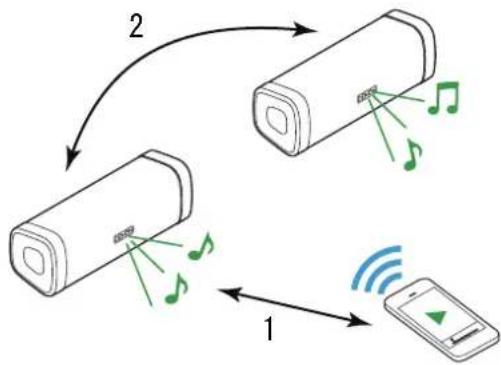
Envaya Link (DSB150BT/DSB250BT)
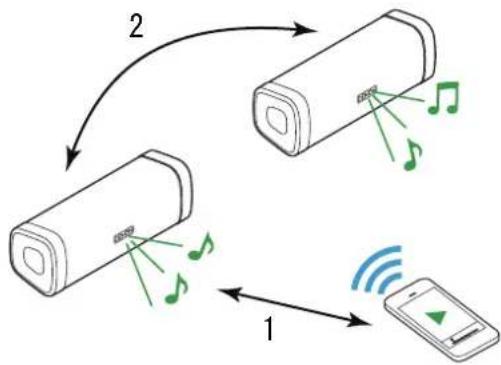
If you have two of the same speakers, you can use them as a pair of stereo speakers.
1 Connect the first Envaya to the Bluetooth device.
2 Press and hold the Bluetooth buttons simultaneously on both Envayas for approximately 6 seconds.
NOTE
- When Envaya Link is connected, the volume of each Envaya is fixed to the maximum value. Adjust the volume on the Bluetooth device.
- Lower the volume on the Bluetooth device initially before playing music, then adjust the volume to the appropriate level.
- Envaya Link is disconnected when the Envaya power is turned off. You need to reconnect Envaya Link in order to use it again.
- Envaya Link does not support aptX's Low Latency function.
flowchart
graph TD
    A["Device 1"] -->|Signal| B["Device 2"]
    B -->|Signal| A
    C["Mobile App"] -->|Signal| A
    style A fill:#f9f,stroke:#333
    style B fill:#ccf,stroke:#333
    style C fill:#cfc,stroke:#333
Contents Preparation Connections
Troubleshooting Appendix
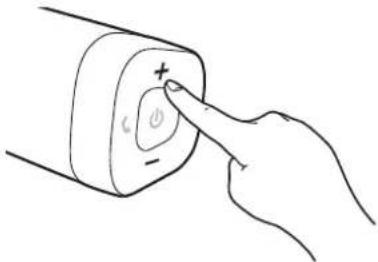
Adjusting the volume
1 While playing music, press the + button to increase the volume. Press the - button to decrease the volume.
- For the best signal to noise ratio, you may have to raise the volume of your connected music player up to an appropriate level then adjust the volume of the speaker up or down.
natural_image
Hand pointing at a button with plus and minus signs, no text or symbols presentIndex

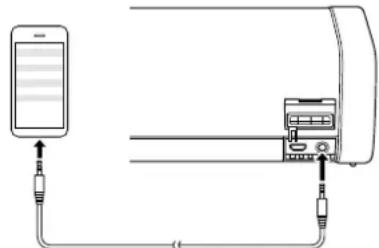
Listening to music using a wired connection
You can enjoy listening to music from devices that do not support Bluetooth audio by connecting to Envaya using a stereo mini plug cable (available commercially).
1 Press and hold ⏻ until a notification sound is heard.
The status indicator illuminates and Envaya turns on.
2 Connect the AUX input connector on Envaya to the headphones jack of the portable music player using a stereo mini plug cable (available commercially).
When a Bluetooth device is playing back music, Bluetooth playback takes priority. Stop playback on the Bluetooth device and then connect the mini plug cable.
natural_image
Diagram showing connections between a mobile device and a server rack (no text or symbols present)Stereo mini plug cable (available commercially)
3 Start playing music from the device. You may need to adjust the volume up on the connected device, then adjust the volume on Envaya.
Bluetooth connection takes priority on Envaya. If Bluetooth playback is started while a cable is connected, input switches to Bluetooth.
Contents Preparation Connections
Troubleshooting Appendix
Voice Control Using Siri
If the Bluetooth device is an iPhone or iPad (iOS device), you can use Siri to control Envaya.
1 Press and hold the 📊 button.
Siri starts.
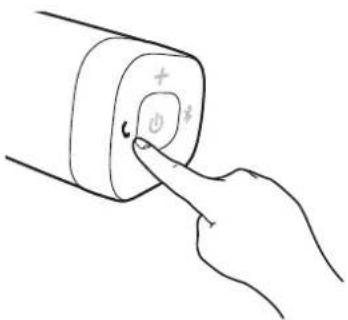
2 Speak into the Envaya microphone.

- iPhone, iPad and Siri are trademarks of Apple Inc., registered in the U.S. and other countries.
Index

Contents Preparation Connections
Troubleshooting Appendix
Conducting hands-free phone calls using Envaya
If your mobile phone supports the Hands-Free profile (HFP), you can answer incoming calls to your mobile phone from Envaya when the devices are connected by Bluetooth.
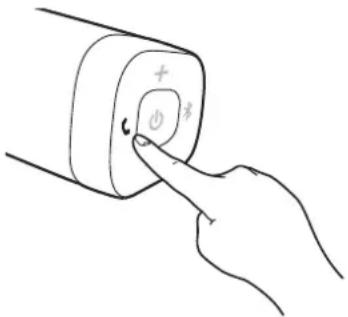
■ Answering an incoming call
If a mobile phone connected to Envaya receives an incoming call, the music being played is paused and Envaya plays a ring tone.
Press and release the ⬆ button on Envaya while the ring tone plays to answer an incoming call.
Speak into the microphone on Envaya.
■ Ending a call
Press the 📊 button on Envaya while a call is in progress to end the call. If you were playing music before the call, playback of the music resumes.
■ Canceling an incoming call
Press and hold the 📊 button on Envaya for approximately two seconds while the ring tone plays to cancel an incoming call.
Index

Contents Preparation Connections Operation
Appendix
Tips
I want to answer incoming calls to my mobile phone on Envaya 27
Connecting multiple Bluetooth devices and switching easily between them 27
Troubleshooting
Speaker does not turn on 28
Envaya cannot be charged 28
No sound from the speaker 29
Sound is distorted, noisy, or cuts in and out 29
Cannot pair a Bluetooth device with the speaker 30
Speaker is turning off automatically 31
Speaker is malfunctioning 31
Cannot conduct a call 31
Index

Contents Preparation Connections Operation
Appendix
Tips
I want to answer incoming calls to my mobile phone on Envaya
- If a mobile phone connected by Bluetooth receives an incoming call, the music being played is paused and a ring tone plays.
Press and release the button on Envaya to answer the call. (12p. 25)
Connecting multiple Bluetooth devices and switching easily between them
- Music can only be output from Envaya from one Bluetooth device connected using Bluetooth, but two Bluetooth devices can be simultaneously connected to Envaya. To switch easily between connections, connect Bluetooth devices that you use frequently to Envaya. To switch playback to a different Bluetooth device when multiple Bluetooth devices are connected, stop or pause playback on the device that is currently playing back, and then start playback on a different Bluetooth device. (Kp. 19)
Index

Contents Preparation Connections Operation
Appendix
Troubleshooting
Check all connections.
If Envaya does not operate properly, check the items listed in the table below.
Should the problem persist, there may be a malfunction. In this case, disconnect the power immediately and contact your store of purchase.
* If you need additional help in solving problems, contact Denon customer service in your area.
For more information, visit www.denon.com.
Speaker does not turn on
Speaker does not turn on. (AC power)
- To turn on the speaker, press and hold the power button for 2 seconds. (p. 14)
Speaker does not turn on. (Battery power)
- The battery is completely discharged. Connect Envaya to the USB to AC power adapter to charge Envaya. (P. 11)
Envaya cannot be charged
Envaya cannot be charged.
- The speaker is not connected to a USB to AC power adapter.
Make sure the USB to AC power adapter is connected to a working power source (AC wall outlet). (P. 11) - Make sure the supplied USB cable is correctly connected to Envaya. (p. 11)
Index

No sound from the speaker
No sound from the speaker.
- The speaker is not connected to USB to AC power adapter or the battery is not charged. Connect power and turn on the speaker. (17 p. 14)
- The volume is too low on your connected device. Turn up the volume on your device to about 90 % and then adjust the volume on the speaker. (17 p. 22)
- There is no connected Bluetooth device. Pair and connect a Bluetooth device and try again. (P. 15)
- There is no connected AUX device. Connect an audio device to the AUX input using a stereo 3.5mm cable and make sure music playing music on your device. (10 p. 23)
- The AUX input connector of Envaya is compatible with stereo mini plug cables that have 3-conductor plugs. Be sure to use a 3-conductor stereo mini plug cable. (17 p. 23)
Sound is distorted, noisy, or cuts in and out
Sound is distorted, noisy, or cuts in and out.
- The volume is too low on your connected device. Turn up the volume on your device to about 90 % and then adjust the volume on the speaker. (12 p. 22)
- The Bluetooth device is out of range. Bring the Bluetooth device closer to the speaker.
- The Bluetooth connection is experiencing wireless interference. Move the speaker away from appliances such as microwave ovens and other wireless devices.
- The Bluetooth device is having connectivity issues. Cycle the power on the Bluetooth and reconnect to the speaker.
- Depending on the type of USB to AC power adapter connected to Envaya, a small amount of noise may occur during charging. This is not a malfunction.
Index

Cannot pair a Bluetooth device with the speaker
Cannot pair a Bluetooth device with the speaker.
- Power On the speaker then press the Ⓧ button. Make sure your mobile device has Bluetooth On and select "Denon Envaya ***" from the list of Bluetooth devices.
- The Bluetooth connection is experiencing wireless interference. Move the speaker away from appliances such as microwave ovens and other wireless devices.
- The Bluetooth device is out of range. Bring the Bluetooth device closer to the speaker.
- The Bluetooth device is malfunctioning. Power cycle the device and try again.
- The Bluetooth device is malfunctioning. Power cycle the device, remove the pairing information (Forget this Device on iOS and Unpair on Android) and re-pair the speaker to the device.
- Bluetooth is off on the device. Make sure Bluetooth is set to ON on your device.
- If the stereo mini plug cable is connected, remove the cable.
Speaker is turning off automatically
Speaker is turning off automatically.
- To save battery power, the speaker is designed to turn off when no audio is played via Bluetooth for approximately 15 minutes. Power on the speaker by pressing and holding the power button for 2 seconds. (☐ p. 14)
- If the input of Envaya is set to AUX for approximately 8 hours, Envaya automatically turns off. Power on the speaker by pressing and holding the power button for 2 seconds. (p. 14)
The power turns off quickly.
- If usage time is extremely short even when the battery has been fully charged, the battery may be near the end of its life. In this case, please contact Denon service center.
Speaker is malfunctioning
Speaker is malfunctioning.
- To reset the speaker, turn on the speaker then, press and release the ⏻, ⏻ and ⏻ button simultaneously.
Envaya is reset. (Note: The battery protection circuit activates after resetting. To restart this unit, charge the battery) - The speaker needs to be reset to the factory default settings. Turn on the speaker. Press and hold the VOLUME+, VOLUME- and 🔔 buttons together for approximately 5 seconds.
(Note: All pairing information from Bluetooth devices will be erased. The battery protection circuit activates after resetting. To restart this unit, charge the battery).
Cannot conduct a call
Cannot conduct a call
- Not all mobile phones and Apps support Hands-free phone calling.
Index

Contents Preparation Connections Operation
Appendix
Restarting the Envaya
To reset the speaker, turn on the speaker then, press and release the ⏻, ⏻ and ⏻ button simultaneously. Envaya is reset.
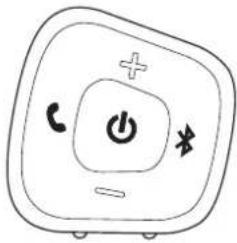
NOTE
- The battery protection circuit activates after resetting. To restart this unit, charge the battery.
Index

Playing back a Bluetooth device
Envaya supports the following Bluetooth profile.
- A2DP (Advanced Audio Distribution Profile): When a Bluetooth device that supports this standard is connected, monaural and stereo sound data can be streamed at a high quality.
- AVRCP (Audio/Video Remote Control Profile): When a Bluetooth device that supports this standard is connected, the Bluetooth device can be operated from Envaya.
- HFP (Hands-Free profile): When a Bluetooth device that supports this standard is connected, hands-free calls can be conducted via Envaya.
■ About Bluetooth Communications
Radio waves broadcast from Envaya may interfere with the operation of medical devices. Make sure you turn off the power of Envaya and Bluetooth device in the following locations as radio wave interference may cause malfunctions.
- Hospitals, trains, aircraft, petrol kiosks and places where flammable gases are generated
• Near automatic doors and fire alarms
Precautions for Dust Resistance and Water Resistance
Envaya has IP67 water and dust resistance.
IP6X: Protection level against dust: Protected from total dust ingress
IPX7: Protection level against water: Can withstand being submerged in 1m of static water for up to 30 minutes without water entering the device.
- Envaya is not completely water resistant, and therefore cannot be used in water.
- Dust and water resistance cannot be guaranteed when the cap is open. Fasten the cap tightly.
- Resistance to liquids other than tap water at normal temperature (such as liquid soap, detergent solution, bath water, shampoo, spa water, hot water, swimming pool water, sea water, etc.) is not guaranteed.
- In the unlikely event that water gets into Envaya, stop use immediately and contact the vendor. Please note that any water damage occurring as a result of the mistaken use of Envaya is not covered by the warranty.
- If this unit gets dirty, wipe the dirt off with a soft, dry cloth. If it is badly soiled, wipe it with a cloth soaked in diluted neutral detergent and then wipe it dry with a dry cloth.
Index

Trademark information

Bluetooth®
The Bluetooth® word mark and logos are registered trademarks owned by Bluetooth SIG, Inc. and any use of such marks by D&M Holdings Inc. is under license. Other trademarks and trade names are those of their respective owners.
Qualcomm ^* aptX ^- low latency

Qualcomm aptX is a product of Qualcomm Technologies International, Ltd.
Qualcomm is a trademark of Qualcomm Incorporated, registered in the United States and other countries, used with permission. aptX is a trademark of Qualcomm Technologies International, Ltd., registered in the United States and other countries, used with permission.
Index

Specifications
DSB50BT
■ Speaker section
Type: 40 mm full range × 2
40 × 83 mm passive radiator × 1
Bluetooth section
Communication system: Bluetooth Specification version 4.2
Compatible Bluetooth profiles: A2DP/AVRCP/HFP
Supported codecs: aptX Low Latency/AAC/SBC
Supported content protection: SCMS-T method
General
Input
5 V = 2.1 A
Power consumption (power off) 12 mW
Battery
Operating life 10 hours
Charging time 2.5 hours
Dustproof specifications Equivalent to IP6X
Waterproof specifications Equivalent to IPX7
* For purposes of improvement, specifications and design are subject to change without notice.
Index

Contents Preparation Connections Operation Troubleshooting
■ Dimensions (Unit : mm)
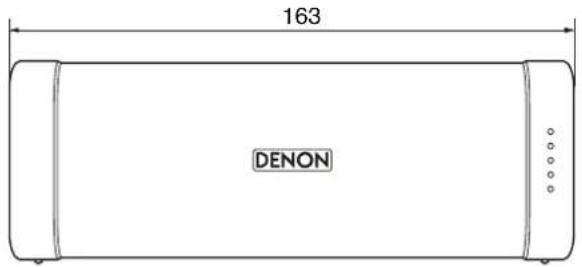
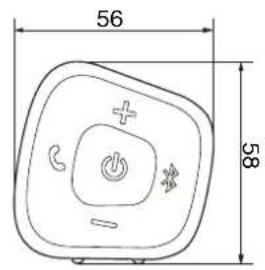
■ Weight: 390 g
DSB150BT
■ Speaker section
Type: 40 mm full range × 2
40 × 83 mm passive radiator × 1
Bluetooth section
Communication system: Bluetooth Specification version 4.2
Compatible Bluetooth profiles: A2DP/AVRCP/HFP
Supported codecs: aptX Low Latency/AAC/SBC
Supported content protection: SCMS-T method
General
Input
5 V = 2.1 A
Power consumption (power off) 12 mW
Battery
Operating life 11 hours
Charging time 3.0 hours
Dustproof specifications Equivalent to IP6X
Waterproof specifications Equivalent to IPX7
* For purposes of improvement, specifications and design are subject to change without notice.
Contents Preparation Connections Operation Troubleshooting
■ Dimensions (Unit : mm)
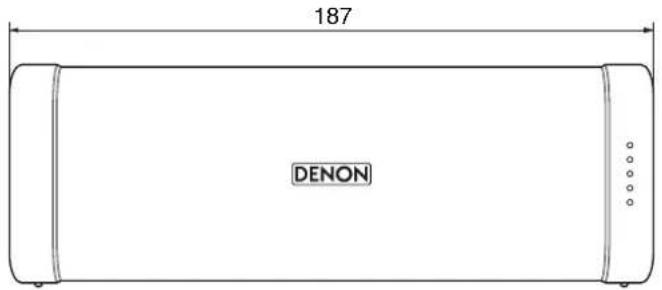
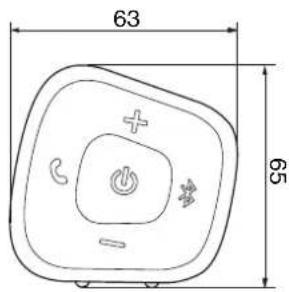
■ Weight: 541 g
Index

DSB250BT
■ Speaker section
Type: 40 mm full range × 2
53 × 135 mm passive radiator × 1
Bluetooth section
Communication system: Bluetooth Specification version 4.2
Compatible Bluetooth profiles: A2DP/AVRCP/HFP
Supported codecs: aptX Low Latency/AAC/SBC
Supported content protection: SCMS-T method
General
Input
5 V = 2.1 A
Power consumption (power off) 24 mW
Battery
Operating life 13 hours
Charging time 3.5 hours
Dustproof specifications Equivalent to IP6X
Waterproof specifications Equivalent to IPX7
* For purposes of improvement, specifications and design are subject to change without notice.
Contents Preparation Connections Operation Troubleshooting
■ Dimensions (Unit : mm)
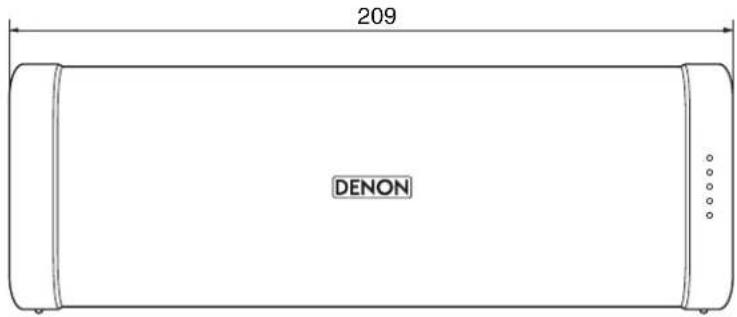
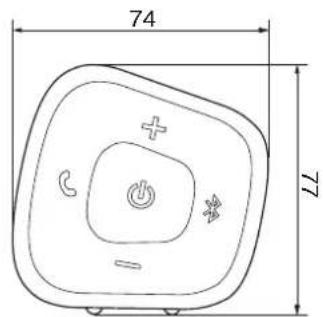
■ Weight: 750 g
Index

Contents Preparation Connections Operation Troubleshooting
Index
A
Accessories 5
AUX auto off function 14
C
Charging 10
F
Features and functions 7
H
Hands-free function 25
M
Multipoint function 19
P
Pairing 15
Playback Bluetooth device 15
R
Remaining battery indicator 12
Restarting the unit 32
S
Turning the power off 14
Turning the power on 14
U
USB Cable 11
V
Volume adjustment 22
W
Wired connection (AUX) 23
Index

DENON®
www.denon.com
D&M Holdings Inc. 3520 10564 00ADC
Let's Go.
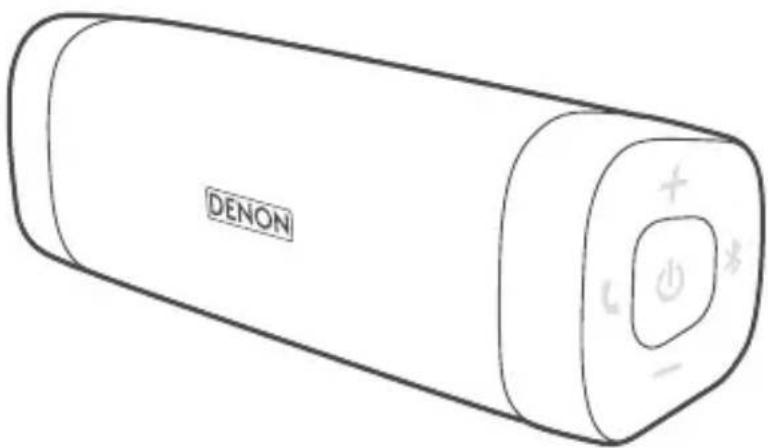
envaya
Get to Know
natural_image
Line drawing of a battery pack and its corresponding U-shaped cable with connectors (no text or symbols)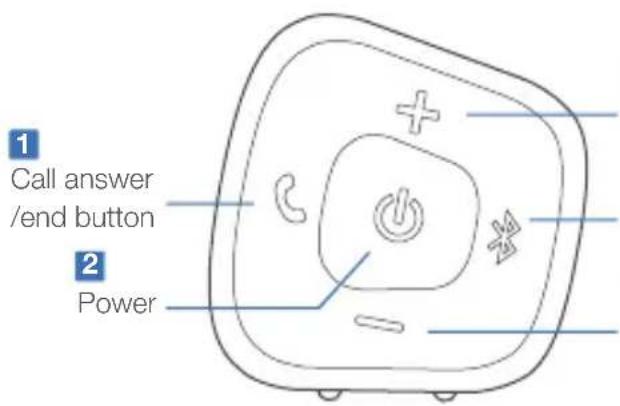
3
Volume up
4
Bluetooth® pairing button
5
Volume down
1
Anruftaste
Touche d'appel
- Open cap on the rear side.
- Connect the USB cable to the speaker and USB power adapter* via an AC outlet.
NOTE
After purchase, charge this unit before use. *USB power adapter not included. Rating of adapter should be DC 5 V, and between 2.1 A and 2.4 A. Must be used with country specific approved adapter.
natural_image
Diagram showing a device connected to an electrical outlet with a magnified inset highlighting the device's internal structure (no text or symbols present)Connect
- Power on.
- Activate Bluetooth settings on your mobile device. Select "Denon Envaya."
- After you hear a 3 note tone, the indicator light stops blinking and turns solid, you are connected.
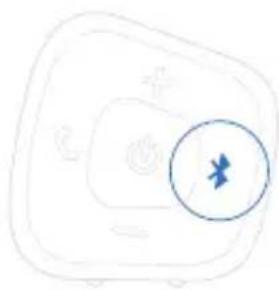
- To connect an additional device, press the "Bluetooth button", and activate Bluetooth settings on your mobile device.
natural_image
Simple line drawing of a computer monitor with a blue circle containing a starburst symbol (no text or labels)Talk + Siri Play\*
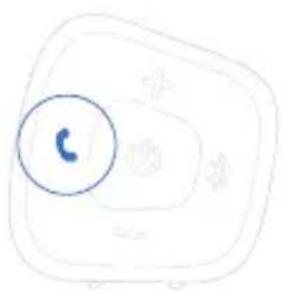
- To answer and end calls, tap the "call answer/end button".**
- To activate Siri Play, confirm that your iPhone is paired. Press and hold the "call answer/end button" for 3 or more seconds.
- Siri is automatically activated and your speaker will answer your voice commands.
NOTE
*For iPhone only.
**Not all mobile phones and apps support hands-free phone calling.
natural_image
Simple line drawing of a computer mouse with a blue circle highlighting the mouse (no text or symbols)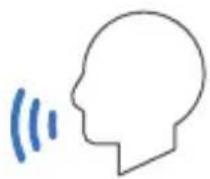
Envaya Link
- Once your mobile device is paired with the master speaker, power on the second speaker.
- Press and hold the "Bluetooth pairing button" on the master speaker and slave speaker simultaneously for 6 or more seconds.
- Once you hear a beep, the pairing of the two speakers is complete.
NOTE
*Stereo pairing allows A2DP audio to be forwarded between your device so that the audio is played in sync on both devices.
DENON®
www.denon.com
Online Manual: http://manuals.denon.com/DSB50_150_250BT/ALL/EN
iPhone and Siri are trademarks of Apple Inc., registered in the U.S. and other countries.
Printed in Vietnam 5411 11562 10AD
Copyright © 2017 D&M Holdings Inc. All Rights Reserved.

- DENON®
- envaya
- Owner's Manual
- Contents Preparation Connections Operation Troubleshooting Appendix
- Appendix
- Introduction
- Unpacking
- Overview
- Sound Quality
- Design
- Operation
- Features and functions
- Attaching the Strap
- NOTE
- Charging
- ■ Charging the speaker
- ■ Battery indicator
- When connected to the USB to AC power adapter (charging)
- When running on battery power
- Turning the power on
- Turning the power off
- Bluetooth operation
- Pairing
- Connecting
- 1: Connecting for the first time
- Turn on Bluetooth on your mobile device.
- Press and hold ⏻ until a notification sound is heard.
- Press the Ⓧ button.
- Contents Preparation
- Operation Troubleshooting Appendix
- Select "Denon Envaya xxx" 1 from the list of devices displayed on the screen of your Bluetooth device.
- Listening to music.
- 2: Reconnecting paired devices
- Select "Denon Envaya xxx" 1 from the list of devices displayed on the screen of your Bluetooth device.
- Listening to music.
- Simultaneously connecting multiple Bluetooth devices (Multipoint function)
- ■ Switching playback devices
- ■ Disconnecting the bluetooth connection
- Envaya Link (DSB50BT)
- Envaya Link (DSB150BT/DSB250BT)
- Adjusting the volume
- While playing music, press the + button to increase the volume. Press the - button to decrease the volume.
- Listening to music using a wired connection
- Voice Control Using Siri
- Press and hold the 📊 button.
- Speak into the Envaya microphone.
- Conducting hands-free phone calls using Envaya
- ■ Answering an incoming call
- ■ Ending a call
- ■ Canceling an incoming call
- Tips
- Troubleshooting
- I want to answer incoming calls to my mobile phone on Envaya
- Connecting multiple Bluetooth devices and switching easily between them
- Check all connections.
- Speaker does not turn on
- Speaker does not turn on. (AC power)
- Speaker does not turn on. (Battery power)
- Envaya cannot be charged
- Envaya cannot be charged.
- No sound from the speaker
- No sound from the speaker.
- Sound is distorted, noisy, or cuts in and out
- Sound is distorted, noisy, or cuts in and out.
- Cannot pair a Bluetooth device with the speaker
- Cannot pair a Bluetooth device with the speaker.
- Speaker is turning off automatically
- Speaker is turning off automatically.
- The power turns off quickly.
- Speaker is malfunctioning
- Speaker is malfunctioning.
- Cannot conduct a call
- Restarting the Envaya
- Playing back a Bluetooth device
- ■ About Bluetooth Communications
- Precautions for Dust Resistance and Water Resistance
- Trademark information
- Bluetooth®
- Qualcomm * aptX - low latency
- Specifications
- DSB50BT
- ■ Speaker section
- Bluetooth section
- General
- DSB150BT
- DSB250BT
- Contents Preparation Connections Operation Troubleshooting
- Index
- A
- C
- F
- H
- M
- P
- R
- S
- U
- V
- W
- Get to Know
- 1
- Connect
- Talk + Siri Play\*
- Envaya Link
Brand : DENON
Model : Envaya DSB250
Category : Pregnant