
Stream BT - Loudspeaker Tracer - Free user manual and instructions
Find the device manual for free Stream BT Tracer in PDF.


| Product Type | Portable Bluetooth Speaker |
| Brand | Tracer |
| Model | Stream BT |
| Speaker Driver | 40 mm, 4 Ω, 3 W |
| Frequency Range | 150 Hz - 18 kHz |
| Signal-to-Noise Ratio | >80 dB |
| Total Harmonic Distortion | <0.5% |
| Battery Type | Built-in Li-ion, 3.7 V, 200 mAh |
| Charging Voltage | DC 5 V via USB |
| Charging Time | Approximately 3 hours |
| Connectivity | Bluetooth, 3.5 mm auxiliary input, TF card slot, mini USB (charging only) |
| Supported Audio Sources | Bluetooth devices, MP3 files from TF card, external audio players via 3.5 mm jack, FM radio |
| Controls | Power/Mode switch (BT/OFF/MP3), Volume +/-, Next/Previous track, Play/Pause, FM station programming |
| Microphone | Built-in for hands-free calls |
| FM Radio | Yes, with auto-scan and presets |
| Additional Features | TF card playback, MP3 format support, FM radio with programmable stations |
| Safety and Maintenance | Keep away from children, fire, water, extreme temperatures. Do not block speaker nets or disassemble. |
Frequently Asked Questions - Stream BT Tracer
User questions about Stream BT Tracer
0 question about this device. Answer the ones you know or ask your own.
Ask a new question about this device
Download the instructions for your Loudspeaker in PDF format for free! Find your manual Stream BT - Tracer and take your electronic device back in hand. On this page are published all the documents necessary for the use of your device. Stream BT by Tracer.
USER MANUAL Stream BT Tracer
EN Speaker BT Urban Style User's manual
natural_image
Abstract geometric shape composed of three horizontal gray bars on white background (no text or symbols)PL
Głośnik Tracer BT Urban Style
Instrukcja obsługi
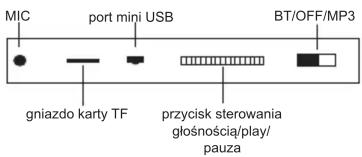
INFORMACJE DODATKOWE:
- Volume control
- Briefly press (+) to play the next track or change the radio station
- Press and hold (+) to increase volume
- Briefly press (-) to play the previous track or change the radio station
- Use the key to switch between BT/MP3
- Press and hold ▶II to program FM stations (power cord serves as an antenna)
- Press and hold ▶II switch set in MP3 position to switch to FM or Audio mode
- FM playback
BASIC
- Playing songs in MP# format which saved in TF card.
- Support PC/iPod/iPhone/MP3/MP4/other mobile phones by connecting with 3.5 mm jack.
- Bluetooth play
TROUBLE SHOOTING
- Failed to read TF card, formatting TF card or change the format of song to MP3.
- No audio input when connecting with other devices, press ▶ button to switch it or shut down to reboot it.
SPECIFICATION
• Built-in Li-on battery, 3,7V/200mAh
• USB charging voltage: DC 5 V
- Speaker: 440mm, 4 Ω, 3W
• Frequency range: 150Hz-18KHz
- S/N: >80dB
- Distortion ≤ 0,5%
- Battery charge time: 3 hours
CAUTIONS
- Keep out of reach of children.
- Never knock the speaker.
- Keep it away from fire, water, high and low temperature.
- Never block speaker nets.
- Never open it by yourself
CZ
Reproduktor Tracer BT Urban Style
Návod k obsluze
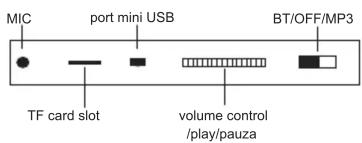
NÁVOD
Brand : Tracer
Model : Stream BT
Category : Loudspeaker