
Osaka 678710006 - Lighting Trio Lighting - Free user manual and instructions
Find the device manual for free Osaka 678710006 Trio Lighting in PDF.


| Product Type | LED Ceiling Light |
| Brand | Trio Lighting |
| Model | Osaka 678710006 |
| Category | Lighting Fixture |
| Light Source | Integrated LED |
| Color Temperature | Cool White and Warm White (adjustable) |
| Brightness Control | Yes, stepless dimming via remote control |
| Remote Control | Yes, included |
| Number of Control Channels | 2 (CH1, CH2) |
| Light Modes | 100% brightness, Cool White, Warm White, Night Light |
| Wall Switch Control | Toggle between modes (100% → Cool → Warm → Night Light) |
| External Dimmer | Do not use |
| Power Supply | AC 220-240V, 50/60Hz |
| Power Consumption | Not specified in manual |
| Dimensions | Not specified in manual |
| Weight | Not specified in manual |
| Ingress Protection | IP20 (suitable for indoor use) |
| Safety Compliance | EU Directive 2014/53/EU |
| Installation | Hardwired to mains (professional installation recommended) |
| Usage | Indoor only |
Frequently Asked Questions - Osaka 678710006 Trio Lighting
User questions about Osaka 678710006 Trio Lighting
0 question about this device. Answer the ones you know or ask your own.
Ask a new question about this device
Download the instructions for your Lighting in PDF format for free! Find your manual Osaka 678710006 - Trio Lighting and take your electronic device back in hand. On this page are published all the documents necessary for the use of your device. Osaka 678710006 by Trio Lighting.
USER MANUAL Osaka 678710006 Trio Lighting
DECLARATION OF CONFORMITY
Hereby, Trio Leuchten GmbH, Dieselstr.4, D-59823 Arnsberg, declares that this product is in compliance with Directive 2014/53/EU.
The full text of the EU declaration of conformity is available at the following internet address: www.trio-leuchten.de
The light should not be operated on an external dimmer.
Functional description without remote control
If the luminaire is switched on via the wall switch, the following base setting is specified--> 100% brightness. All previous settings will be reset. By switching the wall switch in short intervals you can change between the following scenarios:
• 100% brightness * cool white * warm white* Night light
Commissioning the remote control
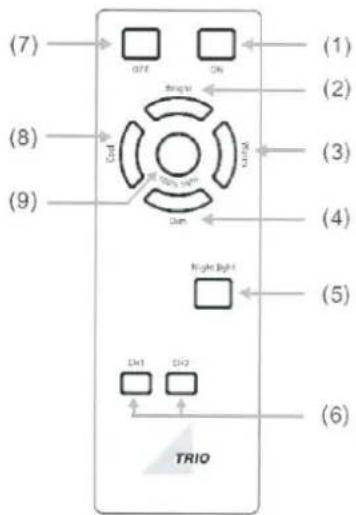
Matching code: Press the button CH1 or CH2 more than 3 seconds (don't loosen) and switch the luminaire via the wall switch on. The luminaire will confirm the successful coding with two flashes. So the luminaire may be controlled by the remote control system.
These button enable us to control simultaneously more than one group of luminaries with one remote. By pressing the CH1, only those luminaries which have been coded with the CH1 button will be activated. In the same way, only those luminaries will be controlled with the CH2 which are coded by the CH2 button.
Attention! A lighting scenario chosen by remote control, will be reseted if the luminaire is switched off by the wall switch.
Resetting the remote control
Switch off the luminaire via the wall switch. Press the OFF button more than 3 seconds (don't loosen) and switch on the luminaire by wall switch. The luminaire will confirm the successful reset with two flashes.
Attention! Now the luminaire cannot be controlled by the remote control.
For reprogramming please wait approx. 10 seconds and follow the steps „Commissioning the remote control.”
Operation of remote control:
Button 1: ON Button 7: OFF
Button 2 / 4:
Brightness +/- : Pressing the button for a short period, the brightness would be increased/ decreased in individual steps, pressing the button permanently results in the maximum or minimum brightness being reached.
Button 3 / 8:
Color temperature* Cool: Cool white Warm: Warm white
Pressing the button for a short period, the color temperature would be increased / decreased in individual steps, pressing the button permanently maximum color temperature is reached.
Button 5: Night light: Press button to switch on the night light.
Button 9: 100 % light
Brand : Trio Lighting
Model : Osaka 678710006
Category : Lighting