
GLS-LCCT - Home Automation Crestron - Free user manual and instructions
Find the device manual for free GLS-LCCT Crestron in PDF.


| Product Type | Occupancy Sensor |
| Model | GLS-LCCT |
| Brand | Crestron |
| Category | Home Automation |
| Dimensions | 4.5 x 4.5 x 1.5 inches (114 x 114 x 38 mm) |
| Weight | 0.5 lbs (227 g) |
| Power Supply | 24 VDC, low voltage (powered by Crestron control system) |
| Sensing Technology | Passive Infrared (PIR) with ultrasonic |
| Detection Range | Up to 30 ft (9.1 m) radius at 360° |
| Output | Relay dry contact, low voltage |
| Communication | Wired to Crestron control system |
| Mounting | Ceiling mount (junction box) |
| Operating Temperature | 32°F to 104°F (0°C to 40°C) |
| Operating Humidity | 5% to 95% non-condensing |
| Certifications | UL, CE, FCC |
| Primary Functions | Occupancy detection, vacancy detection, daylight harvesting |
| Maintenance | Clean with dry soft cloth; no liquids or solvents |
| Safety | Install by qualified professional; disconnect power before servicing |
| Spare Parts | Contact Crestron for replacement; no user-serviceable parts |
| Reparability | Not user-repairable; return to manufacturer |
| General Information | Part of Crestron GLS series; integrates with Crestron control systems |
Frequently Asked Questions - GLS-LCCT Crestron
User questions about GLS-LCCT Crestron
0 question about this device. Answer the ones you know or ask your own.
Ask a new question about this device
Download the instructions for your Home Automation in PDF format for free! Find your manual GLS-LCCT - Crestron and take your electronic device back in hand. On this page are published all the documents necessary for the use of your device. GLS-LCCT by Crestron.
USER MANUAL GLS-LCCT Crestron
The GLS-LCCT SolarSync™ Photosensor measures the correlated color temperature (CCT) and luminosity (lux) of outdoor, natural sunlight. Measurements from the sensor are relayed to the Crestror® control system, which adjusts indoor lighting to match outdoor lighting conditions.
Additional Resources
Visit the product page on the Crestron website (www.crestron.com) for additional information and the latest firmware updates. Use a QR reader application on your mobile device to scan the QR image.
Installation
The GLS-LCCT is designed to be mounted outdoors (on a roof) or indoors (beneath a skylight). When determining the mounting location, provide the GLS-LCCT with an unobstructed view of the sky. Use a 1/2 inch knockout (0.885 inch (22.5 mm) actual hole size) when mounting.
WARNING: To avoid personal injury and equipment damage, consider the following when mounting the GLS-LCCT outdoors:
- Secure the GLS-LCCT to an IP67 or better J-box to ensure that the enclosure remains waterproof.
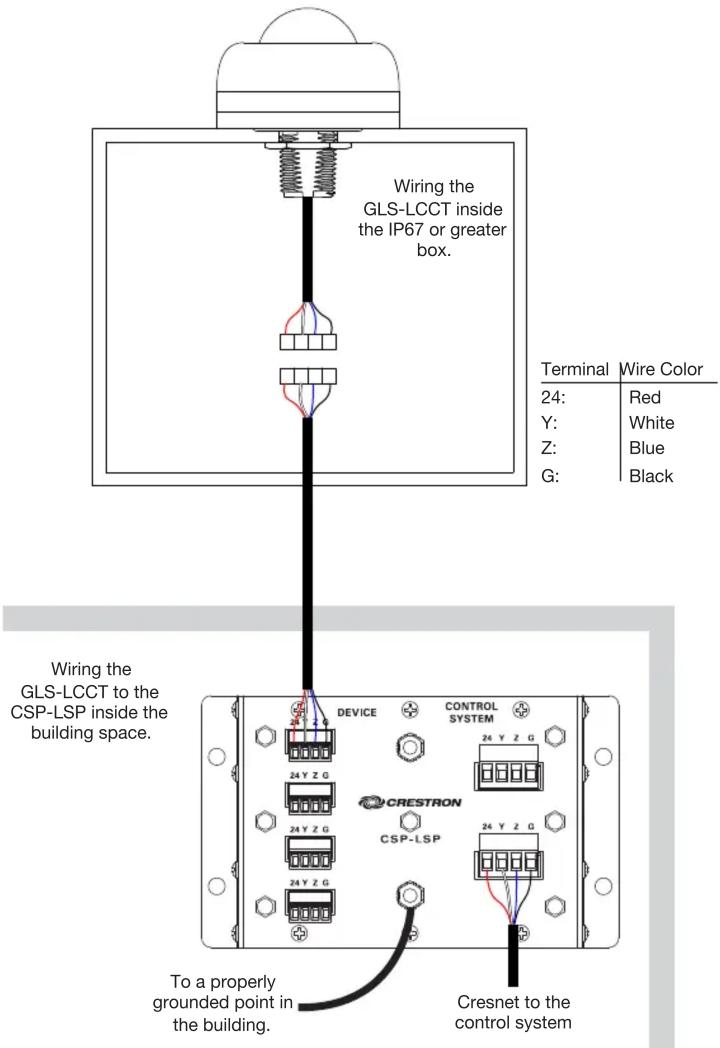
- Use a CSP-LSP Lighting Strike Protector to prevent personal injury during a lighting strike or damage to the control system and other devices on the Cresnet® network.
- Mount the CSP-LSP inside the building at the point where the Cresnet network cable enters the building. The CSP-LSP must be properly grounded.
- For installation, wiring, and operation of the CSP-LSP, refer to the CSP-LSP Installation and Operation Guide (see www.crestron.com/manuals).
Install the GLS-LCCT:
- Disconnect power to the system.
- Seat the o-ring in the groove on the bottom of the sensor.
- Thread the wire pigtail and the threaded nipple through the knockout. Ensure that the sensor sits flush with the J-box.
- Secure the sensor to the J-box using a 1/2-14 NPT locknut. Tighten the locknut to ensure a proper seal with the J-box.
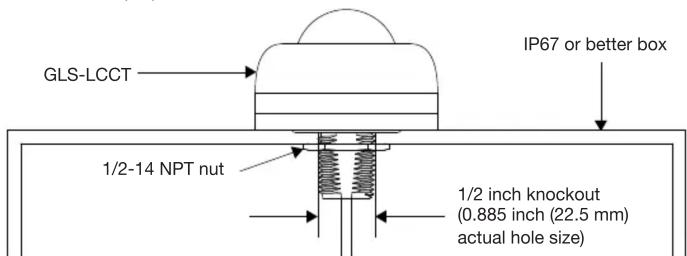
- Make the Cresnet network connections inside the box using the provided connectors.
- Reconnect power to the system.
Wiring Diagram - Indoor Mounting Location
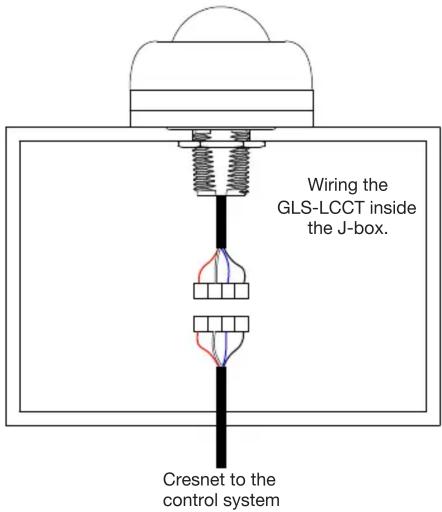
| Terminal | Wire Color |
| 24: | Red |
| Y: | White |
| Z: | Blue |
| G: | Black |
Wiring Diagram - Outdoor Mounting Location
Operation
Set up the GLS-LCCT using Crestron Toolbox™ software. The GLS-LCCT has a bi-color (red/green) LED that is located inside the dome of the device. The LED flashes to identify the device during setup.
NOTE: Before using the GLS-LCCT, ensure the device is using the latest firmware. Check for the latest firmware for the GLS-LCCT at www.crestron.com/firmware. Load the firmware onto the GLS-LCCT using Crestron Toolbox™ software.
Specifications
| SPECIFICATION DETAILS | |
| PowerPower Consumption 70 mW typical; | 5 W (208 mA @ 24 VDC) maximum when self-heating |
| Light SensingSensor Technology | XYZ chromatic white color sensor; measures color temperature and luminosity consistent with the CIE 1931 2° Standard Observer color coordinates |
| Correlated Color Temperature | 2,000K to 25,000K* |
| Light Sensitivity | 0 to 100,000 lux (0 to 9,290 foot-candles) |
| Field of View | 360° semispherical |
| EnvironmentalTemperatureHumidityIngress Protection | -4° to 185 °F (-20° to 85 °C)10% to 90% RH (non-condensing)IP67 rated per IEC/EN 60529, dust tight and waterproof |
| Heat Dissipation | 17 Btu/h maximum |
* The sensor is factory calibrated to achieve highly accurate correlated color temperature (CCT) measurements from 2,700K to 5,700K. Values outside this range may vary by a few hundred K or more.
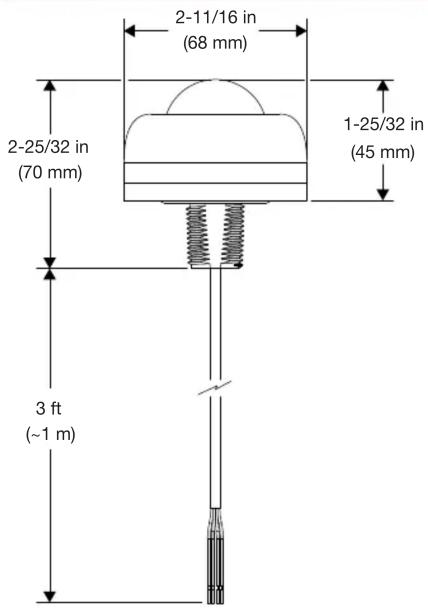
Dimensions
As of the date of manufacture, the product has been tested and found to comply with specifications for CE marking.
CE
The product warranty can be found at www.crestron.com/warranty.
The specific patents that cover Crestron products are listed at www.crestron.com/legal/patents.
Certain Crestron products contain open source software. For specific information, please visit www.crestron.com/opensource.
Crestron, the Crestron logo, Crestron Toolbox, Cresnet, and SolarSync are either trademarks or registered trademarks of Crestron Electronics, Inc. in the United States and/or other countries. Other
trademarks, registered trademarks, and trade names may be used in this document to refer to either the entities claiming the marks and names or their products. Crestron disclaims any proprietary interest in the marks and names of others. Crestron is not responsible for errors in typography or photography.
This document was written by the Technical Publications department at Crestron.
©2018 Crestron Electronics, Inc.
Crestron Electronics, Inc. Installation Guide - DOC. 8320A
15 Volvo Drive, Rockleigh, NJ 07647 (2051515)
Tel: 888.CRESTRON 06.18
Fax: 201.767.7576 Specifications subject to
www.crestron.com change without notice.


Brand : Crestron
Model : GLS-LCCT
Category : Home Automation