
CBORIGIN - Headphones T'nB - Free user manual and instructions
Find the device manual for free CBORIGIN T'nB in PDF.


| Product type | Bluetooth wireless audio headset |
| Model | CBORIGIN |
| Brand | T'nB |
| Bluetooth version | 5.3 |
| Frequency response | 20 Hz – 20 kHz |
| Impedance | 32 Ω |
| Sensitivity | 100 dB ± 3 dB |
| Power supply | 5V ⎓ 0.5A (USB-C port) |
| Built-in battery | Lithium-ion polymer 3.7V, 300mAh |
| Approximate weight | Approximately 200 g |
| Connectivity | 3.5mm jack, USB-C port |
| Main functions | Play/pause, volume, track change, call management, automatic pairing |
| Box contents | Headset, USB-C cable, 3.5mm audio cable |
| Operating temperature | 0°C to 35°C |
| Maintenance | Clean with a soft, dry cloth. Do not use abrasive products. |
| Safety | Do not disassemble, do not expose to moisture, do not use at high volume for extended periods |
| Warranty | Standard manufacturer warranty |
| Support | Contact: info@t-nb.com, website: www.t-nb.com |
Frequently Asked Questions - CBORIGIN T'nB
User questions about CBORIGIN T'nB
0 question about this device. Answer the ones you know or ask your own.
Ask a new question about this device
Download the instructions for your Headphones in PDF format for free! Find your manual CBORIGIN - T'nB and take your electronic device back in hand. On this page are published all the documents necessary for the use of your device. CBORIGIN by T'nB.
USER MANUAL CBORIGIN T'nB
Bluetooth® headphone

natural_image
Modern black and gold headband with silver bezel (no text or symbols visible)Instructions
natural_image
Close-up of a modern blue and white headband with gold and silver filter bands (no text or symbols visible)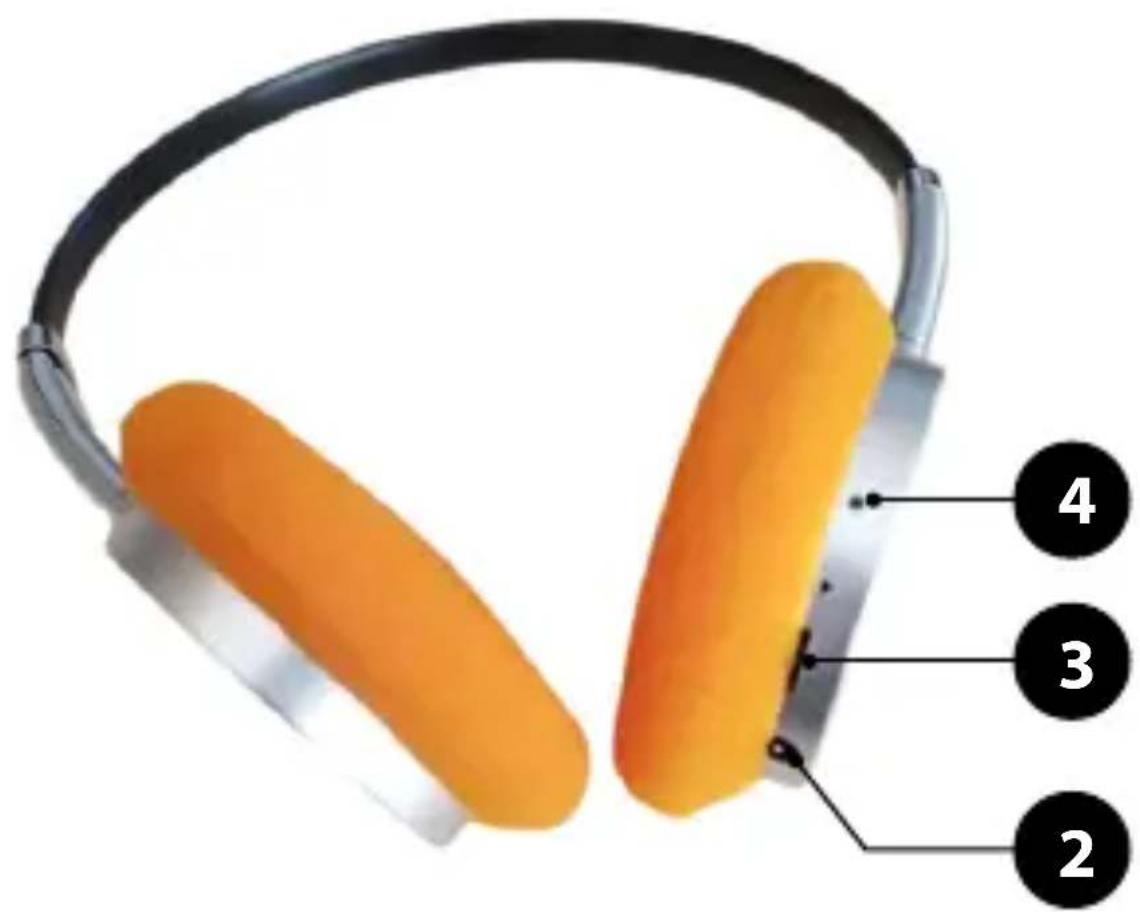
Congratulations on your purchase and thank you for the trust you have placed in T'nB. Our products comply with the all relevant regulations and standards. Before using this equipment, we recommend that you read the instructions and safety instructions carefully and keep this manual for future reference.
IMPORTANT SAFETY INSTRUCTIONS
- No guarantee will apply in case of misuse.
- T'nB accepts no liability if the safety instructions are not respected.
- Handle the device with care.
- The power supply of your device must match the initially specified characteristics
- The socket of the electrical equipment must be located near the said equipment and easy to get to.
- Keep the device away from flammable objects, explosive substances or dangerous objects.
- Use and store your device in an environment where the temperature is between 0°C and 35°C.
- Store your device out of the reach of children.
- This device is not designed to be used by persons (including children) whose physical, sensory or mental capacities are reduced, or persons without experience or knowledge, except if they are supervised or receive prior instruction on using the device by a person in charge of their safety.
- Do not disassemble your device and do not attempt to repair or modify it yourself.
- Stop using your device if it has been hit or damaged.
- To avoid the risk of electric shock, disconnect your device from the mains and from any other device before cleaning it or when not in use.
- Only use the supplied accessories and connectors. The use of any other type of accessory not intended for this purpose may irremediably damage your device.
- Make sure the appliance is switched off and cold before cleaning. Do not use any product or lubricant which may damage the appliance.
- T'nB accepts no liability for damage caused by misuse of the product or by use with an incompatible electrical device.
- Unless otherwise stated, never use your device in rain, in damp places or near a water source.
- Unless otherwise stated, this product is for indoor use only.
- Keep the original product-related documentation for future reference.
- Switch off the helmet/earphones after use and tidy it/them away in a suitable place to avoid damage, scratches and warping.
- Do not set the volume to a high level before switching on the product. Slowly increase the volume to avoid damaged cause by a high volume.
- Do not use the helmet/earphones in a dangerous place or in a location where you cannot hear outdoor sounds.
- Do not leave wireless products near credit cards or other data storage devices.
- Avoid using your wireless devices near sources of interference, such as power supply cables, microwave ovens, fluorescent lamps, wireless video cameras and wireless domestic telephones.
- To improve the quality and the strength of the wireless signal, reduce the number of devices operating on the same wireless frequency.
- Do not leave the device on charge unattended. In the event of a short circuit or mechanical damage to the internal lithium battery, there is a risk of overheating or fire.
- WARNING: risk of explosion if the battery is replaced with an inappropriate model. Recycle used batteries in accordance with current regulations.
- Please fully charge before using the first time
- Do not short-circuit a cell or battery. Do not store cells or batteries haphazardly in a box or drawer where they may short-circuit each other or be short-circuited by other metal objects.
- In case of cell leakage, ensure that the liquid does not come into contact with the skin or eyes. If it does, wash the affected area with plenty of water and seek medical advice.
- Keep cells and batteries clean and dry.
- It is necessary to charge the batteries before use. Always use the appropriate charger and refer to the manufacturer's instructions or the device's manual for correct charging instructions.
- After long storage periods, it may be necessary to charge and discharge the batteries several times to achieve maximum performance.
- Use the product or battery only for the application for which it was intended.
- If a cell or battery is ingested, seek medical advice immediately.
- Remove the protective plastics from the earbuds if applicable and fully charge the product before the first use.
- In case of earbuds charging issues, clean the small metallic sensors on the earbuds and the charging case thoroughly using an alcohol wipe.
DESCRIPTION:
- Multifunction button
2.3.5mm jack port - USB-C charging port
- LED indicator
CHARGING YOUR HEADSET
To charge your headset, use the supplied USB-C cable. Connect the cable to the headset via the USB-C port (3), then connect the other end to a USB port: computer, USB charger, etc. The LED indicator (4) lights up red while charging. Once charging is complete, the red light turns off. When the headset is charging, it cannot be used in Bluetooth mode, only in wired mode.
PAIRING
- Ensure your phone or Bluetooth device is turned on.
- Turn on the headset by pressing the multifunction button (1) for 3 seconds. You will hear a beep when it automatically switches to «Pairing» mode. A blue and red light (4) will flash rapidly in alternation.
- Activate the Bluetooth function on your device, then select «TNB ORIGIN.» You will then hear a beep confirming the Bluetooth connection.
- Once the connection is established, the blue light (4) flashes three times successively every 5 seconds.
Once the headset has been connected, it will automatically pair with your device each time you turn it on.
To turn off your headset, press the multifunction button (1) for 3 seconds. The indicator light will turn off. You will then hear a tone confirming the shutdown.
WIRED MODE
When you plug an audio jack cable into the headset (2), it automatically turns off and switches to wired mode. The headset's battery is not used in this mode.
FUNCTIONS
- Play/Pause: Press the multifunction button (1) once to stop the music. Press it again to resume playback.
• Volume adjustment: Press the multifunction button (1) up to increase the volume / down to decrease it. - Track change: Hold the multifunction button (1) up to skip to the next track / down to return to the previous track.
-
Answer/End a call: When you receive a call, the music stops automatically. Press the multifunction button (1) once to answer, and press it again to hang up. Once the call ends, your music resumes automatically.
-
Reject a call: Press and hold the multifunction button (1).
- Redial last number: Press the multifunction button (1) twice in succession to redial the last incoming or outgoing call. This feature also works while listening to music.
SPECIFICATIONS:
- Bluetooth: 5.3
• Maximum range: 10 m
• Frequency range: 20 Hz – 20 KHz - Impedance: 32 Ω
• Headset sensitivity: 100 dB ± 3 dB - Input: 5V=0.5A
• Built-in battery: Lithium-ion polymer 3.7V—300 mAh - Charging: USB-C / USB-A cable included
Minimum power required by the radio equipment to charge : 0.1 W Maximum power required by the radio equipment to achieve maximum charging speed : 1.3 W
NEED HELP?
Concerned about the satisfaction of our customers, you can contact us at info@t-nb.com. Maintenance, troubleshooting, miscellaneous information about this product, please visit our website: www.t-nb.com
 | Direct currentTo indicate on the rating plate that the equipment is suitable for direct current only; to identify relevant terminals. |
 | Prolonged listening at full volume can damage the user's ear. |


Brand : T'nB
Model : CBORIGIN
Category : Headphones