
WPF-52 - Humidifier Wood's - Free user manual and instructions
Find the device manual for free WPF-52 Wood's in PDF.
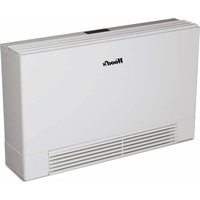


| Product type | Dehumidifier (indicated category: Humidifier) |
| Brand | Wood's |
| Model | WPF-52 |
| Dimensions (L x W x H) | 1008 x 231 x 605 mm |
| Weight | 47 kg |
| Power supply | 220-240 V, 50 Hz, mandatory grounding |
| Power (35 °C, 70 % RH) | 0.97 kW |
| Dehumidification capacity (20 °C, 60 % RH) | 20 l/day |
| Dehumidification capacity (30 °C, 80 % RH) | 52 l/day |
| Maximum efficiency area | 380 m² |
| Airflow | 600 m³/h |
| Sound level | 49 dB |
| Operating temperature range | +5 °C to +35 °C |
| Relative humidity range | 45 % to 99 % |
| Hygrostat adjustment | 30 % to 80 % (continuous possible) |
| Refrigerant | R410A (freon-free) |
| Tank volume | Not applicable (continuous drainage) |
| Main functions | Dehumidification, automatic defrost, timer, continuous mode, optional heating, optional water pump |
| Maintenance and cleaning | Clean the air filter (washable), the grille, and the coils; disconnect before cleaning |
| Safety | IPX2, automatic shutoff when tank full, error alarms (code displayed) |
| Installation | Wall-mounted or on feet; at least 1 m free space around the appliance |
| Warranty | 2 years (manufacturing defect, upon presentation of the receipt) |
Frequently Asked Questions - WPF-52 Wood's
User questions about WPF-52 Wood's
0 question about this device. Answer the ones you know or ask your own.
Ask a new question about this device
Download the instructions for your Humidifier in PDF format for free! Find your manual WPF-52 - Wood's and take your electronic device back in hand. On this page are published all the documents necessary for the use of your device. WPF-52 by Wood's.
USER MANUAL WPF-52 Wood's
GB Operating Instructions
| WPF52 WPF100 | ||
| Max. working area 380 m | 2 (24m 2 swimming pool surface) 700 m | 2 (50m 2 swimming pool surface) |
| Air flow 600 m | 3 /hour 850 m | 3 /hour |
| Dehumidifying at 20°C and 60% r.h. 20 l/day 32 l/day | ||
| Dehumidifying at 30°C and 80% r.h. | 52 l/day | 80 l/day |
| Power at 35°C and 70% r.h. 0.97 kW 1.61 kW | ||
| Tank volume N/A N/A | ||
| Cooling medium, freon-free R410A R410A | ||
| Dimensions in mm., L x B x H 1008 x 231 x 605 | 1218 x 248 x 737 | |
| Weight | 47 kg | 72 kg |
| Noise level in decibels | 49 dB | 49 dB |
TROUBLE SHOOTING
| PROBLEM | SOLUTION |
| Dehumidifier does not start | - Check that the unit is connected to electricity and that no fuse has blown.- Check that the hygrostat is working. The dehumidifier should start when the hygrostat is in maximum position. |
| Does not dehumidify | - Check that the fan is spinning- Check that air can flow freely through the dehumidifier. Front grid and air filter should be clean.- Listen for sound of compression, but bear in mind that the dehumidifier may be in a dehumidifying cycle, when the compression stops.Wait initially for about 35 minutes.- Check that a thick coating of ice has not formed on the cooling coils. |
| High noise level | - Increase distance between dehumidifier and surrounding surfaces.- Cooling coils may be in contact with one another and cause vibration. Disconnect dehumidifier from electricity and separate coils. |
| Ice formation on cooling coils | - Remove air filter and check that no dust or fluff is obstructing passage of air through the machine.- Timer which controls defrosting may be broken, in which case compression will not stop regularly. |
| No water is drained from the machine | - Check for obstruction to the drip-tray.- Unit under alarm.- When the red light is lit, the unit stops. |
| “FULL” Tank is full | - Empty the tank (note: only for models equipped with a water tank). |
| “Lo t” Environment temperature too low . Defrost cycle is not able to melt the ice in the battery | - Set the dehumidifier above 10 °C- Switch the dehumidifier off and unplug it |
| “LoPt” Possible lack of gas in the circuit. | - The alarm automatically resets after 210 sec. If the alarm doesn’t reset, press SET HOURS+ for 10 seconds. If the problem occurs again, call for service. |
| “Hi t” Combination of temperature and humidity is too high. | - The alarm resets automatically when the temperature drops. |
| “Prob” | - Malfunction humidistat. In any case, the machine continues to operate. Contact service to replace humidistat. |
| “Pro1” “Pro2” “Pro 3” | - Malfunction of one of the three temperature probes. The dehumidifier goes into stand-by mode. Contact service to replace the probes. |
| “PunP” | - The internal alarm of the pump is ON (for machines with pump). The alarm resets when the pump switch is closed. |
| If none of the above works, you should contact your nearest retailer for checking and possible overhaul of the dehumidifier | |
WOOD'S, THE WORLD'S LEADING DEHUMIDIFIERS
Wood's dehumidifier products have been known as market leaders for many years. They are suitable for use in the most demanding climates, where dehumidifying capacity needs to be good even at lower temperatures and humidity levels. They are used with good results in premises that become damp such as cellars, garages or summer-houses. They are also excellent for drying washing, attics, pool rooms and laundry, being efficient and low on energy consumption. Wood's dehumidifiers will also dry your clothes effectively without wearing them out.
The amount of humidity that the dehumidifier removes depends on temperature, humidity level and placement. External weather conditions may also affect the performance of the dehumidifier. In cold weather the relative humidity decreases and thus the extraction of humidity from the air by the dehumidifier is reduced. Therefore the dehumidifier is suitable for use in the temperature range +5°C to +35°C. Wood's dehumidifiers are safe in operation and intended for continuous use over many years.

NOTE: For use in swimming pool rooms, keep distances from water in accordance with safety norms (machine is IPX2).
EXCESSIVE AIR HUMIDITY - A DANGER
Condensation occurs when water vapour in the air comes into contact with a cold roof, window or wall. When water vapour is cooled down, condensation occurs, and water-drops are formed. In high air humidity, the air may get musty and mould is formed, causing damage to a house and its furnishings. This environment may even cause illness for the residents, since mites and other creatures thrive in a damp environment. A dehumidifier with high performance creates a good, healthy humidity level, and for greatest efficiency the doors and windows of rooms that are being dehumidified should be kept closed. A dehumidifier may be used in cellars, washrooms, garages, crawl spaces, caravans, summer-houses and on boats It also removes odours, dries wood and removes moisture from sportswear outdoors equipment. If the dehumidifier is kept in colder environments, you should study the Hints at the end of the manual.
PLACEMENT OF DEHUMIDIFIER
Wood's dehumidifiers are easy to move around, all you need to have is a power source for 220/240V, but bear in mind the following:
- The dehumidifier should not be placed near radiators or other heat sources or exposed to direct sunlight, as it will reduce performance.
- It is beneficial to use a radiator or heating fan to keep the temperature above +5°C.
- It is ideal is to put it in the centre of the room / area.
- Locate the dehumidifier so that the air flow isn't blocked.
- Ensure access for servicing/maintenance
- Make sure that the wall is able to support the operating weight of the dehumidifier.
WALL MOUNTING:
To mount the unit to the wall, use the two holes on the back of the dehumidifier. Always make sure that you use the correct screws to support the machine.

NOTE: It must be verified that the electric supply corresponds to the unit's electric nominal data rated on the label on the front of the unit. Ground connection is compulsory.
NOTE: When placed in a shower or bathing area, the dehumidifier should be fixed in place. It is compulsory to check and respect your local bathroom regulations before use.
NOTE: Ensure adequate air volume to the unit by keeping at least 1 m distance from walls on the top side and filter suction side.
USING THE DEHUMIDIFIER:
If the dehumidifier is transported horizontally, oil may have run out of the compressor and into the closed piping system. In such a case, let the dehumidifier stand for a few hours before being used. It is very important that the oil runs back into the compressor, otherwise the dehumidifier may be seriously damaged. After mounting the dehumidifier to the wall correctly, follow these easy steps to start using your dehumidifier.
- Connect the dehumidifier to water drainage. See the section on water drainage.
- Connect the dehumidifier to an earthed power source.
- Set the desired humidity level by means of the hygrostat.
NOTE: Main power supply must be protected with a potential switch. Also, there is a main switch present close to the unit.
NOTE: When the dehumidifier is turned off, you should wait three minutes before restarting it, so that the built-in automatic functions are deactivated.
1. POWER
To activate the dehumidifier, press POWER and the unit will start, depending on the relative humidity. When the dehumidifier reaches set humidity, the unit enters stand-by mode. When the unit is switched off using the POWER button, the display will still show the humidity of the room.
2. SET
You can set the desired humidity between 30% and 80% by using the buttons SET + and -. To enter continuous operating mode; hold the SET button until the message "Cont" appears. To set the desired temperature in heating mode; press HEAT button and then immediately after set the desired temperature using the SET + and -.
3. HOURS
Set the hours of operation by using the buttons SET + and -.

OPTIONAL FEATURES
NOTE: the following features are optional and are not included as standard.
4. PUMP
To activate the water pump operation, make sure that the unit is switched off. At the same time, press SET + and PUMP for 4 seconds. The message "PunP" appears on the display and the Full LED flashes every 10 seconds. Repeat procedure to deactivate. When in pump mode, press and hold the PUMP button to empty the water.
5. HEAT
When the unit is switched on, you can activate the heating function by pressing and holding the HEAT button for 4 seconds. Repeat to disable it.
INDICATION LIGHTS:
Heat LED: When the heating function is activated, the LED pulses every 10 seconds, when the heating element is powered the LED remains lit.
Power LED: The LED is lit when the machine is switched ON.
Alarm LED: The LED is lit when an alarm is turned on and switched off when the alarm is reset.
Run LED: The LED is lit when the compressor is running, and blinks when the dehumidifier is waiting to restart or is in defrost. When the desired humidity has been reached, the LED is switched off.
Full LED: The LED is lit when the water tank is full (note: only for units equipped with a water tank).
Remote LED: The LED is lit when the remote panel is activated.
DRAINAGE OF WATER
The dehumidifier is fitted with a hose connection. By attaching a hose to the
dehumidifier the dehumidified water can be drained away directly.
- Disconnect the dehumidifier from the power outlet.
- Use a 3/4" hose connection
- It should always be avoided to form a double siphon, which could obstruct the water flow and cause flooding.
- Remove the casing in order to insert the pipe.
- Reconnect the dehumidifier to the power source.
THE HYGROSTAT
Wood's dehumidifier is fitted with a built in hygrostat, or humidity controller, which is used to set the desired level of humidity. The hygrostat registers the current level of humidity and ensures that the dehumidifier is turned on and off automatically. For reference on setting the hygrostat, see the chapter on the control panel. When the desired humidity level is reached, the dehumidifier shuts off automatically.
NOTE: The ambient relative humidity is most simply measured with a Wood's meter, and the most suitable is between 40% and 50%.
THE AIR FILTER
The air filter at the bottom of the dehumidifier ensures that the cooling coils are kept free of dust. It is important that the filter is kept clean so that air can flow freely through the dehumidifier. The filter should thus be cleaned when required.
- Loosen the filter by pulling it out gently.
- Wash the filter with warm water and a mild cleansing agent. Alternatively the filter may be vacuum-cleaned.
- Let the filter dry and put it back.
AUTOMATIC DEFROSTING
The unit has an electronic defrost function that will operate exclusively when the dehumidifier needs defrosting. The function shuts down the compressor, which causes the cooling of the coils to stop. The fan continues to draw the air at room temperature through the dehumidifier and thus melts the ice, and the water is drained from the dehumidifier. This defrosting system means that the dehumidifier works at temperatures as low as +5°C.
THE FAN
The fan ensures that air flows through the dehumidifier. Moist air is sucked in from the rear and goes via the cooling coils and the vaporizer to come out dry at the front of the dehumidifier.
Important!
Wood's dehumidifiers must be connected to an earthed power source.
CLEANING AND MAINTENANCE
Wood's dehumidifiers require cleaning to maintain their high dehumidifying capacity.
- The front grid can be vacuum-cleaned or cleaned with a brush.
- The cooling coils are best cleaned with a rag and warm water.
- The air filter may be washed or vacuum-cleaned.
- The fan motor is permanently lubricated and requires no maintenance.
NOTE: Always disconnect the cord before cleaning.
Hints:
- When the dehumidifier is used in extremely damp environments or when the temperature is below +10°C, the dehumidifier may stop working. A large amount of ice builds up on the cooling coil. Turn off the dehumidifier so that the ice will melt away.
- Sometimes it may be useful to use a frost guard or heater fan to make sure that the temperature does not fall below +5°C.
- For maximum dehumidifying power in a room, it is recommended that the air supply from outside and from adjoining rooms is minimized – close doors and ventilators.
- Put the dehumidifier in the centre of the room.
- Increase temp. for faster dehumidification (warm air carries more water.)
- Use a frost guard if temperature is below +5°C.
- Higher dehumidification in Autumn / Summer because outside air is warmer and more humid.
WHEN THE DEHUMIDIFIER REQUIRES SERVICING:
If the dehumidifier requires servicing, you must first contact the retailer. Proof of purchase is required for all guarantee claims.
GUARANTEES
2 years' guarantee against faults in manufacture. Note that the guarantee is valid only on production of a receipt.
MACHINE NORMS 2006/42/EC; SAFETY REGULATIONS FOR LOW VOLTAGE APPLIANCES 2006/95/EC; ELECTROMAGNETIC COMPATIBILITY (EMC) – 2004/108/EC.
This machine complies with EEC directives:
IEC Regulations CEI-EN 60335-2-40, CEI-EN 55014-1, 55014-2.
The machine is built according to RoHS European Norms: 2011/65/EU year 2001 & CEI-EN 50581.
RECOMMENDED LIMITS FOR USE
Temperature range: +5°C to +35°C Relative humidity: 45% to 99%
Recommended humidity level: approx. 50% RH
DISPOSAL OF THE UNIT AT END OF ITS LIFE:
- The unit refrigerant has to be recovered by trained people and sent to proper collecting centre.
- Compressor lubricating oil has to be recovered and sent to proper collecting centre.
- The frame and various components have to be dismantled and subdivided according to their nature.
TECHNICAL DATA
Machine Norms 2006/42/EC; Safety regulations for low voltage appliances 2006/95/EC; Electromagnetic compatibility (EMC) – 2004/108/EC.
OPTIONAL FUNCTIONS

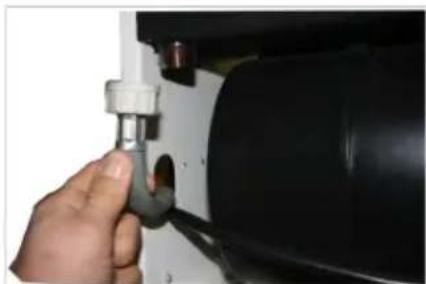
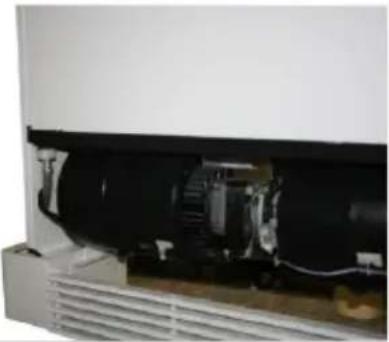
- Remove the housing screws.
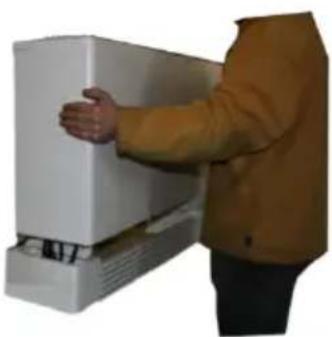
- Remove the housing cover.
AUTOMATIC DEFROSTING
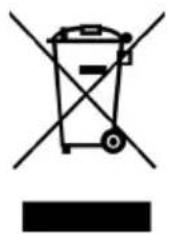
This marking indicates that this product should not be disposed with other household wastes throughout the EU. To prevent possible harm to the environment or human health from uncontrolled waste disposal, recycle it responsibly to promote the sustainable reuse of material resources. To return your used device, please use the return and collection systems or contact the retailer where the product was purchased. They can take this product for environmentally safe recycling.


- WOOD'S, THE WORLD'S LEADING DEHUMIDIFIERS
- EXCESSIVE AIR HUMIDITY - A DANGER
- PLACEMENT OF DEHUMIDIFIER
- WALL MOUNTING
- USING THE DEHUMIDIFIER
- POWER
- SET
- HOURS
- OPTIONAL FEATURES
- PUMP
- HEAT
- INDICATION LIGHTS
- DRAINAGE OF WATER
- THE HYGROSTAT
- THE AIR FILTER
- AUTOMATIC DEFROSTING
- THE FAN
- IMPORTANT
- CLEANING AND MAINTENANCE
- NOTE: ALWAYS DISCONNECT THE CORD BEFORE CLEANING
- HINTS
- WHEN THE DEHUMIDIFIER REQUIRES SERVICING
- GUARANTEES
- THIS MACHINE COMPLIES WITH EEC DIRECTIVES
- RECOMMENDED LIMITS FOR USE
- DISPOSAL OF THE UNIT AT END OF ITS LIFE
- OPTIONAL FUNCTIONS
Brand : Wood's
Model : WPF-52
Category : Humidifier