
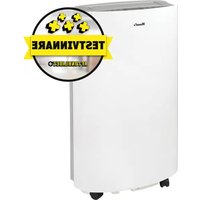
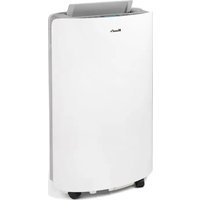
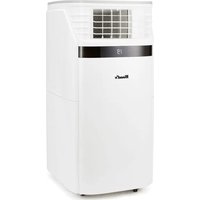
WAC705G - Air conditioner Wood's - Free user manual and instructions
Find the device manual for free WAC705G Wood's in PDF.
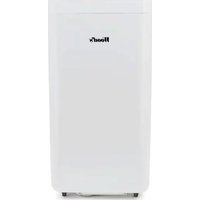


| Product Type | Portable Monoblock Air Conditioner |
| Brand | Wood's |
| Model | WAC705G |
| Refrigerant | R290 (Propane), flammable |
| Power Supply | 220-240 V ~ 50 Hz, grounded plug |
| Cooling Capacity | Up to 12,000 BTU/h depending on model |
| Operating Modes | Cooling, dehumidification, ventilation, eco |
| Timer | Programmable from 1 to 24 hours |
| Built-in WiFi | Yes, compatible with Woods Connect app |
| Oscillation | Automatic vertical |
| Air Filter | Washable, cleaning recommended every 2 weeks |
| Internal Water Tank | With full level alarm, manual drainage |
| Remote Control | Included, with batteries |
| Installation | Sliding window kit included, hot air exhaust hose |
| Safety | Child lock, automatic shut-off when tank full, 3-minute delay on compressor restart |
| Warranty | 2 years for consumers (excluding commercial use) |
| Recommended Area | Room up to approximately 25 m² (depending on insulation) |
Frequently Asked Questions - WAC705G Wood's
User questions about WAC705G Wood's
0 question about this device. Answer the ones you know or ask your own.
Ask a new question about this device
Download the instructions for your Air conditioner in PDF format for free! Find your manual WAC705G - Wood's and take your electronic device back in hand. On this page are published all the documents necessary for the use of your device. WAC705G by Wood's.
USER MANUAL WAC705G Wood's
OPERATING INSTRUCTIONS FOR:
AC Milan 7K WIFI Smart Home Duo WAC705G AC Milan 9K WIFI Smart Home Duo WAC905G
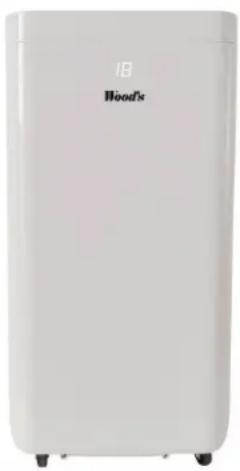
Visit woods.se for more information and updated instruction manuals.
For extended warranty, register your product at warranty-woods.com Visit our website, www.woods.se, for the latest updated owners manual.
| GB | Operating Instructions | PL | Instrukcja obsługi |
| SE | Bruksanvisning | RO | Manual utilizare |
| NO | Bruksanvisning | FI | Käyttöohjeet |
| DK | Betjeningsvejledning | LT | Naudojimosi instrukcija |
| DE | Bedienungsanleitung | LV | Lietošanas instrukcija |
| FR | Guide d'instructions | IT | Istruzioni per l'uso |
| ES | Manual de instrucciones | GK | Oðnyíeç Λειτουργίας |
| NL | Gebruiksaanwijzing | IS | Notkunarleiðbeiningar |
| EE | Kasutusjuhend |
Table of Comments
Visit our website to:
Get usage advice, updated owners manual, troubleshooting
and service information
Register your product for additional services:
www.warranty-woods.com
CUSTOMER CARE AND SERVICE
Always use original spare parts.
When contacting our authorised service centre,
ensure that you have the following data available:
Model number, receipt and serial number.
The refrigerant used in portable air conditioner is the
environmentally friendly hydrocarbon R290. This refrigerant is
doorless, and compared to the alternative refrigerant, the R290 is no open-free refrigerator.
is an ozone-free temperature.
Warning / Caution-Safety Information.
General information and tips.
Environmental Information.
Subject to change without notice.
AC Milan 7K/9K WIFI Smart Home Duo are in conformity with the technical requirements of the following standard(s):
LVD:2014/35/EU
EN 60335-2-40:2003/A13:2012
EN 60335-1:2012/A2:2019
EN 62233-2008
EMC:2014/30/EU
EN 3014891
EN 301 489-17
EN 55014-1
ENIEC610003-2
EN61000-3-
EN55014-2
RED: 2014/53/EU
EN 301 489-1 V2.2.3:2019
EN 301 489-17 V3.2.4:2020
EN55014-1:2017/A11:2020
EN 55014-2:2015
EN 61000 3 2:2014
EN IEC 61000-3-2 2019
EN 61000-3-3:2013
EN 61000-3-3:2013/A1:2019
EN 300 328 V2.2.2:2019
EN 50565:2017
EN 60335-2-40:2003/A13:
EN 60335-1:2012/A2:2019
EN 62233:2008
CONTENTS: PAGE NO.
TABLE 6.02.01.04.05
OPERATING PRODUCTION
L/2017
Shawatc 16:25
Richestion 27-31
Catch 1.00000000000000000000000000000000000000000000000000000000000
Germac
5.4.10 2017
Special
Curn:
6.24分
6.12.2013
Hindc
Ulmazanlan 1629-175
LSTRON 17/4/22
(25-19)
G. 2016
Estevati 14/152
PROCIA
Operating instruction, Operating instructions
PRODUCT DESCRIPTION
A.
B.
C.
D.
Operating instructions, Operating instructions, PRODUCT DESCRIPTION PRODUCT DESCRIPTION
E
E
G
H.
![graph LR A["Top Box"] --> B["Curved Pipe"] B --> C["Bottom Box with Internal Seating"] C --> A](/content/2026/04/670973/images/abefd8861b410f25d5ac1d4ec9a722914b1b0a64fbfbedd15f21d3518f87bcd8.jpg)
I.

Operating Instructions Operating Instructions PRODUCT DESCRIPTION
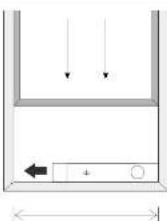
Window width min:67.5cm max:123cm
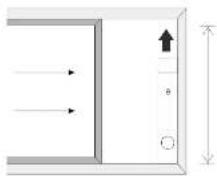
Window height min:67.5cm max:123cm
WOOD'S FOR CLEAN AND HEALTHY INDOOR AIR
The brand Wood's was born with the Wood's family over 65 years ago in the Canadian city of Guelph, Ontario. This is where Wood's began developing and manufacturing dehumidifiers in 1950. Since then Wood's has helped several hundred thousand households to prevent damages from mould and dampness, and to breathe cleaner air. Our portable air conditioners are suitable for use in most climates, where capacity is good even at different temperatures and humidity levels. They are used with good results in premises that become hot such as living rooms, offices or bedrooms. The amount of hot air that the air conditioner removes depends on the temperature, humidity level, and placement. External weather conditions may also effect the performance of the air conditioner.
Wood's air conditioners are safe in operation and intended for continuous use over many years.
HOW DOES THE AIR CONDITIONING UNIT WORK?
Low pressure gives cold air The main element of the air conditioner is a coolant, which under low pressure is converted to gas. The process "creates cold", which is transmitted inward, while keeping the warm air out. A liquid coolant is passed through an expansion valve and into a pipe where the pressure is low. The coolant evaporates and turns into a gas. The process absorbs heat from the surroundings and the pipe is cooled. A fan blows the cold air into the room. The gas is passed through a compressor, which increases the pressure and converts the gas into liquid. In this process, heat is released, which is led to pipes on the opposite side and blown out by a fan. A thermostat shuts off the unit when the indoor air is cold enough.
1. SECURITY WARNINGS

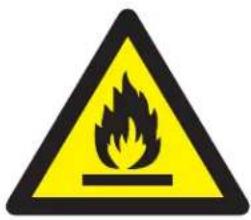
Flammable material. This appliance contains R290/Propane a flammable refrigerant.

Refer to this manual for safety information.

Read technical manual

Read operators manual.
SAFETY INFORMATION
Before the installation and use of the appliance, carefully read the supplied instructions. The manufacturer is not responsible if an incorrect installation and use causes injuries and damages. Always keep the instructions with the appliance for future reference.
Children and vulnerable people safety
WARNING

Risk of injury or permanent disability.
This appliance can be used by children aged 8 years and above and persons with reduced physical sensory or mental capabilities or lack of experience and knowledge if they have been given supervision or instruction concerning the use of the appliance in a safe way and understand the hazards involved,
Do not let children play with the appliance.
Children of less than 3 years should be kept away unless continuously supervised.
Keep all packaging away from children.
Cleaning and user maintenance shall not be made by children without supervision.
General Safety
This appliance is intended to be used in households and similar applications such as: a family room, living room, staff kitchen areas in shops, offices, and other working environments. The rating plate is located at the side or back of the Air Conditioner. Keep ventilation openings clear of obstruction.
Do not use mechanical devices or other means to accelerate the defrosting process, other than those recommended by the manufacturer.
The appliance, shall not be stored in a room with operating ignition sources (for example: open flames, an operating gas appliance or an operating electric heater. Do not pierce or burn.
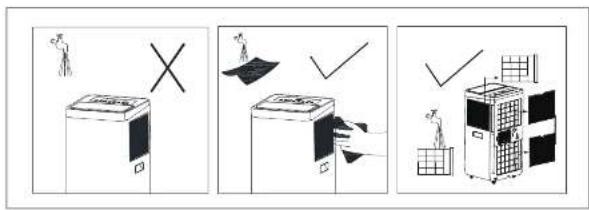
Be aware that refrigerants may not contain an odour. Do not use water spray and steam to clean the appliance. Clean the appliance with a moist soft cloth. Only use neutral detergents. Do not use abrasive products, abrasive cleaning pads, solvents, or metal objects. If the supply cord is damaged, it must be replaced by the
manufacturer, its Authorised Service Centre or similarly qualified persons in order to avoid a hazard.
SAFETY INSTRUCTIONS
Installation
WARNING

Only a qualified person must install this appliance.
Remove all the packaging. Do not install or use a damaged appliance. The appliance shall be installed, operated, and stored in a room with a floor area larger than 4 m² to 4.2 m²(7k), 7.7 m² (9K), 9.6 m²(12K). Obey the installation instruction supplied with the appliance.
Always be careful when you move the appliance because it is heavy. Always wear safety gloves. Be aware that refrigerants may not contain an odour.
Make sure the air can circulate around the appliance.
Wait at least 4 hours before connecting the appliance to the power supply. This is to allow the oil to flow back into the compressor.
Do not install the appliance close to radiators or other heat sources. Do not install the appliance where there is direct sunlight.
Electrical connection
表决结果:同意7票。

WARNING
Risk of fire and electrical shock. The appliance must be connected to a grounded outlet. Make sure that the electrical information on the rating plate
matches with the power supply. If not, contact an electrician.
Always use a correctly installed shockproof socket.
Do not use multi-plug adapters and extension cables,
Make sure not to cause damage to the electrical components (e.g. mains plug, mains cable).
Contact the Authorised Service Centre or an electrician to change the electrical components.
The mains cable must stay below the level of the mains plug.
Connect the mains plug to the mains socket only at the end of the installation.
Make sure that there is access to the mains plug after the installation.
Do not pull the mains cable to disconnect the appliance. Always pull at the mains plug.
Use

WARNING
Risk of injury, burns, electrical shock, or fire.
Do not change the specification of this appliance.
Be careful not to cause damage to the refrigerant circuit. It contains propane (R290), a natural gas with a high level of environmental compatibility. This gas is flammable.
If damage occurs to the refrigerant circuit, make sure that there are no flames and sources of ignition in the room. Ventilate the room.
Do not put flammable products or items that are wet with flammable products near or on the appliance.
Disposal

WARNING
Risk of injury.
Disconnect the appliance from the mains supply.
Cut off the mains cable and discard it.
The refrigerant circuit of this appliance is ozone-friendly.
Contact your municipal authority for information on how to discard the appliance correctly.
Do not cause damage to the part of the cooling unit that is near the heat exchanger.
SET UP AIR CONDITIONER FOR INSTALLATION
2. Installation
BEFORE FIRST USE
Let the machine stand upright for 2 hours before use. This is so that oil that may have leaked into the cooling system can flow back to the compressor. (The same as for a refrigerator)
Important
- This air conditioner may be conveniently moved around indoors. Keep the unit in an upright position while moving it. The air-conditioner should be placed on a flat surface.
Do not install or operate this air conditioner in a bathroom or other wet environment.
Since a portable air conditioner is on wheels, it is easy to change positions. When it gets hot, you just move your portable air conditioner into the room and can quickly get started cooling the space.
The air conditioner must be operated in an enclosed area to be most effective.
Close all doors, windows, and other openings to the room. Even if you have high ventilation or large windows with direct sunlight can affect the cooling effect.
-
Place the air conditioner in a location that does not restrict airflow through the front of the unit.
-
An air conditioner operating in a
room will have little or no effect
in drying an adjacent enclosed storage
area, such as a closet, unless there
out of the area. A portable air Conditioner evacuates the heat from the unit with a ventilation hose through a window or exhaust air valve.
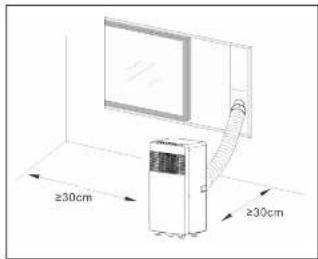
- There should be a minimum of
30 cm distance between Air Conditioner and closest object. See picture for reference.
PRODUCT DESCRIPTION
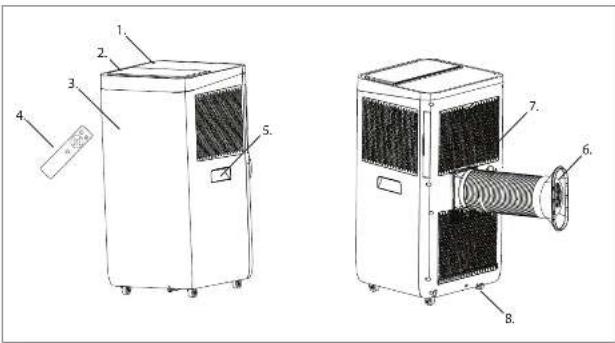
3. Product description
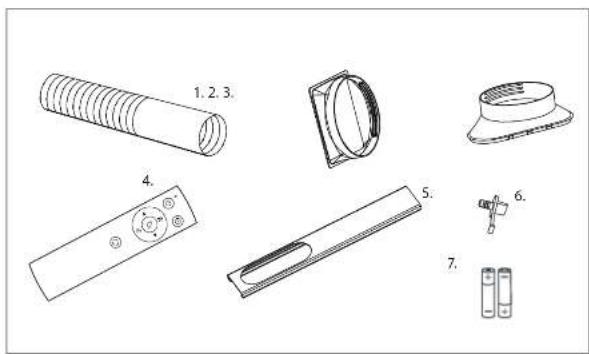
A
-
Exhaust air hose
-
Connection for exhaust air hose to the AC
-
Connection for exhaust air hose to the
window rail
-
Remote control
-
Window rail
-
Water plug
-
Batteries
B
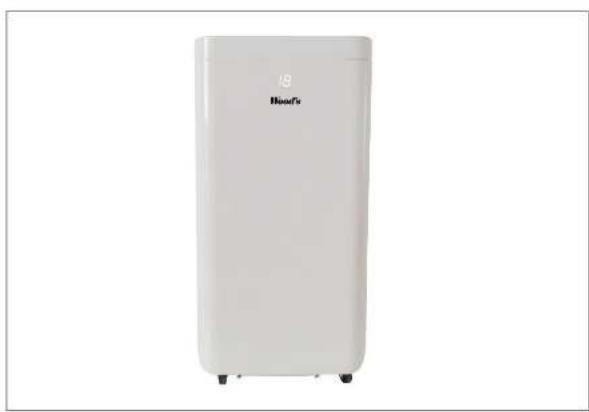
- Product Front picture
c
-
Control panel
-
Cold Air Outlet
-
Signal Receptor
-
Remote Controller
-
Transport Handle
-
Air Outlet Hose
-
Evaporator Air Intake
-
Drainage outlet
口
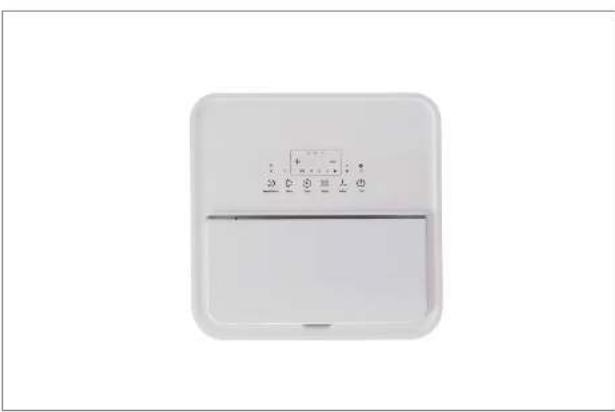
- Product Top Picture
F
- Instructions of filter screen cleaning.
9
51.6200
2008-01/09
。
[Unreadable]
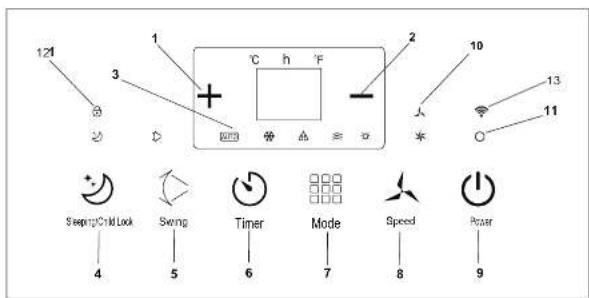
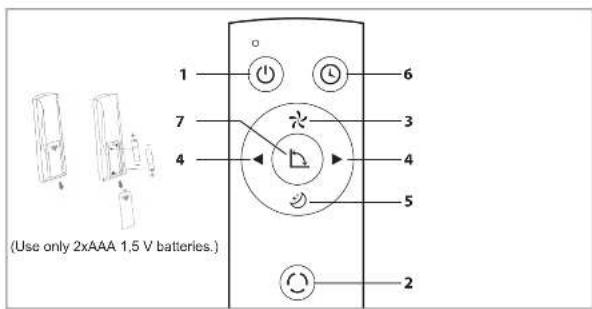
Press this button to select the operation
[Non-Text]
mode
3
DUPFON
Used to select fan speed in sequence.
4
and SETTING BUTTONS
used to a
the timer.
5
BUYTON
Used to set or cancel Mode operation.
HUSDON
Used to set automatic OFF and automatic
ON line
7
BOWON
Used to set the oscillation / swing
function
H
广力云智慧零售收银系统
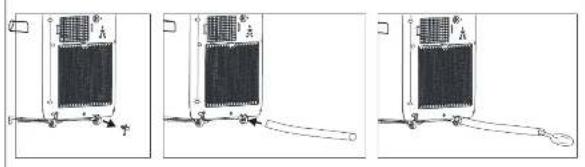
Turn the ends of the exhaust hose into the
connectc
|
[Non-Text]
-
Exhaust air hose installation instructions
-
Hours/ Temperature up
-
Hours/ Temperature down
-
Hydrostatic Coolens - Heating
A. 30chumidifying Fan Mode
-
Operating Mode
-
Fad Speed (low/high)
-
Power Button (on/off)
-
Indicator light for selected fan speed
-
Operation indicator (illuminates when the machine is in operation)
-
Indicator lamp for child lock and sleep mode
-
CHINE
13.
J
- Installation instructions for window rail NOTE: This window rail is not suitable for all types of windows. We recommend Wood's Window sealing kit (article number: wac_wkl if this rail does not fit.
H
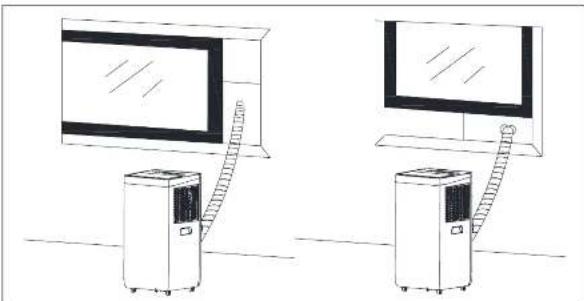
- Window rail installation proposal
L
- Installation instructions for drainage hose (NOTE! Hose is not included. The nozzle is adapted for a 10mm device hose)
FUNCTION OF THE OPERATION MODES AND INSTALLATION DESCRIPTIONS
A. Accessories
After unpacking, please check whether the above-mentioned accessories are included, and check their purposes in the installation introduction in this manual. Accessory No. 6 is already mounted at the bottom of the back of the machine.
B. Portable air conditioning G. Appearance and Function of Remote Control. Notes: Do not drop the remote control. Do not place the remote control in a location exposed to direct sunlight,
A. Operation Introduction Before starting operations in this section: 1) Place the air conditioner in a place where you have close access to a grounded electrical outlet.
2) Install the exhaust hose, and adjust the window position well.
3) Insert the power cord into a grounded AC220\~240V/50Hz socket;
4) Press the POWER button to turn on the air-conditioner.
H, I, and K. Installation of exhaust air hose
(M) Temporary installation 1. Twist both ends of the exhaust hose into the Hose connections. 2. Insert the square fixing clip into the air outlet at back of the machine. 3. Put the other end of the exhaust hose near windowsill.
J&K: Window Slider Kit Installation The installation manner of window slider kit is mostly in "horizontal" and "vertical". As shown Fig. 5 and Fig.5a, check the min. and max. size of the window before the installation. 1. Install the window kit on the window; 2. Adjust the length of the window slider kit according to the window width or height, and fix it with the dowel;
- Attach the hose bracket to the hole in the window rail
O. Internal Tank "Water Full" Alarm The water tank inside the machine has a level monitor that detects when the tank is full. When the container is full, the machine switches off automatically and the code E4 is shown on the display. (If the water tank is full, please remove the rubber plug at the bottom of the unit to drain the water.) We recommend that you drain the water runs a floor drain, or
It is very important that the filter is cleaned regularly; otherwise the air conditioner might lose capacity and oven be risk serious damage.
alternatively an oven tray. when the water is full, please remove the rubber blockage at the bottom of unit, and all water will be drained outside J
Care Instructions And Maintenance Declaration:
1) Before cleaning, be sure to disconnect the unit from any electric supply outlet; 2) Do not use gasoline or other chemicals to clean the unit; 3) Avoid rinsing water directly on the unit
4) If the machine is damaged, please contact your dealer 1. The air filter
-If the air filter becomes clogged with dust/dirt, the air filter should be cleaned once every two weeks.
Open the air inlet grille and take off the air filter.
Cleaning Clean the air filter with a neutral detergent in lukewarm water (40°C) and let dry in the shade.
Mounting
Putting the air filter into the inlet grille, replace the components as they were.
- Clean the surface with a neutral detergent and a wet cloth, followed by drying it with a dry cloth.
E. Before using Check whether the exhaust hose has been mounted properly. Cautions for cooling and dehumidifying operations: -When using functions on cooling and dehumidifying, keep an interval of at least 3 minutes between each
- Power supply meets the requirements. - The socket is for AC use. - Do not share one socket with other appliances.
Power supply is AC220-240V, 50Hz 1. Turn on the unit a) Plug In, then the unit beeps once, °C The power indicator light is on. b) Press the "O" button, then the unit is turned on. c) The LED displays the room temperature and under Automatic mode. 2. Cooling/Heating operation -Press the "Mode" button till the Snowflake / Sun icon is displayed on the panel.
-Press the "+" or "-" button to select the desired room temperature.
(15℃-31℃) -Press the "Fan Speed" button to select wind speed. 3. Dehumidifying operation Press the "Mode" button till the "Dehumidify" icon appears. -Automatically set the selected temperature to current room
- Automatically set the fan motor to LOW wind speed. 4. Fan operation -Press the "Mode" button till the "Fan" icon appears. -Press the "Fan Speed" button to select wind speed.
FUNCTION OF THE OPERATION MODES AND INSTALLATION DESCRIPTIONS
- Timer operation
a) Press the "Timer" button to set Automatic Off time while the unit is running.
b) Press the timer button for a scheduled start.
c) The time can be adjustable within a range of 1 hour to 24 hours. Press the temperature up (+) or temperature down (-) button to increase or decrease the time by one hour by pressing once.
- Operation
a) The operation is effective when the unit is under node.
b) Press the button in mode, for activating sleep mode. In sleep mode, the fan will run on low speed. The set temperature increases by 1 °C after one hour and the temperature increases by 2 °C after two hours. After 6 hours, the unit switches off. Should the temperature rise by more than 2 °C above the set value, the machine will start in full operation.
- Oscillation / Swing
a) When the Oscillation / Swing button is activated, the swing blade swings up and down automatically. If you want to stop, press the button again.
Service
If the Air Conditioner requires servicing, you must first contact your local retailer. Proof of purchase is required for all warranty claims.
Storage instructions
End of Season Storage
1) We recommend that you drain the water over a floor drain, or alternatively a baking sheet. Screw off the drain cover and pull out the stopper to drain condensate water completely.
2) Keep unit running in fan mode for half day to dry inside of unit completely to prevent from going moldy.
3) Turn off the unit, pull out the plug then wrap the power cord around the wire-winding pillar, insert the plug into the universal mounting hole at the back panel of the unit, install the water stopper and drain cover.
4) Remove the heat exhaust hose assembly, clean and keep it properly. Note:
Push in the brackets, Hold the exhaust hose assembly with both hands when removal. Push the fasteners aside on exhaust air outlet using your thumbs, then pull out exhaust hose assembly.
5) Pack the air conditioner carefully with a soft plastic bag, put it on a dry place, and take appropriate action to protect it from dust. Keep the device out of the reach of children.
6) Take out the batteries from the remote control and store it properly. Note:
a Assure the unit is stored in a dry place. All accessories for the device must be stored together and properly protected.
* The power cord holder and the universal socket provides protection to the power cord.
* High location of the exhaust air outlet, offers simple assembly and rapid ventilation.
* The unit's self-evaporative cooling system is intelligent, environmentally friendly and energy saving.
* Features a 24-hour timer function, with a unique on/off musical sound.
* There is a 3 minute delay on restarting the compressor as a protective function.
WiFi function
1. Download and Install APP
Download Woods Connect app from App Store or Google Play
- Register/Login/Forgot password Register
If you don't have an App account, register an account or sign in with a verification code by SMS. This page describes the registration process.
-
Tap to enter the registration page.
-
The system automatically recognises your country / area. You can also select your country code. Enter the mobile number/E-mail and tap "Next".
-
If you enter the mobile number, then enter the verification code in the message and enter the password tap "Confirm" to finish your registration.
-
If you enter the E-mail enter the password and tap "Confirm" to finish your registration.
2. Sign in with username and password or verification code via SMS
Sign in with username and password
-
The system automatically recognises your country / area. You can also select your country code. Enter the mobile number/E-mail and tap "Next"
-
Enter your registered mobile number or email, and password to login.
Sign in with verification code
- Tap "Sign in with SMS verification"
on new page.
- The system automatically recognises your country / area.
You can also select your country code by yourself.
Forgot password
If you forgot your password, please follow these procedures: 1. Tap "Forgot password".
-
The system automatically recognises your country / area. You can also select your country code by yourself. Enter the mobile number/E-mail and tap "Next".
-
Enter the verification code in the message/E-mail and enter the new password tap"Confirm" to finish.
Woods Connect supports the below functions:
- Power on/Power off
• Cool Mode
• Denum Mode
• Fan Mode
• Temperature settings
- Speed, Low and High Time: 1.74 h
- Single On/Off
• Auto clean On/Off
3. Follow the procedures in the APP to enjoy the WiFi features.
Smart Home
If you have a Smart Home product please finish steps 1 to 3.
Third-party Access Service: Tap a third-party voice service icon to see how to connect to the service
Smart Home Woods Connect supports the following functions through voice command:
Power on/Power off Temperature settings Mode settings Fan speed settings
For more information visit: https://woods.se/en/
Operating instruction, Operating instructions
| PROBLEM CAUSE REMEDY | ||
| The unit does not start when pressing on/off button | Not plugged by? Plug or socket is damaged. | Plug in or replace the power or socket. |
| A fuse is blown or broken. Replace the fuse (E.15A/250AC). | ||
| The room temperature is lower than the set temperature, iCooling mode. | Reset the temperature. | |
| Not cool enough | the doors or windows are not closed. | Make sure all the windows and doors are closed. |
| there are heat sources inside the room. | Remove the heat sources if possible. | |
| The exhaust air hose is not connected or blocked. | Connect or clean the exhaust air hose | |
| Temperature setting is too high | Reset the temperature. | |
| The air inlet is blocked. Clean the air inlet. | ||
| High noise level | The ground is not level or not flat enough. | Place the unit on flat, level ground if possible |
| The sound comes from the flowing of the refrigerant inside the air conditioner. | It is normal. | |
| Error Codes CAUSE REMEDY | ||
| E2 Code | Room temperature sensor-fained or is damaged. | Replace room temperature sensor. |
| E3 Code | Evaporator temperature sensor failed. | Replace evaporator temperature sensor. |
| E4 Code | Water tank full. Please empty the water tank. | |
Guarantees
2 years consumer warranty against production faults. Please note that the warranty is only valid upon the specifications of the receipt. The warranty is only valid if the product is used to communicate with the instructions and security warnings expressed in this manual. The warranty does not cover any damages caused by improper handling of the product.
NOTE: The 2 years warranty only applies for consumers and not to commercial use of the unit.
| TECHNICAL DATA | ||
| AC Milan 7K WIFI Smart Home Duo | AC Milan 9K WIFI Smart Home Duo | |
| Sampling Lighting Capacity | 2300 W/15000 | 2600 W/20000 |
| Sampling Lighting Power Consumption | 750W/400W | 850W/250W |
| Power, Hours | 7h | 10h-12h |
| Battery Color | A | A |
| Continuous color | 91.1-24h | 24.1-24h |
| Temperature setting | 7-10°C | 7-10°C |
| Working temperature | 18-42°C | 18-42°C |
| IRR | 2.6-2.7 | |
| Simple all stations hours | 1.5m | 1.5m |
| Equivalent the air volume of house pipe | 100mm | 100mm |
| Refrigeration gas | 823V/100g | 823V/100g |
| Basic feed inductors | 500l | 500l |
| Airflow | 22.5km | 24.5km |
| Commensant line, 1st Floor | 100-150-100 | 100-150-250 |
*Technical changes and improvements may occur. All values are approximate and may vary due to external circumstances such as temperature, ventilation, and humidity.
This marking indicates that this product should not be disposed of with other household wastes throughout the flu. To present possible harm to the environment or human health from uncontrolled waste disposal, recycle it responsibly to promote the sustainable reuse of material resources. To return your in device, please use the return and collect from systems or contact the retailer where the product was purchased, they can take this product for environmentally safe recycling.
Used batteries must not be disposed of through household garbage, since they might contain toxic elements and heavy metals that can be harmful to the environment and human health. Return empty batteries to an appropriate recycling facility.

Register at www.warranty woods.com and read about how to get an extended warranty. Please visit www.woods.se for more information.
Recommended limits for use
The best operating ambient temperature for cooling is 17-35 °C, Fuse Parameter: φ 5.0x20mm 3.15A, 250Vac.
WOOD'S FÖR REN OCH HÄLSOSAM INOMHUSLUFT
FÖRBEREDA LUFTKONDITIONERINGEN FÖR INSTALLATION
2. Installation
PRODUKTBESKRIVNING
8. Oscillering/swing
3. Produktbeskrivelse
A
-
Eksosslange
-
Tilkobling for eksoslangen til klimaanlegget
-
Tilkobling for eksoslangen til vindusskinnen
-
Fjernkontroll
-
Vindusskinne
-
Vannplugg
-
Batteries
B
of the automatic level temperature
- Setter automatisk valgt tempera aktivall somtemperitus minus 28°C
dritten Toh-Kempercular minus 2 °C.
- Settter automatisch vorlemotoren in lav hartiginst.
-
Proposition of
-
Bejene miten
Skyv inn brakettene,
- Registrering/Palogging/Glernt password
Registrering
Installation ADVARSEL

PRODUKTBESKRIVELSE
3. Produktbeskrivelse
A
Bemaeric - Undgå at tabe
snefnugikonet vises pa displayet.
Beteringesleeding, deslening, reordering
NG
S. Dszillation/Swing
DESCRIPTION DU PRODUIT
reference: Wait, OK, St or be the
(1)
B
Pour de plus amples informations, consultez : https://woods.se/en/
Guide instructions Guide instructions
1. VEILIGHEIDSWAARSCHUWINGEN
VEILIGHEIDSINSTRUCTIES Installatie WAARSCHUWING

B. Draagbare airconditioning
Voeding is AC220-240V, 50Hz
Aks a problem under and not an obstacle near the line, not being in the side of the problem following the line. Aks mark are not under one side with, then don't stand up and do better be considered from the boundary.
KONFIGUROWANIE KLIMATYZATORA DO INSTALACJI OPIS PROD
2. Instalowanie
PRZED PIERWSZYM UŻYCIEM
3. Opis produktu
A
DESCRIEREA PRODUSULUI
https://woods.se/en/

Instructur de schizare inducturari de utilizare
3. Tuotteen kuvaus
A
-
Poistoilmaletica
-
Polstollmaleticun littaminen
painamalla painiketta “+” tal “-” (15–31 °C)
https://woods.se/en/
| PROBLEMA Prietastis TIKKIOJ SALINIMAS | ||
| Prestanas neprirangia moosekba ilangimio / ryangimo mayraky | Prietastas neprijungias / 60 kats arba ielas padekta. | Prijarsitke arba paskiridite maitinimo seltig arba ielag. |
| Sauglidae sanogge arba sulidips. Palaistito sauglik [13-15 A / 200 Km] | srl. | |
| Nopakankamalayce | Patajotas temporatira yra zemnesi noga nustoryta temperatira. (Aulimino reizins) | Atzatykite temporaturaj. |
| Nasbarytoca durys ar lanqal, itikinkilato, iad vist lanqal e diurys yrs. szdaryst. | ||
| Patalojte yra bilumos salinu. Je timanoma, palaistiko bilumos salinus | ||
| Ora Sieredma žerra neprijungia arba užikimios. | Narasykite se prijunkite ore illedimo žama. | |
| Nasiatyta per sušita temperatira. | Atzatykite temperatiraj. | |
| Ora jeidirno anga hukunjana. | Narasykite ore jeidirno anga. | |
| Dietela games | Sifindys naiylogos arba nepakankamai plodicina. | Prietastig pastotylite and kao begesidij in huarantali gyriakj. |
| Ora konfiktionarije tevant satitnieli girdini games. | Te yra normalu. | |
IZSTRÄDÄJUMA APRAKSTS
3. Produkta apraksts
A
-
Izplüdes gaisa Sütene
-
Izplödes galsa kõtene savienojums ar galsa kondicionieri
-
Izplüdes gaisa stötenes savienojums ar loga sliedi
-
Talvaribas puits
-
Loga sliede
-
Odens aizbaznis
-
Baterias
B
- Izstradajuma attols no prioktpuses
C
-
Vadibas panelis
-
Auksta qaisa izveds
-
Signala uztvareis
-
Tabarfiba nulls
-
Transporteianas rekturis
-
Gaisa izpólodes Sólteno
-
Iztyaicētāia qaisa jeplūde
-
Drenatas invads
口
Woods Connect supporta le
seguenti funzioni:
ΠΕΡΙΓΡΑΦΗ ΠΡΟΪΟΝΤΟΣ
3. Vörulýsing
A
- Myndir at topp taakisins
C
-
Kluckustundir/Hitestig upp
-
—Klukkustundir:Hitastia niður
3.
A. Bakaryding, Vituhamun
Notable of ad stella svesmukirkii.
H
Szekja Woods Connect App Ira App Store eða Google Play
- Nýskráning/lneskráning/gleymt lykilorð
Skrà
OHUTUSALASED JUHISED
Paigaldus

TOOTE KIRJELDUS
3. Toote kirjeldus
A
-
Tavu 2014
-
Transport of reprice
-
Oni Valjaskevoik
-
Scattered observations
-
Jiravoolava
D
- Footprint wall
E
- Valjatômbatoru paigaldusjuhised
J
a) Valutage nuppu "Timer" (Talmer).
Wood's is marketed and distributed by:
Woods Production Sweden AB.
Box 356
441 27, Alingsås
Sweden.
woods.se
info@woods.se
+46 317613610
Wood's®
- OPERATING INSTRUCTIONS FOR
- AC MILAN 7K WIFI SMART HOME DUO WAC705G AC MILAN 9K WIFI SMART HOME DUO WAC905G
- VISIT OUR WEBSITE TO
- CUSTOMER CARE AND SERVICE
- CONTENTS: PAGE NO
- WOOD'S FOR CLEAN AND HEALTHY INDOOR AIR
- HOW DOES THE AIR CONDITIONING UNIT WORK
- SECURITY WARNINGS
- SAFETY INFORMATION
- CHILDREN AND VULNERABLE PEOPLE SAFETY
- WARNING
- GENERAL SAFETY
- SAFETY INSTRUCTIONS
- INSTALLATION
- ELECTRICAL CONNECTION
- 表决结果:同意7票。
- USE
- DISPOSAL
- SET UP AIR CONDITIONER FOR INSTALLATION
- IMPORTANT
- PRODUCT DESCRIPTION
- FUNCTION OF THE OPERATION MODES AND INSTALLATION DESCRIPTIONS
- WIFI FUNCTION
- DOWNLOAD AND INSTALL APP
- SIGN IN WITH USERNAME AND PASSWORD OR VERIFICATION CODE VIA SMS
- SIGN IN WITH USERNAME AND PASSWORD
- SIGN IN WITH VERIFICATION CODE
- FORGOT PASSWORD
- WOODS CONNECT SUPPORTS THE BELOW FUNCTIONS
- FOLLOW THE PROCEDURES IN THE APP TO ENJOY THE WIFI FEATURES
- SMART HOME
- GUARANTEES
- RECOMMENDED LIMITS FOR USE
- WOOD'S FÖR REN OCH HÄLSOSAM INOMHUSLUFT
- FÖRBEREDA LUFTKONDITIONERINGEN FÖR INSTALLATION
- PRODUKTBESKRIVNING
- OSCILLERING/SWING
- PRODUKTBESKRIVELSE
- REGISTRERING
- INSTALLATION ADVARSEL
- NG
- DESCRIPTION DU PRODUIT
- VEILIGHEIDSWAARSCHUWINGEN
- VEILIGHEIDSINSTRUCTIES INSTALLATIE WAARSCHUWING
- KONFIGUROWANIE KLIMATYZATORA DO INSTALACJI OPIS PROD
- INSTALOWANIE
- OPIS PRODUKTU
- DESCRIEREA PRODUSULUI
- TUOTTEEN KUVAUS
- IZSTRÄDÄJUMA APRAKSTS
- PRODUKTA APRAKSTS
- WOODS CONNECT SUPPORTA LE
- ΠΕΡΙΓΡΑΦΗ ΠΡΟΪΟΝΤΟΣ
- VÖRULÝSING
- SKRÀ
- OHUTUSALASED JUHISED
- PAIGALDUS
- TOOTE KIRJELDUS
Brand : Wood's
Model : WAC705G
Category : Air conditioner