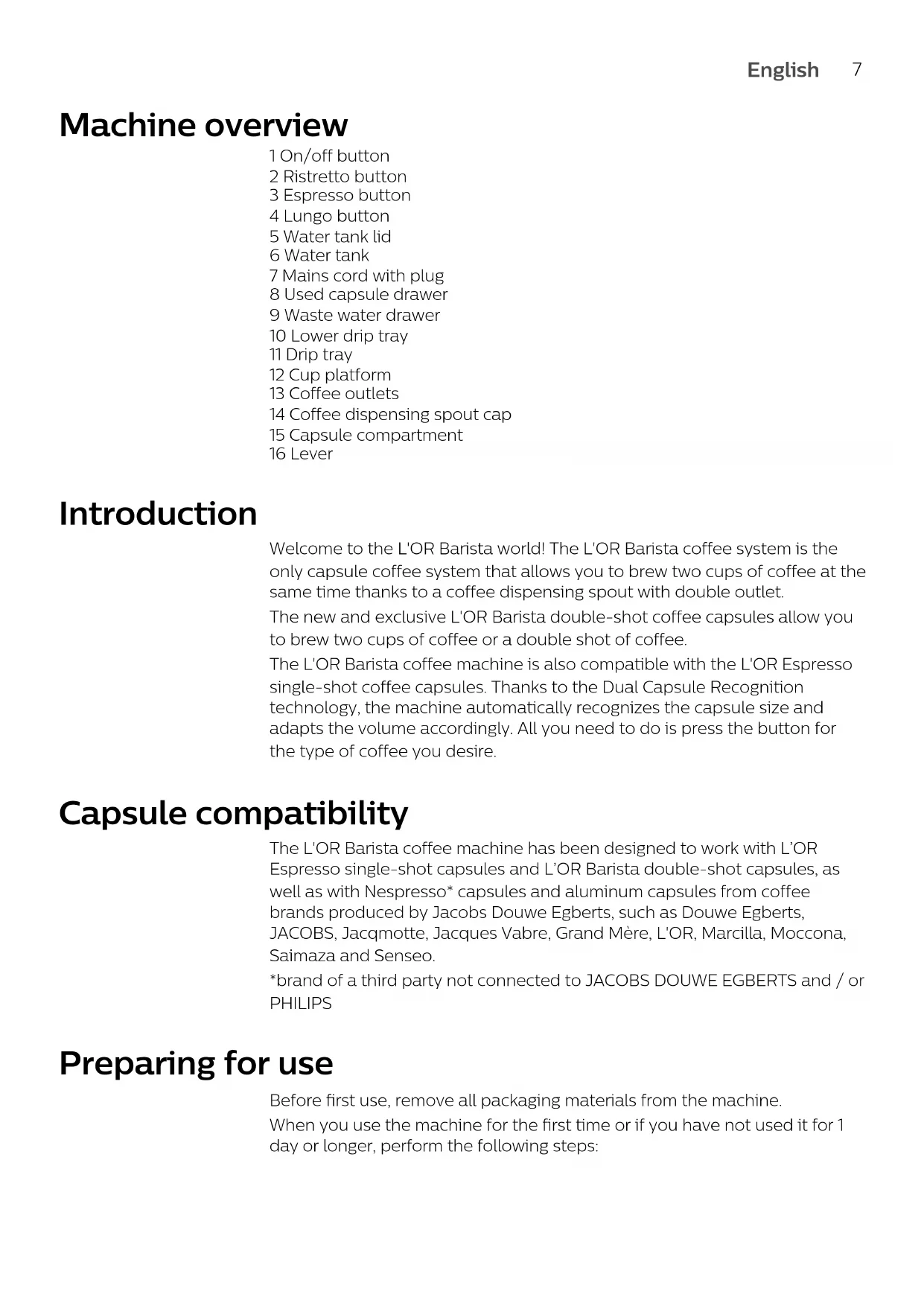
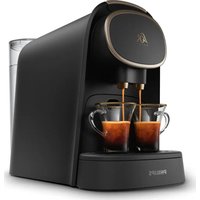
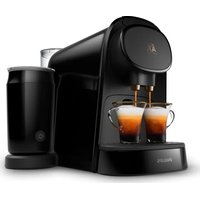
USER MANUAL Barista LM8012 L'or
text_image
Technical diagram of a device with numbered parts and labeled functions, including power button, socket, and plug connections.
English 7
Deutsch 22
Español 38
Français 54
Nederlands 70
Português 86
Machine overview
1 On/off button
2 Ristretto button
3 Espresso button
4 Lungo button
5 Water tank lid
6 Water tank
7 Mains cord with plug
8 Used capsule drawer
9 Waste water drawer
10 Lower drip tray
11 Drip tray
12 Cup platform
13 Coffee outlets
14 Coffee dispensing spout cap
15 Capsule compartment
16 Lever
Introduction
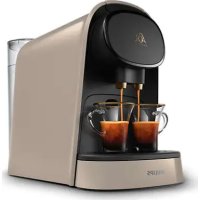
Welcome to the L'OR Barista world! The L'OR Barista coffee system is the only capsule coffee system that allows you to brew two cups of coffee at the same time thanks to a coffee dispensing spout with double outlet.
The new and exclusive L'OR Barista double-shot coffee capsules allow you to brew two cups of coffee or a double shot of coffee.
The L'OR Barista coffee machine is also compatible with the L'OR Espresso single-shot coffee capsules. Thanks to the Dual Capsule Recognition technology, the machine automatically recognizes the capsule size and adapts the volume accordingly. All you need to do is press the button for the type of coffee you desire.
Capsule compatibility
The L'OR Barista coffee machine has been designed to work with L'OR Espresso single-shot capsules and L'OR Barista double-shot capsules, as well as with Nespresso* capsules and aluminum capsules from coffee brands produced by Jacobs Douwe Egberts, such as Douwe Egberts, JACOBS, Jacqmotte, Jacques Vabre, Grand Mère, L'OR, Marcilla, Moccona, Saimaza and Senseo.
*brand of a third party not connected to JACOBS DOUWE EGBERTS and / or PHILIPS
Preparing for use
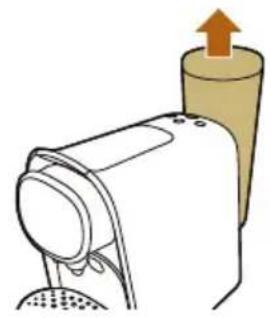
Before first use, remove all packaging materials from the machine.
When you use the machine for the first time or if you have not used it for 1 day or longer, perform the following steps:
natural_image
Diagram of a hairdryer with an upward arrow indicating motion (no text or symbols)

natural_image
Simple line drawing of a glass with a blue liquid and a funnel inserted into it (no text or symbols)
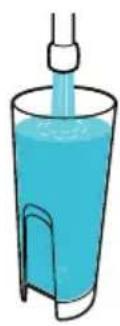
1 Remove the water tank from the machine.
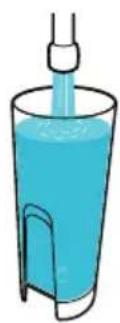
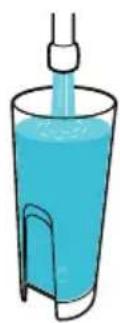
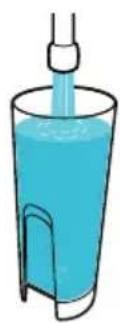
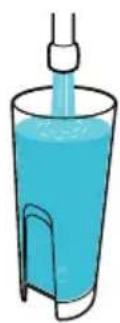
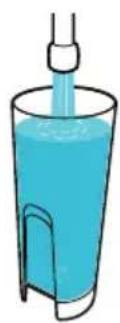
2 Rinse and fill the water tank under the tap. Place the water tank back onto the machine.
text_image
Diagram illustrating coffee maker setup with a coffee cup, a tray, and a red 'X' symbol indicating a warning or rejection.
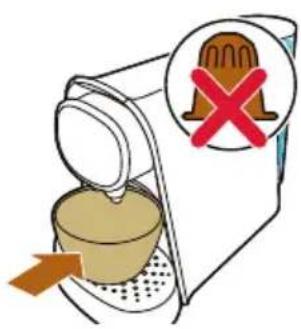
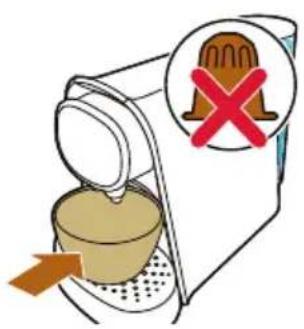
3 Place a bowl under the coffee dispensing spout. Do not insert a capsule and make sure that the lever is closed.
text_image
Diagram illustrating a medical procedure with labeled components and temperature measurement, including a circular dial indicator and thermometer.
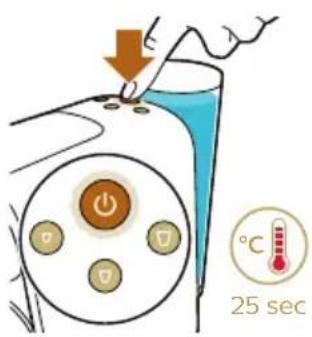
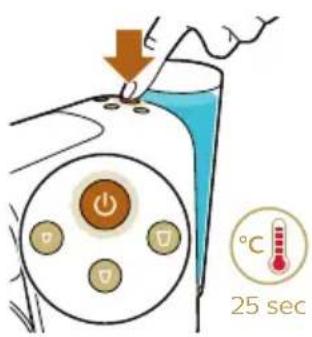
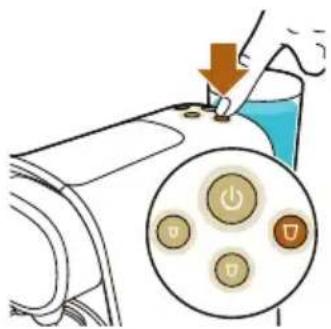
4 Press the on/off button to switch on the machine.
- The on/off button flashes slowly to indicate that the machine is heating up.
text_image
Diagram showing a hand pressing down on a device with a magnified view of control buttons, indicating action or operation.
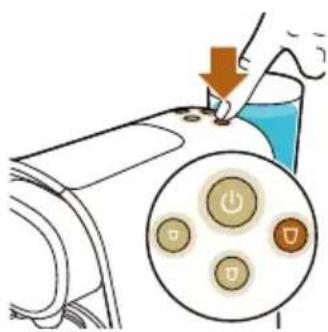
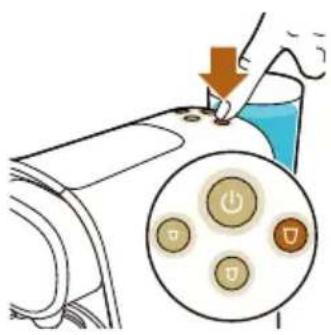
5 When all buttons light up continuously, press the lungo button.
- Water flows from the coffee dispensing spout.
Note: When the internal water circuit is empty, the machine produces a humming sound. When the machine dispenses water, it produces a less loud humming sound. This is normal.
6 The machine is ready when all buttons light up continuously.
7 Empty the drip tray and waste water drawer (see 'Cleaning the used capsule drawer and waste water drawer').
The machine is now ready for use.
Brewing coffee
Beverages and capsules
Capsules
L'OR aluminum capsules are available online at www.lorespresso.com and in shops. You can choose from a variety of coffee capsules for different types of coffee.
Beverages
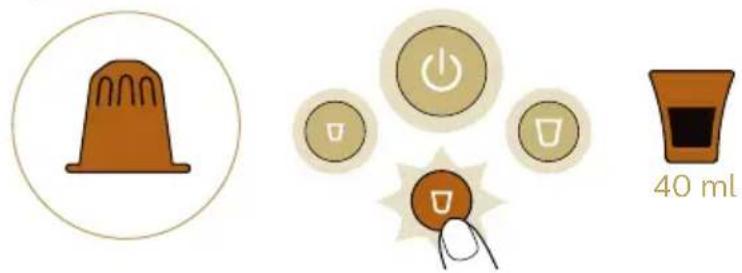
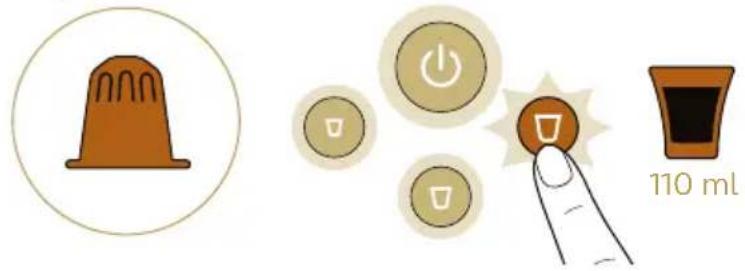
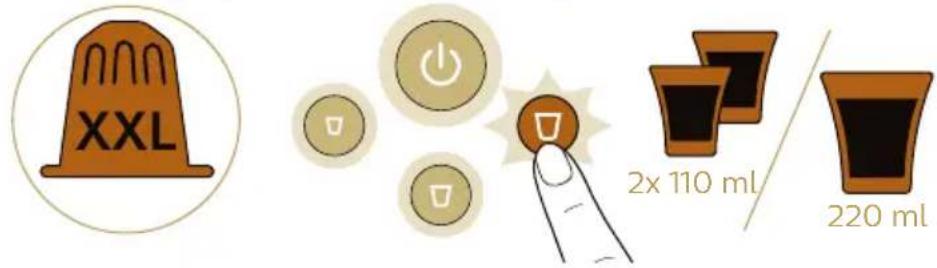
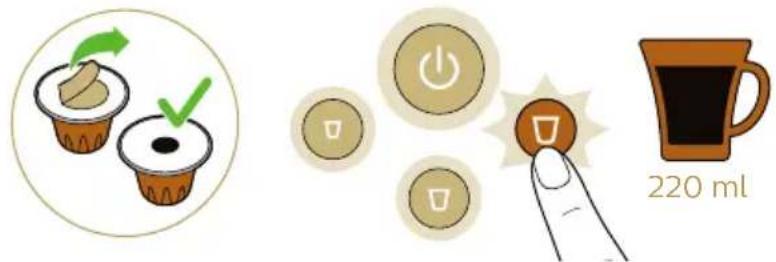
Thanks to the Dual Capsule Recognition technology, the machine automatically recognizes the capsule size and adapts the volume of your drink accordingly. All you need to do is press the button for the type of coffee you desire.
Ristretto
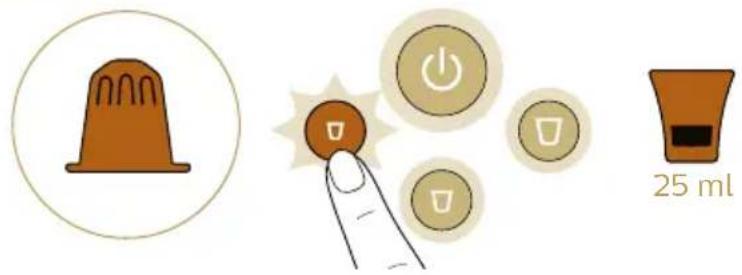
text_image
25 ml
text_image
XXL
2x 25 ml
50 ml
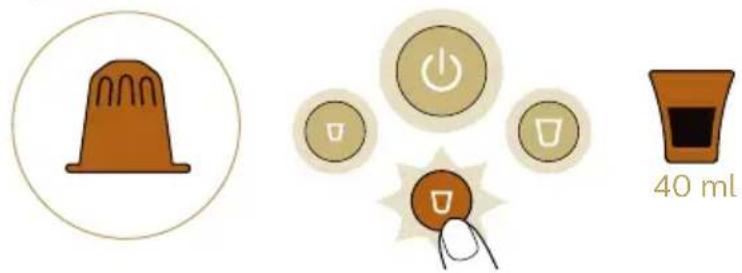
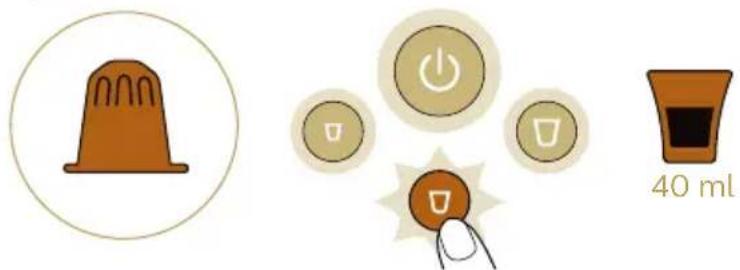
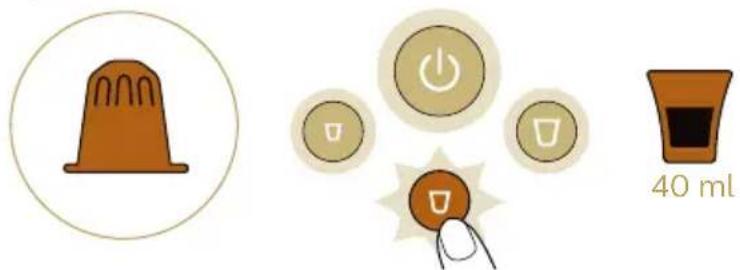
Espresso

text_image
40 ml
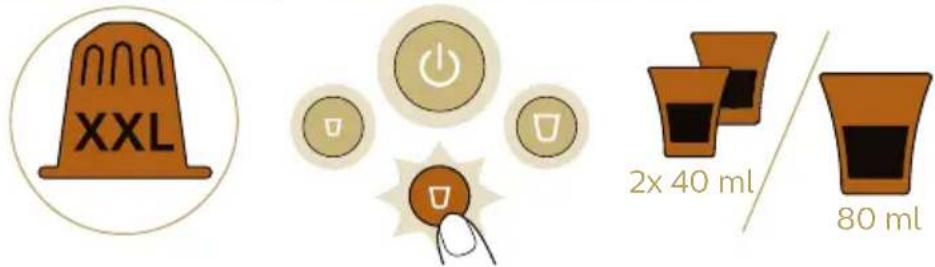
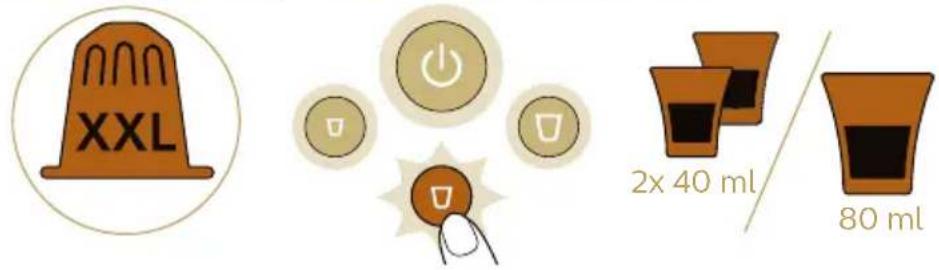
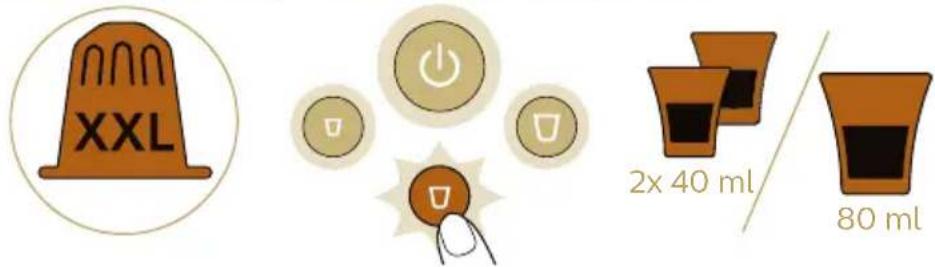
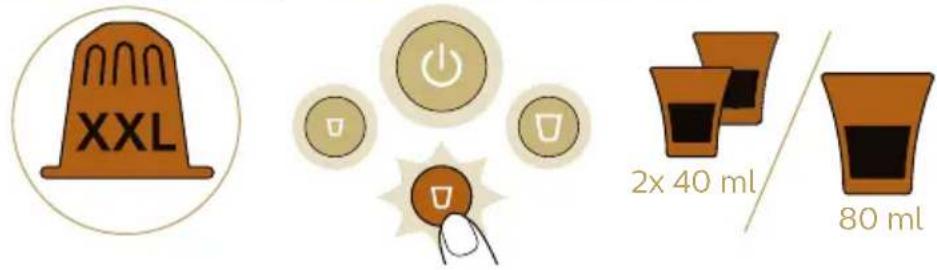
Double espresso / Double shot of espresso
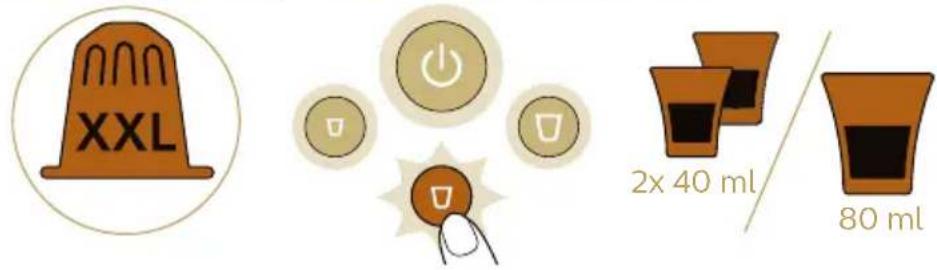
text_image
XXL
2x 40 ml / 80 ml
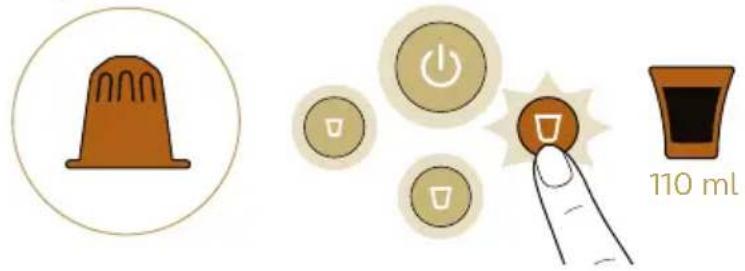
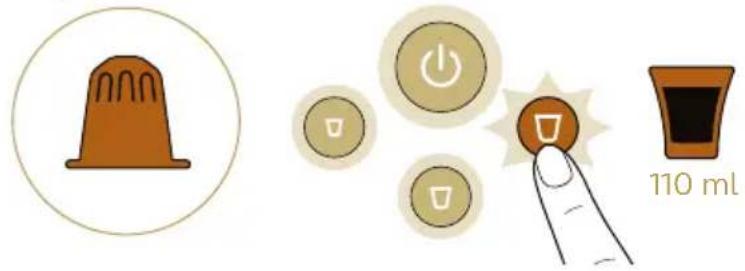
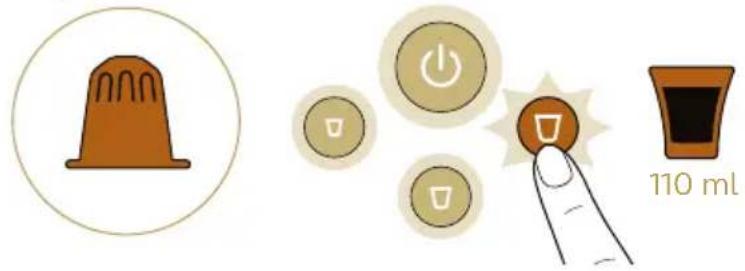
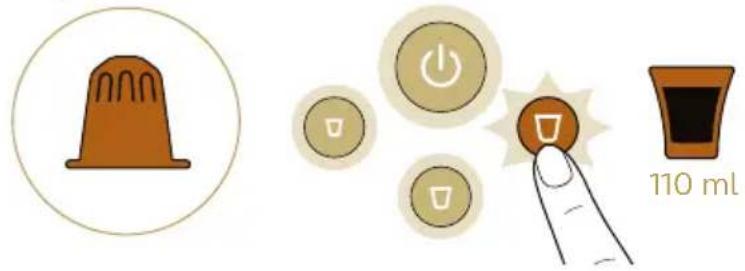
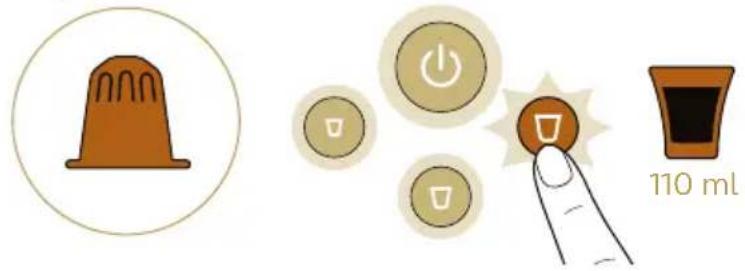
Lungo

text_image
110 ml
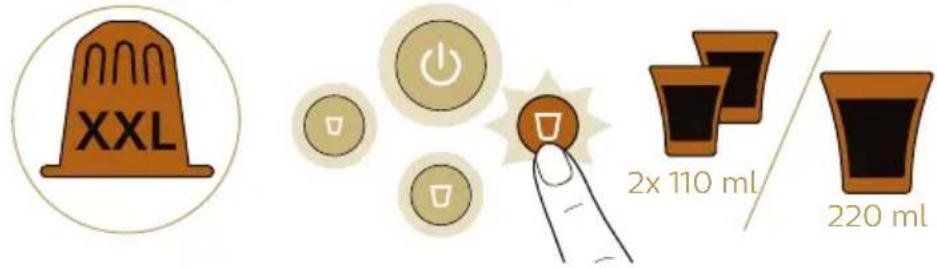
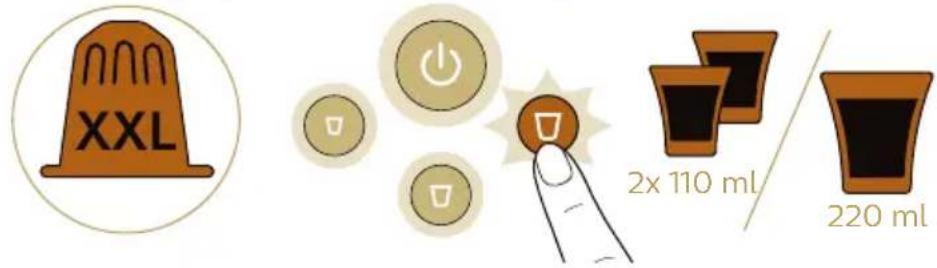
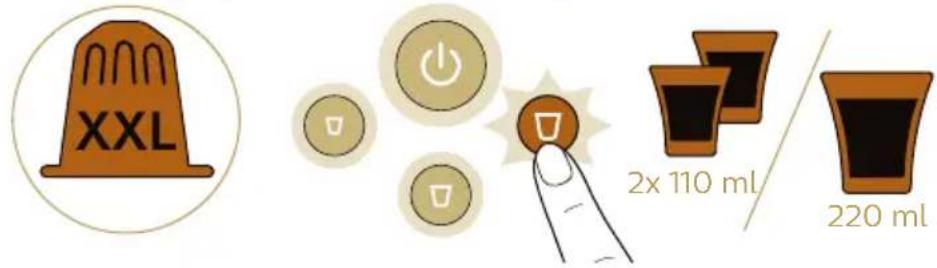
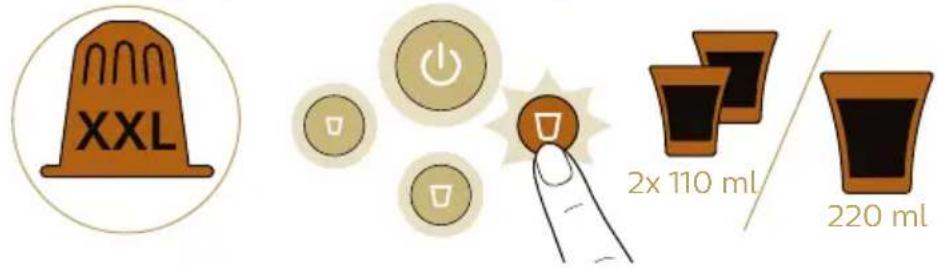
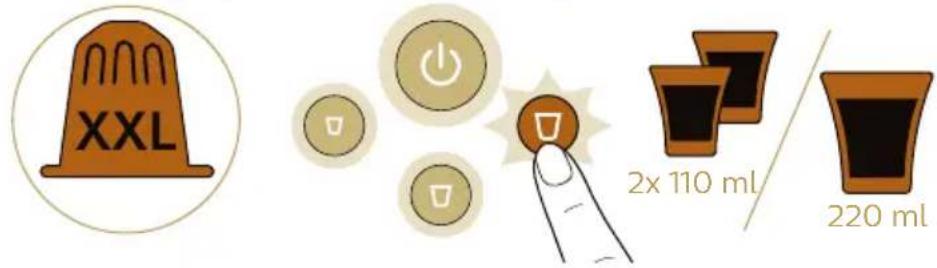
Double lungo / Double shot of lungo

text_image
XXL
2x 110 ml
220 ml
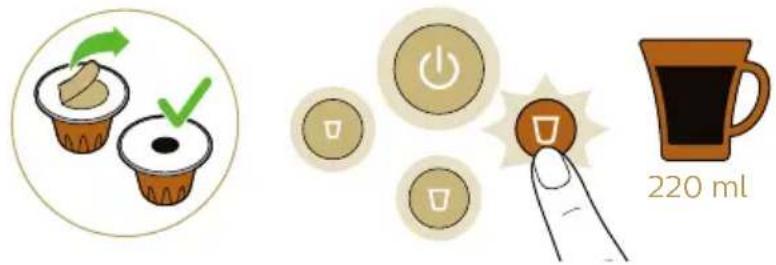
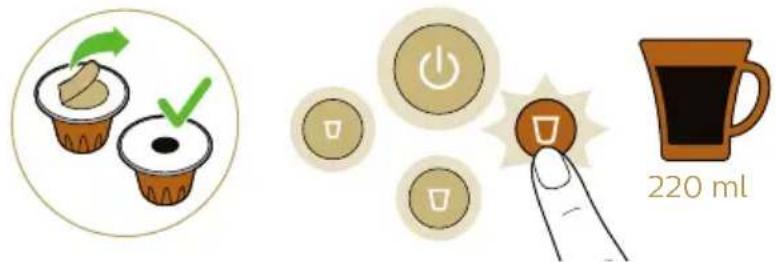
Grand Café Filtre

text_image
220 ml
Preparing coffee
1 Press the on/off button to switch on the machine. The on/off button starts flashing to indicate that the machine is heating up.
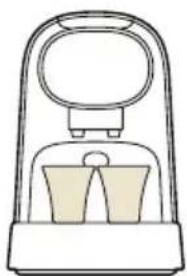
2 For one coffee, place one cup under the coffee dispensing spout.
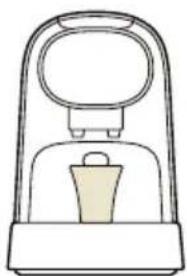
natural_image
Simple line drawing of a mechanical device with a handle and central component (no text or symbols)

natural_image
Simple line drawing of a mechanical device with a handle and base (no text or symbols)
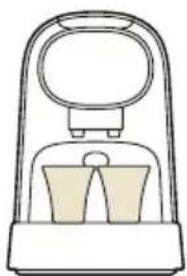
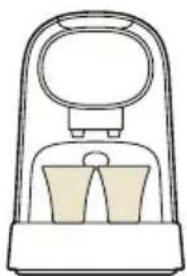
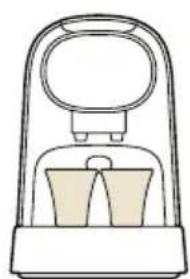
3 For two coffees, place two cups under the coffee dispensing spout.

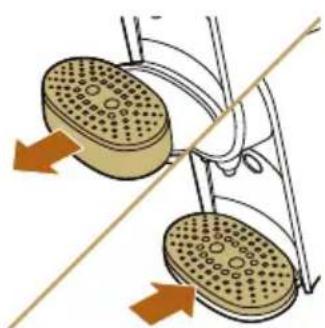
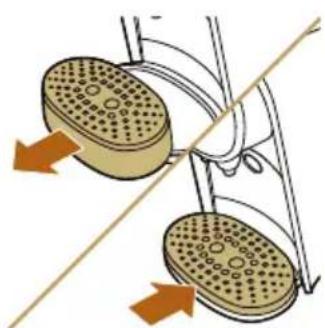
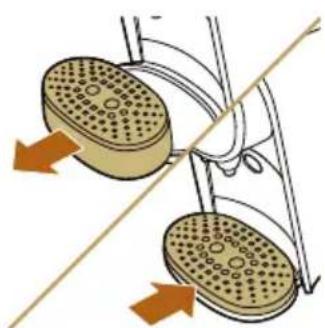
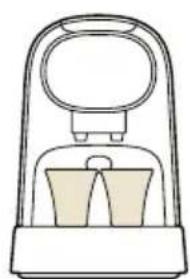
4 For a large coffee or Grand Café Filtre, remove the cup platform and the drip tray, place the cup platform on the lower drip tray and place a large cup or mug on the cup platform under the coffee dispensing spout.
5 Lift the lever.
6 Insert a capsule.
- For a single cup of coffee, insert a L'OR Espresso single-shot capsule.
- For two cups of coffee or one large coffee, insert a L'OR Barista double-shot capsule.
7 Close the lever by pushing it down.
Warning: Do not insert a finger into the brew chamber when closing the lever.
text_image
Diagram illustrating a power switch mechanism with labeled buttons and a magnified circular button showing 'Power' and 'U'.
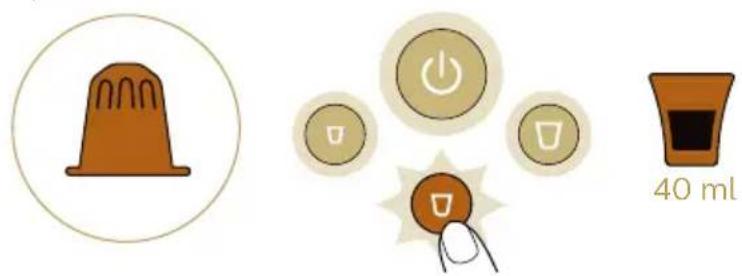
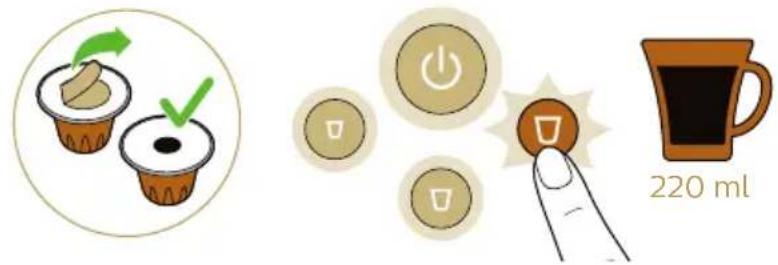
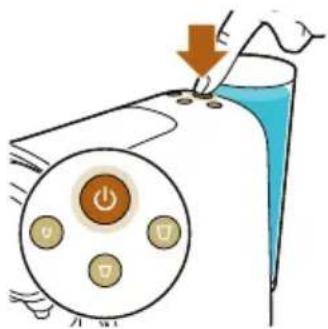
8 When the on/off button stops flashing and all buttons light up continuously, press the button for the type of coffee you desire.
Caution: Do not lift the lever until the brewing process has finished. Brewing is finished when the lights stop flashing and no more coffee comes out of the coffee dispensing spout.
Brewing Grand Café Filtre
natural_image
Illustration of two cupcake cups with green arrows indicating selection or confirmation (no text or symbols)
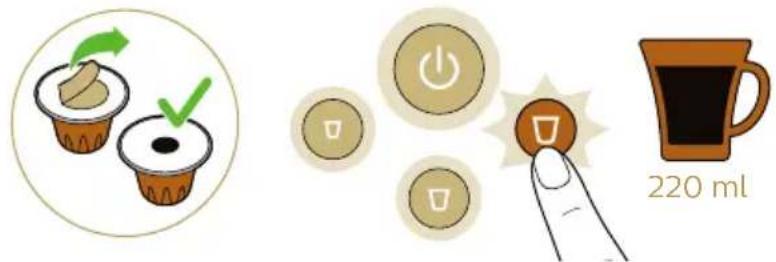
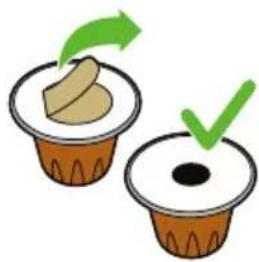
1 Remove the seal completely from the capsule.
natural_image
Illustration of a mechanical device with a lever and blue liquid, no text or symbols present
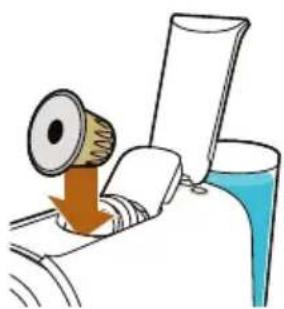
2 Lift the lever and insert the capsule.
natural_image
Illustration of a machine emitting powder from a bottle, with no visible text or symbols
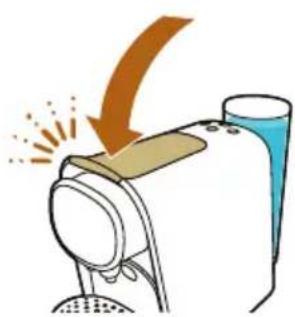
3 Close the lever.

natural_image
Diagram of two circular objects with perforated surfaces connected by a diagonal line, no text or symbols present
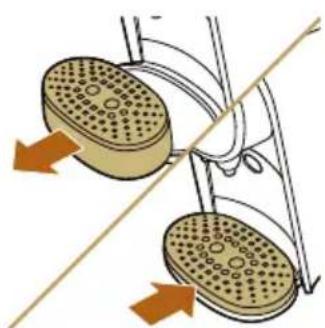
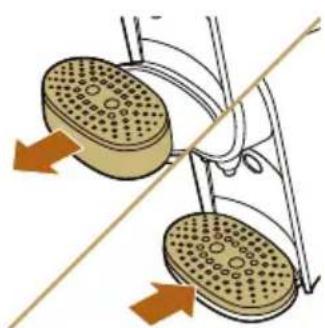
4 Remove the drip tray with the cup platform. Put the drip tray aside and place the cup platform on the lower drip tray.

natural_image
Simple line drawing of a mechanical device with a handle and base (no text or symbols)
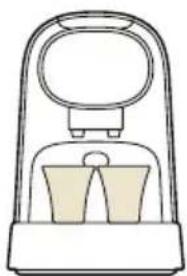
5 Place a large cup or mug on the cup platform under the coffee dispensing spout.
text_image
Diagram showing a hand pressing down on a device with a magnified view of three buttons labeled 'Power', 'Control', and 'Display'.
6 Press the lungo button to start the brewing process.
Adjusting the coffee quantity
Each coffee button has been programmed to brew coffee at its ideal setting. Nevertheless, you can adapt the coffee quantity to your wishes, within a range that ensures the best coffee quality.
L'OR Espresso single-shot min standard max capsule
| Ristretto 20 ml 25 ml 40 ml |
| Espresso 30 ml 40 ml 50 ml |
| Lungo 85 ml 110 ml 135 ml |
| L'OR Barista double-shot min standard max capsule |
| Ristretto 40 ml 50 ml 60 ml |
| Espresso 60 ml 80 ml 100 ml |
| Lungo/Grand Café Filtre 170 ml 220 ml 270 ml |
The coffee quantities for L'OR Espresso single-shot and L'OR Barista double-shot capsules are adjusted separately:
1 Press the on/off button to switch on the machine.
2 Fill the water tank.
3 Insert a capsule and close the lever.
- If you want to adjust the quantity for L'OR single-shot espresso capsules, insert a normal L'OR Espresso capsule.
- If you want to adjust the quantity for a L'OR Barista double-shot capsule, insert a L'OR Barista capsule.
4 Press and hold the button of the coffee whose quantity you want to adjust for 3 seconds until the button flashes quickly. Then release the button. The machine starts brewing coffee.
5 Press the same button again when the cup contains the desired quantity of coffee.
Note: If you press the coffee button too early, the machine programs the minimum quantity of coffee shown in the table above. If you do not press the coffee button, the machine programs the maximum quantity of coffee.
Resetting the coffee quantities
To reset the coffee quantities to their factory settings:
1 Press the on/off button to switch on the machine.
2 Wait until the machine has heated up and all buttons light up.
3 Press and hold the ristretto, espresso and lungo buttons simultaneously until all buttons flash quickly to show that the machine has been reset to factory settings.
Cleaning and maintenance
Cleaning the used capsule drawer and waste water drawer
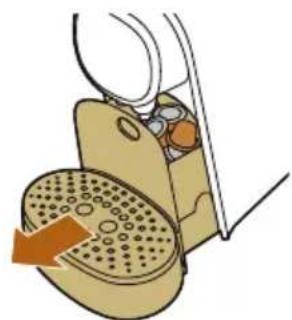
Check the used capsule drawer and waste water drawer regularly.
Note: For optimal hygiene, pull up the lever after use to ensure the last used capsule falls into used capsule drawer.
natural_image
Illustration of a mechanical device with a gear and lever mechanism (no text or symbols)
1 Pull the used capsule drawer and the waste water drawer out of the machine.
natural_image
Illustration of a hand turning a car wheel with a textured seat cover (no text or symbols)
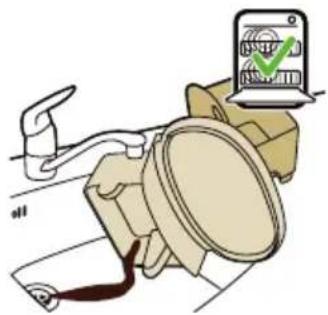
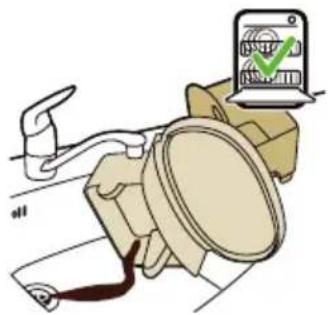
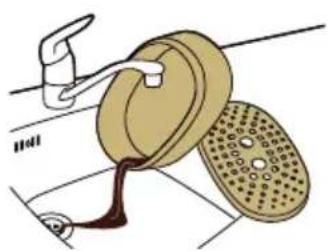
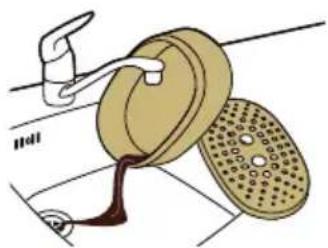
2 Remove the drip tray from the lower drip tray and rinse the drip tray and the cup tray under a warm tap. Do not clean these parts in the dishwasher.
natural_image
Illustration of a mechanical device with an open lid and internal components (no text or symbols)

natural_image
Illustration of a car with a switch and gear, showing a device with a green checkmark (no text or symbols present)
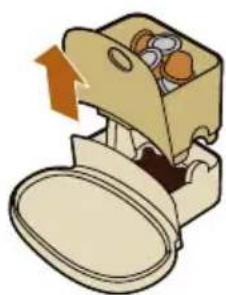
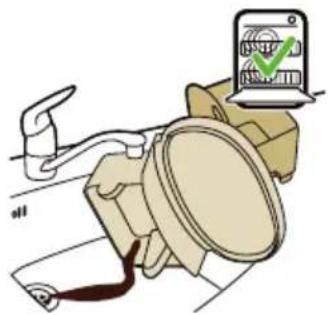
3 Remove the used capsule drawer by pulling it up and empty it.
Caution: Be careful when you remove the used capsule drawer. Capsules are still hot immediately after brewing.
4 Rinse all parts under a warm tap. Dry all parts with a soft cloth. You can also clean all these parts in the dishwasher.
5 Reinsert the used capsule drawer into the waste water drawer.
6 Insert the waste water drawer with the used capsule drawer into the machine.
7 Place the drip tray back onto the lower drip tray. Place the cup platform onto the drip tray.
Cleaning other parts of the machine
natural_image
Line drawing of a hand cleaning a small mechanical device with a cloth (no text or symbols)
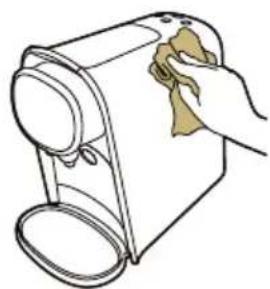
1 Clean the outside of the machine with a soft damp cloth.
Caution: Never use scouring pads, abrasive cleaning agents or aggressive liquids such as petrol or acetone to clean the machine.
Warning: Do not insert a finger into the capsule compartment to avoid injury. There is an invisible piercer inside.
natural_image
Illustration of a car seatbelt with a magnified inset showing a device and gear (no text or symbols)
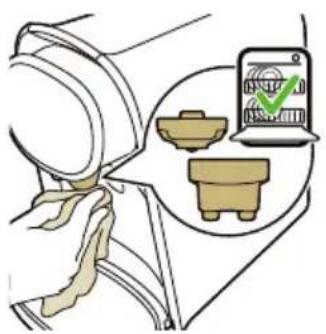
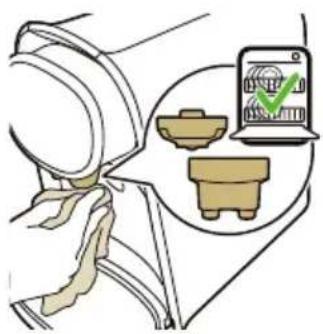
2 Clean the front of the machine with a soft damp cloth and clean the two parts of the coffee dispensing spout (the coffee outlets and the spout cover) under a warm tap or in the dishwasher.
3 Clean the water tank by rinsing it under a warm tap. The water tank is not dishwasher-proof.
Note: Rinse the water tank and fill it with fresh water every 24 hours.
Cleaning the coffee circuit
Clean the coffee circuit every week to ensure you get coffee with an optimum quality and taste.
natural_image
Illustration of a coffee machine with a cup and two cups (no text or symbols)
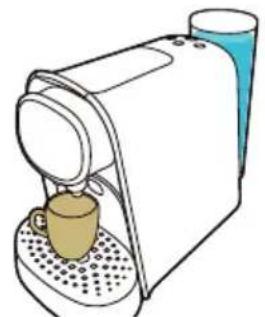
1 Place a cup under the coffee dispensing spout.
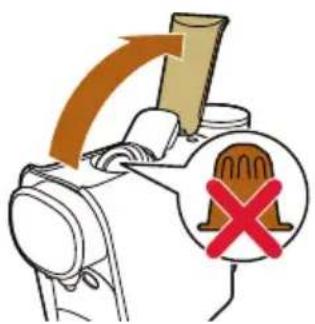
2 Lift the lever to ensure the last used capsule falls into the used capsule drawer.
3 Do not insert a new capsule and close the lever.
text_image
Diagram illustrating a hand operating a device with a hammer and a warning symbol indicating no change or failure.

text_image
Diagram showing a hand pressing down on a device with a magnified view of three buttons labeled 'Power', 'Battery', and 'Control'.
4 Press the lungo button.
5 Empty the cup after the machine has finished dispensing water.
6 Open the lever and repeat steps 3 to 5 to ensure proper cleaning of the coffee circuit.
The machine is now ready for use.
Descaling
When to descale
natural_image
Simple line drawing of a curved surface with scattered brown oval shapes (no text or symbols)
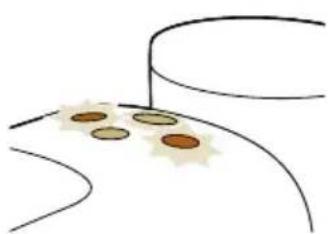
- Descale the machine when the ristretto and lungo button flash quickly a few times after brewing. The descaling procedure takes up to 40 minutes and consists of a descaling cycle and a rinsing cycle. Do not interrupt the descaling procedure.
Why to descale
Descaling is essential for the following reasons:
If the descaling procedure is not performed correctly, scale residue remains behind in the machine. This causes scale to build up more quickly and may cause permanent and irreparable damage to the machine.
Use the correct descaler
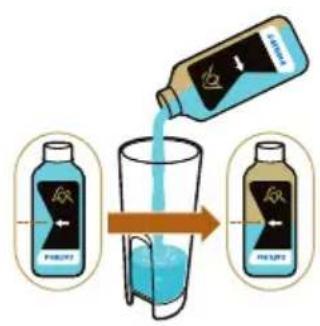
Only citric acid-based descalers are suitable for descaling the L'OR Barista machine. This type of descaler descales the machine without damaging it. We advise you to use the dedicated L'OR Barista liquid descaler (CA6530). It is available in bottles that contain liquid descaler for two descaling procedures. You need half a bottle for one descaling procedure and can store the other half for the next descaling procedure.
Descaling procedure
text_image
Diagram illustrating the step of pouring liquid into a glass, with two labeled bottles showing different conditions.
Note: If something goes wrong during the descaling procedure, e.g. because you accidentally interrupt the descaling cycle, you have to restart the descaling procedure from step 1.
1 Press the on/off button to switch on the machine.
2 Pour half a bottle of L'OR Barista liquid descaler (CA6530) into the water tank.
natural_image
Illustration of a glass with blue liquid being poured into a tube (no text or symbols)
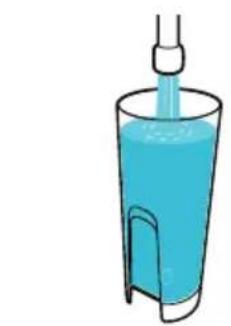
3 Fill up the water tank with fresh tap water.
text_image
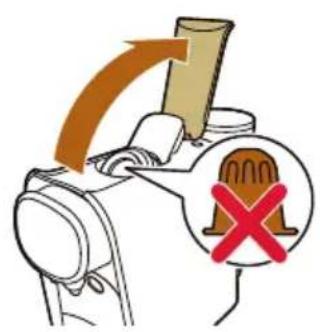
Diagram illustrating a mechanical device with an arrow indicating direction and a warning symbol with a cross.
4 Make sure that there is no capsule in the capsule compartment.
natural_image
Illustration of a washing machine with a blue liquid and orange arrow indicating airflow (no text or symbols)
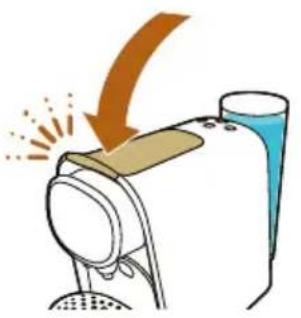
5 Close the lever.

text_image
1.5L
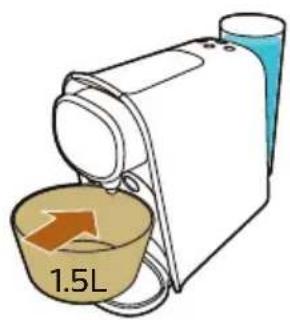
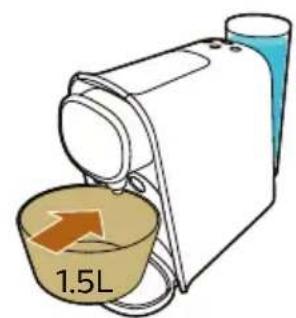
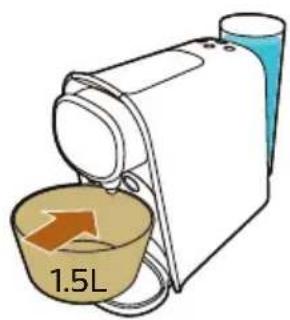
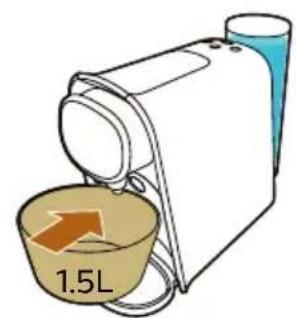
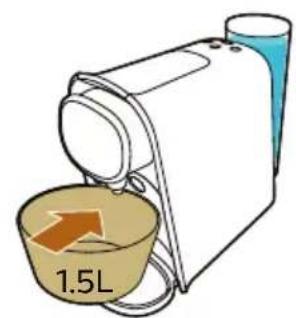
6 Place a bowl with a minimum capacity of 1.5 liters on the lower drip tray under the coffee dispensing spout to collect the descaling solution.
text_image
Diagram showing a hand pressing down on a device with a magnified view of three buttons labeled 'Power', 'Control', and 'Feedback'.
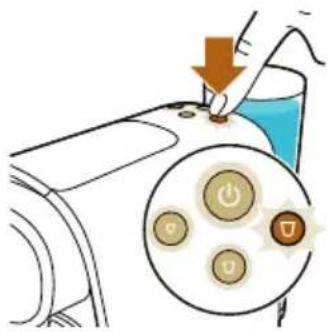
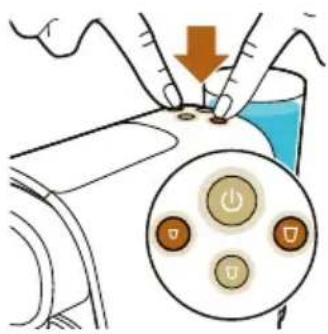
7 Press the ristretto and lungo button briefly at the same time.
text_image
Diagram showing a device with a downward arrow and a circular button interface displaying three labeled buttons.
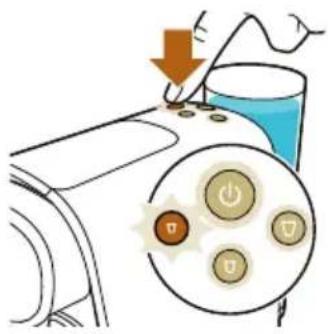
8 The ristretto button starts to flash quickly. Press the ristretto button to activate the descaling cycle. The machine dispenses the entire descaling solution at regular intervals. This takes up to 30 minutes.
- When the lungo button starts to flash quickly again, the first phase of the descaling cycle has finished.
natural_image
Illustration of a hand washing a bowl into a sink with a faucet (no text or symbols)
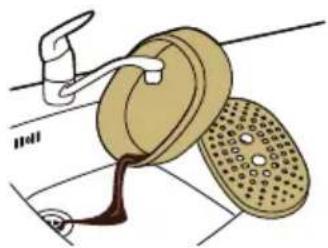
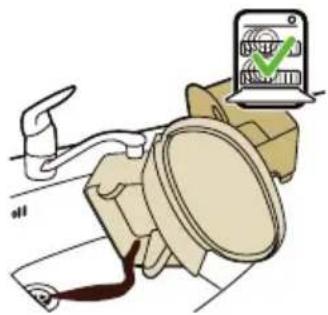
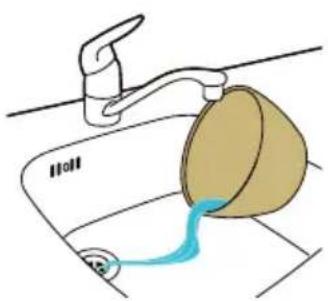
9 Remove and empty the bowl. Place the bowl back onto the lower drip tray under the coffee dispensing spout.
10 Remove the water tank and rinse it under the tap. Fill the water tank with cold tap water and place it back onto the machine.
text_image
Diagram showing a hand pressing down on a device with a magnified view of three buttons labeled 'Power', 'Battery', and 'Control'.
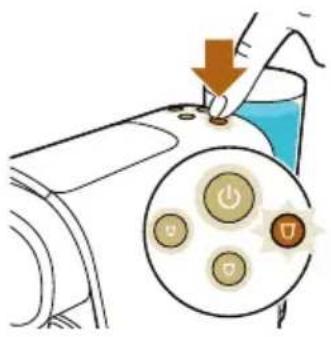
11 Press the lungo button to start the flushing cycle.
Note: The water tank will be emptied without interruption. The flushing cycle lasts about 3 minutes.
natural_image
Simple line drawing of a curved path with scattered dots and a green checkmark (no text or symbols)
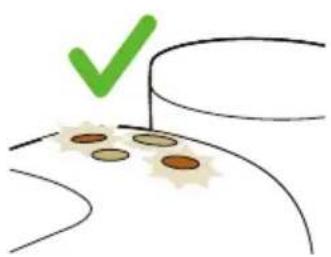
12 When the flushing cycle has finished, the ristretto and lungo button flash a few times.
Note: It is normal that some water remains behind in the water tank after the descaling procedure.
The machine switches off. The descaling procedure is finished.
Meaning of light signals
- The on/off button flashes slowly: the machine is heating up.
- The on/off button flashes quickly: the water tank is empty, fill the water tank with tap water.
- All buttons light up continuously: the machine is ready for use.
- The selected coffee button flashes slowly: the machine is preparing the coffee recipe.
- The selected coffee button flashes quickly:
- Programming is activated.
- The new coffee quantity is saved.
- The ristretto and lungo button flash simultaneously after brewing coffee: you need to descale the machine.
Troubleshooting
This chapter summarizes the most common problems you could encounter with your machine. If you are unable to solve the problem with the information below, visit www.lorbarista.com/support for a list of frequently asked questions or contact the Consumer Care Center in your country.
Problem
Possible cause Solution
| The machine does not switch on. | The machine is not connected to the mains. | Put the plug in an earthed wall socket. |
| The on/off button is flashing slowly. | The machine is heating up. This is normal. |
| The brewing time is longer than before. | The machine is clogging up with scale. | Descale the machine (see 'Descaling procedure'). |
Problem Possible cause Solution
| The temperature of freshly brewed coffee gradually decreases. | The machine is clogging up with scale. | Descale the machine (see 'Descaling procedure'). |
| The pump makes a lot of noise. | There is not enough water in the water tank. | Fill the water tank with fresh tap water. |
| The water tank is not placed correctly. | Place the water tank correctly and push it downwards. |
| The machine suddenly stops brewing coffee. | There is not enough water in the water tank. | Fill the water tank with fresh tap water. Press the button of the selected type of coffee again to continue brewing. When the cup is full, press the same button again to stop the brewing process. |
| The on/off button flashes quickly. | The water tank is empty. Fill the water tank with fresh tap water. Press the button of the selected type of coffee again to continue brewing. When the cup is full, press the same button again to stop the brewing process. |
| I cannot close the capsule compartment lever completely. | Check if you use the recommended L'OR capsule. Other capsules may cause problems during use.. | |
| The used capsule drawer is full. Empty the used capsule drawer and insert the capsule again. |
| The capsule is not inserted correctly. | Insert the capsule again and check if it is inserted correctly. |
| The capsule is stuck. Open and close the lever a few times with moderate force to remove the capsule. |
| The lever does not open completely. | The used capsule drawer is full. Empty the used capsule drawer. |
| The machine does not dispense coffee or only dispenses drops of coffee. | You have not flushed the machine before first use. | Flush the machine before first use (see 'Preparing for use'). |
| There is not enough water in the water tank. | Fill the water tank with fresh tap water. |
| Scale has built up inside the machine (see 'Descaling'). | Descale the machine (see 'Descaling'). |
Problem Possible cause Solution
| Coffee grounds end up in the cup of coffee. | A small amount of ground coffee will always end up on the bottom of the cup. | This is normal. |
| The coffee flow splits or is not straight. | The coffee dispensing spout cap is not placed correctly or it is missing. | Snap the coffee dispensing spout onto the coffee outlets. |
| The ristretto and lungo button lights are flashing after brewing. | This means it is time to descale the machine to prevent it from clogging with scale. | Descale the machine (see 'Descaling'). |
| Why do I find water in the waste water drawer? | The used capsule drawer and waste water drawer catch the residual water released after brewing coffee. | This is normal. |
| The coffee quantity is not what I expected. | The coffee quantity has been adjusted. | Readjust the coffee quantity (see 'Adjusting the coffee quantity') or reset the coffee quantities (see 'Resetting the coffee quantities'). |
| My coffee is less warm. When you brew the first cup of the day or when it has been a while since your previous cup of coffee, the inside of the machine is still cold when you brew coffee. | You can pre-heat the machine and coffee cup by brewing a cup of coffee first without placing a coffee capsule. |
| If you use a cold, thick-walled cup, the coffee will cool down immediately. | Use thin-walled cups, as thin-walled cups will absorb less heat from the coffee than thick-walled cups. Make sure the size of the cup matches the coffee quantity. Do not brew a small quantity of coffee in a large cup. |
| The machine is clogged with scale. | Descale the machine when the ristretto and lungo button flash quickly a few times after brewing (see 'Descaling'). |
| You used cold milk. If you drink coffee with cold, fresh milk, this will cool down your coffee. You can prevent this by preheating the milk. |
| The machine suddenly switches off after some time. | This is the automatic shut-off function. | The automatic shut-off function is programmed to switch off the machine after 9 minutes of inactivity to save energy. |
natural_image
Diagram of a hairdryer with an upward arrow indicating motion (no text or symbols)


text_image
Illustration showing a coffee maker with a red 'X' symbol indicating a rejection or rejection process, and a brown coffee cup pouring into it.

text_image
Diagram illustrating a medical procedure with labeled components and temperature measurement, including a circular dial indicator and thermometer.

text_image
Diagram showing a hand pressing down on a device with a magnified view of control buttons, indicating action or operation.
text_image
XXL
2x 25 ml
50 ml
Espresso

text_image
40 ml
Double espresso / Double shot of espresso
text_image
XXL
2x 40 ml
80 ml
Lungo

text_image
110 ml
Double lungo / Double shot of lungo

text_image
XXL
2x 110 ml
220 ml
Grand Café Filtre

text_image
220 ml
Kaffee zubereiten
natural_image
Simple line drawing of a mechanical device with a handle and base (no text or symbols)

natural_image
Line drawing of a mechanical device with a circular top and two side supports (no text or symbols)
text_image
Diagram illustrating a power switch mechanism with labeled buttons and a downward arrow indicating action
natural_image
Illustration of two cupcake cups with green arrows indicating selection or confirmation (no text or symbols)
natural_image
Diagram of a mechanical device with a lever and liquid, showing no text or symbols
natural_image
Illustration of a washing machine emitting powder from a bottle (no text or symbols)
natural_image
Diagram of two circular objects with perforated surfaces connected by a diagonal line, no text or symbols present
natural_image
Simple line drawing of a mechanical device with a handle and base (no text or symbols)
text_image
Diagram showing a hand pressing down on a machine with a magnified view of control buttons labeled 'Power' and 'Down'.
natural_image
Illustration of a mechanical device with a gear and handle, showing internal components and motion direction (no text or symbols)
natural_image
Illustration of a hand turning a circular component with a textured surface, no text or symbols present
natural_image
Illustration of a wooden box with open lid and open lid, showing internal compartments (no text or symbols)

natural_image
Illustration of a car with a switch and a smartphone displaying a green checkmark (no text or symbols on the car itself)
natural_image
Line drawing of a hand cleaning a cylindrical device with a cloth (no text or symbols)
natural_image
Illustration of a person's seatbelt with icons showing a device, gear, and a small object (no text or symbols)
natural_image
Illustration of a coffee machine with a cup and two cups (no text or symbols)
text_image
Diagram illustrating a warning or hazard symbol with an arrow and a cross, indicating incorrect use of a device.
text_image
Diagram showing a hand pressing down on a device with a magnified view of three buttons labeled 'Power', 'Battery', and 'Control'.
natural_image
Simple line drawing of a curved surface with scattered brown oval shapes (no text or symbols)
text_image
Diagram illustrating the process of pouring liquid into a glass, with two labeled bottles showing different conditions.
text_image
Diagram illustrating a device with an arrow and a warning symbol, indicating incorrect operation or failure.
natural_image
Illustration of a hand washing machine with a blue cup and orange arrow indicating motion (no text or symbols)
text_image
Diagram showing a hand pressing down on a device with a magnified view of three buttons labeled 'Power', 'Control', and 'Unstable'.
text_image
Diagram showing a hand pressing down on a device with a magnified view of control buttons and power symbols.
natural_image
Illustration of a faucet pouring liquid into a bowl on a sink (no text or symbols)
text_image
Diagram showing a hand pressing down on a device with a magnified view of three buttons labeled 'Power', 'Battery', and 'Discharge'.
natural_image
Simple line drawing of a curved path with scattered brown dots and a green checkmark (no text or symbols)
natural_image
Diagram of a hair dryer with an upward arrow indicating motion (no text or symbols present)

text_image
Illustration showing a coffee maker with a red 'X' symbol indicating a rejection or rejection process, and a brown coffee cup pouring into it.
text_image
Diagram illustrating a medical procedure with labeled components and temperature measurement, including a circular dial indicator and thermometer.
text_image
Diagram showing a hand pressing down on a device with a magnified view of control buttons, indicating action or operation.
text_image
XXL
2x 25 ml
50 ml
Espresso

text_image
40 ml
Double espresso / Double shot of espresso

text_image
XXL
2x 40 ml
80 ml
Lungo

text_image
110 ml
Double lungo / Double shot of lungo

text_image
XXL
2x 110 ml
220 ml
Grand Café Filtre

text_image
220 ml
natural_image
Simple line drawing of a mechanical device with a handle and base (no text or symbols)

natural_image
Simple line drawing of a device resembling a pump or stand (no text or symbols)
text_image
Diagram illustrating a power switch mechanism with labeled buttons and a downward arrow indicating action
natural_image
Illustration of two cupcake cups with green arrows indicating rotation and checkmark (no text or symbols)
natural_image
Illustration of a mechanical device with a lever and liquid, no text or symbols present
natural_image
Illustration of a washing machine with a hand emitting powder from a bottle (no text or symbols)
3 Cierre la palanca.

natural_image
Diagram of two circular objects with perforated surfaces connected by a diagonal line, no text or symbols present
natural_image
Simple line drawing of a mechanical device with a handle and base (no text or symbols)
text_image
Diagram showing a hand pressing down on a machine with a magnified view of control buttons labeled 'Power' and 'Down'.
natural_image
Illustration of a medical device with a magnified view showing internal components and a directional arrow (no text or symbols)
natural_image
Illustration of a hand turning a car wheel with a textured seat cover (no text or symbols)
natural_image
Illustration of a wooden box with open lid and open lid, showing internal compartments (no text or symbols)

natural_image
Illustration of a person using a device with a green checkmark (no text or symbols present)
natural_image
Line drawing of a hand cleaning a small mechanical device with a cloth (no text or symbols)
natural_image
Illustration of a car seatbelt with three components and a small inset showing a device with a checkmark (no text or symbols present)
natural_image
Illustration of a coffee machine with a cup and two cups (no text or symbols)
text_image
Diagram illustrating a warning or hazard with an arrow pointing to a device and a red 'X' symbol indicating no risk.
text_image
Diagram showing a hand pressing down on a device with a magnified view of three buttons labeled 'Power', 'Battery', and 'Control'.
natural_image
Simple line drawing of a curved surface with scattered circular elements (no text or symbols)
text_image
Diagram illustrating a chemical process with two bottles labeled 'PHILIPS' pouring liquid into a glass, showing the same setup.
text_image
Diagram illustrating a device with a hammer and arrow, indicating mechanical or electrical hazard, and a red 'X' symbol highlighting a specific component.
natural_image
Illustration of a machine emitting exhaust from a bottle, showing airflow direction (no text or symbols)
5 Cierre la palanca.

text_image
1.5L
text_image
Diagram showing a hand pressing down on a device with a magnified view of three buttons labeled 'Power', 'Control', and 'Unlabeled'.
text_image
Diagram showing a hand pressing down on a device with a magnified view of control buttons and power symbols.
natural_image
Illustration of a faucet pouring liquid into a bowl on a sink (no text or symbols)
text_image
Diagram showing a hand pressing down on a device with a magnified view of three buttons labeled 'Power', 'Battery', and 'Discharge'.
natural_image
Simple line drawing of a curved path with scattered brown dots and a green checkmark (no text or symbols)
natural_image
Diagram of a hair dryer with an upward arrow indicating motion (no text or symbols present)

text_image
Illustration showing a coffee maker with a red 'X' symbol indicating a rejection or rejection process, and a brown coffee cup pouring into it.
text_image
Diagram illustrating a medical procedure with labeled components and temperature measurement, including a circular dial indicator and thermometer.
text_image
Diagram showing a hand pressing down on a device with a magnified view of control buttons, indicating action or operation.
text_image
XXL
2x 25 ml
50 ml
Espresso

text_image
40 ml
Double espresso / Double shot of espresso
text_image
XXL
2x 40 ml / 80 ml
Lungo

text_image
110 ml
Double lungo / Double shot of lungo

text_image
XXL
2x 110 ml
220 ml
Grand Café Filtre

text_image
220 ml
Préparation du café
natural_image
Simple line drawing of a mechanical device with a handle and base (no text or symbols)

natural_image
Simple line drawing of a mechanical device with a circular top and two triangular bases (no text or symbols)
text_image
Diagram illustrating a power switch mechanism with labeled buttons and a downward arrow indicating action
natural_image
Illustration of two cupcake cups with green arrows indicating rotation and checkmark (no text or symbols)
natural_image
Illustration of a mechanical device with a lever and liquid, no text or symbols present
natural_image
Illustration of a washing machine with a hand emitting powder from a bottle (no text or symbols)
3 Fermez le levier.

natural_image
Diagram of two circular objects with perforated surfaces connected by a diagonal line, no text or symbols present
natural_image
Simple line drawing of a mechanical device with a handle and base (no text or symbols)
text_image
Diagram showing a hand pressing down on a device with a magnified view of three buttons labeled 1, 2, and 3.
natural_image
Illustration of a mechanical device with internal components and an orange arrow indicating motion (no text or symbols)

natural_image
Illustration of a hand turning a valve into a circular component with a textured surface (no text or symbols)
natural_image
Illustration of a box with an open lid and a paperclip, showing internal components (no text or symbols)

natural_image
Illustration of a car with a switch and a smartphone displaying a green checkmark (no text or symbols on the car itself)
natural_image
Line drawing of a hand cleaning a small mechanical device with a cloth (no text or symbols)
natural_image
Illustration of a car seatbelt with a magnified inset showing a device and gear (no text or symbols)
natural_image
Illustration of a coffee machine with a cup and two cups (no text or symbols)
text_image
Diagram illustrating a device with a hammer and a warning symbol, indicating no change or absence of text.

text_image
Diagram showing a hand pressing down on a device with a magnified view of three buttons labeled 'Power', 'Battery', and 'Control'.
natural_image
Simple line drawing of a curved surface with scattered brown oval shapes (no text or symbols)
text_image
Illustration showing three steps of a beverage preparation: pouring liquid into a glass, adding liquid to a tall beaker, and using a stand mixer with a red 'X' symbol.
natural_image
Illustration of a hand washing machine with a bottle and fan, showing motion direction (no text or symbols)
5 Fermez le levier.

text_image
1.5L
text_image
Diagram showing a hand pressing down on a device with a magnified view of three buttons labeled 'Power', 'Control', and 'Feedback'.
text_image
Diagram showing a device with a downward arrow and a circular button interface displaying three labeled buttons.
natural_image
Illustration of a hand washing a bowl with liquid, placed on a kitchen sink (no text or symbols)
text_image
Diagram showing a hand pressing down on a device with a magnified view of three buttons labeled 'Power', 'Battery', and 'Control'.
natural_image
Simple line drawing of a curved path with scattered dots and a green checkmark (no text or symbols)
natural_image
Diagram of a hairdryer with an upward arrow indicating motion (no text or symbols)

text_image
Illustration showing a coffee maker with a red 'X' symbol indicating a rejection or rejection process, and a brown coffee cup pouring into it.
text_image
Diagram illustrating a medical procedure with labeled components and temperature measurement, including a circular dial indicator and thermometer.
text_image
Diagram showing a hand pressing down on a device with a magnified view of control buttons, indicating action or operation.
text_image
XXL
2x 25 ml
50 ml
Espresso

text_image
40 ml
Double espresso / Double shot of espresso
text_image
XXL
2x 40 ml
80 ml
Lungo

text_image
110 ml
Double lungo / Double shot of lungo

text_image
XXL
2x 110 ml
220 ml
Grand Café Filtre

text_image
220 ml
Koffie bereiden
natural_image
Simple line drawing of a mechanical device with a handle and base (no text or symbols)

natural_image
Simple line drawing of a device resembling a pump or stand (no text or symbols)
text_image
Diagram illustrating a power switch mechanism with labeled buttons and a magnified circular button showing 'Power' and 'U'.
natural_image
Illustration of two cupcake cups with green arrows indicating rotation and checkmark (no text or symbols)
natural_image
Illustration of a mechanical device with a lever and blue liquid, no text or symbols present
natural_image
Illustration of a machine emitting powder from a bottle, with no visible text or symbols
3 Duw de hendel omlaag.

natural_image
Diagram of two circular objects with perforated surfaces connected by a diagonal line, no text or symbols present
natural_image
Simple line drawing of a mechanical device with a handle and base (no text or symbols)
text_image
Diagram showing a hand pressing down on a device with a magnified view of three buttons labeled 1, 2, and 3.
natural_image
Illustration of a medical device with a hand pointing to a device component (no text or symbols visible)

natural_image
Illustration of a hand holding a circular object with a handle, next to a perforated plate (no text or symbols)
natural_image
Illustration of a wooden box with open lid and open lid, showing internal compartments (no text or symbols)

natural_image
Illustration of a medical device with a screen showing a green checkmark (no text or symbols present)
natural_image
Line drawing of a hand cleaning a small kitchen appliance with a cloth (no text or symbols)

natural_image
Illustration of a car seatbelt with a small inset showing a device and a green checkmark (no text or symbols)
natural_image
Illustration of a coffee machine with a cup and two cups (no text or symbols)
text_image
Diagram illustrating a warning or hazard symbol with an arrow and a cross, indicating incorrect use of a device.
text_image
Diagram showing a hand pressing down on a device with a magnified view of three buttons labeled 'Power', 'Battery', and 'Control'.
natural_image
Simple line drawing of a curved surface with scattered brown oval shapes (no text or symbols)
text_image
Diagram illustrating a chemical process with two bottles labeled 'PHILIPS' pouring liquid into a glass, showing the same setup.
text_image
Diagram illustrating a device with an arrow and a warning symbol, indicating a hazard or failure.
natural_image
Illustration of a hand washing machine with a blue cup and orange arrow indicating motion (no text or symbols)
5 Duw de hendel omlaag.

text_image
1.5L
text_image
Diagram showing a hand pressing down on a device with a magnified view of three buttons labeled 'Power', 'Control', and 'Unlabeled'.
text_image
Diagram showing a hand pressing down on a device with a magnified view of control buttons and power symbols.
natural_image
Illustration of a faucet pouring liquid into a bowl on a sink (no text or symbols)
text_image
Diagram showing a hand pressing down on a device with a magnified view of three buttons labeled 'Power', 'Battery', and 'Discharge'.
natural_image
Simple line drawing of a curved path with scattered brown dots and a green checkmark (no text or symbols)
natural_image
Diagram of a hair dryer with an upward arrow indicating motion (no text or symbols present)

text_image
Illustration showing a coffee maker with a red 'X' symbol indicating a rejection or rejection process, and a brown coffee cup pouring into it.
text_image
Diagram illustrating a medical procedure with labeled components and temperature measurement, including a circular dial indicator and thermometer.
text_image
Diagram showing a hand pressing down on a device with a magnified view of control buttons, indicating action or operation.
text_image
XXL
2x 25 ml
50 ml
Espresso

text_image
40 ml
Double espresso / Double shot of espresso
text_image
XXL
2x 40 ml
80 ml
Lungo

text_image
110 ml
Double lungo / Double shot of lungo

text_image
XXL
2x 110 ml
220 ml
Grand Café Filtre

text_image
220 ml
Preparar café
natural_image
Simple line drawing of a mechanical device with a handle and base (no text or symbols)

natural_image
Simple line drawing of a mechanical device with a handle and base (no text or symbols)
text_image
Diagram illustrating a power switch mechanism with labeled buttons and a downward arrow indicating action
natural_image
Illustration of two cupcake cups with green arrows indicating rotation and checkmark (no text or symbols)
1 Retire o selo da cápsula por completo.
natural_image
Illustration of a mechanical device with a lever and liquid, no text or symbols present
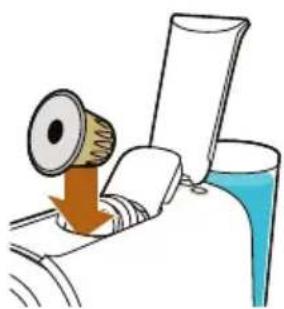
2 Levante o manípulo e insira a cápsula.
natural_image
Illustration of a washing machine with a hand emitting powder from a bottle (no text or symbols)
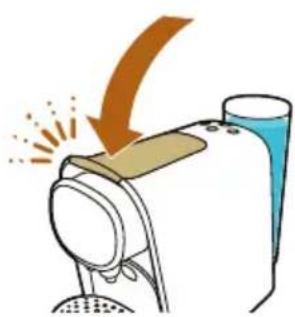
3 Feche o manípulo.

natural_image
Diagram of two circular objects with perforated surfaces connected by a diagonal line, no text or symbols present
natural_image
Simple line drawing of a mechanical device with a handle and base (no text or symbols)
text_image
Diagram showing a hand pressing down on a device with a magnified view of three buttons labeled 1, 2, and 3.
natural_image
Illustration of a medical device with a magnified view showing internal components (no text or symbols)
natural_image
Illustration of a hand turning a car doorbell with a textured seat (no text or symbols)
natural_image
Illustration of a wooden box with open lid and open lid, showing internal compartments (no text or symbols)

natural_image
Illustration of a mechanical device with a magnified view showing a green checkmark on its screen (no text or symbols present)
natural_image
Line drawing of a hand cleaning a small kitchen appliance with a cloth (no text or symbols)
natural_image
Illustration of a car's seatbelt with icons showing a laptop, gear, and bucket (no text or symbols)
natural_image
Illustration of a coffee machine with a cup and side dish (no text or symbols)
text_image
Diagram illustrating a device with a hammer and a warning symbol, indicating incorrect operation or absence of text.
text_image
Diagram showing a hand pressing down on a device with a circular button labeled with icons for power, switch, and power button.
natural_image
Simple line drawing of a curved surface with scattered circular elements (no text or symbols)
text_image
Illustration showing a glass pouring liquid into a bottle, with two labeled bottles and an arrow indicating the process.
text_image
Diagram illustrating a device with an arrow and a warning symbol, indicating incorrect operation or failure.
natural_image
Illustration of a hand washing machine with a blue cup and orange arrow indicating motion (no text or symbols)
5 Feche o manipulo.

text_image
1.5L
text_image
Diagram showing a hand pressing down on a device with a magnified view of three buttons labeled 'Power', 'Control', and 'Unlabeled'.
text_image
Diagram showing a hand pressing down on a device with a magnified view of control buttons and power symbols.
natural_image
Illustration of a faucet pouring liquid into a bowl (no text or symbols)
text_image
Diagram showing a hand pressing down on a device with a circular button labeled 'Power' and 'Switch', indicating action or control.
natural_image
Simple line drawing of a curved path with scattered brown dots and a green checkmark above (no text or symbols)
natural_image
Abstract digital artwork with flowing, muted tones and no visible text or symbols