ManualGo.com
WS 9273 - Weather Station Techno Line - Free user manual and instructions
Find the device manual for free WS 9273 Techno Line in PDF.



Download the instructions for your Weather Station in PDF format for free! Find your manual WS 9273 - Techno Line and take your electronic device back in hand. On this page are published all the documents necessary for the use of your device. WS 9273 by Techno Line.
USER MANUAL WS 9273 Techno Line
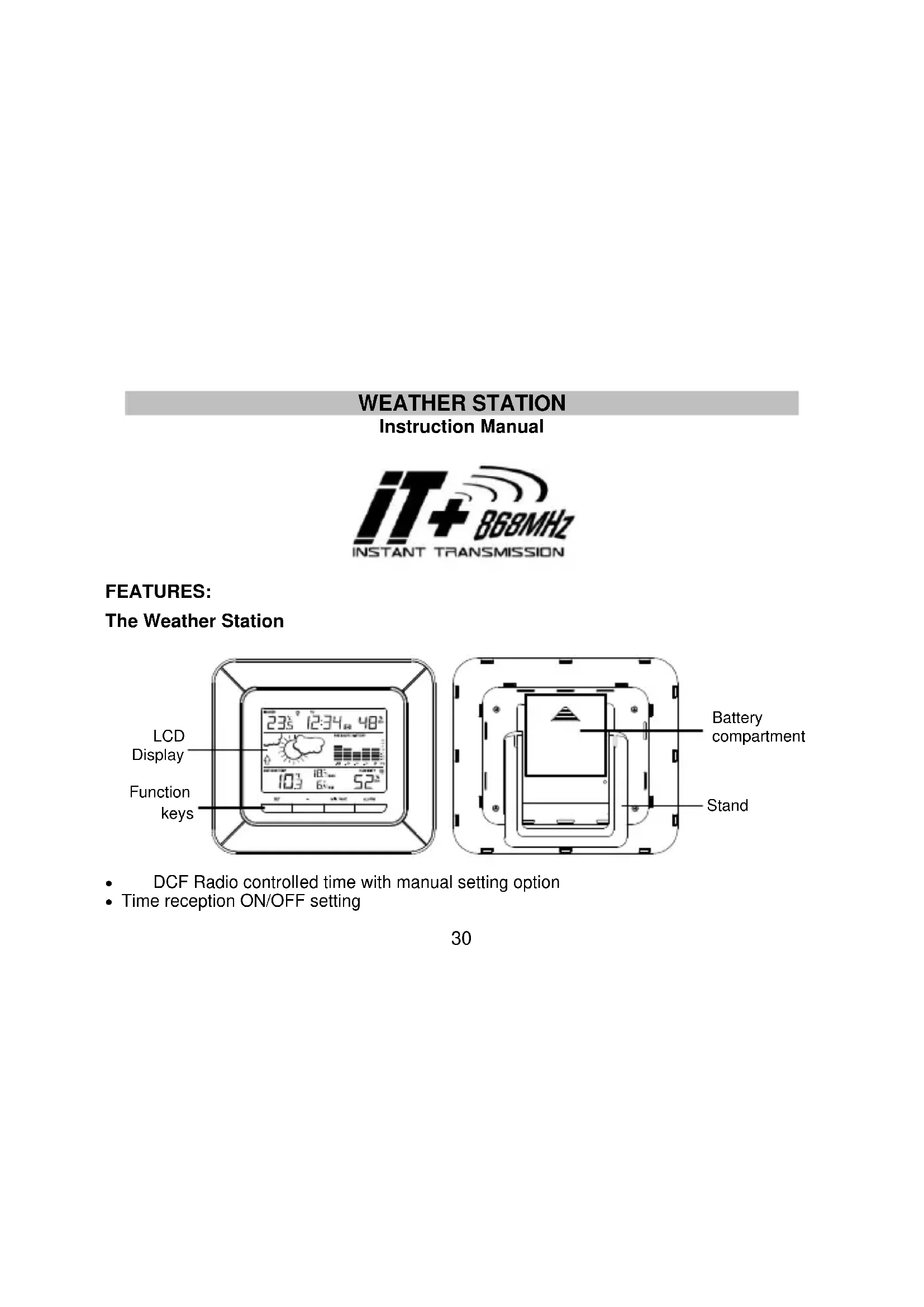
FEATURES: The Weather Station
DCF Radio controlled time with manual setting option Time reception ON/OFF setting Battery compartment31 Weekday, date and month display (year only in setting mode) Time zone option (-2h to +5h) Daylight saving time (DST) setting Alarm setting Temperature display in degree Celsius (°C) Indoor temperature display with MIN/MAX recordings Outdoor temperature display with MIN/MAX recordings with time and date received All MIN/MAX recordings can be reset Indoor and outdoor humidity display in RH% Weather forecast with weather tendency indicator Relative air pressure history for the past 12 hours LCD contrast setting Low battery indicators Foldout table stand Thermo-Hygro Transmitter Remote transmission of outdoor temperature and humidity to weather station by 868MHz Wall mounting case Mounting at a sheltered place. Avoid direct rain and sunshine32 TO INSTALL AND REPLACE BATTERIES IN THE THERMO-HYGRO TRANSMITTER The outdoor thermo-hygro transmitter uses 2 x AAA, IEC LR3, 1.5V batteries. To install and replace the batteries, please follow the steps below:
1. Remove the battery cover by pushing the battery cover upwards with
2. Insert the batteries, observing the correct polarity (see battery
compartment marking).
3. Replace the battery cover on the unit.
TO INSTALL AND REPLACE BATTERIES IN THE WEATHER STATION The weather station uses 2 x C, IEC LR14, 1.5V batteries. To install and replace the batteries, please follow the steps below:
1. Remove the battery cover by sliding the
battery cover upwards.
2. Insert batteries observing the correct
polarity (see marking).
3. Replace compartment cover.
Note: In the event of changing batteries in any of the units, all units need to be reset by following the setting up procedures. This is33 due to a random security code assigned by the transmitter at start-up. This code must be received and stored by the weather station in the first 3 minutes of power being supplied to the transmitter. BATTERY CHANGE: It is recommended to replace the batteries in all units on an annual basis to ensure optimum accuracy of these units. Please participate in the preservation of the environment. Return used batteries to an authorized depot.
1. First, insert the batteries in the transmitter (see “To install and replace batteries in
the thermo-hygro transmitter” above).
2. Within 2 minutes of powering up the transmitter, insert the batteries in the weather
station (see “To install and replace batteries in the weather station” above). Once the batteries are in place, all segments of the LCD will light up briefly. Following the indoor temperature/humidity and the time as 00:00 will be displayed. If this information is not displayed on the LCD after 60 seconds, remove the batteries and wait for at least 60 seconds before reinserting them. Once the indoor data is displayed user may proceed to the next step.
3. After the batteries are inserted, the weather station will start receiving data signal from
the transmitter. The outdoor temperature and humidity data should then be displayed on the weather station. If this does not happen after 2 minutes, the batteries will need34 to be removed from both units and reset from step 1.
4. In order to ensure sufficient 868 MHz transmission however, the distance between the
weather station and the transmitter should not be more than 100 meters (see notes on “Positioning” and “868 MHz Reception”). Note: In the event of changing batteries of the units, ensure the batteries do not spring free from the contacts. Always wait at least 1 minute after removing the batteries before reinserting, otherwise start up and transmission problems may occur.
5. Once the outdoor data reception test period is completed, the DCF tower icon in the
clock display will start flashing in the upper left corner. This indicates that the clock has detected that there is a radio signal present and is trying to receive it. When the time code is received, the DCF tower becomes permanently lit and the time will be displayed.
DCF RADIO CONTROLLED TIME
The time base for the radio controlled time is a Cesium Atomic Clock operated by the Physikalisch Technische Bundesanstalt Braunschweig which has a time deviation of less than one second in one million years. The time is coded and transmitted from Mainflingen near Frankfurt via frequency signal DCF-77 (77.5 kHz) and has a transmitting range of approximately 1,500 km. Your radio-controlled weather station receives this signal and converts it to show the precise time in summer or wintertime. The quality of the reception depends greatly on the geographic location. In normal cases, there should be no reception problems within a 1,500 km radius of Frankfurt. DCF reception is done twice daily at 02:00 and 03:00 am. If the reception is not successful at 03:00 am, then the next reception takes place the next hour and so on until 06:00am, or until35 the reception is successful. If the reception is not successful at 06:00 am, then the next attempt will take place the next day at 02:00 am. If the tower icon flashes, but does not set the time or the DCF tower does not appear at all, then please take note of the following: Recommended distance to any interfering sources like computer monitors or TV sets is a minimum of 1.5 - 2 meters. Within ferro-concrete rooms (basements, superstructures), the received signal is naturally weakened. In extreme cases, please place the unit close to a window and/ or point its front or back towards the Frankfurt transmitter. During nighttime, the atmospheric disturbances are usually less severe and reception is possible in most cases. A single daily reception is adequate to keep the accuracy deviation below 1 second. FUNCTION KEYS: Weather station: The weather station has 4 easy to use function keys: SET key + key MIN/MAX key ALARM key36 SET key Press and hold for 2 seconds to enter manual setting modes: LCD contrast, time zone, time reception ON/OFF, DST ON/OFF, manual time setting and calendar To stop the alarm sound + key To increase/change values in setting modes Toggle between time / date / indoor humidity / seconds display To stop the alarm sound MIN/MAX key To toggle between the indoor and outdoor MIN/MAX temperature To decrease/change values in setting modes Press and hold for 3 seconds to reset ALL indoor/outdoor minimum/maximum temperature recordings to current readings To stop the alarm sound ALARM key To activate/deactivate the alarm and display alarm time Press and hold for 2 seconds to enter the alarm setting mode To stop the alarm sound To exit the manual setting mode37 LCD SCREEN The LCD screen is split into 3 sections displaying the information for time/calendar, indoor data, weather forecast and air pressure history, and outdoor data.
DCF signal reception icon Low battery indicator (weather station) Weather forecast icon Air pressure history bar graph Outdoor data signal reception indicator * Weather tendency indicator Low battery indicator (outdoor transmitter) Outdoor temperature in °C MIN/MAX outdoor temperature display Weekday Indoor Temperature in °C Time Alarm icon Outdoor humidity display in RH% Indoor humidity display in RH% Summer time indicator38
- When the signal is successfully received by the weather station, the outdoor transmission icon will be switched on. (If not successful, the icon will not be shown on LCD). The user can then easily see whether the last reception was successful (icon on) or not (icon off). MANUAL SETTINGS The following settings can be changed when pressing and holding the SET key: LCD contrast setting Time zone setting Time reception ON/OFF setting Daylight saving time (DST) ON/OFF setting Manual time setting Calendar setting
The LCD contrast can be set within 8 levels, from LCD 0 to LCD 7 (Default is LCD 3):
1. The LCD contrast level starts flashing.
2. Use the + or MIN/MAX key to select the level of contrast desired.
3. Confirm with the SET key and enter the Time Zone Setting.
The time zone default of the weather station is “0”. To set a different time zone:
1. The current time zone value starts flashing.
2. Use the + or MIN/MAX key to set the time zone. The range runs from -2h to +5h hours
in 1-hour intervals.
3. Confirm with the SET key and enter the Time Reception ON/OFF Setting.
TIME RECEPTION ON/OFF SETTING
In area where reception of the DCF-77 time signal is not possible, the DCF-77 time reception function can be turned OFF. The clock will then work as a normal quartz clock. (Default setting is “1” = ON).
1. The digit “1” will start flashing on the LCD.
2. Use the + or MIN/MAX key to turn OFF (“0” = OFF) the time reception function.
3. Confirm with the SET key and enter the Daylight Saving Time (DST) ON/OFF
Flashing Flashing40 Note: If the Time Reception function is turned OFF manually, the clock will not attempt any reception of the DCF time as long as the Time Reception OFF function is activated. The time reception “ “ and the “DCF” icons will not be displayed on the LCD. DAYLIGHT SAVING TIME (DST) ON/OFF SETTING
The daylight saving time (DST) function can be set ON/OFF. Default setting is “1” = ON:
1. The digit “1” will start flashing on the LCD.
2. Use the + or MIN/MAX key to turn OFF (“0” = OFF) the daylight saving function.
3. Confirm with the SET key and enter the Manual Time setting.
MANUAL TIME SETTING: In case the weather station cannot detect the DCF-signal (for example due to disturbances, transmitting distance, etc.), the time can be manually set. The clock will then work as a normal quartz clock.
1. The hour digit will start flashing.
3. Press again the SET key to set the minutes. The minute digits start flashing.
5. Confirm with the SET key and enter the Calendar setting.
Note: The unit will still try and receive the signal despite it being manually set. When it does receive the signal, it will change the manually set time into the received time. During reception attempts the DCF tower icon will flash. If reception has been unsuccessful, then the DCF tower icon will not appear but reception will still be attempted the following day. The time reception “ “ and the “DCF” icons will not be displayed on the LCD after manual time setting. CALENDAR SETTING
1. The year digits will start flashing. The range runs from 2011 to 2025 (default is 2011).
Weekday Year Date. Month.42
2. Use the + or MIN/MAX key to set the year. Keep holding the key allows the value to
3. Press the SET key to confirm and enter the month setting mode.
4. The month digit will be flashing. Use the + or MIN/MAX key to set the month. Keep
holding the key allows the value to advance faster.
5. Press the SET key to enter date setting.
6. The date digit will be flashing. Use the + or MIN/MAX key to set the date. Keep holding
the key allows the value to advance faster.
7. Confirm with the SET key and exit the manual setting.
Note: The weekday is automatically displayed above the time in short form (from Monday to Sunday): MO / TU / WE / TH / FR / SA / SU.
TO EXIT THE MANUAL SETTING MODE
To exit the manual setting mode anytime during the manual setting, press the ALARM key. The mode will return to normal time display. ALARM SETTING
1. Press and hold ALARM key for 3 seconds until the alarm time shown.
Alarm time (flashing) Alarm indicator (ON)43 Rainy
2. The hour digit will be flashing. Use the + or MIN/MAX key to adjust the hour. Keep
holding the key allows the value to advance faster.
3. Use the ALARM key again, and the minute digits will be flashing. Press + or MIN/MAX
key to set the minute. Keep holding the key allows the value to advance faster.
4. Press the ALARM key to confirm the setting.
Note: To activate/deactivate the alarm function, press the ALARM key once. The display of the alarm icon represents that the alarm is "ON". The duration of alarm sounding is 2 minutes. Press any key will stop the alarm sound. WEATHER FORECASTING ICONS: The weather icons in the second section of LCD can be displayed in any of the following combinations:
For every sudden or significant change in the air pressure, the weather icons will update accordingly to represent the change in weather. If the icons do not change, then it means either the air pressure has not changed or the change has been too slow for the weather station to register. However, if the icon displayed is a sun or raining cloud, there will be no Sunny Cloudy with sunny intervals44 change of icon if the weather gets any better (with sunny icon) or worse (with rainy icon) since the icons are already at their extremes. The icons displayed forecasts the weather in terms of getting better or worse and not necessarily sunny or rainy as each icon indicates. For example, if the current weather is cloudy and the rainy icon is displayed, it does not mean that the product is faulty because it is not raining. It simply means that the air pressure has dropped and the weather is expected to get worse but not necessarily rainy. Note: After setting up, readings for weather forecasts should be disregarded for the next 12-24 hours. This will allow sufficient time for the weather station to collect air pressure data at a constant altitude and therefore result in a more accurate forecast. Common to weather forecasting, absolute accuracy cannot be guaranteed. The weather forecasting feature is estimated to have an accuracy level of about 75% due to the varying areas the weather station has been designed for use. In areas that experience sudden changes in weather (for example from sunny to rain), the weather station will be more accurate compared to use in areas where the weather is stagnant most of the time (for example mostly sunny). If the weather station is moved to another location significantly higher or lower than its initial standing point (for example from the ground floor to the upper floors of a house), discard the weather forecast for the next 12-24 hours. By doing this, the weather station will not mistake the new location as being a possible change in air-pressure when really it is due to the slight change of altitude.45
WEATHER TENDENCY INDICATOR
The weather tendency indicators (located on the left side of the weather icons) are working together with the weather icons. When the indicator points upwards, it means that the air- pressure is increasing and the weather is expected to improve, but when indicator points downwards, the air-pressure is dropping and the weather is expected to become worse. Taking this into account, one can see how the weather has changed and is expected to change. For example, if the indicator is pointing downwards together with cloud and sun icons, then the last noticeable change in the weather was when it was sunny (the sun icon only). Therefore, the next change in the weather will be cloud with rain icons since the indicator is pointing downwards. Note: Once the weather tendency indicator has registered a change in air pressure, it will remain permanently visualized on the LCD. AIR PRESSURE HISTORY (ELECTRONIC BAROMETER WITH BAROMETRIC PRESSURE TREND) The right side of the second section of the LCD shows the air pressure history bar graph.
Air pressure trend over the last 12 hours46 The bar graph indicates the air pressure history trend over the last 12 hours in 7 intervals: 0h, -3h, -6h, -9h and -12h. The “0h” represents the current full hour air pressure recording. The columns represent the “hPa” (0, ±1, ±3, ±5) at specific time. The “0” in the middle of this scale is equal to the current pressure and each change (±1, ±3, ±5) represents how high or low in “hPa“ the past pressure was compared to the current pressure. If the bars are rising it means that the weather is getting better due to the increase of air pressure. If the bars go down, it means the air pressure has dropped and the weather is expected to get worse from the present time “0h“. Note: For accurate barometric pressure trends, the weather station should operate at the same altitude for recordings (i.e. it should not be moved from the ground to the second floor of the house). When the unit is moved to a new location, discard readings for the next 12 hours.
INDOOR TEMPERATURE/HUMIDITY DATA
The indoor temperature and humidity data are automatically updated and displayed on the first section of the LCD.
Indoor relative humidity in RH% Indoor temperature in ºC47
OUTDOOR TEMPERATURE/HUMIDITY DATA
The last LCD section shows the outdoor temperature and humidity, and the reception indicator.
TOGGLING AND RESETTING THE TEMPERATURE MIN/MAX DATA TO VIEW THE MIN/MAX TEMPERATURE DATA Press the MIN/MAX key several times to view the MIN/MAX indoor and outdoor temperature sequentially. Note: the outdoor MIN/MAX temperature records will also display the recorded time and date.
Outdoor humidity in RH% Outdoor reception icon Outdoor temperature in C Recorded time of the outdoor MIN/MAX records Recorded date of the outdoor MIN/MAX records MAX outdoor temperature MAX icon (outdoor temperature)48
TO RESET TEMPERATURE MIN/MAX DATA
Press and hold MIN/MAX key for 3 seconds to reset all the indoor and outdoor temperature to current temperatures.
ABOUT THE THERMO-HYGRO TRANSMITTER
The range of the thermo-hygro transmitter may be affected by the temperature. At cold temperatures the transmitting distance may be decreased. Please bear this in mind when positioning the transmitters. Also the batteries may be reduced in power for the thermo-hygro transmitter. CHECKING FOR 868MHz RECEPTION If the outdoor temperature and humidity data are not being received within three minutes after setting up (or outdoor display always shows “- -.-” in the outdoor section of the weather station during normal operation), please check the following points:
1. The distance of the weather station or transmitters should be at least 2 meters away
from any interfering sources such as computer monitors or TV sets.
2. Avoid placing the transmitters onto or in the immediate proximity of metal window
3. Using other electrical products such as headphones or speakers operating on the
868MHz-signal frequency may prevent correct signal transmission or reception. Neighbors using electrical devices operating on the 868MHz-signal frequency can also cause interference. Note: When the 868MHz signal is received correctly, do not re-open the battery cover of either the transmitter or weather station, as the batteries may spring free from the contacts and force a49 false reset. Should this happen accidentally then reset all units (see “Setting up” above) otherwise transmission problems may occur. The transmission range is around 100 meters from the thermo-hygro transmitter to the weather station (in open space). However, this depends on the surrounding environment and interference levels. If no reception is possible despite the observation of these factors, all system units have to be reset (see “Setting up” above).
POSITIONING THE WEATHER STATION
Foldout table stand: The foldout table stand leg is located on the backside. Pull the stand out from the bottom center edge of the weather station, below the battery compartment. Once the foldout table stand is extended, place the weather station in an appropriate location.
Mounting at a sheltered place. Avoid direct rain and sunshine. The thermo-hygro transmitter can be placed onto any flat surface or wall mount using the bracket which doubles as a stand or wall mount base.50 To wall mount:
1. Secure the bracket onto a desired wall using the screws and plastic
2. Clip the transmitter onto the bracket.
Note: Before permanently fixing the thermo-hygro to the wall base, pace all units in the desired locations to check that the outdoor temperature and humidity readings are receivable. In event that the signal is not received, relocate the thermo-hygro transmitter or the weather station slightly as this may help the signal reception. CARE AND MAINTENANCE: Extreme temperatures, vibration and shock should be avoided as these may cause damage to the units and give inaccurate forecasts and readings. When cleaning the display and casings, use a soft damp cloth only. Do not use solvents or scouring agents as they may mark the LCD and casings. Do not submerge the units in water. Immediately remove all low powered batteries to avoid leakage and damage. Replace only with new batteries of the recommended type. Do not make any repair attempts to the units. Return it to their original point of purchase for repair by a qualified engineer. Opening and tampering with the units may invalidate their guarantee. Do not expose the units to extreme and sudden temperature changes, this may lead to rapid changes in forecasts and readings and thereby reduce their accuracy.51 SPECIFICATIONS Temperature measuring range: Indoor : -9.9ºC to +59.9ºC with 0.1ºC resolution +14.2ºF to +139.8ºF with 0.2ºF resolution (“OF.L” displayed if outside this range) Outdoor : -39.9ºC to +59.9ºC with 0.1ºC resolution -39.8ºF to +139.8ºF with 0.2ºF resolution (“OF.L” displayed if outside this range, “---“ displayed if no transmitter signal) Humidity measuring range: Indoor humidity range : 20% to 95% with 1% resolution (Display “- -“ if temperature is OF.L; display “19%“ if < 20% and “96%” if > 95%) Outdoor humidity range : 1% to 99% with 1% resolution (Display “- -“ if outside temperature is OF.L; display 1% if < 1% and 99% if > 99%) Data checking intervals: Indoor : every 16 seconds Outdoor : every 4 seconds Transmission range : up to 100 meters (open space) Power consumption (alkaline batteries recommended): Weather station : 2 x C, IEC, LR14, 1.5V Battery life : up to 24 months Transmitter : 2 x AAA, IEC, LR3, 1.5V Battery life : up to 12 months Dimensions (L x W x H): Weather station : 170.4 x 34.3 x 148.8 mm Transmitter : 36 x 16 x 102.6 mm52 LIABILITY DISCLAIMER: The electrical and electronic wastes contain hazardous substances. Disposal of electronic waste in wild country and/or in unauthorized grounds strongly damages the environment Please contact your local or/and regional authorities to retrieve the addresses of legal dumping grounds with selective collection All electronic instruments must from now on be recycled. User shall take an active part in the reuse, recycling and recovery of the electrical and electronic waste. The unrestricted disposal of electronic waste may do harm on public health and the quality of environment. This product must however not be thrown in general rubbish collection points. As stated on the gift box and labeled on the product, reading the “User manual” is highly recommended for the benefit of the user. The manufacturer and supplier cannot accept any responsibility for any incorrect readings and any consequences that occur should an inaccurate reading take place. This product is not to be used for medical purposes or for public information. This product is only designed to be used in the home as indication of the future weather and is not 100% accurate. Weather forecasts given by this product should be taken only as an indication and not as being totally accurate. The specifications of this product may change without prior notice. This product is not a toy. Keep out of the reach of children. No part of this manual may be reproduced without written consent of the manufacturer.53 Precautions Do not subject the unit to excessive force or shock. Do not expose the unit to extreme temperatures, direct sunlight, dust or humidity. Do not immerse in water. Avoid contact with any corrosive materials. Do not dispose this unit in a fire as it may explode. Do not open the inner back case or tamper with any components of this unit. Batteries safety warnings Use only alkaline batteries, not rechargeable batteries. Install batteries correctly by matching the polarities (+/-). Always replace a complete set of batteries. Never mix used and new batteries. Remove exhausted batteries immediately. Remove batteries when not in use. Do not recharge and do not dispose of batteries in fire as the batteries may explode.54 Ensure batteries are stored away from metal objects as contact may cause a short circuit. Avoid exposing batteries to extreme temperature or humidity or direct sunlight. Keep all batteries out of reach from children. They are a choking hazard. Use the product only for its intended purpose! Consideration of duty according to the battery law Old batteries do not belong to domestic waste because they could cause damages of health and environment. You can return used batteries free of charge to your dealer and collection points. As end-user you are committed by law to bring back needed batteries to distributors and other collecting points! Consideration of duty according to the law of electrical devices55 This symbol means that you must dispose of electrical devices separated from the General household waste when it reaches the end of its useful life. Take your unit to your local waste collection point or recycling centre. This applies to all countries of the European Union, and to other European countries with a separate waste collection system.56 Écran LCD Touches de fonction