ManualGo.com
RS670N4BC3 - Fridge HISENSE - Free user manual and instructions
Find the device manual for free RS670N4BC3 HISENSE in PDF.



Download the instructions for your Fridge in PDF format for free! Find your manual RS670N4BC3 - HISENSE and take your electronic device back in hand. On this page are published all the documents necessary for the use of your device. RS670N4BC3 by HISENSE.
USER MANUAL RS670N4BC3 HISENSE
so that anyone using it, throught its life, will be properly informed on its usage and safety notices. 2014/35/EU 2014/30/EU3456en 150 .See in follow diagrams
This appliance performs well in the climate class from SN to ST.It may not work properly if being left at a temperature above or below the indicated range for a long period. Note:1. Freezer zone LED light
4. Wind channel cover in freezer
8 lower. Freezer drawer
16. Fresh upper drawer
17 Fresh lower. drawer
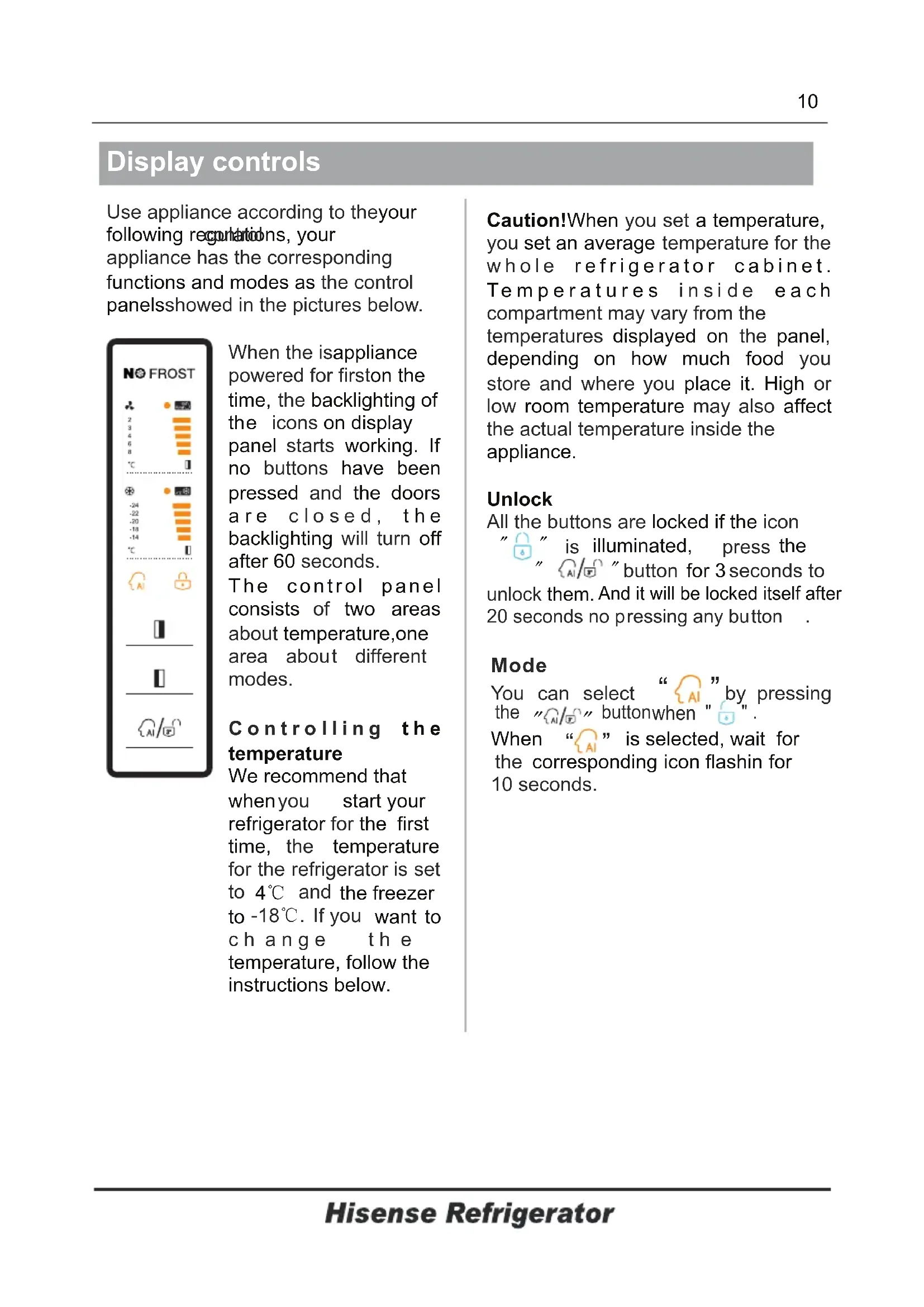
1315(inside)Display controls Use appliance according to theyourfollowing regulations, yourcontrolappliance has the correspondingfunctions and modes as the control panelsshowed in the pictures below. When the isappliancepowered for firston thetime,the backlighting of the icons on displaypanelstarts working. Ifno have beenbuttons pressed the doorsand a r e t h ec l o s e d , backlighting offwill turn after 60 seconds. T h e c o n t r ol p a n e l consists areasof twoabout temperature,onearea about differentmodes. C o n t r o l l i n g t h etemperatureWe recommend thatwhen start youryourefrigerator for the firsttime, temperature the for the refrigerator is set to and4℃ the freezerto want to-18℃. If youc h a n g e t h etemperature, follow theinstructions below. Caution!When a temperature,you set you temperature for theset an average w h o l e r e f r i g e r a t o r c a b i n e t . T e m p e r a t u r e s e a c h i n s i d e compartment may vary from thetemperatures thedisplayed on panel, depending on how much food you store and where you orplace it. High low may alsoroom affecttemperature the actual temperature inside theappliance.Unlock You can select by pressing the button " " . when When is selected, wait forcorresponding icon flashin for the 10 seconds.
All the buttons are iconlocked if the " " illuminated, theis press " " for 3button seconds to unlock them.And it will be locked itself after20 seconds no pressing any button
“ ”Display controls Freezer to activate to controlthe mode the freezer temperature. When you press t h e b u t t o n t h e c o n t i n u o u s l y, temperature setwill be as the following sequence. Door Alarm If door of or freezer isthe fridge open for over minutes, the door alarm The buzzer willwill sound. automatically stop alarming 10 minuteslater. To energy,save please avoid keeping the door open timefor a long when using the The door appliance. alarm can be cleared by closing the door.
Fridge You can the " ” button press to activate mode the fridgeto control the temperature.When you press the button continuously, the temperature will sequence.be set the following
Artificia Intelligence When the function is seleced, the temperature is of the appliance automatically adjusted. When the Artifcial Intelligence function is activated, temperaturethe of the automatically switchedfridge is to and freezer to
Super Freeze vitamins fresh and nutrients of food and keep food fresh longer. Super Freeze function. The light will be illuminated. For maximum tothe amount of food be Сooled , please wait 6 h. about Super switches cool automatically off after 6 hours the fridge and temperature to 2℃. setted
Super Cool can refrigerate your food much faster, keeping food fresh for a longer period . Super Сool function. The light will be illuminated.
Super Freeze will quickly lower the temperature within sothe freezer food will faster. the freeze This can lock in For maximum tothe amount of food be frozen, please wait 24 h.about Super switchesfreeze automatically off after 26 hours the freezerand temperature to -24℃.setted
When you the doors are not at thefind same leve l, yo u ca n us e the scr ewd rive r to adjust the do or. When the freez er door is upper than the refrige rator door. First, you can use the screwdr iver to tur n the bolt anticl ock wi se on the lower hinge tha t can make the doo r go up. Then use the sc rewdr iver to loc ki ng the nut . 1.Adjust the door ck into the position. 4.Using your ice box The ice box is as a independent part that can be take out of the freezing chamber. Using the ice box Take out the ice box placed on a platform, then pour water into the ice trays and the ater level shall notw exceed the maximum line. Place the flled ice box back to the freezing room. When ice cubes form, twist the knobs clockwise and t he ice will drop into the ice box below. Ice cubes can be stored in t he ice box, if you need t hem, you can pull out the ice box and take them out. mes may cause the bottle break。
Place foo Note: If the ice is used for the ?rstbox time or has not been used for a long time, please clean it before using. water injectiontake off ice s suggested by fre sh1415Correct Disposal of this product This marking indicates that this product should not be disposed with other household wastes throughout the EU. To prevent possible harm to the environment or human health from uncontrolled waste disposal, recycle it responsibly to promote the sustainable reuse of material resources. To return your used device, please use the return and collection systems or contact the retailer where the product was purchased. They can take this product for environmental safe recycling.