 ManualGo.com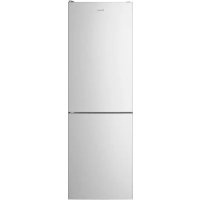
CCE3T618FSU - Fridge CANDY - Free user manual and instructions
Find the device manual for free CCE3T618FSU CANDY in PDF.



| Type of refrigerator | Combined refrigerator |
| Total capacity | 318 liters |
| Energy class | A+ |
| Dimensions (HxWxD) | 185 x 60 x 65 cm |
| Weight | 60 kg |
| Cooling system | Static cooling |
| Noise level | 42 dB |
| Number of drawers | 3 drawers in the freezer |
| Interior lighting | LED |
| Additional features | Fresh zone, glass shelves |
| Maintenance | Manual defrost recommended |
| Warranty | 2 years |
| Annual energy consumption | 300 kWh |
Frequently Asked Questions - CCE3T618FSU CANDY
Download the instructions for your Fridge in PDF format for free! Find your manual CCE3T618FSU - CANDY and take your electronic device back in hand. On this page are published all the documents necessary for the use of your device. CCE3T618FSU by CANDY.
USER MANUAL CCE3T618FSU CANDY
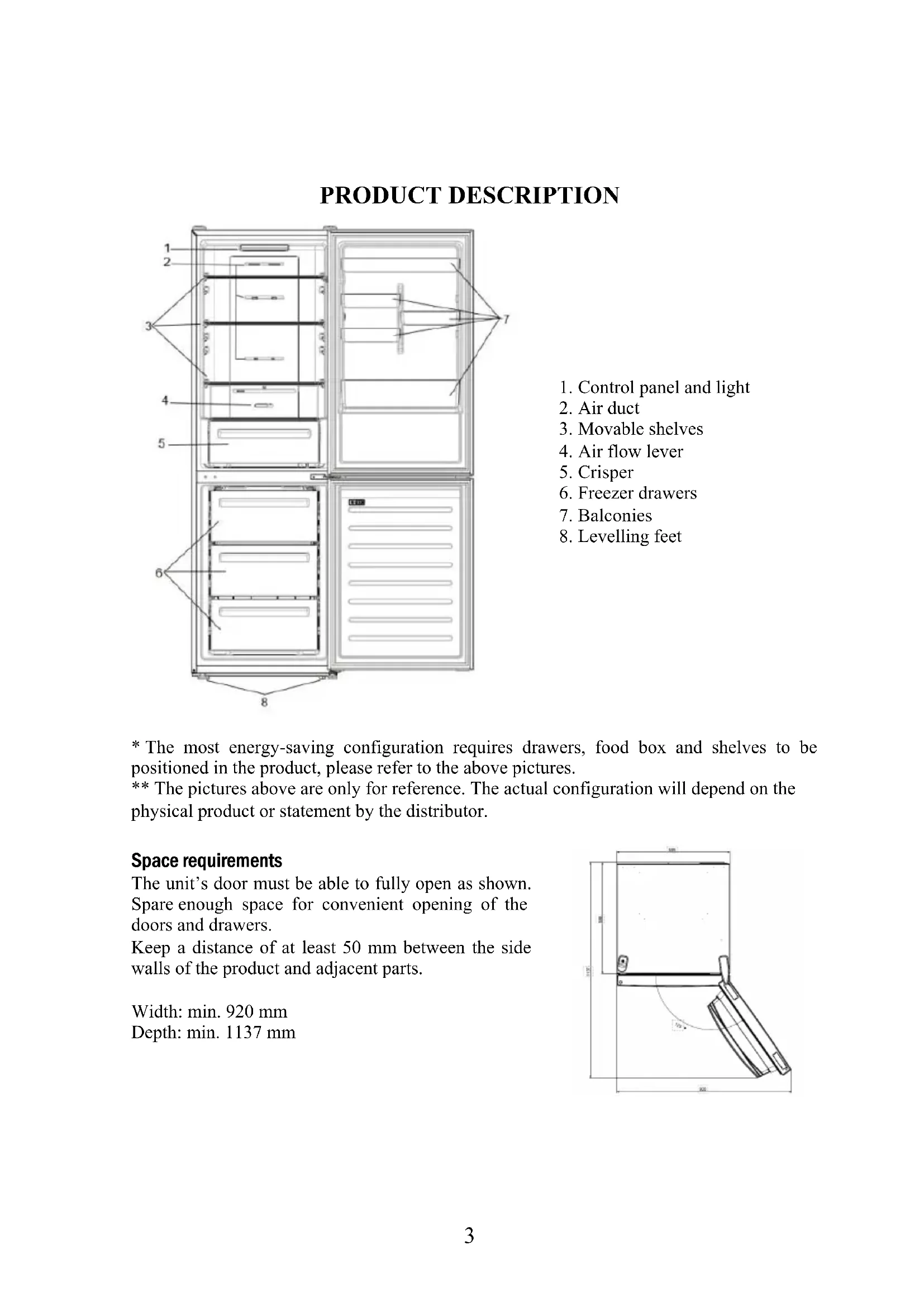
1. Control panel and light
- The most energy-saving configuration requires drawers, food box and shelves to be positioned in the product, please refer to the above pictures. ** The pictures above are only for reference. The actual configuration will depend on the physical product or statement by the distributor. Space requirements The unit’s door must be able to fully open as shown. Spare enough space for convenient opening of the doors and drawers. Keep a distance of at least 50 mm between the side walls of the product and adjacent parts. Width: min. 920 mm Depth: min. 1137 mm4 USE ON/OFF key, used to switch on/off the appliance. SET key, used to adjust the temperature or to select the Super Cool function. Super Cool Icon, shows if the function is activated.
Temperature levels, show which is the selected temperature for the fridge compartment. Use
- Plug on the appliance and it automatically turns on.
- The temperature is automatically set at 4 °C in the fridge.
- To change the temperature, press the SET key. When the setting increases, the corresponding LED light turns on. An acoustic signal is made every time the SET key is pressed and the temperature is changed. After 3 seconds without pressing any key, the setting is confirmed and an acoustic signal is made.
- Under normal operating condition (in spring and autumn), it is recommended to set the temperature at 4 °C. In summer or when the ambient temperature is high, it is recommended to set temperature at 5~8 °C, so as to guarantee the fridge and freezer temperatures and reduce the refrigerator continuous running time; and in winter or when the ambient temperature is low, it is recommended to set temperature at 3~4 °C to avoid frequent start/stop of the refrigerator.
- In case of power loss, the last cooling level set is restored.
- To restore the default setting, keep pressed the door switch inside the refrigerator and simultaneously press the ON/OFF key for 5 seconds. Adjustment of the air flow The airflow in the refrigerator and freezer compartments can be adjusted manually by moving the lever in the fridge compartment (see product description):
- By moving the airflow lever left, the temperature inside the freezer will be colder.
- By moving the airflow lever right, the temperature inside the freezer will be warmer.
- It is suggested to keep the airflow lever in the middle position.5 Fine Tuning The fine tuning selection mode gives the possibility to set the temperatures by sublevels (15 in totals); each temperature level has four sublevels. How to use the fine tuning function:
- Press the SET key for 8 seconds to enter fine tuning selection mode. When the appliance enters the mode, an acoustic signal is made and the LED of currently selected cooling level blinks.
- By short pressing the SET key within 5 seconds, the fine tuning setting increases and, at each pressing, an acoustic signal is made.
- During fine tuning, the LED of the selected cooling level is fixed, while the LED of the selected sublevel blinks.
- If no key is pressed for 5 seconds, the system automatically exits from fine tuning selection mode. The fine tuning setting is saved and the LED of the selected fridge temperature is fixed.
- If the fine tuning is activated again, the setting will start from the previously stored level. Super Cool function It is suggested to switch on the Super Cool function if a large quantity of food should be stored (for example after the purchase). The Super-Cool function accelerates the cooling of fresh food and protects the goods already stored from undesirable warming. When the function is activated, the temperature of the fridge is automatically set at 2 °C. How to use the Super Cool function:
- Press many times the SET key until the Super Cool LED is turned ON; the function is activated (suggestion: turn ON 11hrs before loading).
- To exit the Super Cool function, press the SET key again.
- The Super Cool function automatically ends after 30 hours running.
- When the Super Cool ends, the corresponding icon of the control panel turns off and the previously set cooling level is restored. Defrosting The defrosting of the refrigerator and freezer compartments are done automatically: no manual operation is needed. Slider Near the vegetable basket there is a slider that allows you to adjust the humidity inside it: moving it to the right decreases the humidity, moving it to the left increases the humidity. Demo mode Keeping pressed the door switch inside the refrigerator, if the SET key is pressed for 5 seconds, the refrigerator will enter the Demo mode. To exit the mode, keep pressed the door switch and press again the SET key for 5s. Error codes If 4 °C LED light is flashing, it means there has been a fan error. Please, contact the technical assistance to help solve the problem6 APP CONNECTION (Content only)
- Download the hOn app on the stores Step 2
- Create your account on the hOn App or log in if you already have an account Step 3
- Follow pairing instructions in the hOn App1. Remove the top hinge cover
2. Unscrew the top hinge
3. Remove the top hinge cover (left)
4. Remove middle hinge
DOOR REVERSIBILITY Tools needed: Electric screwdriver
The inside light bulb does not turn on. ● No electricity. The power cable is not properly plugged in. Check if the appliance is switched off (see Temperature Adjustment). Check the power socket is working correctly (e.g. with another electric device). ● Holiday Mode is activated. Deactivate Holiday mode. The internal temperature of the refrigerator and/or freezer is not cold enough. ● The doors are not closed. Check that the door and gaskets close properly. ● The doors are frequently opened. Avoid opening the doors unnecessarily for some time. ● Incorrect temperature setting. Check the temperature setting and, if possible, set a lower temperature (see Temperature Adjustment). ● The refrigerator and/or freezer are too full. Wait for the temperature of the refrigerator/ freezer to stabilise. Avoid filling the refrigerator and freezer excessively. ● The surrounding temperature is too low. Move the unit to a warmer place or heat the current room. ● Warm items have been stored. Always allow items to cool before storing them. The food in the refrigerator freezes. ● Incorrect temperature setting. Check the temperature setting and, if possible, increase the temperature. ● Food in contact with the back wall. Keep the food away from the refrigerator’s back wall. The bottom of the refrigerator compartment is wet or water droplets are present. ● The drain hose could be clogged. Clean the drain hose with a stick or similar item to allow the water to drain. Presence of drops of water or frost on the rear wall of the refrigerator. ● Depending on the function, drops of water or frost form on the rear wall of the refrigerator during operation. It is not a defect. ● Warm items have been stored. Always allow items to cool before storing them. ● There are open food containers or liquids. Always cover food and liquids. ● The doors are not closed. Check that the door and gaskets close properly. ● The doors are frequently opened. Avoid opening the doors unnecessarily for some time. Presence of water in the vegetable drawer. ● Lack of air circulation. Verify that your appliance is not too full. ● Vegetables and fruit with too much moisture. Wrap the fruit and vegetables in plastic materials, e.g. cling film, bags or containers. The motor runs continuously. ● The doors are not closed. Make sure the doors are closed and check the seals close properly. ● The doors are opened frequently. Avoid opening the doors unnecessarily for some time. ● Ambient temperature is very high. Verify that the ambient temperature is in the range set out in the specifications on the appliance tag. Set the display screen/thermostat to a warmer temperature. ● The appliance has been off (no power) for some time. It normally takes the appliance 8-12h to cool completely. The frozen food is thawing. ● Surrounding temperature is too low. Move the unit to a warmer place or heat the current room. ● The freezer door is not closed. Make sure the door is closed and that the gasket is sealing properly. Fridge door alarm. ● Fridge door alarm (acoustic beep) activates whenever the door is left open for more than 3 minutes. Avoid leaving the door open when not needed. The beep ceases when the door is closed. The appliance makes noises such as gurgling, buzzing, clicking, creaking. ● No breakdowns. An engine is running, e.g. refrigeration unit, fan. The refrigerant flows into the pipes. Motor, switches and solenoid valves are switched on or off. No action needed. ● The appliance is not located on level ground. Adjust the feet to level the appliance. ● The appliance touches an object around it. Remove objects around the appliance. The appliance does not cool, the temperature and lighting indicators are on. ● Demo mode is activated. Deactivate DEMO mode. Strong ice and frost in the freezer compartment. ● The items were not adequately packaged. Always pack the items well. ● A door/drawer of the appliance is not tightly closed. Close the door/drawer. ● The door/drawer has been opened too frequently or for too long. Do not open the door/drawer too frequently. ● The door/drawer gasket is dirty, worn, cracked or mismatched. Clean the door/drawer gasket or replace it with a new one. ● Something on the inside prevents the door/drawer from closing properly. Reposition the shelves, door racks or internal containers to allow the door/drawer to close. The sides of the appliance are warm. ● This is normal.9