SQC3-BK-BK-334 - Headphones MIXX - Free user manual and instructions
Find the device manual for free SQC3-BK-BK-334 MIXX in PDF.



| Brand | MIXX |
| Model | SQC3-BK-BK-334 (StreamQ C3) |
| Product Type | Bluetooth wireless headphones |
| Power | Rechargeable lithium battery via USB-C |
| Charging Time | Approximately 2 hours for full charge |
| Fast Charging | 15 minutes for 8 additional hours of battery life |
| Battery Life | Up to 8 hours after a 15-minute fast charge |
| Connectivity | Bluetooth 5.0 (estimated) and 3.5mm audio cable |
| Bluetooth Range | Approximately 10 meters |
| Speakers | Dynamic, 40mm (estimated) |
| Frequency Response | 20 Hz - 20 kHz (estimated) |
| Impedance | 32 ohms (estimated) |
| Microphone | Built-in for hands-free calls |
| Controls | Multifunction button, volume up/down buttons, track controls |
| Equalization Modes | Music, Bass Boost, Voice |
| Voice Assistant | Compatible with Siri and Google Assistant (double press) |
| Foldability | Yes, ear cushions fold towards the headband |
| Headband Adjustment | Yes, adjustable length |
| Wired Use | Possible via included 3.5mm audio cable |
| Care and Cleaning | Clean with a dry cloth only |
| Safety | Do not use at high volume, do not use while driving, observe operating temperature (5°C to 40°C) |
| Recycling | Do not dispose with household waste; deposit at a collection point for electronic devices |
| Warranty | Contact MIXX Ltd at support@mixx-oio.com |
Frequently Asked Questions - SQC3-BK-BK-334 MIXX
User questions about SQC3-BK-BK-334 MIXX
0 question about this device. Answer the ones you know or ask your own.
Ask a new question about this device
Download the instructions for your Headphones in PDF format for free! Find your manual SQC3-BK-BK-334 - MIXX and take your electronic device back in hand. On this page are published all the documents necessary for the use of your device. SQC3-BK-BK-334 by MIXX.
USER MANUAL SQC3-BK-BK-334 MIXX
CONTENTS | CONTENU | INHALT | INHOUDETENIDO | CONTENUTI | CONTEUDO | INDHOLD |SISALLYS
[EN] QUICK START GUIDE 1
[FR]GUIDE DE DEMARRAGE RAPIDE 6
[DE] SCHNELLSTARTANLEITUNG 11
[NL]SNELSTARTGIDS 16
[ES] GUIA BÁSICA DE INICIACION 21
[IT]GUIDA RAPIDA 26
[PT] GUIA RÁPIDO 31
[DA]VEJLEDNING TIL HURTIG START 36
+ [FI] PIKAOPAS 41
LET'S STAY CHARGED
Connect the headphones to a suitable USB wall charger, computer USB port or a power bank using the USB C Charging Cable 8 supplied and connect it to the headphones USB C Charging Port 5.
While charging, the LED Indicator Light will glow WHITE.
Once the headphones are fully charged, the LED Indicator Light will turn off. This can take up to 2 hours.
When using, you may hear a voice prompt 'Battery low' which allows for 2 minutes play time before the headphones power down stating 'Battery low, power off'. The LED Indicator Light will flash WHITE once and will then switch off.
TIP: 15 MINUTE QUICK CHARGE
If you're running low on power, charge your headphones for 15 minutes and get 8 hours extra play time while on the go.
LET'S CONNECT
First Time Pairing
Press and hold the Multi-function button 3 for 2 seconds to power on your MIXX StreamQ C3 wireless headphones.
A voice prompt 'Power on, pairing' confirms the headphones are on and in pairing mode. The LED Indicator Light will flash BLUE and WHITE ready to pair with your audio device.
Go to the Bluetooth settings on your audio device to select 'MIXX StreamQ C3' from the list. Once paired successfully you will hear 'Connected' and the LED Indicator Light 4 will turn off.
You can now enjoy your music, watch a video or take a call hands free.
If there is no Bluetooth connection after 5 minutes the headphones will automatically turn off by confirming with 'Power off' and the LED Indicator Light will flash BLUE and WHITE once and then switch off.
The headphones will automatically reconnect to the last device they were paired with, confirming 'Connected'.
LET'S GO WIRED
The MIXX StreamQ C3 headphones are suitable for devices with a 3.5mm audio socket.
The 3.5mm audio cable supplied provides the flexibility to convert from wireless headphones to wired use. Convenient when watching movies on a plane or when there is no Bluetooth connection.
Insert the 3.5mm audio cable 9 into the 3.5mm Audio Port 6 of your headphones and the other end into your phone or aeroplane's 3.5mm socket to start listening to your music or movie.
The EQ function is not available when using the 3.5mm audio cable.
LET'S PLAY
Play / Pause
Short press the Multi-function button 3
Volume Up / Down
Short press 1 to increase volume, or 2 to decrease volume.
Skip/Previous Track
Long Press 1 for 2 seconds to skip track, or 2 for previous track.
Activate Siri or Google Assistant
Double press the Multi-function button 3
The voice assistant familiar 'Beep' will sound then ask a question or state a command.
Change the Preset Equalisation (EQ) Settings
Choose from 3 Equalisation (EQ) modes to suit your personal preference. There is no App required.
- Bass boost mode increases the bass sound.
- Voice mode decreases the bass, the high-frequency tones and increases the speech frequencies.
- Music mode returns you to the optimal EQ for music listening.
Triple press the Multi-function button 3 to cycle through the Music, Bass Boost and Voice modes.
Answer / End a call
Short press the Multi-function button 3
Audio is picked up via the microphone 7
Power On
Press and hold the Multi-function button 3 for 2 seconds and a voice prompt will confirm with 'Power on, pairing'. The LED indicator light 4 will flash BLUE and WHITE.
Power off
Press and hold the Multi-function button 3 for 2 seconds. A voice prompt will confirm with 'Power off'. The LED indicator light 4 will glow WHITE and will then switch off.
TRAVEL FRIENDLY
For ease of storage while travelling, fold the MIXX StreamQ C3 ear pads in towards the headband A then pop them in your bag or, place the headband around your neck and rotate the earpads to rest comfortably on your shoulders.
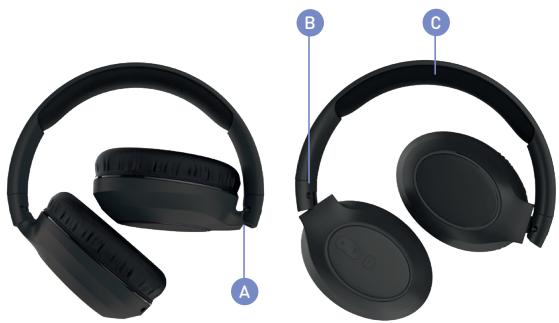
The headband is adjustable and can be extended B . It also has soft cushioning C for extra comfort on the top of your head.
LET'S RECYCLE
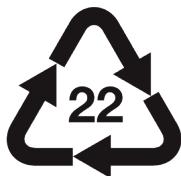
This product can be recycled.
Products bearing this symbol normal household waste.

must NOT be thrown away with
Take the product to a collection point designated for recycling of electronic devices. Find out more about return and collection points through your local authority.
LET'S BE SAFE
IT IS IMPORTANT THAT YOU PLEASE READ THIS SECTION COMPLETELY.
For your protection
Check with your doctor before use if you are fitted with a medical device such as a pacemaker or a programmable shunt.
Ensure the product is correctly connected using the manufacturer's original accessories included with the product.
Do NOT make unauthorized alterations to this product.
Product may contain small parts which can be a choking hazard. Please keep the product out of reach from children under 6 and animals.
Whilst this product has been made using hypo-allergenic materials, you may suffer some skin irritation after prolonged use.
Do NOT listen to loud music for a long duration of time. We recommend turning the volume down before placing the device in your ears to avoid hearing damage.
Do NOT use the product while operating machinery, including cars, trucks or other vehicles.
Do NOT use noise cancelling mode or use your device in areas where the use of hearing is required for safety. e.g., while riding a bicycle, at a construction site or railroad etc.
Clean only with a dry cloth - Wipe off sweat from the earbuds and the charging case before charging.
IMPORTANT!
Do NOT use a non-certified PD or QC3 wall charger as this may damage the product. Only use the cable supplied to charge your device.
If your product has become damaged in any way, does not operate normally or has been dropped, please refer to a qualified person to have the product checked before continuing to use it.
WARNING:
This product contains a Lithium battery. Incorrect disposal of this battery may result in an explosion.
The operating temperature range for this product is 5^ - 40^ Celsius.
Please avoid exposing the product, charging case and cable connectors to prolonged rain, moisture, or liquid spills/splashing.
Please remove your device from your ears immediately if they emit any loud unusual noise or you experience a warming sensation.
If you experience any of the issues listed above, please turn off your device and contact MIXX Ltd on
support@miox-io.com
CHARGEONS
Activeer Siri of Google Assistant
This device complies with part 15 of the FCC Rules. Operation is subject to the following two conditions:
(1)This device may not cause harmful interference, and
(2)this device must accept any interference received, including interference that may cause undesired operation.
This equipment has been tested and found to comply with the limits for a Class B digital device, pursuant to part 15 of the FCC Rules.
These limits are designed to provide reasonable protection against harmful interference in a residential installation.
This equipment generates, uses and can radiate radio frequency energy and, if not installed and used in accordance with the instructions.
may cause harmful interference to radio communications. However, there is no guarantee that interference will not occur in a particular installation. If this equipment does cause harmful interference to radio or
television reception, which can be determined by turning the equipment off and on,
the user is encouraged to try to correct the interference by one or more of the following measures: Reorient or relocate the receiving antenna.
.Increase the separation between the equipment and receiver.
Connect the equipment into an outlet on a circuit different from that to which the receiver is connected.
Consult the dealer or an experienced radio/TV technician for help.
Changes or modifications not expressly approved by the party responsible for compliance could void the user's authority to operate the equipment.
RF Exposure Information
The device has been evaluated to meet general RF exposure requirement.
The device can be used in portable exposure condition without restriction.


PAP
SCATOLA
RACCOLTA
CARTA