ManualGo.com
FDM73850SS - Food processor KENWOOD - Free user manual and instructions
Find the device manual for free FDM73850SS KENWOOD in PDF.


Download the instructions for your Food processor in PDF format for free! Find your manual FDM73850SS - KENWOOD and take your electronic device back in hand. On this page are published all the documents necessary for the use of your device. FDM73850SS by KENWOOD.
USER MANUAL FDM73850SS KENWOOD
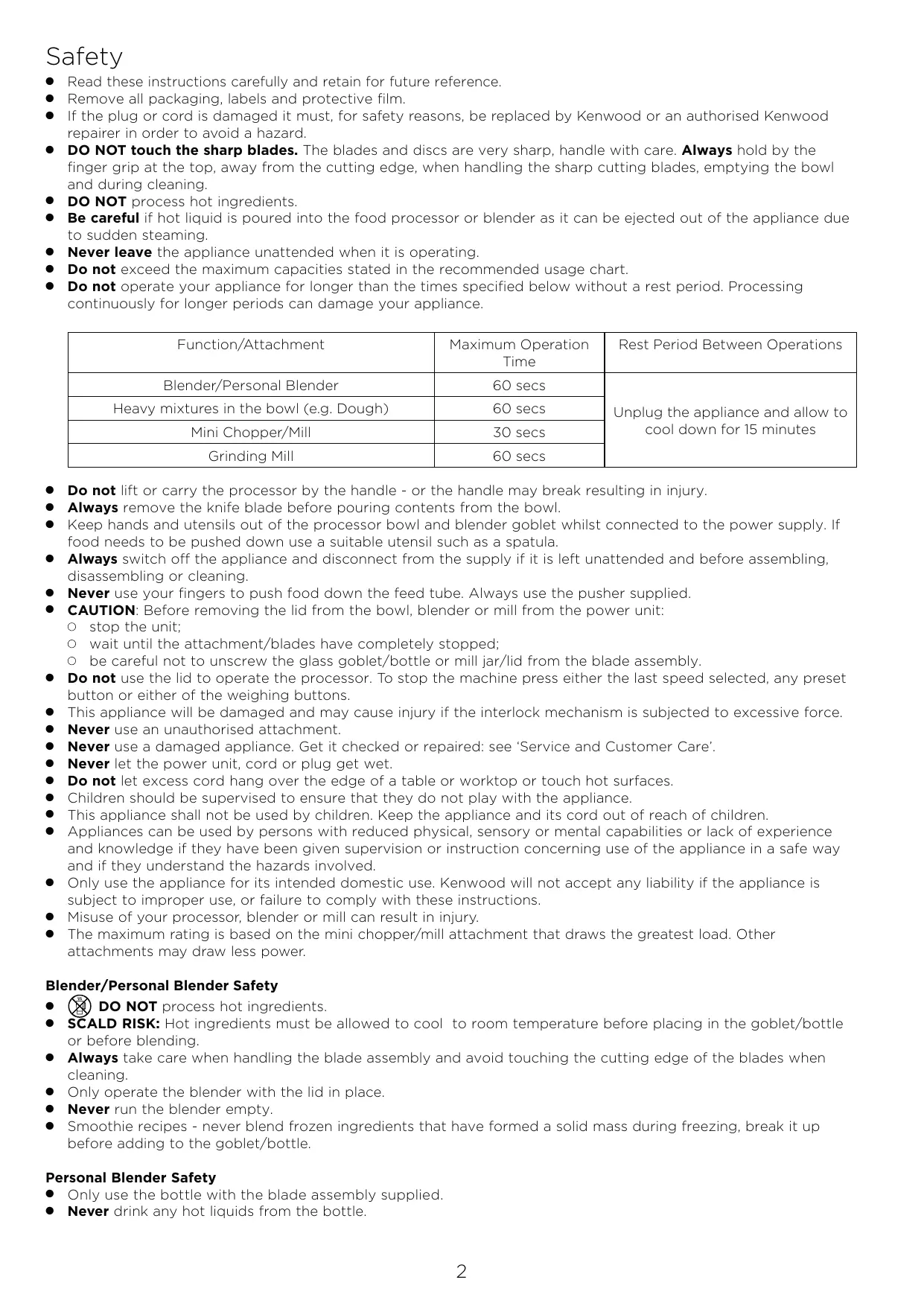
Read these instructions carefully and retain for future reference. Remove all packaging, labels and protective film. If the plug or cord is damaged it must, for safety reasons, be replaced by Kenwood or an authorised Kenwood repairer in order to avoid a hazard. DO NOT touch the sharp blades. The blades and discs are very sharp, handle with care. Always hold by the finger grip at the top, away from the cutting edge, when handling the sharp cutting blades, emptying the bowl and during cleaning. DO NOT process hot ingredients. Be careful if hot liquid is poured into the food processor or blender as it can be ejected out of the appliance due to sudden steaming. Never leave the appliance unattended when it is operating. Do not exceed the maximum capacities stated in the recommended usage chart. Do not operate your appliance for longer than the times specified below without a rest period. Processing continuously for longer periods can damage your appliance. Function/Attachment Maximum Operation Time Blender/Personal Blender 60 secs Heavy mixtures in the bowl (e.g. Dough) 60 secs Mini Chopper/Mill 30 secs Grinding Mill 60 secs Rest Period Between Operations Unplug the appliance and allow to cool down for 15 minutes Do not lift or carry the processor by the handle - or the handle may break resulting in injury. Always remove the knife blade before pouring contents from the bowl. Keep hands and utensils out of the processor bowl and blender goblet whilst connected to the power supply. If food needs to be pushed down use a suitable utensil such as a spatula. Always switch off the appliance and disconnect from the supply if it is left unattended and before assembling, disassembling or cleaning. Never use your fingers to push food down the feed tube. Always use the pusher supplied. CAUTION: Before removing the lid from the bowl, blender or mill from the power unit: O stop the unit; O wait until the attachment/blades have completely stopped; O be careful not to unscrew the glass goblet/bottle or mill jar/lid from the blade assembly. Do not use the lid to operate the processor. To stop the machine press either the last speed selected, any preset button or either of the weighing buttons. This appliance will be damaged and may cause injury if the interlock mechanism is subjected to excessive force. Never use an unauthorised attachment. Never use a damaged appliance. Get it checked or repaired: see ‘Service and Customer Care’. Never let the power unit, cord or plug get wet. Do not let excess cord hang over the edge of a table or worktop or touch hot surfaces. Children should be supervised to ensure that they do not play with the appliance. This appliance shall not be used by children. Keep the appliance and its cord out of reach of children. Appliances can be used by persons with reduced physical, sensory or mental capabilities or lack of experience and knowledge if they have been given supervision or instruction concerning use of the appliance in a safe way and if they understand the hazards involved. Only use the appliance for its intended domestic use. Kenwood will not accept any liability if the appliance is subject to improper use, or failure to comply with these instructions. Misuse of your processor, blender or mill can result in injury. The maximum rating is based on the mini chopper/mill attachment that draws the greatest load. Other attachments may draw less power. Blender/Personal Blender Safety
DO NOT process hot ingredients. SCALD RISK: Hot ingredients must be allowed to cool to room temperature before placing in the goblet/bottle or before blending. Always take care when handling the blade assembly and avoid touching the cutting edge of the blades when cleaning. Only operate the blender with the lid in place. Never run the blender empty. Smoothie recipes - never blend frozen ingredients that have formed a solid mass during freezing, break it up before adding to the goblet/bottle. Personal Blender Safety O Only use the bottle with the blade assembly supplied. O Never drink any hot liquids from the bottle.
When drinking through the lid, take care that the drink is smooth. Some experimentation may be necessary to achieve the desired result, particularly when processing firm or unripened foods as you may find that some ingredients remain unprocessed. Do not blend frozen ingredients or ice cubes without liquid. Never blend dry ingredients (e.g. spices, nuts) or run the Blender empty. Never fit the blade assembly to the power unit without the bottle fitted. Mill Attachments Safety
Never fit the blade assembly to the power unit without the jar/lid fitted. Never unscrew the jar/lid while the mill is fitted to your appliance. Do not touch the sharp blades – Keep the blade assembly away from children. Never remove the mill until the blades have completely stopped. The appliance will not work if the mill is incorrectly fitted. Do not process hot ingredients in the mill allow to cool down to room temperature before processing. Mini Chopper/Mill
The processing of spices is not recommended as they may damage the plastic parts. Grinding Mill
Do not process dried turmeric root as it is too hard and may damage the blades. Juice extractor O Do not use the juicer if the filter, juicer lid or bowl are damaged or has visible cracks. O The cutting blades on the base of the filter drum are very sharp, take care when handling and cleaning the drum. O Only use the pusher supplied. Never put your fingers in the feed tube. Unplug before unblocking the feed tube. O Before removing the lid, switch off and wait for the filter to stop. Express Dice/Express Serve Attachment and Discs
The cutting grid and discs are very sharp; handle with care when fitting, removing and cleaning. Always hold by the finger grip away from the cutting edge when handling the sharp cutting blades, emptying the bowl and during cleaning. Never use your fingers to push food down the feed tube. Only use the pusher supplied. Do not use excessive force to push food down the feed tube – you could damage your attachment. Before removing the lid, switch off and wait until the disc has completely stopped. Do not pour hot liquids down the feed tube. Do not process frozen foods. Express Serve O Avoid contact with moving parts. Keep fingers out of the food outlet opening. O Do not operate when using the Dicer or Discs without the slinger plate fitted. If the slinger plate is not fitted food will clog under the plate and not exit the food outlet, resulting in damage to your attachment. O The citrus juicer is not designed to be used with the Express Serve. Always use the citrus juicer with the main bowl. Power Consumption O Automatically switches to standby mode after: 12 minutes. O Standby mode: 0.3W. Before plugging in
Make sure your electricity supply is the same as the one shown on the underside of the power unit. Important – Plug and Fuse Information
The wires in the cord are coloured as follows: Blue = Neutral, Brown = Live.
If the plug is cut off it must be DESTROYED IMMEDIATELY. An electric shock hazard may arise if an unwanted non-rewireable plug is inadvertently inserted into a socket outlet. If the plug supplied with your appliance has a fuse fitted and the fuse fails it must be replaced with one of the same rating. Note:
For non-rewireable Plug Type G the fuse cover MUST be refitted when replacing the fuse. If the fuse cover is lost then the plug must not be used until a replacement can be obtained. The correct fuse cover is identified by colour and a replacement may be obtained from your Kenwood Authorised Repairer (see Service). Plug Type G This appliance conforms to EC Regulation 1935/2004 on materials and articles intended to come into contact with food.
Stop the unit and unplug prior to cleaning. Push any excess cord into the storage area at the back of the power unit. Wipe the power unit and whisk drive head with a damp cloth (do not use abrasive materials), then dry. Ensure that the interlock area is clear of food debris. Do not immerse the power unit, whisk drive head or blade assemblies in water. The bowl, lid, pusher and all attachments/tools apart from the blade assemblies and whisk drive head are suitable for both handwashing and dishwashing. The blade assemblies should be brushed clean and rinsed under running water. Blender with fixed blades - Do not dishwash or immerse the blender base in water. Fill with warm water, fit the lid, then switch on for 20-30 seconds or use the clean preset. Empty, then rinse. If it is still dirty use a brush. Wipe, then leave to air-dry. Always switch off and unplug before cleaning. Handle the blade and cutting discs with care - they are extremely sharp. Some foods may discolour the plastic. This is perfectly normal and will not harm the plastic or affect the flavour of your food. Rub with a cloth dipped in vegetable oil to remove the discolouration.
Key Processor - Express Prep
Pushers Feed tube Lid Bowl Detachable drive shaft Power unit Safety interlocks Cord storage (at back) Preset control Zero button Kg/lb button Pulse control Speed control Custom pre-set control Display screen Standard Attachments
Knife blade Dough tool 4mm slicing/grating disc Plastic blendedr Lid with drip feed Goblet with fixed blade Optional Attachments (if supplied)
IMPORTANT Always fit the bowl and attachment onto the processor before adding ingredients. Do not use the lid to operate the processor. The processor will not operate if the bowl or lid are not fitted correctly into the interlock. Check that the feed tube and bowl handle are situated to the right front hand corner. Always switch off and unplug before removing the lid. Your processor is not suitable for crushing or grinding coffee beans, or converting granulated sugar to caster sugar. When adding almond essence or flavouring to mixtures avoid contact with the plastic as this may result in permanent marking. Dough - The unit is intended to create a dough ball only, it is not intended to continuously knead the dough. After the dough ball has formed, remove from the unit and knead by hand.
Fit the detachable drive shaft onto the power unit. Then fit the bowl to the power unit and turn clockwise until it locks into position. Fit either the knife blade or dough tool over the drive shaft. Add ingredients to the bowl. Fit the lid - ensuring the top of the drive shaft/tool locates into the centre of the lid. Turn the appliance on by plugging into the mains power. Press on the icon of the preset you wish to use. Note: Select only a preset relevant to the attachment fitted (food processor bowl). The timer will start to count down to zero as the preset runs. The appliance will stop at the end of the preset sequence. To stop processing whilst the preset is running, press one of the following buttons: The illuminated preset. Any other preset. Low/Med/High button. Zero button. Kg/lb button.
IMPORTANT Do not use the lid to operate the blender attachment. The processor will not operate if the blender and blender lid are not correctly fitted into the interlocks. Always stop the unit and unplug before removing the lid. Your blender is not suitable for crushing or grinding coffee beans, or converting granulated sugar to caster sugar. When adding almond essence or flavouring to mixtures avoid contact with the plastic as this may result in permanent marking. Use a maximum of 1L of water when using the clean preset.
Put your ingredients into the goblet. Fit the lid onto the goblet and turn clockwise until it locks into place. Fit the blender attachment to the power unit. Turn the appliance on by plugging into the mains power. Press on the icon of the preset you wish to use. Note: Select only a preset relevant to the attachment fitted (blender). The timer will start to count down to zero as the preset runs. The appliance will stop at the end of the preset sequence. To stop processing whilst the preset is running, press one of the following buttons: The illuminated preset Any other preset Low/Med/High button Zero button Kg/lb button
Recipes Cinnamon Buns Dough: 300g Whole Milk (room temperature) 7g Dried Yeast 50g Unsalted Butter 1 Egg 450g Plain Flour 60g Caster Sugar ¼ Tsp Salt
Fit the knife blade and add the milk and yeast to the food processor bowl and leave for 5 minutes. Add the remaining dough ingredients to the bowl. Combine using the ‘Dough’ preset. Transfer the dough to a bowl, cover, and leave to prove until doubled in size (approximately 1 hour). Filling: 100g Unsalted Butter (room temperature) 100g Brown Sugar 1 Tbsp Ground Cinnamon ¼ Tsp Salt
Fit the knife blade. Add the ingredients to the food processor bowl. Combine using the ‘Mix’ preset. Glaze: Combine the ingredients in a small bowl. 80g Unsalted Butter (Melted) 60g Maple Syrup 2 Tsp Cinnamon 15g Light Brown Sugar Method 1 Roll the proved dough into 45 X 35cm rectangle. 2 Spread the filling across the dough. 3 Roll tightly along the longest edge and trim the ends. 4 Cut the dough into 2.5cm pieces and place into a greased muffin tin. 5 Prove for 45 minutes. 6 Bake at 200°C for 25 minutes. 7 Once cooled, brush the buns with the prepared glaze.
Note: Do not run the Food Processor or Blender empty. There is a maximum time you are able to record in the custom mode, When the maximum time has been reached, the preset will automatically save. To cancel recording: Press any of the preset buttons or the scales ‘zero’ or ‘kg/lb’ button. Alternatively, cut power to the product. The machine can store one custom preset at a time. To overwrite the recorded custom preset, follow the instructions on how to record a custom preset. Existing presets cannot be used during the recording of a custom preset. When recording the custom preset the maximum number of speed changes is 20. If pulse action is used this counts as 2 speed changes. The maximum possible length of a custom preset is 5 minutes. The timer will count up during the recording of the custom preset until it reaches the maximum recording length of 5 minutes, the timer does not reset each time a different speed is selected.
Turn on the appliance by plugging it into mains power. When ready to record your custom preset, press and hold until rEC is displayed.. If successful: The light below the custom button will start flashing orange. The preset buttons will not be illuminated. The manual speeds (low, med, high, pulse) will be brightly illuminated.
Begin your selected sequence using the pulse, low, med and high buttons, the timer will count up in seconds. Note: the user is not required to hold down the low, medium or high buttons during recording when that speed has been selected. The selected speed will continue to run until another speed is selected. For pulse speed press and hold the button. During the recording stage the product should match the below. The selected manual speed will be flashing. The manual speeds not in use will be illuminated. The preset buttons will not be illuminated. When the product is not running during the recording stage, the product should match the below. The manual speeds will be brightly illuminated. The custom preset will be flashing orange. The preset buttons will not be illuminate The timer will continue to count up, recording the time the product is not running, which will be included in the preset sequence.
To save the preset sequence, press the custom preset button. During saving, the custom preset button will flash 4 times quickly, stop flashing for 4 seconds, and then it will turn white.
IMPORTANT Always fit the bowl and attachment onto the processor before adding ingredients. Do not use the lid to operate the processor. The processor will not operate if the bowl or lid are not fitted correctly into the interlock. Check the feed tube and bowl handle are situated to the right hand corner. Always stop the unit and unplug before removing the lid. Your processor is not suitable for crushing or grinding coffee beans, or converting granulated sugar to caster sugar. The whisk is not suitable for making all in one cake mixes as these mixes are too heavy and will damage it. Always use the knife blade. When adding almond essence or flavouring to mixtures avoid contact with the plastic as this may result in permanent marking. Bread dough, do not process for longer than 60 seconds. The unit is intended to create a dough ball only, it is not intended to continuously knead the dough. After the dough ball has formed, remove from the unit and knead by hand. Re-knead bread dough by hand only. Re-kneading in the bowl is not recommended as it may cause the processor to become unstable. When creaming fat and sugar using the dual whisk do not use fat straight from the fridge as this will damage the whisk. 1 Fit the detachable drive shaft onto the power unit. 2 Then fit the bowl to the power unit and turn clockwise until it locks into position. 3 Fit either the knife blade, dough tool or dual whisk over the drive shaft. Note: if using the dual whisk ensure that the beaters are inserted into the drive head prior to fitting the attachment over the drive shaft in the processor bowl. 4 Add ingredients to the bowl. 5 Fit the lid - ensuring the top of the drive shaft/tool locates into the centre of the lid. 6 Turn the appliance on by plugging into the mains power. 7 Select a speed (Low/Med/High/Pulse). refer to the recommended usage chart. Hints and Tips Use the pulse for short bursts. The pulse will operate for as long as the control is held in position. Some foods may discolour the plastic. This is perfectly normal and will not harm the plastic or affect the flavour of your food. Rub with a cloth dipped in vegetable oil to remove the discolouration. For coarse textures use the pulse control. Take care not to over process. When making pastry use fat straight from the fridge cut into 2 cm cubes. For best results when processing sticky fruit/ingredients such as dates, use ‘Pulse’ first to break down the ingredients and then continue processing at maximum speed. Hints and Tips - Dough Tool Bread Dough - Place the dry ingredients into the bowl first and then add the liquid. Process until a smooth elastic ball of dough is formed. Hints and Tips - Dual Whisk For best results whisk eggs at room temperature. Ensure the bowl and whisks are clean and free from grease before whisking. Creaming fat and sugar - For best results fat should be allowed to soften at room temperature (20˚C) before creaming. Heavy ingredients such as flour and dried fruit should be folded into cake mixes by hand.
MAX (secs) 600 g High + Pulse 10–30
Low–High 10–20 250 g Pulse 5–10 30–50 g High 20–30 High
10–20 High 60–120 High
x5 (150 g) High 90–150 250–500 ml Med–High 60–90 High 240–300
75 g Recipes All In One Sponge Cake 362g Plain Flour 13g Baking Powder 375g Caster Sugar 375g Unsalted Butter (Room Temperature) 375g Eggs Method: 1 Fit the knife blade and add the ingredients to the food processor bowl in the order listed above. 2 Combine the ingredients using the mix preset. 3 Add cake mix to a lined loaf tin (approximately 300 X 80 X 110mm) 4 Bake in a pre-heated oven at 170°C for 40-50 minutes Pizza Dough 500g Flour 30g Olive Oil 7g Salt 7g Yeast 300ml Water
Fit the dough tool to the bowl. Add all the ingredients to the bowl. Press the DOUGH preset. Knead on a floured work surface until desired consistency. Remove the tool from the bowl. Cover dough with a damp tea towel and leave to rest for 30 - 40 minutes in a warm place. Divide into 2 and roll out into two 15cm pizza bases. Transfer to a semolina covered baking tray, garnish/top your pizza and bake for 10 - 15 minutes at 240°C. To Use Your Food Processor - Discs Usage Diagrams & Usage Instructions
IMPORTANT Do not use the small pusher without the larger pusher fitted, otherwise you may damage the bottom of the pusher. Never put your fingers in the feed tube.
Fit the drive shaft and bowl onto the power unit. Holding by the centre grip, place the disc onto the drive shaft with the appropriate side uppermost. Fit the lid. Put the food in the feed tube you want to use. To use the small feed tube - first put the large pusher inside the feed tube. Use for individual thin ingredients. To use the large feed tube - use both pushers together. Plug in, select a speed and push down evenly with the pusher. Hints and Tips Use fresh ingredients Do not cut food too small. Fill the width of the feed tube fairly full, this prevents the food from slipping sideways during processing. When slicing or grating: food placed upright comes out shorter than food placed horizontally. There will always be a small amount of waste on the disc or in the bowl after processing. Usage Chart MAX (secs) Max High 5-30 Max High 5-30 Max Low 5-30
IMPORTANT The dicing disc is designed only to be used with the dicing attachment. The dicing pusher should only be used with the dicing grid. Using it without the dicing grid fitted will result in damage to the bottom of the pusher. Foods such as cheese, ham and chorizo will clog in the grid so are not recommended for use with this attachment. 1 Fit the drive shaft and bowl onto the power unit. 2 Add the dicing disc and fit the lid. 3 Fit the dicing grid into the feed tube. 4 Plug in, select a speed and use the dicing pusher to process food items through the dicing grid. The express dice can also be used to produce French Fries, crudities and batons. 5 Fit the dicing grid without the dicing disc. 6 Manually push the food through the grid without switching the appliance on. Hints and Tips To assist with processing place both hands on top of the pusher and press down firmly. For best results, use fresh fruit and vegetables. To prevent the food from jamming do not pack the food tightly in the feed tube – ideally the food should be cut no larger than: 50 × 30mm If the food is too hard to push through the grid cook for approximately 10-15 minutes, then allow to cool in a refrigerator before processing. Always remove hard skins, stones, pips and seeds etc., from food before processing. Note: Due to the various sizes and shapes of foods, the diced results will contain some misshapen pieces, this is normal. To clean the dicing grid, use the end of the pusher to dislodge any food which may become trapped in the dicing grid.
Usage Chart MAX (g) (secs) Max High 5-30 Max N/A N/A
IMPORTANT The express serve will not operate unless the small drive shaft has been fitted to the main drive shaft. Do not apply excessive force when using the attachment. If food does not exit the food outlet, switch off and check that food is not clogging under the disc and the slinger plate is fitted. Clear any trapped food before continuing to process. 1 Fit the drive shaft and bowl onto the power unit. 2 Fit the small drive shaft to the main shaft. 3 Fit the required attachment/disc. Note: the express serve attachment can be used with the express dice attachment and the slicing/grating and extra fine grating discs. 4 Fit the lid. 5 Fit the feed chute extension. 6 Put the food into the feed tube that you want to use. 7 Plug in, select a speed and push food down evenly using the pusher. Usage Chart MAX (secs) Max High 5-30 Max High 5-30 Max Low 5-30 Max High 5-30
To Use Your Food Processor - Citrus Juicer Usage Diagrams and Instructions IMPORTANT The citrus juicer will not operate if the sieve is not locked correctly.
Fit the drive shaft and bowl onto the power unit. Fit the sieve into the bowl - ensuring the sieve handle is locked into position directly over the bowl handle. Place the cone over the drive shaft turning until it drops all the way down. Cut the fruit in half. Plug in, select low speed and press the fruit onto the cone. Hints and Tips For best results store and juice the fruit at room temperature and hand roll on a worktop before juicing. To help with juice extraction move the fruit from side to side when juicing. When juicing large quantities, empty the sieve regularly to prevent the build up of pulp and seeds. Usage Chart MAX 1 kg
(secs) Low 120–180 To Use Your Food Processor - Glass Mill Usage Diagrams and Instructions
Put the ingredients into the jar. Fit the sealing ring into the blade assembly. Turn the blade assembly upside down. Lower it into the jar, blades down. Screw the blade assembly onto the jar. Refer to the graphics on the underside of the blade assembly as follows: - Unlocked position - Locked position
Place the mill onto the power unit and turn clockwise to lock in position. Plug in, select high speed speed or use the pulse. Hints and Tips Baby food/purée - allow cooked food to cool down to room temperature before processing in the mill. For best results the main bowl is recommended when chopping herbs. Usage Chart MAX (secs) 50 g High 10–30 50 g High
Place all ingredients into the mill. Refrigerate overnight. Fit the mill to the power unit. Plug in, select and hold pulse speed and process for 4 seconds. Use as required. To Use Your Food Processor - Plastic Mill Usage Diagrams and Instructions
Put the ingredients into the jar. Fit the sealing ring into the blade assembly. Turn the blade assembly upside down. Lower it into the jar, blades down. Screw the blade assembly onto the jar. Refer to the graphics on the underside of the blade assembly as follows: - Unlocked position - Locked position
Place the mill onto the power unit, align the Plug in, select high speed or use the pulse. don the mill with the
on the power unit and turn clockwise to lock. Usage Chart MAX 50 g High 10–30 50 g High
To Use Your Food Processor - Grinding Mill Usage Diagrams and Instructions IMPORTANT Do not process dried turmeric root in the mill as it is too hard and may damage the blades.
(secs) Place your ingredients into the blade assembly. Fit the lid and turn clockwise to lock. Place the mill onto the power unit and turn clockwise to lock. Plug in, select high speed or use the pulse.
Hints and Tips O For optimum performance when processing spices do not process more than 50g at a time. O Whole spices retain their flavour for a much longer time than ground spices so it is best to grind a small quantity fresh at a time to retain the flavour. O To release the maximum flavour and essential oils whole spices are best roasted prior to milling. O Do not process dried turmeric root in the mill as it is too hard and may damage the blades. O Cut ginger and coconut into small pieces before processing. O For best results the main bowl is recommended when chopping herbs. Usage Chart MAX 1 cm 1 cm
(secs) 50 g High 30–60 50 g High 30–60 50 g Pulse 15–30 30 g Pulse 5–10 30 g Pulse 5–10 30 g Pulse 5–10 40 g High/Pulse 30–60 To Use Your Food Processor - Personal Blender Usage Diagrams and Instructions MAX 400ml MAX 60g
IMPORTANT Do not blend frozen ingredients without liquid. Leaking will occur if the sealing ring is damaged or incorrectly fitted.
Add ingredients to the bottle up to the 400ml level mark. Fit the sealing ring to the blade unit, ensuring the seal is located correctly in the grooved area. Hold the underside of the blade unit and lower it onto the bottle, blades down. Screw the blade holder onto the bottle - turn clockwise to lock. Plug in, select ‘High’ speed. Allow the ingredients to blend until smooth. Fit and lock the drinking lid by turning clockwise. When you want to drink, simply flip open the lid cover. The drink can be consumed straight from the bottle. Hints and Tips Once your drink has reached the desired consistency, you can use the pulse to ensure all ingredients are thoroughly blended. Note that when the bottle is filled to max capacity (400ml), this is approximately two servings. If you do not intend to consume your drink immediately, keep it refrigerated. Ensure your drink is thin enough to be able to drink from the dispensing lid. To make a thinner drink add more liquid. After blending, some drinks may not be completely smooth due to seeds or the fibrous nature of ingredients. Some drinks may separate on standing, therefore it is best to drink them straight away. Separated drinks should be stirred before drinking. When the dispensing lid is fitted always keep the bottle upright.
60 g) (secs) High 30–60 To Use Your Food Processor - Plastic Blender Usage Diagrams and Instructions IMPORTANT The appliance will not operate if the blender is incorrectly fitted to the interlock. The processing of spices is not recommended as they may damage the plastic parts.
Put your ingredients into the goblet. Fit the lid onto the goblet and turn clockwise until it clicks. Fit the blender to the power unit and turn clockwise to lock in position. Plug in, select High speed and blend to desired consistency. Hints and Tips When making mayonnaise, put all the ingredients, except the oil, into the blender. With the appliance running pour the oil through the drip feed hole in the lid. Thick mixtures, e.g. pâtés and dips, may need scraping down. If the mixture is difficult to process, add more liquid.
Usage Chart MAX (secs)
High 15–30 High 45–60 Pulse
250 g 500 g (125 g) Recipes Mayonnaise 4 Egg Yolks 32g Dijon Mustard 350ml Oil Method 1 Add the egg yolks and mustard to the blender. 2 Blend on high speed for 10 seconds. 3 Whilst the blender is running, all the oil through the dripper hole in the lid. Baby Food: 200g Raw Beef (Cut into 2cm cubes) 200g Raw Carrots (Cut into 2cm cubes) 200g Raw Potatoes (Cut into 2cm cubes) Method 1 Place the diced beef into a pan of boiling water. Return the pan to the boil and cook for 1hour. 2 Place the diced carrot and potato into a separate pan of boiling water, return to the boil and cook for 30 mins. 3 Drain the beef, carrots and potatoes, retain 250ml of cooking water. Allow the beef, vegetables and water to cool to room temperature before processing. 4 Place the beef, carrots and potatoes into the blender followed by the retained cooking water. 5 Blend on high speed for 15 seconds. 6 Scrape down and agitate the contents of the blender. 7 Blend on high speed until the desired consistency is achieved.
IMPORTANT Your juicer will not operate if the bowl or lid are not fitted correctly into the interlock. If the juicer starts to vibrate, switch off and empty the pulp from the drum. The juicer vibrates if the pulp becomes unevenly distributed. Some very hard foods may make your juicer slow down or stop. If this happens switch off and unblock the filter. Switch off and clear the pulp collector regularly during use.
Fit the juicer bowl to the power unit, turn clockwise until it locks - the spout should be situated to the left side when the bowl is fitted correctly. Place the pulp remover into the filter drum - ensuring the tabs locate with the slots in the bottom of the drum. Fit the filter drum Fit the attachment lid - turn clockwise until it locks. Place a suitable glass or jug under the juice outlet. Cut the food to fit the feed tube. Plug in, select High speed and push down evenly with the pusher - never put your fingers in the feed tube. Process fully before adding more. After adding the last piece, let the juicer run for a further 30 seconds to extract all the juice from the filter drum. Hints and Tips O Before processing remove stones and pips (eg pepper, melon, plum) and tough skins (e.g. melon, pineapple). You do not need to peel or core apples and pears. O Use firm, fresh fruit and vegetables. Usage Chart MAX
Weighing Function Usage Diagrams and Instructions
IMPORTANT Your food processor is fitted with a built in weighing function to allow ingredients to be weighed straight into the bowl or blender goblet. The Maximum weighing capacity is 3kg. The weight of any additional ingredients added down the feed tube whilst the processor is running will not be shown on the display screen. The display screen can be turned off manually by pressing and holding down the ZERO button for a few seconds.
Always fit the bowl, detachable drive shaft and attachment or blender goblet onto the power unit before adding ingredients. Plug in – the display screen will display 00:00.. Press the ZERO button once and the display screen will light up. Press the (kg/lb) button to select either grams or ounces. The display will default to kg/g when first switched on. The unit weighs in 1g increments and teaspoon/tablespoon measures are recommended for weighing small quantities. To zero press the ZERO button once. Weigh the required ingredients straight into the bowl or goblet. After all the ingredients are weighed fit the lid and select a speed to operate the processor.
Weighing Tray A removable weighing tray is supplied for weighing ingredients without the bowl or blender. 7 To use, place the tray on top of the power unit and turn clockwise to secure. Then follow steps 2 to 4 under ‘To Use The Weighing Function’. 8 To remove, rotate the tray anti-clockwise and lift off. Storage Bag
(if supplied) Store your discs, dual whisk and dough tool in the bag. For safety reasons the knife blade should be stored in the main bowl instead of the storage bag when not in use.
Service and Customer Care
If you need help with: using your appliance or servicing, spare parts or repairs (in or out of guarantee) call Kenwood customer care on 0345 222 0458. Have your model number (e.g. TYPE: FDM73) and date code (5 digit code e.g. 23T04) ready. They are on the underside of the power unit. spares and attachments call 0844 557 3653. Other countries If you experience any problems with the operation of your appliance, before requesting assistance refer to the ‘Troubleshooting Guide’ section in the manual or visit www.kenwoodworld.com.
Please note that your product is covered by a warranty, which complies with all legal provisions concerning any existing warranty and consumer rights in the country where the product was purchased.
If your Kenwood product malfunctions or you find any defects, please send it or bring it to an authorised KENWOOD Service Centre. To find up to date details of your nearest authorised KENWOOD Service centre visit www.kenwoodworld.com or the website specific to your Country.
Designed and engineered by Kenwood in the UK. Made in China.
IMPORTANT INFORMATION FOR CORRECT DISPOSAL OF THE PRODUCT IN ACCORDANCE WITH THE EUROPEAN DIRECTIVE ON WASTE ELECTRICAL AND ELECTRONIC EQUIPMENT (WEEE) At the end of its working life, the product must not be disposed of as urban waste. It must be taken to a special local authority differentiated waste collection centre or to a dealer providing this service. Guarantee UK only
If your food processor goes wrong within one year from the date you bought it, we will repair it (or replace it if necessary) free of charge provided: it has been used in accordance with these instructions. you have not misused, neglected, or damaged it; it has not been modified (unless by KENWOOD); it is not second hand; it has not been used commercially; you have not fitted a plug incorrectly; and you supply your receipt to show when you bought it. This guarantee does not affect your statutory rights.
Troubleshooting Guide Problem Cause The processor will not operate. No Power. Check processor is plugged in. Bowl not fitted to power unit correctly. Check bowl is located correctly and the handle is situated towards the right front hand corner. Solution Bowl lid not locked on correctly. Detachable drive shaft power unit. Blender, Personal Blender or mill will not operate Processor stops during processing not fitted to Check that the lid interlock is located correctly into the handle area. The processor will not work if the bowl and lid are fitted incorrectly. Fit the detachable drive shaft onto the power unit before fitting the bowl. The bowl tools and attachments will not operate unless the drive shaft is fitted. Blender, Personal Blender or mill not locked on correctly. Blender, Blender lid, Personal Blender or mill will not operate if fitted incorrectly to the interlock. Blender, Personal Blender or mill not assembled correctly. Check blade assembly is fully tightened into the goblet, bottle or jar. Processor overloaded/maximum capacities exceeded. Check maximum capacities stated in the recommended usage chart. Lid unlocked. Check lid is locked correctly. Personal Blender or multi mill leaking from blade assembly base. Seal missing Seal incorrectly fitted Seal damaged. Check seal is fitted correctly and not damaged. To obtain a replacement seal see ‘Service and customer care’. Unit unstable/heavy vibrations. Sticky fruit/ingredients such as dates being processed. Speed selected too low. For best results use 'Pulse' first to break down the ingredients and then continue processing on high speed. Poor performance of tools/ attachments Refer to hints in relevant ‘Using the attachment’ section. Check attachments are assembled correctly. Weighing Function Weight not displayed on screen Display screen showing a minus reading due to display not ‘zeroed’ and either ingredients or the bowl/lid/ attachment is removed. Either zero the screen or replace the missing ingredients or refit the bowl/lid/attachment. Quantity weighed too small. Use teaspoon and tablespoon measures for very small quantities. Weight changed on display Power unit moved during operation. Always place the processor on a dry flat surface prior to weighing. Do not move the power unit during operation of the weighing function. Zero the display before weighing next ingredients Display screen turned off Power unit unplugged Plug appliance in. The display screen will turn off automatically if the same weight reading is shown after 5 minutes. Press the ZERO button once and the display screen will light up. Display showing [0 – Ld] Display screen flashes ----- Weighing function overloaded Do not exceed the maximum weighing capacity of 3Kg. Excessive force applied to power unit. Do not subject the power unit to excessive force as this may damage the weighing sensor. Interlocks not engaged Ensure interlocks are fully engaged Error codes explained E12 Weighing Sensor Fault E41 Motor Speed Detection Fault E49 Communications Fault Switch the machine off. Leave for 30 secs, the switch back on. If the problem persists contact the service centre.
High (÷Ŭŕñĭ÷ĭđĕ) osn–wn Med–High ÷Ħĕťúř÷ĭđĕ) (÷Ŭŕñĭ÷ĭđĕ– wn–tn High (÷Ŭŕñĭ÷ĭđĕ) qnn–prn 2 cm 1/4 4-8˚C