 ManualGo.com
HSCX 70421 - Tumble drier WHIRLPOOL - Free user manual and instructions
Find the device manual for free HSCX 70421 WHIRLPOOL in PDF.


Download the instructions for your Tumble drier in PDF format for free! Find your manual HSCX 70421 - WHIRLPOOL and take your electronic device back in hand. On this page are published all the documents necessary for the use of your device. HSCX 70421 by WHIRLPOOL.
USER MANUAL HSCX 70421 WHIRLPOOL
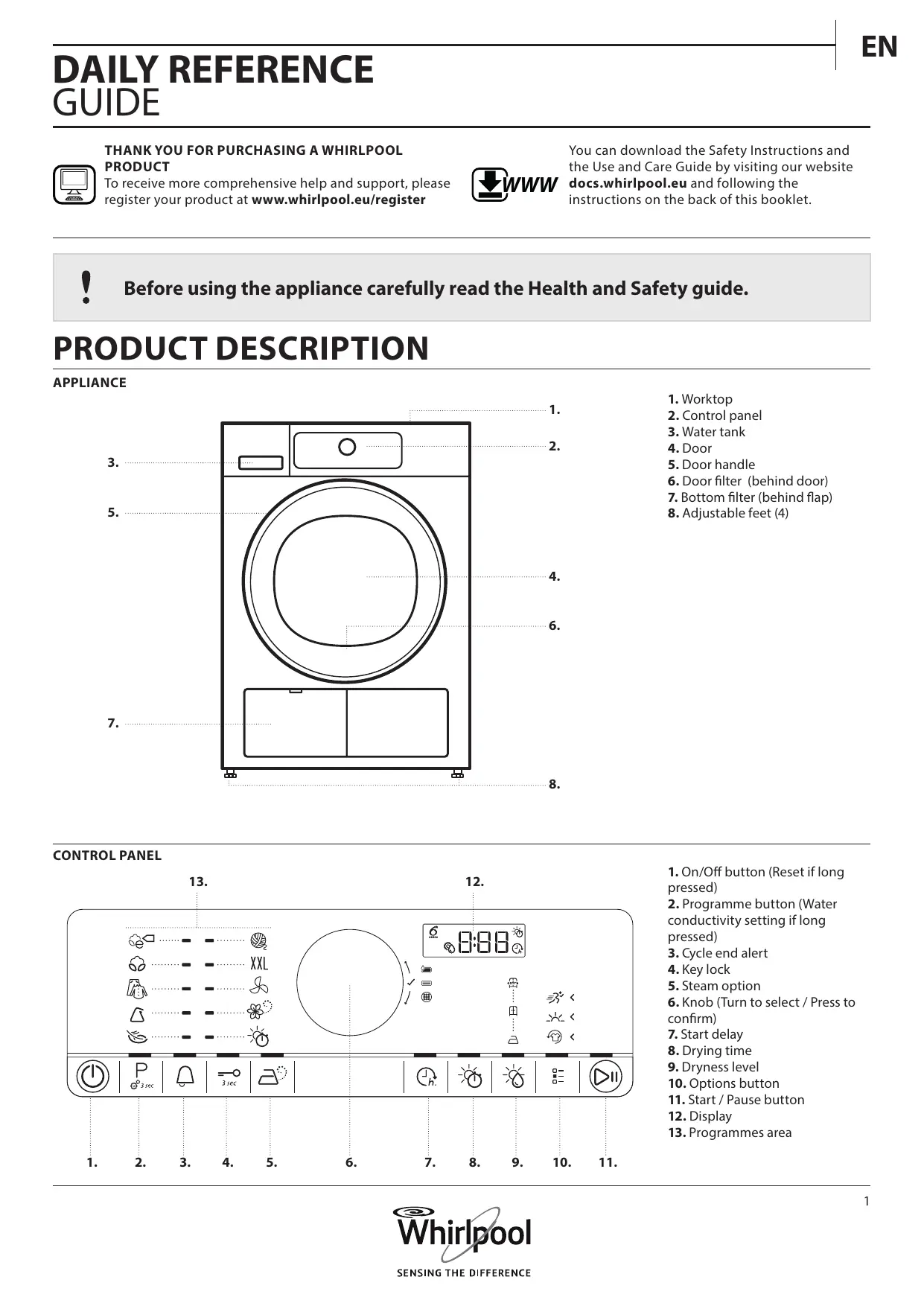
DAILY REFERENCE GUIDE
THANK YOU FOR PURCHASING A WHIRLPOOL
PRODUCT To receive more comprehensive help and support, please register your product at www.whirlpool.eu/register WWW You can download the Safety Instructions and the Use and Care Guide by visiting our website docs.whirlpool.e u and following the instructions on the back of this booklet. Before using the appliance carefully read the Health and Safety guide. PRODUCT DESCRIPTION APPLIANCE
6. Door filter (behind door)
7. Bottom filter (behind flap)
8. Adjustable feet (4)
conductivity setting if long pressed)
6. Knob (Turn to select / Press to
BEFORE USING THE DRYER
CHECK DRAIN HOSE AND WATER TANK
Make sure that the drain hose on the back of the dryer is fixed correctly, either to the dryer’s water tank (see picture), or to your domestic sewage system (see Installation guide). Also make sure that the water tank is correctly inserted. DAILY USE See Use and Care Guide for more details on functions / see last page for information on how to obtain the Use and Care Guide WARNING Make sure that no lighters or matches remain in the laundry.
Prepare your laundry according to the recommendations in section HINTS AND TIPS. Make sure that pockets are empty, fasteners closed and ribbons tied together. Open the door and load the laundry. Observe the maximum load sizes given in the PROGRAMME CHART. Make sure that the laundry is not soaked with flammable liquids.
4. SET THE DESIRED PROGRAMME
GUIDED MODE – the button light will guide you through setting your programme in the following order: selection of programme / drying time (ONLY if Drying time or Airing programme is selected) / dryness level (only if selectable / adjustable) / options. As soon as you confirm a selection by pressing the knob, the button light will jump to the next step. Select programme: Make sure that the Programme button « lights up. Turn the knob to select the desired programme. The indicator next to the selected programme lights up. Confirm the desired programme by pressing the knob.
Make sure that no laundry gets stuck between door glass and door filter. Close the door so that you can hear it click shut.
Press the On/Off button « until the programme button lights up. An animation occurs, and there is a sound. Afterwards the dryer is ready to be operated.
Find more information regarding programmes in the PROGRAMME CHART. Select Drying time, if needed Only if you have selected programme Drying time or Airing «, you can set the desired drying time from a minimum of 10 minutes to maximum 180 minutes (three hours). Make sure that the Drying time button lights up.
Turn the knob to select the desired drying time. Confirm it by pressing the knob. Set dryness level, if needed If you want to change the dryness level, make sure that the Dryness level button « lights up. Turn the knob to select the desired dryness level, then press the knob to confirm. Select options, if needed If you want to select additional options, make sure that the Options button « lights up. The options which are selectable for your programme are indicated by lighting arrows. To change the settings of a running programme or start delay, you can also:
- press Start/Pause to put the running programme on pause
- change your settings
- press Start/Pause again to continue the programme.
Press and hold the On/Off button « until “rES” appears on the display. Turn the knob to select the desired options. The symbol of the selected option will blink. To confirm it, press the knob. The programme is ended afterwards. Immediately open the door and unload the laundry, so that eventual heat in the laundry can dissipate. Some options / functions can be selected by directly pressing the button.
8. SWITCH OFF THE DRYER AFTER PROGRAMME END
Refer to section OPTIONS, FUNCTIONS AND INDICATORS for more information. INDIVIDUAL MODE After you have switched on the dryer, you are not forced to follow the GUIDED MODE. It is up to you which order you choose to set your programme. To do a setting, first press the relevant button, then turn the knob to select, and finally press the knob to confirm. The variety of options and dryness levels depends on the programme selected. Therefore it is recommended to start your setting with selecting the programme. At the end of the programme, „End“ appears on the display. Press On/Off « to switch off the dryer. Open the door and take out your laundry. The dryer will switch off automatically in about a quarter of an hour after programme end, to save energy.
Press and hold Start/Pause « until the button lights up solidly; the drying process starts. The duration can be recalculated and adapted in the course of the programme. During such phases, an animation occurs on the display.
PROGRAMME, IF NEEDED
You can still change some settings after a programme was started:
- Adjust drying time (only if programme Drying time is selected)
- Add or cancel an option, provided the progress of the programme still allows it. Press the relevant button. The selected setting will blink for a few seconds. While blinking, you can adjust the setting by turning the knob. If the value or setting stopped blinking, press the button again. Press the knob to confirm the modification. If you do not confirm, the modification will be confirmed automatically — the modified setting will stop blinking. The programme will continue automatically.
Respect the care labels of your laundry; make sure that it is appropriate for being treated in a dryer. CARE LABELS The dots indicate the temperature degree for drying the laundry. Normal temperature Reduced temperature
ADAPTING THE DRYER TO WATER CONDUCTIVITY
The drying results are affected by the conductivity of the water used during washing. If, by modifying the available dryness levels (iron dry; cupboard dry; extra dry), you are not satisfied with the final drying results, you can adapt the water conductivity level. The dryer comes with preset level 2. Choose between level 1 (most damp results) and 5 (most dry results). Press and hold the Programme button until the Conductivity Adjustment symbol on the display blinks. Do not tumble dry
Objects like coins or keys can damage your laundry as well as the drum. Turn the knob to adjust the level (1 –2 – 3 – 4 - 5). Press the knob to confirm the selected level. This operation is not needed for every drying cycle. Once the most satisfying water conductivity level has been identified, you no longer need to modify it. SAVING TIPS Always dry a full load; this optimizes the relative energy consumption. The maximum load sizes for the various programmes are indicated in the programme chart. To reduce the drying time, make sure that the laundry is spun with the maximum possible spin speed of the wash programme. This reduces the moisture content in the laundry. CONSUMPTION DATA Data can differ in your home, mainly depending on the moisture content of the laundry load. Programme Load (Kg) Spin Speed (rpm) Humidity
Energy consumption (kWh) Drying Time (min) ECO COTTON *
*Reference programmes for Energy Label / Regulation 392/2012 / EU Values are based on the default programme setting, with clean door and bottom filter. For consumer tests, the door filter and bottom filter need to be cleaned after each cycle. The energy consumption and drying time may differ from the values above. They depend on the operation conditions in your home (such as voltage fluctuation, mixture of textiles, humidity of the textiles after spinning, load volume). The values are determined according to European Norm 61121 and refer to the default programme setting; changing the setting also impacts the consumption data. Heat Pump System This dryer is fitted with a sealed heat pump system to dry your clothes. To operate, the heat pump contains fluorinated greenhouse gases (Fgases) which are covered by the Kyoto Protocol. These F gases are contained in a hermetically sealed unit. This sealed unit contains 0.37 kg of the F gas R134a which acts as a refrigerant. GWP = 1430 (1 t CO2).
COTTON Selectable by options button
PROGRAMMES Make sure that your laundry is suitable to be treated in a tumble dryer. Refer to HINTS AND TIPS / Care labels. ECO COTTON For drying normally wet cotton laundry. Standard cotton programme, suitable to dry normal wet cotton laundry. Most efficient programme in terms of energy consumption for drying cotton laundry. The values on the Energy Label are based on this programme. COTTON For drying cotton laundry. MIXED For drying mixed laundry made of cotton, linen, synthetic fibres and their blends. SYNTHETICS For drying laundry made of synthetic fibres. DELICATES For drying delicate laundry which needs gentle treatment. WOOL EXCELLENCE For drying woolens labeled with the Woolmark TOTAL EASY CARE WOOL. BIG ITEMS For drying big laundry items, such as sleeping bags, blankets etc. AIRING For airing, refreshing and loosening up laundry without heating. Select the airing duration with option Drying time. STEAM REFRESH For refreshing laundry with steam. Specifically designed to refresh and remove odors from dry and clean casual garments like shirts, blouses, trousers made out of cotton, synthetics and their blends. Before loading the laundry into the drum, slightly humidify it by spraying it with water (maximum 200 ml; use a water spray bottle). Dryness level Cupboard dry is preset and cannot be changed. After programme end, unload the laundry immediately and put on clothes hangers to minimize creasing. DRYING TIME Time-restricted drying programme. Select programme duration with option Drying time. For all fabrics appropriate for tumble drying. Suitable to add an additional short drying phase after programme end. Refer to OPTIONS, FUNCTIONS AND INDICATORS / option Drying time for more information.
OPTIONS, FUNCTIONS AND INDICATORS
Refer to the programme chart to check which options are available for the selected programme.
OPTIONS WHICH ARE DIRECTLY SELECTABLE BY
PRESSING THE RESPECTIVE BUTTON
Steam option Minimizes creasing of garments made of cotton, synthetics and their blends by adding a humidifying phase at the end of the drying cycle. Use the option with small loads only, unload the garments from the dryer immediately after programme end and put them on clothes hangers. The humidity level automatically adjusts to Cupboard dry and cannot be changed with this option. Not combinable with options Fresh care, Rapid and Gentle.
Drying time To adjust the desired drying time, only if the Drying time or Airing programme has been selected. Press the button; the drying time symbol on the display lights up. Turn the knob to select the desired drying time up to maximum 180 minutes, then press the knob to confirm it. Not selectable for any other programme except the Drying time and Airing programme. Dryness level To select the desired dryness level for the laundry load. Press the button, then turn the knob to select the desired dryness level; chose between Iron dry (suitable to be ironed after the drying cycle, therefore still slightly humid)
Cupboard dry (dry enough to be placed in a cupboard at the end of the drying cycle) Extra dry (maximum dryness level) and confirm by pressing the knob. OPTIONS WHICH ARE SELECTABLE WITH THE OPTIONS BUTTON Fresh Care Helps to prevent creasing if you cannot unload the laundry soon after programme end. The dryer starts to tumble the laundry periodically a few minutes after programme end. This tumbling will last up to approximately 12 hours after end of the programme. You can stop it at any time by switching off the dryer with the On/Off button. Not combinable with Steam option. Gentle Enables a more gentle treatment of the laundry by reducing the drying temperature. Not combinable with Rapid and Steam option. Rapid Enables quicker drying. Not combinable with Gentle and Steam option. FUNCTIONS Start delay Moves the start of your programme to a later time. Choose a delay up to 23 hours.
- Select programme and options.
- Press the Start delay button « – the Start delay symbol on the display blinks.
- Turn the knob to select a delay up to 23 hours, which will be shown on the display. Press the knob to confirm.
- Press Start / Pause - the display shows the countdown of the delay until start of the programme. The Start / Pause button lights up. A sound by activation of the pump may occur.
- After the delay has expired, the dryer starts automatically. The display then indicates the remaining programme duration. To cancel the Start delay
- Press Start / Pause to cancel the start delay (and press Start / Pause again to start the selected programme immediately). INDICATORS Water tank full (=> empty water tank) Bottom filter clogged (=> clean bottom filter). Door filter clogged (=> clean door filter) In case of any failures, refer to section TROUBLESHOOTING in the USE AND CARE GUIDE. End of cycle signal To switch on and off the signal tone at the end of the programme. Key lock To lock the keys and the knob of the control panel against unwanted operation. To lock the keys:
- The dryer must be switched on.
- Press and hold the Key lock button « until the button lights up. Knob and keys are locked now. Only the On/Off button works. If you switch the dryer off and on again, the key lock will remain active until you unlock it. To unlock the keys:
- Press and hold the Key lock button until the button light goes off.
WARNING Switch off and unplug the dryer before doing any cleaning and maintenance. EMPTY WATER TANK AFTER EACH DRYING CYCLE Hold the handle and carefully pull out the water tank. Hold the full water tank with both hands. Empty the water and insert the container by pushing it back into place. Make sure that it is properly inserted. Caution, the water in the water tank can still be hot. CLEAN THE BOTTOM FILTER AFTER ABOUT EVERY FIFTH DRYING CYCLE Be Careful. Some models are equipped with different filters, therefore some descriptions below may differ from the filter present in the dryer. All filters parts have to be cleaned Open the bottom flap. Hold the handle and pull out the bottom filter. CLEAN DOOR FILTER AFTER EACH DRYING CYCLE Open the door and remove the door filter by pulling it upwards. Remove the foam from the bottom filter, to clean it. Clean the filter foam and the filter by hand or under running water. Do not wash it in the washing machine. Wring out the filter foam. Do not insert it in the bottom filter dripping wet. Fix the filter foam on the bottom filter. Clean the filter chamber of the dryer with a damp cloth or carefully with a vacuum cleaner. Insert the bottom filter again. Clap the filter handle down and close the bottom flap. Press the button to open the door filter. Remove the lint inside. Close the filter and reinsert it in the right direction, so that it completely integrates in the filter chamber. HOW TO OBTAIN THE USE AND CARE GUIDE > WWW Download the Use and Care Guide from our website docs.whirlpool.e u (you can use this QR code), specifying the product’s commercial code. > Alternatively, contact our Client After‑sales Service
CONTACTING OUR AFTER‑SALES
SERVICE You can find our contact details in the warranty manual. When contacting our Client After‑sales Service, please state the codes provided on your product’s identification plate. xxxxxxxxxxxx PRODUCT FICHE WWW The product fiche with energy data of this appliance can be downloaded from Whirlpool Website docs.w hirlpool.e u