 ManualGo.com
 CTV 250 - Wine cellar LA SOMMELIERE - Free user manual and instructions
Find the device manual for free CTV 250 LA SOMMELIERE in PDF.


Download the instructions for your Wine cellar in PDF format for free! Find your manual CTV 250 - LA SOMMELIERE and take your electronic device back in hand. On this page are published all the documents necessary for the use of your device. CTV 250 by LA SOMMELIERE.
USER MANUAL CTV 250 LA SOMMELIERE
2.PLACE YOUR CABINET (1) When moving your wine cabinet, do not incline it more than 45o, and always toward side where the power lead is located. (2) In order to reduce the working time and save power, place your cabinet at where the temperature is between 5oC~32oC, and there should be space to allow air to flow around the cabinet, so the heat produced by condenser can be eliminated in time. Leaving a space of at least 8cm between the wall and the back of your wine cabinet. Please keep your wine cabinet away from other domestic appliances like fridge, electric welding machine to avoid interference. (3) Away from heat source. (4) Place at proper humidity location. Not too wet (wash room, utility room, etc.). Never place your wine cabinet in a location liable to flooding. (5) Be on a flat solid floor. Gently incline the wine cabinet backwards in order to adjust the front feet (screw adjustment) so that your wine cabinet stands at perfect level.
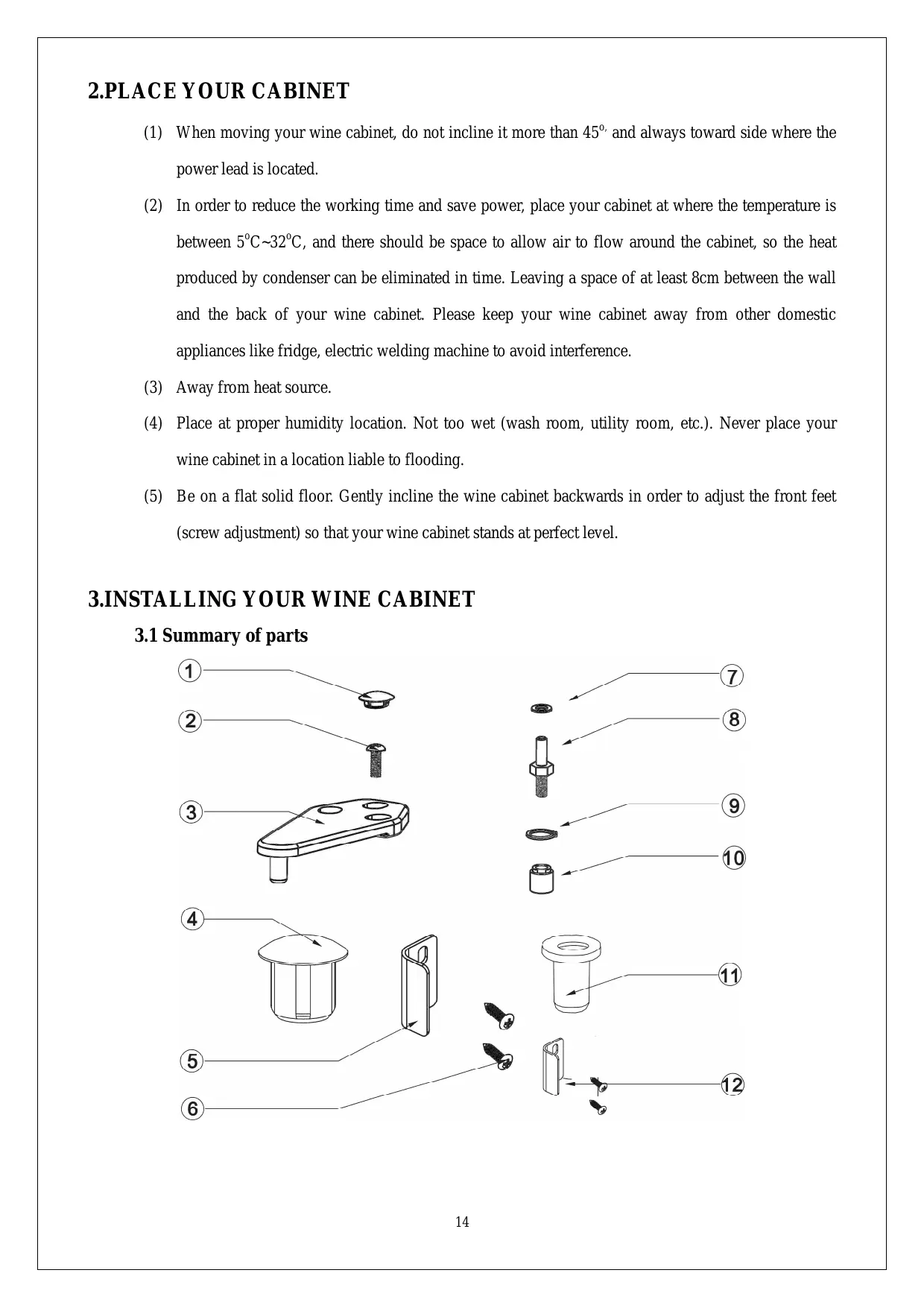
2. Screw 3. Top hinge 4.Grommet 5. Closing clip 7. Washer 8. Door pivot guide 9. Washer 10. Hinge nut 11. Pivot 13. Handle of door 14. Chamfer head screw
3.2 Installing the drip tray Install the drip tray on the compressor support at the back of the cabinet, locating it under the small pipe protruding from the housing, the lower part of the tank being placed under this pipe. See diagram below:
Installing the drip tray 3.3 Installing the carbon filter Install the carbon filter, which you will find inside your cabinets, by placing it in the air circulation hole located on the top inside the cabinet. The carbon filter can be used for one year, please change it thereafter. Contact your local distributor for new carbon filter. Please remove the used carbon filter before inserting the new one.
3.4 Installing the handle of door You can find a handle and two chamfer head screws in your accessories box .Following a diagram below you can fix the handle on the door.
Installing the handle of door
3.5Alternative hanging of the door (excepted door with lock) The door is set to be hinged right at purchase; you can change it to left. To do this, proceed as follows: (1) Close the door. (2) Remove the grommets gently using a fine blade, loosen the screws and remove the upper hinge.
(3) Remove the door from the case by opening it slightly and then lifting.
(4) Unscrew the closing clip on the left, and then fix it on the right.
(5) Remove the grommet on the right, unscrew the door pivot guide with the washer, and then tighten nit onto the same part on the opposite side.
(6) Turn the door 1800,slightly lift the door and move down, replace the door on its pivot guide.
(7) Relocate the hinge, using the screws in such a way so that the door is parallel with the case. Replace the grommets.
Important : Please note that models with lock are not reversible.
3.6 Installing the shelves 3.6.1 Installing the shelf bracing Shelf bracing should be installed before placing the shelves, the process see diagram below. Putting the shelf bracing hook in the hole inside the case and press down, this allow the shelf bracing to be hitched firmly inside the case. There are front and back shelf bracings, the longer one is back shelf bracing, should be fixed with the hook on the back inside the case; another type is front shelf bracing, should be fixed with the hook on the front inside the case. The two shelf bracings should be at the same level to keep the shelf stay at a perfect position.
Two dumpy wires in front of the shelf should lock the shelf on the shelf bracing 3.6.3 Installing the wooden shelf See diagram below to install your wooden shelf. Put the shelf on the shelf bracing with the front going first. Make sure the wooden pin should be after the back shelf bracing hook. See diagram below.
Wooden shelf installing direction
Position of wooden pin and back shelf bracing
3.7 The installation of door base support When replacing the reversible door, should change the installation direction of the base support; rotating pull up at the same time the base support can be removed; spin down at the same time the base support can be fixed.
3.8 The installation of the wall separate screws When the back side of wine cellar placed against the wall, should need to install the wall separate screws. As shown, the wall separate screws were installed in the flange on both sides of compressors pallet.
4.1 Control and adjustment 4.1.1 Control panel description
, the display start to flash, then press
to adjust temperature. Press
finsh setting. (2)The button
is disabled without pressing
and hold down for 5 seconds to display the
life of carbon filter (unit: day). Otherwise the display automatically returns to the temperature display after 15 seconds. Note: Don’t press
when displaying the life of carbon filter, or the number of life will be disordered.
is disabled without pressing
Stay on mode, displaying symbol “
to choose LED mode, then press
When door opens, displaying symbol when confirm. Otherwise the display
for 5 seconds, all output will be cut off including the display and LED. Gently press
together at sametime, humidity values will be displayed on the display panel, after 5
seconds, the display should be returned to the original layout automatically. 22
4.1.3 Alarm explanation “Door open” alarm:
will flash when door is open for more then 15 minutes and your will hear the buzzer
ring three times every 30 seconds. Buzzer will stop automatically after 3 minutes. “Invalidation of carbon filter” alarm: When the carbon filter is disabled, ring. Change the carbon filter and press when pressing
will flash and the buzzer will
for 5 seconds, then the life of new carbon filter will display
4.1.4 Humidity alarm display When the relative humidity values less than 50% more than 72hours, the display symol “
flashes. The symol should lifting flash until the humidity is greater than 50%.
4.1.5 Operating faults Temperature:
will flash when the temperature excess the limit between -300C and 600C. Buzzer will ring
every 10 seconds until pressing Hot and cold circuits: 10 seconds until pressing
will flash when there is fault about hot and cold circuits, buzzer will ring every or
4.1.6 Winter position: How does it work ? 1. When the setting temperature is lower than the internal temperature of the cabinet, the machine will start to work and refrigeration. The cold circuit operating indicator light will be on (green color) 2. When the setting temperature is higher than the internal temperature of the cabinet, the machine will stop working and stop the cooling, heating wire will begin to work to maintain cabinet temperature equilibrium. Machines’ work or stop without any environmental temperature. The hot circuit operating indicator light will be on (red color).
5. Attention (1) After unpacking your cabinet, take the discarded packaging, the majority of which is recyclable, to a refuse collection point. (2) Do not wipe the back of wine cabinet with wet cloth. (3) Do not place electric appliance or food on top of the cabinet. (4) Not for outdoor use. (5) Clean the dust on the rear condenser at least twice a year. (6) The compressor start working 3 minutes after switching on the power. If the compressor does not start immediately ,it does not mean faulty. (7) Switch off the power and take out the power lead before moving the wine cabinet. Take out all bottles before moving. (8) Do not keep the door open any longer than necessary. (9) Do not allow children to climb, sit on, stand on or hang from the shelves of the wine cabinet. They could damage the wine cabinet and cause themselves serious injury. (10) Take care to keep keys out of reach of children in order to avoid them locking themselves in the cabinet. (11)Do not try to repair any damaged wire or electric components. Contact your distributor or service agent.
Compressor not working
Power lead or wire damaged
Contact distributor or service agent
Internal circuit fault
Contact distributor or service agent
Common phenomena. When the temperature inside cabinet is lower than that you set, the cabinet will be heated automatically
Compressor noisy or frequently on or off
Power supply not stable
Switch off the power, restart 3 minutes later
Cabinet not on flat floor
Adjust front feet until perfect level
Temperature set too high
Check temperature, reset it
Door open too long or too often
Only open when necessary
Contact your distributor or service agent
Electric circuit problem
Contact your distributor or service agent
Contact your distributor or service agent
Cabinet not on level
Adjust front feet until perfect level
Door installation incorrect after change hanging side
See Alternative hanging of door and install it correctly
Shelf extend out of the case
Put the shelf back to right position
LED do not light Can not close door properly
Setting temperature and measured temperature may be different (2 or 3°C). This is normal, the reason can be temperature sensor position or external conditions
La Sommelière Int. ZA Les portes de l’Océane Ouest BP 16 72 650 Saint Saturnin, France contact@lasommeliere.com
Household refrigerating appliances categories
2. Réfrigérateur avec compartiment cave, cave et appareil de stockage du vin
1. Refrigerator with one or more fresh-food storage compartments 2. Refrigerator-cellar, Cellar and Wine storage appliances 3. Refrigerator-chiller and Refrigerator with a 0-star compartment
4. Réfrigérateur avec compartiment «une étoile»
4. Refrigerator with a one-star compartment
5. Réfrigérateur avec compartiment «deux étoiles»
5. Refrigerator with a two-star compartment
6. Réfrigérateur avec compartiment «trois étoiles»
6. Refrigerator with a three-star compartment
10. Multi-use and other refrigerating appliances