
NT-DP1WXE - Toaster PANASONIC - Free user manual and instructions
Find the device manual for free NT-DP1WXE PANASONIC in PDF.



| Product Type | Toaster |
| Brand | Panasonic |
| Model | NT-DP1WXE |
| Usage | Domestic |
| Power Supply | 230 V ~ 50-60 Hz |
| Power Consumption | 850 W |
| Dimensions (W × D × H) | 29.8 × 15.5 × 19.5 cm |
| Weight | 2.0 kg |
| Power Cord Length | 0.9 m |
| Number of Slots | 2 |
| Browning Setting | 5 levels (1 to 5) |
| Functions | Browning, defrost, reheat, bun warmer |
| Auto Shut-off | Yes |
| Automatic Bread Ejection | Yes |
| Crumb Tray | Removable and washable |
| Housing Material | Heat-resistant plastic |
| Care and Cleaning | Wipe exterior with a damp cloth; wash crumb tray with soapy water; do not immerse |
| Safety | Overheat protection, short cord, auto shut-off |
| Spare Parts and Repairability | Repair by an authorized Panasonic service center; power cord replaceable by a professional |
| General Information | Only for toasting bread; do not use for foods with sugar or fat |
Frequently Asked Questions - NT-DP1WXE PANASONIC
User questions about NT-DP1WXE PANASONIC
0 question about this device. Answer the ones you know or ask your own.
Ask a new question about this device
Download the instructions for your Toaster in PDF format for free! Find your manual NT-DP1WXE - PANASONIC and take your electronic device back in hand. On this page are published all the documents necessary for the use of your device. NT-DP1WXE by PANASONIC.
USER MANUAL NT-DP1WXE PANASONIC
Toaster (Household Use)
Toaster (Household Use)
| Contents | Page |
| Safety Precautions | 4 |
| Important Information | 10 |
| Parts Names and Handling Instructions | 11 |
| How to Use | 12 |
| How to Clean | 14 |
| Troubleshooting | 14 |
| Specifications | 15 |
Thank you for purchasing the Panasonic product.
- This product is intended for household use only.
- Please read these instructions carefully to use the product correctly and safely.
- Before using this product please give your special attention to "Safety Precautions" (Page 4~10).
- Please keep this Operating Instructions for future use.
Please make sure to follow these instructions.
In order to prevent accidents or injuries to the user, other people, and damage to property, please follow the instructions below.
The following charts indicate the degree of damage caused by wrong operation.

WARNING: Indicates serious injury or death.

CAUTION: Indicates risk of injury or property damage.
The symbols are classified and explained as follows.

This symbol indicates prohibition.

This symbol indicates requirement that must be followed.

WARNING

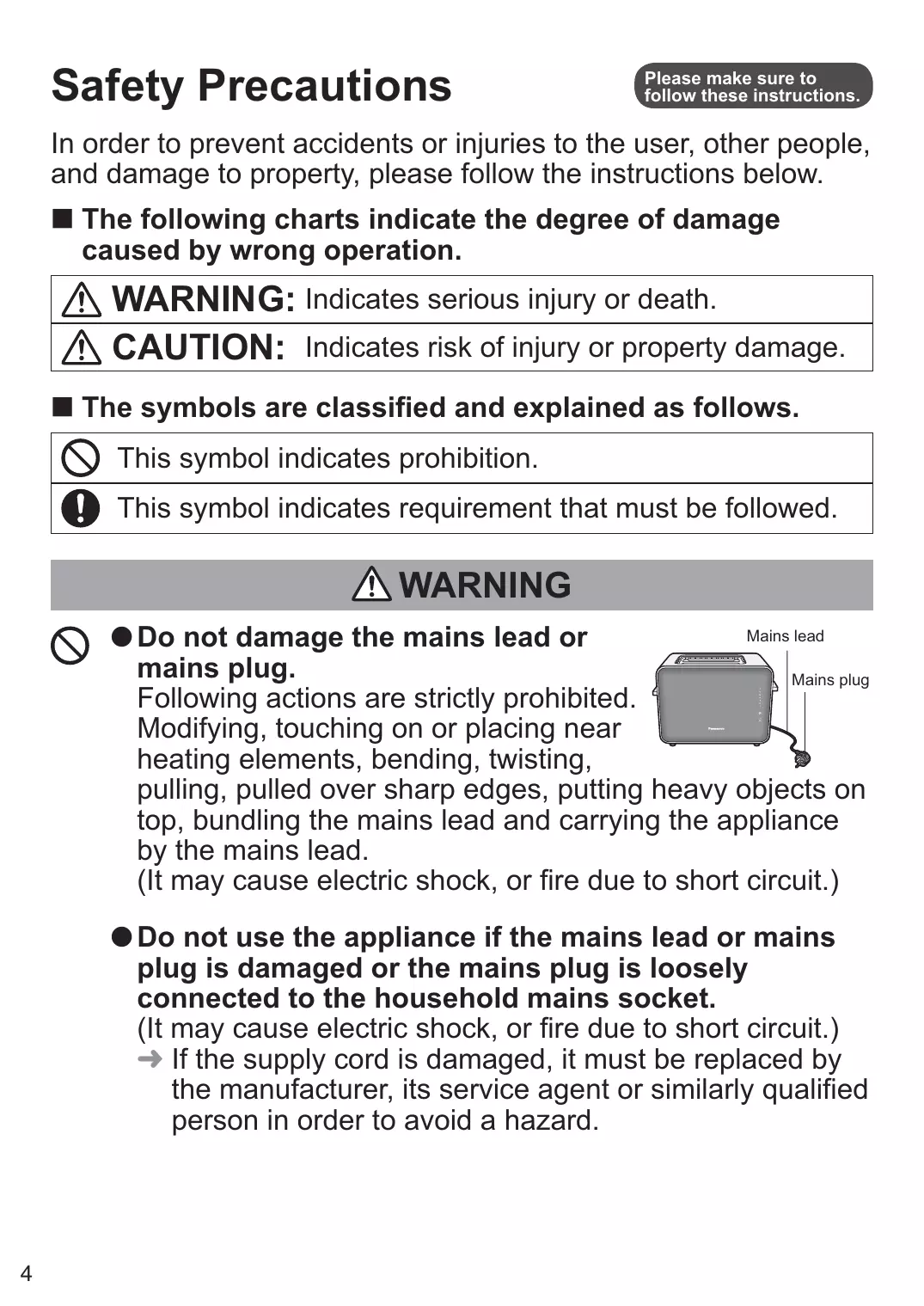
- Do not damage the mains lead or mains plug.
Following actions are strictly prohibited. Modifying, touching on or placing near heating elements, bending, twisting,
pulling, pulled over sharp edges, putting heavy objects on top, bundling the mains lead and carrying the appliance by the mains lead.
(It may cause electric shock, or fire due to short circuit.)
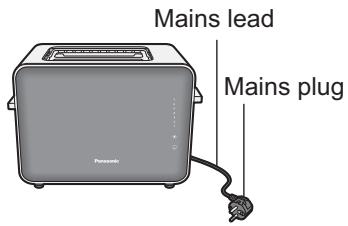
- Do not use the appliance if the mains lead or mains plug is damaged or the mains plug is loosely connected to the household mains socket.
(It may cause electric shock, or fire due to short circuit.)
→ If the supply cord is damaged, it must be replaced by the manufacturer, its service agent or similarly qualified person in order to avoid a hazard.

-
Do not plug or unplug the mains plug with wet hands. (It may cause electric shock.)
-
Always ensure that hands are dry before handling the mains plug or switching on the appliance.

- Make sure the voltage indicated on the label of the appliance is the same as your local supply.
(It may cause electric shock or fire.)
Also avoid plugging other devices into the same household mains socket to prevent electrical over heating.
However, if you are connecting a number of mains plugs, make sure the total wattage does not exceed the rated wattage of the household mains socket.
- Insert the mains plug firmly.
(Otherwise It may cause electric shock and fire due to heat that may be generated around the mains plug.)
Clean the mains plug regularly.
Dust and moisture build-up on the mains plug may cause insufficient insulation, which may cause a fire.
→ Unplug the mains plug, and wipe with a dry cloth.
- Keep the mains lead out of reach of children. Do not let the mains lead hang over the edge of the table or worktop.
(It may cause burns, injury or electric shock.)
WARNING

- Do not immerse the appliance in water or splash it with water.
(It may cause electric shock, or fire due to short circuit.)
- Do not disassemble, repair or modify this appliance. (It may cause fire, electric shock or injury.)
→ Consult the place of purchase or a Panasonic service centre.
- Do not put your hands or metal utensils into the insertion slots.
(It may cause electric shock.)
- Do not insert any object in the gaps.
(It may cause electric shock.)
- Especially metal objects such as pins or wires

- This appliance can be used by children aged from 8 years and above and persons with reduced physical, sensory or mental capabilities, or lack of experience and knowledge if they have been given supervision or instruction concerning use of the appliance in a safe way and understand the hazards involved. Children shall not play with the appliance. Cleaning and user maintenance shall not be made by children unless they are older than 8 and supervised. Keep the appliance and its cord out of reach of children less than 8 years.
(It may cause burns, injury or electric shock.)

-
Always keep the children away from the appliance. (It may cause burns or injury.)
-
Children do not realise dangers that are likely to occur because of improper use of appliances.
-
Discontinue using the appliance immediately and unplug in the unlikely event that this appliance stops working properly.
(It may cause smoking, fire, electric shock or burns.) e.g. for abnormal or breaking down
- The mains plug and the mains lead become abnormally hot.
- The mains lead is damaged or the appliance power fails.
- The main body is deformed, has visible damage or is abnormally hot.
- The appliance keeps heating after power is turned off.
- There is another abnormality or failure.
→ Unplug the appliance immediately and consult the place of purchase or a Panasonic service centre for inspection or repair.
- The bread may burns, therefore do not use the appliance near or below flammable material such as curtains.
(It may cause fire.)
CAUTION

- Do not use the appliance for any purpose other than those described in these instructions.
(It may cause burns or injury.)
-
Panasonic will not accept any liability if the appliance is subject to improper use, or failure to comply with these instructions.
-
Do not touch parts other than the operating controls as the appliance can become hot while it is in use and after toasting.
The temperature of accessible surfaces may be high when the appliance is operating.
(The surfaces get hot during use which may cause a) burns.
- Do not put anything on or insert anything underneath the appliance.
(It may cause discolouration, deformation, deterioration) or fire.
- Do not toast or warm up bread which has butter or jam on it.
(It may cause fire.)
- Do not toast other than the appropriate size of bread or deformed bread. (P.11)
(It may cause fire or malfunction.)

- Do not use the appliance on following places.
- On uneven surfaces, on non-heat-resistant carpet or table cloths etc.
(It may cause fire or injury.)
- Places where it may be splashed with water or near a heat source.
(It may cause electric shock or electrical leakage.)
- Near any open water such as bathtubs, sinks, or other containers.
(It may cause electric shock or electrical leakage.)
- Near a wall or furniture.
(It may cause discolouration or deformation.)
- Do not touch the appliance with wet hands.
(It may cause electric shock.)

- Make sure to hold the mains plug when unplugging the mains plug.
Never pull on the mains lead.
(Otherwise It may cause electric shock, or fire due to short circuit.
- Always ensure the appliance is switched off and unplug the mains plug when the appliance is not in use, before moving and before cleaning.
(Otherwise It may cause electric shock, or fire due to electric leakage.
- Place the appliance on a firm, dry, clean flat heatproof worktop.
(Otherwise It may cause burns or injury.)
- Beware not to be tripped over or get caught in the mains lead while in use.
(Otherwise It may cause burns or injury.)
CAUTION

-
Pay attention to the appliance when it is in use. (It may cause fire.)
-
When leaving it, turn the power off.
-
Make sure the crumb tray is clean and set correctly when using the appliance.
(It may cause fire or injury.)
- Unplug and allow the appliance to cool down fully before cleaning and storing away.
(It may cause burns.)
-
Do not move the appliance while it is hot.
-
Press down the toast lever only for toasting, never block it.
(It may cause burns.)
- Make sure to clean the appliance after every use.
(Otherwise It may cause smoke or fire.)
Important Information
- Do not drop the appliance to avoid damaging it.
- Do not turn on the appliance for purposes other than toasting or warming up bread.
- Do not turn on the appliance if the insertion slots are covered with bread.
- Do not toast anything other than breads, for example pastries.
- This appliance is not intended to be operated by means of an external timer or separate remote-control system.
- Do not move the appliance by holding the levers, warming rack or insertion slots.
Parts Names and Handling Instructions
The illustrations inside mainly show model NT-ZP1.
Please remove the protection seals from the appliance before use.
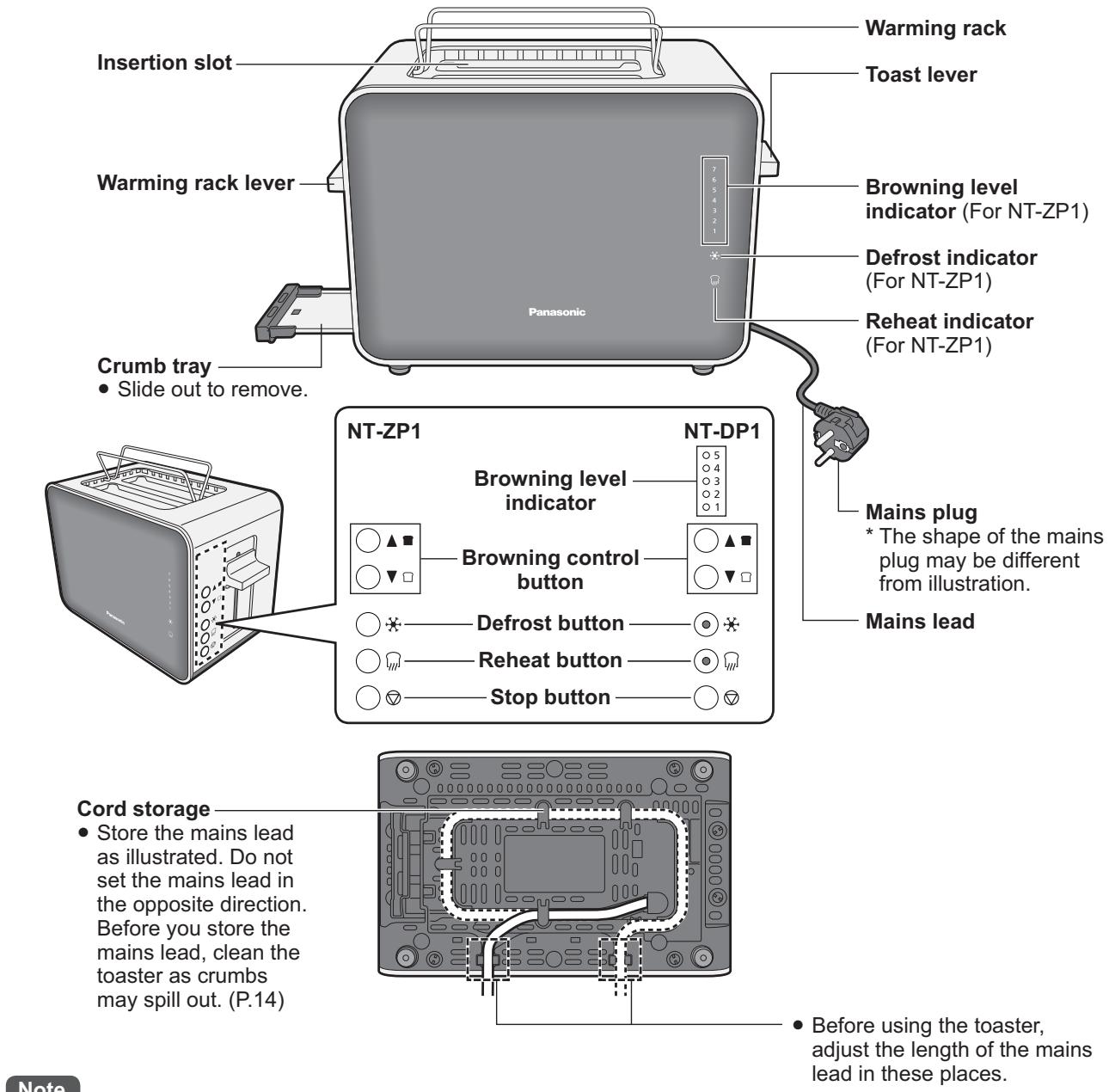
- When using the toaster for the first time, there may be a small amount some smoke or smell. This will disappear with usage.
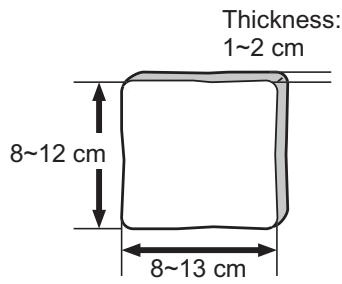
Size of bread
- Insert the bread with the longer side facing down.
- If the bread is too large, thick, thin or bread with uneven surfaces, it may get jammed or caught inside of the toaster.
- If the bread is too small, it may get caught inside of the toaster or pop it up.
- If bread gets jammed, unplug the toaster, let it cool, and carefully remove the bread. Otherwise it will keep toasting. Don't use anything sharp to remove the bread, you'll damage the heating elements.
How to Use ~Toasting bread~
Plug in and insert the slice(s) of bread into the insertion slots. Note
- Make sure the crumb tray is clean and set in place correctly before plugging in.
- When toasting a slice of bread, use either insertion slot.
Lower the toast lever until it locks. The number of the selected level on the brown will light up until toasting is completed.
- After a period of time, the indicator starts flashing from level 1, and rises up the indicator as browning progresses, up to the selected level.
- The toast will pop up automatically. If the toast do not pop up fully, lift the toast lever up manually.
e.g. When it set on 4.
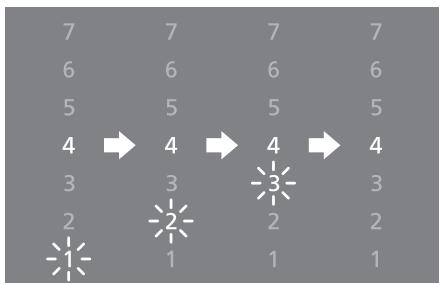
Browning control range is from 1 to 5 on NT-DP1.
To change toasting color.
The toaster memorises the previous setting. If you wish to change setting, press the browning control button shortly after following steps 1 and 2 in "Toasting bread".
The browning level indicators will light up and change each time the button is pressed.
Note
- When toasting a single slice of bread, the colour will be darker than that when toasting two slices of bread.
- Toasting colour may vary depending on the thickness and type of bread, as well as the room temperature and humidity. (Dry bread browns faster than fresh bread.)


(Darker)


(Lighter)
To toastfrozenbread
Press the defrost button shortly after following steps 1 and 2 in "Toasting bread".
To reheat toast
Press the reheat button shortly after following steps 1 and 2 in "Toasting bread".
Note
- The browning control cannot be applied to the reheat function.
To cancel toasting or reheating bread
Press the stop button to cancel toasting bread.
The toast lever will lift up and bread will pop up.
Note
- The defrost and reheat buttons light up when they are pressed. If the buttons are pressed again while light stayed on, the selected function will be canceled and toasting function will be activated.


~Warming up buns~
Plug in and lower the warming rack lever until it locks.
Place buns on top of the warming rack.
Note
- Do not place frozen, buttered, coated, iced or filled buns or aluminium foil.
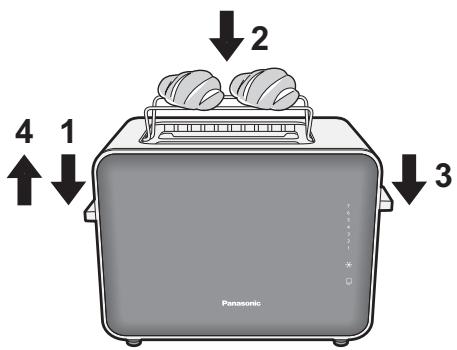
3 Lower the toast lever and set the browning level on 1. The toaster will be turned off automatically.
- If the buns are not warm enough, repeat step 1 to 3.
Note
- Do not set browning level on level 2 or higher.
Remove the buns and lift the warming rack lever.
Note
- Beware of the warming rack and body, it is hot.
When toasting bread or warming buns consecutively
- When toasting bread or warming buns consecutively for more than 4 cycles, rest the toaster for more than 1 minute after each cycle.
- When toasting bread consecutively, toasting colour may vary slightly.
How to Clean
Clean the appliance after every use.
Unplug and make sure the appliance is cooled down completely.
Note
- Do not use benzine, thinner, alcohol, bleach, polishing powder, metal brush or nylon brush, otherwise the surface will be damaged.
- Do not wash in a dishwasher.
Interior
Shake the main body lightly to allow crumbs inside to fall onto the crumb tray.
To avoid breaking down.
- Do not turn upside-down and shake. (It may cause malfunction.)
- Do not insert any instruments into the insertion slots.
Exterior
Wipe with a well-wrung cloth.
Crumb Tray
Wash with diluted dish soap (neutral) and a soft sponge.
Troubleshooting
- Please check the following points before arranging for service.
Problem
The lever does not lock when it is lowered.
The browning control, defrost and reheat buttons do not work.
Bread does not pop up after.
toasting is finished.
Toasting colour is too dark or too light.
Cause
The mains plug is not plugged in.
→ Plug it in firmly.
- Toasting bread consecutively.
→ When operating the toaster for more than 4 cycles, rest the toaster for more than 1 minute after each cycle.
The toast lever is not lowered.
→ Select either button after lowering the toast lever.
- The browning control button does not work while reheating function is on.
The bread is deformed.
The bread is too large or too small.
The bread is too thick.
→ Lift the lever up manually.
Use the appropriate size of the bread. (P.11)
Thebrowning control is not set appropriately.
- Toasting bread consecutively.
→ When operating the toaster for more than 4 cycles, rest the toaster for more than 1 minute after each cycle.
Specifications
| NT-ZP1 | NT-DP1 | |
| Power supply | 230 V ~ 50 - 60 Hz | |
| Power consumption | 850 W | |
| Dimensions (W × D × H) (approx.) | 29.8 × 16.0 × 19.5 cm | 29.8 × 15.5 × 19.5 cm |
| Weight (approx.) | 2.7 kg | 2.0 kg |
| Length of the mains lead (approx.) | 0.9 m | |
Information on Disposal for Users of Waste Electrical & Electronic Equipment (private households)
This symbol on the products and/or accompanying documents means that used electrical and electronic products should not be mixed with general household waste.
For proper treatment, recovery and recycling, please take these products to designated collection points, where they will be accepted on a free of charge basis. Alternatively, in some countries you may be able to return your products to your local retailer upon the purchase of an equivalent new product.
Disposing of this product correctly will help to save valuable resources and prevent any potential negative effects on human health and the environment which could otherwise arise from inappropriate waste handling. Please contact your local authority for further details of your nearest designated collection point.
Penalties may be applicable for incorrect disposal of this waste, in accordance with national legislation.
For business users in the European Union
If you wish to discard electrical and electronic equipment, please contact your dealer or supplier for further information.
Information on Disposal in other Countries outside the European Union
This symbol is only valid in the European Union.
If you wish to discard this product, please contact your local authorities or dealer and ask for the correct method of disposal.
Representative in EU :
Panasonic Marketing Europe GmbH
Panasonic Testing Centre
Winsbergring 15, 22525 Hamburg, Germany
Panasonic Taiwan Co., Ltd.
Web Site : http://panasonic.net/
© Panasonic Taiwan Co., Ltd. 2012
Representative in EU :
Panasonic Marketing Europe GmbH
Panasonic Testing Centre
Winsbergring 15, 22525 Hamburg, Germany
Panasonic Taiwan Co., Ltd.
Web Site : http://panasonic.net/
© Panasonic Taiwan Co., Ltd. 2012
TZ50B108
F0712S0

- WARNING
- CAUTION
- DO NOT USE THE APPLIANCE ON FOLLOWING PLACES
- DO NOT TOUCH THE APPLIANCE WITH WET HANDS
- MAKE SURE TO HOLD THE MAINS PLUG WHEN UNPLUGGING THE MAINS PLUG
- ALWAYS ENSURE THE APPLIANCE IS SWITCHED OFF AND UNPLUG THE MAINS PLUG WHEN THE APPLIANCE IS NOT IN USE, BEFORE MOVING AND BEFORE CLEANING
- PLACE THE APPLIANCE ON A FIRM, DRY, CLEAN FLAT HEATPROOF WORKTOP
- BEWARE NOT TO BE TRIPPED OVER OR GET CAUGHT IN THE MAINS LEAD WHILE IN USE
- IMPORTANT INFORMATION
- PARTS NAMES AND HANDLING INSTRUCTIONS
- HOW TO USE ~TOASTING BREAD
- PLUG IN AND INSERT THE SLICE(S) OF BREAD INTO THE INSERTION SLOTS. NOTE
- LOWER THE TOAST LEVER UNTIL IT LOCKS. THE NUMBER OF THE SELECTED LEVEL ON THE BROWN WILL LIGHT UP UNTIL TOASTING IS COMPLETED
- TO CHANGE TOASTING COLOR
- NOTE
- TO TOASTFROZENBREAD
- TO REHEAT TOAST
- TO CANCEL TOASTING OR REHEATING BREAD
- WARMING UP BUNS
- WHEN TOASTING BREAD OR WARMING BUNS CONSECUTIVELY
- HOW TO CLEAN
- INTERIOR
- EXTERIOR
- CRUMB TRAY
- TROUBLESHOOTING
- PROBLEM
- CAUSE
- SPECIFICATIONS
- INFORMATION ON DISPOSAL FOR USERS OF WASTE ELECTRICAL & ELECTRONIC EQUIPMENT (PRIVATE HOUSEHOLDS)
- FOR BUSINESS USERS IN THE EUROPEAN UNION
- INFORMATION ON DISPOSAL IN OTHER COUNTRIES OUTSIDE THE EUROPEAN UNION
Brand : PANASONIC
Model : NT-DP1WXE
Category : Toaster