 ManualGo.com
12C - Calculator HP - Free user manual and instructions
Find the device manual for free 12C HP in PDF.


Download the instructions for your Calculator in PDF format for free! Find your manual 12C - HP and take your electronic device back in hand. On this page are published all the documents necessary for the use of your device. 12C by HP.
USER MANUAL 12C HP
This Solutions Handbook has been designed to supplement the HP-12C Owner's Handbook by providing a variety of applications in the financial area. Programs and/or step-by-step keystroke procedures with corresponding examples in each specific topic are explained. We hope that this book will serve as a reference guide to many of your problems and will show you how to redesign our examples to fit your specific needs.
Real Estate
Refinancing
It can be mutually advantageous to both borrower and lender to refinance an existing mortgage which has an interest rate substantially below the current market rate, with a loan at a below-market rate. The borrower has the immediate use of tax-free cash, while the lender has substantially increased debt service on a relatively small cash outlay.
To find the benefits to both borrower and lender:
- Calculate the monthly payment on the existing mortgage.
- Calculate the monthly payment on the new mortgage.
- Calculate the net monthly payment received by the lender (and paid by the borrower) by adding the figure found in Step 1 to the figure found in Step 2.
- Calculate the Net Present Value (NPV) to the lender of the net cash advanced.
- Calculate the yield to the lender as an IRR.
- Calculate the NPV to the borrower of the net cash received.
Example 1: An investment property has an existing mortgage which originated 8 years ago with an original term of 25 years, fully amortized in level monthly payments at 6.5% interest. The current balance is $133,190.
Although the going current market interest rate is 11.5% , the lender has agreed to refinance the property with a 200,000, 17 year, level-monthly-payment loan at9.5\%$ interest.
What are the NPV and effective yield to the lender on the net amount of cash actually advanced?
What is the NPV to the borrower on this amount if he can earn a 15.25% equity yield rate on the net proceeds of the loan?
| Keystrokes | Display | |
| g ENDf CLEAR FIN17 g 12x6.5 g 12÷133190 PVPMT STO 0 | -1,080.33 | Monthly payment on existing mortgage received by lender. |
| 9.5 g 12÷ 200000 CHS PV PMT | 1,979.56 | Monthly payment on new mortgage. |
| RCL 0 + PMT | 899.23 | Net monthly payment (to lender). |
| RCL PV 133190 + STO 0 | -66,810.00 | Net amount of cash advanced (by lender). |
| 11.5 g 12÷ PV | -80,425.02 | Present value of net |
| RCL 0 - | -13,615.02 | NPV to lender of net cash advanced |
| RCL 0 PV i 12 x | 14.83 | % nominal yield (IRR). |
| 15.25 g 12÷ PV | -65,376.72 | Present value of net monthly payment at 15.25%. |
| RCL 0 - | 1,433.28 | NPV to borrower. |
Wrap-Around Mortgage
A wrap-around mortgage is essentially the same as a refinancing mortgage, except that the new mortgage is granted by a different lender, who assumes the payments on the existing mortgage, which remains in full force. The new (second) mortgage is thus "wrapped around" the existing mortgage. The "wrap-around" lender advances the net difference between the new (second) mortgage and the existing mortgage in cash to the borrower, and receives as net cash flow, the difference between debt service on the new (second) mortgage and debt service on the existing mortgage.
When the terms of the original mortgage and the wrap-around are the same, the procedures in calculating NPV and IRR to the lender and NPV to the borrower are exactly the same as those presented in the preceding section on refinancing.
Example 1: A mortgage loan on an income property has a remaining balance of 200,132.06 . When the load originated 8 years ago, it had a 20-year term with full amortization in level monthly payments at 6.75% interest.
A lender has agreed to "wrap" a $300,000 second mortgage at 10%, with full amortization in level monthly payments over 12 years. What is the effective yield (IRR) to the lender on the net cash advanced?
| Keystrokes | Display | |
| g END | 144.00 | Total number of months remaining in original load (into n). |
| f CLEAR FIN 20 ENTER 8 - g 12x | ||
| 6.75 g 12÷ | 0.56 | Monthly interest rate (into i). |
| 200132.06 PV | 200,132.06 | Loan amount (into PV). |
| PMT STO 0 | -2,031.55 | Monthly payment on existing mortgage (calculated). |
| 10 g 12÷ | 0.83 | Monthly interest on wrap-around. |
| 300000 CHS PV | -300,000.00 | Amount of wrap-around (into PV). |
| PMT | 3,585.23 | Monthly payment on wrap-around (calculated). |
| RCL 0 + PMT | 1,553.69 | Net monthly payment received (into PMT). |
| RCL PV 200132.06 + PV | -99,867.94 | Net cash advanced (into PV). |
| i 12 x | 15.85 | Nominal yield (IRR) to lender (calculated). |
Sometimes the wrap around mortgage will have a longer payback period than the original mortgage, or a balloon payment may exist.
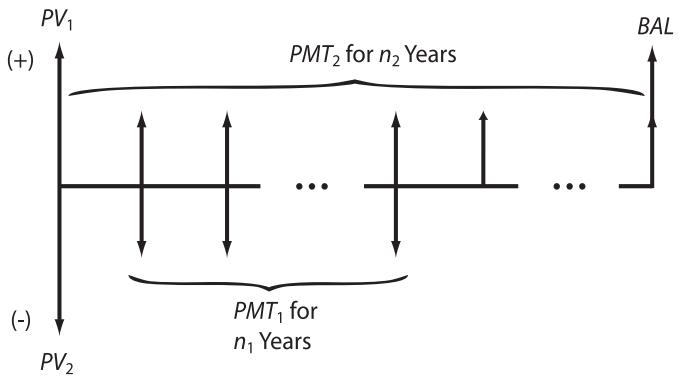
where:
n_1 = number of years remaining in original mortgage
PMT_1 = yearly payment of original mortgage
PV_1 = remaining balance of original mortgage
n_2 = number of years in wrap-around mortgage
PMT_2 = yearly payment of wrap-around mortgage
PV_2 = total amount of wrap-around mortgage
BAL = balloon payment
Example 2: A customer has an existing mortgage with a balance of 125.010, a remaining term of 200 months, and a1051.61 monthly payment. He wishes to obtain a 200,000, 9 1/2% wrap-around with 240 monthly payments of1681.71 and a balloon payment at the end of the 240th month of $129,963.35. If you, as a lender, accept the proposal, what is your rate of return?
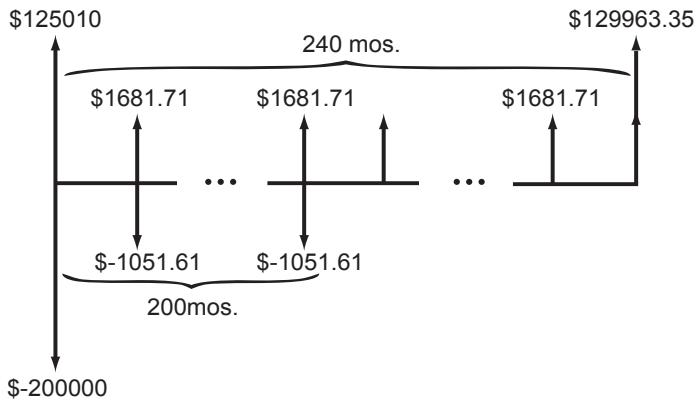
| Keystrokes | Display | |
| g ENDf CLEAR FIN200000 CHS ENTER125010 + g CF0 | -74,990.00 | Net investment. |
| 1051.61 CHS ENTER1681.71 + | 630.10 | Net cash flow received by lender. |
| g CFj 99 g Njx ≈ y g CFjx ≈ y g NJx ≈ y g CFj2 g Nj | The above cash flow occurs 200 times. | |
| g LSTX g CFj | 1,681.71 | Next cash flow received by lender. |
| 39 g Nj | 39.00 | Cash flow occurs 39 times. |
| x ≈ y 129963.35 + g CFj | 131,645.06 | Final cash flow. |
| f IRR 12 x | 11.84 | Rate of return to lender. |
If you, as a lender, know the yield on the entire transaction, and you wish to obtain the payment amount on the wrap-around mortgage to achieve this yield, use the following procedure. Once the monthly payment is known, the borrower's periodic interest rate may also be determined.
- Press the g END and press f CLEAR FIN
- Key in the remaining periods of the original mortgage and press n
- Key in the desired annual yield and press g 12÷
- Key in the monthly payment to be made by the lender on the original mortgage and press CHS PMT.
- Press PV
- Key in the net amount of cash advanced and press + CHS PV
- Key in the total term of the wrap-around mortgage and press .
- If a balloon payment exists, key it in and press FV
- Press PMT to obtain the payment amount necessary to achieve the desired yield.
- Key in the amount of the wrap-around mortgage and press CHS PV i to obtain the borrower's periodic interest rate.
Example 3: Your firm has determined that the yield on a wrap-around mortgage should be 12% annually. In the previous example, what monthly payment must be received to achieve this yield on a $200,000 wrap-around? What interest rate is the borrower paying?
| Keystrokes | Display | |
| g ENDf CLEAR FIN200 n 12 g 12÷ | Number of periods and monthly interest rate. | |
| 1051.61 CHS PMTfV 74990 +CHS PV | -165,776.92 | Present value of payments plus cash advanced. |
| 240 n129963.35 FV PMT | 1,693.97 | Monthly payment received by lender |
| 2000 CHS PV i | 9.58 | Annual interest rate paid by borrower. |
12
X
Income Property Cash Flow Analysis
Before-Tax Cash Flows
The before-tax cash flows applicable to real estate analysis and problems are:
Potential Gross Income
Effective Gross Income
Net Operating Income (also called Net Income Before Recapture.)
Cash Throw-off to Equity (also called Gross Spendable Cash)
The derivation of these cash flows follows a set sequence:
- Calculate Potential Gross Income by multiplying the rent per unit times the number of units, times the number of rental payments periods per year. This gives the rental income the property would generate if it were fully occupied.
- Deduct Allowance for Vacancy and Rental Loss. This is usually expressed as a percentage. The result is Rent Collections (which is also Effective Gross Income if there is no "Other Income").
- Add "Other Income" such as receipts from concessions (laundry equipment, etc.), produced from sources other than the rental office space. This is Effective Gross Income.
- Deduct Operating Expenses. These are expenditures the landlord-investor must make, by contract or custom, to preserve the property and keep in capable of producing the gross income. The result is the Net Operating Income.
- Deduct Annual Debt Service on the mortgage. This produces Cash Throw-Off to Equity.
Thus:
Effective Gross Income =
Potential Gross Income - Vacancy Loss + Other Income.
Net Operating Income =
Effective Gross Income - Operating Expenses.
Cash Throw-Off =
Net Operating Income - Annual Dept Service.
Example: A 60-unit apartment building has rentals of 250 per unit per month. With a (5% vacancy rate, the annual operating cost is )76,855.
The property has just been financed with a $700,000 mortgage, fully amortized in a level monthly payments at 11.5% over 20 years.
a. What is the Effective Gross Income?
b. What is the Net Operating Income?
c. What is the Cash Throw-Off to Equity?
| Keystrokes | Display | |
| g ENDf CLEAR FIN60 ENTER250 x 12 x | 180,000.00 | Potential Gross Income. |
| 5 % | 9,000.00 | Vacancy Loss. |
| - | 171,000.00 | Effective Gross Income. |
| 76855 - | 94,145.00 | Net Operating Income. |
| 20 g 12x11.5 g 12÷700000 PVPMT 12 x | -89,580.09 | Annual Debt Service. |
| + | 4,564.91 | Cash Throw-Off. |
Before-Tax Reversions (Resale Proceeds)
The reversion receivable at the end of the income projection period is usually based on forecast or anticipated resale of the property at that time. The before tax reversion amount applicable to real estate analysis and problems are:
Sale Price.
Cash Proceeds of Resale.
Outstanding Mortgage Balance.
Net Cash Proceeds of Resale to Equity.
The derivation of these reversions are as follows:
- Forecast or estimate Sales Price. Deduct sales and Transaction Costs. The result is the Proceeds of Resale.
- Calculate the Outstanding Balance of the Mortgage at the end of the Income Projection Period and subtract it from Proceeds of Resale. The result is net Cash Proceeds of Resale.
Thus:
Cash Proceeds of Resale = Sales Price - Transaction Costs.
Net Cash Proceeds of Resale = Cash Proceeds of Resale - Outstanding Mortgage Balance.
Example: The apartment property in the preceding example is expected to be resold in 10 years. The anticipated resale price is (800,000. The
transaction costs are expected to be 7% of the resale price. The mortgage is the same as that indicated in the preceding example.
What will the Mortgage Balance be in 10 years?
- What are the Cash Proceeds of Resale and Net Cash Proceeds of Resale?
| Keystrokes | Display | |
| g ENDf CLEAR FIN20 g 12x | 240.00 | Mortgage term. |
| 11.5 g 12÷ | 0.96 | Mortgage rate. |
| 700000 PV | Property value. | |
| PMT | -7,465.01 | Monthly payment. |
| 10 g 12x | 120.00 | Projection period. |
| FV | -530,956.57 | Mortgage balance in 10 years. |
| 800000 ENTER | Estimated resale. | |
| 7 % | 56,000.00 | Transaction costs. |
| - | 744,000.00 | Cash Proceeds of Resale. |
| + | 213,043.43 | Net Cash Proceeds of Resale. |
After-Tax Cash Flows
The After-Tax Cash Flow (ATCF) is found for the each year by deducting the Income Tax Liability for that year from the Cash Throw Off.
where:
Taxable Income =
Net Operating Income - interest - depreciation.
Tax Liability =
Taxable Income x Marginal Tax Rate.
After Tax Cash Flow =
Cash Throw Off - Tax Liability.
The After-Tax Cash Flow for the initial and successive years may be calculated by the following HP-12C program. This program calculates the Net Operating Income using the Potential Gross Income, operational cost and vacancy rate. The Net Operating Income is readjusted each year from the growth rates in Potential Gross Income and operational costs.
The user is able to change the method of finding the depreciation from declining balance to straight line. To make the change, key in f SL at line 32 of the program in place of f DB.
| KEYSTROKES | DISPLAY |
| f P/R | |
| f CLEAR PRGM | 00- |
| 0 | 01- 0 |
| n | 02- 11 |
| STO 1 | 03- 44 1 |
| RCL 7 | 04- 45 7 |
| EEX | 05- 26 |
| 2 | 06- 2 |
| ÷ | 07- 10 |
| STO 7 | 08- 44 7 |
| 1 | 09- 1 |
| STO + 1 | 10-44 40 1 |
| 1 | 11- 1 |
| 2 | 12- 2 |
| f AMORT | 13- 42 11 |
| STO 0 | 14- 44 0 |
| RCL 5 | 15- 45 5 |
| n | 16- 11 |
| RCL i | 17- 45 12 |
| RCL 6 | 18- 45 6 |
| i | 19- 12 |
| R↓ | 20- 33 |
| STO 6 | 21- 44 6 |
| R↓ | 22- 33 |
| RCL PV | 23- 45 13 |
| RCL 4 | 24- 45 4 |
| PV | 25- 13 |
| R↓ | 26- 33 |
| STO 4 | 27- | 44 | 4 |
| R↓ | 28- | 33 | |
| g x=0 | 29- | 43 | 35 |
| g GTO 36 | 30-43, | 33 | 36 |
| RCL 1 | 31- | 45 | 1 |
| f DB | 32- | 42 | 25 |
| STO - 0 | 33-44 | 30 | 0 |
| 0 | 34- | 0 | |
| g GTO 17 | 35-43, | 33 | 17 |
| n | 36- | 11 | |
| RCL 2 | 37- | 45 | 2 |
| RCL 8 | 38- | 45 | 8 |
| % | 39- | 25 | |
| STO + 2 | 40-44 | 40 | 2 |
| R↓ | 41- | 33 | |
| RCL 0 | 42-45 | 48 | 0 |
| % | 43- | 25 | |
| - | 44- | 30 | |
| RCL 3 | 45- | 45 | 3 |
| RCL 9 | 46- | 45 | 9 |
| % | 47- | 25 | |
| STO + 3 | 48-44 | 40 | 3 |
| R↓ | 49- | 33 | |
| - | 50- | 30 | |
| 1 | 51- | 1 | |
| RCL 7 | 52- | 45 | 7 |
| STO x 0 | 53-44 | 20 | 0 |
| - | 54- | 30 |
| x | 55- | 20 |
| RCL PMT | 56- 45 | 14 |
| 1 | 57- | 1 |
| 2 | 58- | 2 |
| x | 59- | 20 |
| + | 60- | 40 |
| RCL 0 | 61- 45 | 0 |
| - | 62- | 30 |
| RCL 1 | 63- 45 | 1 |
| g PSE | 64- 43 | 31 |
| x≥y | 65- | 34 |
| R/S | 66- | 31 |
| g GTO 09 | 67-43, 33 | 09 |
| f P/R | ||
| REGISTERS | ||
| n: Used | i: Annual % | |
| PV: Used | PMT: Monthly | |
| FV: 0 | R0: Used | |
| R1: Counter | R2: PGI | |
| R3: Oper. cost | R4: Dep. value | |
| R5: Dep. life | R6: Factor (DB) | |
| R7: Tax Rate | R8: % gr. (PGI) | |
| R9: % gr. (op) | R.0: Vacancy rt. | |
- Press g END and press f CLEAR REG
- Key in loan values:
Key in annual interest rate and press 12÷
Key in principal to be paid and press PV
Key in monthly payment and press CHS PMT (If any of the values are not known, they should be solved for.)
- Key in Potential Gross Income (PGI) and press STO 2.
-
Key in Operational cost and press STO 3.
-
Key in depreciable value and press STO 4.
- Key in depreciable life and press STO 5.
- Key in factor (for declining balance only) and press STO 6.
- Key in the Marginal Tax Rate (as a percentage) and press STO 7.
- Key in the growth rate in Potential Gross Income ( 0 for no growth) and pressSTO8.
- Key in the growth rate in operational cost (0 if no growth) and press STO 9.
- Key in the vacancy rate (0 for no vacancy rate) and press STO 0.
- Key in the desired depreciation function at line 32 in the program.
- Press R/S to compute ATCF. The display will pause showing the year and then will stop with the ATCF for that year. The Y-register contains the year.
- Continue pressing R/S to compute successive After-Tax Cash Flows.
Example 1: A triplex was recently purchased for (100,000 with a 30-year loan at (12.25\%) and a (20\%) down payment. Not including a (5\%) annual vacancy rate, the potential gross income is (\9,900) with an annual growth rate of (6%). Operating expenses are (\ 3,291.75) with a (2.5\%) growth rate. The depreciable value is (\75,000) with a projected useful life of (\ 20) years. Assuming a (125\%) declining balance depreciation, what are the After-Tax Cash Flows for the first 10 years if the investors Marginal Tax Rate is (35\%)?
| Keystrokes | Display | |
| g ENDf CLEAR FIN100000 ENTER20 % - PV | 80,000.00 | Mortgage amount. |
| 12.25 g 12÷ | 1.02 | Monthly interest rate. |
| 30 g 12x | 360 | Mortgage term. |
| PMT | -838.32 | Monthly payment. |
| 9900 STO 2 | 9,900.00 | Potential Gross Income. |
| 3291.75 STO 3 | 3,291.75 | 1st year operating cost. |
| 75000 STO 4 | 75,000.00 | Depreciable value. |
| 20 STO 5 | 20.00 | Useful life. |
| 125 STO 6 | 125.00 | Decline in balance factor. |
| 35 STO 7 | 35.00 | Marginal Tax Rate. |
| 6 STO 8 | 6.00 | Potential Gross Income growth rate. |
| 2.5 STO 9 | 2.50 | Operating cost growth. |
| 5 STO .0 | 5.00 | Vacancy rate. |
| R/S | 1.00 | Year 1 |
| -1,020.88 | ATCF1 | |
| R/S | 2.00 | Year 2 |
| -822.59 | ATCF2 | |
| R/S | 3.00 | Year 3 |
| -598.85 | ATCF3 | |
| R/S | 4.00 | Year 4 |
| -72.16 | ATCF4 | |
| R/S | 5.00 | Year 5 |
| 232.35 | ATCF5 | |
| R/S | 6.00 | Year 6 |
| 565.48 | ATCF6 | |
| R/S | 7.00 | Year 7 |
| 928.23 | ATCF7 | |
| R/S | 8.00 | Year 8 |
| 1,321.62 | ATCF8 | |
| R/S | 9.00 | Year 9 |
| 1,746.81 | ATCF9 | |
| R/S | 10.00 | Year 10 |
| -1,020.88 | ATCF10 |
Example 2: An office building was purchased for 1,400,000. The value of depreciable improvements is 1,200,000.00 with a 35 year economic life. Straight line depreciation will be used. The property is financed with a 1,050,000 loan. The terms of the loan are 9.5% interest and9,173.81 monthly payments for 25 years. The office building generates a Potential Gross Income of 175,2000 which grows at a 3.5% annual rate. The operating cost is40,296.00 with a 1.6% annual growth rate. Assuming a Marginal Tax Rate of 50% and a vacancy rate of 7%, what are the After-Tax Cash Flows for the first 5 years?
| Keystrokes | Display | |
| g ENDf CLEAR REG1050000 PV9173.81 CHS PMT9.5 g 12÷ | 175,200.00 | Potential Gross Income. |
| 25 12x 175200 STO 2 | ||
| 40296 STO 3 | 40,296.00 | 1st year operating cost. |
| 1200000 STO 4 | 1,200,000.00 | Depreciable value. |
| 35 STO 5 | 35.00 | Depreciable life. |
| 50 STO 7 | 50.00 | Marginal tax rate. |
| 3.5 STO 8 | 3.50 | Potential Gross Income |
| 1.6 STO 9 | 1.60 | Operating cost growth rate. |
| 7 STO 0 | 7.00 | Vacancy rate. |
| g GTO 31 | 7.00 | Go to dep. step. |
| f P/R f SL | 32-42 23 | Change to SL. |
| f P/R R/S | 1.00 18,021.07 | Year 1 ATCF1 |
| R/S | 2.00 20,014.26 | Year 2 ATCF2 |
| R/S | 3.00 22,048.90 | Year 3 ATCF3 |
| R/S | 4.00 24,123.14 | Year 4 ATCF4 |
| R/S | 5.00 26,234.69 | Year 5 ATCF5 |
After-Tax Net Cash Proceeds of Resale
The After-Tax Net Cash Proceeds of Resale (ATNCPR) is the after-tax reversion to equity; generally, the estimated resale price of the property less commissions, outstanding debt and any tax claim.
The After-Tax Net Cash Proceeds can be found using the HP-12C program which follows. In calculating the owner's income tax liability on resale, this program assumes that the owner elects to have his capital gain taxed at 40% of his Marginal Tax Rate. This assumption is in accordance with a 1978 Federal tax ruling. (Federal Taxes, code sec. 1202 (32,036))
This program uses declining balance depreciation to find the amount of depreciation from purchase to sale. This amount is used to determine the excess depreciation (which is equal to the amount of actual depreciation minus the amount of the straight line depreciation).
The user may change to a different depreciation method by keying in the desired function at line 35 in place of f DE.
| KEYSTROKES | DISPLAY |
| f P/R | |
| f CLEAR PRGM | 00- |
| g END | 01- 43 8 |
| STO 2 | 02- 44 2 |
| R↓ | 03- 33 |
| % | 04- 25 |
| - | 05- 30 |
| STO | 06- 44 0 |
| - | 07- 30 |
| · | 08- 48 |
| 4 | 09- 4 |
| x | 10- 20 |
| STO 1 | 11- 44 1 |
| RCL PMT | 12- 45 14 |
| f RND | 13- 42 14 |
| PMT | 14- 14 |
| RCL 2 | 15- 45 2 |
| g 12x | 16- 43 11 |
| FV | 17- 15 |
| STO + 0 | 18-44 40 0 |
| f CLEAR FIN | 19- 42 34 |
| RCL 3 | 20- 45 3 |
| PV | 21- 13 |
| RCL 4 | 22- 45 4 |
| n | 23- 11 |
| RCL 5 | 24- 45 5 |
| i | 25- | 12 |
| RCL 2 | 26- | 45 2 |
| f SL | 27- | 42 23 |
| RCL 2 | 28- | 45 2 |
| x | 29- | 20 |
| · | 30- | 48 |
| 6 | 31- | 6 |
| x | 32- | 20 |
| STO + 1 | 33-44 | 40 1 |
| RCL 2 | 34- | 45 2 |
| f DB | 35- | 42 25 |
| x≥y | 36- | 34 |
| RCL PV | 37- | 45 13 |
| - | 38- | 30 |
| STO + 1 | 39-44 | 40 1 |
| RCL 6 | 40- | 45 6 |
| EEX | 41- | 26 |
| 2 | 42- | 2 |
| ÷ | 43- | 10 |
| RCL 1 | 44- | 45 1 |
| x | 45- | 20 |
| RCL 0 | 46- | 45 0 |
| + | 47- | 40 |
| g GTO 00 | 48-43 | 33 00 |
| f P/R | ||
| REGISTER | ||
| n: Used | i: Used | |
| PV: Used | PMT: Used | |
| FV: Used | R0: Used | |
| R1: Used | R2: Desired yr. | |
| R3: Dep. value | R4: Dep. life | |
| R5: Factor | R6: MTR | |
| R7-R3: Unused | ||
- Key in the program and press f CLEAR REG
- Key in the loan values:
Key in annual interest rate and press g 12÷
Key in mortgage amount and press PV.
Key in monthly payment and press CHS PMT. (If any of the values are unknown, they should be solved for.)
- Key in depreciable value and press STO 3.
- Key in depreciable life in years and press STO 4.
- Key in accelerated depreciation factor for the declining balance method and press STO 5.
- Key in your Marginal Tax Rate as a percentage and press STO 6.
- Key in the purchase price and press ENTER
- Key in the sale price and press ENTER
- Key in the % commission charged on the sale and press ENTER* *If a dollar value is desired instead of a commission rate, key in g END, which does not affect the register values, at line 04 of the program.
- Key in the number of years after purchase and press R/S
Example 1: An apartment complex, purchased for 900,000 ten years ago, is sold for 1,750,000. The closing cost are 8% of the sale price and the income tax rate is 48%.
A (700,000 loan for 20 years at (9.5\%) annual interest was used to purchase the complex. When it was purchased the depreciable value was (\$ 750,000)with a useful life of 25 years. Using (125\%) declining balance depreciation, what are the After- Tax Net Cash Proceeds in year 10?
| Keystrokes | Display | |
| g END f CLEAR REG | 0.00 | |
| 700000 PV | 700,000.00 | Mortgage. |
| 9.5 g 12÷ | 0.79 | Monthly interest. |
| 20 g 12x | 240.00 | Number of payments. |
| PMT | -6,524.92 | Monthly payment. |
| 750000 STO 3 | 750,000.00 | Depreciable value. |
| 25 STO 4 | 25.00 | Depreciable life. |
| 125 STO 5 | 125.00 | Factor. |
| 48 STO 6 | 48.00 | Marginal Tax Rate. |
| 900000 ENTER | 900,000.00 | Purchase price. |
| 1750000 ENTER | 1,750,000.00 | Sale price. |
| 8 ENTER | 8.00 | Commission rate. |
| 10 R/S | 911,372.04 | ATNCPR. |
Lending
Loan With a Constant Amount Paid Towards Principal
This type of loan is structured such that the principal is repaid in equal installments with the interest paid in addition. Therefor each periodic payment has a constant amount applied toward the principle and a varying amount of interest.
Loan Reduction Schedule
If the constant periodic payment to principal, annual interest rate, and loan amount are known, the total payment, interest portion of each payment, and remaining balance after each successive payment may be calculated as follows:
- Key in the constant periodic payment to principal and press STO 0.
- Key in periodic interest rate and press ENTER ENTER ENTER
- Key in the loan amount. If you wish to skip to another time period, press ENTER. Then key in the number of payments to be skipped, and press RCL 0 x -
- Press ≥ y to obtain the interest portion of the payment.
- Press RCL 0 + to obtain the total payment.
- Press CLX RCL 0 to obtain the remaining balance of the loan.
- Return to step 4 for each successive payment.
Example 1: A (60,000 land loan at (10 \%)interest calls for equal semi- annual principal payments over a 6- year maturity. What is the loan reduction schedule for the first year? (Constant payment to principal is (\$ 5000)semi- annually). What is the fourth year's schedule (skip 4 payments)?
| Keystrokes | Display | |
| 5000 STO 0 10 ENTER 2 ÷ ENTER ENTER ENTER | 5.00 | Semi-annual interest rate. |
| 60000 x ≥ y % | 3,000.00 | First payment's interest. |
| RCL 0 + | 8,000.00 | Total first payment. |
| CLX RCL 0 - | 55,000.00 | Remaining balance. |
| x≥y % | 2,750.00 | Second payment's interest. |
| RCL 0 + | 7,750.00 | Total second payment. |
| CLX RCL 0 - | 50,000.00 | Remaining balance after the first year. |
| 4 RCL 0 x - | 1,500.00 | Seventh payment's interest. |
| x≥y % | ||
| RCL 0 + | 6,500.00 | Total seventh payment. |
| CLX RCL 0 - | 25,000.00 | Remaining balance. |
| x≥y % | 1,250.00 | Eighth payment's interest. |
| RCL 0 + | 6,250.00 | Total eighth payment. |
| CLX RCL 0 - | 20,000.00 | Remaining balance after fourth year. |
Add-On Interest Rate Converted to APR
An add-on interest rate determines what portion of the principal will be added on for repayment of a loan. This sum is then divided by the number of months in a loan to determine the monthly payment. For example, a 10% add-on rate for 36 months on 3000 means add one-tenth of3000 for 3 years (300 x 3) - usually called the "finance charge" - for a total of 3900. The monthly payment is3900/36.
This keystroke procedure converts an add-on interest rate to a annual percentage rate when the add-on rate and number of months are known.
- Press g END and press f CLEAR FIN
- Key in the number of months in loan and press n ENTER RCL g 12x
- Key in the add-on rate and press .
- Key in the amount of the loan and press PV * ( *Positive for cash received; negative for cash paid out.) x y % +
- Press x ≥ y ÷ CHS PMT
- Press 12 to obtain the APR.
Example 1: Calculate the APR and monthly payment of a 12 % 1000 add- on loan which has a life of 18 months.
| Keystrokes | Display | |
| g ENDf CLEAR FIN18 n ENTERRCL g 12x 12x1000 PV x y % + | 1,180.00 | Amount of loan. |
| x y ÷ CHS PMT | -65.56 | Monthly payment. |
| i 12 x | 21.64 | Annual Percentage Rate. |
APR Converted to Add-On Interest Rate.
Given the number of months and annual percentage rate, this procedure calculates the corresponding add-on interest rate.
- Press g END and press f CLEAR FIN
- Enter the following information:
a. Key in number of months of loan and press n
b. Key in APR and press 12÷
c. Key in 100 and press PV PMT
- Press RCL PV RCL n ++++ CHS 12 x to obtain the add-on rate.
Example 1: What is the equivalent add-on rate for an 18 month loan with an APR of 14% .
| Keystrokes | Display | |
| g ENDf CLEAR FIN18 n 14 g 12÷100 PV PMT RCL PVRCL n ÷ + CHS12 x | 7.63 | Add-On Interest Rate. |
Add-On Rate Loan with Credit Life.
This HP-12C program calculates the monthly payment amount, credit life amount (an optional insurance which cancels any remaining indebtedness at the death of the borrower), total finance charge, and annual percentage rate (APR) for an add-on interest rate (AIR) loan. The monthly payment is rounded (in normal manner) to the nearest cent. If other rounding techniques are used, slightly different results may occur.
| KEYSTROKES | DISPLAY | ||
| f | P/R | ||
| f | CLEAR PRGM | 00- | |
| g | END | 01- 43 8 | |
| 1 | 02- 1 | ||
| RCL0 | 03- 45 0 | ||
| 1 | 04- 1 | ||
| 2 | 05- 2 | ||
| 0 | 06- 0 | ||
| 0 | 07- 0 | ||
| ÷ | 08- 10 | ||
| STO4 | 09- 44 4 | ||
| RCL2 | 10- 45 2 | ||
| x | 11- 20 | ||
| - | 12- 30 | ||
| g | LSTX | 13- 43 36 | |
| RCL1 | 14- 45 1 | ||
| x | 15- 20 | ||
| RCL4 | 16- 45 4 | ||
| x | 17- 20 | ||
| - | 18- 30 | ||
| RCL4 | 19- 45 4 | ||
| RCL1 | 20- 45 1 | ||
| x | 21- 20 | ||
| 1 | 22- | 1 | |
| + | 23- | 40 | |
| x≥y | 24- | 34 | |
| ÷ | 25- | 10 | |
| RCL 3 | 26- | 45 3 | |
| x | 27- | 20 | |
| RCL 0 | 28- | 45 0 | |
| ÷ | 29- | 10 | |
| f RND | 30- | 42 14 | |
| CHS | 31- | 16 | |
| PMT | 32- | 14 | |
| R/S | 33- | 31 | |
| RCL PMT | 34- | 45 14 | |
| RCL 0 | 35- | 45 0 | |
| x | 36- | 20 | |
| CHS | 37- | 16 | |
| PV | 38- | 13 | |
| RCL PV | 39- | 45 13 | |
| RCL 2 | 40- | 45 2 | |
| % | 41- | 25 | |
| RCL 0 | 42- | 45 0 | |
| x | 43- | 20 | |
| 1 | 44- | 1 | |
| 2 | 45- | 2 | |
| ÷ | 46- | 10 | |
| STO 5 | 47- | 44 5 | |
| EEX | 48- | 26 | |
| 2 | 49- | 2 | |
| x | 50- | 20 | |
| g FRAC | 51- 43 35 |
| g x=0 | 52- 43 35 |
| g GTO 61 | 53-43, 33 61 |
| RCL 5 | 54- 45 5 |
| · | 55- 48 |
| 0 | 56- 0 |
| 1 | 57- 1 |
| + | 58- 40 |
| f RND | 59- 42 14 |
| STO 5 | 60- 44 5 |
| RCL 5 | 61- 45 5 |
| R/S | 62- 31 |
| RCL PV | 63- 45 13 |
| x y | 64- 34 |
| - | 65- 30 |
| RCL 3 | 66- 45 3 |
| - | 67- 30 |
| CHS | 68- 16 |
| R/S | 69- 31 |
| RCL 5 | 70- 45 5 |
| RCL 3 | 71- 45 3 |
| + | 72- 40 |
| + | 73- 13 |
| RCL 0 | 74- 45 0 |
| n | 75- 11 |
| i | 76- 12 |
| RCL g 12÷ | 77-45, 43 12 |
| g GTO 00 | 78-43, 33 00 |
| f P/R | |
| REGISTER | |
| n: N | i: i |
| PV: Used | PMT: PMT |
| FV: 0 | R0: N |
| R1: AIR | R2: CL (%) |
| R3: Loan | R4: N/1200 |
| R5: Used | R6-R9: Unused |
- Key in the program.
- Press f CLEAR FIN
- Key in the number of monthly payments in the loan and press STO 0.
- Key in the annual add-on interest rate as a percentage and press STO 1.
- Key in the credit life as a percentage and press STO 2.
- Key in the loan amount and press STO 3.
- Press R/S to find the monthly payment amount.
- Press R/S to obtain the amount of credit life.
- Press / to calculate the total finance charge.
- Press R/S to calculate the annual percentage rate.
- For a new loan return to step 3.
Example 1: You wish to quote a loan on a (3100 balance, payable over 36 months at an add-on rate of (6.75\%). Credit life (CL) is (1\%). What are the monthly payment amount, credit life amount, total finance charge, and APR?
| Keystrokes | Display | |
| f CLEAR FIN 36 STO 0 | 36.00 | Months. |
| 6.75 STO 1 | 6.75 | Add-on interest rate. |
| 1 STO 2 | 1.00 | Credit life (%). |
| 3100 STO 3 | 3100.00 | Loan. |
| R/S | -107.42 | Monthly payment. |
| R/S | 116.02 | Credit life. |
| R/S | -651.10 | Total finance charge. |
| R/S | 12.39 | APR. |
Interest Rebate - Rule of 78's
This procedure finds the unearned interest rebate, as well as the remaining principal balance due for a prepaid consumer loan using the Rule of 78's. The known values are the current installment number, the total number of installments for which the loan was written, and the total finance charge (amount of interest). The information is entered as follows:
- Key in number of months in the loan and press STO 1.
- Key in payment number when prepayment occurs and press STO 2 1
- Key in total finance charge and press RCL 1 ENTER RCL 1 + ÷ RCL 2 to obtain the unearned interest (rebate).
- Key in periodic payment amount and press RCL 2 x x y - to obtain the amount of principal outstanding.
Example 1: A 30 month 1000 loan having a finance charge of 180, is being repaid at $39.33 per month. What is the rebate and balance due after the 25th regular payment?
| Keystrokes | Display | |
| 30 STO 125 - STO 21 + 180 xRCL 1 ENTERx RCL 1 +÷ RCL 2 x | 5.81 | Rebate. |
| 39.33 RCL 2 xx≥y - | 190.84 | Outstanding principal. |
The following HP-12C program can be used to evaluate the previous example.
| KEYSTROKES | DISPLAY |
| f P/R | |
| f CLEAR PRGM | 00- |
| STO 0 | 01- 44 0 |
| R↓ | 02- 33 |
| STO 2 | 03- 44 2 |
| R↓ | 04- 33 |
| STO 1 | 05- 44 1 |
| RCL 2 | 06- 45 2 |
| - | 07- 30 |
| STO 2 | 08- 44 2 |
| 1 | 09- 1 |
| + | 10- 40 |
| RCL 0 | 11- 45 0 |
| x | 12- 20 |
| RCL 1 | 13- 45 1 |
| ENTER | 14- 36 |
| x | 15- 20 |
| RCL 1 | 16- 45 1 |
| + | 17- 40 |
| ÷ | 18- 10 |
| RCL 2 | 19- 45 2 |
| x | 20- 20 |
| R/S | 21- 31 |
| RCL 2 | 22- 45 2 |
| x | 23- 20 |
| x≥y | 24- 34 |
| - | 25- 30 |
| g GTO 00 | 26-43, 33 00 |
| f P/R | |
| REGISTER | |
| n: Unused | i: Unused |
| PV: Unused | PMT: Unused |
| FV: Unused | R0: Fin. charge |
| R1: Payment# | R2: # moths |
| R3-R6: Unused | |
- Key in the program.
- Key in the number of months in the loan and press ENTER
- Key in the payment number when prepayment occurs and press ENTER
- Key in the total finance charge and press R/S to obtain the unearned interest (rebate).
- Key in the periodic payment amount and press R/S to find the amount of principal outstanding.
- For a new case return to step 2.
| Keystrokes | Display | |
| 30 ENTER | 5.81 | Rebate. |
| 25 ENTER | ||
| 180 R/S | ||
| 39.33 R/S | 190.84 | Outstanding principal. |
Graduated Payment Mortgages
The Graduated Payment Mortgage is designed to meet the needs of young home buyers who currently cannot afford high mortgage payments, but who have the potential of increasing earning in the years on come.
Under the Graduated Payment Mortgage plan, the payments increase by a fixed percentage at the end of each year for a specified number of years. Thereafter, the payment amount remains constant for remaining life of the mortgage.
The result is that the borrower pays a reduced payment (a payment which is less than a traditional mortgage payment) in the early years, and in the later years makes larger payments than he would with a traditional loan. Over the entire term of the mortgage, the borrower would pay more than he would with conventional financing.
Given the term of the mortgage (in years), the annual percentage rate, the loan amount, the percentage that the payments increase, and the number of years that the payments increase, the following HP-12C program determines the monthly payments and remaining balance for each year until the level payment is reached.
| KEYSTROKES | DISPLAY | |||
| f | P/R | |||
| f | CLEAR PRGM | 00- | ||
| g | END | 01- | 43 8 | |
| STO 2 | 02- | 44 2 | ||
| x≥y | 03- | 34 | ||
| 1 | 04- | 1 | ||
| % | 05- | 25 | ||
| 1 | 06- | 1 | ||
| + | 07- | 40 | ||
| STO 0 | 08- | 44 0 | ||
| RCL n | 09- | 45 11 | ||
| RCL 2 | 10- | 45 2 | ||
| - | 11- | 30 | ||
| g | 12x | 12- | 43 11 | |
| RCL i | 13- | 45 12 | ||
| g | 12÷ | 14- | 43 12 | |
| RCL PV | 15- | 45 13 | ||
| STO 3 | 16- | 44 3 | ||
| 1 | 17- | 1 | ||
| CHS | 18- | 16 | ||
| PMT | 19- | 14 | ||
| PV | 20- | 13 | ||
| CHS | 21- | 16 | ||
| FV | 22- | 15 | ||
| 1 | 23- | 1 | ||
| g | 12x | 24- | 43 11 | |
| RCL PMT | 25- | 45 14 | ||
| RCL 0 | 26- | 45 0 | ||
| ÷ | 27- | 10 | ||
| PMT | 28- | 14 | ||
| PV | 29- | 13 | ||
| CHS | 30- | 16 | ||
| FV | 31- | 15 | ||
| 1 | 32- | 1 | ||
| STO + 1 | 33- | 1 | ||
| RCL 1 | 34-44 | 40 1 | ||
| RCL 2 | 35- | 45 2 | ||
| - | 36- | 30 | ||
| g x=0 | 37- | 43 35 | ||
| g GTO 40 | 38-43, | 33 40 | ||
| g GTO 25 | 39-43, | 33 25 | ||
| RCL 3 | 40- | 45 3 | ||
| RCL PV | 41- | 45 13 | ||
| ÷ | 42- | 10 | ||
| STO 4 | 43- | 44 4 | ||
| RCL 3 | 44- | 45 3 | ||
| PV | 45- | 13 | ||
| 1 | 46- | 1 | ||
| STO 3 | 47- | 44 3 | ||
| RCL 3 | 48- | 45 3 | ||
| R/S | 49- | 31 | ||
| RCL 4 | 50- | 45 4 | ||
| 1 | 51- | 1 | ||
| RCL 0 | 52- | 45 0 | ||
| RCL 1 | 53- | 45 1 | ||
| yx | 54- | 21 | ||
| ÷ | 55- | 10 | ||
| x | 56- | 20 | ||
| CHS | 57- | 16 | ||
| f RND | 58- 42 | 14 | ||
| PMT | 59- | 14 | ||
| R/S | 60- | 31 | ||
| FV | 61- | 15 | ||
| FV | 62- | 15 | ||
| f RND | 63- 42 | 14 | ||
| R/S | 64- | 31 | ||
| CHS | 65- | 16 | ||
| PV | 66- | 13 | ||
| 1 | 67- | 1 | ||
| STO + 3 | 68-44 40 | 3 | ||
| STO - 1 | 69-44 30 | 1 | ||
| RCL 1 | 70- 45 | 1 | ||
| g x=0 | 71- 43 | 35 | ||
| g GTO 74 | 72-43, 33 | 74 | ||
| g GTO 48 | 73-43, 33 | 48 | ||
| RCL 4 | 74- 45 | 4 | ||
| CHS | 75- | 16 | ||
| R/S | 76- | 31 | ||
| g GTO 76 | 77-43, 33 | 76 | ||
| f P/R | ||||
| REGISTERS | ||||
| n: Used | i: i/12 | |||
| PV: Used | PMT: Used | |||
| FV: Used | R0: Used | |||
| R1: Used | R2: Used | |||
| R3: Used | R4: Level Pmt. | |||
| R5-R9: Unused | ||||
-
Key in the program.
-
Press CLEAR REG
- Key in the term of the loan and press n
- Key in the annual interest rate and press i
- Key in the total loan amount and press PV
- Key in the rate of graduation (as a percent) and press ENTER
- Key in the number of years for which the loan graduates and press R/S. The following information will be displayed for each year until a level payment is reached.
a. The current year.
Then press R/S to continue.
b. The monthly payment for the current year.
Then press R/S to continue.
c. The remaining balance to be paid on the loan at the end of the current year. Then press R/S to return to step a. unless the level payment is reached. If the level payment has been reached, the program will stop, displaying the monthly payment over the remaining term of the loan.
- For a new case press GTO 00 and return to step 2.
Example: A young couple recently purchased a new house with a Graduated Payment Mortgage. The loan is for (50,000 over a period of 30 years at an annual interest rate of (12.5\%). The monthly payments will be graduating at an annual rate of (5\%) for the first 5 years and then will be level for the remaining 25 years. What are the monthly payment amount for the first 6 years?
| Keystrokes | Display | |
| f CLEAR REG | 0.00 | |
| 30 n | 30.00 | Term |
| 12.5 i | 12.50 | Annual interest rate |
| 50000 PV | 50,000.00 | Loan amount |
| 5 ENTER | 5.00 | Rate of graduation |
| 5 R/S | 1.00 | Year 1 |
| R/S | -448.88 | 1st year monthly payment. |
| R/S | -50,194.67 | Remaining balance after 1st year. |
| R/S | 2.00 | Year 2 |
| R/S | -471.33 | 2nd year monthly payment. | |
| R/S | -51,665.07 | Remaining balance after 2nd year. | |
| R/S | 3.00 | Year 3 | |
| R/S | -494.89 | 3rd year monthly payment. | |
| R/S | -52,215.34 | Remaining balance after 3rd year. | |
| R/S | 4.00 | Year 4 | |
| R/S | -519.64 | 4th year monthly payment. | |
| R/S | -52.523.34 | Remaining balance after 4th year. | |
| R/S | 5.00 | Year 5 | |
| R/S | -545.62 | 5th year monthly payment. | |
| R/S | -52,542.97 | Remaining balance after 5th year. | |
| R/S | -572.90 | Monthly payment for remainder of term. |
Variable Rate Mortgages
As its name suggests, a variable rate mortgage is a mortgage loan which provides for adjustment of its interest rate as market interest rates change. As a result, the current interest rate on a variable rate mortgage may differ from its origination rate (i.e., the rate when the loan was made). This is the difference between a variable rate mortgage and the standard fixed payment mortgage, where the interest rate and the monthly payment are constant throughout the term.
Under the agreement of the variable rate mortgage, the mortgage is examined periodically to determine any rate adjustments. The rate adjustment may be implemented in two ways:
- Adjusting the monthly payment.
- Modifying the term of the mortgage.
The period and limits to interest rate increases vary from state to state. Each periodic adjustment may be calculated by using the HP-12C with the following keystroke procedure. The original terms of the mortgage are assumed to be known.
-
Press g END and press f CLEAR FIN
-
Key in the remaining balance of the loan and press . The remaining balance is the difference between the loan amount and the total principal from the payments which have been made.
To calculate the remaining balance, do the following:
a. Key in the previous remaining balance. If this is the first mortgage adjustment, this value is the original amount of the loan. Press PV.
b. Key in the annual interest rate before the adjustment (as a percentage) and press g 12÷
c. Key in the number of years since the last adjustment. If this is the first mortgage adjustment, then key in the number of years since the origination of the mortgage. Press 12x .
d. Key in the monthly payment over this period and press CHS PMT
e. Press FV to find the remaining balance, then press f CLEAR FIN CHS PV
- Key in the adjusted annual interest rate (as a percentage) and press g 12÷ . To calculate the new monthly payment:
a. Key in the remaining life of the mortgage (years) and press g 12x
b. Press PMT to find the new monthly payment.
To calculate the revised remaining term of the mortgage:
c. Key in the present monthly payment and press PMT.
d. Press 12 ÷ to find the remaining term of the mortgage in years.
Example: A homeowner purchased his house 3 years ago with a 50,000 variable rate mortgage. With a 30-year term, his current monthly payment is 495.15. When the interest rate is adjusted from 11.5% to 11.75%, what will the monthly payment be? If the monthly payment remained unchanged, find the revised remaining term on the mortgage.
| Keystrokes | Display | |
| g END f CLEAR FIN 50000 PV | 50,000.00 | Original amount of loan. |
| 11.5 g 12÷ | 0.96 | Original monthly interest rate. |
| 3 g 12x | 36.00 | Period. |
| 495.15 CHS PMT | -495.15 | Previous monthly payment. |
| FV | -49,316.74 | |
| f CLEAR FIN CHS PV | 49,316.74 | Remaining balance. |
| 11.75 g 12÷ | 0.98 | Adjusted monthly interest. |
| 30 ENTER 3 - | 27.00 | Remaining life of mortgage. |
| g 12x | 324.00 | |
| PMT | -504.35 | New monthly payment. |
| 495.15 CHS PMT | -495.15 | Previous monthly payment. |
| n 12 ÷ | 31.67 | New remaining term (years). |
Skipped Payments
Sometimes a loan (or lease) may be negotiated in which a specific set of monthly payments are going to be skipped each year. Seasonally is usually the reason for such an agreement. For example, because of heavy rainfall, a bulldozer cannot be operated in Oregon during December, January, and February, and the lessee wishes to make payments only when his machinery is being used. He will make nine payments per year, but the interest will continue to accumulate over the months in which a payment is not made.
To find the monthly payment amount necessary to amortize the loan in the specified amount of time, information is entered as follows:
- Press g END and press f CLEAR FIN
- Key in the number of the last payment period before payments close the first time and press n.
- Key in the annual interest rate as a percentage and press g 12÷ 1 PMT FV
- Press CHS PV 12 RCL n - n 0 PMT FV STO 0 RCL n
- Key in the number of payments which are skipped and press - n 1 PMT 0 PV FV STO + 0.
- Press 0 PMT 12 n 100 PV FV RCL PV + CHS f CLEAR FIN i
-
Key in the total number of years in the loan and press n
-
Key in the loan amount and press PV PMT RCL 0 to obtain the monthly payment amount when the payment is made at the end of the month.
- Press CHS FV 0 PMT 1 n
- Key in the annual interest rate as a percent and press g 12÷ PV to find the monthly payment amount when the payment is made at the beginning of the month.
Example: A bulldozer worth 100,000 is being purchased in September. The first payment is due one month later, and payments will continue over a period of 5 years. Due to the weather, the machinery will not be used during the winter months, and the purchaser does not wish to make payments during January, February, and March (months 4 thru 6). If the current interest rate is14\%$ , what is the monthly payment necessary to amortize the loan?
| Keystrokes | Display | |
| g ENDf CLEAR FIN3 n | 3.00 | Number of payment made before a group of payments is skipped. |
| 14 g 12÷1 PMT FV CHS PV12 RCL n - n0 PMT FV STO 0RCL n 3 - n1 PMT 0 PV FVSTO + 00 PMT 12 n100 PV FVRCL PV + CHSf CLEAR FIN i5 n 100000 PVPMT RCL 0 ÷ | 3,119.98 | Monthly payment in arrears. |
Savings
Initial Deposit with Periodic Deposits
Given an initial deposit into a savings account, and a series of periodic deposits coincident with the compounding period, the future value (or accumulated amount) may be calculated as follows:
- Press g END and press f CLEAR FIN
- Key in the initial investment and press CHS PV
- Key in the number of additional periodic deposits and press n
- Key in the periodic interest rate and press i
- Key in the periodic deposit and press CHS PMT
- Press FV to determine the value of the account at the end of the time period.
Example: You have just opened a savings account with a 200 deposit. If you deposit 50 a month, and the account earns 5 1/4 % compounded monthly, how much will you have in 3 years?
| Keystrokes | Display | |
| g ENDf CLEAR FIN200 CHS PV3 g 12x5.25 g 12÷50 CHS PMT FV | 2,178.94 | Value of the account. |
Note: If the periodic deposits do not coincide with the compounding periods, the account must be evaluated in another manner. First, find the future value of the initial deposits and store it. Then use the procedure for compounding periods different from payment periods to calculate the future value of the periodic deposits. Recall the future value of the initial deposit and add to obtain the value of the account.
Number of Periods to Deplete a Savings Account or to Reach a Specified Balance.
Given the current value of a savings account, the periodic interest rate, the amount of the periodic withdrawal, and a specified balance, this procedure determines the number of periods to reach that balance (the balance is zero if the account is depleted).
- Press g END and press f CLEAR FIN
- Key in the value of the savings account and press CHS PV
- Key in the periodic interest rate and press i
- Key in the amount of the periodic withdrawal and press PMT
- Key in the amount remaining in the account and press FV. This step may be omitted if the account is depleted (FV=0).
- Press to determine the number of periods to reach the specified balance.
Example: Your savings account presently contains 18,000 and earns 5 1/4% compounded monthly. You wish to withdraw 300 a month until the account is depleted. How long will this take? If you wish to reduce the account to $5,000, how many withdrawals can you make?
| Keystrokes | Display | |
| g ENDf CLEAR FIN18000 CHS PV5.25 g 12÷300 PMT n | 71.00 | Months to deplete account. |
| 5000 FV n | 53.00 | Months to reduce the account to $5,000 |
Periodic Deposits and Withdrawals
This section is presented as a guideline for evaluating a savings plan when deposits and withdrawals occur at irregular intervals. One problem is given, and a step by step method for setting up and solving the problem is presented:
Example: You are presently depositing 50 and the end of each month into a local savings and loan, earning 5 1/2% compounded monthly. Your current balance is 1023.25. How much will you have accumulated in 5 months?
The cash flow diagram looks like this:
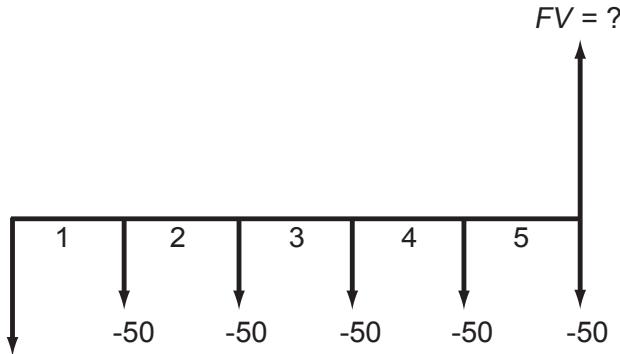
PV=-1023.25
| Keystrokes | Display | |
| g ENDf CLEAR FIN50 CHS PMT5.5 g 12÷1023.25 CHS PV5 n FV | 1,299.22 | Amount in account. |
Now suppose that at the beginning of the 6th month you withdrew $80.
What is the new balance?
| Keystrokes | Display | |
| 80 - | 1,219.22 | New balance. |
You increase your monthly deposit to (65. How much will you have in 3 months?
The cash flow diagram looks like this:
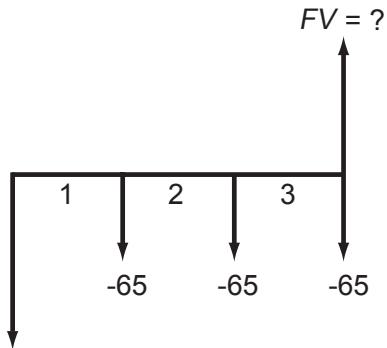
PV = -1219.22
| Keystrokes | Display | |
| CHS PV 65 CHS PMT 3 n FV | 1,431.95 | Account balance. |
Suppose that for 2 months you decide not to make a periodic deposit.
What is the balance in the account?
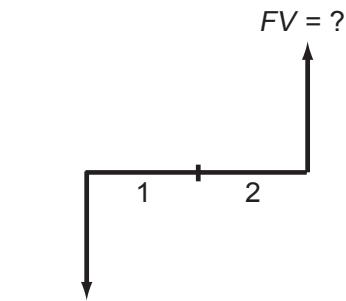
PV = -1431.95
| Keystrokes | Display | |
| CHS PVT2 n0 PMT FV | 1,455.11 | Account balance. |
This type of procedure may be continued for any length of time, and may be modified to meet the user's particular needs.
Savings Account Compounded Daily
This HP 12C program determines the value of a savings account when interest is compounded daily, based on a 365 day year. The user is able to
calculate the total amount remaining in the account after a series of transactions on specified dates.
| KEYSTROKES | DISPLAY |
| f P/R | |
| f CLEAR PRGM | 00- |
| CHS | 01- 16 |
| PV | 02- 13 |
| R↓ | 03- 33 |
| 3 | 04- 3 |
| 6 | 05- 6 |
| 5 | 06- 5 |
| ÷ | 07- 10 |
| i | 08- 12 |
| R↓ | 09- 33 |
| STO 0 | 10- 44 0 |
| RCL PV | 11- 15 13 |
| CHS | 12- 16 |
| R/S | 13- 31 |
| STO 2 | 14- 44 2 |
| R↓ | 15- 33 |
| STO 1 | 16- 44 1 |
| RCL 0 | 17- 45 0 |
| RCL 1 | 18- 45 1 |
| g ΔDYS | 19- 43 26 |
| n | 20- 11 |
| FV | 21- 15 |
| f RND | 22- 42 14 |
| FV | 23- 15 |
| ENTER | 24- 36 |
| RCL PV | 25- 45 13 |
| + | 26- | 40 |
| STO + 3 | 27-44 40 3 | |
| RCL FV | 28- 45 15 | |
| RCL 2 | 29- 45 2 | |
| + | 30- | 40 |
| CHS | 31- | 16 |
| PV | 32- | 13 |
| RCL 1 | 33- 45 1 | |
| STO 0 | 34- 44 0 | |
| RCL PV | 35- 45 13 | |
| CHS | 36- | 16 |
| g GTO 13 | 37-43, 33 13 | |
| f P/R | ||
| REGISTER | ||
| n: Δdays | i: i/365 | |
| PV: Used | PMT: 0 | |
| FV: Used | R0: Initial date | |
| R1: Next date | R2: $ amount | |
| R3: Interest | R4-R4: Unused | |
- Key in the program
- Press f CLEAR REG and press g M.DY.
- Key in the date (MM.DDYYYY) of the first transaction and press ENTER.
- Key in the annual nominal interest rate as a percentage and press ENTER
- Key in the amount of the initial deposit and press R/S
- Key in the date of the next transaction and press ENTER
- Key in the amount of the transaction (positive for money deposited, negative for cash withdrawn) and press R/S to determine the amount in the account.
- Repeat steps 6 and 7 for subsequent transactions.
-
To see the total interest to date, press RCL 3.
-
For a new case press f PRGM and go to step 2.
Example: Compute the amount remaining in this 5.25% account after the following transactions:
- January 19, 1981 deposit $125.00
- February 24, 1981 deposit $60.00
- March 16, 1981 deposit $70.00
- April 6, 1981 withdraw $50.00
- June 1, 1981 deposit $175.00
- July 6, 1981 withdraw $100.00
| Keystrokes | Display | |
| f CLEAR REGg M.D.Y1.191981 ENTER5.25 ENTER125 R/S | 125.00 | Initial Deposit. |
| 2.241981 ENTER60 R/S | 185.65 | Balance in account, February 24, 1981. |
| 3.161981 ENTER70 R/S | 256.18 | Balance in account, March 16, 1981. |
| 4.061981 ENTER50 R/S | 206.95 | Balance in account, April 6 1981. |
| 6.0111981 ENTER175 R/S | 383.62 | Balance in account, June 1, 1981. |
| 7.061981 ENTER100 R/S | 285.56 | Balance in account, July 6, 1981. |
| RCL 3 | 5.56 | Total interest. |
Compounding Periods Different From Payment Periods
In financial calculations involving a series of payments equally spaced in time with periodic compounding, both periods of time are normally equal and coincident. This assumption is preprogrammed into the HP 12C.
I savings plans however, money may become available for deposit or investment at a frequency different from the compounding frequencies offered. The HP 12C can easily be used in these calculations. However, because of the assumptions mentioned the periodic interest rate must be adjusted to correspond to an equivalent rate for the payment period.
Payments deposited for a partial compounding period will accrue simple interest for the remainder of the compounding period. This is often the case, but may not be true for all institutions.
These procedures present solutions for future value, payment amount, and number of payments. In addition, it should be noted that only annuity due (payments at the beginning of payment period) calculations are shown since this is the most common in savings plan calculations.
To calculate the equivalent payment period interest rate, information is entered as follows:
- Press g REG and press f CLEAR FIN
- Key in the annual interest rate (as a percent) and press ENTER
- Key in the number of compounding periods per year and press n ÷
- Key in 100 and press PV FV
- Key in the number of payments (deposits) per year and press n i f CLEAR FIN i
The interest rate which corresponds to the payment period is now in register "i" and you are ready to proceed.
Example 1: Solving for future value.
Starting today you make monthly deposits of (25 into an account paying 5% compounded daily (365-day basis). At the end of 7 years, how much will you receive from the account?
| Keystrokes | Display | |
| g BEG f CLEAR FIN 5 ENTER 365 n ÷ i 100 PV FV 12 n i f CLEAR FIN i | 0.42 | Equivalent periodic interest rate. |
| 7 g 12x 25 CHS PMT FV | 2,519.61 | Future value. |
Example 2: Solving for payment amount.
For 8 years you wish to make weekly deposits in a savings account paying 5.5% compounded quarterly. What amount must you deposit each week to accumulate $6000.
| Keystrokes | Display | |
| g BEG f CLEAR FIN 5.5 ENTER 4 n ÷ i 100 PV FV 52 n i f CLEAR FIN i | 0.11 | Equivalent periodic interest rate. |
| 8 ENTER 52 x n 6000 FV PMT | -11.49 | Periodic payment. |
Example 3: Solving for number of payment periods.
You can make weekly deposits of (10 in to an account paying (5.25 \%)compounded daily (365- day basis). How long will it take you to accumulate (\$ 1000)?
| Keystrokes | Display | |
| g BEG f CLEAR FIN 5.25 ENTER 365 n ÷ i 100 PV FV 52 n i f CLEAR FIN i | 0.10 | Equivalent periodic interest rate. |
| 8 CHS PMT 1000 FV n | 96.00 | Weeks. |
Investment Analysis
Lease vs. Purchase
An investment decision frequently encountered is the decision to lease or purchase capital equipment or buildings. Although a thorough evaluation of a complex acquisition usually requires the services of a qualified accountant, it is possible to simplify a number of the assumptions to produce a first approximation.
The following HP-12C program assumes that the purchase is financed with a loan and that the loan is made for the term of the lease. The tax advantages of interest paid, depreciation, and the investment credit which accrues from ownership are compared to the tax advantage of treating the lease payment as an expense. The resulting cash flows are discounted to the present at the firm's after-tax cost of capital.
| KEYSTROKES | DISPLAY | ||
| f | P/R | ||
| f | CLEAR PRGM | 00- | |
| - | 01- | 30 | |
| 1 | 02- | 1 | |
| STO + 0 | 03-44 | 40 0 | |
| RCL 3 | 04- | 45 3 | |
| - | 05- | 30 | |
| x | 06- | 20 | |
| STO 8 | 07- | 44 8 | |
| 1 | 08- | 1 | |
| f | AMORT | 09- | 42 11 |
| STO 1 | 10- | 44 1 | |
| RCL PV | 11- | 45 13 | |
| STO 9 | 12- | 44 9 | |
| RCL PMT | 13- | 45 14 | |
| STO - | 14-44 | 48 0 | |
| RCL n | 15- | 45 | 11 |
| STO 1 | 16-44 | 48 | 1 |
| RCL i | 17- | 45 | 12 |
| STO 2 | 18-44 | 48 | 2 |
| RCL 5 | 19- | 45 | 5 |
| PV | 20- | 13 | |
| RCL 6 | 21- | 45 | 6 |
| n | 22- | 11 | |
| RCL 7 | 23- | 45 | 7 |
| i | 24- | 12 | |
| RCL 0 | 25- | 45 | 0 |
| f SOYD | 26- | 42 | 24 |
| STO + 1 | 27-44 | 40 | 1 |
| RCL 9 | 28- | 45 | 9 |
| PV | 29- | 13 | |
| RCL 0 | 30-45 | 48 | 0 |
| PMT | 31- | 14 | |
| RCL 1 | 32-45 | 48 | 1 |
| n | 33- | 11 | |
| RCL 2 | 34-45 | 48 | 2 |
| i | 35- | 12 | |
| RCL 1 | 36- | 45 | 1 |
| RCL 3 | 37- | 45 | 3 |
| x | 38- | 20 | |
| RCL PMT | 39- | 45 | 14 |
| - | 40- | 30 | |
| RCL 8 | 41- | 45 | 8 |
| - | 42- | 30 | |
| RCL 4 | 43 - 45 4 |
| RCL 0 | 44 - 45 0 |
| y' | 45 - 21 |
| ÷ | 46 - 10 |
| STO + 2 | 47-44 40 2 |
| g GTO 00 | 48-43, 33 00 |
| f P/R | |
| REGISTER | |
| n: Used | i: Used |
| PV: Used | PMT: Used |
| FV: 0 | R0: Used |
| R1: Used | R2: Purch. Adv. |
| R3: Tax | R4: Discount |
| R5: Dep. Value | R6: Dep. life |
| R7: Factor (DB) | R8: Used |
| R9: Used | R.0: Used |
| R.1: Used | R.2: Used |
| R.3: Unused | |
Instructions:
- Key in the program.
-Select the depreciation function and key in at line 26. - Press g END and press f CLEAR REG
- Input the following information for the purchase of the loan:
-Key in the number of years for amortization and press n.
-Key in the annual interest rate and press i.
-Key in the loan amount (purchase price) and press CHS PV
-Press PMT to find the annual payment.
- Key in the marginal effective tax rate (as a decimal) and press STO 3.
- Key in the discount rate (as a decimal) or cost of capital and press ENTER 1 + STO 4.
- Key in the depreciable value and press STO 5.
-
Key in the depreciable live and press STO 6.
-
For declining balance depreciation, key in the depreciation factor (as a percentage) and press STO 7.
- Key in the total first lease payment (including any advance payments) and press ENTER 1 RCL 3 - x STO 2.
- Key in the first year's maintenance expense that would be anticipated if the asset was owned and press. If the lease contract does not include maintenance, then it is not a factor in the lease vs. purchase decision and 0 expense should be used.
- Key in the next lease payment and press R/S. During any year in which a lease payment does not occur (e.g. the last several payments of an advance payment contract) use 0 for the payment.
- Repeat steps 10 and 11 for all maintenance expenses and lease payments over the term of the analysis. Optional - If the investment tax credit is taken, key in the amount of the credit after finishing steps 10 and 11 for the year in which the credit is taken and press GTO 43 R/S. Continue steps 10 and 11 for the remainder of the term.
- After all the lease payments and expenses have been entered (steps 10 and 11), key in the lease buy back option and press ENTER 1 RCL 3 - x GTO 43 R/S. If no buy back option exists, use the estimated salvage value of the purchased equipment at the end of the term.
- To find the net advantage of owning press RCL 2. A negative value represents a net lease advantage.
Example: Home Style Bagel Company is evaluating the acquisition of a mixer which can be leased for 1700 a year with the first and last payments in advance and a 750 buy back option at the end of 10 years (maintenance is included).
The same equipment could be purchased for 10,000 with a 12% loan amortized over 10 years. Ownership maintenance is estimated to be 2% of the purchase price per year for the first for years. A major overhaul is predicted for the 5th year at a cost of 1500. Subsequent yearly maintenance of 3% is estimated for the remainder of the 10-year term. The company would use sum of the years digits depreciation on a 10 year life with $1500 salvage value. An accountant informs management to take the 10% capital investment tax credit at the end of the second year and to figure the cash flows at a 48% tax rate. The after tax cost of capital (discounting rate) is 5 percent.
Because lease payments are made in advance and standard loan payments are made in arrears the following cash flow schedule is appropriate for a lease with the last payment in advance.
| Year | Maintenance | Lease Payment | Tax Credit | Buy Back |
| 0 | 1700+700 | |||
| 1 | 200 | 1700 | ||
| 2 | 200 | 1700 | 1000 | |
| 3 | 200 | 1700 | ||
| 4 | 200 | 1700 | ||
| 5 | 1500 | 1700 | ||
| 6 | 300 | 1700 | ||
| 7 | 300 | 1700 | ||
| 8 | 300 | 1700 | ||
| 9 | 300 | 0 | 750 | |
| 10 | 300 | 0 |
| Keystrokes | Display | |
| g BEG f CLEAR REG | 0.00 | |
| 10 n 12 i 10000 CHS PV | -10,000.00 | Always use negative loan amount. |
| PMT | 1,769.84 | Purchase payment. |
| .48 STO 3 | 0.48 | Marginal tax rate. |
| .05 ENTER 1 + STO 4 | 1.05 | Discounting factor. |
| 10000 ENTER 1500 - STO 5 | 8,500.00 | Depreciable value. |
| 10 STO 6 | 10.00 | Depreciable life. |
| 1700 ENTER + | 3,400.00 | 1st lease payment. |
| 1 RCL 3 - x STO 2 | 1,768.00 | After-tax expense. |
| 200 ENTER 1700 R/S | 312.36 | Present value of 1st year's net purchase. |
| 200 ENTER 1700 R/S | 200.43 | 2nd year's advantage. |
| 1000 g GTO 43 | 1,000.00 | Tax credit. |
| R/S | 907.03 | Present value of tax credit. |
| 200 ENTER 1700 R/S | 95.05 | 3rd year. |
| 200 ENTER 1700 R/S | -4.38 | 4th year. |
| 200 ENTER 1700 R/S | -628.09 | 5th year. |
| 200 ENTER 1700 R/S | -226.44 | 6th year. |
| 200 ENTER 1700 R/S | -309.48 | 7th year. |
| 200 ENTER 1700 R/S | -388.81 | 8th year. |
| 300 ENTER 0 R/S | -1,034.72 | 9th year. |
| 300 ENTER 0 R/S | -1,080.88 | 10th year. |
| 750 ENTER | 750.00 | Buy back. |
| 1 RCL 3 - x | 390.00 | After tax buy back expense. |
| g GTO 43 R/S | 239.43 | Present value. |
| RCL 2 | -150.49 | Net lease advantage. |
Break-Even Analysis
Break-even analysis is basically a technique for analyzing the relationships among fixed costs, variable costs, and income. Until the break even point is reached at the intersection of the total income and total cost lines, the producer operates at a loss. After the break-even point each unit produced and sold makes a profit. Break even analysis may be represented as follows.
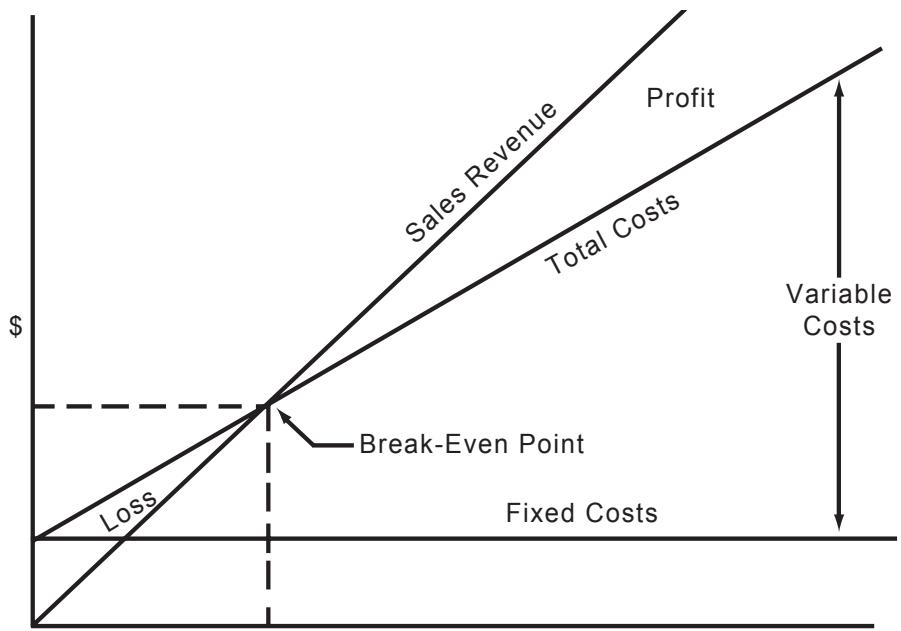
The variables are: fixed costs (F) , Sales price per unit (P) , variable cost per unit (V) , number of units sold (U) , and gross profit (GP) . One can readily evaluate GP , U or P given the four other variables. To calculate the break-even volume, simply let the gross profit equal zero and calculate the number of units sold (U) .
To calculate the break-even volume:
- Key in the fixed costs and press ENTER
- Key in the unit price and press ENTER
- Key in the variable cost per unit and press - .
- Press ÷ to calculate the break-even volume.
To calculate the gross profit at a given volume:
- Key in the unit price and press ENTER
- Key in the variable cost per unit and press - .
- Key in the number of units sold and press .
- Key in the fixed cost and press - to calculate the gross profit.
To calculate the sales volume needed to achieve a specified gross profit:
- Key in the desired gross profit and press ENTER
- Key in the fixed cost and press + .
- Key in sales price per unit and press ENTER
- Key in the variable cost per unit and press [-] .
- Press 12 to calculate the sales volume.
To calculate the required sales price to achieve a given gross profit at a specified sales volume:
- Key in the fixed costs and press ENTER
- Key in the gross desired and press ENTER
- Key in the specified sales volume in units and press 12 .
- Key in the variable cost per unit and press + to calculate the required sales price per unit.
Example 1: The E.Z. Sells company markets textbooks on salesmanship. The fixed cost involved in setting up to print the books are 12,000. The variable cost per copy, including printing and marketing the books are6.75 per copy. The sales price per copy is $13.00. How many copies must be sold to break even?
| Keystrokes | Display | |
| 12000 ENTER | 12,000.00 | Fixed cost. |
| 13 ENTER | 13.00 | Sales price. |
| 6.75 - ÷ | 1,920.00 | Break-even volume. |
Find the gross profit if 2500 units are sold.
| 13 ENTER | 13.00 | Sales price. |
| 6.75 - | 6.25 | Profit per unit. |
| 2500 × | 15,625.00 | |
| 12000 - | 3,625.00 | Gross profit. |
If a gross profit of (4,500 is desired at a sales volume of 2500 units, what should the sales price be?
| 12000 | ENTER | 12,000.00 | Fixed cost. |
| 4500 | + | 16,500.00 | |
| 2500 | ÷ | 6.60 | |
| 6.75 | + | 13.35 | Sales price per unit to achieve desired gross profit. |
For repeated calculation the following HP-12C program can be used.
| KEYSTROKES | DISPLAY |
| f P/R | |
| f CLEAR PRGM | 00- |
| RCL 3 | 01- 45 3 |
| RCL 2 | 02- 45 2 |
| - | 03- 30 |
| g GTO 00 | 04-43, 33 00 |
| RCL 4 | 05- 45 4 |
| x | 06- 20 |
| RCL 1 | 07- 45 1 |
| - | 08- 30 |
| g GTO 00 | 09-43, 33 00 |
| RCL 5 | 10- 45 5 |
| RCL 1 | 11- 45 1 |
| + | 12- 40 |
| x≥y | 13- 34 |
| ÷ | 14- 10 |
| g GTO 00 | 15-43, 33 00 |
| RCL 1 | 16- 45 1 |
| RCL 5 | 17- 45 5 |
| ÷ | 18- 40 |
| RCL 4 | 19- 45 4 |
| ÷ | 20- 10 |
| RCL 2 | 21- 45 2 |
| + | 22- 40 |
| g GTO 00 | 23-43, 33 00 |
| f P/R | |
| REGISTER | |
| n: Unused | i: Unused |
| PV: Unused | PMT: Unused |
| FV: Unused | R0: Unused |
| R1: F | R2: V |
| R3: P | R4: U |
| R5: GP | R6-R6: Unused |
- Key in the program and store the know variables as follows:
a. Key in the fixed costs, F and press STO 1.
b. Key in the variable costs per unit, V and press STO 2.
c. Key in the unit price, P (if known) and press STO 3.
d. Key in the sales volume, U , in units (if known) and press STO 4.
e. Key in the gross profit, GP , (if known) and press STO 5.
- To calculate the sales volume to achieve a desired gross profit:
a. Store values as shown in 1a, 1b, and 1c.
b. Key in the desired gross profit (zero for break even) and press STO 5.
c. Press R/S g GTO 10 R/S to calculate the required volume.
- To calculate the gross profit at a given sales volume.
a. Store values as shown in 1a, 1b, 1c, and 1d.
b. Press R/S g GTO 05 R/S to calculate gross profit.
- To calculate the sales price per unit to achieve a desired gross profit at a specified sales volume:
a. Store values as shown in 1a, 1b, 1d, and 1e.
b. Press GTO 16 R/S to calculate the required sales price.
Example 2: A manufacturer of automotive accessories produces rear view mirrors. A new line of mirrors will require fixed costs of 35,00 to produce. Each mirror has a variable cost of8.25. The price of mirrors is tentatively set at $12.50 each. What volume is needed to break even?
| Keystrokes | Display | |
| 35000 STO 1 | 35,000.00 | Fixed cost. |
| 8.25 STO 2 | 8.25 | Variable cost. |
| 12.5 STO 3 | 12.50 | Sales price. |
| 0 STO 5 | 0.00 | |
| R/S g GTO 10 R/S | 8,235.29 | Break-even volume is between 8,235 and 8,236 units. |
What would be the gross profit if the price is raised to $14.00 and the sales volume is 10,000 units?
| Keystrokes | Display | |
| 14 STO 3 | 14.00 | Sales price. |
| F and V are already stored. | ||
| 10000 STO 4 | 10,000.00 | Volume. |
| R/S g GTO 05 R/S | 22,500.00 | Gross Profit. |
Operating Leverage
The degree of operating leverage (OL) at a point is defined as the ratio of the percentage change in net operating income to the percentage change in units sold. The greatest degree of operating leverage is found near the break even point where a small change in sales may produce a very large increase in profits. Likewise, firms with a small degree of operating leverage are operating farther from the break even point, and they are relatively insensitive to changes in sales volume.
The necessary inputs to calculate the degree of operating leverage and fixed costs (F) , sales price per unit (P) , variable cost per unit (V) and number of units (U) .
The operating leverage may be readily calculated as follows:
- Key in the sales price per unit and press ENTER
-
Key in the variable cost per unit and press - .
-
Key in the number of units and press x ENTER ENTER
- Key in the fixed cost and press -÷ to obtain the operating leverage.
Example 1: For the data given in example 1 of the Break-Even Analysis section, calculate the operating leverage at 2000 units and at 5000 units when the sales price is $13 a copy
| Keystrokes | Display | |
| 13 ENTER | 13.00 | Price per copy. |
| 6.75 - | 6.25 | Profit per copy. |
| 2000 x ENTER | 25.00 | Close to break-even point. |
| ENTER 12000 - ÷ | ||
| 13 ENTER | 13.00 | Price per copy. |
| 6.75 - | 6.25 | Profit per copy. |
| 5000 x ENTER | 1.62 | Operating further from the breakeven point and lesssensitive to changes in sales volume. |
| ENTER 12000 - ÷ |
For repeated calculations the following HP-12C program can be used:
| KEYSTROKES | DISPLAY | |
| f | P/R | |
| f | CLEAR PRGM | 00- |
| RCL 3 | 01- 45 3 | |
| RCL 2 | 02- 45 2 | |
| - | 03- 30 | |
| x | 04- 20 | |
| ENTER | 05- 36 | |
| ENTER | 06- 36 | |
| RCL 1 | 07- 45 1 | |
| - | 08- 30 | |
| ÷ | 09- 10 | |
| g | GTO 00 | 10-43, 33 00 |
| f | P/R | |
| REGISTER | |
| n: Unused | i: Unused |
| PV: Unused | PMT: Unused |
| FV: Unused | R0: Unused |
| R1: F | R2: V |
| R3: P | R4-R8: Unused |
- Key in the program.
- Key in and store input variables F, V and P as described in the Break-Even Analysis program.
- Key in the sales volume and press R/S to calculate the operating leverage.
- To calculate a new operating leverage at a different sales volume, key in the new sales volume and press R/S
Example 2: For the figures given in example 2 of the Break-Even Analysis section, calculate the operating leverage at a sales volume of 9,000 and 20,000 units if the sales price is $12.50 per unit.
| Keystrokes | Display | |
| 35000 STO 1 | 35,000.00 | Fixed costs. |
| 8.25 STO 2 | 8.25 | Variable cost. |
| 12.5 STO 3 | 12.50 | Sales price. |
| 9000 R/S | 11.77 | Operating leverage near break-even. |
| 20000 R/S | 1.70 | Operating leverage further from break-even. |
Profit and Loss Analysis
The HP-12C may be programmed to perform simplified profit and loss analysis using the standard profit income formula and can be used as a dynamic simulator to quickly explore ranges of variables affecting the profitability of a marketing operation.
The program operates with net income return and operating expenses as percentages. Both percentage figures are based on net sales price.
It may also be used to simulate a company wide income statement by replacing list price with gross sales and manufacturing cost with cost of goods sold.
Any of the five variables: a) list price, b) discount (as a percentage of list price), c) manufacturing cost, d) operating expense (as a percentage), e) net profit after tax (as a percentage) may be calculated if the other four are known.
Since the tax rage varies from company to company, provision is made for inputting your applicable tax rate. The example problem uses a tax rate of 48% .
| KEYSTROKES | DISPLAY | ||
| f | P/R | ||
| f | CLEAR PRGM | 00- | |
| RCL5 | 01- | 45 5 | |
| RCL6 | 02- | 45 6 | |
| ÷ | 03- | 10 | |
| RCL4 | 04- | 45 4 | |
| + | 05- | 40 | |
| CHS | 06- | 16 | |
| RCL0 | 07- | 45 0 | |
| + | 08- | 40 | |
| RCL0 | 09- | 45 0 | |
| ÷ | 10- | 10 | |
| g | GTO 00 | 11-43, | 33 00 |
| RCL3 | 12- | 45 3 | |
| RCL1 | 13- | 45 1 | |
| RCL2 | 14- | 45 2 | |
| RCL0 | 15- | 45 0 | |
| ÷ | 16- | 10 | |
| CHS | 17- | 16 | |
| 1 | 18- | 1 | |
| + | 19- | 40 | |
| x | 20- | 20 | |
| R/S | 21- | 31 | |
| ÷ | 22- | 10 | |
| CHS | 23- | 16 | |
| 1 | 24- | 1 | |
| + | 25- | 40 | |
| RCL0 | 26- | 45 0 | |
| x | 27- | 20 | |
| g GTO 00 | 28-43, | 33 0 | |
| ÷ | 29- | 10 | |
| CHS | 30- | 16 | |
| RCL1 | 31- | 45 1 | |
| + | 32- | 40 | |
| RCL1 | 33- | 45 1 | |
| ÷ | 34- | 10 | |
| RCL0 | 35- | 45 0 | |
| x | 36- | 20 | |
| g GTO 00 | 37-43, | 33 00 | |
| RCL5 | 38- | 45 5 | |
| RCL6 | 39- | 45 6 | |
| ÷ | 40- | 10 | |
| - | 41- | 30 | |
| g GTO 00 | 42-43, | 33 00 | |
| RCL4 | 43- | 45 5 | |
| - | 44- | 30 | |
| RCL6 | 45- | 45 6 | |
| x | 46- | 20 | |
| g GTO 00 | 47-43, | 33 00 | |
| f P/R | |||
| REGISTERS | |||
| n: Unused | i: Unused | ||
| PV: Unused | PMT: Unused | ||
| FV: Unused | R0: 100 | ||
| R1: list price | R2: % discount | ||
| R3: mfg. cost | R4: % op. exp. | ||
| R5: % net profit | R6: 1-% tax | ||
| R7-R3: Unused | |||
-
Key in the program and press f CLEAR REG, then key in 100 and press STO 0.
-
Key in 1 and press ENTER, then key in your appropriate tax rate as a decimal and press -STO 6.
3.
a. Key in the list price in dollars (if known) and press STO 1.
b. Key in the discount in percent (if known) and press STO 2.
c. Key in the manufacturing cost in dollars (if known) and press STO 3.
d. Key in the operating expense in percent (if known) and press STO 4.
e. Key in the net profit after tax in percent (if known) and press STO 5.
- To calculate list price:
a. Do steps 2 and 3b, c, d, e above.
b. Press RCL 3 R/S ÷ 1 g GTO 14 R/S ÷ g GTO 00.
- To calculate discount:
a. Do steps 2 and 3a, c, d, e above.
b. Press RCL 3 R/S g GTO 29 R/S
- To calculate manufacturing cost:
a. Do steps 2 and 3a, b, d, e, above.
b. Press GTO 13 R/S g GTO 01 R/S x
- To calculate operating expense:
a. Do steps 2 and 3a, b, c, e, above.
b. Press GTO 12 R/S R/S GTO 38 R/S
- To calculate net profit after tax:
a. Do steps 2 and 3a, b, c, d, above.
Example: What is the net return on an item that is sold for (11.98, discounted through distribution an average of (35\%) and has a manufacturing cost of (\$ 2.50?) The standard company operating expense is (32\%) of net shipping (sales) price and tax rate is (48\%).
| Keystrokes | Display | |
| f CLEAR REG 100 STO 0 | 100.00 | |
| 1 ENTER .48 - STO 6 | 0.52 | 48% tax rate. |
| 11.98 STO 1 | 11.98 | List price () . |
| 35 STO 2 | 35.00 | Discount (%). |
| 2.50 STO 3 | 2.50 | Manufacturing cost () . |
| 32 STO 4 | 32.00 | Operating expenses (%). |
| g GTO 12 R/S R/S | 67.90 | |
| g GTO 43 R/S | 18.67 | Net profit (%). |
If manufacturing expenses increase to $3.25, what is the effect on net profit?
| 3.25 | STO | 3 | 3.25 | Manufacturing cost. | |
| g | GTO | 12 | R/S | R/S | 58.26 |
| g | GTO | 43 | R/S | 13.66 | |
| Net profit reduced to 13.66% | |||||
If the manufacturing cost is maintained at $3.25, how high could the overhead (operating expense) be before the product begins to lose money?
| 0 STO 5 | 0.00 | ||||
| g | GTO | 12 | R/S | R/S | 58.26 |
| g | GTO | 38 | R/S | 58.26 | |
| Maximum operating expense (%). | |||||
At 32 % operating expense and 3.25 manufacturing cost, what should the list price be to generate20 \%$ net profit?
| 20 STO 5 | 20.00 | |
| RCL 3 R/S ÷ | 11.00 | |
| 1 g GTO 14 R/S ÷ | 16.93 | List price ($) |
What reduction in manufacturing cost would achieve the same result without necessitating an increase in list price above $11.98?
| g | GTO | 13 | R/S | 7.79 | |
| g | GTO | 01 | R/S | 2.30 | Manufacturing cost ($) . |
Securities
After-Tax Yield
The following HP-12C program calculate the after tax yield to maturity of a bond held for more than one year. The calculations assume an actual/actual day basis. For after-tax computations, the interest or coupon payments are considered income, while the difference between the bond or note face value and its purchase price is considered capital gains.
| KEYSTROKES | DISPLAY | ||
| f | P/R | ||
| f | CLEAR PRGM | 00- | |
| f | CLEAR FIN | 01- | 42 34 |
| STO 7 | 02- | 44 7 | |
| R↓ | 03- | 33 | |
| STO 6 | 04- | 44 6 | |
| RCL 2 | 05- | 45 2 | |
| RCL 1 | 06- | 45 1 | |
| - | 07- | 30 | |
| RCL 4 | 08- | 45 4 | |
| % | 09- | 25 | |
| RCL 2 | 10- | 45 2 | |
| x≥y | 11- | 34 | |
| - | 12- | 30 | |
| EEX | 13- | 26 | |
| 2 | 14- | 2 | |
| ÷ | 15- | 10 | |
| STO 0 | 16- | 44 0 | |
| RCL 3 | 17- | 45 3 | |
| RCL 5 | 18- | 45 5 | |
| % | 19- | 25 | |
| - | 20- | 30 | |
| RCL 0 | 21- | 45 0 | |
| ÷ | 22- | 10 | |
| PMT | 23- | 14 | |
| RCL 1 | 24- | 45 1 | |
| RCL 0 | 25- | 45 0 | |
| ÷ | 26- | 10 | |
| PV | 27- | 13 | |
| RCL 6 | 28- | 45 6 | |
| RCL 7 | 29- | 45 7 | |
| f YTM | 30- | 42 22 | |
| g GTO 00 | 31-43, | 33 00 | |
| f P/R | |||
| REGISTERS | |||
| n: Unused | i: Yield | ||
| PV: Used | PMT: Used | ||
| FV: 0 | R0: Used | ||
| R1: Purchase price | R2: Sales price | ||
| R3: Coupon rate | R4: Capital rate | ||
| R5: Income rate | R6: Used | ||
| R7: Used | R8-R5: Unused | ||
- Key in the program.
- Key in the purchase price and press STO 1.
- Key in the sales price and press STO 2.
- Key in the annual coupon rate (as a percentage) and press STO 3.
- Key in capital gains tax rate (as a percentage) and press STO 4.
- Key in the income tax rate (as a percentage) and press STO 5.
-
Press g M.DY
-
Key in the purchase date (MM.DDYYYY) and press ENTER
- Key in the assumed sell date (MM.DDYYYY) and press R/S to find the after-tax yield (as a percentage).
- For the same bond but different date return to step 8.
- For a new case return to step 2.
Example: You can buy a 7 % bond on October 1, 1981 for 70 and expect to sell it in 5 years for90. What is your net (after- tax) yield over the 5- year period if interim coupon payments are considered as income, and your tax bracket is 50 % ?
(One-half of the long term capital gain is taxable at 50% , so the tax on capital gains alone is 25% )
| Keystrokes | Display | |
| 70 STO 1 | 10.00 | Purchase price. |
| 90 STO 2 | 90.00 | Selling price. |
| 7 STO 3 | 7.00 | Annual coupon rate. |
| 25 STO 4 | 25.00 | Capital gains tax rate. |
| 50 STO 5 | 50.00 | Income tax rate. |
| g M.DY 10.011981 R/S | 10.01 | Purchase Date. |
| 10.011986 R/S | 8.53 | % after tax yield. |
Discounted Notes
A note is a written agreement to pay a sum of money plus interest at a certain rate. Notes to not have periodic coupons, since all interest is paid at maturity.
A discounted note is a note that is purchase below its face value. The following HP 12C program finds the price and/or yield (The yield is a reflection of the return on an investment) of a discounted note.
| KEYSTROKES | DISPLAY |
| f P/R | |
| f CLEAR PRGM | 00- |
| RCL 1 | 01- 45 1 |
| RCL2 | 02- 45 2 |
| g ΔDYS | 03- 43 26 |
| RCL3 | 04- 45 3 |
| ÷ | 05- 10 |
| RCL5 | 06- 45 5 |
| % | 07- 25 |
| 1 | 08- 1 |
| x≥y | 09- 34 |
| - | 10- 30 |
| RCL4 | 11- 45 4 |
| x | 12- 20 |
| STO5 | 13- 44 5 |
| R/S | 14- 31 |
| RCL1 | 15- 45 1 |
| RCL2 | 16- 45 2 |
| g ΔDYS | 17- 43 26 |
| RCL3 | 18- 45 3 |
| x≥y | 19- 34 |
| ÷ | 20- 10 |
| RCL4 | 21- 45 4 |
| RCL5 | 22- 45 5 |
| ÷ | 23- 10 |
| 1 | 24- 1 |
| - | 25- 30 |
| x | 26- 20 |
| EEX | 27- 26 |
| 2 | 28- 2 |
| x | 29- 20 |
| g GTO 00 | 30-43, 33 00 |
| f P/R | |
| REGISTER | |
| n: Unused | i: Unused |
| PV: Unused | PMT: Unused |
| FV: Unused | R0: Unused |
| R1: Settl. date | R2: Mat. date |
| R3: 360 or 360 | R4: redemp. value |
| R5: dis./price | R6-R5: Unused |
- Key in the program.
- Press g M.DY
- Key in the settlement date (MM.DDYYYY) and press STO 1.
- Key in the maturity date (MM.DDYYYY) and press STO 2.
- Key in the number of days in a year (360 or 365) and press STO 3.
- Key in the redemption value per $100 and press STO 4.
- To calculate the purchase price:
a. Key in the discount rate and press STO 5.
b. Press R/S to calculate the purchase price.
c. Press R/S to calculate the yield.
d. For a new case, go to step 3.
- To calculate the yield when the price is known:
a. Key in the price and press STO 5.
b. Press GTO 15 R/S to calculate the yield.
c. For a new case, go to step 3.
Example 1: Calculate the price and yield on this U.S. Treasury Bill: settlement date October 8, 1980; maturity date March 21, 1981; discount rate 7.80% . Compute on a 360 day basis.
| Keystrokes | Display | |
| g M.DY 10.081920 STO 1 | 10.08 | Settlement date. |
| 3.211981 | STO 2 | 3.21 | Maturity dtae. |
| 360 | STO 3 | 360.00 | 360 day basis. |
| 100 | STO 4 | 100.00 | Redemption value per $100. |
| 7.8 | STO 5 | 7.80 | Discount rate. |
| R/S | 96.45 | Price. | |
| R/S | 8.09 | Yield. |
Example 2: Determine the yield of this security; settlement date June 25, 1980; maturity date September 10, 1980; price 99.45; redemption value 101.33. Assume 360 day basis.
| Keystrokes | Display | |
| 6.251980 STO 1 | 6.25 | Settlement date. |
| 9.101980 STO 2 | 9.10 | Maturity dtae. |
| 360 STO 3 | 360.00 | 360 day basis. |
| 101.33 STO 4 | 101.33 | Redemption value per $100. |
| 99.45 STO 5 | 99.45 | Price. |
| g GTO 15 R/S | 8.84 | Yield. |
Forecasting
Simple Moving Average
Moving averages are often useful in recording of forecasting sales figures, expenses or manufacturing volume. There are many different types of moving average calculations. An often used, straightforward method of calculation is presented here.
In a moving average a specified number of data points are averaged. When there is a new piece of input data, the oldest piece of data is discarded to make room for the latest input. This replacement scheme makes the moving average a valuable tool in following trends. The fewer the number of data points, the more trend sensitive the average becomes. With a large number of data points, the average behaves more like a regular average, responding slowly to new input data.
A simple moving average may be calculated with your HP 12C as follows.
- Press f CLEAR REG
- Key in the first m data points (where m is the number of data points in the average) and press + after each entry.
- Press to obtain the first average.
- Key in the oldest (first value) entered in step 2 and press - .
- Key in the newest data point (m + 1) and press + .
- Press to obtain the next value of the moving average.
- Repeat steps 4 through 5 for the remaining data.
Example: An electronics sales firm wished to calculate a 3-month moving average for the dollar volume of components sole each month. Sales for the first six months of this year were:
| January | $211,570 |
| February | 112,550 |
| March | 190,060 |
| April | 131,760 |
| May | 300,500 |
| June | 271,120 |
| Keystrokes | Display | ||
| f CLEAR REG | 0.00 | ||
| 211570 Σ+ | 1.00 | ||
| 112550 Σ+ | 2.00 | ||
| 190060 Σ+ | 3.00 | ||
| g x | 171,393.33 | 3-month average for March. | |
| 211570 g Σ- | 2.00 | ||
| 131760 Σ+ | 3.00 | ||
| g x | 144,790.00 | 3-month average for April. | |
| 112550 g Σ- | 2.00 | ||
| 300500 Σ+ | 3.00 | ||
| g x | 207,440.00 | 3-month average for May. | |
| 190060 g Σ- | 2.00 | ||
| 271120 Σ+ | 3.00 | ||
| g x | 234,460.00 | 3-month average for June. | |
For repeated calculations the following HP 12C program can be used for up to a 12 element moving average:
| KEYSTROKES | DISPLAY | |
| f P/R | ||
| f CLEAR PRGM | 00- | |
| RCL 1 | 01- 45 1 | |
| RCL 2 | 02- 45 2 | |
| STO 1 | 03- 44 1 | |
| + | 04- 40 | |
| RCL 3 | 05- 45 3 | |
| STO 2 | 06- 44 2 | |
| + 3 | 07- 40 | |
| RCL 4 | 08- 45 4 | |
| STO 3 | 09- 44 3 | |
| +4 | 10- | 40 |
| RCL5 | 11- | 45 5 |
| STO4 | 12- | 44 4 |
| +5 | 13- | 40 |
| RCL6 | 14- | 45 6 |
| STO5 | 15- | 44 5 |
| +6 | 16- | 40 |
| RCL7 | 17- | 45 7 |
| STO6 | 18- | 44 6 |
| +7 | 19- | 40 |
| RCL8 | 20- | 45 8 |
| STO7 | 21- | 44 7 |
| +8 | 22- | 40 |
| RCL9 | 23- | 45 9 |
| STO | 24- | 44 8 |
| +9 | 25- | 40 |
| RCL·0 | 26-45 | 48 0 |
| STO9 | 27- | 44 9 |
| +10 | 28- | 40 |
| RCL·1 | 29-45 | 48 1 |
| STO·0 | 30-44 | 48 0 |
| +11 | 31- | 40 |
| RCL·2 | 32-45 | 48 2 |
| STO·1 | 33-44 | 48 1 |
| +12 | 34- | 40 |
| RCL0 | 35- | 45 0 |
| ÷ | 36- | 10 |
| R/S | 37- | 31 |
| STO m* | 38- | 44 -- |
| g GTO 01 | 39-43, | 33 01 |
| f P/R | ||
| REGISTERS | ||
| n: Unused | i: Unused | |
| PV: Unused | PMT: Unused | |
| FV: Unused | R0: m | |
| R1: X1 | R2: X2 | |
| R3: X3 | R4: X4 | |
| R5: X5 | R6: X6 | |
| R7: X7 | R8: X8 | |
| R9: X9 | R.0: X.0 | |
| R.1: X11 | R.2: X12 | |
| R.3-R.4: Unused | ||
*At step 38, m = number of elements in the moving average, i.e. fir a 5 element moving average line 38 would be STO 5 and for a 12-element average line 38 would be STO 2
This program can be used for a moving average of 2 to 12 elements. It may be shortened considerably for moving averages with less than 12 elements. To do this, key in the program, as shown, form line 01 until you reach a + superscripted with the number of elements you desire. Key in this line, then skip the reset of the program down to line 35. Then key in lines 35 through 39, being sure to specify the register number at line 38, m , corresponding to the number of elements you are using. (For instance, for a 5 element moving average, key in lines 01 through 13 then go to line 35 in the listing and key in the balance of the program. Obviously the program listing line 38, m becomes the displayed line 17, 5 .)
To run the program:
- Key in the program.
- Press CLEAR REG. Key in the number of elements, m , and press 0.
- Key in the second data point and press STO 1.
-
Key in the second data point and press STO 2.
-
Continue as above, keying in and storing each data point in its appropriate register until m data points have been stored.
- Press G GTO 00 R/S to calculate the first moving average.
- Key in the next data point and press R/S to calculate the next moving average.
- Repeat step 7 for each new data point.
Example 2: Calculate the 3-element moving average for the data given in example 1. Your modified program listing will look like this:
| KEYSTROKES | DISPLAY | |
| f P/R | ||
| f CLEAR PRGM | 00- | |
| RCL 1 | 01- 45 1 | |
| RCL 2 | 02- 45 2 | |
| STO 1 | 03- 44 1 | |
| + | 04- 40 | |
| RCL 3 | 05- 45 3 | |
| STO 2 | 06- 44 2 | |
| + 3 | 07- 40 | |
| RCL 0 | 08- 45 0 | |
| ÷ | 09- 10 | |
| R/S | 10- 31 | |
| STO 3 | 11- 44 3 | |
| g GTO 01 | 12-43, 33 01 | |
| f P/R | ||
| Keystrokes | Display | |
| f CLEAR REG | 0.00 | |
| 3 STO 0 | 3.00 | |
| 211570 STO 1 | 211,570.00 | |
| 112550 STO 2 | 112,550.00 | |
| 190060 STO 3 | 190,060.00 |
| g | GTO | 00 | R/S | 171,393.33 | 3-month average for March. |
| 131760 | R/S | 144,790.00 | 3-month average for April. | ||
| 300500 | R/S | 207,440.00 | 3-month average for May. | ||
| 271120 | R/S | 234,460.00 | 3-month average for June. |
Seasonal Variation Factors Based on Centered Moving Averages.
Seasonal variation factors are useful concepts in many types of forecasting. There are several methods of developing seasonal moving averages, on the of more common ways being to calculate them as a ration of the periodic value to a centered moving average for the same period.
For instance, to determine the sales for the 3rd quarter of a given year a centered moving average for that quarter would be calculated from sales figures from the 1st, 2nd, 3rd and 4th quarters of the year and the 1st quarter of the following year. The seasonal variation factor for that 3rd quarter would then be the ration of the actual sales in the 3rd quarter to the centered moving average for that quarter.
While quarterly seasonal variations are commonly used, the HP 12C can also be programmed to calculate monthly seasonal variations using a centered 12 month moving averages. Programs for both of these calculations are represented here:
An HP 12C program to calculate the quarterly seasonal variations based on a centered 4-point moving average is:
| KEYSTROKES | DISPLAY | |
| f | P/R | |
| f | CLEAR PRGM | 00- |
| RCL 1 | 01- 45 1 | |
| 2 | 02- 2 | |
| ÷ | 03- 10 | |
| RCL 2 | 04- 45 2 | |
| STO 1 | 05- 44 1 | |
| + | 06- 40 | |
| RCL 3 | 07- 45 3 | |
| STO 2 | 08- 44 2 | |
| + | 09- 40 | |
| RCL 4 | 10- 45 4 | |
| STO 3 | 11- 44 3 | |
| + | 12- 40 | |
| RCL 5 | 13- 45 5 | |
| STO 4 | 14- 44 4 | |
| 2 | 15- 2 | |
| ÷ | 16- 10 | |
| + | 17- 40 | |
| 4 | 18- 4 | |
| ÷ | 19- 10 | |
| R/S | 20- 31 | |
| RCL 2 | 21- 45 2 | |
| %T | 22- 23 | |
| R/S | 23- 31 | |
| STO 5 | 24- 44 5 | |
| g GTO 01 | 25-43, 33 01 | |
| f P/R | ||
| REGISTER | ||
| n: Unused | i: Unused | |
| PV: Unused | PMT: Unused | |
| FV: Unused | R0: n | |
| R1: X1 | R2: X2 | |
| R3: X3 | R4: X4 | |
| R5: X5 | R6-R6: Unused | |
- Key in the program.
- Press f CLEAR REG
- Key in the quarterly sales figures starting with the first quarter:
a. Key in 1st quarter sales and press STO1.
b. Key in 2nd quarter sales and press STO 2.
c. Key in 3rd quarter sales and press STO 3.
d. Key in 4th quarter sales and press STO 4.
e. Key in the 1st quarter sales for the next year and press STO 5.
- Press G GTO 00 R/S to calculate the centered moving average for the 3rd quarter of the first year.
- Press R/S to calculate the seasonal variation for this quarter.
- Key in the next quarter's sales and press R/S to calculate the moving average for the next quarter.
- Press R/S to calculate the seasonal variation.
- Repeat steps 6 and 7 for the balance of the data.
Example: Econo-Wise Home Appliance Company had quarterly sales for the years 1978 thru 1980 as follows:
| Sales (IN $K) | ||||
| Quarterly | 1st | 2nd | 3rd | 4th |
| 1978 | 397 | 376 | 460 | 501 |
| 1979 | 455 | 390 | 530 | 560 |
| 1980 | 513 | 434 | 562 | 593 |
Find the centered 4-quarter moving average and seasonal variation factor for each quarter.
| Keystrokes | Display | |||
| f | CLEAR | REG | 0.00 | |
| 397 | STO | 1 | 397.00 | |
| 376 | STO | 2 | 376.00 | |
| 460 | STO | 3 | 460.00 | |
| 501 | STO | 4 | 501.00 | |
| 455 | STO | 5 | 455.00 | |
| g | GTO | 00 R/S | 440.75 | Centered 4-element average for 3rd quarter, 1978 seasonal variation factor. |
| R/S | 104.37 | |||
| 390 R/S | 449.75 | 4th quarter, 1978. | |
| R/S | 111.40 | ||
| 530 R/S | 460.25 | 1st quarter, 1979. | |
| R/S | 98.86 | ||
| 560 R/S | 476.38 | 2nd quarter, 1979. | |
| R/S | 81.87 | ||
| 513 R/S | 490.00 | 3rd quarter, 1979. | |
| R/S | 107.94 | ||
| 434 R/S | 503.75 | 4th quarter, 1979. | |
| R/S | 111.17 | ||
| 562 R/S | 513.25 | 1st quarter, 1979. | |
| R/S | 99.95 | ||
| 593 R/S | 521.38 | 2nd quarter, 1980. | |
| R/S | 83.24 |
Now average each quarter's seasonal variation for the two years?
| Keystrokes | Display | ||
| f CLEAR | Σ | 0.00 | |
| 98.86 Σ+ | 1.00 | ||
| 99.95 Σ+ | 2.00 | ||
| g x | 99.41 | 1st quarter average seasonal variation, %. | |
| f CLEAR | Σ | 0.00 | |
| 81.87 Σ+ | 1.00 | ||
| 83.24 Σ+ | 2.00 | ||
| g x | 82.56 | 2nd quarter average seasonal variation, %. | |
| f CLEAR | Σ | 0.00 | |
| 104.37 Σ+ | 1.00 | ||
| 107.94 Σ+ | 2.00 | ||
| g x | 106.16 | 3rd quarter average seasonal variation, %. | |
| f CLEAR Σ | 0.00 | ||
| 111.4 Σ+ | 1.00 | ||
| 111.17 Σ+ | 2.00 | ||
| g x | 111.29 | 4th quarter average seasonal variation, %. | |
An HP-12C program to calculate a centered 12-month moving average and seasonal variation factor is as follows:
| KEYSTROKES | DISPLAY |
| f P/R | |
| f CLEAR PRGM | 00- |
| RCL 1 | 01- 45 1 |
| 2 | 02-2 |
| ÷ | 03- 10 |
| RCL 2 | 04- 45 2 |
| STO 1 | 05- 44 1 |
| + | 06- 40 |
| RCL 3 | 07- 45 3 |
| STO 2 | 08- 44 2 |
| + | 09- 40 |
| RCL 4 | 10- 45 4 |
| STO 3 | 11- 44 3 |
| + | 12- 40 |
| RCL 5 | 13- 45 5 |
| STO 4 | 14- 44 4 |
| + | 15- 40 |
| RCL 6 | 16- 45 6 |
| STO 5 | 17- 44 5 |
| + | 18- 40 |
| RCL 7 | 19- 45 7 |
| STO 6 | 20- | 44 | 6 |
| + | 21- | 40 | |
| RCL 8 | 22- | 45 | 8 |
| STO 7 | 23- | 44 | 7 |
| + | 24- | 40 | |
| RCL 9 | 25- | 45 | 9 |
| STO 8 | 26- | 44 | 8 |
| + | 27- | 40 | |
| RCL 0 | 28-45 | 48 | 0 |
| STO 9 | 29- | 44 | 9 |
| + | 30- | 40 | |
| RCL 1 | 31-45 | 48 | 1 |
| STO 0 | 32-44 | 48 | 0 |
| + | 33- | 40 | |
| RCL 2 | 34-45 | 48 | 2 |
| STO 1 | 35-44 | 48 | 1 |
| + | 36- | 40 | |
| RCL 3 | 37-45 | 48 | 3 |
| STO 2 | 38-44 | 48 | 2 |
| 2 | 39- | 2 | |
| ÷ | 40- | 10 | |
| + | 41- | 40 | |
| RCL 0 | 42- | 45 | 0 |
| ÷ | 43- | 10 | |
| R/S | 44- | 31 | |
| RCL 6 | 45- | 45 | 6 |
| %T | 46- | 23 | |
| R/S | 47- | 31 |
| STO 3 | 48-44 48 3 |
| g GTO 01 | 48-43, 33 01 |
| f P/R | |
| REGISTER | |
| n: Unused | i: Unused |
| PV: Unused | PMT: Unused |
| FV: Unused | R0: n |
| R1: X1 | R2: X2 |
| R3: X3 | R4: X4 |
| R5: X5 | R6: X6 |
| R7: X7 | R8: X8 |
| R9: X9 | R.0: X10 |
| R.1: X11 | R.2: X12 |
| R.3: X13 | |
- Key in the program.
- Press f CLEAR REG
- Key in 12 and press 0.
- Key in the values for the first 13 months, storing them one at a time in registers 1 through .3; i.e.
Key in the 1st month and press STO 1.
Key in the 2nd month and press STO 2, etc.,
Key in the 10th month and press STO 0,etc.,
Key in the 13th month and press STO 3.
- Press G GTO 00 R/S to calculate the centered moving average for the 7th month.
- Press R/S to calculate the seasonal variation for that month.
- Key in the value for the next month (14th) and press R/S to calculate the moving average for the next month (8th).
- Repeat steps 6 and 7 for the balance of the data.
These programs may be customized by the user for different types of centered moving averages. Inspection of the programs will show how they can be modified.
Gompertz Curve Trend Analysis
A useful curve for evaluating sales trends, etc., is the Gompertz curve. This is a "growth" curve having a general "S" shape and may be used to describe series of data where the early rate of growth is small, then accelerates for a period of time and then slows again as the time grows long. The sales curve for many products follow this trend during the introductory, growth and maturity phases.
The data points to be fit to a Gompertz curve should be equally spaced along the x (or time) axis and all the data points must be positive. The points are divided serially into 3 groups for data entry.
The following HP 12C program processes the data, fits it to a Gompertz curve and calculates estimated values for future data points. The 3 constants which characterize the curve are available to the user if desired.
| KEYSTROKES | DISPLAY |
| f P/R | |
| f CLEAR PRGM | 00- |
| g LN | 01- 43 23 |
| STO + 3 | 02-44 40 3 |
| R↓ | 03- 33 |
| g LN | 04- 43 23 |
| STO STO 2 | 05-44 40 2 |
| R↓ | 06- 33 |
| g R↓ | 07- 43 23 |
| STO + 1 | 08-44 40 1 |
| 1 | 09- 1 |
| STO + 4 | 10-44 40 4 |
| RCL 4 | 11- 45 4 |
| g GTO 00 | 12-43, 33 00 |
| RCL 3 | 13- 45 3 |
| RCL 2 | 14- 45 2 |
| - | 15- 30 |
| RCL 2 | 16- 45 2 |
| RCL 1 | 17- 45 1 |
| - | 18- | 30 |
| ÷ | 19- | 10 |
| RCL 4 | 20- | 45 4 |
| 1/x | 21- | 22 |
| y' | 22- | 21 |
| STO 6 | 23- | 44 6 |
| RCL 1 | 24- | 45 1 |
| RCL 3 | 25- | 45 3 |
| x | 26- | 20 |
| RCL 2 | 27- | 45 2 |
| ENTER | 28- | 36 |
| x | 29- | 20 |
| - | 30- | 30 |
| RCL 1 | 31- | 45 1 |
| RCL 3 | 32- | 45 3 |
| + | 33- | 40 |
| RCL 2 | 34- | 45 2 |
| 2 | 35- | 2 |
| x | 36- | 20 |
| - | 37- | 30 |
| ÷ | 38- | 10 |
| RCL 4 | 39- | 45 4 |
| ÷ | 40- | 10 |
| g e x | 41- | 43 22 |
| STO 7 | 42- | 44 7 |
| RCL 6 | 43- | 45 6 |
| 1 | 44- | 1 |
| - | 45- | 30 |
| RCL 6 | 46- | 45 | 6 |
| RCL 4 | 47- | 45 | 4 |
| y' | 48- | 21 | |
| 1 | 49- | 1 | |
| - | 50- | 30 | |
| ENTER | 51- | 36 | |
| x | 52- | 20 | |
| ÷ | 53- | 10 | |
| RCL 6 | 54- | 45 | 6 |
| ÷ | 55- | 10 | |
| RCL 2 | 56- | 45 | 2 |
| RCL 1 | 57- | 45 | 1 |
| - | 58- | 30 | |
| x | 59- | 20 | |
| g e x | 60- | 43 | 22 |
| STO 5 | 61- | 44 | 5 |
| R/S | 62- | 31 | |
| RCL | 63- | 45 | 6 |
| x y | 64- | 34 | |
| y x | 65- | 21 | |
| RCL 5 | 66- | 45 | 5 |
| x y | 67- | 34 | |
| y x | 68- | 21 | |
| RCL 7 | 69- | 45 | 7 |
| x | 70- | 20 | |
| g GTO 62 | 71-43, 33 | 62 | |
| f P/R | |||
| REGISTERS | |||
| n: Unused | i: Unused | ||
| PV: Unused | PMT: Unused | ||
| FV: Unused | R0: Unused | ||
| R1: S1 | R2: S2 | ||
| R3: S3 | R4: n | ||
| R5: a | R6: b | ||
| R7: c | R8-R0: Unused | ||
- Key in the program and press f CLEAR REG
- Divide the data points to be input into 3 equal consecutive groups. Label them Groups I, II and III for convenience.
- Key in the first point of group I and press ENTER.
- Key in the first point of group II and press ENTER
- Key in the first point of group III and press R/S
- Repeat steps 3, 4, and 5 for the balance of the data in each group. After executing step 5 the display shows how many sets of data have been entered.
- To fit the data to a Gompertz curve, press g GTO 12 R/S . The resultant display is the curve constant "a". Constants "b" and "c" may be obtained by pressing RCL 6 and RCL 7 respectively.
- To calculate a projected value, key in the number of the period and press R/S.
- Repeat step 8 for each period desired.
Example: The X-presso Company marked a revolutionary new coffee brewing machine in 1968. Sales grew at a steady pace for several years, then began to slow. The sales records for the first 9 years of the product's life were as follows.
| Year | Sales($K) |
| 1 | 18 |
| 2 | 41 |
| 3 | 49 |
| 4 | 151 |
| 5 | 188 |
| 6 | 260 |
| 7 | 282 |
| 8 | 322 |
| 9 | 340 |
What are the projected sales volumes for this product in its 10th and 12th year? What is the maximum yearly sales volume for this product if the
present trend continues? What annual sales rate would the curve have predicted for the 5th year of the product's life? (Arrange the data as follows:)
| Group I | Group II | Group III |
| 18 | 151 | 282 |
| 41 | 188 | 322 |
| 49 | 260 | 340 |
| Keystrokes | Display | |||
| f | CLEAR | REG | 0.00 | |
| 18 | ENTER | 18.00 | ||
| 151 | ENTER | 151.00 | ||
| 282 | R/S | 1.00 | ||
| 41 | ENTER | 41.00 | ||
| 188 | ENTER | 188.00 | ||
| 322 | R/S | 2.00 | ||
| 49 | ENTER | 49.00 | ||
| 260 | ENTER | 260.00 | ||
| 340 | R/S | 3.00 | Total number of entries. | |
| g | GTO | 13 R/S | 0.004 | a |
| RCL | 6 | 0.65 | b | |
| RCL | 7 | 373.92 | c | |
| 10 | R/S | 349.09 | Sales in 10th year, (in K). | |
| 12 | R/S | 363.36 | Sales in 12th year, (inK). | |
| 100 | R/S | 373.92 | Maximum annual sales (after very long product life). | |
| 5 | R/S | 202.60 | Sales in 5th year (actual sales were $188K). | |
Forecasting with Exponential Smoothing
A common method for analyzing trends in sales, inventory and securities is the moving average. Exponential smoothing is a version of the weighted moving average which is readily adaptable to programmable calculator forecasting.
Exponential smoothing is often used for short term sales and inventory forecasts. Typical forecast periods are monthly or quarterly. Unlike a moving average, exponential smoothing does not require a great deal of historical data. However, it should not be used with data which has more than a moderate amount of up or down trend.
When using exponential smoothing, a smoothing factor is chosen which affects the sensitivity of the average much the same way as the length of the standard moving average period. The correspondence between the two techniques can be represented by the formula:
$$ \alpha = \frac {2}{n + 1} $$
where is the exponential smoothing factor (with values from 0 to 1) and n is the length of the standard moving average. As the equation shows, the longer the moving average period, the smaller the equivalent and the less sensitive the average becomes to fluctuations in current values.
Forecasting with exponential smoothing involves selecting the best smoothing factor based on historical data and then using the factor for updating subsequent data and forecasting. This procedure uses the following HP 12C program:
| KEYSTROKES | DISPLAY | |
| f P/R | ||
| f CLEAR PRGM | 00- | |
| ENTER | 01- 36 | |
| ENTER | 02- 36 | |
| RCL 6 | 03- 45 6 | |
| - | 04- 30 | |
| ENTER | 05- 36 | |
| x | 06- 20 | |
| STO + 4 | 07-44 40 4 | |
| g LSTX | 08- 43 36 | |
| R/S | 09- 31 | |
| R↓ | 10- 33 | |
| R↓ | 11- 33 | |
| RCL 0 | 12- 45 0 | |
| x | 13- 20 | |
| RCL2 | 14- | 45 | 2 |
| RCL1 | 15- | 45 | 1 |
| x | 16- | 20 | |
| + | 17- | 40 | |
| RCL2 | 18- | 45 | 2 |
| CHS | 19- | 16 | |
| x≥y | 20- | 34 | |
| STO2 | 21- | 44 | 2 |
| + | 22- | 40 | |
| RCL0 | 23- | 45 | 0 |
| x | 24- | 20 | |
| RCL1 | 25- | 45 | 1 |
| RCL3 | 26- | 45 | 3 |
| x | 27- | 20 | |
| + | 28- | 40 | |
| STO3 | 29- | 44 | 3 |
| RCL1 | 30- | 45 | 1 |
| x | 31- | 20 | |
| RCL0 | 32- | 45 | 0 |
| ÷ | 33- | 10 | |
| RCL2 | 34- | 45 | 2 |
| + | 35- | 40 | |
| STO | 36- | 44 | 5 |
| RCL3 | 37- | 45 | 3 |
| RCL0 | 38- | 45 | 0 |
| ÷ | 39- | 10 | |
| RCL2 | 40- | 45 | 2 |
| + | 41- | 40 |
| STO 6 | 42- 44 6 |
| g GTO 00 | 43-43, 33 00 |
| f P/R | |
| REGISTER | |
| n: Unused | i: Unused |
| PV: Unused | PMT: Unused |
| FV: Unused | R0: α |
| R1: 1-α | R2: St-1 |
| R3: Tt-1 | R4: Σe2 |
| R5: Dt | R6: Dt+1 |
| R7-R4: Unused | |
Selecting the "best" smoothing constant () :
- Key in the program and press f CLEAR REG
- Key in the number 1 and press ENTER
- Key in the "trial" and press STO 0 -STO 1.
- Key in the first historical value (X_1) and press STO 2.
- Key in the second historical value (X_2) and press STO 6 R/S. The result is the error between the forecast value (t + 1) and the true value (Xt + 1)
- Press R/S; the display shows the next forecast (_t + 2)
- Optional: Press RCL 5 to display the smoothed estimate of current demand.
- Continue steps 5 and 6 for X_3, X_4, , X_n until all historical values have been entered. When doing step 5 merely key in the value and press R/S (do not press STO 6).
- Press RCL 4. This value represents the cumulative forecasting error ( e^2) . Record the value and the following additional values; press RCL 0 () , RCL 2 (smoothed average S_t-1 ), RCL 3 (trend T_t-1 ) and RCL 6 (forecast _t+1 ).
- Press f CLEAR REG
- Repeat steps 2 through 10 until a "best" is selected based on the lowest cumulative forecasting error (Register 4).
Forecasting:
- Key in the number 1 and press ENTER
- Key in the selected and press STO 0 -STO 1.
- From the selection routing or from a previous forecast:
o Key in the smoothed average S_t - 1 and press STO 2.
o Key in the trend T_t - 1 and press STO 3.
o Key in the forecast _t + 1 and press STO 6.
- Key in the current data value and press R/S. The output is the error in forecasting the value just entered.
- Press R/S. The displayed value represents the forecast for the next period.
- Record the following values: 0 (α), 2 ( S_t-1 ), 3 ( T_t-1 ) and 6 ( D_t+1 ) for use as initial values in the next forecast. You may also wish to record 5 ( D_t ).
- Repeat steps 4, 5, and 6 for the next forecast if available.
Example: Select the best smoothing constant based on sales (in thousands of dollars) of 22, 23, 23, 25, 23, 27, 25. Given the current sales in month 8 of 26, forecast the following month. Select the smoothing constant () :
| Keystrokes | Display | |||
| f CLEAR REG | 0.00 | |||
| 1 ENTER | 1.00 | |||
| .5 STO 0 - | 0.50 | |||
| STO 1 | 0.50 | |||
| 22 STO 2 | 22.00 | |||
| 23 STO 6 R/S | 0.00 | |||
| R/S | 23.00 | |||
| 23 R/S | R/S | 23.25 | ||
| 25 R/S | R/S | 25.25 | ||
| 23 R/S | R/S | 23.69 | ||
| 27 R/S | R/S | 27.13 | ||
| 25 R/S | R/S | 25.95 | ||
| RCL 4 | 23.61 | Cumulative error (Σe2). |
| RCL 0 | 0.50 | Smoothing constant (a). |
| RCL 2 | 25.11 | Smoothing average (St-1). |
| RCL 3 | 0.42 | Trend (Tt-1). |
| RCL 6 | 25.95 | Last forecast (Dt+1). |
The procedure is repeated for several 's.
Smoothing Constant (α) .5 .1 .25 .2
Cumulative Error ( e^2) 23.61 25.14 17.01 18.03
For the selected = .25 S_t + 1 = 24.28
$$ T _ {t - 1} = 0. 3 4 $$
$$ D _ {t + 1} = 2 5. 6 4 $$
Forecasting:
| Keystrokes | Display | |
| f CLEAR REG | 0.00 | |
| 1 ENTER | 1.00 | |
| .25 STO 0 - | 0.75 | |
| STO 1 | 0.75 | |
| 24.28 STO 2 | 24.28 | |
| .34 STO 3 | 0.34 | |
| 25.64 STO 6 | 25.64 | |
| 26 R/S | 0.36 | |
| R/S | 26.16 | Forecast for month 9, (Dt+1). |
| RCL 5 | 25.80 | Expected usage for current (month 8) period, (Smoothed Dt). |
| RCL 0 | 0.25 | α |
| RCL 2 | 24.71 | Record for initial values when month 9 actual figures become available. |
| RCL 3 | 0.36 | |
| RCL 6 | 26.16 |
Note: At least 4 periods of current data should be entered before forecasting is attempted.
Pricing Calculations
Markup and Margin Calculations
Sales work often involves calculating the various relations between markup, margin, selling price and costs. Markup is defined as the difference between selling price and cost, divided by the cost. Margin is defined as the difference between selling price and cost, divided by selling price. In other words, markup is based on cost and margin is based on selling price.
The following keystroke sequences are given to readily make these calculations on the HP-12C.
| CALCULATE | GIVEN | KEYSTROKES |
| Selling Price | Cost & Markup | Key in cost, ENTER, key in markup (in %), % + . |
| Selling Price | Cost & Margin | Key in cost, ENTER 1 ENTER, key in margin (in %), % - ÷ . |
| Cost | Selling Price & Markup | Key in selling price, ENTER 1 ENTER, key in markup (in %0, % + ÷ . |
| Cost | Selling Price & Margin | Key in selling price, ENTER 1 ENTER, key in margin (in %0, % - ÷ . |
| Markup | Cost and Selling Price | Key in cost, ENTER, key in selling price, % |
| Markup | Margin | Key in margin, ENTER 1 x ≥ y % - ÷ . |
| Margin | Selling Price & Cost | Key in selling price, ENTER, key in cost, % CHS. |
| Margin | Markup | Key in markup, ENTER 1 x ≥ y % + ÷ . |
Example 1: If the cost of an item is $160 and the margin is 20%, what is the selling price? What is the markup?
| Keystrokes | Display | |
| 160 ENTER | 160.00 | Cost. |
| 1 ENTER 20 | 20.00 | Margin (%). |
| % - ÷ | 200.00 | Selling price. |
| 20 ENTER ENTER | 20.00 | |
| 1 x ≥ y % - ÷ | 25.00 | Markup (%). |
Example 2: If an item sells for 21.00 and has a markup of50\%$ , what is its cost? What is the margin?
| Keystrokes | Display | |
| 21 ENTER | 21.00 | Selling price. |
| 1 ENTER 50 | 50.00 | Markup (%). |
| % + ÷ | 14.00 | Cost. |
| 50 ENTER ENTER | 50.00 | |
| 1 x ≥ y % + ÷ | 33.33 | Margin (%). |
The following HP 12C program may be helpful for repetitive calculations of selling price and costs as well as conversions between markup and margin.
| KEYSTROKES | DISPLAY | |
| f | P/R | |
| f | CLEAR PRGM | 00- |
| ENTER | 01- 36 | |
| g | GTO 04 | 02-43, 33 04 |
| CHS | 03- 16 | |
| 1 | 04- 1 | |
| x≥y | 05- 34 | |
| % | 06- 25 | |
| + | 07- 40 | |
| ÷ | 08- 10 | |
| R/S | 09- 31 | |
| g | LSTX | 10- 43 36 |
| x | 11- 20 | |
| g | LSTX | 12- 43 36 |
| x | 13- 20 | |
| g | GTO | 14-43, 33 00 |
| f | P/R | |
| REGISTERS | ||
| n: Unused | i: Unused | |
| PV: Unused | PMT: Unused | |
| FV: Unused | R0-R8: Unused | |
- Key in program.
- To calculate selling price, given the markup, key in the cost, press ENTER, key in the markup and press g GTO 00 R/S R/S
- To calculate cost, given the markup, key in the selling price, press ENTER, key in the markup and press g GTO 00 R/S
- To calculate selling price, given the margin, key in the cost, press ENTER, key in the margin and press GTO 03 R/S R/S
- To calculate cost given the margin, key in the selling price, press ENTER, key in the margin and press GTO 03 R/S
- To calculate markup from the margin, key in the margin and press ENTER g GTO 03 R/S
- To calculate margin from the markup, key in the markup and press ENTER g GTO 00 R/S
Example: Find the cost of an item selling for (38.00 with a margin of (30\%). What is the markup on the item? If the markup is raised to (50\%), what will the selling price be?
| Keystrokes | Display | |
| 38 ENTER | 38.00 | Selling price. |
| 30 g GTO 03 | 30.00 | Markup (%). |
| R/S R/S | 26.60 | Cost. |
| 30 ENTER g GTO 03 | 42.86 | Markup (%). |
| R/S | ||
| 26.6 ENTER | 26.60 | Cost. |
| 50 g GTO 00 | 39.90 | New selling price. |
| R/S R/S |
Calculations of List and Net prices With Discounts
If it often useful to be able to quickly calculate list or net price when the other price and a series of discount rates are known. Alternatively, if the
list and new and several discounts are known it may be desirable to calculate a missing discount. The following series of keystrokes may be used:
- Key in 1, press ENTER ENTER ENTER STO 1.
- Key in the first discount (as a percentage) and press % -STO x1 R
- Repeat step 2 for each of the remaining known discount rates.
- To calculate the list price, key in the net price and press RCL 1
- To calculate the net price, key in the list price and press RCL 1 x
- To calculate an unknown discount rate, immediately after doing step 3 (display should show 1.00), key in the net price, press ENTER and key in the list price.
- Press RCL 1 x ÷ -100 x
Example: The list price of an item is 3.28 and the net price is 1.45. Two of the discount rates are 48% and 5%. What is the third discount rate?
| Keystrokes | Display | |
| 1 ENTER ENTERSTO 1 | 1.00 | |
| 48 % - STO x 1R↓ | 1.00 | |
| 5 % - STO x 1R↓ | 1.00 | |
| 1.45 ENTER3.28 RCL 1 | 0.49 | |
| x ÷ - 100 x | 10.51 | 3rd discount rate (%). |
The following program for the HP 12C will be helpful in performing the calculations:
| KEYSTROKES | DISPLAY |
| f P/R | |
| f CLEAR PRGM | 00- |
| 1 | 01- 1 |
| x≥y | 02- 34 |
| % | 03- 25 |
| - | 04 - | 30 |
| STO x 1 | 05-44 | 20 1 |
| g GTO 00 | 06-43, | 33 00 |
| RCL 1 | 07- | 45 1 |
| x | 08- | 20 |
| ÷ | 09- | 10 |
| 1 | 10- | 1 |
| x y | 11- | 34 |
| - | 12- | 30 |
| EEX | 13- | 26 |
| 2 | 14- | 2 |
| x | 15- | 20 |
| g GTO 00 | 16-43, | 33 00 |
| f P/R | ||
| REGISTER | ||
| n: Unused | i: Unused | |
| PV: Unused | PMT: Unused | |
| FV: Unused | R0: Unused | |
| \( R_1: \) \( R_1D_1xD_2\dots D \) | \( R_2-R_7: \) Unused | |
- Key in the program.
- Key in 1 and press STO 1.
- Key in the first discount rate (as a percentage) and press R/S
- Repeat step 2 for each of the remaining discount rates.
- To calculate the list price, key in the net price and press RCL 1
- To calculate the net price, key in the list price and press RCL 1 x
- To calculate the unknown discount rate, key in the net price, press ENTER, key in the list price and press GTO 07 R/S
Example: Calculate the unknown discount rate for the previous example. If the list price is now raised to (3.75 what is the new net price?
| Keystrokes | Display | |
| 1 STO 1 | 1.00 | |
| 48 R/S | 0.52 | |
| 5 R/S | 0.95 | |
| 1.45 ENTER 3.28 g GTO 07 R/S | 10.51 | 3rd discount rate (%). |
| R/S | 0.89 | Include 3rd discount rate in calculation. |
| 3.75 RCL 1 x | 1.66 | New net price. |
Statistics
Curve Fitting
Exponential Curve Fit
Using the function of the HP-12C, a least squares exponential curve fit may be easily calculated according to the equation y = Ae^Bx . The exponential curve fitting technique is often used to determine the growth rate of a variable such as a stock's value over time, when it is suspected that the performance is non-linear. The value for B is the decimal value of the continuous growth rate. For instance, assume after keying in several end-of-month price quotes for a particular stock it is determined that the value of B is 0.10. This means that over the measured growth period the stock has experienced a 10% continuous growth rate.
If B > 0 , you will have a growth curve. If B
Examples of these are given below.
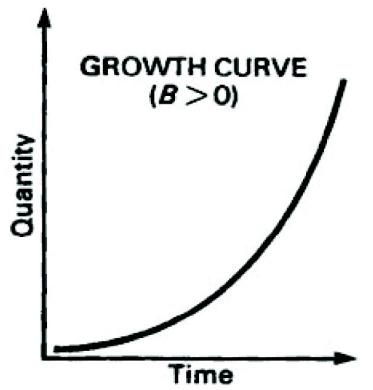
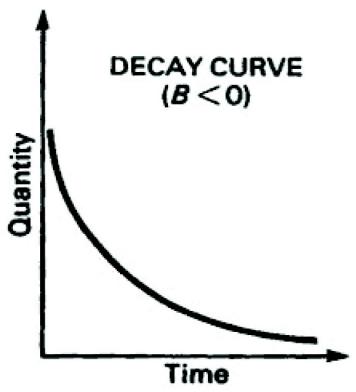
The procedure is as follows:
- Press CLEAR REG
- For each input pair of values, key in the y-value and press g LN, key in the corresponding x-value and press +
- After all data pairs are input, press ,r to obtain the correlation coefficient (between In y and x).
-
Press 1 ,r^x0,r^x to obtain A in the equation above.
-
Press ≥ y R↓ ÷ g LN to obtain B.
- Press ^X-1 to obtain the effective growth rate (as a decimal).
- To make a y-estimate, key in the x-value and press g ,r^x.
Example 1: A stock's price in history is listed below. What effective growth rate does this represent? If the stock continues this growth rate, what is the price projected to be at the end of 1982 (year 7)?
| End of Year | Price |
| 1976(1) | 45 |
| 1977(2) | 51.5 |
| 1978(3) | 53.75 |
| 1979(4) | 80 |
| 1980(5) | 122.5 |
| 1981(6) | 210 |
| 1982(7) | ? |
| Keystrokes | Display | |
| f CLEAR REG45 g LN 1 Σ+ | 1.00 | First data pair input. |
| 51.5 g LN 2 Σ+ | 2.00 | Second data pair input. |
| 53.75 g LN 2 Σ+ | 3.00 | Third data pair input. |
| 80 g LN 2 Σ+ | 4.00 | Fourth data pair input. |
| 122.5 g LN 2 Σ+ | 5.00 | Fifth data pair input. |
| 210 g LN 2 Σ+ | 6.00 | Sixth data pair input. |
| g y,r x Σy | 0.95 | Correlation coefficient (between ln y and x). |
| 1 g y,r g e^x0 g y,r g e^x | 27.34 | A |
| x Σy R ↓ ÷ g LN | 0.31 | B |
| g e^x 1 - | 0.36 | Effective growth rate. |
| 7 g y,r g e^x | 232.35 | Projected price at end of year 7 (1982). |
For repeated use of this routine, the following HP-12C program will be useful.
| KEYSTROKES | DISPLAY |
| f | P/R | ||
| f | CLEAR | PRGM | 00- |
| x̅z y | 01- 34 | ||
| g | LN | 02- 43 23 | |
| x̅z y | 03- 34 | ||
| Σ+ | 04- 49 | ||
| g | GTO 00 | 05-43, 33 00 | |
| ŷ,r | 06- 43 2 | ||
| x̅z y | 07- 34 | ||
| R/S | 08- 31 | ||
| 1 | 09- 1 | ||
| g | ŷ,r | 10- 43 2 | |
| g | ex | 11- 43 22 | |
| 0 | 12- 0 | ||
| g | ŷ,r | 13- 43 2 | |
| g | ex | 14- 43 22 | |
| R/S | 15- 31 | ||
| x̅z y | 16- 34 | ||
| R↓ | 17- 33 | ||
| ÷ | 18- 10 | ||
| g | LN | 19- 43 23 | |
| R/S | 20- 31 | ||
| g | ex | 21- 43 22 | |
| 1 | 22- 1 | ||
| - | 23- 30 | ||
| R/S | 24- 31 | ||
| g | ŷ,r | 25- 43 2 | |
| g | ex | 26- 43 22 | |
| g | GTO 00 | 27-43, 33 00 | |
| f P/R | |
| REGISTER | |
| n: Unused | i: Unused |
| PV: Unused | PMT: Unused |
| FV: Unused | R0: Unused |
| R1: n | R2: Σx |
| R3: Σx2 | R4: Σy |
| R5: Σy2 | R6: Σxy |
| R7-R.6: Unused | |
- Key in the program and press f CLEAR REG
- For each input pair of values, key in the y-value and press ENTER, key in the corresponding x-value and press R/S.
- After all data pairs are input, press g GTO 06 R/S to obtain the correlation coefficient (between In y and x).
- Press R/S to obtain A.
- Press R/S to obtain B
- Press R/S to obtain the effective growth rate as a decimal.
- To make a y-estimate, key in the x-value and press R/S. For subsequent estimates, key in the x-value and press GTO 25 R/S.
- For a different set of data, press f CLEAR REG and go to step 2.
| Keystrokes | Display | |
| f CLEAR REG45 ENTER 1 R/S | 1.00 | First data pair input. |
| 51.5 ENTER 2 R/S | 2.00 | Second data pair input. |
| 53.75 ENTER 3 R/S | 3.00 | Third data pair input. |
| 80 ENTER 4 R/S | 4.00 | Fourth data pair input. |
| 122.5 ENTER 5 R/S | 5.00 | Fifth data pair input. |
| 210 ENTER 6 R/S | 6.00 | Sixth data pair input. |
| g GTO 06 R/S | 0.95 | Correlation coefficient (between ln y and x). |
| R/S | 27.34 | A | |
| R/S | 0.31 | B | |
| R/S | 0.36 | Effective growth rate. | |
| 7 R/S | 232.35 | Projected price at the end of year 7 (1982). |
Logarithmic Curve Fit
If your data does not fit a line or an exponential curve, try the following logarithmic curve fit. This is calculated according to the equation y = A + B (In x ), and all x values must be positive.
A typical logarithmic curve is shown below.
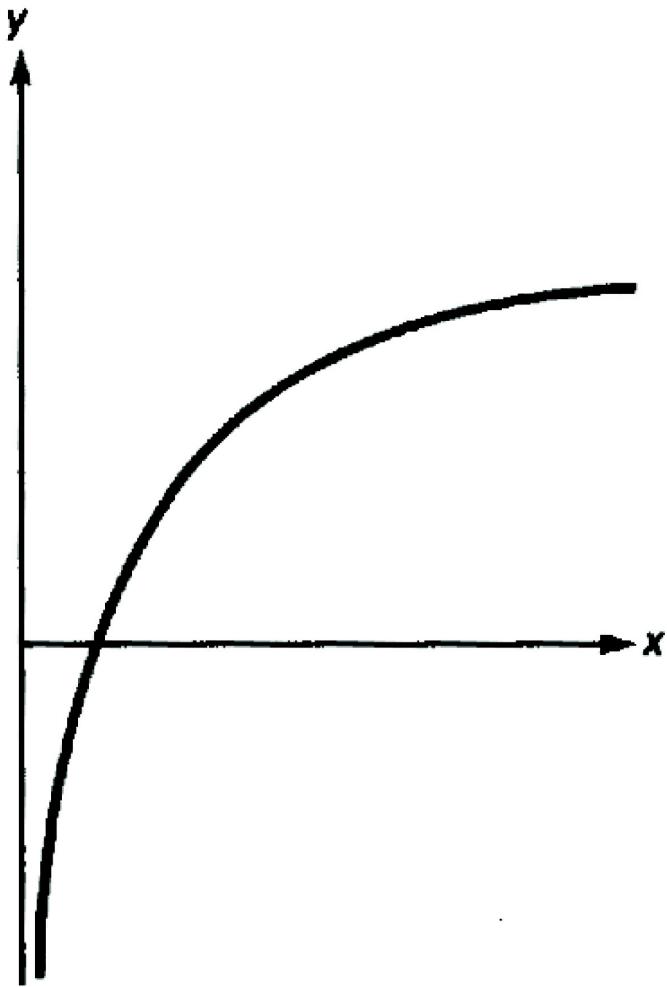
The procedure is as follows:
- Press f CLEAR REG
- Key in the first y -value and press ENTER. Key in the first x -value and press g LN + . Repeat this step for each data pair.
- After all data pairs are input, press g ,r x to obtain the correlation coefficient (between y and In x ).
- Press 1 ,r 0 ,r to obtain A in the equation above.
- Press ≥ y - to obtain B .
- To make a y -estimate, key in the x -value and press ,r .
Example 1: A manufacturer observes declining sales of a soon-to-be obsolete product, of which there were originally 10,000 units in inventory. The cumulative sales figures over a number of months, given below, may be fit by a logarithmic cure of the form y = A + B (In x ), where y represents cumulative sales in units and x the number of months since the beginning. How many units will be sold by the end of eighth months?
| Month | 1 | 2 | 3 | 4 | 5 | 6 |
| Cumulative Sales (units) | 1431 | 3506 | 5177 | 6658 | 7810 | 8592 |
| Keystrokes | Display | |
| f CLEAR REG1431 ENTER1 g LN Σ+ | 1.00 | First pair data input. |
| 3506 ENTER2 g LN Σ+ | 2.00 | Second pair data input. |
| 5177 ENTER3 g LN Σ+ | 3.00 | Third pair data input. |
| 6658 ENTER4 g LN Σ+ | 4.00 | Forth pair data input. |
| 7810 ENTER5 g LN Σ+ | 5.00 | Fifth pair data input. |
| 8592 ENTER6 g LN Σ+ | 6.00 | Sixth pair data input. |
| g | ŷ,r | x̅≥y | 0.99 | Correlation coefficient (between y and ln x). | |
| 1 | g | ŷ,r | 0 | g | ŷ,r |
| x̅≥y | R↓ | - | 4,069.93 | Value of B. | |
| 8 | g | LN | g | ŷ,r | 9,529.34 |
| Total units sold by end of eighth month. |
Power Curve Fit
Another method of analysis is the power curve or geometric curve. The equation of the power curve is y = A x^B , and the values for A and B are computed by calculations similar to linear regression. Some examples of power curves are shown below.
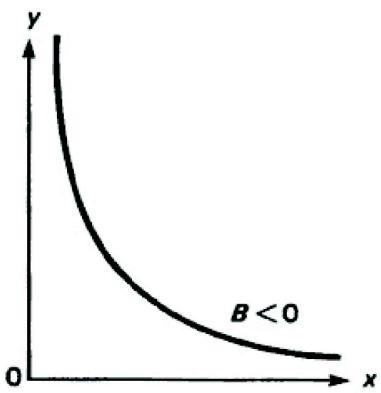
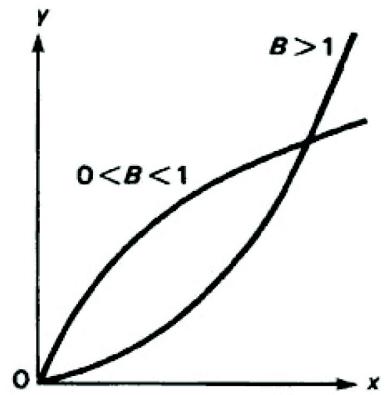
The following keystrokes fit a power curve according to the equation y = A + B( x) :
- Press f CLEAR REG
- Key in the first y -value and press g LN. Key in the first x -value and press g LN + . Repeat this step for all data pairs.
- Press ,r≥ y , to obtain the correlation coefficient (between y and x ).
- Press 0 g ,r^x to obtain A in the above equation.
- Press 1 g , r 0 g , r x< y Rto obtain B.
- To make a y-estimate, key in the x-value and press g LN g ,r g eX
Example: If Galileo had wished to investigate quantitatively the relationship between the time (t) for a falling object to hit the ground and the height (h) it has fallen, he might have released a rock from various
levels of the Tower of Pisa (which was leaning even then) and timed its descent by counting his pulse. The following data are measurements Galileo might have made.
| t (pulses) | 2 | 2.5 | 3.5 | 4 | 4.5 |
| h (feet) | 30 | 50 | 90 | 130 | 150 |
Find the power curve formulas that best expresses h as a function of t ( h = A t^B ).
| Keystrokes | Display | |
| f CLEAR REG30 g LN2 g LN Σ+ | 1.00 | First pair data input. |
| 50 g LN2.5 g LN Σ+ | 2.00 | Second pair data input. |
| 90 g LN3.5 g LN Σ+ | 3.00 | Third pair data input. |
| 130 g LN4 g LN Σ+ | 4.00 | Fourth pair data input. |
| 150 g LN4.5 g LN Σ+ | 5.00 | Fifth pair data input. |
| g y,r x Εy | 1.00 | Correlation coefficient (between ln y and ln x). |
| 0 g y,r g eX | 7.72 | Value of A. |
| 1 g y,r o g y,rx Εy R↓ - | 1.99 | Value of B. |
The formula that best expresses h as a function of t is
$$ h = 7. 7 2 t ^ {1. 9 9} $$
We know, as Galileo did not, that in fact h is proportional to t^2 .
Standard Error of the Mean
The standard error of the mean is a measure of how reliable the mean of a sample () is as an estimator of the mean of the population from which the sample was drawn.
To calculate the standard error of the mean:
- Press f CLEAR REG
- If you are summing one set of numbers, key in the first number and press + . Continue until you have entered all of the values.
- If you are summing two sets of numbers, key in the y -value and press ENTER, key in the x -value and press + . Continue until you have entered all of the values.
- Press to obtain the mean of the x -values.
- Press g s RCL 1 g x to obtain the standard error of the mean of the x -values.
- Alternatively, press g s x y RCL 1 g to obtain the standard error for the mean of the y -values.
Example: A sample of 6 one-bedroom apartment rentals reveals that one rents for 190 per month unfurnished, one rents for200 pre month, two rent for 205 per month, one rents for216 per month, and one rents for $220 per month. What are the mean monthly rental and the standard deviation? What is the standard error of the mean?
| Keystrokes | Display | |
| f CLEAR REG 190 Σ+ 200 Σ+ 205 Σ+ 205 Σ+ 216 Σ+ 220 Σ+ | 6.00 | Total number of inputs. |
| g x | 206.00 | Average monthly rent. |
| g s | 10.86 | Standard deviation. |
| RCL 1 g √x ÷ | 4.43 | Standard error of the mean. |
Mean, Standard Deviation, Standard Error for Grouped Data
Grouped data are presented in frequency distributions to save time and effort in writing down (or entering) each observation individually. Given a set of data points
$$ x _ {1}, x _ {2}, \ldots , x _ {n} $$
with respective frequencies
$$ f _ {1}, f _ {2}, \ldots , f _ {n} $$
this procedure computes the mean, standard deviation, and standard error of the mean.
- Press f CLEAR REG
- Key in the first value and press ENTER ENTER
- Key in the respective frequency and press STO + 0 x ^+ . The display shows the number of data points entered.
- Repeat steps 2 and 3 for each data point.
- To calculate the mean (average) press RCL 0 STO 1 RCL 6 STO 3 g X
- Press to find the standard deviation.
- Press RCL 0 g to find the standard error of the mean.
Example 1: A survey of 266 one-bedroom apartment rentals reveals that 54 rent for 190 a month unfurnished, 32 rent for195 per month, 88 rent for $200 per month, and 92 rent for 206 per month. What are the average monthly rental, the standard deviation, and the standard error of the mean?
| Keystrokes | Display | |||
| f CLEAR REG190 ENTER ENTER54 STO + 0 x Σ+ | 1.00 | First data pair entered. | ||
| 195 ENTER ENTER32 STO + 0 x Σ+ | 2.00 | Second data pair entered. | ||
| 200 ENTER ENTER88 STO + 0 x Σ+ | 3.00 | Third data pair entered. | ||
| 206 ENTER ENTER92 STO + 0 x Σ+ | 4.00 | Fourth data pair entered. | ||
| RCL 0 STO 1 RCL 6STO 3 g x | 199.44 | Average monthly rent. | ||
| g s | 5.97 | Standard deviation. | ||
| RCL 0 g √x ÷ | 0.37 | Standard error of the mean. | ||
Use the following HP-12C program for the previous example:
| KEYSTROKES | DISPLAY |
| f P/R | |
| f CLEAR PRGM | 00- |
| STO + 0 | 01-44 40 0 |
| x | 02- 20 |
| Σ+ | 03- 49 |
| g GTO 00 | 04-43, 33 00 |
| RCL 0 | 05- 45 0 |
| STO 1 | 06- 44 1 |
| RCL 6 | 07- 45 6 |
| STO 3 | 08- 44 3 |
| g x | 09- 43 0 |
| R/S | 10- 31 |
| g s | 11- 43 48 |
| R/S | 12- 31 |
| RCL 0 | 13- 45 0 |
| g √x | 14- 43 21 |
| ÷ | 15- 10 |
| g GTO 00 | 16-43, 33 00 |
| f P/R | |
| REGISTER | |
| n: Unused | i: Unused |
| PV: Unused | PMT: Unused |
| FV: Unused | R0: Σfi |
| R1: Σfi | R2: Σfi xi |
| R3: Σfi xi2 | R4: Σxi |
| R5: Σxi2 | R6: Σfi xi2 |
| R7-R.7: Unused | |
- Key in the program.
- Press f CLEAR REG
-
Key in the first value and press ENTER ENTER
-
Key in the respective frequency and press R/S. The display shows the number of data points entered.
- Repeat steps 3 and 4 for each data point.
- To calculate the mean, press g GTO 05 R/S
- Press R/S to find the standard deviation.
- Press R/S to find the standard error of the mean.
- For a new case, go to step 2.
| Keystrokes | Display | |||
| f CLEAR REG190 ENTER ENTER54 R/S | 1.00 | First data pair. | ||
| 195 ENTER ENTER32 R/S | 2.00 | Second data pair. | ||
| 200 ENTER ENTER88 R/S | 3.00 | Third data pair. | ||
| 206 ENTER ENTER92 R/S | 4.00 | Total number of data sets. | ||
| g GTO 05 R/S | 199.44 | Average monthly rent (maen). | ||
| R/S | 5.97 | Standard deviation. | ||
| R/S | 0.37 | Standard error of the mean. | ||
Chi-Square Statistics
The chi-square statistic is a measure of the goodness of fit between two sets of frequencies. It is used to test whether a set of observed frequencies differs from a set of expected frequencies sufficiently to reject the hypothesis under which the expected frequencies were obtained.
In other words, you are testing whether discrepancies between the observed frequencies (O_i) and the expected frequencies (E_i) are significant, or whether they may reasonable be attributed to chance. The formula generally used is:
$$ x ^ {2} = \sum_ {i = 1} ^ {n} \frac {\left(O _ {i} - E _ {i}\right)}{E _ {i}} $$
If there is a close agreement between the observed and expected frequencies, x^2 will be small. If the agreement is poor, x^2 will be large. The following keystrokes calculate the x^2 statistic:
- Press f CLEAR REG
- Key in the first O_i value and press ENTER
- Key in the first E_i value and press STO 0 - ENTER x RCL 0 +
- Repeat steps 2 and 3 for all data pairs. The x^2 value is displayed.
Example 1: A suspect die from a Las Vegas casino is brought to an independent testing firm to determine its bias, if any. The die is tossed 120 times and the following results obtained.
| Number | 1 | 2 | 3 | 4 | 5 | 6 |
| Observed Frequency | 25 | 17 | 15 | 23 | 24 | 16 |
The expected frequency = 120 throws / 6 sides, or E = 20 for each number, 1 thru 6. (Since E is a constant in this example, there is no need to store it in R_0 each time.)
| Keystrokes | Display | |
| f CLEAR REG25 ENTER20 STO 0 - ENTERx RCL 0 ÷ + | 1.25 | |
| 17 ENTER 20 -ENTERx RCL 0 ÷ + | 1.70 | |
| 15 ENTER 20 - ENTER x RCL 0 ÷ + | 2.95 | |
| 23 ENTER 20 - ENTER x RCL 0 ÷ + | 3.40 | |
| 24 ENTER 20 - ENTER x RCL 0 ÷ + | 4.20 | |
| 16 ENTER 20 - ENTER x RCL 0 ÷ + | 5.00 | x² |
The number of degrees of freedom is (n - 1) . Since n = 6 , the degrees of freedom = 5 .
Consulting statistical tables, you look up x^2 to a 0.05 significance level with 5 degrees of freedom, and see that x_0.05,5^2 = 11.07 . Since x^2 = 5 is within 11.07, we may conclude that to a 0.05 significance level (probability = .95 ), the die is fair.
Try the following HP-12C program with the same example.
| KEYSTROKES | DISPLAY |
| f P/R | |
| f CLEAR PRGM | 00- |
| STO 0 | 01- 44 0 |
| - | 02- 30 |
| ENTER | 03- 36 |
| x | 04- 20 |
| RCL 0 | 05- 45 0 |
| ÷ | 06- 10 |
| + | 07- 40 |
| g GTO 00 | 08-43, 33 00 |
| f P/R | |
| REGISTER | |
| n: Unused | i: Unused |
| PV: Unused | PMT: Unused |
| FV: Unused | R0: Ei |
| R1-R.9: Unused | |
- Key in the program.
- Press f CLEAR REG
- Key in the first O_i value and press ENTER
- Key in the first E_j value and press R/S
- Repeat steps 3 and 4 for all data pairs. The x^2 value is displayed.
- For a new case, go to step 2.
| Keystrokes | Display | |
| f CLEAR REG25 ENTER20 R/S | 1.25 | |
| 17 ENTER20 R/S | 1.70 | |
| 15 ENTER20 R/S | 2.95 | |
| 23 ENTER20 R/S | 3.40 | |
| 24 ENTER20 R/S | 4.20 | |
| 16 ENTER20 R/S | 5.00 | \(X^2\) |
Normal Distribution
The normal (or Gaussian) distribution is an important tool in statistics and business analysis. The following HP-12C program gives an approximation to the upper tail area Q under a standardized normal distribution curve, given x . The upper tail area signifies the probability of occurrence of all values ≥ x .
$$ Q (x) \cong \frac {1}{2} \operatorname {E X P} \left[ - \frac {(8 3 x + 3 5 1) x + 5 6 2}{7 0 3 / x + 1 6 5} \right] $$
Relative error less than 0.042% over the range 0 < x < 5.5
Reference:
Stephen E. Derenzo, "Approximations for Hand Calculators Using Small Integer Coefficients," Mathematics of Computation, Vol. 31, No. 137, page 214-225; Jan 1977.
| KEYSTROKES | DISPLAY |
| f P/R | |
| f CLEAR PRGM | 00- |
| STO 0 | 01- 44 0 |
| 8 | 02- 8 |
| 3 | 03- 3 |
| x | 04- | 20 |
| 3 | 05- | 3 |
| 5 | 06- | 5 |
| 1 | 07- | 1 |
| + | 08- | 40 |
| RCL0 | 09- | 45 0 |
| x | 10- | 20 |
| 5 | 11- | 5 |
| 6 | 12- | 6 |
| 2 | 13- | 2 |
| + | 14- | 40 |
| 7 | 15- | 7 |
| 0 | 16- | 0 |
| 3 | 17- | 3 |
| RCL0 | 18- | 45 0 |
| ÷ | 19- | 10 |
| 1 | 20- | 1 |
| 6 | 21- | 6 |
| 5 | 22- | 5 |
| + | 23- | 40 |
| ÷ | 24- | 10 |
| CHS | 25- | 16 |
| g ex | 26- | 43 22 |
| 2 | 27- | 2 |
| ÷ | 28- | 10 |
| g GTO 00 | 29-43, 33 | 00 |
| f P/R | ||
| REGISTERS | ||
| n: Unused | i: Unused | |
| PV: Unused | PMT: Unused | |
| FV: Unused | R0: x | |
| R1-R.6: Unused | ||
- Key in program.
-
Key in x and press R/S to computed Q(x) .
-
Repeat step 2 for each new case.
Example: Find Q(x) for x = 1.18 and x = 2.1 .
| Keystrokes | Display | |
| 1.18 R/S | 0.12 | Q(1.18) |
| 2.1 R/S | 0.02 | Q(2.1) |
Covariance
Covariance is a measure of the interdependence between paired variables ( x and y ). Like standard deviation, covariance may be defined for either a sample (S_xy) or a population (S'_xy) as follows:
$$ \mathsf {S} _ {x y} = r ^ {} s _ {x} ^ {} s _ {y} $$
$$ \mathsf {S} _ {x y} ^ {\prime} = r ^ {} \mathsf {S} _ {x} ^ {\prime } \mathsf {S} _ {y} ^ {\prime} $$
The following procedure finds the covariance of a sample (S_xy) and of a population (S_xy^) :
- Press f CLEAR REG
- Key in the y-values and press ENTER
- Key in the x -values and press + . Repeat steps 2 and 3 for all data pairs.
- Press g s x ENTER g y r R to obtain the value of S_xy
- Press RCL 1 1 - RCL 1 ÷ to obtain S_xy^
Example 1: Find the sample covariance (S_xy) and population covariance (S_xy^) for the following paired variables:
| x_i | 26 | 30 | 44 | 50 | 62 | 68 | 74 |
| y_i | 92 | 85 | 78 | 81 | 54 | 51 | 40 |
| Keystrokes | Display | |
| f CLEAR REG92 ENTER 26 Σ+85 ENTER 30 Σ+78 ENTER 44 Σ+81 ENTER 50 Σ+ | 7.00 | Total number of entries. |
| 54 ENTER 62 Σ+ 51 ENTER 68 Σ+ 40 ENTER 74 Σ+ | ||
| g s x ENTER g y,r R↓ x | -354.14 | Sxy |
| RCL 1 1 - RCL 1 ÷ x | -303.55 | S'xy |
Try the previous example using the following HP-12C program:
| KEYSTROKES | DISPLAY | |
| f | P/R | |
| f | CLEAR PRGM | 00- |
| Σ+ | 01- 49 | |
| g | GTO 00 | 02-43, 33 00 |
| g | s | 03- 43 48 |
| x | 04- 20 | |
| ENTER | 05- 36 | |
| g | y,r | 06- 43 2 |
| R↓ | 07- 33 | |
| x | 08- 20 | |
| R/S | 09- 31 | |
| RCL 1 | 10- 45 1 | |
| 1 | 11- 1 | |
| - | 12- 30 | |
| RCL | 13- 45 1 | |
| ÷ | 14- 10 | |
| x | 15- 20 | |
| g | GTO 00 | 16-43, 33 00 |
| f | P/R | |
| REGISTER | ||
| n: Unused | i: Unused |
| PV: Unused | PMT: Unused |
| FV: Unused | R0: Unused |
| R1: n | R2: Σx |
| R3: Σx2 | R4: Σy |
| R5: Σy2 | R6: Σxy |
| R7-R.7: Unused |
- Key in the program.
- Press CLEAR REG
- Key in the y-value and press ENTER
- Key in the x -value and press R/S. Repeat steps 3 and 4 for all data pairs.
- Press g GTO 03 R/S to obtain the value of S_xy
- Press R/S to obtain S_xy^
- For a new case, go to step 2.
| Keystrokes | Display | |||
| f | CLEAR | REG | ||
| 92 | ENTER | 26 | R/S | |
| 85 | ENTER | 30 | R/S | |
| 78 | ENTER | 44 | R/S | 7.00 |
| 81 | ENTER | 50 | R/S | |
| 54 | ENTER | 62 | R/S | |
| 51 | ENTER | 68 | R/S | |
| 40 | ENTER | 74 | R/S | |
| g | GTO | 03 | R/S | -354.14 |
| R/S | -303.55 | S'xy | ||
Permutation
A permutation is an ordered subset of a set of distinct objects. The number of possible permutations, each containing n objects, that can be formed from a collection of m distinct objects is given by:
$$ m P n = \frac {m !}{(m - n) !} $$
where m, n are integers and 69 ≥ m ≥ n ≥ 0 .
Use the following HP-12C program to calculate the number of possible permutations.
| KEYSTROKES | DISPLAY | |
| f | P/R | |
| f | CLEAR PRGM | 00- |
| STO 0 | 01- 44 0 | |
| x̅y | 02- 34 | |
| g | n! | 03- 43 3 |
| g | LSTX | 04- 43 36 |
| RCL 0 | 05- 45 0 | |
| - | 06- 30 | |
| g | n! | 07- 43 3 |
| ÷ | 08- 10 | |
| g | GTO 00 | 09-43, 33 00 |
| f | P/R | |
| REGISTER | ||
| n: Unused | i: Unused | |
| PV: Unused | PMT: Unused | |
| FV: Unused | R0:n | |
| R1-R.8: Unused | ||
- Key in the program.
- Key in m and press ENTER
- Key in n and press R/S to calculate _mP_n .
- For a new case go to step 2.
Example: How many ways can 10 people be seated on a bench if only 4 seats are available?
| Keystrokes | Display | |
| 10 ENTER 4 R/S | 5,040.00 | 10P4. |
Combination
A combination is a selection of one or more of a set of distinct objects without regard to order. The number of possible combinations, each containing n objects, that can be formed from a collection of m distinct objects is given by:
$$ m C n = \frac {m !}{(m - n) ! n !} $$
Where m, n are integers and 69 ≥ m ≥ n ≥ 0 .
Use the following HP-12C to calculate the number of possible combinations.
| KEYSTROKES | DISPLAY | |
| f | P/R | |
| f | CLEAR PRGM | 00- |
| STO 0 | 01- 44 0 | |
| x≥y | 02- 34 | |
| g | n! | 03- 43 3 |
| g | LSTX | 04- 43 36 |
| RCL 0 | 05- 45 0 | |
| - | 06- 30 | |
| g | n! | 07- 43 3 |
| RCL 0 | 08- 45 0 | |
| g | n! | 09- 43 3 |
| x | 10- 20 | |
| ÷ | 11- 10 | |
| g | GTO 00 | 12-43, 33 00 |
| f | P/R | |
| REGISTER | ||
| n: Unused | i: Unused | |
| PV: Unused | PMT: Unused | |
| FV: Unused | R0: n | |
| R1-R8: Unused | ||
- Key in the program.
- Key in m and press ENTER
- Key in n and press R/S to calculate mCn .
- For a new case, go to step 2.
Example: A manager wants to choose a committee of three people from the seven engineers working for him. In how many different ways can the committee be selected?
| Keystrokes | Display | |
| 7 ENTER | 35.00 | 7C3. |
| 3 R/S |
Random Number Generator
This HP-12C program calculates uniformly distributed pseudo-random numbers u_i in the range
$$ 0 < u _ {j} < 1. $$
The following method is used:
u_j + 1 = fractional part of (997u_j)
where i = 0,1,2,
- u_0 = 0.5284163^ (seed), Other seeds may be selected but the quotient of (seed × 10^7 ) divided by two or five must not be an integer. Also, it would be wise to statistically test other seeds before using them.)
The period of this generator has a length of 500,000 numbers and the generator passes the frequency test (chi Square) for uniformity, the serial test and the run test. The most significant digits (the left hand digits) are the most random digits. The right most digits are significantly less random.
| KEYSTROKES | DISPLAY |
| f P/R | |
| f CLEAR PRGM | 00 - |
| · | 01 - 48 |
| 5 | 02 - 5 |
| 2 | 03- | 2 |
| 8 | 04- | 8 |
| 4 | 05- | 4 |
| 1 | 06- | 1 |
| 6 | 07- | 6 |
| 3 | 08- | 3 |
| STO 0 | 09- | 44 0 |
| 9 | 10- | 9 |
| 9 | 11- | 9 |
| 7 | 12- | 7 |
| x | 13- | 20 |
| g FRAC | 14- | 43 24 |
| STO 0 | 15- | 44 0 |
| R/S | 16- | 31 |
| g GTO 10 | 17-43, 33 | 10 |
| f P/R | ||
| REGISTER | ||
| n: Unused | i: Unused | |
| PV: Unused | PMT: Unused | |
| FV: Unused | R0: Ui | |
| R1-R.7: Unused | ||
- Key in the program.
- To generate a random number, press R/S
- Repeat step 2 as many times as desired.
Example: Generate a sequence of 5 random numbers.
| Keystrokes | Display |
| R/S | 0.83 |
| R/S | 0.83 |
| R/S | 0.83 |
| R/S | 0.83 |
| R/S | 0.83 |
Personal Finance
Homeowners Monthly Payment Estimator
It is often useful, when comparison shopping for a mortgage or determining the appropriate price range of houses to consider, to be able to quickly estimate the monthly payment given the purchase price, tax rate per $1000, percent down, interest rate and term of the loan.
The calculation assumes that the assessed value is 100% of the sales price and does not take into account financing of the closing costs.
A simple keystroke procedure may be used to calculate the monthly payment:
- Press g END and press f CLEAR FIN
- Key in the annual interest rate and press 12÷
- Key in the term of the loan (in years) and press 12x .
- Key in the purchase prices and press STO 1.
- Key in the percent down and press %-.
- Key in the tax rate in dollars per thousand and press RCL 1 x 12000 ÷ ENTER PMT PMT ^+ . (A negative sign is the convention for cash paid out).
Example: What would your monthly payments be on a 65,000 house in a neighborhood with a 25 per thousand tax rate and a 10 3/4 % interest rate on a 35 year loan with 10% down?
| Keystrokes | Display | |
| g ENDf CLEAR FIN10.75 g 12÷ | 0.90 | Monthly interest rate. |
| 35 g 12x | 420.00 | Months of loan. |
| 65000 STO 1 | 65,000.00 | Purchase price. |
| 10 % - PV | 58,800.00 | Mortgage balance. |
| 25 RCL 1 x12000 ÷ CHS | -135.42 | Approximate monthly taxes. |
| ENTER PMT PMT | -672.16 | Approximate monthly payment. |
The following HP-12C program may be used instead of the above.
| KEYSTROKES | DISPLAY | ||
| f | P/R | ||
| f | CLEAR PRGM | 00- | |
| g | END | 01- | 43 8 |
| RCL 1 | 02- | 45 1 | |
| RCL 2 | 03- | 45 2 | |
| % | 04- | 25 | |
| - | 05- | 30 | |
| PV | 06- | 13 | |
| ENTER | 07- | 36 | |
| g | LSTX | 08- | 43 36 |
| + | 09- | 40 | |
| RCL 3 | 10- | 45 3 | |
| x | 11- | 20 | |
| 1 | 12- | 1 | |
| 2 | 13- | 2 | |
| EEX | 14- | 26 | |
| 3 | 15- | 3 | |
| ÷ | 16- | 10 | |
| CHS | 17- | 16 | |
| ENTER | 18- | 36 | |
| PMT | 19- | 14 | |
| PMT | 20- | 14 | |
| + | 21- | 40 | |
| g | GTO 00 | 22-43, 33 00 | |
| f | P/R | ||
| REGISTER | |||
| n: Term | i: Interest |
| PV: Loan | PMT: Loan PMT |
| FV: 0 | R0: Unused |
| R1: Purch. Price | R2: % Down |
| R3: Tax rate | R4-R7: Unused |
- Key in the program.
- Press CLEAR FIN
- Key in the annual interest rate and press 12÷
- Key in the term of the loan in years and press 12x
- Key in the purchase price and press STO 1.
- Key in the percent down and press STO 2.
- Key in the tax rate in dollars per thousand and press STO 3.
- To calculate the approximate monthly payment, press R/S.
- For a new case, store only the new variables by performing steps 3 thru 7 as needed. Press R/S for the new approximate monthly payment.
Example: Solve the previous example using the HP-12C program..
| Keystrokes | Display | |
| f CLEAR FIN 10.75 g 12÷ | 0.90 | Monthly interest. |
| 35 g 12x | 420.00 | Months of loan. |
| 65000 STO 1 | 65,000.00 | Purchase price. |
| 10 STO 2 | 10.00 | Percent down. |
| 25 STO 3 | 25.00 | Tax rate per thousand. |
| R/S | -672.16 | Approximate monthly payment. |
What would the approximate payment be if the loan was at 10% interest?
10 g 12÷ R/S
-638.33
Approximate monthly payment.
What if the down payment is increased to 20% ?
20 STO 2 R/S
-582.45
Approximate monthly payment.
Tax-Free Individual Retirement (IRA) of Keogh Plan.
The advent of tax-free retirement accounts (IRA or Keogh) has resulted in considerable benefits for many person who are not able to participate in group profit sharing or retirement plans. The savings due to tax-free status are often considerable, but complex to calculate. Required data are: the years to retirement, the total annual investment, the compound annual interest rate of the investment, and an assumed tax rate which would be paid on a similar non taxfree investment. This program calculates:
- The future cash value of the tax-free investment.
- The total cash paid in.
- The total dividends paid.
- The future value of the investment at retirement, assuming that after retirement you withdrew the money at a rate which causes the money to be taxed at 1/2 the rate at which it would otherwise have been taxed during the pay in period.
- The diminished purchasing power assuming a given annual inflation rate.
- The future value of a comparable taxable investment.
- The diminished purchasing power of a comparable taxable investment.
Notes:
- The calculations run from the beginning of the first year to the end of the last year.
- The interest (annual yield), i, should be entered to as many significant figures as possible for maximum accuracy.
- The assumed 10% annual inflation rate may be changed by modifying the program at lines 19 and 20.
- The assumed tax rate used to calculate the after tax value of the tax-free investment may be changed by modifying the program at line 9.
| KEYSTROKES | DISPLAY |
| f P/R | |
| f CLEAR PRGM | 00- |
| RCL n | 01- 45 11 |
| RCL PMT | 02- 45 14 |
| x | 03- 20 |
| R/S | 04- 31 |
| + | 05- 40 |
| R/S | 06- | 31 |
| RCL 1 | 07- 45 | 1 |
| · | 08- | 48 |
| 5 | 09- | 5 |
| % | 10- | 25 |
| CHS | 11- | 16 |
| 1 | 12- | 1 |
| + | 13- | 40 |
| RCL FV | 14- 45 | 15 |
| x | 15- | 20 |
| R/S | 16- | 31 |
| 1 | 17- | 1 |
| · | 18- | 48 |
| 1 | 19- | 1 |
| 0 | 20- | 0 |
| RCL n | 21- 45 | 11 |
| y' | 22- | 21 |
| ÷ | 23- | 10 |
| R/S | 24- | 31 |
| RCL i | 25- 45 | 12 |
| 1 | 26- | 1 |
| RCL 1 | 27- 45 | 1 |
| % | 28- | 25 |
| - | 29- | 30 |
| x | 30- | 20 |
| i | 31- | 12 |
| FV | 32- | 15 |
| R/S | 33- | 31 |
| g GTO 17 | 34-43, 33 | 17 |
| f P/R |
| REGISTER | |
| n: Years | i: Used |
| PV: 0 | PMT: Yearly Pmt |
| FV: Used | R0: Unused |
| R1: Tax % | R2-R5: Unused |
- Key in the program.
- Press f CLEAR REG and press g BEG.
- Key in the tax rate as a percentage and press STO 1.
- Key in years to retirement and press n
- Key in the interest rates as a percentage and press i
- Key in the annual payment and press CHS PMT
- Press FV to calculate the future value of the tax free investment.
- Press R/S to compute the total cash paid in.
- Press / S to compute the total dividends paid.
- Press R/S to compute the future value when, after retirement, money is withdrawn at a rate causing the tax rate to equal 1/2 the rate paid during the pay in period.
- Press R/S to compute the diminished purchasing power, in terms of today's dollars, of the future value assuming a 10% annual inflation rate.
- Press R/S to compute the future value of an ordinary tax investment.
- Press R/S to compute the diminished purchasing power of the ordinary tax investment.
Example: Assuming a 35 year investment period with a dividend rate of 8.175% and a tax rate of 40% .
- If you invest $1500 each year in a tax free account, what will its value be at retirement?
- How much cash will be paid in?
- What will be the value of the earned dividends?
- After retirement, if you withdrew cash form the account at a rate such that it will be taxed at a rate equal to one-half the rate paid during the pay-in period, what will be the after-tax value?
-
What is the diminished purchasing power of that amount, in today's dollars, assuming 10% annual inflation?
-
If you invest the same amount ($1500, *after taxes for a not-Keogh or IRA account.) each year with dividends taxed as ordinary income, what will be the total tax-paid cash at retirement?
- What is the purchasing power of that figure in terms of today's dollars?
| Keystrokes | Display | |||
| f CLEAR REGg BEG40 STO 1 | 40.00 | Tax rate. | ||
| 35 n | 35.00 | Years to retirement. | ||
| 8.175 i | 8.18 | Dividend rate. | ||
| 1500 CHS PMT | -1,500.00 | Annual payment. | ||
| FV | 290,730.34 | Future value at retirement. | ||
| R/S | -52,500.00 | Cash Paid in. | ||
| R/S | 238,230.34 | Earned dividends. | ||
| R/S | 232,584.27 | After-tax value. | ||
| R/S | 8,276.30 | Diminished purchasing power. | ||
| R/S | 139,360.09 | Tax-paid cash at retirement. | ||
| R/S | 4,959.00 | Purchasing power of tax-paid cash at retirement. | ||
Stock Portfolio Evaluation and Analysis
This program evaluates a portfolio of stocks given the current market price per share and the annual dividend. The user inputs the initial purchase price of a stock, the number of shares, the beta coefficient*, the annual dividend, and the current market price for a portfolio of any size.
The program returns the percent change in value of each stock and the valuation and beta coefficient* of the entire portfolio. Output includes the original portfolio value, the new portfolio value, the percent change in the value and the annual dividend and yield as a percent of the current market value. The overall beta coefficient of the portfolio is also calculated.
*The beta coefficient is a measure of a stock variability (risk) compared to the market in general. Beta values for individual stocks can be acquired from brokers, investment publications or the local business library.
Notes:
- Prices are input in the form XXX.ND where N is the numerator and D is the Denominator of the fractional portion of the price, e.g. 25 5/8 is input as 25.58.
- The beta coefficient analysis is optional. Key in 1.00 if beta is not to be analyzed.
| KEYSTROKES | DISPLAY | ||
| f | P/R | ||
| f | CLEAR PRGM | 00- | |
| STO 6 | 01- | 44 6 | |
| g | FRAC | 02- | 43 24 |
| g | x=0 | 03- | 43 35 |
| g | GTO 15 | 04-43, | 33 15 |
| 1 | 05- | 1 | |
| 0 | 06- | 0 | |
| x | 07- | 20 | |
| g | INTG | 08- | 43 25 |
| g | LSTX | 09- | 43 36 |
| g | FRAC | 10- | 43 24 |
| ÷ | 11- | 10 | |
| 1 | 12- | 1 | |
| 0 | 13- | 0 | |
| ÷ | 14- | 10 | |
| RCL 6 | 15- | 45 6 | |
| g | INTG | 16- | 43 25 |
| + | 17- | 40 | |
| RCL 4 | 18- | 45 4 | |
| g | x=0 | 19- | 43 35 |
| g | GTO 38 | 20-43, | 33 38 |
| STO - 4 | 21-44 | 30 4 | |
| x | 22- | 20 | |
| RCL 7 | 23- | 45 7 | |
| x | 24- | 20 | |
| STO + 0 | 25-44 | 40 | 0 |
| x≥y | 26- | 34 | |
| RCL 7 | 27- | 45 | 7 |
| x | 28- | 20 | |
| STO + 1 | 29-44 | 40 | 1 |
| R↓ | 30- | 33 | |
| x | 31- | 20 | |
| STO + 3 | 32-44 | 40 | 3 |
| RCL 5 | 33- | 45 | 5 |
| g LSTX | 34- | 43 | 36 |
| Δ% | 35- | 24 | |
| R/S | 36- | 31 | |
| g GTO 01 | 37-43, | 33 | 01 |
| + | 38- | 40 | |
| x≥y | 39- | 34 | |
| STO 7 | 40- | 44 | 7 |
| x | 41- | 20 | |
| STO 5 | 42- | 44 | 5 |
| STO + 2 | 43-44 | 40 | 2 |
| 1 | 44- | 1 | |
| STO 4 | 45- | 44 | 4 |
| R/S | 46- | 31 | |
| g GTO 01 | 47-43, | 33 | 01 |
| RCL 2 | 48- | 45 | 2 |
| R/S | 49- | 31 | |
| RCL 0 | 50- | 45 | 0 |
| R/S | 51- | 31 | |
| Δ% | 52- | 24 | |
| R/S | 53- | 31 |
| RCL 0 | 54- | 45 0 |
| RCL 1 | 55- | 45 1 |
| R/S | 56- | 31 |
| %T | 57- | 23 |
| R/S | 58- | 31 |
| RCL 3 | 59- | 45 3 |
| RCL 0 | 60- | 45 0 |
| ÷ | 61- | 10 |
| g GTO 00 | 62-43, 33 00 | |
| f P/R | ||
| REGISTERS | ||
| n: Unused | i: Unused | |
| PV: Unused | PMT: Unused | |
| FV: Unused | R0: ΣPV | |
| R1: ΣDIV | R2: ΣOrig. Val. | |
| R3: ΣPiSiβi | R4: Flag | |
| R5: Pi | R6: XXX.ND | |
| R7: Si | R8-R1: Unused | |
Instructions:
- Key in the program.
- Initialize the program by pressing f CLEAR REG
- Key in the number of shares of a stock and press ENTER
- Key in the initial purchase of the stock and press R/S
- Key in the beta coefficient of the stock and press ENTER
- Key in the annual dividend of the stock and press ENTER
- Key in the present price of the stock and press R/S. The display will show the percent change in the stock value.
-
Repeat steps 3 through 7 until all the stocks are entered.
-
Next, to evaluate the entire portfolio, press GTO 48.
- Press R/S to see the initial portfolio value.
- Press R/S to see the present portfolio value.
- Press R/S to see the percent change in value.
- Press R/S to see the total yearly dividend.
- Press R/S to see the annual dividend yield as a percent of the current market value.
- Press R/S to see the beta coefficient of the portfolio.
- For a new case return to step 2.
Example: Evaluate the following portfolio:
| Number of Shares Held | Initial Purchase Price | Beta Coefficient | Annual Dividend | Present Market Price | Stock |
| 100 | 25 5/8 | .8 | 1.70 | 27 1/4 | Int'l Heartburn |
| 200 | 30 1/4 | 1.2 | 2.10 | 33 1/2 | P. D. Q. |
| 50 | 89 7/8 | 1.3 | 4.55 | 96 1/8 | Datacrunch |
| 500 | 65 1/4 | .6 | 3.50 | 64 3/8 | N.W. Sundial |
| Keystrokes | Display | ||
| f CLEAR REG | 0.00 | Int'l Heartburn | |
| 100 ENTER | 100.00 | ||
| 25.58 R/S | 1.00 | ||
| .8 ENTER | 0.80 | ||
| 1.70 ENTER | 1.70 | ||
| 27.14 R/S | 6.34 | Percent change in Stock's value. | |
| 200 ENTER | 200.00 | P. D. Q. | |
| 30.14 R/S | 1.00 | ||
| 1.2 ENTER | 1.20 | ||
| 2.10 ENTER | 2.10 | ||
| 33.12 R/S | 10.74 | Percent change in Stock's value. | |
| 50 ENTER | 50.00 | Datacrunch | |
| 89.78 R/S | 1.00 | ||
| 1.3 ENTER | 1.30 | ||
| 4.55 ENTER | 4.55 | ||
| 96.18 R/S | 6.95 | Percent change in Stock's value. | |
| 500 ENTER | 500.00 | N. W. Sundial | |
| 65.14 R/S | 1.00 | ||
| 6 ENTER | 0.60 | ||
| 3.50 ENTER | 3.50 | ||
| 64.38 R/S | -1.34 | Percent change in Stock's value. | |
| g GTO 48 | 45,731.25 | Original value. | |
| R/S | |||
| R/S | 46,418.75 | Present value. | |
| R/S | 1.50 | Percent change in value. | |
| R/S | 2,567.50 | Total yearly dividend. | |
| R/S | 5.53 | Annual dividend yield. | |
| R/S | 0.77 | Portfolio beta coefficient. | |
Canadian Mortgages
In Canada, interest is compounded semi-annually with payments made monthly. This results in a different monthly mortgage factor than is used in the United States and preprogrammed into the HP-12C. This difference can be easily handled by the addition of a few keystrokes. For any problem requiring an input for , the Canadian mortgage factor is calculated first and then this value is entered in for in the calculation to give the answer for Canada. The keystrokes to calculate the Canadian Mortgage factor are:
- Press f CLEAR FIN g END
- Key in 6 and press n
- Key in 200 and press ENTER PV
- Key in the annual interest rate as a percentage and press + CHS FV
- Press i.
The Canadian mortgage factor is now stored in for future use. The examples below show how this factor is used for in Canadian mortgage problems.
Periodic Payment Amount
Example 1: What is the monthly payment required to fully amortize a 30-year, $30,000 Canadian mortgage if the interest rate is 9%?
| Keystrokes | Display | |
| f CLEAR FIN g END 6 n 200 ENTER PV 9 + CHS FV i | 0.74 | Canadian mortgage factor |
| 30 g 12x | 360.00 | Total monthly periods in mortgage life |
| 30000 PV 0 FV PMT | -237.85 | Monthly payment |
Number of Periodic Payments to Fully Amortize a Mortgage
Example 2: An investor can afford to pay 440 per month on a 56,000 Canadian Mortgage. If the annual interest rate is 9 1/4%, how long will it take to completely amortize this mortgage?
| Keystrokes | Display | |
| f CLEAR FIN g END 6 n 200 ENTER PV 9.25 + CHS FV i | 0.76 | Canadian mortgage factor. |
| 440 CHS PMT | -440.00 | Monthly payment. |
| 56000 PV 0 FV n | 437.00 | Total number of monthly payments. |
Effective Interest Rate (Yield)
Example 3: A Canadian mortgage has monthly payments of 612.77 with a maturity of 25 years. The principal amount is 75,500. What is the annual interest rate?
| Keystrokes | Display | |
| f CLEAR FIN g END 25 g 12x 612.77 CHS PMT 75500 PV i | 0.72 | Canadian mortgage factor. |
| 6 n 0 PMT 200 CHS PV FV RCL PV + | 8.75 | Annual interest rate. |
Balance Remaining at End of Specified Period
Example 4: A Canadian mortgage has monthly payments of 612.77 at 8.75% interest. The principal amount is 75,500. What will be the outstanding balance remaining at the end of 10 years?
| Keystrokes | Display | |
| f CLEAR FIN g END 6 n 200 ENTER PV 8.75 + CHS FV i | 0.72 | Canadian Mortgage factor. |
| 612.77 CHS PMT 10 g 12x 75500 PV FV | -61,877.18 | Outstanding balance remaining at the end of 10 years. |
Miscellaneous
Learning Curve for Manufacturing Costs
Many production process costs vary with output according to the "learning curve" equation. The production team becomes more proficient in manufacturing a given item as more and more of them are fabricated and costs may be expected to decrease by a predictable amount. The learning factor, r , characterizes the learning curve. For instance, if r = .80 the curve is called an 80% learning curve.
It is readily apparent that the learning, or experience curve, has many uses in setting production standards, forecasting costs, setting prices, etc. Note, however, that the learning factor may change, especially after large numbers have been produced.
It the cost of the first unit of a run, C_1 , and the learning curve factor, r , are known, the following procedure can be used to calculate the cost of the nth item:
- Key in the cost of the first item, C_1 and press ENTER.
- Key in the number of units produced, n , and press ENTER.
- Key in the learning factor, r , and press g LN 2 g LN
- Then press ^× to calculate the cost of the nth unit, C_n .
Example 1: An electronic manufacturer begins a pilot run on a new instrument. From past experience he expects the process to have a learning factor, r , or 0.90. If the first unit costs $875 to produce, what is the expected cost of the 100th unit?
| Keystrokes | Display | |
| 875 ENTER | 875.00 | |
| 100 ENTER | 100.00 | |
| .g LG 2 g LN ÷ | -0.15 | |
| y'x | 434.51 | Cost of the 100th unit. |
If the cost of the first unit, C_1 , and the nth unit, C_n , are known the learning factor may be calculated. In addition, it is possible to calculate C_ij , the average cost of the ith thru jth unit. These calculations may be rapidly done with the following HP-12C program:
| KEYSTROKES | DISPLAY |
| f P/R | |
| f CLEAR PRGM | 00- |
| g LN | 01- 43 23 |
| 2 | 02- 2 |
| g LN | 03- 43 23 |
| ÷ | 04- 10 |
| STO 2 | 05- 44 2 |
| R↓ | 06- 33 |
| x̅z y | 07- 34 |
| STO 1 | 08- 44 1 |
| ÷ | 09- 10 |
| g LN | 10- 43 23 |
| RCL 2 | 11- 45 2 |
| ÷ | 12- 10 |
| g e^x | 13- 43 22 |
| STO 2 | 14- 44 2 |
| g GTO 00 | 15-43, 33 00 |
| RCL 2 | 16- 45 2 |
| g LN | 17- 43 23 |
| 2 | 18- 2 |
| g LN | 19- 43 23 |
| ÷ | 20- 10 |
| y^x | 21- 21 |
| RCL 1 | 22- 45 1 |
| x | 23- 20 |
| g GTO 00 | 24-43, 33 00 |
| STO 3 | 25- 44 3 |
| x̅z y | 26- 34 |
| STO 4 | 27- | 44 | 4 |
| RCL 2 | 28- | 45 | 2 |
| g LN | 29- | 43 | 23 |
| 2 | 30- | 2 | |
| g LN | 31- | 43 | 23 |
| ÷ | 32- | 10 | |
| 1 | 33- | 1 | |
| + | 34- | 40 | |
| STO 0 | 35- | 44 | 0 |
| yx | 36- | 21 | |
| RCL 3 | 37- | 45 | 3 |
| RCL 0 | 38- | 45 | 0 |
| yx | 39- | 21 | |
| - | 40- | 30 | |
| RCL 0 | 41- | 45 | 0 |
| ÷ | 42- | 10 | |
| RCL 4 | 43- | 45 | 4 |
| RCL 3 | 44- | 45 | 3 |
| - | 45- | 30 | |
| ÷ | 46- | 10 | |
| RCL 1 | 47- | 45 | 1 |
| x | 48- | 20 | |
| g GTO 00 | 49-43, | 33 | 00 |
| f P/R | |||
| REGISTERS | |||
| n: Unused | i: Unused | ||
| PV: Unused | PMT: Unused | ||
| FV: Unused | R0: K+1 | ||
| R1: C1 | R2: r | ||
| R3: i | R4: j | ||
| R5~R3: Unused | |||
- Key in the program, (Note: If the average cost are not going to be calculated, lines 25 through 48 need not be keyed in).
- To calculate r , the learning factor, if C_1 and C_n are known:
a. Key in C_1 , the cost of the first unit and press ENTER.
b. Key in C_n , the cost of the nth unit and press ENTER.
c. Key in n , the number of units and press R/S to calculate r the learning factor.
- To calculate the cost of the n th unit when C_1 and r are known:
a. Key in C_1 and press STO 1. Key in r and press STO 2. (Note: This step may be skipped if step 2 has just been done).
b. Key in the number of units, n and calculate C_n , the cost of the nth unit by pressing g GTO 16 R/S.
- To calculate the average cost per unit of the i th through j th unit, C_ij , if C_1 and r are known.
a. Key in C_1 and press STO 1. Key in r and press STO 2. (Note: This step may be skipped if step 2 has just been done).
b. Key in the number of the last unit of the batch, j and press ENTER
c. Key in the number of the first unit of the batch, i , and calculate the average cost per unit by pressing g GTO 25 R/S.
Example 2: The electronic manufacturer cited in example 1 found that the 100th instrument actually cost 395 to manufacture. Find the actual learning factor, r, the cost of the 500th unit and the average cost of units 500 thru 1000. (Recall that (C_1 was )875).
| Keystrokes | Display | |||
| 875 | ENTER | 875.00 | ||
| 395 | ENTER | 395.00 | ||
| 100 | R/S | 0.89 | Actual r. | |
| 500 | g | GTO 16 | R/S | 299.14 |
| 1000 | ENTER | 1000.00 | ||
| 500 | g | GTO 25 | R/S | 280.00 |
Queuing and Waiting Theory
Waiting lines, or queues, cause problems in many marketing situations. Customer goodwill, business efficiency, labor and space considerations are only some of the problems which may be minimized by proper application of queuing theory.
Although queuing theory can be complex and complicated subject, handheld calculators can be used to arrive at helpful decisions.
One common situation that we can analyze involves the case of several identical stations serving customers, where the customers arrive randomly in unlimited numbers. Suppose there are n (1 or more) identical stations serving the customers. is the arrival rate (Poisson input) and is the service rate (exponential service). We will assume that all customers are served on a firstcome, first-served basis and wait in a single line (queue) then are directed to whichever station is available. We also will assume that no customers are lost from the queue. This situation, for instance, would be closely approximated by customers at some banking operations.
The formulas for calculating some of the necessary probabilities are too complex for simple keystroke solution. However, tables listing these probabilities are available and can be used to aid in quick solutions. Using the assumptions outlined above and a suitable table giving mean waiting time as a multiple of mean service (see page 512 of the Reference) the following keystroke solutions may be obtained:
- Key in the arrival rate of customers, , and press ENTER
- Key in the service rate, , and press ÷ to calculate , the intensity factor. (Note must be less than n for valid results, otherwise the queue will lengthen without limit).
- Key in n , the number of servers and press 1· to calculate / n .
- For a given n and p/n find the mean waiting time as a multiple of mean service time from the table. Key it in and press ENTER.
- Calculate the average waiting time in the queue by keying in the service rate, , and pressing 1 ÷ 2 .
- Calculate the average waiting time in the system by pressing RCL 1 1 / x| + .
- Key in and press RCL 2 to calculate the average queue length.
- Key in , then intensity factor (from step 2 above) and press + to calculate the average number of customer in the system.
Reference:
Richard E Trueman, "An Introduction to Quantitative Methods for Decision-Making," Holt, Rinehart and Winston, New York, 1977
Example 1: Bank customers arrive at a bank on an average of 1.2 customers per minute. They join a common queue for three tellers. Each teller completes a transaction at the rate of one customer every 2 minutes (0.5 customers per minute). What is the average waiting time in the queue? In the system? What is the average number of customers in the queue? In the system?
| Keystrokes | Display | |
| 1.2 ENTER | 1.20 | |
| .5 ÷ | 2.40 | ρ, intensity factor. |
| 3 ÷ | 0.80 | ρ / n |
From Table 12.2, page 512 of the reference, the mean waiting time as a multiple of mean service time for n = 3 , / n = 0.8 is 1.079. (Note S is used instead of n in the reference's notation).
| 1.079 ENTER | 1.08 | |
| .5 STO 1 ÷ STO 2 | 2.16 | Average wait in queue (min). |
| RCL 1 1/x + | 4.16 | Average wait in system (min). |
| 1.2 RCL 2 x | 2.59 | Average queue length. |
| 2.4 + | 4.99 | Average # of customers in system. |
If the number of servers is limited to one, with other conditions remaining the same (unlimited queue, Poisson arrival, exponential service), the average queue length can be readily calculated without reference to tables:
- Key in the arrival rate, , and press STO 1.
- Key in the service rate, , and press STO 2 ENTER ENTER 2 y^x x≥ y 1 x≥ y - to calculate the average number of customers waiting in queue at any one time.
- Press RCL 1 to calculate the average waiting time.
- Press RCL 2 1 / x+ to calculate the average total time the customer spends in the system.
- Press RCL 1 to calculate the average number of customers in the system.
Example 2: A small grocery store has but a single check-out counter. Customers arrive at a rate of 1 every 2 minutes ( = .5 ) and, on the average, customers can be checked out at a rate of .9 per minute ( ).
What is the average number of customers in the waiting line at any time? The average waiting time? What is the average total time for a customer to wait and be checked out? The average number of customers in the system?
| Keystrokes | Display | |
| .5 STO 1 | 0.50 | |
| .9 STO 2 ÷ ENTER | 0.56 | |
| ENTER 2 yx x̅z y | ||
| 1 x̅z y - ÷ | 0.69 | Average # customers waiting in queue. |
| RCL 1 ÷ | 1.39 | Average waiting time. |
| RCL 2 1/x + | 2.50 | Average total time in the system. |
| RCL 1 x | 1.25 | Average # customers in system. |
With an HP-12C program on can readily calculate the necessary probabilities for this type of problem (dispensing with the use of tables) and perform additional calculations as well.
| KEYSTROKES | DISPLAY | |
| f | P/R | |
| f | CLEAR PRGM | 00- |
| 1 | 01- 1 | |
| STO - 0 | 02-44 33 0 | |
| RCL 0 | 03-45 48 0 | |
| RCL 0 | 04- 45 0 | |
| 0 | 05- 0 | |
| g x≤y | 06- 43 34 | |
| g GTO 09 | 07-43, 33 09 | |
| g GTO 16 | 08-43, 33 16 | |
| + | 09- 40 | |
| yx | 10- 21 | |
| g LSTX | 11- 43 36 | |
| g n! | 12- 43 3 | |
| ÷ | 13- 10 | |
| Σ+ | 14- | 49 |
| g GTO 01 | 15-43, 33 | 01 |
| RCL 0 | 16-45 48 | 0 |
| RCL 7 | 17- 45 | 7 |
| y' | 18- | 21 |
| 1 | 19- | 1 |
| RCL 0 | 20-45 48 | 0 |
| RCL 7 | 21- 45 | 7 |
| ÷ | 22- | 10 |
| - | 23- | 30 |
| ÷ | 24- | 10 |
| RCL 7 | 25- 45 | 7 |
| g n! | 26- 43 | 3 |
| ÷ | 27- | 10 |
| STO 6 | 28- 44 | 6 |
| RCL 2 | 29- 45 | 2 |
| + | 30- | 40 |
| 1/x | 31- | 22 |
| STO 1 | 32- 44 | 1 |
| RCL 6 | 33- 45 | 6 |
| x | 34- | 20 |
| STO 2 | 35- 44 | 2 |
| RCL 0 | 36-45 48 | 0 |
| x | 37- | 20 |
| RCL 7 | 38- 45 | 7 |
| RCL 0 | 39-45 48 | 0 |
| - | 40- | 30 |
| ÷ | 41- | 10 |
| STO 3 | 42- | 44 | 3 |
| RCL 0 | 43-45 | 48 | 0 |
| + | 44- | 40 | |
| STO 4 | 45- | 44 | 4 |
| RCL 8 | 46- | 45 | 8 |
| ÷ | 47- | 10 | |
| STO 5 | 48- | 44 | 5 |
| RCL 3 | 49- | 45 | 3 |
| RCL 8 | 50- | 45 | 8 |
| ÷ | 51- | 10 | |
| STO 6 | 52- | 44 | 6 |
| R/S | 53- | 31 | |
| RCL 8 | 54- | 45 | 8 |
| RCL 7 | 55- | 45 | 7 |
| RCL 9 | 56- | 45 | 9 |
| x | 57- | 20 | |
| - | 58- | 30 | |
| x | 59- | 20 | |
| g e x | 60- | 43 | 22 |
| RCL 2 | 61- | 45 | 2 |
| x | 62- | 20 | |
| g GTO 53 | 63-43, | 33 | 53 |
| f P/R | |||
| REGISTERS | |||
| n: Unused | i: Unused | ||
| PV: Unused | PMT: Unused | ||
| FV: Unused | R0: K | ||
| R1: P0 | R2: Pb | ||
| R3: Lq | R4: L | ||
| R5: T | R6: Used, Tq | ||
| R7: n | R8: λ | ||
| R9: μ | R.0: ρ | ||
| R.1: Unused | |||
- Key in the program and press f CLEAR REG
- Key in the number of servers, n and press STO 0 STO 7.
- Key in the arrival rate of customers, , and press STO 8.
- Key in the service rate of each server, , and press STO 9.
- Press ÷· 0 to calculate and store , the intensity factor.
- Press R/S to see T_q , the average waiting time in the queue. Display P_0 , probability that all servers are idle, by pressing RCL 1. Display P_b , probability that all servers are busy by pressing RCL 2. Display L_q , average number waiting in the queue by pressing RCL 3. Display L , the average number in the system (waiting and being served), by pressing RCL 4. Display T , average total time through the system, by pressing RCL 5. T_q , the average waiting time in the queue, may again be displayed by pressing RCL 6.
- If desired, calculate P(t) , the probability of waiting longer than a given time, by keying in the time and pressing R/S.
- Repeat step 7 for other times of interest.
Example 3: Using the data from example 1 of the keystroke solutions verify the data obtained. In addition, obtain P_0 , the probability that none of the tellers are busy, and P_b the probability that all the tellers are busy. What is the probability that a customer will have to wait 2 minutes or more?
| Keystrokes | Display | |
| f CLEAR REG | 0.00 | |
| 3 STO 0 STO 7 | 3.00 | n |
| 1.2 STO 8 | 1.20 | λ |
| .5 STO 9 | 0.50 | μ |
| ÷ STO · 0 | 2.40 | ρ |
| R/S | 2.16 | Tq average waiting time in queue. |
| RCL 1 | 0.06 | P0 probability all servers are idle. |
| RCL 2 | 0.65 | Pb probability all servers are busy. |
| RCL 3 | 2.59 | Lq average # waiting in queue. |
| RCL 4 | 4.99 | L, average # waiting in system. |
| RCL 5 | 4.16 | T, average total time in system. |
| 2 R/S | 0.36 | Probability of having to wait 2 minutes or more. |
Appendix
Real Estate
Wrap-Around Mortgage
n_1 = number of years remaining in original mortgage.
- PMT_1 = yearly payment of original mortgage.
- PV_1 = remaining balance of original mortgage.
n_2 = number of years in wrap-around mortgage.
- PMT_2 = yearly payment of wrap-around mortgage.
r = interest rate of wrap-around mortgage as a decimal.
FV = balloon payment.
$$ P V _ {2} - P V _ {1} = \frac {P M T _ {2} [ 1 - (1 + r) ^ {- n 2} ]}{r} - \frac {P M T _ {1} [ 1 - (1 + r) ^ {- n 1} ]}{r} + F V (1 + r) ^ {- n 2} $$
After-Tax Cash Flows
- ATCF_k = After-Tax Cash Flow for kth year.
I n t_k = interest for kth year. - Dep_k = depreciation for k th year.
r = appropriate tax rate. - NOI = Net Operating Income.
- ATCF_k = NOI(1 - r) - 12 × PMT + r × (Int_k + De p_k) .
After-Tax Net Cash Proceeds of Resale
CO = capital purchase.
- CPR = sales price - closing costs.
r = marginal tax rate.
- N C P R = C P R - remaining balance of mortgage.
ATNCPR = NCPR + r × (.6 SL Dep. - Total Dep) + .4 × (CO - CPR)
Lending
Loans with a constant amount paid towards Principal
- BAL_k = remaining balance after time period k.
- CPMT = Constant payment to principal.
BAL_k = PV - (k× CPMT) - Kth payment to interest = i(BAL_k) = (PMT_i)_k
- Kth total payment = CPMT + ( PMTi) _k
Add-On Interest Rate to APR
r = add-on rate as a decimal.
n = number of monthly payments.
- APR = 1200i , where i is the solution in the following equation:
$$ \frac {n}{1 + \frac {n}{1 2} r} = \frac {1 - (1 + i) ^ {- n}}{i} $$
Add-On to APR with Credit Life
- CL = credit life as decimal.
- AMT = loan amount.
FC = finance charge.
$$ \left[ \frac {1 + \left(\frac {n}{1 2}\right) r}{1 - \left(\frac {n}{1 2}\right) C L - \left(\frac {n}{1 2}\right) ^ {2} C L \times r} \right] $$
$$ \frac {G}{n} = P M T $$
$$ \frac {G \times C L \times n}{1 2} = \text {a m o u n t o f c r e d i t l i f e} $$
$$ F C = (G - A M T - C L) $$
Rule of 78's Rebate
PV = finance charge.
I_k = interest charged at month k
- n = number of months in loan.
$$ I _ {k} = \frac {2 (n - k + 1)}{n (n + 1)} P V $$
$$ R e b a t e = \frac {(n - k) I _ {k}}{2} $$
$$ B A L _ {k} = (n - k) \times P M T - R e b a t e _ {k} $$
Skipped Payments
- A = number of payments per year.
B = number of years.
C = annual percentage rate as decimal.
D = periodic payment amount.
E = loan amount. - K = number of last payment before payments close the first time.
L = number of skipped payment.
$$ D _ {E N D} = \frac {E}{\left[ 1 - \left(1 + \frac {C}{A}\right) \bar {A} B \right]} \times \frac {\left[ \left(1 + \frac {C}{A}\right) ^ {A} - 1 \right] \frac {C}{A}}{\left[ \left(1 + \frac {C}{A}\right) ^ {A} - \left(1 + \frac {C}{A}\right) ^ {A} \bar {K} + \left(1 + \frac {C}{A}\right) ^ {A} \bar {L} - 1 \right]} $$
$$ D _ {B E G I N} = \frac {D _ {E N D}}{1 + \frac {C}{A}} $$
Savings
Compounding Periods Different From Payment Periods
C = number of compounding periods per year.
- P = number of payments periods per year.
i = periodic interest rate, expressed as a percentage.
r = i / 100 periodic interest rate expressed as a decimal.
i_PMT = ((1 + r / C)^C / P - 1)100
Investment Analysis
Lease vs. Purchase
- PMT_p = loan payment for purchase.
- PMT_L = lease payment.
I_n = interest portion of PMT_p for period n
D_n = depreciation for period n
M_n = maintenance for period n
T = marginal tax rate.
k
Net purchasing advantage = _n = 1^ccost of leasing (n) - cost of owning (n)(1 + i)^n
Cost of owning(n) = PMT_p - T(I_n + D_n) + (1 - T)M_n
Break-Even Analysis and Operating Leverage
GP = Gross Profit.
P = Price per unit.
- V = Variable costs per unit.
F = Fixed costs.
U = number of Units.
- OL = Operating Leverage.
GP = U(P - V) - F
$$ O L = \frac {U (P - V)}{U (P - V) - F} $$
Profit and Loss Analysis
- Net income = (1 - tax)(net sales price - manufacturing expense - operating expense)
Net sales price = list price(1 - discount rate)
where operating expense represents a percentage of net sales price.
Securities
Discounted Notes
Price (given discount rate)
- B = number of days in year (annual basis).
- DR = discount rate (as a decimal).
- DSM = number of days from settlement date to maturity date.
- P = dollar price per $100 per value.
RV = value per100 par value}.$
$$ P = [ R V ] - \left[ D R \times R V \times \frac {D S M}{B} \right] $$
Yield (given price)
- B = number of days in year (annual basis).
- DSM = number of days from settlement date to maturity date.
- P = dollar price per $100 par value.
- RV = redemption value per $100 par value.
- Y = annual yield of investment with security held to maturity (as a decimal).
$$ Y = \left[ \frac {R V - P}{P} \right] \times \left[ \frac {B}{D S M} \right] $$
Forecasting
Simple Moving Average
- = moving average.
m = number of elements in moving average.
$$ \overline {{{X _ {1}}}} = \frac {X _ {1} + X _ {2} + X _ {3} + . . . X _ {\mathrm {m}}}{m} $$
.
$$ \overline {{X _ {2}}} = \frac {X _ {1} + X _ {2} + X _ {3} + \dots X _ {m} + 1}{m} $$
etc.
Seasonal Variation Factors Based on a Centered Moving Average
- _c = centered moving average
- m = number of elements in the centered moving average.
$$ \overline {{X _ {c}}} = \frac {\frac {X _ {1}}{2} + (X _ {2} + X _ {3} + \dots X _ {m}) + \frac {X _ {m} + 1}{2}}{m} $$
- SV = Seasonal variation factor.
x_i = value of the ith data point.
i = centered moving average of the ith data point.
$$ S V = \frac {X _ {i}}{\bar {X} _ {i}} $$
Gompertz Curve Trend Analysis
y = ca^(bx)
where x,y,a,b, and c are positive.
$$ b = \left(\frac {S _ {3} - S _ {2}}{S _ {2} - S _ {1}}\right) ^ {\frac {1}{n}} $$
$$ D _ {t} = S _ {t} + \frac {(1 - a)}{\alpha} T _ {t} $$
$$ c = e x p \left[ \frac {1}{n} \left(\frac {\hat {D} \left. S _ {1} S _ {3} - S _ {2} ^ {2} \right.}{S _ {1} + S _ {3} - 2 S _ {2}}\right) \right] $$
$$ \hat {D} _ {t + 1} = S _ {t} + \left(\frac {1}{\alpha}\right) T _ {t} $$
$$ a = e x p \left[ \frac {(b - 1) (S _ {2} - S _ {1})}{b (b ^ {n} - 1) ^ {2}} \right] $$
Where S_1, S_2 , and S_3 are:
$$ S _ {1} = \sum_ {i = 1} ^ {n} I n y _ {i} = n I n c + b (I n a) \frac {b ^ {n} - 1}{b - 1} $$
$$ S _ {2} = \sum_ {i = n + 1} ^ {2 n} I n y _ {i} = n I n c + b ^ {n + 1} (I n a) \frac {b ^ {n} - 1}{b - 1} $$
- a, b and c are determined by solving the three equations above simultaneously.
Forecasting With Exponential Smoothing
a = smoothing constant (0 < a < 1)
X_t = actual current period usage
3n
$$ S _ {3} = \sum_ {i = 2 n + 1} I n y _ {i} = n I n c + b ^ {2 n + 1} (I n a) \frac {b ^ {n} - 1}{b - 1} $$
- Smoothed average S_t = X_t + (1 - )S_t - 1
Change, C_t = S_t - S_t - 1
Trend, T_t = C_t + (1 - )T_t - 1
Current period expected usage,
Forecast of next period expected usage,
Error, e_t = t - X_t
Cumulative error = _t=1^ e_t^2
Initial conditions: S_t-1 = X_t-1
$$ \mathsf {T} _ {t - 1} = 0 $$
Pricing Calculations
Markup and Margin Calculations
- M a = margin(%) .
M_u = markup(%)
S = selling price.
C = cost
$$ M a = 1 0 0 \frac {S - C}{S} $$
$$ M u = 1 0 0 \frac {S - C}{C} $$
$$ S = \frac {C}{1 - \frac {M a}{1 0 0}} $$
$$ S = C \left(1 + \frac {M u}{1 0 0}\right) $$
$$ C = S \left(1 - \frac {M a}{1 0 0}\right) $$
$$ C = \frac {S}{1 + \frac {M u}{1 0 0}} $$
$$ M a = \frac {M u}{1 + \frac {M u}{1 0 0}} $$
$$ M u = \frac {M a}{1 + \frac {M a}{1 0 0}} $$
Calculations of List and Net Prices with Discounts
L = List price.
N = Net price.
D = Discount (%)
$$ \begin{array}{l} D ^ {\prime} = 1 - \frac {D}{1 0 0} \ L = \frac {N}{D _ {1} ^ {\prime} \times D _ {2} ^ {\prime} \times \ldots D _ {x} ^ {\prime}} \ D _ {X} = \left(1 - \frac {N}{L (D _ {1} \times D _ {2} \times \bar {\cdots \bar {\cdots}} \times D _ {X - 1})}\right) \ \end{array} $$
Statistics
Exponential Curve Fit
$$ y = A e ^ {B x} $$
$$ \begin{array}{l} B = \frac {\sum x _ {i} \ln y _ {i} - \frac {1}{n} \left(\sum x _ {j}\right) \left(\sum \ln y _ {j}\right)}{\sum x _ {i} ^ {2} - \frac {1}{n} \left(\sum x _ {j}\right) ^ {2}} \ A = \exp \left[ \frac {\sum I n y _ {j}}{n} - B \frac {\sum x _ {i}}{n} \right] \ \end{array} $$
$$ \begin{array}{c c} \bullet & \widehat {y} = - A e ^ {B x} \end{array} $$
Logarithmic Curve Fit
Standard Error of the Mean
$$ S _ {X} = \frac {S _ {X}}{\sqrt {n}} \qquad S _ {y} = \frac {S _ {y}}{\sqrt {n}} $$
Mean, Standard Deviation, Standard Error for Grouped Data
$$ \text {m e a n} \bar {X} = \frac {\Sigma f _ {i} x _ {i}}{\Sigma f _ {i}} $$
$$ \mathrm {s t a n d a r d d e v i a t i o n} \quad S _ {X} = \sqrt {\frac {\Sigma f _ {i} X _ {i} ^ {2} - (\Sigma f _ {i}) \bar {X} ^ {2}}{\Sigma f _ {i} - 1}} $$
$$ \text {s t a n d a r d e r r o r} \quad S _ {\bar {x}} = \sqrt {\Sigma \bar {T} _ {i}} $$
Personal Finance
Tax-Free Retirement Account (IRA) or Keogh Plan
- n = the number of years to retirement.
i = the compunded annual interest. - PMT = the earnings used for investment (and taxes).
FV = future value. - tax= the percent tax expressed as a decimal.
For ordinary taxable investment:
$$ F V = \frac {P M T}{i (1 - t a x)} [ 1 + i (1 - t a x) ] {[ 1 + i (1 - t a x) ] ^ {n} - 1 } $$
For tax-free investment:
$$ F V = \frac {P M T}{i} (1 + i) [ (1 + i) ^ {n - 1} ] $$
Stock Portfolio Evaluation and Analysis
- n = the number of issues held.
P_i = the current market price / share of a stock.
S_j = the number of shares of a stock held. - _i = the beta coefficient of an individual stock.
- T = the total present value of a portfolio.
Portfolio beta coefficient:
$$ \beta = \sum_ {T} ^ {n} \frac {P _ {i} S _ {i} \beta_ {i}}{T} $$
Canadian Mortgages
r = annual interest rate expressed as a decimal.
monthly factor = ((1 + 2)^16 - 1)× 100
Miscellaneous
Learning Curve for Manufacturing Cost
C_n = Cost of the nth unit.
C_1 = Cost of the first unit.
n = number of units.
r = learning factor.
k = r / 2
C_n = C_1 n^k
_ij = the average cost of the ith through jth unit.
$$ \overline {{{C}}} _ {i j} = \frac {C _ {1}}{j - 1} \Big [ \frac {j ^ {k + 1} - i ^ {k + 1}}{k + 1} \Big ] $$
This formula is only approximate and may give appreciable error at small i .
Queuing and Waiting Theory
n = number of servers.
- = arrival rate of customers (Poisson input).
= service rate for each server (exponential service).
= Intensity factor = / (p, n for valid results).
P_0 = Probability that all servers are idle.
P_b = Probability that all servers are busy.
L_q = Average number of customers in queue.
- L = Average number of customers in the system (waiting and being served).
T_q = Average waiting time in queue.
T = Average total time through the sytem.
P(t) = Probability of waiting longer than time t.
$$ P _ {0} = \left[ \sum_ {k = 0} ^ {n - 1} \frac {\rho^ {k}}{k !} + \frac {\rho^ {n}}{n ! \left(1 - \frac {\rho}{n}\right)} \right] ^ {- 1} $$
$$ P _ {b} = \frac {\rho^ {n} P _ {0}}{n ! \left(1 - \frac {\ell}{n}\right)} $$
$$ L _ {q} = \frac {\rho P _ {b}}{n - \rho} L = L _ {q} + \rho T = L / \lambda T _ {q} = \frac {L _ {q}}{\lambda} $$
$$ \cdot \quad P (t) = P _ {b} e ^ {- (n _ {\mu - \lambda}) t} $$
Graduated Payment Mortgage
$$ P V = P M T _ {1} \left{\left[ \begin{array}{c} 1 \ (1 + I) \ \frac {A}{I} \end{array} \right] \left(\left[ \begin{array}{c} 1 \ (1 + Q) ^ {B} \ \frac {1}{Q} \end{array} \right]\right) + \frac {(1 + C) ^ {B} \left[ \begin{array}{c} 1 \ (1 + I) \ \frac {(n - A B)}{I} \end{array} \right]}{(1 + I) ^ {A B}} \right} $$
where:
$$ Q = \frac {1 + C}{(1 + I) ^ {A}} - 1 $$
- A = number of payments per year
- B = number of years that payments increase
C = percentage increase in periodic payments (as a decimal) - PMT_1 = amount of the first payment