
VG753GEA0M - Oven SIEMENS - Free user manual and instructions
Find the device manual for free VG753GEA0M SIEMENS in PDF.


Pick your language and provide your email: we'll send you a specifically translated version.
| Product Type | Built-in Oven |
| Brand | Siemens |
| Model | VG753GEA0M |
| Dimensions (H × W × D) | 595 × 594 × 548 mm |
| Weight | Approximately 35 kg |
| Power Supply | 220–240 V, 50/60 Hz |
| Power Rating | 3.5 kW |
| Oven Capacity | 71 L |
| Energy Efficiency Class | A+ |
| Number of Cooking Functions | 13 |
| Heating Elements | Top, bottom, convection, grill |
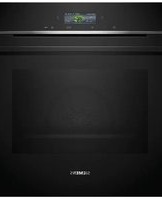
| Control Type | TFT touch display with rotary knob |
| Special Features | Home Connect, EcoClean Direct, cooling fan |
| Cleaning System | Pyrolytic self-cleaning |
| Safety Features | Child lock, automatic shutdown, residual heat indicator |
| Cooling System | Automatically controlled cool front |
| Interior Light | Halogen with dim function |
| Accessories Included | 1x baking tray, 1x wire grill, 1x universal pan |
| Spare Parts Availability | Original spare parts available via Siemens service |
| Warranty | 2 years (manufacturer warranty) |
| Manual Language | English (PDF) |
Frequently Asked Questions - VG753GEA0M SIEMENS
How do I install the Siemens VG753GEA0M oven correctly?
Ensure the oven is placed into a stable built-in cabinet with proper ventilation. The electrical installation must be carried out by a qualified electrician, respecting the voltage requirements (220–240 V) and protecting the circuit with a suitable fuse. Leave a clearance gap for air circulation as per the manual.
How do I use the Home Connect feature on this oven?
Download the Home Connect app, create a Siemens account, and pair the oven via its Wi-Fi module. In the app, you can remotely start or stop heating modes, monitor cooking status, and receive notifications. Ensure your home network is stable and the oven is in standby mode for pairing.
What are the main cooking functions available?
The VG753GEA0M offers 13 functions including 4D Hotair, top/bottom heating, grill, pizza setting, and eco modes. Each function is optimised for specific dishes, ensuring even heat distribution and consistent results.
How do I activate the child lock?
Press and hold the lock button for 3 seconds until the symbol appears on the display. When the child lock is active, all oven functions are disabled. To deactivate, repeat the same procedure.
How do I perform the initial clean before using the oven?
Remove all accessories and packaging. Heat the empty oven to 250 °C using the top/bottom heating function for 1 hour. Then let it cool down and wipe the interior with a soft damp cloth. This removes any residual manufacturing oils.
How does the pyrolytic self-cleaning function work?
Select the PyroClean program, and the oven heats to a very high temperature to turn food residues into ash. Once the cycle finishes and the oven cools, simply wipe the ash with a damp cloth. This process is energy-efficient and eliminates manual scrubbing.
What should I do if the oven does not heat up?
Check the household circuit breaker and ensure the oven is correctly switched on. Verify that the selected time and heating function are properly set. If the problem persists, contact Siemens technical support for a diagnostic check.
How do I clean the oven door glass?
Allow the oven to cool completely. Use a soft sponge with mild detergent and warm water. For stubborn stains, use a glass-ceramic scraper. Avoid abrasive cloths as they can scratch the glass surface.
Can I replace the oven light myself?
Yes, you can replace the halogen interior light by turning off the power to the oven. Remove the lamp cover and swap the bulb (type G9, 25 W) with a new one. Make sure not to touch the new bulb with bare fingers; use a cloth or gloves.
Where can I find spare parts for this Siemens oven?
Original spare parts are available via the Siemens customer service or authorised dealers. You can order online using the model number VG753GEA0M. Common spare parts include heating elements, door hinges, and fans.
User questions about VG753GEA0M SIEMENS
0 question about this device. Answer the ones you know or ask your own.
Ask a new question about this device
No questions yet. Be the first to ask one.
Download the instructions for your Oven in PDF format for free! Find your manual VG753GEA0M - SIEMENS and take your electronic device back in hand. On this page are published all the documents necessary for the use of your device. VG753GEA0M by SIEMENS.
USER MANUAL VG753GEA0M SIEMENS
Manual assistant
Powered by Anthropic
Waiting for your message
Product information
Brand : SIEMENS
Model : VG753GEA0M
Category : Oven