Beecore BL F3 1S - Drone flight controller HappyModel - Free user manual and instructions
Find the device manual for free Beecore BL F3 1S HappyModel in PDF.


| Product type | Flight controller for drone with integrated ESC (4-in-1) |
| Brand | HappyModel |
| Model | Beecore BL F3 |
| Processor | STM32F303CCT6, 72 MHz, 256K Flash |
| Inertial sensor | MPU-6000 (three-axis accelerometer and gyroscope, SPI connection) |
| Target firmware | OMNIBUS (Betaflight) |
| Controller power supply | 1S LiPo/LiHV battery (DC 3.6-4.35V) |
| Integrated BEC | 5V / 0.5A (voltage step-up circuit) |
| ESC power supply | 1S LiPo/LiHV battery |
| ESC current | 5A continuous, 6A peak (3 seconds) |
| Supported ESC protocols | D-shot150/300/600, Oneshot125, Multishot, PWM |
| Compatible receivers | PPM, SBUS, IBUS, Spektrum DSM2/DSMX (1024/2048) |
| Integrated functions | OSD, buzzer interface, LED strip output |
| Dimensions | 29 mm × 29 mm |
| Weight | 3.2 g (board only) |
| Mounting hole spacing | 36 × 36 mm, diameter 3.0 mm |
| Motor connectors | 4 × JST 1.25 mm 3-pin soldered |
| Included cables | PH2.0 power cable, JST1.25, Molex51006 |
| Firmware update | Via Betaflight configurator, DFU mode, STM32 Virtual COM Port driver |
| Safety | Use a compatible 1S battery, respect polarity, do not exceed specified currents |
| Maintenance and cleaning | Clean with a dry cloth, avoid moisture, check connections |
| Spare parts and repairability | Replaceable connectors and cables, BOOT pad for firmware update |
Frequently Asked Questions - Beecore BL F3 1S HappyModel
User questions about Beecore BL F3 1S HappyModel
0 question about this device. Answer the ones you know or ask your own.
Ask a new question about this device
Download the instructions for your Drone flight controller in PDF format for free! Find your manual Beecore BL F3 1S - HappyModel and take your electronic device back in hand. On this page are published all the documents necessary for the use of your device. Beecore BL F3 1S by HappyModel.
USER MANUAL Beecore BL F3 1S HappyModel
Beecore_BL F3 1S controller board Integrated with OSD BEC
Flight controller:
Firmware Target: OMNIBUS
CPU: STM32F303CCT6 (72MHZ, 256K FLASH)
Sensor: MPU-6000 triaxial accelerometer / triaxial gyroscope (SPI connection)
Power supply: 1S Lipo / LIHV battery input (DC 3.6-4.35V)
BEC: Built-in 5V / 0.5A step-up circuit
Compatible Receivers signal: PPM, SBUS, IBUS, Spektrum DSM2 / DSMX, 1024/2048.
Built-in OSD interface, buzzer interface
Dshot ESC ready, Blheli_S pass-through ready
Board size: 29MM * 29MM
Screw hole spacing: 36 * 36MM diameter 3.0MM
Board weight: 3.2 g
4x JST1.25mm 3pin plug soldered
ESC:
Power supply: 1S Lipo/LiHV battery
Current: 5A continuous peak 6A (3 seconds)
Support BLHeliSuite programmable
BLHELI_S Firmware target: O_L_5_REV16_6.HEX
Signal Support: D-shot150, D-shot300, D-shot600, Oneshot125, Multishot, PWM
Package include:
Beecore_BL flight contorller x1
Shock Absorption Dumping Balls x4, Screws x4
PH2.0, JST1.25, Molex51006 power cable x1

Connection diagram:


Note:
- GND and VCC is connected to the 1S lipo battery.
2.VTX suggest to use a 25mw VTX, if you want to use a higher power VTX,
please use a external battery to power for the VTX.
Firmware update:
- Install latest STM32 Virtual COM Port Driver http://www.st.com/web/en/catalog/tools/PF257938
- Install STM BOOTLOAD Driver (STM Device in DFU MODE)
3.Open Betaflight configurator and choose firmware target "OMNIBUS", then select the firmware version
4.There are 2 ways to get in DFU Mode: 1). solder the boot pad and then plug USB to comuper 2). loading betaflight firmware and hit "flash", then it will getting into DFU Mode automatically - Open Zadig tools to replace the drivers from STM32 Bootloader to WINUSB Driver

- Reconnect the flight controller to the computer after replace driver done, and open Betaflight configurator, loading firmware and flash.
Receiver configuration:
1.SBUS Receiver:
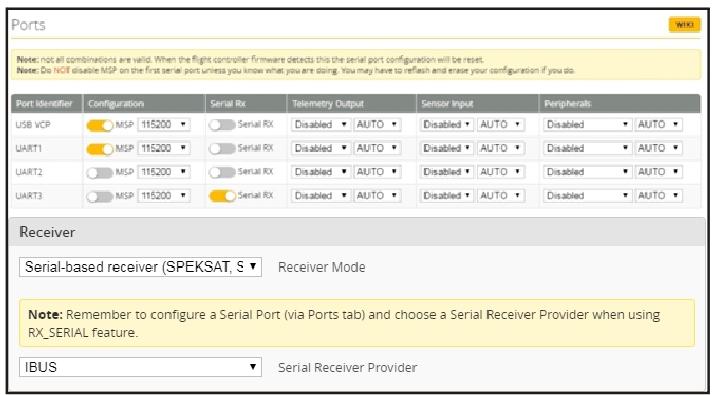
Connect your SBUS receiver to [RCIN +5V GND] port; Enable Serial_RX for UART3 from the Port tab in Betaflight configurator, then select SERIAL-based receiver from the RECEIVER Mode and set the Serial Receiver Provider to be SBUS in Betaflight Configurator.

2.PPM Receiver:
Connect your PPM receiver to [RCIN +5V GND] port and then set the Receiver Mode to RX_PPM from the configuration in Betaflight configurator.

3.DSM2/DSMX Receiver
Connect your DSM2/DSMX receiver to [RCIN +3.3V GND] port, Enable Serial_RX for UART3 from the Port tab in Betaflight configurator, then select SERIAL-based receiver from the RECEIVER Mode and Select SPEKTRUM1024 for DSM2 Radio; Select SPEKTRUM2048 for DSMX Radio in Betaflight Configurator.

4.Flysky IBUS Receiver
Connect your IBUS receiver to [RCIN +5V GND] port, Enable Serial_RX for UART3 from the Port tab in Betaflight configurator, then select SERIAL-based receiver from the RECEIVER Mode and Select IBUS in Betaflight Configurator.
ESC Check and Flash firmware
- Download New release Blhelisuite from:
https://www.mediafire.com/folder/dx6kfaasyo24l/BLHeliSuite
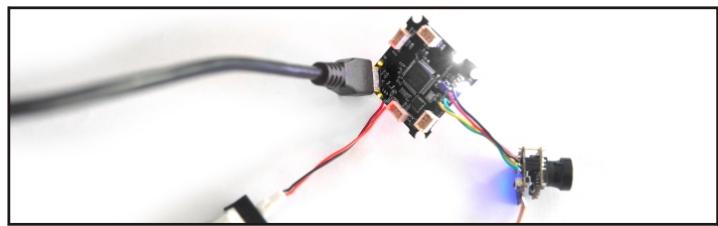
- Connect the BEECORE_BL flight controller to computer and power for it with 1S Lipo battery
3.Open the Device Manager of your computer, find the Ports, please make sure the Com port Serial Number is under 255, otherwise it will can't connect to the BLHELISUITE. You can change the port serial number like the bellowing step :

4.Open the BLHELISUITE, Select SILABS BLHeli Bootloader (Cleanflight) from the third tab on the top side. Then Select the right Serial com port and Click connect. You can also Flash the new release BLHeli_s firmware via the BLHELISUITE, the firmware Target is "O-L-05"

Brand : HappyModel
Model : Beecore BL F3 1S
Category : Drone flight controller