SA Cockpit (egaliseur manuel) - Audio Equalizer System Audio - Free user manual and instructions
Find the device manual for free SA Cockpit (egaliseur manuel) System Audio in PDF.


User questions about SA Cockpit (egaliseur manuel) System Audio
0 question about this device. Answer the ones you know or ask your own.
Ask a new question about this device
Download the instructions for your Audio Equalizer in PDF format for free! Find your manual SA Cockpit (egaliseur manuel) - System Audio and take your electronic device back in hand. On this page are published all the documents necessary for the use of your device. SA Cockpit (egaliseur manuel) by System Audio.
USER MANUAL SA Cockpit (egaliseur manuel) System Audio
What is Manual EQ?
A manual equalizer is a tool in the SA Cockpit app that lets you shape and tailor the sound of your Silverback system.
Instead of simple tone controls, you can adjust specific frequency ranges with high precision - by small or large amounts – to give the sound exactly the character you prefer.
The frequency balance of music has a major impact on the listening experience, and fine-tuning individual aspects can bring out details, reduce muddiness, and create a personal sound.
About room correction: If you adjust in the bass using Manual EQ and run room correction with Room Service afterwards, the room correction will most likely cancel the effect of Manual EQ. Therefore: run room correction first, then make fine adjustments with Manual EQ.
Why digital EQ is an advantage
Digital filters provide precise control, a predictable response, and the ability to use many individual filters - tuning that would be impractical or impossible with analogue technology.
Practical advantages:
- You can make extremely accurate adjustments in specific frequency ranges
- You can audition, save, change, and reset your EQ settings instantly
- The changes act directly in the speaker's DSP, providing full integration in the Silverback system
In short: digital EQ offers flexibility and precision that analogue equipment cannot match.
You need to understand three concepts to use a manual equalizer
Frequency (described in Hz). Also called pitch: low frequencies are the deep tones in music, while high frequencies are the bright tones. In a manual equalizer you can adjust the sound within larger or smaller frequency ranges.
Decibel (described in dB). This refers to sound level. A manual equalizer can increase (boost) the level of one or more frequency ranges or reduce (cut) the level of specific frequency ranges. We use the term “boost” for increasing level, and “cut” for reducing it.
Q (described as a number from 0.01 to 30). Defines the width and steepness of the frequency range you boost or cut. Q is used in a parametric equalizer where you set a center frequency, and Q defines how wide or narrow a range you adjust. A low Q (e.g., 0.3) affects a broad spectrum and is suitable for “gentle adjustments”. A higher Q (e.g., 1) affects a small, precise area and is used almost “surgically”, for example to remove a specific resonance.


Manual EQ is not a requirement — it’s an option
It's important to emphasize that using Manual EQ is not necessary to get great sound. The Silverback system already sounds excellent out of the box.
Manual EQ is an option for you if you find it exciting to:
- refine the sound
• highlight details you love
• tailor the system to your room and your music
• create a unique personal sound signature
You can always return to the default sound - nothing is permanent.
That's what makes Silverback so powerful.
How to do it
Get inspired by the filters on the next pages and try them before creating your own. That way we can help you if you need support. You can test your EQ settings with any music, but we hope you’ll also use our playlists.
EQ settings can be created individually for each speaker. We recommend using identical EQ for speakers that belong together - for example - the left and right speaker in a 2-channel music system. To do this, open Manual EQ and drag the lower speaker to the upper one. This ensures both speakers are adjusted the same way by the EQ.
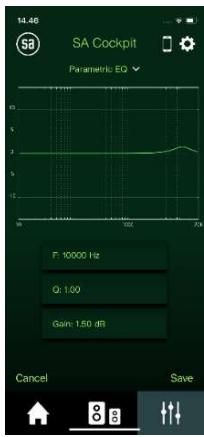
You can create up to 16 filters. Each filter can be adjusted individually while you listen to the system and evaluate its impact on the sound.
Filters can be activated and deactivated while you listen.


Press + to add a filter

Choose one of five filter types:
Parametric EQ – for precise shaping of sound Low shelving – to boost or cut bass
High shelving – to boost or cut treble
12 dB highpass – for an effective cut of bas
6 dB highpass – for a smoother cut of bass

Choose a frequency for the filter. The appen starts at 1000 Hz and by tapping plus or minus you can change the frequency.
Choose dB or -dB, and Q if the filter is parametric and tap 'save',
Filter types in Manual EQ and what they are used for
1. Parametric EQ
This is the most flexible filter.
You can choose frequency, bandwidth (Q), and how much you want to boost or cut (in dB).
Use it for:
- Bringing vocals forward (e.g., 2–3 kHz)
- Reducing bass boom (e.g., 120–150 Hz)
- Adding or removing warmth in the midrange (200–300 Hz)
2. Low-shelf filter
Boost or cut the entire low-frequency range below a point you choose. It works like a bass tone control (often from 120 Hz and below), but in Manual EQ you decide which frequency it starts from.
Use it for:
• More full-bodied, warm bass
• Suppressing bass or room resonances
3. High-shelf filter
Boosts or cuts the high frequencies above the selected frequency. It works like a treble tone control (normally from 8 kHz and above), but here you decide which frequency it starts from.
Use it for:
• More air, clarity, and detail
• Less sharpness or hardness in the top end
4. 12 dB high-pass filter (strong low-cut)
This filter cuts the lowest frequencies aggressively.
Use it for:
- Controlling very deep bass in rooms that “rumble”
- Reducing distortion when playing loud
5. 6 dB high-pass filter (mild low-cut)
A gentler version of the high-pass filter.
Use it for:
- Fine-tuning the bass
- Removing unwanted bass energy without making the sound thin.


6 dB high-pass filter

12 dB high-pass filter
Three simple and useful filters in a parametric EQ
1. Low-cut / High-pass filter (around 30–40 Hz)
A high-pass filter removes very low frequencies that some rooms don't handle well. It can deliver a more precise and cleaner low end - especially in smaller rooms.
Typical use:
- Set a high-pass at 30 Hz (optionally 35–40 Hz).
- Reduces rumble and uncontrolled sub-bass.
2. A narrow "problem filter" around 130–150 Hz
This range often creates boom, muddiness, and dominant bass in many rooms. A small cut here can make bass and kick drum much cleaner.
Typical use:
- Use a parametric EQ at approx. 134 Hz, Q=1.0, -2 dB as a starting point.
- Adjust Q and gain as needed.
3. A broad midrange filter (200–300 Hz)
This is where the “warmth” and body of the sound lives.
Too much = muddy and unclear sound
Too little = thin and cold sound
A broad cut here can provide a cleaner and more balanced sound.
Typical use:
• A filter around 225 Hz, Q=0.3, -2 dB.
- Fine-tune to taste.
Here are three filters that are specifically aimed at improving speech intelligibility, adding more air to the sound, and creating kick bass.
4. For better speech intelligibility (clearer voices)
Parametric EQ filter:
• Frequency: 2.0–3.5 kHz
- Type: Peak
• Gain: +1 to +3 dB
• Q: 1.0–1.4
Why this works:
The most important range for speech clarity is roughly 2–4 kHz. This is where consonants (s, t, k, f) live - making words easier to understand.
A small boost here brings voices forward in the soundstage without necessarily making them sound bright.
Listen for:
• Whether vocals become more distinct
• Whether dialogue in movies is easier to understand
- Whether the sound becomes more “focused”


5. For more "air" and openness at the top
EQ filter:
• Frequency: 8–12 kHz
• Type: Shelf (high-shelf)
• Gain: +1 to +2 dB
• Q: 0.7–1.0
Why this works:
The top treble region adds shimmer, air, and spaciousness. A gentle lift provides more “air” without making the sound harsh.
Listen for:
• Cymbals and reverb tails become more detailed
• The soundstage feels wider and more free
• Vocals have more air around them
6. Create "kick bass" (punch in the bass)
Parametric EQ filter:
• Frequency: 55–70 Hz
- Type: Peak
• Gain: +2 to +3 dB (depending on room and sound level)
• Q: 1.0–1.4
Why this works:
Kick drum and the physical “punch” in, for example, electronic music typically sits around 60 Hz.
A moderate boost here gives noticeably more energy- and shouldn't make the bass boomy the way a boost at 100–150 Hz.
Listen for:
• Whether kick drum feels tight and controlled
- Whether it hits physically, but doesn’t become boomy
• Whether rhythms get more energy and drive

Audiophile playlist for EQ listening Link to playlist in Spotify Link to playlist in Tidal
1. Dire Straits – “Your Latest Trick” (1985)
Good for: Low-shelf filter testing (bass richness)
Listen for:
- The rounded bass and warm sax
- Whether the low end becomes too heavy or too light when using +/- low-shelf filter
– A great recording for judging overall sound balance
2. Peter Gabriel – “Red Rain” (1986)
Good for: 12 dB high-pass and 6 dB high-pass
Listen for:
- The deep, dark bass in the intro
- How room rumble may disappear with a low-cut
- Whether drums become tighter with 6 dB vs. 12 dB low cut
3. Talk Talk – “I Believe in You” (1988)
Good for: High-shelf (air, details)
Listen for:
- Overtones in the vocal
- The very open studio ambience
– A high-shelf filter can create a larger sense of space and presence
4. Enya – “Orinoco Flow” (1988)
Good for: High-shelf and 2–3 kHz speech clarity
Listen for:
– Clear, layered vocals
- How small details at the top open the track
– A lift at 2–3 kHz gives clearer vocal focus
5. Tears for Fears – “Woman in Chains” (1989)
Good for: Midrange warmth (200–300 Hz)
Listen for:
– Vocal fullness and the body of the drums
– A small cut in the mids can open the sound dramatically
– Great for hearing the difference between “dense” vs. “airy”
6. Suzanne Vega – “Tired of Sleeping” (1990)
Good for: Speech intelligibility (2–3.5 kHz)
Listen for:
– Vega’s dry, precise vocal
- Consonants and articulation stand out with a small +2 dB speech filter
- Perfect for vocal clarity
7. Sade – “No Ordinary Love” (1992)
Good for: Low-shelf & boom control (130–150 Hz)
Listen for:
- The deep, flowing bass line
– A small cut at 130-150 Hz can remove boom in many rooms - While keeping the warmth of the song
8. Michael Jackson – “Stranger in Moscow” (1995)
Good for: High-shelf + air and spaciousness
Listen for:
– High-frequency ambience details
– Swishes in percussion and small effects
– High-shelf can make the soundstage noticeably more open
9. Massive Attack – “Protection” (1994)
Good for: Kick bass (55–70 Hz)
Listen for:
- The deep, tight beat
- A lift around 60 Hz adds punch
- Too much boost makes the bass smear and lose focus
10. Mark Knopfler – “Rüdiger” (1996)
Good for: Overall tonality / full-system balance
Listen for:
- The balance between guitar, vocal, and bass
– High-pass, low-shelf, and midrange warmth are easy to hear here - Perfect as a final track after adjustments
Modern playlist for EQ listening
- Bonobo – “Linked”
Good for: Low-shelf (bass fullness)
Listen for:
- Deep synth pads and sub layers in the intro
- How boosting the low end makes the track warmer and fuller
-
Whether reducing bass adds more definition
-
Caribou – “Never Come Back”
Good for: Low-shelf + kick bass
Listen for:
- The interplay between drums and bassline
– A lift around 60–70 Hz gives more “punch” in the kick drum -
Reducing bass removes boom in smaller rooms
-
Jon Hopkins – “Luminous Beings”
Good for: High-shelf (air + detail)
Listen for:
- Sparkling high-frequency textures
- Space, air, and ambience with +1–2 dB high-shelf
-
The sense of openness when the top end is lifted
-
Four Tet – “Parallel 7”
Good for: 12 dB high-pass
Listen for:
- How clearly a low-cut cleans up the bottom end
-
How the midrange is freed up when sub-bass is removed
– A good test for room resonances in small rooms -
Maribou State – “Glasshouses”
Good for: Testing a 6 dB high-passfilter (gentle cleanup)
Listen for:
- Whether the deep layers become more precise
– the soundstage opens up without becoming thin -
Track works well for fine-tuning
-
Kári Bremnes – “Det er min sønn” (Gjørval remix)
Good for: Speech intelligibility (2–3 kHz) parametric filter
Listen for:
- The transparency of the voice within the electronic soundscape
-
Consonants (s, t, k) become clearer with +1–2 dB
– Great for hearing the balance of precision vs. hardness -
Tycho – “Awake”
Good for: Air + high-shelf filter
Listen for:
– Wide synth textures and crisp cymbals
– High-shelf filters lifts the space and makes the track feel larger
- Listen for changes in atmosphere
- Nils Frahm – “Ambre”
Good for: Airiness
Listen for:
- Overtones, room, and pedal noises become airier
-
More top-end air makes the recording feel more open
-
Stephan Bodzin – “Strand”
Good for: Midrange warmth (200–300 Hz)
Listen for:
-
Whether the synth lead sounds warm or too thick
– A broad cut makes the track feel more open
– A great way to calibrate your sense of tonal balance -
Jamie xx – “Idontknow”
Good for: Overall EQ control (all filters)
Listen for:
- Energy in the kick
- Space at the top
- Precision in the mids
– A perfect final track to judge whether your EQ choices are right


- WHAT IS MANUAL EQ
- WHY DIGITAL EQ IS AN ADVANTAGE
- PRACTICAL ADVANTAGES
- YOU NEED TO UNDERSTAND THREE CONCEPTS TO USE A MANUAL EQUALIZER
- MANUAL EQ IS NOT A REQUIREMENT — IT’S AN OPTION
- HOW TO DO IT
- FILTER TYPES IN MANUAL EQ AND WHAT THEY ARE USED FOR
- PARAMETRIC EQ
- USE IT FOR
- LOW-SHELF FILTER
- HIGH-SHELF FILTER
- DB HIGH-PASS FILTER (STRONG LOW-CUT)
- DB HIGH-PASS FILTER (MILD LOW-CUT)
- THREE SIMPLE AND USEFUL FILTERS IN A PARAMETRIC EQ
- LOW-CUT / HIGH-PASS FILTER (AROUND 30–40 HZ)
- A NARROW "PROBLEM FILTER" AROUND 130–150 HZ
- A BROAD MIDRANGE FILTER (200–300 HZ)
- FOR BETTER SPEECH INTELLIGIBILITY (CLEARER VOICES)
- PARAMETRIC EQ FILTER
- WHY THIS WORKS
- LISTEN FOR
- FOR MORE "AIR" AND OPENNESS AT THE TOP
- EQ FILTER
- CREATE "KICK BASS" (PUNCH IN THE BASS)
- AUDIOPHILE PLAYLIST FOR EQ LISTENING LINK TO PLAYLIST IN SPOTIFY LINK TO PLAYLIST IN TIDAL
- DIRE STRAITS – “YOUR LATEST TRICK” (1985)
- PETER GABRIEL – “RED RAIN” (1986)
- TALK TALK – “I BELIEVE IN YOU” (1988)
- ENYA – “ORINOCO FLOW” (1988)
- TEARS FOR FEARS – “WOMAN IN CHAINS” (1989)
- SUZANNE VEGA – “TIRED OF SLEEPING” (1990)
- SADE – “NO ORDINARY LOVE” (1992)
- MICHAEL JACKSON – “STRANGER IN MOSCOW” (1995)
- MASSIVE ATTACK – “PROTECTION” (1994)
- MARK KNOPFLER – “RÜDIGER” (1996)
- MODERN PLAYLIST FOR EQ LISTENING
Brand : System Audio
Model : SA Cockpit (egaliseur manuel)
Category : Audio Equalizer