OVATIONF415FC-2 - Light projector Chauvet Professional - Free user manual and instructions
Find the device manual for free OVATIONF415FC-2 Chauvet Professional in PDF.
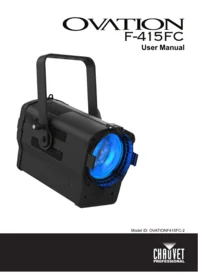


| Product Type | RGBAL Fresnel-style LED light projector |
| Brand / Model | Chauvet Professional Ovation F-415FC (OVATIONF415FC-2) |
| LED Source | Red x10, Green x10, Blue x6, Amber x8, Lime x12; 3-5 W per LED, 1 A |
| LED Lifespan | 40,000 to 50,000 hours average |
| Beam Angle | 14° to 43° |
| Field Angle | 27° to 68° |
| Zoom Range | Motorized zoom, 14° to 68° |
| Color Temperature Presets | 2800 K to 6500 K |
| Virtual Color Wheel | More than 30 premixed gel-matched colors |
| DMX Control | Personalities: 1, 3, 5, 7, 11, 13, 14, 18 channels and HSV |
| Dimming | 16-bit dimmer on master and individual colors |
| Strobe | Variable strobe, slow to fast |
| Control Features | RDM, adjustable PWM, motorized zoom, on-board color and zoom controls, virtually silent operation |
| Power Supply | Auto-ranging 100-240 VAC, 50/60 Hz |
| Power Consumption | 126-132 W depending on line voltage |
| Dimensions (L x W x H) | 15.80 x 11.22 x 9.51 in (401.46 x 285 x 241.65 mm) |
| Weight | 12 lb (5.6 kg) |
| Mounting | Omega/adjustable bracket with safety cable attachment |
| Included Accessories | Seetronic powerkon IP65 power cable, gel frame, Quick Reference Guide |
| Maintenance / Cleaning | Clean at least twice monthly; use mild soap, ammonia-free glass cleaner or isopropyl alcohol |
| Safety | Max ambient temperature 113 °F (45 °C); disconnect from power before cleaning or fuse replacement |
| Fuse | T 3.15 A, 250 V |
| Repairability / Spare Parts | Light source replacement by manufacturer or service agent; no user-serviceable parts |
| Certifications | UL 1573, CSA C22.2 No. 166, RoHS, FCC Part 15 Class B |
Frequently Asked Questions - OVATIONF415FC-2 Chauvet Professional
User questions about OVATIONF415FC-2 Chauvet Professional
0 question about this device. Answer the ones you know or ask your own.
Ask a new question about this device
Download the instructions for your Light projector in PDF format for free! Find your manual OVATIONF415FC-2 - Chauvet Professional and take your electronic device back in hand. On this page are published all the documents necessary for the use of your device. OVATIONF415FC-2 by Chauvet Professional.
USER MANUAL OVATIONF415FC-2 Chauvet Professional
OVATION
F-415FC
User Manual

Model ID: OVATIONF415FC-2
Edition Notes
The Ovation F-415FC User Manual includes a description, safety precautions, installation, programming, operation and maintenance instructions for the Ovation F-415FC.
Trademarks
Chauvet, Chauvet Professional, the Chauvet logo, and Ovation are registered trademarks or trademarks of Chauvet & Sons, LLC (d/b/a Chauvet and Chauvet Lighting) in the United States and other countries. Other company and product names and logos referred to herein may be trademarks of their respective companies.
Copyright Notice
The works of authorship contained in this manual, including, but not limited to, all designs, text, and images are owned by Chauvet.
© Copyright 2024 Chauvet & Sons, LLC. All rights reserved.
Electronically published by Chauvet in the United States of America.
Manual Use
Chauvet authorizes its customers to download and print this manual for professional information purposes only. Chauvet expressly prohibits the usage, copy, storage, distribution, modification, or printing of this manual or its content for any other purpose without written consent from Chauvet.
Document Printing
For best results, print this document in color, on letter size paper (8.5 x 11 in), double-sided. If using A4 paper (210 x 297 mm), configure the printer to scale the content accordingly.
Intended Audience
Any person installing, operating, and/or maintaining this product should completely read through the guide that shipped with the product, as well as this manual, before installing, operating, or maintaining this product.
Disclaimer
Chauvet believes that the information contained in this manual is accurate in all respects. However, Chauvet assumes no responsibility and specifically disclaims any and all liability to any party for any loss, damage or disruption caused by any errors or omissions in this document, whether such errors or omissions result from negligence, accident or any other cause. Chauvet reserves the right to revise the content of this document without any obligation to notify any person or company of such revision, however, Chauvet has no obligation to make, and does not commit to make, any such revisions.
Document Revision
Go to www.chauvetprofessional.com for the latest version.
| Revision | Date | Description |
| 8 | 07/2024 | Updated “What’s Included” section and updated drawings |
TABLE OF CONTENTS
1. Before You Begin .... 1
What Is Included 1
Claims 1
Manual Conventions 1
Symbols 1
Safety Notes.... 2
FCC Statement of Compliance 3
Expected LED Lifespan.... 3
2. Introduction ...... 4
Description 4
Features 4
Product Overview 5
Product Dimensions 6
3. Setup 7
AC Power 7
AC Plug 7
Power Linking.... 7
Fuse Replacement 7
DMX Linking.... 7
DMX Personalities....7
Remote Device Management.... 7
Master/Slave Connectivity.... 8
Mounting 8
Orientation....8
Rigging 8
Procedure 8
4. Operation 9
Control Panel Operation.... 9
Control Options 9
Programming...... 9
Menu Map 10
DMX Configuration.... 13
DMX Personalities.... 13
Starting Address.... 13
Virtual Color Wheel 14
Virtual Color Wheel Chart 14
Color Temperature Chart 15
DMX Channel Assignments and Values 15
18Ch / 14Ch / 13Ch / 11Ch / 7Ch / 5Ch / 3Ch.... 15
1Ch.... 16
HSV 16
Standalone Configuration.... 17
Static Mode 17
Auto Programs 17
Zoom 17
Master/Slave 17
Dimmer Curve 17
Dimmer Profiles.... 18
White Balance 18
LED Frequency 18
Fan Mode 18
Back Light 18
System Information 18
Zoom Reset.... 18
Factory Reset 18
- Technical Information.... 19
Product Maintenance 19
- Technical Specifications 20
Contact Us 21
Warranty & Returns...... 21
1. Before You Begin
What Is Included
- Ovation F-415FC
• Seetronic powerkon IP65 power cable
• Gel frame (6.25 in/ 158.75 mm accessories)
• Quick Reference Guide
Claims
Carefully unpack the product immediately and check the container to make sure all the parts are in the package and are in good condition.
If the box or the contents (the product and included accessories) appear damaged from shipping, or show signs of mishandling, notify the carrier immediately, not Chauvet. Failure to report damage to the carrier immediately may invalidate a claim. In addition, keep the box and contents for inspection.
For other issues, such as missing components or parts, damage not related to shipping, or concealed damage, file a claim with Chauvet within 7 days of delivery.
Manual Conventions
| Convention | Meaning |
| 1-512 | A range of values |
| 50/60 | A set of values of which only one can be chosen |
| A button on the product's control panel | |
| Settings | A product function or a menu option |
Symbols
| Symbol | Meaning |
 | Electrical warning. Not following these instructions may cause electrical damage to the product, accessories, or the user. |
 | Critical installation, configuration, or operation information. Not following these instructions may make the product not work, cause damage to the product, or cause harm to the operator. |
 | Important installation or configuration information. The product may not function correctly if this information is not used. |
 | Useful information. |

The term “DMX” used throughout this manual refers to the USITT DMX512-A digital data transmission protocol.
Connection of the control signal: DMX line
• The product has XLR sockets for DMX input and output.
- Notice: This control circuit is isolated and belongs to the Class 2 data port.
The control circuit has a cumulative leakage current of less than 3.5 mA.
Safety Notes
Read all the following safety notes before working with this product. These notes contain important information about the installation, usage, and maintenance of this product.

This product contains no user-serviceable parts. Any reference to servicing in this User Manual will only apply to properly trained, certified technicians. Do not open the housing or attempt any repairs.

All applicable local codes and regulations apply to proper installation of this product.
• The luminaire is intended for professional use only.
- If the external flexible cable or cord of this luminaire is damaged, it shall be replaced by a special cord or cord exclusively available from the manufacturer or its service agent.
- The light source contained in this luminaire shall only be replaced by the manufacturer or its service agent or a similar qualified person.
- CAUTION:
- This product's housing may be hot when operating. Mount this product in a location with adequate ventilation, at least 20 in (50 cm) from adjacent surfaces.
- When transferring the product from extreme temperature environments, (e.g., cold truck to warm humid ballroom) condensation may form on the internal electronics of the product. To avoid causing a failure, allow the product to fully acclimate to the surrounding environment before connecting it to power.
- Flashing light is known to trigger epileptic seizures. User must comply with local laws regarding notification of strobe use.
• ALWAYS:
- Disconnect from power before cleaning the product or replacing the fuse.
- Replace the fuse with the same type and rating.
• Use a safety cable when mounting this product overhead. - Connect this product to a grounded and protected circuit.
• DO NOT:
- Open this product. It contains no user-serviceable parts.
- Look at the light source when the product is on.
- Leave any flammable material within 1.64 ft (50 cm) of this product while operating or connected to power.
- Connect this product to a dimmer or rheostat.
- Operate this product if the housing, lenses, or cables appear damaged.
- Operate this product outdoors or in any location where dust, excessive heat, water, or humidity may affect it (adhere to standards for the published IP rating).
• ONLY use the hanging/mounting bracket to carry this product.
- The maximum ambient temperature is 113 °F (45 °C). Do not operate this product at higher temperatures.
• The minimum startup temperature is -4° F ( -20° C). Do not start the product at lower temperatures.
• The minimum ambient temperature is -22°F ( -30°C ). Do not operate the product at lower temperatures.
- To eliminate unnecessary wear and improve its lifespan, during periods of non-use completely disconnect the product from power via breaker or by unplugging it.
• In the event of a serious operating problem, stop using immediately.

If a Chauvet product requires service, contact Chauvet Technical Support.
FCC Statement of Compliance
This device complies with Part 15 Part B of the FCC rules. Operation is subject to the following two conditions:
- This device may not cause harmful interference, and
- This device must accept any interference received, including interference that may cause undesired operation.
This equipment has been tested and found to comply with the limits for a Class B digital device, pursuant to Part 15 of the FCC Rules. These limits are designed to provide reasonable protection against harmful interference in a residential installation. This equipment generates uses and can radiate radio frequency energy and, if not installed and used in accordance with the instructions, may cause harmful interference to radio communications. However, there is no guarantee that interference will not occur in a particular installation. If this equipment does cause harmful interference to radio or television reception, which can be determined by turning the equipment off and on, the user is encouraged to try to correct the interference by one or more of the following measures:
• Reorient or relocate the receiving antenna.
- Increase the separation between the equipment and receiver.
- Connect the equipment into an outlet on a circuit different from that to which the receiver is connected.
- Consult the dealer or an experienced radio/TV technician for help.
- Any changes or modifications not expressly approved by the party responsible for compliance could void the user's authority to operate the equipment.
Expected LED Lifespan
Over time, use and heat will gradually reduce LED brightness. Clustered LEDs produce more heat than single LEDs, contributing to shorter lifespans if always used at full intensity. The average LED lifespan is 40,000 to 50,000 hours. To extend LED lifespan, maintain proper ventilation around the product, and limit the overall intensity.
2. Introduction
Description
The Ovation F-415FC is a RGBAL Fresnel-style LED system. It projects a bright, beautifully soft field of light, from subtle pastels to punchy saturates, and nearly any temperature of white. A motorized zoom with a 27° to 68° field of angle allows users to add light where it is needed. Control of the virtual color wheel, zoom, and output can be via DMX or on-board dials. It is also RDM-enabled to ease installation and offers adjustable PWM for flicker-free user on camera.
Features
- Operating modes:
• 1-channel: dimmer
• 3-channel: dimmer, virtual color wheel, color temperature
• 5-channel: RGBAL control
• 7-channel: dimmer, RGBAL control, strobe
• 11-channel: 16-bit dimmer, RGBAL control, strobe, virtual color wheel, color temperature, zoom
• 13-channel: 16-bit dimmer, RGBAL control, strobe
- 14-channel: dimmer, RGBAL control, strobe, virtual color wheel, color temperature, auto programs, auto speed, control, zoom, motor reset
- 18-channel: 16-bit dimmer, 16-bit RGBAL, strobe, virtual color wheel, color temperature, zoom, motor reset, control
• HSV: hue, saturation, value
• Full-color LED (RGBAL) Fresnel-style lighting fixture for theater, film, and production
- Soft and even field of light
- Smooth, motorized zoom range from 14° to 68°
- Beautiful 16-bit dimming of master dimmer and individual colors
- Easy-to-use on-board control of color, zoom, and dimming
• Virtual color wheel with color matched to popular gel colors
• Color temperature presets from 2800 K to 6500 K
• RDM (remote device management) for added flexibility
- Adjustable PWM (pulse width modulation) to avoid flickering on camera
• Virtually silent operation for use in studio and theater applications
Product Overview
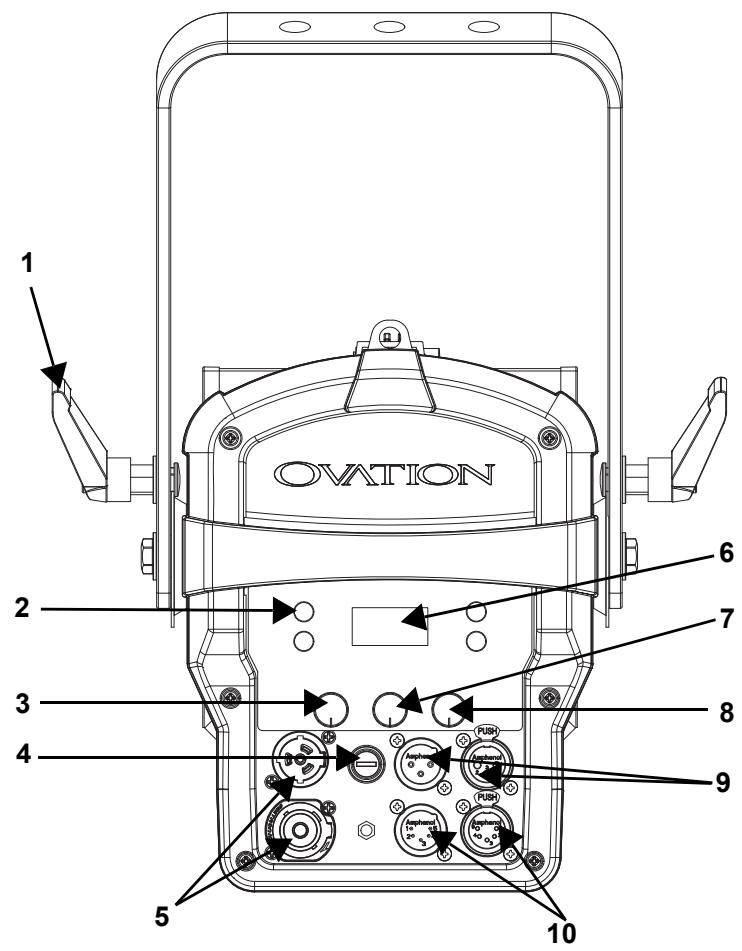
| # | Name | # | Name |
| 1 | Tilt adjustment knob | 6 | Display |
| 2 | Menu buttons | 7 | Dimmer |
| 3 | Color Temperature | 8 | Zoom |
| 4 | Fuse holder | 9 | 3-pin DMX in/out |
| 5 | Seetronic powerkon in/out | 10 | 5-pin DMX in/out |
Product Dimensions


3. Setup
AC Power
The Ovation F-415FC has an auto-ranging power supply and can work with an input voltage range of 100 to 240 VAC, 50/60 Hz.
To determine the product's power requirements (circuit breaker, power outlet, and wiring), use the current value listed on the label affixed to the product's back panel, or refer to the product's specifications chart. The listed current rating indicates the product's average current draw under normal conditions.

- Always connect the product to a protected circuit (a circuit breaker or fuse). Make sure the product has an appropriate electrical ground to avoid the risk of electrocution or fire.
- To eliminate unnecessary wear and improve its lifespan, during periods of non-use completely disconnect the product from power via breaker or by unplugging it.

Never connect the product to a rheostat (variable resistor) or dimmer circuit, even if the rheostat or dimmer channel serves only as a 0 to 100% switch.
AC Plug
The Ovation F-415FC comes with a power input cord terminated with a Seetronic Powerkon IP65 connector on one end and an Edison plug on the other end (U.S. market). If the power input cord that came with the product has no plug, or if the plug needs to be changed, use the table below to wire the new plug.
| Connection | Wire (U.S.) | Wire (Europe) | Screw Color |
| AC Live | Black | Brown | Yellow or Brass |
| AC Neutral | White | Blue | Silver |
| AC Ground | Green/Yellow | Green/Yellow | Green |
Power Linking
It is possible to power link Ovation F-415FC products. See the table below for the current draw at each voltage and frequency:
| 100 V, 60 Hz | 120 V, 60 Hz | 208 V, 60 Hz | 230 V, 50 Hz | 240 V, 60 Hz | |
| Current Draw | 1.351 A | 1.101 A | 0.638 A | 0.585 A | 0.569 A |
Never exceed 12A on a single circuit. Power-linking cables can be purchased separately.
Fuse Replacement
- Disconnect this product from the power outlet.
- Using a Phillips #2 head screwdriver, unscrew the fuse holder cap from the housing.
- Remove the blown fuse and replace with another fuse of the same type and rating (T 3.15 A, 250 V).
- Screw the fuse holder cap back in place and reconnect power.
DMX Linking
The Ovation F-415FC can be linked to a DMX controller using a 3- and 5-pin DMX connection. If using other DMX-compatible products with this product, it is possible to control each individually with a single DMX controller.
DMX Personalities
The Ovation F-415FC uses a 3- and 5-pin DMX data connection for the HSV, 1Ch, 3Ch, 5Ch, 7Ch, 11Ch, 13Ch, 14Ch, and 18Ch DMX personalities.
- Refer to the Operation chapter to learn how to configure the Ovation F-415FC to work in these personalities.
- The DMX Channel Assignments and Values section provides detailed information regarding the DMX personalities.
Remote Device Management
Remote Device Management, or RDM, is a standard for allowing DMX-enabled devices to communicate bi-directionally along existing DMX cabling. Check the DMX controller's User Manual or with the manufacturer as not all DMX controllers have this capability. The Ovation F-415FC supports RDM protocol that allows feedback to make changes to menu map options.
Master/Slave Connectivity
The Master/Slave mode allows an Ovation F-415FC (the master) to control one or more Ovation F-415FC products (the slaves) without a DMX controller. One Ovation F-415FC becomes the master when running an auto or custom program or in Static mode.
Each slave's control panel must be configured to operate in Slave mode. During Master/Slave operation, the slaves will operate in unison with the master.

DO NOT connect a DMX controller to products operating in Master/Slave mode. The DMX controller signals may interfere with the signals from the master.

- The Operation section of this manual provides detailed instructions on how to configure the master and slaves.
- For more information about DMX standards or the DMX cables needed to link this product to a DMX controller, download the DMX primer from the Chauvet website: www.chauvetprofessional.com.
Mounting
Before mounting the product, read and follow the safety recommendations indicated in the Safety Notes.
Orientation
Always mount this product in a safe position, ensuring that there is adequate room for ventilation, configuration, and maintenance.
Rigging
Chauvet recommends using the following general guidelines when mounting this product:
- Before deciding on a location for the product, make sure there is easy access to the product for maintenance and programming purposes.
- Make sure that the structure and attachment points can support the weight before hanging the product (see the Technical Specifications for weight information).
- When mounting the product overhead, always use a safety cable. Mount the product securely to a rigging point, whether an elevated platform or a truss.
- When rigging the product onto a truss, use a mounting clamp of appropriate weight capacity.
Procedure
The Ovation F-415FC comes with an Omega/adjustable bracket. The user can directly attach a mounting clamp (sold separately) to this Omega bracket. Make sure the clamp is capable of supporting the weight of this product. For the Chauvet Professional line of mounting clamps, go to http://www.trusst.com/products.
Mounting Diagram

4. Operation
Control Panel Operation
| Button/Knob | Function |
| Exits from the current menu or function | |
| Enables the currently displayed menu or sets the currently selected value in to the current function | |
| Navigates upward through the menu list or increases the numeric value when in a function | |
| Navigates downward through the menu list or decreases the numeric value when in a function | |
| Push twice, then turn to select the color temperature | |
| Push twice, then turn to increase or decrease the dimmer | |
| Push twice, then turn to increase or decrease the zoom |
Control Options
Set the Ovation F-415FC starting address in the 001-512 DMX range. This enables control of up to 24 products in the 18-channel personality.
Programming
Refer to the menu map to understand the menu options. The menu map shows the main level and a variable number of programming levels for each option.
- To go to the desired main level, press
- To select an option or value within the current programming level, press
or until the option shows on the display. Press to select. This will show either the first option if there is another programming level, or the selected value. - Press
Menu Map
Refer to the Ovation F-415FC product page on www.chauvetprofessional.com for the latest menu map.
| Main Level | Programming Levels | Description | ||
| DMX Address | 001-512* | Selects DMX address (*highest channel restricted to personality chosen) | ||
| DMX Channel | 1Ch | 1-channel: dimmer | ||
| 3Ch | 3-channel: dimmer, virtual color wheel, color temperature | |||
| 5Ch | 5-channel: RGBAL | |||
| 7Ch | 7-channel: dimmer, RGBAL, strobe | |||
| 11Ch | 11-channel: 16-bit dimmer, RGBAL, virtual color wheel, color temperature, strobe, zoom | |||
| 13Ch | 13-channel: 16-bit dimmer, 16-bit RGBAL, strobe | |||
| 14Ch | 14-channel: dimmer, RGBAL, strobe, virtual color wheel, color temperature, auto show, auto speed, control, zoom, motor reset | |||
| 18Ch | 18-channel: 16-bit RGBAL and dimmer, strobe, virtual color wheel, color temperature, zoom, motor reset, control | |||
| HSV | 3-channel: hue, saturation, value | |||
| Virtual Color Wheel | Virtual Color Wheel | C3050 - Md Yellow | Dimmer 0-255 | Virtual Color Wheel simulates the output of each gel color. Refer to the Virtual Color Wheel Chart for specific values. |
| C3040 - Lt Yellow | ||||
| C3240 - Amb Yellow | ||||
| C2340 - VLt Amber | ||||
| C2040 - Lt Amber | ||||
| C2050 - Md Amber | ||||
| C2060 - Dk Amber | ||||
| C1050 - Lt Red | ||||
| C1080 - Md Red | ||||
| C1020 - NC Pink | ||||
| C1030 - Md Pink | ||||
| C1630 - Dk Pink | ||||
| C1250 - Md Red Amber | ||||
| C1060 - Dk Red Amber | ||||
| C1650 - Magenta | ||||
| C6170 - Dk Magenta | ||||
| C6020 - Lt Lavender | ||||
| C5030 - Lt Blue | ||||
| C5020 - VLt Blue | ||||
| C5430 - Lt Blue 2 | ||||
| C5070 - Blue | ||||
| C5050 - Md Blue | ||||
| C5060 - Dk Blue | ||||
| C5690 - Indigo | ||||
| C5080 - VDk Blue | ||||
| C5081 - VDk Blue 2 | ||||
| C4370 - Yel Green | ||||
| Virtual Color Wheel (cont.) | Virtual Color Wheel (cont.) | C4070 - Green | Dimmer 0-255 | Virtual Color Wheel simulates the output of each gel color. Refer to the Virtual Color Wheel Chart for specific values. |
| C4550 - Turquoise | ||||
| C4560 - Aqua | ||||
| C4570 - Blue Green | ||||
| Color Temperature | 2800K | Dimmer 0-255 | Preset white color temperatures. Emulates a tungsten lamp at the specified color temperature. Refer to the Color Temperature Chart for specific values. | |
| 3000K | ||||
| 3200K | ||||
| 3500K | ||||
| 4000K | ||||
| 4500K | ||||
| 5000K | ||||
| 5600K | ||||
| 6000K | ||||
| 6500K | ||||
| Manual Color Mixer | Red | 0-255 | Combines red, green, blue, amber, and lime to make a custom color (0-100%) | |
| Green | ||||
| Blue | ||||
| Amber | ||||
| Lime | ||||
| Color X-Fade Speed | Off | Turns off the fade transition between colors | ||
| X-Fade Speed 1 | Creates fade transition between colors when using colors in the Virtual Color Wheel or Color Temperature chart, from fast (X-Fade Speed 1) to slow (X-Fade Speed 4) | |||
| X-Fade Speed 2 | ||||
| X-Fade Speed 3 | ||||
| X-Fade Speed 4 | ||||
| Auto Show | Auto 1-5 | 1-100 | Selects automatic programs and auto program speed | |
| Zoom | 0-255 | Controls zoom | ||
| Red Shift | On | Mimics halogen lamp dimming | ||
| Off | ||||
| Master/ Slave | Master | Receives DMX signal from the DMX controller (master) | ||
| Slave | Receives DMX signal from the master unit | |||
| Dimmer Curve | S-Curve | Sets the dimmer curve | ||
| Linear | ||||
| Square | ||||
| Inverse Square | ||||
| Dimmer Mode | Off | Linear dimmer | ||
| Dimmer 1-3 | Dimming curves, from fast (Dimmer 1) to slow (Dimmer 3) | |||
| White Balance | Off | Uses factory default white setting | ||
| Manual | Red | 125-255 | Sets red LED maximum value | |
| Green | Sets green LED maximum value | |||
| Blue | Sets blue LED maximum value | |||
| Amber | Sets amber LED maximum value | |||
| Lime | Sets lime LED maximum value | |||
| Main Level | Programming Levels | Description | |
| LED Frequency | 600Hz | Sets the PWM output frequency | |
| 1200Hz | |||
| 2000Hz | |||
| 4000Hz | |||
| 6000Hz | |||
| 25KHz | |||
| Fan Mode | Auto | Sets the fan to auto mode | |
| On | Sets the fan to always on | ||
| Off | Sets the fan to always off | ||
| Silent | Sets the fan to silent | ||
| Back Light | 10S | Turns off display backlight after 10 seconds of inactivity | |
| 30S | Turns off display backlight after 30 seconds of inactivity | ||
| 2Min | Turns off display backlight after 2 minutes of inactivity | ||
| Always On | Display backlight always on | ||
| Information | Fixture Hours | ____H | Shows total hours the product has been powered on |
| LED Hours | ____H | Shows total LED hours | |
| Version | V._. | Shows current firmware version | |
| UID | _____ | Shows product UID | |
| Reset Zoom w/ Power | No | Keeps zoom in last position when powered on | |
| Yes | Resets the zoom to home position when powered on | ||
| Factory Reset | No | Resets the product to factory default settings | |
| Yes | |||

WARNING: When operating in Fan Mode: Off, the fixture will become hotter to the touch than when using other fan modes. Use proper protective equipment to prevent burns. Keep a safe distance from flammable objects.

When operating in Fan Mode: Off, output of the fixture will be reduced and will not reach the same levels as when using other fan modes.
DMX Configuration
Use DMX configurations to operate the product with a DMX controller.
DMX Personalities
To set the DMX personality:
- Go to the DMX Channel main level.
- Select the desired personality, from 1Ch, 3Ch, 5Ch, 7Ch, 11Ch, 13Ch, 14Ch, 18Ch, and HSV.

• See the Starting Address section for the highest starting address suggested for each personality.
- Make sure that the starting addresses on the various products do not overlap due to the new personality setting.
Starting Address
Each product will respond to a unique starting address from the controller. All products with the same starting address will respond in unison. To set the starting address in DMX mode:
- Go to the DMX Address main level.
- Set the starting address (001–512).
The highest recommended starting address for each DMX mode is as follows:
| DMX Personality | DMX Address |
| 1Ch | 512 |
| 3Ch | 510 |
| 5Ch | 509 |
| 7Ch | 506 |
| 11Ch | 502 |
| 13Ch | 500 |
| 14Ch | 499 |
| 18Ch | 495 |
Virtual Color Wheel
The Ovation F-415FC includes a feature called the Virtual Color Wheel (VCW). This feature is available as a standalone control mode for manual use and as a control channel in select DMX personalities. More than 30 premixed colors, custom blended by Chauvet engineers, are available to call up for easier programming.
The DMX values used to mix these colors are provided below. The overall intensity of the Ovation fixture can be adjusted to more closely replicate familiar industry-standard colors. A chart is available at www.chauvetprofessional.com to compare Chauvet's premixed colors with popular gel colors. This chart is for comparison purposes only and is not an assertion that Chauvet's premixed colors match any of the gel colors listed.
Virtual Color Wheel Chart
| DMX Value | Display Readout | Red Value | Green | Blue | Amber | Lime |
| 000 ⇔ 005 | -- | 000 | 000 | 000 | 000 | 000 |
| 006 ⇔ 013 | C3050 - Md Yellow | 233 | 163 | 020 | 123 | 255 |
| 014 ⇔ 021 | C3040 - Lt Yellow | 224 | 158 | 047 | 255 | 231 |
| 022 ⇔ 028 | C3240 - Amb Yellow | 180 | 060 | 000 | 245 | 255 |
| 029 ⇔ 035 | C2340 - VLt Amber | 245 | 107 | 081 | 255 | 213 |
| 036 ⇔ 043 | C2040 - Lt Amber | 230 | 130 | 062 | 255 | 155 |
| 044 ⇔ 051 | C2050 - Md Amber | 255 | 000 | 025 | 255 | 194 |
| 052 ⇔ 059 | C2060 - Dk Amber | 255 | 000 | 024 | 255 | 150 |
| 060 ⇔ 067 | C1050 - Lt Red | 255 | 037 | 027 | 030 | 038 |
| 068 ⇔ 075 | C1080 - Md Red | 255 | 004 | 017 | 000 | 000 |
| 076 ⇔ 083 | C1020 - NC Pink | 238 | 135 | 129 | 255 | 255 |
| 084 ⇔ 091 | C1030 - Md Pink | 255 | 131 | 120 | 255 | 195 |
| 092 ⇔ 099 | C1630 - Dk Pink | 255 | 165 | 123 | 255 | 210 |
| 100 ⇔ 107 | C1250 - Md Red Amber | 255 | 000 | 041 | 195 | 055 |
| 108 ⇔ 115 | C1060 - Dk Red Amber | 255 | 000 | 045 | 120 | 030 |
| 116 ⇔ 121 | C1650 - Magenta | 255 | 050 | 115 | 255 | 115 |
| 122 ⇔ 130 | C6170 - Dk Magenta | 255 | 035 | 117 | 000 | 000 |
| 131 ⇔ 138 | C6020 - Lt Lavender | 127 | 122 | 142 | 251 | 255 |
| 139 ⇔ 146 | C5030 - Lt Blue | 000 | 255 | 197 | 100 | 255 |
| 147 ⇔ 154 | C5020 - VLt Blue | 158 | 255 | 189 | 000 | 255 |
| 155 ⇔ 162 | C5430 - Lt Blue 2 | 000 | 255 | 180 | 000 | 243 |
| 163 ⇔ 170 | C5070 - Blue | 043 | 255 | 210 | 043 | 036 |
| 171 ⇔ 178 | C5050 - Md Blue | 000 | 255 | 218 | 000 | 181 |
| 179 ⇔ 186 | C5060 - Dk Blue | 000 | 210 | 206 | 000 | 118 |
| 187 ⇔ 194 | C5690 - Indigo | 065 | 000 | 210 | 040 | 055 |
| 195 ⇔ 202 | C5080 - VDk Blue | 000 | 203 | 230 | 000 | 040 |
| 203 ⇔ 210 | C5081 - VDk Blue2 | 040 | 199 | 240 | 000 | 045 |
| 211 ⇔ 218 | C4370 - Yel Green | 027 | 255 | 028 | 016 | 104 |
| 219 ⇔ 226 | C4070 - Green | 049 | 255 | 055 | 120 | 090 |
| 227 ⇔ 234 | C4550 - Turquoise | 060 | 230 | 109 | 000 | 245 |
| 235 ⇔ 242 | C4560 - Aqua | 020 | 240 | 126 | 036 | 255 |
| 243 ⇔ 250 | C4570 - Blue Green | 000 | 255 | 079 | 030 | 053 |
| 251 ⇔ 255 | -- | 000 | 000 | 000 | 000 | 000 |

The colors above are simulated renditions of the color output produced compared with other similar incandescent products. Chauvet makes no guarantee of the color output accuracy.
Color Temperature Chart
| DMX Value | Display Readout | Red Value | Green | Blue | Amber | Lime |
| 000 ⇔ 005 | -- | 000 | 000 | 000 | 000 | 000 |
| 006 ⇔ 025 | 2800K | 198 | 065 | 056 | 220 | 230 |
| 026 ⇔ 050 | 3000K | 181 | 078 | 074 | 220 | 230 |
| 051 ⇔ 075 | 3200K | 165 | 092 | 093 | 220 | 230 |
| 076 ⇔ 100 | 3500K | 153 | 128 | 111 | 220 | 230 |
| 101 ⇔ 125 | 4000K | 127 | 128 | 163 | 220 | 230 |
| 126 ⇔ 150 | 4500K | 106 | 128 | 200 | 220 | 230 |
| 151 ⇔ 175 | 5000K | 092 | 128 | 230 | 220 | 230 |
| 176 ⇔ 200 | 5600K | 073 | 128 | 255 | 220 | 230 |
| 201 ⇔ 225 | 6000K | 048 | 128 | 255 | 220 | 230 |
| 226 ⇔ 250 | 6500K | 019 | 128 | 255 | 220 | 230 |
| 251 ⇔ 255 | -- | 000 | 000 | 000 | 000 | 000 |

The colors above are simulated renditions of the color output produced compared with other similar incandescent products. Chauvet makes no guarantee of the color output accuracy.
DMX Channel Assignments and Values
18Ch / 14Ch / 13Ch / 11Ch / 7Ch / 5Ch / 3Ch
| 3Ch | 5Ch | 7Ch | 11Ch | 13Ch | 14Ch | 18Ch | Function | Value | Percent/Setting |
| 1 | - | 1 | 1 | 1 | 1 | 1 | Dimmer | 000 ⇔ 255 | 0–100% |
| - | - | - | 2 | 2 | - | 2 | Dimmer fine | 000 ⇔ 255 | 0–100% |
| - | 1 | 2 | 3 | 3 | 2 | 3 | Red | 000 ⇔ 255 | 0–100% |
| - | - | - | - | 4 | - | 4 | Red fine | 000 ⇔ 255 | 0–100% |
| - | 2 | 3 | 4 | 5 | 3 | 5 | Green | 000 ⇔ 255 | 0–100% |
| - | - | - | - | 6 | - | 6 | Green fine | 000 ⇔ 255 | 0–100% |
| - | 3 | 4 | 5 | 7 | 4 | 7 | Blue | 000 ⇔ 255 | 0–100% |
| - | - | - | - | 8 | - | 8 | Blue fine | 000 ⇔ 255 | 0–100% |
| - | 4 | 5 | 6 | 9 | 5 | 9 | Amber | 000 ⇔ 255 | 0–100% |
| - | - | - | - | 10 | - | 10 | Amber fine | 000 ⇔ 255 | 0–100% |
| - | 5 | 6 | 7 | 11 | 6 | 11 | Lime | 000 ⇔ 255 | 0–100% |
| - | - | - | - | 12 | - | 12 | Lime fine | 000 ⇔ 255 | 0–100% |
| - | - | 7 | 8 | 13 | 7 | 13 | Strobe | 000 ⇔ 010 | No function |
| 011 ⇔ 255 | Strobe, slow to fast | ||||||||
| 2 | - | - | 9 | - | 8 | 14 | Virtual color wheel | 000 ⇔ 255 | See Virtual Color Wheel Chart |
| 3 | - | - | 10 | - | 9 | 15 | Color temperature | 000 ⇔ 255 | See Color Temperature Chart |
| - | - | - | - | - | 10 | - | Auto programs | 000 ⇔ 010 | No function |
| 011 ⇔ 060 | Auto program 1 | ||||||||
| 061 ⇔ 110 | Auto program 2 | ||||||||
| 111 ⇔ 160 | Auto program 3 | ||||||||
| 161 ⇔ 210 | Auto program 4 | ||||||||
| 211 ⇔ 255 | Auto program 5 | ||||||||
| - | - | - | - | - | 11 | - | Auto speed | 000 ⇔ 255 | Auto speed, slow to fast |
| - | - | - | 11 | - | - | 16 | Zoom | 000 ⇔ 255 | Narrow to wide |
| - | - | - | - | - | - | 17 | Motor reset | 000 ⇔ 200 | No function |
| 201 ⇔ 220 | Motor reset | ||||||||
| 221 ⇔ 255 | No function | ||||||||
| Control(Hold for 3 seconds, then release) | 000 ⇔ 007 | No function | |||||||
| 008 ⇔ 015 | Dimmer reset | ||||||||
| 016 ⇔ 023 | Red shift on | ||||||||
| 024 ⇔ 031 | Red shift off | ||||||||
| 032 ⇔ 039 | Dimmer: S-Curve | ||||||||
| 040 ⇔ 047 | Dimmer: linear | ||||||||
| 048 ⇔ 055 | Dimmer: square | ||||||||
| 056 ⇔ 063 | Dimmer: inverse square | ||||||||
| 064 ⇔ 071 | Dimmer speed mode off | ||||||||
| 072 ⇔ 079 | Dimmer speed mode 1 | ||||||||
| 080 ⇔ 087 | Dimmer speed mode 2 | ||||||||
| 088 ⇔ 095 | Dimmer speed mode 3 | ||||||||
| 096 ⇔ 103 | Fan auto | ||||||||
| 104 ⇔ 111 | Fan on | ||||||||
| 112 ⇔ 119 | Fan off | ||||||||
| 120 ⇔ 127 | Fan silent | ||||||||
| 128 ⇔ 135 | X-Fade Speed: OFF | ||||||||
| 136 ⇔ 143 | X-Fade Speed: 1 (fastest) | ||||||||
| 144 ⇔ 151 | X-Fade Speed: 2 | ||||||||
| 152 ⇔ 159 | X-Fade Speed: 3 | ||||||||
| 160 ⇔ 167 | X-Fade Speed: 4 (slowest) | ||||||||
| 168 ⇔ 225 | No Function | ||||||||
| - | - | - | - | - | 13 | - | Zoom | 000 ⇔ 255 | Narrow to wide |
| Motor reset | 000 ⇔ 200 | No function | |||||||
| - | - | - | - | - | 14 | - | 201 ⇔ 220 | Motor reset | |
| 221 ⇔ 255 | No function |
1Ch
| Channel | Function | Value | Percent/Setting |
| 1 | Dimmer | 000 ⇔ 255 | 0–100% (color set through menu) |
HSV
| Channel | Function | Value | Percent/Setting |
| 1 | Hue | 000 ⇔ 255 | 0–100% |
| 2 | Saturation | 000 ⇔ 255 | 0–100% |
| 3 | Value | 000 ⇔ 255 | 0–100% |
Standalone Configuration
Use standalone configuration to operate the product without a DMX controller.
Static Mode
The Static mode allows for an unchanging color without a DMX controller.
Virtual Color Wheel
- Go to the Virtual Color Wheel main level.
- Select Virtual Color Wheel.
- Select the desired gel color (see Virtual Color Wheel Chart).
- Select the desired output level (0–255).
Color Temperature
To select a color temperature, do the following:
- Go to the Virtual Color Wheel main level.
- Select Color Temperature.
- Select the desired color temperature (see Color Temperature Chart).
- Select the desired output level (0–255).
Manual Color Mixer
To do color mixing without a DMX controller, follow the instructions below:
- Go to the Virtual Color Wheel main level.
- Select Manual Color Mixer.
- Select the color to edit (Red, Green, Blue, Amber, or Lime Green).
- Select the desired output level for that color (0–255).
- Repeat steps 3 and 4 until product outputs as desired.
Color X-Fade Speed
The Color X-Fade Speed sets the cross-fade speed for Virtual Color Wheel options.
- Go to the Virtual Color Wheel main level.
- Select Color X-Fade Speed.
- Select the desired cross-fade speed (Off, X-Fade Speed 1–4).
Auto Programs
Auto programs allow for dynamic blinder effects without a DMX controller.
- Go to Auto Show main level.
- Select the desired auto program (Auto 1-5).
- Select the desired speed (1–100).
Zoom
This setting allows standalone control of the motorized zoom. To adjust, do the following:
- Go to Zoom main level.
- Select the desired output level (0–255).
Master/Slave
The Master/Slave mode allows a group of Ovation F-415FC products (the slaves) to simultaneously duplicate the output of another Ovation F-415FC (the master) without a DMX controller.
To set each of the slaves:
- Go to the Master/Slave main level
- Select Slave.
To set the master:
- Go to the Master/Slave main level
- Select Master.
- Select a static setting.

• The master is the one that runs a program whether in Auto or Static mode.
- Do not connect a DMX controller to the products configured for Master/Slave operation. The DMX controller may interfere with signals from the master.
• The master should be the first product in the daisy chain.
Dimmer Curve
To set the dimmer curve, follow the instructions below:
- Go to the Dimmer Curve main level.
- Select the desired option (Linear, Square, I Squa, or SCurve).
Dimmer Profiles
This setting determines how fast the output of the Ovation F-415FC changes when the output value is modified. It provides four different options to simulate the dimming curve of an incandescent lighting product. To select a specific dimmer profile, do the following:
- Go to the Dimmer Mode main level.
- Select a dimmer curve (Off, Dimmer 1, Dimmer 2, or Dimmer 3).

Off: The output is proportional (linear) to the dimmer channel value.
Dimmer 1-3: The output follows the dimmer value based on the corresponding dimmer curve, Dimmer 1 being the fastest.
White Balance
This setting determines the maximum output values for each color, which affects the appearance of a full output white.
- Go to the White Balance main level.
- Select Off (the product will use a default setting) or Manual.
- For Manual mode, select the color value to edit (Red, Green, Blue, Amber, or Lime Green).
- Set the maximum value for the selected color (125–255).
- Repeat steps 3 and 4 until the product outputs as desired.
LED Frequency
This option changes the Pulse Width Modulation (PWM) frequency of the LEDs on the Ovation F-415FC. To do so, follow the instructions below:
- Go to the LED Frequency main level.
- Select PWM Frequency (600Hz, 1200Hz, 2000Hz, 4000Hz, 6000Hz, or 25Khz).
Fan Mode
This setting determines how the fan speed on the Ovation F-415FC is set.
- Go to the Fan Mode main level
- Select Auto (fan speed will increase or decrease based on product temperature), Off (fan will stay off. Product output will decrease based on product temperature), Silent (fan will maintain a constant silent speed), or On (fan speed will always be at maximum).

NOTICE: When operating in Fan Mode: Off, the output of the fixture will be reduced and will not reach the same levels as when using other fan modes.

WARNING: When operating in Fan Mode: Off, the fixture will become hotter to the touch than when using other fan modes. Use proper protective equipment to prevent burns. Keep a safe distance from flammable objects.
Back Light
This setting allows for selection of the amount of time the backlight on the Ovation F-415FC's display stays on after the last button is pressed on the control panel.
- Go to the Back Light main level.
- Select 10S (10 seconds), 30S (30 seconds), 2Min (2 minutes), or Always On (remains on).
System Information
This option displays essential product information.
- Go to the Information main level.
- Select Fixture Hours, LED Hours, Version, or UID.
Zoom Reset
This setting determines whether the zoom resets when power is applied to the Ovation F-415FC. To adjust, do the following:
- Go to the Reset Zoom w/ Power main level.
- Select No (zoom stays in last command position when power was removed) or Yes (zoom resets when power is applied to the product).
Factory Reset
This option restores the Ovation F-415FC to factory default settings.
- Go to the Factory Reset main level.
- Select No or Yes.
5. Technical Information
Product Maintenance
To maintain optimum performance and minimize wear, clean this product frequently. Usage and environment are contributing factors in determining the cleaning frequency.
Clean this product at least twice a month. Dust build-up reduces light output performance and can cause overheating. This can lead to reduced light source life and increased mechanical wear.
To clean the product:
- Unplug the product from power.
- Wait until the product is at room temperature.
- Use a vacuum (or dry compressed air) and a soft brush to remove dust collected on the external vents.
- Clean all transparent surfaces with a mild soap solution, ammonia-free glass cleaner, or isopropyl alcohol.
- Apply the solution directly to a soft, lint-free cotton cloth or a lens-cleaning tissue.
- Softly drag any dirt or grime to the outside of the transparent surface.
- Gently polish the transparent surfaces until they are free of haze and lint.

Always dry the transparent surfaces carefully after cleaning them.
6. Technical Specifications
Dimensions and Weight
| Length | Width | Height | Weight |
| 15.80 in (401.46 mm) | 11.22 in (285 mm) | 9.51 in (241.65 mm) | 12 lb (5.6 kg) |
Note: Dimensions in inches rounded to the nearest hundredth.
Power
| Power Supply Type | Range | Voltage Selection | |||
| Switching (internal) | 100 to 240 VAC, 50/60 Hz | Auto-ranging | |||
| Parameter | 100 V, 60 Hz | 120 V, 60 Hz | 208 V, 60 Hz | 230 V, 50 Hz | 240 V, 50 Hz |
| Consumption | 132 W | 130 W | 127 W | 127 W | 126 W |
| Operating Current | 1.351 A | 1.101 A | 0.638 A | 0.585 A | 0.569 A |
| Power-linking current (products) | 12 A(8 products) | 12 A(10 products) | 12 A(18 products) | 12 A(20 products) | 12 A(21 products) |
| Fuse | T3.15 A, 250 V | T3.15 A, 250 V | T3.15 A, 250 V | T3.15 A, 250 V | T3.15 A, 250 V |
| Power I/O | U.S./Canada | Worldwide |
| Power input connector | Seettronic powerkon IP65 | Seettronic powerkon IP65 |
| Power output connector | Seettronic powerkon IP65 | Seettronic powerkon IP65 |
| Power cord plug | Edison (U.S.) | Local plug |
Light Source
| Type | Color | Quantity | Power | Current | Lifespan |
| Red | 10 | ||||
| Green | 10 | ||||
| LED | Blue | 6 | 3–5 W | 1 A | 50,000 hours |
| Amber | 8 | ||||
| Lime green | 12 |
Photometrics
| Beam Angle | Field Angle | Zoom Range | Illuminance @ 5 m (27°) | Illuminance @ 5 m (68°) |
| 14° to 43° | 27° to 68° | 14° to 68° | 915 lux | 190 lux |
Thermal
| Maximum External Temperature | Cooling System |
| 113 °F (45 °C) | Fan-assisted convection |
DMX
| I/O Connector | Channel Range |
| 3- and 5-pin XLR | 1, 3, 5, 7, 11, 13, 14, 18, and HSV |
Ordering
| Product Name | Item Code | UPC Number |
| Ovation F-415FC | 03032349 | 781462226978 |


UL 1573 CSA C22.2 No. 166 E113093


RoHS


Contact Us
| General Information | Technical Support |
| Chauvet World Headquarters | |
| Address: 3360 Davie Rd. Suite 509 | Voice: (844) 393-7575 |
| Davie, FL 33314 | Fax: (954) 756-8015 |
| Voice: (954) 577-4455 | Email: chauvetcs@chauvetlighting.com |
| Fax: (954) 929-5560 | |
| Toll Free: (800) 762-1084 | Website: www.chauvetprofessional.com |
| Chauvet U.K. | |
| Address: Pod 1 EVO Park | Email: UKtech@chauvetlighting.eu |
| Little Oak Drive, Sherwood Park | |
| Nottinghamshire, NG15 0EB | Website: www.chauvetprofessional.eu |
| UK | |
| Voice: +44 (0) 1773 511115 | |
| Fax: +44 (0) 1773 511110 | |
| Chauvet Benelux | |
| Address: Stokstraat 18 | Email: BNLtech@chauvetlighting.eu |
| 9770 Kruishoutem | |
| Belgium | Website: www.chauvetprofessional.eu |
| Voice: +32 9 388 93 97 | |
| Chauvet France | |
| Address: 3, Rue Ampère | Email: FRtech@chauvetlighting.fr |
| 91380 Chilly-Mazarin | |
| France | Website: www.chauvetprofessional.eu |
| Voice: +33 1 78 85 33 59 | |
| Chauvet Germany | |
| Address: Bruno-Bürgel-Str. 11 | Email: DEtech@chauvetlighting.de |
| 28759 Bremen | |
| Germany | Website: www.chauvetprofessional.eu |
| Voice: +49 421 62 60 20 | |
| Chauvet Mexico | |
| Address: Av. de las Partidas 34 - 3B(Entrance by Calle 2) | Email: servicio@chauvet.com.mx |
| Zona Industrial Lerma | Website: www.chauvetprofessional.mx |
| Lerma, Edo. de México, CP 52000 | |
| Voice: +52 (728) 690-2010 | |
Warranty & Returns
For warranty terms and conditions and return information, please visit our website.
For customers in the United States and Mexico: www.chauvetlighting.com/warranty-registration.
For customers in the United Kingdom, Republic of Ireland, Belgium, the Netherlands, Luxembourg, France, and Germany: www.chauvetlighting.eu/warranty-registration.




- OVATION
- F-415FC
- EDITION NOTES
- TRADEMARKS
- COPYRIGHT NOTICE
- MANUAL USE
- DOCUMENT PRINTING
- INTENDED AUDIENCE
- DISCLAIMER
- DOCUMENT REVISION
- TABLE OF CONTENTS
- BEFORE YOU BEGIN
- INTRODUCTION
- SETUP
- OPERATION
- WHAT IS INCLUDED
- CLAIMS
- MANUAL CONVENTIONS
- SYMBOLS
- SAFETY NOTES
- FCC STATEMENT OF COMPLIANCE
- EXPECTED LED LIFESPAN
- DESCRIPTION
- FEATURES
- PRODUCT OVERVIEW
- PRODUCT DIMENSIONS
- AC POWER
- AC PLUG
- POWER LINKING
- FUSE REPLACEMENT
- DMX LINKING
- DMX PERSONALITIES
- REMOTE DEVICE MANAGEMENT
- MASTER/SLAVE CONNECTIVITY
- MOUNTING
- ORIENTATION
- RIGGING
- PROCEDURE
- MOUNTING DIAGRAM
- CONTROL PANEL OPERATION
- CONTROL OPTIONS
- PROGRAMMING
- DMX CONFIGURATION
- STARTING ADDRESS
- VIRTUAL COLOR WHEEL
- DMX CHANNEL ASSIGNMENTS AND VALUES
- STANDALONE CONFIGURATION
- STATIC MODE
- COLOR TEMPERATURE
- MANUAL COLOR MIXER
- COLOR X-FADE SPEED
- AUTO PROGRAMS
- ZOOM
- MASTER/SLAVE
- DIMMER CURVE
- DIMMER PROFILES
- WHITE BALANCE
- LED FREQUENCY
- FAN MODE
- BACK LIGHT
- SYSTEM INFORMATION
- ZOOM RESET
- FACTORY RESET
- TECHNICAL INFORMATION
- PRODUCT MAINTENANCE
- TECHNICAL SPECIFICATIONS
- WARRANTY & RETURNS
Brand : Chauvet Professional
Model : OVATIONF415FC-2
Category : Light projector