DXG - Audio module Make Noise - Free user manual and instructions
Find the device manual for free DXG Make Noise in PDF.


| Product Type | Dual Stereo Low Pass Gate and Mixer module for Eurorack modular synthesizers |
| Brand | Make Noise |
| Model | DXG |
| Category | Audio Module |
| Format | Eurorack modular synthesizer module |
| Width | 8HP |
| Power Supply | +12V: 74mA, -12V: 86mA |
| Inputs | Left and Right signal inputs per channel, Strike gate input, Ctrl CV input, Stereo Auxiliary inputs |
| Outputs | Channel 2 individual Left/Right outputs, Sum Left/Right outputs |
| Main Functions | Dual stereo low pass gate, stereo mixer, VCA and VCF characteristics, vactrol-free analog circuit |
| Controls | CTRL Combo Pot for amplitude and frequency, Strike input for percussive envelopes |
| Normalizations | Left input normalled to both outputs for mono use; Aux left normalled to right |
| Stereo Capability | All inputs and outputs are stereo with mono normalization |
| Unique Features | No vactrols, consistent response, compact and affordable design |
| Compatibility | Designed for use with XPO, QPAS, Morphagene, Mimeophon and other stereo modules |
| Installation | Requires 8HP of space, proper bus board connection with red stripe to -12V |
| Safety | Always turn off and unplug case before connecting or disconnecting Eurorack bus board cables |
| Maintenance | Clean with a dry cloth, avoid liquids, no user-serviceable parts |
| Reparability | Contact Make Noise for repairs, one year limited warranty |
| Warranty | 1 year limited warranty from date of purchase |
Frequently Asked Questions - DXG Make Noise
User questions about DXG Make Noise
0 question about this device. Answer the ones you know or ask your own.
Ask a new question about this device
Download the instructions for your Audio module in PDF format for free! Find your manual DXG - Make Noise and take your electronic device back in hand. On this page are published all the documents necessary for the use of your device. DXG by Make Noise.
USER MANUAL DXG Make Noise
DXG

MAKE NOISE
TABLE OF CONTENTS
- LIMITED WARRANTY
- INSTALLATION
- INTRODUCTION
- PANEL CONTROLS
- OVERVIEW
- STEREO USE AND MIXING
- TIPS & TRICKS
- PATCH IDEAS
LIMITED WARRANTY
Make Noise warrants this product to be free of defects in materials or construction for a period of one year from the date of purchase (proof of purchase/invoice required).
Malfunction resulting from wrong power supply voltages, backwards or reversed eurorack bus board cable connection, abuse of the product, removing knobs, changing faceplates, or any other causes determined by Make Noise to be the fault of the user are not covered by this warranty, and normal service rates will apply.
During the warranty period, any defective products will be repaired or replaced, at the option of Make Noise, on a return-to-Make Noise basis with the customer paying the transit cost to Make Noise.
Make Noise implies and accepts no responsibility for harm to person or apparatus caused through operation of this product.
Please contact technical@makenoisemusic.com with any questions, Return To Manufacturer Authorization, or any needs & comments.
http://www.makenoisemusic.com
About This Manual:
Written by Tony Rolando and Walker Farrell Illustration and layout by Lewis Dahm
INSTALLATION
Electrocution hazard!
Always turn the Eurorack case off and unplug the power cord before plugging or unplugging any Eurorack bus board connection cable. Do not touch any electrical terminals when attaching any Eurorack bus board cable.
The Make Noise DXG is an electronic music module requiring 74mA of +12VDC and 86mA of -12VDC regulated voltage and a properly formatted distribution receptacle to operate. It must be properly installed into a Eurorack format modular synthesizer system case.
Go to http://www.makenoisemusic.com/ for examples of Eurorack Systems and Cases.
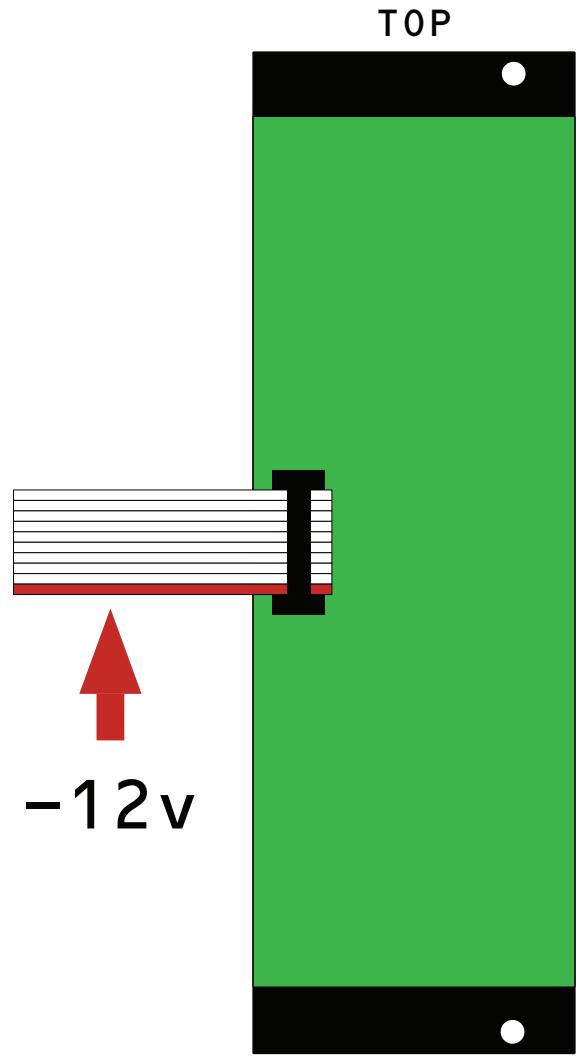
To install, find 8HP in your Eurorack synthesizer case, confirm proper installation of Eurorack bus board connector cable on backside of module (see picture below), plug the bus board connector cable into the Eurorack style bus board, minding the polarity so that the RED stripe on the cable is oriented to the NEGATIVE 12 Volt line on both the module and the bus board. On the Make Noise 6U or 3U Busboard, the negative 12 Volt line is indicated by the white stripe.
Please refer to your case manufacturer's specification for location of the negative supply.
INTRODUCTION
The Dual Stereo Gate (DXG) music synthesizer module is a Dual Stereo Low Pass Gate and Mixer. It follows in the footsteps of the QMMG, Optomix, RxMx, DynaMix, and LxD. Unlike its predecessors, the DXG is specifically oriented around mixing stereo signals, making it an important addition to any system containing modules like XPO, QPAS, Morphagene, Mimeophon, and other stereo modules by Make Noise or others.
Unique to the DXG is a new low pass gate circuit that does not use vactrols. This circuit is 100% analog and its response was arrived at after many months tailoring it to meet or exceed the expectations that have been set by all the vactrol low pass gates that Make Noise has created over the years.
In the past, Make Noise produced the Dynamix module and Dynamics circuit in the 0-COAST, both of which are vactrolless LPGs; however, the DXG is a completely new approach which better implements the gentle single pole filtering of a low pass gate, while also emulating the slow decay and memory of the vactrol based low pass gate. This new circuit makes possible the consistency of response necessary for versatile stereo use, while also keeping the module small and affordable so that it can be a key part of just about any modular system.
As on all of our low pass gates, the DXG's CTRL parameter is used to set both the amplitude and the frequency content of the sound that passes through it. The control parameter tends to open faster than it closes, imparting a subtle decay phase onto any envelope shape that is used to modulate it.
Unlike previous low pass gates made by Make Noise, all the DXG's inputs and outputs are stereo. Each set of inputs is normalled so that the left input can be used for a mono signal, sending a copy to both left and right outputs. The Auxiliary inputs are also a stereo pair with mono normalization. These normalizations allow for the DXG to be used as a simple three channel stereo mixer, with one or two of the channels additionally being used for dynamics control and note event generation. The Aux inputs can be used to chain together larger decentralized mixes using additional DXG modules, or X-PAN, Optomix, modDemix etc.
PANEL CONTROLS

- Left and Right Inputs: Signal Inputs for low pass gate. Expects 10v peak-to-peak modular level signal. Use Left (Mono) input alone for Mono sound sources.
- STRIKE Input: Gate input for "striking" the low pass gate. Reacts to 5V, 8V, or 10V gates.
- CTRL Input: Control Voltage input for CTRL parameter. Range 0-8V. Normalled to +8V.
- CTRL Combo Pot: Panel control for CTRL parameter. Sets amplitude, and frequency content, of sound passed through the channel via the Left and Right Inputs, to the Sum Outputs. Becomes a CV input attenuator when CTRL Input is patched.
Note: Items (1-4) above are identical on Channels 1 and 2.
- Ch2 Outs: Individual Left and Right Channel outputs for Channel 2.
- Auxiliary Ins: Stereo Auxiliary input. Use Left (Mono) input alone for Mono sound sources. Passes to Sum outputs at near Unity.
- SUM outputs: Left and Right outputs containing Sum of both Low Pass Gate Channels, and Aux inputs.
OVERVIEW (It's a VCA, It's a VCF...)
The Low Pass Gate operates simultaneously in the amplitude and frequency domains. As the CTRL Signal becomes more positive, the Amplitude of the processed signal increases, with the lower frequencies being more quickly amplified than high frequencies. As the CTRL Signal becomes less positive, the Amplitude decreases with the high frequencies being attenuated much sooner than the low frequencies. The net effect is that in fast, transient modulation of the signal's amplitude the low frequencies will be more pronounced, lurking in the spectrum, while the high frequencies are eagerly diminished.
Manual manipulation of the controls will not well display this phenomenon. A fast/ short envelope (control signal) of around +8V will provide a beautiful example of the DXG's ability to produce acoustic-like Attack & Decay transients. The processed signal will seem to ring, not unlike a struck drum, piano string or xylophone bar.
The DXG's CTRL parameter extends past the typical range of our other Low Pass Gates, reaching higher frequencies and with the potential for sharper transients. Usually you will want to set the CTRL Combo Pot somewhere in the 1:00 to 3:00 range when modulating it with an envelope signal. If using a Trigger to modulate CTRL, you can also overdrive and pinch/“damp” the ring by turning the Combo Pot fully clockwise.
The STRIKE input, as on the Optimix and others before it, allows for the programming of percussive sounds without the need for a voltage controlled envelope generator. It has a different feel from the CTRL input.
STEREO USE AND MIXING
Each channel of the DXG is actually two Low Pass Gates that are controlled by the same CTRL input. This allows for the gating and mixing of stereo signals. Channel 2 also has an individual channel output set.
The Auxiliary Input is also Stereo, with Left and Right inputs. It is useful for adding a third sound to the mix, particularly one that does not need gating, or for chaining with multiple DXG units or other “____Mix” modules for larger, decentralized mixes.
On all three channels (1, 2, and Aux), the Left/Mono Input will pass to both Left and Right outputs if the Right input is unpatched.
The Channel 1 and 2 Low Pass Gates, and Auxiliary Input, are all summed together at the Sum outputs.
TIPS & TRICKS
The Strike input will respond dynamically to different heights of gate - try running a gate stream through a modulated VCA ahead of the Strike input to add some dynamic motion!
The DXG also subtly changes its ring time as the modulation frequency changes, allowing for articulation of individual notes even when using fast gate or envelope streams.
The Channel 2 outputs can be great for parallel processing. For example, band pass filter or ring modulate your gated sound, run it through a delay or reverb, then mix the result back into the DXG via the Aux inputs.
DXG can chain via the Aux inputs to a second DXG, an X-PAN, or even mono-based __Mix modules like Optimix to create larger decentralized mixes.
PATCH IDEAS
STEREO BONGO
BY WALKER FARRELL

- XPO VariTimbre Left and Right to DXG Ch1 Left and Right Inputs
- STO Sine to XPO LinFM Input
- Pressure Points or 0-CTRL Touch Gate to MATHS or Function Trig In
- MATHS Unity to DXG CTRL
-
DXG SUM L/R to Monitor
-
MATHS or Function set RISE CCW, FALL 9:00
- XPO Freq 10:00
- XPO Lin FM Index 12:00
- XPO Focus CCW, Modulate L 10:00, R 2:00
- STO Freq 2:00
- DXG CTRL 1 2:00 to CW (Range)
Press a touchplate to generate a new stereo bongo.
Optional: sequence the pitch of XPO and/or STO with tuned voltage outs
Optional: LFO to XPO Modulate L for additional stereo timbral motion
FLUTTER BASS
BY RODENT

- XPO set to bass frequency range
- XPO PWM to DXG Ch1
- XPO FOLD to DXG Ch2
- DXG L/R to speakers
- TEMPI x1 clock to SPECTRAPHON OSC A CLK in
- Set SPECTRAPHON OSC A CV to TRI LFO
- Send LFO to MODULATE on XPO and CTRL on Ch1 of DXG.
-
Set DXG Ch1 CTRL knob to 2 o'clock.
-
TEMPI x16 clock to SPECTRAPHON OSC B CLK IN and DXG Ch1 STRIKE.
- Set SPECTRAPHON OSC B CV to TRI LFO.
- Send LFO to DXG Ch2 CTRL
- Set DXG Ch2 knob to 5 o'clock.
- TEMPI x4 clock to RENÉ CLK in.
- RENÉ CV OUT to XPO V/OCT in.
Tune to taste, should rumble the subs and people on the dancefloor.
STEREOPHONIC ETHEREAL WOODLAND SPACE DRONE
BY RYAN JOBES

- XPO vari-timbre outs to QPAS.
- QPAS LP and BP to DXG Ch1 and Ch2, respectively.
- DXG L/R out to Mimeophon L/R in.
- Mimeophon L/R out to speakers.
-
MATHS Ch1 and Ch4 set to CYCLE.
-
MATHS Ch1 UNITY out to XPO Modulate R and DXG Ch2 CTRL in.
- MATHS Ch4 UNITY out to XPO Modulate L and DXG Ch1 CTRL in.
- MATHS SUM out to QPAS FREQ1 in.
Listen to the patch for 15 minutes before adding additional modulation, then add lots of modulation.
Keep attenuverters close to center, subtlety is key!
Experiment with different combinations of XPO and QPAS outputs.
PANNER
BY RODENT

- Mult XPO SINE to DXG CH1 R and CH2 L in.
- Patch dummy cable to DXG CH2 R in.
- DXG L/R outputs to speakers.
- Trigger MATHS Ch1 with a /2 clock from TEMPI. Set a triangle wave function that completes a full cycle just before the next trigger.
-
MATHS Ch1 unity out to DXG Ch1 CTRL input.
-
Set MATHS Ch3 to 3 o'clock and Ch4 to fully inverted.
- MATHS SUM to DXG Ch2 CTRL input.
- Patch a x4 Tempi clock to RENÉ X-CLK in.
- RENÉ X-CV to XPO V/OCT for FREQ variation.
BONUS: Flutter variation
Mult a x16 TEMPI clock to both DXG Ch1 and Ch2 STRIKE inputs. Use TEMPI's mute function to turn the flutter on and off.
STEREO ECHO SEND
BY PETE SPEER

- XPO vari-timbre outs to DXG CH2 L/R in.
- DXG CH2 L/R out to QPAS L/R in.
- QPAS HP L/R out to Mimeophon L/R in.
-
MATHS CH1 set to cycle.
-
MULT MATHS CH1 EOR out to MATHS CH4 TRIG in and Réné XCLK in.
- MATHS CH4 Unity out to DXG CH2 CTRL in.
- Réné X-CV out to XPO V/OCT in 1.
- DXG L/R outs to speakers.



Brand : Make Noise
Model : DXG
Category : Audio module