
TRU 9260 - Telephone UNIDEN - Free user manual and instructions
Find the device manual for free TRU 9260 UNIDEN in PDF.


Pick your language and provide your email: we'll send you a specifically translated version.
| Brand | Uniden |
| Model | TRU 9260 |
| Product Type | Cordless Telephone |
| Frequency Band | 2.4 GHz |
| Operating Range | Up to 50 m indoors; 300 m outdoors |
| Display | Backlit LCD with Caller ID |
| Phonebook Memory | 50 Names and Numbers |
| Caller ID | Yes, with Call Waiting |
| Answering Machine | Digital, up to 15 minutes recording time |
| Redial Memory | Last 10 Numbers |
| Speakerphone | Handset and Base Speakerphones |
| Intercom | Yes, between Handset and Base |
| Conference Calling | Up to 3-Way Conference |
| Battery Type | 2 AAA NiMH Rechargeable Batteries |
| Talk Time | Up to 10 Hours |
| Standby Time | Up to 7 Days |
| Headset Jack | 2.5 mm on Handset |
| Power Adapter | AC 120V, 60Hz |
| Handset Dimensions | 170 x 45 x 25 mm |
| Base Dimensions | 120 x 90 x 50 mm |
| Handset Weight | 120 g |
| Base Weight | 200 g |
| Mounting | Wall Mountable Base |
| Maintenance | Clean with a Soft Dry Cloth |
| Accessories Included | Handset, Base, Charger Cradle, AC Adapter, Telephone Line Cord |
Frequently Asked Questions - TRU 9260 UNIDEN
How do I set the date and time on my Uniden TRU 9260?
Press the MENU key on the handset, then navigate to SETUP using the arrow keys. Select DATE/TIME and enter the correct date and time using the keypad. Press SELECT to save.
How many phonebook entries can I store?
The Uniden TRU 9260 can store up to 50 names and numbers in its phonebook. To add an entry, press PHONEBOOK, select ADD NEW, and follow the prompts.
How do I record a personal greeting on the answering machine?
Press the MENU button on the base, go to ANSWERING SYSTEM, then GREETING. Select RECORD and speak clearly after the beep. Press STOP when finished. Your greeting will be saved automatically.
How long does the battery last?
With two fully charged AAA NiMH batteries, the handset provides up to 10 hours of talk time and up to 7 days of standby time.
What is the range of the handset?
The TRU 9260 operates on a 2.4 GHz frequency and provides a range of up to 50 meters indoors and 300 meters in open outdoor areas.
How do I charge the handset?
Place the handset into the charger cradle or the base unit. The CHARGE LED will light up. For best results, allow the battery to charge for 15 hours before first use.
Can I use this phone with a VoIP adapter?
Yes, the TRU 9260 is an analog cordless phone, so it can be connected to standard VoIP adapters or ATA devices. Use a standard RJ11 telephone cable to connect the base to your adapter.
How do I turn off the ringer?
Press the MENU key, select RINGER, and choose OFF from the volume options. You can also set the ringer volume to LOW or HIGH using the arrow keys during an incoming call.
How do I speed dial a number?
To speed dial, store a number in a memory location (1-9) by pressing MEM and following the prompts. To dial, press and hold the assigned number key until the number is dialed.
How do I replace the batteries?
Slide off the battery compartment cover on the back of the handset. Remove the old batteries and insert new AAA NiMH batteries, observing the correct polarity. Replace the cover and place the handset on the charger for 15 hours before use.
User questions about TRU 9260 UNIDEN
0 question about this device. Answer the ones you know or ask your own.
Ask a new question about this device
No questions yet. Be the first to ask one.
Download the instructions for your Telephone in PDF format for free! Find your manual TRU 9260 - UNIDEN and take your electronic device back in hand. On this page are published all the documents necessary for the use of your device. TRU 9260 by UNIDEN.
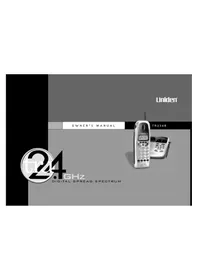
USER MANUAL TRU 9260 UNIDEN


Manual assistant
Powered by Anthropic
Waiting for your message
Product information
Brand : UNIDEN
Model : TRU 9260
Category : Telephone