COM-CAM1 - Surveillance Camera Crimestopper - Free user manual and instructions
Find the device manual for free COM-CAM1 Crimestopper in PDF.


Pick your language and provide your email: we'll send you a specifically translated version.
| Product Type | Surveillance Camera |
| Brand | Crimestopper |
| Model | COM-CAM1 |
| Image Sensor | 1/4" CMOS |
| Resolution | 700 TVL |
| Lens | 3.6 mm fixed lens |
| Minimum Illumination | 0.1 Lux (F1.2) |
| Video Output | 1.0 Vp-p / 75 Ohm, CVBS |
| Power Supply | 12V DC |
| Current Consumption | 100 mA |
| Dimensions | 50 × 50 × 60 mm |
| Weight | 150 g |
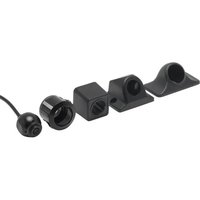
| Mounting | Wall or ceiling bracket included |
| Operating Temperature | -10°C to 50°C |
| Storage Temperature | -20°C to 60°C |
| Infrared LEDs | 12 built-in LEDs for night vision |
| Night Vision Range | Up to 10 meters |
| Cleaning | Gently wipe with a dry, soft cloth |
| Maintenance | Check cable connections periodically |
| Safety | Do not install near water sources |
| Repairability | Lens and cables are replaceable |
| General Information | For indoor and outdoor use with weatherproof housing |
Frequently Asked Questions - COM-CAM1 Crimestopper
How do I connect the COM-CAM1 camera to my monitor?
Connect the yellow video cable to the video input of your monitor or DVR. Then connect the red and black power wires to a 12V DC power supply. Make sure the connections are secure.
Can the COM-CAM1 be used outdoors?
Yes, it features a weatherproof housing rated IP66, allowing it to withstand rain and dust. It can be mounted in outdoor locations with the provided bracket.
How far can the night vision see?
The camera is equipped with 12 infrared LEDs and can capture clear images in complete darkness up to a distance of 10 meters.
What is the resolution of the camera?
The COM-CAM1 provides a resolution of 700 TVL, delivering crisp and detailed analog video suitable for standard CCTV systems.
Does the camera support audio?
No, the COM-CAM1 is a video-only camera. It does not have a built-in microphone. To add audio, you would need a separate audio-capable camera or device.
How do I adjust the camera angle?
The camera comes with a mounting bracket that allows tilting and rotation. Loosen the screws slightly, adjust the desired position, and retighten the screws to lock the angle.
What is the power consumption of the camera?
The camera operates on 12V DC and draws a current of 100mA, making it energy-efficient. Suitable for continuous operation.
Can I connect it to a wireless system?
The COM-CAM1 is a wired camera. However, you can connect it to a wireless DVR or video transmitter to include it in a wireless surveillance setup.
What maintenance does the camera require?
Regularly inspect the lens for dirt or smudges and clean it with a soft dry cloth. Also check cables for wear and ensure connections are tight. This will prolong the camera's lifespan.
Is the camera compatible with standard CCTV DVRs?
Yes, the camera outputs a standard CVBS analog video signal, which is compatible with most analog DVRs and monitors with RCA or BNC inputs.
User questions about COM-CAM1 Crimestopper
0 question about this device. Answer the ones you know or ask your own.
Ask a new question about this device
No questions yet. Be the first to ask one.
Download the instructions for your Surveillance Camera in PDF format for free! Find your manual COM-CAM1 - Crimestopper and take your electronic device back in hand. On this page are published all the documents necessary for the use of your device. COM-CAM1 by Crimestopper.
USER MANUAL COM-CAM1 Crimestopper

Manual assistant
Powered by Anthropic
Waiting for your message
Product information
Brand : Crimestopper
Model : COM-CAM1
Category : Surveillance Camera