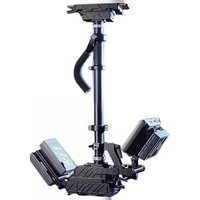
Centurion - Photo accessory Glidecam - Free user manual and instructions
Find the device manual for free Centurion Glidecam in PDF.


Pick your language and provide your email: we'll send you a specifically translated version.
| Product Type | Camera Stabilizer |
| Brand | Glidecam |
| Model | Centurion |
| Category | Photo Accessory |
| Intended Use | Professional video and film stabilization |
| Construction Material | Aircraft-grade aluminum and steel components |
| Maximum Payload | Up to 5 kg (11 lbs) |
| Product Weight | Approximately 1.6 kg (3.5 lbs) |
| Mounting Thread | 1/4"-20 and 3/8"-16 camera screws |
| Adjustment Controls | Fine-tuning knobs for balance, tilt, and roll |
| Bearings | Precision sealed bearings for smooth rotation |
| Included Components | Stabilizer arm, platform, counterweights, and mounting hardware |
| Assembly Required | Yes, minimal setup with included tools |
| Maintenance | Periodic lubrication of moving parts recommended |
| Cleaning | Wipe with a soft, dry cloth; avoid solvents |
| Safety | Always secure camera before operation and check balance regularly |
| Spare Parts | Available from the manufacturer |
| Repairability | Modular design with replaceable parts |
| Compatibility | Works with DSLR, mirrorless, and professional video cameras |
| General Information | Designed for handheld or body-rig operation |
Frequently Asked Questions - Centurion Glidecam
How do I balance the Glidecam Centurion?
Start by mounting the camera and adjusting the tilt and roll knobs until the rig stays level when released. Then fine-tune the fore-aft and lateral balance using the sliding platform and counterweights. Always re-check after any change.
What is the maximum camera weight the Centurion can support?
The Centurion can support cameras up to 5 kg (11 lbs). Heavier setups require a larger stabilizer system. Ensure the payload is within this limit for optimal performance.
How do I mount my camera to the Centurion?
Use the included 1/4"-20 or 3/8"-16 mounting screw to attach the camera plate to the base of your camera. Tighten securely and then slide the plate forward or backward to adjust horizontal balance.
Can I use the Centurion with a DSLR camera?
Yes, the Centurion is compatible with DSLR, mirrorless, and professional video cameras within its payload capacity. It is ideal for run-and-gun shooting where smooth handheld footage is required.
How do I adjust the tilt and roll?
Tilt is adjusted using the front knob to set the horizontal level, while roll is adjusted with the side knob to correct any rotational imbalance. Loosen, adjust, and retighten while checking the rig's static balance.
What maintenance does the Centurion require?
Regularly check screws for tightness and apply a small amount of lubricant to the bearings and sliding parts. Clean the rails with a dry cloth to prevent dust buildup. Avoid over-tightening as it can damage components.
Is the Centurion compatible with a vest or body rig?
Yes, the Centurion can be used with Glidecam vest and arm systems for extended shooting. It connects via the standard mounting plate and provides additional stability for fatigue-free operation.
How do I store the Centurion when not in use?
Keep the stabilizer in a dry, padded case to protect it from impacts. Loosen the adjustments slightly to relieve tension on the springs and bearings. Do not store with a camera attached.
What is the threading for the mounting plate?
The mounting plate features both 1/4"-20 and 3/8"-16 threads, making it compatible with nearly all cameras and accessories. Use the appropriate screw for your device and always ensure it is hand-tight before operation.
Does the Centurion come with a warranty?
Yes, the Centurion includes a manufacturer warranty against defects in materials and workmanship. The warranty covers repair or replacement of faulty parts. Keep your proof of purchase for service requests.
User questions about Centurion Glidecam
0 question about this device. Answer the ones you know or ask your own.
Ask a new question about this device
No questions yet. Be the first to ask one.
Download the instructions for your Photo accessory in PDF format for free! Find your manual Centurion - Glidecam and take your electronic device back in hand. On this page are published all the documents necessary for the use of your device. Centurion by Glidecam.
USER MANUAL Centurion Glidecam


Manual assistant
Powered by Anthropic
Waiting for your message
Product information
Brand : Glidecam
Model : Centurion
Category : Photo accessory