
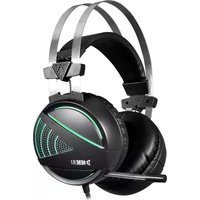
Aether P1 - Headphones Gamdias - Free user manual and instructions
Find the device manual for free Aether P1 Gamdias in PDF.


Pick your language and provide your email: we'll send you a specifically translated version.
| Product Type | Gaming Headset |
| Brand | Gamdias |
| Model | Aether P1 |
| Connectivity | Wired 3.5mm + USB for RGB |
| Driver Size | 50mm Neodymium |
| Frequency Range | 20Hz - 20kHz |
| Impedance | 32Ω |
| Sensitivity | 100dB ±3dB |
| Microphone | Omni-directional noise-cancelling |
| Microphone Frequency | 100Hz - 10kHz |
| Cable Length | 2.2m braided |
| Weight | 320g (with cable) |
| Ear Cushions | Soft leatherette memory foam |
| RGB Lighting | Yes, 7-color dynamic |
| Compatibility | PC, PS4, PS5, Xbox One, Switch, Mobile |
| Controls | In-line volume and mic mute |
| Battery | No, wired power from USB for RGB |
| Materials | Durable ABS plastic, stainless steel headband |
| Maintenance | Wipe with dry microfiber cloth, avoid moisture |
| Safety | Do not use at high volume for extended periods |
| Spare Parts | Replacement ear pads and cable available |
| Warranty | 2 years |
Frequently Asked Questions - Aether P1 Gamdias
How do I connect the Gamdias Aether P1 to my PC?
To connect the Aether P1, plug the 3.5mm jack into your PC's headphone port and the USB connector into a USB port to power the RGB lighting. If your PC has separate mic and headphone jacks, you may need a Y-splitter cable (not included).
The microphone is not working – what should I do?
First, check that the mic mute switch on the in-line controls is not enabled. Ensure the 3.5mm jack is fully inserted into the correct port (usually pink or labeled with a mic icon). On your computer, set the Aether P1 as the default recording device and adjust the microphone volume in system settings.
Can I use the Aether P1 wirelessly?
No, the Gamdias Aether P1 is a wired headset. It features a 3.5mm audio cable and a USB cable for powering the RGB lighting. It does not support Bluetooth or wireless connections.
How do I control the RGB lighting?
The RGB lighting cycles automatically through 7 colors when the USB cable is connected. There is no dedicated software or button; simply plug the USB into a powered port to activate the dynamic light effect.
Is the headset compatible with my Xbox console?
Yes, the Aether P1 works with Xbox One and Xbox Series X/S if your controller has a 3.5mm audio jack. Note that the USB lighting will only function when plugged into a USB port on the console or a powered hub.
How do I clean and maintain the headset?
Use a dry microfiber cloth to wipe the ear cushions and headband. Avoid using water or cleaning agents, as they may damage the leatherette material. Store the headset in a cool, dry place and disconnect the cables when not in use.
Can I replace the ear cushions if they wear out?
Yes, the ear cushions are replaceable. You can order official replacement ear pads from Gamdias or authorized resellers. Gently pull the old cushions off and push the new ones into place until they snap securely.
Why is there no sound coming from the headset?
Check the 3.5mm connection and ensure it is fully inserted. Verify that the volume control on the in-line remote is turned up. On your device, confirm the audio output is set to the headset and that the system volume is not muted.
What devices are compatible with the in-line controls?
The in-line controls (volume wheel and mic mute) work with most smartphones, tablets, and PCs that support 3.5mm headsets. Some consoles may not support the controls due to hardware limitations; in that case, use the system volume settings instead.
Does the headset require a battery or charging?
No, the Aether P1 does not have an internal battery. It is wired, drawing power from the USB connection solely for the RGB lights. The audio function is passive and works via the 3.5mm jack.
User questions about Aether P1 Gamdias
0 question about this device. Answer the ones you know or ask your own.
Ask a new question about this device
No questions yet. Be the first to ask one.
Download the instructions for your Headphones in PDF format for free! Find your manual Aether P1 - Gamdias and take your electronic device back in hand. On this page are published all the documents necessary for the use of your device. Aether P1 by Gamdias.
USER MANUAL Aether P1 Gamdias



Manual assistant
Powered by Anthropic
Waiting for your message
Product information
Brand : Gamdias
Model : Aether P1
Category : Headphones