
COM-5709 - Mouse Steren - Free user manual and instructions
Find the device manual for free COM-5709 Steren in PDF.


Pick your language and provide your email: we'll send you a specifically translated version.
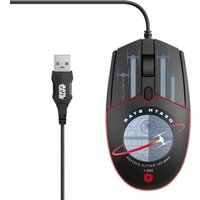
| Product Type | Wired Optical Mouse |
| Connectivity | USB 2.0 |
| Sensor Type | Optical |
| Resolution | 1000 DPI |
| Number of Buttons | 3 (Left, Right, Middle) |
| Scroll Wheel | Yes |
| Cable Length | 1.5 meters |
| Dimensions (L x W x H) | 110 x 60 x 35 mm |
| Weight | 80 g |
| Color | Black |
| Compatibility | Windows, macOS, Linux |
| Power Source | USB Powered |
| Plug and Play | Yes, no drivers required |
| Operating Temperature | 0°C to 40°C |
| Storage Temperature | -20°C to 60°C |
| Humidity Range | 10% to 90% |
| Maintenance | Clean with a soft, dry cloth |
| Safety | Do not expose to liquids or extreme heat |
| Spare Parts & Repairability | No user-serviceable parts; replacement recommended in case of malfunction |
| General Information | Compact and ergonomic design for everyday use |
Frequently Asked Questions - COM-5709 Steren
How do I connect the mouse to my computer?
Simply plug the USB connector into an available USB port on your computer. The mouse is plug and play, so it will be recognized automatically without needing to install any driver.
Why is the cursor not moving?
First, check that the USB cable is properly connected. Try a different USB port. If the issue persists, clean the optical sensor on the bottom of the mouse with a soft, dry cloth to remove dust or debris that may interfere with tracking.
How do I clean the mouse?
Use a soft, dry cloth to wipe the exterior surfaces. For the optical sensor, gently dab with a cotton swab. Do not use solvents or water directly on the device.
Does the mouse require a driver?
No, the mouse uses a standard USB protocol and works with the built-in drivers of Windows, macOS, and Linux. It is truly plug and play.
Is the mouse compatible with Mac computers?
Yes, the mouse is compatible with macOS. Just plug it into a USB port, and it will work immediately. The left and right click functions are supported, and the scroll wheel works on most Mac applications.
How long is the USB cable?
The cable is approximately 1.5 meters long, giving you enough flexibility to connect to your computer while maintaining a comfortable working distance.
What should I do if the scroll wheel is not working?
Make sure the scroll wheel is free of dirt or debris. You can gently clean around the wheel with a toothpick or soft brush. If the problem continues, test the mouse on another computer to determine if the issue is with the mouse or the USB port.
Can I use the mouse on a glass surface?
Optical mice may not track well on transparent or glossy surfaces like glass. We recommend using a mouse pad or a matte surface for optimal performance.
How do I adjust the pointer speed?
On Windows, go to Settings > Devices > Mouse > Additional mouse options. In macOS, go to System Preferences > Mouse. You can adjust the tracking speed or sensitivity to your preference.
What is the warranty for this mouse?
Steren typically offers a 1-year limited warranty against manufacturing defects. Keep your receipt as proof of purchase. For warranty claims, contact the store where you purchased the product or Steren customer support.
User questions about COM-5709 Steren
0 question about this device. Answer the ones you know or ask your own.
Ask a new question about this device
No questions yet. Be the first to ask one.
Download the instructions for your Mouse in PDF format for free! Find your manual COM-5709 - Steren and take your electronic device back in hand. On this page are published all the documents necessary for the use of your device. COM-5709 by Steren.
USER MANUAL COM-5709 Steren



Manual assistant
Powered by Anthropic
Waiting for your message
Product information
Brand : Steren
Model : COM-5709
Category : Mouse