
Streamer-Desktop - Media player Vocopro - Free user manual and instructions
Find the device manual for free Streamer-Desktop Vocopro in PDF.


Pick your language and provide your email: we'll send you a specifically translated version.
| Type of product | Media player |
| Brand | Vocopro |
| Model | Streamer-Desktop |
| Color | Black |
| Dimensions (W x D x H) | 220 x 160 x 50 mm |
| Weight | 0.55 kg |
| Power supply | AC 100-240V, 50/60 Hz |
| Power consumption | 15 W |
| Video outputs | HDMI, composite video |
| Audio outputs | Stereo RCA, optical |
| Supported discs | DVD, CD |
| USB port | 1 x USB 2.0 |
| Memory card slot | SD card |
| Network connections | Ethernet, Wi-Fi |
| Streaming services | Netflix, YouTube, and more |
| Remote control | Yes, included |
| Maintenance | Clean with a dry, soft cloth |
| Safety instructions | Keep away from liquids and extreme heat |
| Spare parts | Remote, power adapter, and cables available |
| Repairability | Disassembly required; consult qualified technician |
Frequently Asked Questions - Streamer-Desktop Vocopro
How do I connect the Streamer-Desktop to my TV?
Use an HDMI cable for best quality. Plug one end into the HDMI output and the other into your TV's HDMI input. Select the correct HDMI source on your TV.
Can the device play videos from a USB drive?
Yes, insert the USB drive into the USB port, then navigate to the Media section on the home screen and select your files. The player supports AVI, MP4, MKV and other common formats.
Does the Streamer-Desktop support 4K video?
Yes, the device supports 4K Ultra HD playback via HDMI when connected to a compatible TV and the content is 4K.
How can I connect the device to the internet?
Go to Settings > Network, select Wi-Fi or Ethernet. For Wi-Fi, choose your network and enter the password. For Ethernet, just plug in a network cable.
What should I do if the remote control stops working?
Insert fresh batteries, make sure no obstacles block the infrared sensor, and point the remote directly at the front panel. If it still fails, try resetting the device by unplugging it for 30 seconds.
How do I update the firmware?
Check Settings > System > Software Update. Select "Online Update" to download and install the latest version from the network.
Can I output audio to an external sound system?
Yes, use the optical or stereo RCA outputs to connect to a receiver or soundbar. You may need to change the audio output setting in the audio options menu.
The player does not recognize my disc. What can I do?
Make sure the disc is inserted label-side up and that it is not scratched or dirty. Clean the disc gently from the center outward with a soft cloth. Check that the disc format is compatible (DVD, CD).
Is it possible to set parental controls?
Yes, go to Settings > Parental Controls and set a PIN. You can then restrict access to content by rating or block certain channels.
How do I restart the device if it freezes?
Press and hold the power button on the device for 10 seconds until it shuts off, then unplug the power cord for 1 minute and plug it back in. Power on again.
User questions about Streamer-Desktop Vocopro
0 question about this device. Answer the ones you know or ask your own.
Ask a new question about this device
No questions yet. Be the first to ask one.
Download the instructions for your Media player in PDF format for free! Find your manual Streamer-Desktop - Vocopro and take your electronic device back in hand. On this page are published all the documents necessary for the use of your device. Streamer-Desktop by Vocopro.
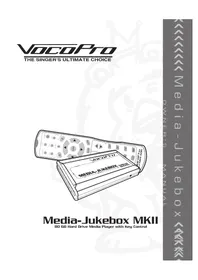
USER MANUAL Streamer-Desktop Vocopro
Manual assistant
Powered by Anthropic
Waiting for your message
Product information
Brand : Vocopro
Model : Streamer-Desktop
Category : Media player