
515-1912 - Clock LA CROSSE TECHNOLOGY - Free user manual and instructions
Find the device manual for free 515-1912 LA CROSSE TECHNOLOGY in PDF.


Pick your language and provide your email: we'll send you a specifically translated version.
| Brand | La Crosse Technology |
| Model | 515-1912 |
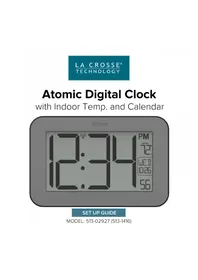
| Product Type | Digital Wall Clock |
| Display Type | LCD |
| Time Format | 12/24 hour selectable |
| Atomic Time Sync | Yes (WWVB) |
| Calendar Display | Date and weekday |
| Indoor Temperature | Displayed in °F/°C |
| Alarm Function | Single alarm with snooze |
| Backlight | Yes (blue backlight) |
| Power Source | 1 x AA 1.5V battery |
| Battery Life | Up to 12 months |
| Dimensions (HxWxD) | 7.5 x 7.5 x 1.5 inches |
| Weight | 12 oz |
| Mounting Options | Table stand or keyhole wall mount |
| Radio Signal | WWVB 60 kHz |
| Operating Temperature | 32°F to 122°F (0°C to 50°C) |
| Storage Temperature | -4°F to 140°F (-20°C to 60°C) |
| Cleaning | Wipe with soft dry cloth |
| Safety | Do not expose to water or moisture |
| Replacement Parts | Batteries, stand |
| Repair | Contact manufacturer support |
Frequently Asked Questions - 515-1912 LA CROSSE TECHNOLOGY
How do I set the clock manually?
Press and hold the SET button for 3 seconds. Use the + or - buttons to adjust hour, minutes, month, date, and year. Press SET to confirm each step.
How do I set the alarm?
Press the ALARM button to enter alarm setup. Use + or - to set hours and minutes. Press ALARM to save. The alarm icon will appear.
How do I switch between 12-hour and 24-hour time?
In normal time display, press and hold the 12/24 button until the display changes. Alternatively, access the time setup menu and select format.
Why is my clock not receiving the atomic time signal?
The clock receives the WWVB signal at night. Ensure it is at least 6 feet from electronics and oriented with the front facing Colorado. Press the RECEIVE button to force a sync.
Does this clock display indoor temperature?
Yes, it shows the indoor temperature in the lower right corner, in °F or °C, which can be changed via the °F/°C button.
How do I replace the battery?
Open the battery compartment on the back. Insert one AA battery with correct polarity. Replace the cover. All settings will be retained during battery change if done quickly.
Can I mount this clock on the wall?
Yes, it has a keyhole on the back for wall mounting. Insert a screw and hang the clock securely.
How do I clean the clock?
Use a soft, dry cloth to wipe the surface. Do not use liquids or abrasive cleaners, as they may damage the device.
Is the clock water-resistant?
No, it is not water-resistant. Keep it away from moisture and direct water exposure to avoid damage.
What should I do if the display is faint?
Replace the battery with a fresh AA alkaline battery. If the problem persists, check if the backlight is enabled or adjust the contrast if available.
User questions about 515-1912 LA CROSSE TECHNOLOGY
0 question about this device. Answer the ones you know or ask your own.
Ask a new question about this device
No questions yet. Be the first to ask one.
Download the instructions for your Clock in PDF format for free! Find your manual 515-1912 - LA CROSSE TECHNOLOGY and take your electronic device back in hand. On this page are published all the documents necessary for the use of your device. 515-1912 by LA CROSSE TECHNOLOGY.
USER MANUAL 515-1912 LA CROSSE TECHNOLOGY
Manual assistant
Powered by Anthropic
Waiting for your message
Product information
Brand : LA CROSSE TECHNOLOGY
Model : 515-1912
Category : Clock